How to Write a Follow Up Reminder Email in 2026 (+ Templates)
Most replies land on touch two through four, not the first send. Here is the cadence, the six templates that hold up in 2026, and the deliverability checks to run before you hit send.
TL;DR
- A follow up reminder email is not a nag. It is a second attempt at delivering value to someone who was busy, out of office, or waiting on internal sign-off.
- Most replies to a cold or semi-warm thread arrive on touch two through four. If you stop after one send, you are throwing away the majority of your pipeline.
- Cadence beats cleverness: 3 days, 5 days, 7 days, 14 days is a defensible spacing for B2B. Same thread for the first two, new thread with a new angle after that.
- Every follow-up should add one new thing — a case study, a question, a deadline, a piece of research. "Just bumping this" adds nothing and trains people to ignore you.
- Before you send four touches to an address, verify it. Sending four times to a dead mailbox multiplies bounce damage instead of dividing it.
What is a follow up reminder email?#
A follow up reminder email is a short message sent after an unanswered email, meeting, proposal, invoice, or application, whose job is to resurface the original request without restating it in full.
Think of it like knocking on an office door. The first knock might land while someone is on a call. The second knock, thirty seconds later, is not rude — it is how doors get answered. What is rude is standing there knocking every ten seconds with nothing new to say.
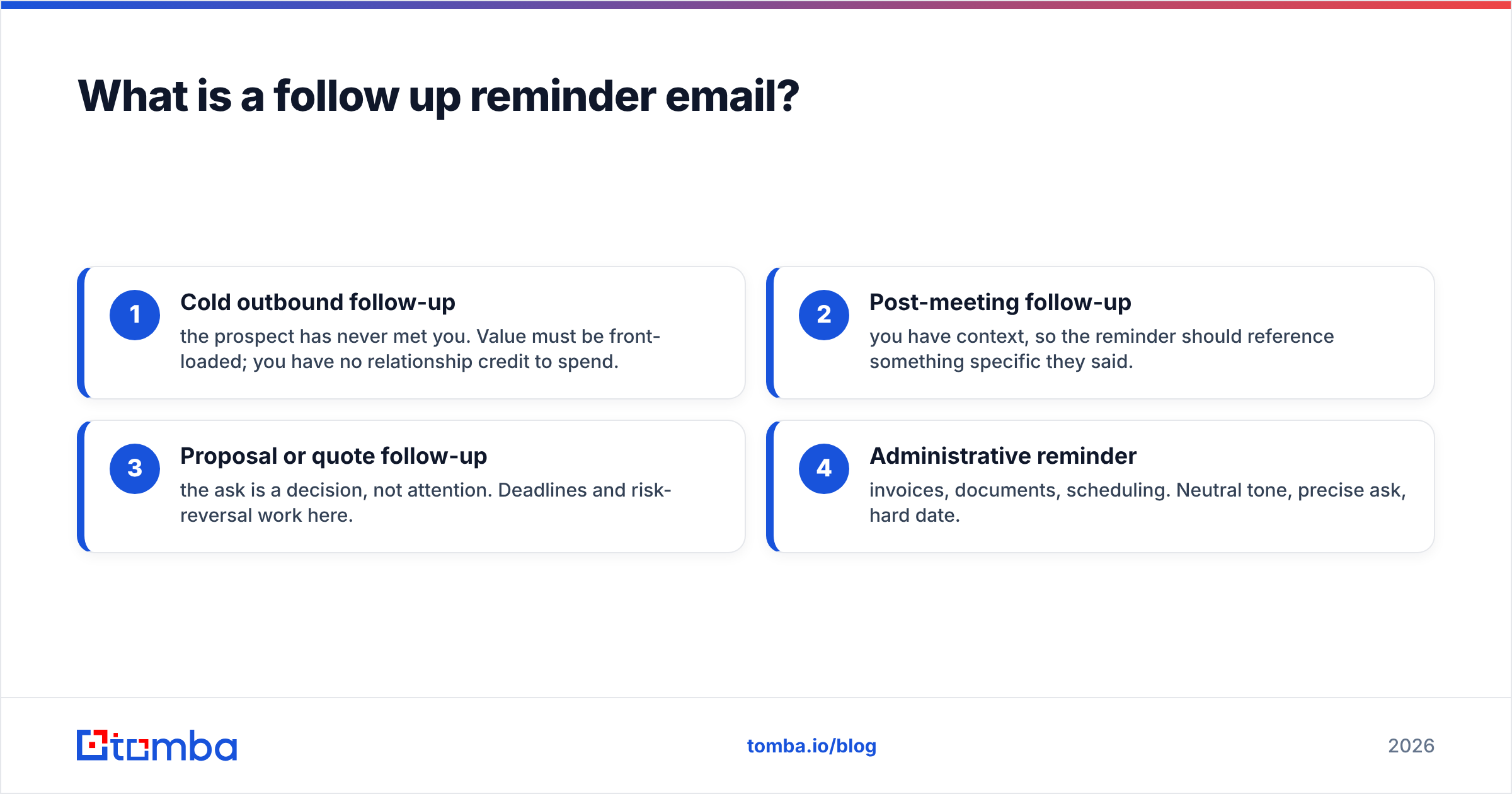
There are four common variants, and they have different rules:
- Cold outbound follow-up — the prospect has never met you. Value must be front-loaded; you have no relationship credit to spend.
- Post-meeting follow-up — you have context, so the reminder should reference something specific they said.
- Proposal or quote follow-up — the ask is a decision, not attention. Deadlines and risk-reversal work here.
- Administrative reminder — invoices, documents, scheduling. Neutral tone, precise ask, hard date.
Mixing the tones is the fastest way to sound wrong. A cold prospect does not owe you a reply, so a firm "per my last email" reads as entitled. A client who is 40 days late on an invoice does owe you, and softness there costs you money.
Why do follow up reminder emails outperform the first send?#
Because the first email is judged on luck and the follow-up is judged on persistence, and persistence is the only one you control.
- Inbox timing is random. Your first send may have arrived during a two-hour meeting block. The second lands on a Tuesday morning when the inbox is being cleared.
- Recognition compounds. By touch three, your name and company are familiar. Familiarity moves a message from "unknown sender" to "I've seen this."
- Reply intent changes over time. A buyer who had no budget in March may have a renewal decision in June. You are not persuading; you are being present when the trigger fires.
- The ask can get smaller. Follow-ups let you ladder down: a 30-minute call becomes a 10-minute call becomes "should I close the file?" A smaller ask converts better.
- Threading helps deliverability. Replies inside an existing thread inherit engagement signals from the original message, which mailbox providers weigh.
The practical version of all this: teams that send one email and stop are usually seeing a fraction of the replies they could get from the exact same list. The list is not the problem. The cadence is.
How many follow up reminder emails should you send, and when?#
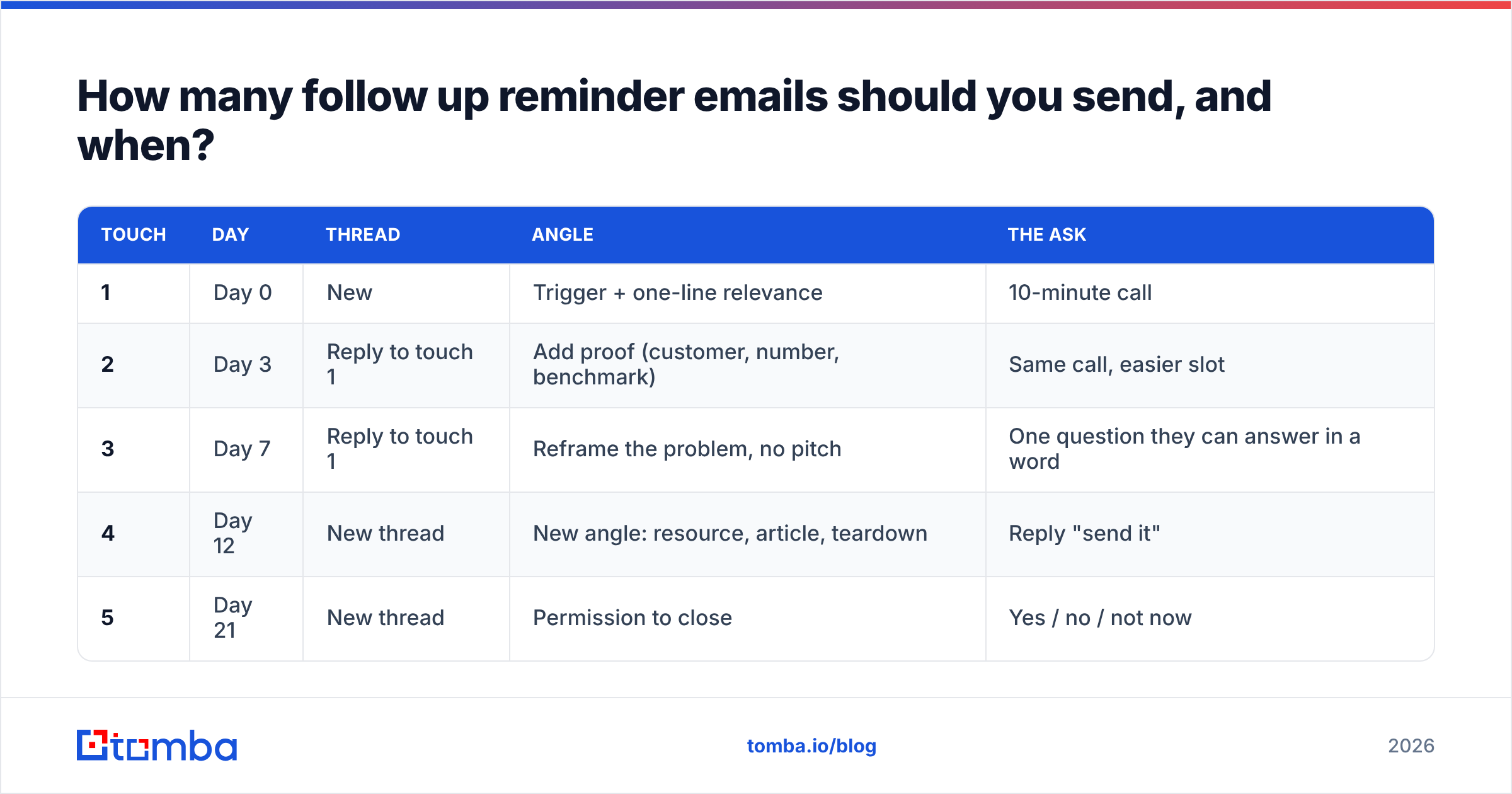
Four to six touches over roughly three weeks is the range most B2B teams land on. Here is a cadence you can copy directly, adjusted for context.
| Touch | Day | Thread | Angle | The ask |
|---|---|---|---|---|
| 1 | Day 0 | New | Trigger + one-line relevance | 10-minute call |
| 2 | Day 3 | Reply to touch 1 | Add proof (customer, number, benchmark) | Same call, easier slot |
| 3 | Day 7 | Reply to touch 1 | Reframe the problem, no pitch | One question they can answer in a word |
| 4 | Day 12 | New thread | New angle: resource, article, teardown | Reply "send it" |
| 5 | Day 21 | New thread | Permission to close | Yes / no / not now |
Adjust the spacing by deal type. Enterprise cycles tolerate 21–30 days; SMB self-serve does not — compress to 10 days total. For invoices and documents, tighten hard: day 1 after due date, day 7, day 14, then escalate to a phone call.
Two rules that matter more than the exact days:
- Never send two follow-ups in under 48 hours. It reads as automation, and it is the single most common trigger for "unsubscribe" on an otherwise good sequence.
- Stop when you say you will stop. If touch five says "I'll close the file," close it. Sending touch six after that destroys the credibility of every promise in your copy.
What should a follow up reminder email actually contain?#
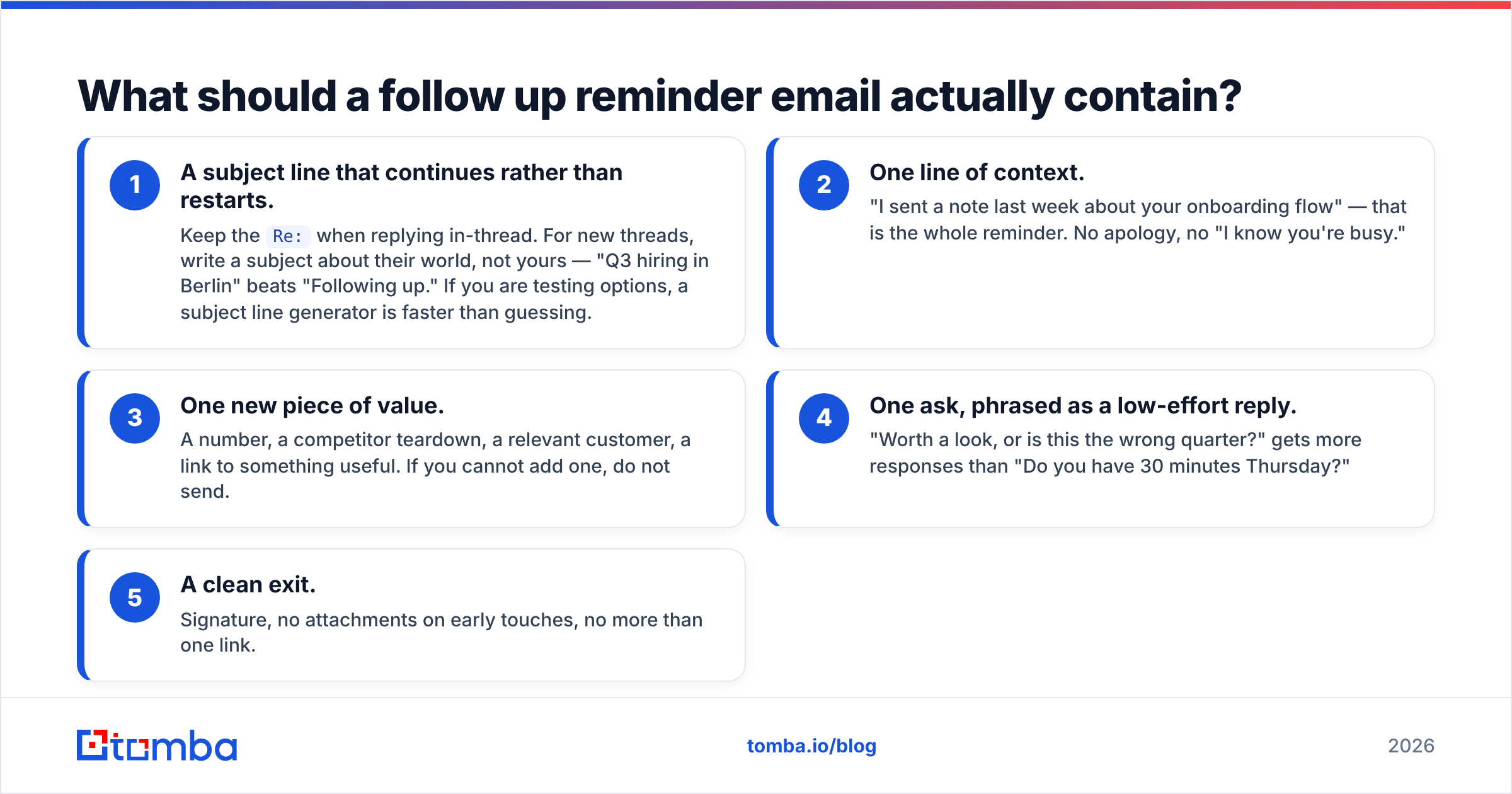
Five components, in this order, and nothing else:
- A subject line that continues rather than restarts. Keep the
Re:when replying in-thread. For new threads, write a subject about their world, not yours — "Q3 hiring in Berlin" beats "Following up." If you are testing options, a subject line generator is faster than guessing. - One line of context. "I sent a note last week about your onboarding flow" — that is the whole reminder. No apology, no "I know you're busy."
- One new piece of value. A number, a competitor teardown, a relevant customer, a link to something useful. If you cannot add one, do not send.
- One ask, phrased as a low-effort reply. "Worth a look, or is this the wrong quarter?" gets more responses than "Do you have 30 minutes Thursday?"
- A clean exit. Signature, no attachments on early touches, no more than one link.
Length target: 50–90 words. If your follow-up is longer than your first email, you have inverted the funnel.
What do good follow up reminder email templates look like?#
1. The 3-day bump (in-thread)
Subject: Re: [original]
Hi [Name] — adding one thing to the note below: [Competitor/peer] cut their [metric] by [X]% doing this, and their setup looked a lot like yours.
Worth 10 minutes next week, or is this not a priority right now?
2. The reframe (day 7)
Hi [Name] — I might have aimed this at the wrong problem. Most [role]s I talk to are more worried about [problem B] than [problem A] this quarter.
Which one is actually on your list? One word is a fine answer.
3. The value drop (day 12, new thread)
Subject: [Their company] vs [Competitor] — quick teardown
Hi [Name] — I pulled apart how [Competitor] handles [process] and where your current flow differs. Two pages, no pitch.
Want me to send it?
4. The close-the-file (day 21)
Hi [Name] — I have not heard back, so I will assume the timing is wrong and stop reaching out.
If that is wrong, reply "later" and I will check back in Q[X].
5. The post-meeting reminder
Hi [Name] — following our call on [date], you were going to check with [stakeholder] on [item]. Anything I can send to make that conversation easier?
Happy to put the pricing in a one-pager if that helps internally.
6. The invoice reminder
Hi [Name] — invoice [#] for [amount] was due on [date] and is still showing unpaid on our side.
Could you confirm it is in the payment run? Copy attached in case it got lost.
Every one of these is under 70 words. That is not a coincidence. Short messages get read on a phone screen between meetings, which is where most replies to follow-ups actually get typed. For a fuller starting library, see these cold email templates and adapt the tone rather than the wording.
Which tools support a follow-up cadence, and what do they cost?#
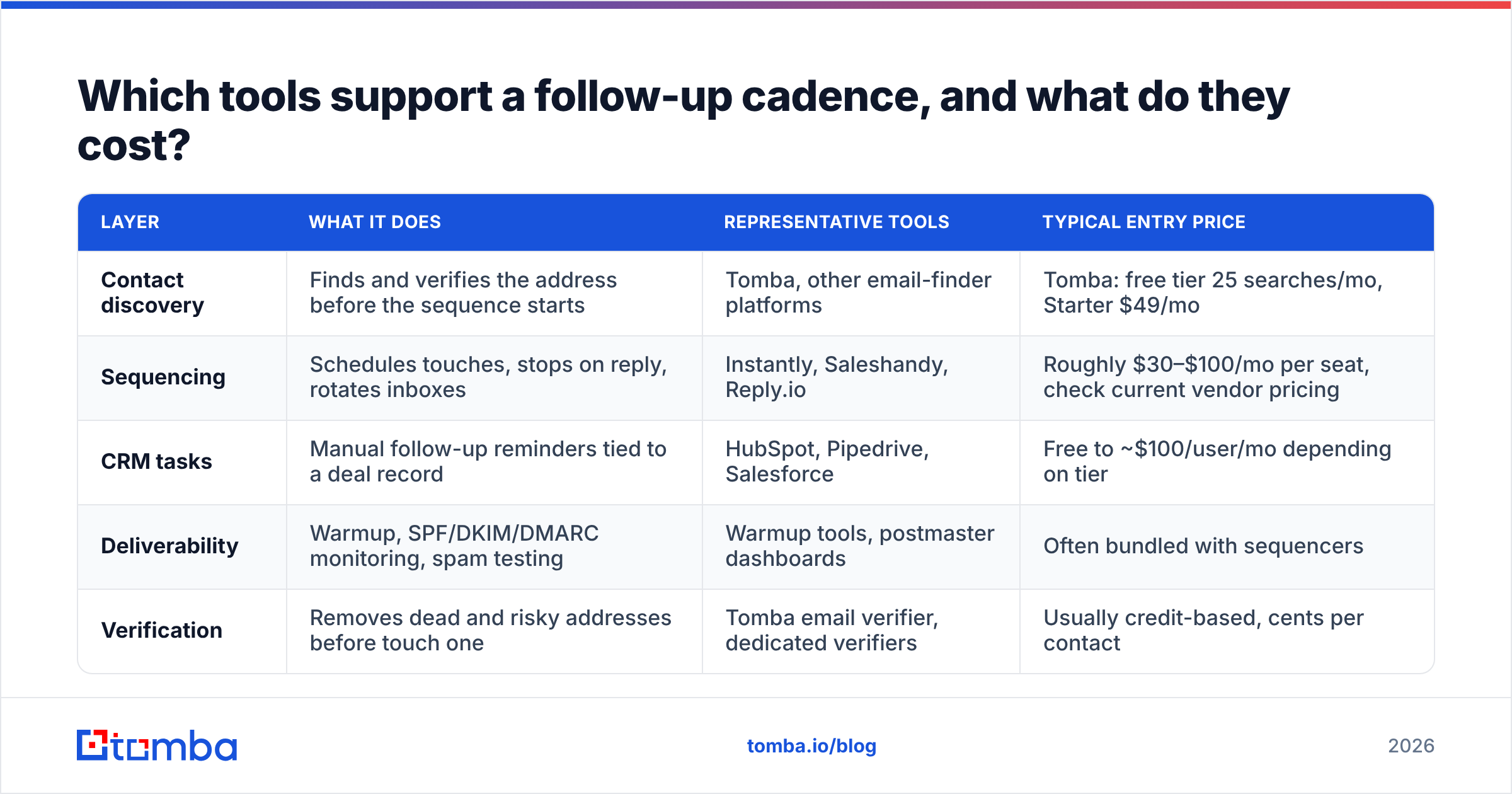
Follow-up sequencing lives in the sending tool; contact accuracy lives upstream. Both matter, and teams that only buy the sending tool are the ones who complain that "cold email doesn't work anymore."
| Layer | What it does | Representative tools | Typical entry price |
|---|---|---|---|
| Contact discovery | Finds and verifies the address before the sequence starts | Tomba, other email-finder platforms | Tomba: free tier 25 searches/mo, Starter $49/mo |
| Sequencing | Schedules touches, stops on reply, rotates inboxes | Instantly, Saleshandy, Reply.io | Roughly $30–$100/mo per seat, check current vendor pricing |
| CRM tasks | Manual follow-up reminders tied to a deal record | HubSpot, Pipedrive, Salesforce | Free to ~$100/user/mo depending on tier |
| Deliverability | Warmup, SPF/DKIM/DMARC monitoring, spam testing | Warmup tools, postmaster dashboards | Often bundled with sequencers |
| Verification | Removes dead and risky addresses before touch one | Tomba email verifier, dedicated verifiers | Usually credit-based, cents per contact |
Tomba's own tiers are Free (25 searches/mo), Starter $49/mo, Growth $99/mo, Pro $249/mo, and Enterprise custom — full Tomba pricing is public. Third-party prices move often, so treat the middle rows as directional and confirm on the vendor's site or a review aggregator like G2 before you budget.
The point of the table is the layering, not the vendors. A sequencer will happily send five follow-ups to an address that never existed. Nothing in that stack catches the mistake except verification.
Why do follow up reminder emails bounce or land in spam?#
Because repetition amplifies whatever was wrong with touch one.
Send one email to a bad address and you take one bounce. Send a five-touch sequence to the same bad address and you take five, all from the same sending domain, in a compressed window. Mailbox providers read that as a sender who does not manage their list.
Three checks that prevent most of it:
- Verify before the sequence, not after the bounce. Run the list through an email verifier and drop everything marked invalid. For large imports, bulk verify is faster than doing it per contact.
- Handle catch-all domains separately. A catch-all server accepts everything, so a "valid" result means little. Use a catch-all verifier and either exclude those contacts or cap them at two touches instead of five.
- Authenticate the domain. SPF, DKIM, and DMARC records must be correct before volume goes up. This is table stakes, and it is also the legal floor — the CAN-SPAM Act sets requirements on identification and opt-out that apply to your follow-ups exactly as they do to your first send.
There is also a behavioural cause. If your follow-ups get deleted unread at high rates, engagement signals drop and future sends from your domain get filtered harder. Bad copy is a deliverability problem, not just a conversion problem.
What mistakes kill reply rates on follow-ups?#
- "Just bumping this up your inbox." Zero new information. It signals that your time is worth less than theirs.
- "Per my last email." Reads as passive-aggressive to almost everyone under a VP title.
- Guilt framing. "I guess you're not interested" makes the reader defensive, and defensive readers archive.
- Re-pitching the same offer verbatim. If it did not land the first time, repetition will not fix it. Change the angle.
- Attachments on early touches. They hurt deliverability and rarely get opened by someone who has not replied yet.
- No stop condition. Sequences that keep running after a reply, an out-of-office, or a "no" are the fastest route to a spam complaint.
- One channel only. A LinkedIn view or a short call between touch three and four lifts reply rates more than a sixth email will. HubSpot's sales follow-up guidance and Salesforce's sales resources both land on the same conclusion: multi-threading beats volume on a single channel.
One more, less obvious: writing follow-ups to the wrong person. If the contact changed roles, no cadence saves you. Re-checking the account for a current decision maker beats sending touch five into a mailbox that is being auto-forwarded to nobody.
How do you measure whether your follow-ups are working?#
Track by touch, not by campaign. A campaign-level reply rate hides the fact that touch one is dead and touch three is carrying everything.
Minimum reporting:
- Reply rate per touch — tells you where to invest in copy.
- Positive reply rate per touch — a spike in negative replies at touch four means your cadence is too tight.
- Bounce rate on touch one — anything above 2–3% means your verification step is broken.
- Unsubscribe rate per touch — rising through the sequence is normal; a jump of more than double is a copy problem.
- Meetings per 100 contacts — the only number that survives a QBR.
Run the sequence for at least 200 contacts before you judge it. Below that, you are reading noise.
Ready to stop guessing at addresses?#
Follow-ups only compound if the address underneath them is real. Start each sequence by pulling verified, current contacts with the Tomba Email Finder — find the right person by name or domain, confirm the address is deliverable, and push a clean list into whatever sequencer you already run. The free tier gives you 25 searches a month to test the workflow before you commit to a plan.
Related guides#
Ready to find emails that actually work?
Join 150,000+ professionals who stopped guessing and started sending. Free credits on signup — no credit card required.
Get the Tomba newsletter
Practical outbound tactics and product updates — once every two weeks.
About the author