Follow Up Statistics 2026: What the Data Says About Persistence
Most reps quit after one or two touches, yet the majority of replies land on touch three and later. Here is what the 2026 follow up statistics actually show — and the cadence math that beats them.
TL;DR
- Across published outbound benchmarks, roughly half of all replies arrive after the first email — yet most sequences stop at two touches.
- The best-performing cadences in 2026 run 5-8 touches over 21-30 days, with widening gaps (day 0, 3, 7, 12, 20) rather than daily hammering.
- Follow-up volume only helps if the list is clean. A 12% bounce rate kills a 6-touch sequence faster than bad copy ever will.
- Multichannel follow-up (email + phone + LinkedIn) consistently outperforms email-only, but the lift comes from timing alignment, not channel count.
- The single highest-ROI change most teams can make is not "more follow-ups" — it's verifying the list first, then extending the sequence.
What do follow up statistics actually measure?#
Follow up statistics are the numbers behind persistence: how many touches it takes to get a reply, when replies cluster, and how much incremental value each additional attempt produces before it turns into noise.
The trap is that most quoted figures come from vendor blog posts that recycle each other. You will see "80% of sales require 5 follow-ups" attributed to a 2007 study nobody can locate. Treat any stat without a named dataset and a sample size as directional folklore, not evidence.
What holds up under scrutiny is the shape of the curve, which is remarkably stable across every credible dataset: reply rate per touch declines, but the cumulative reply rate keeps climbing well past where most teams stop. That gap between "where replies still exist" and "where reps quit" is the entire opportunity.
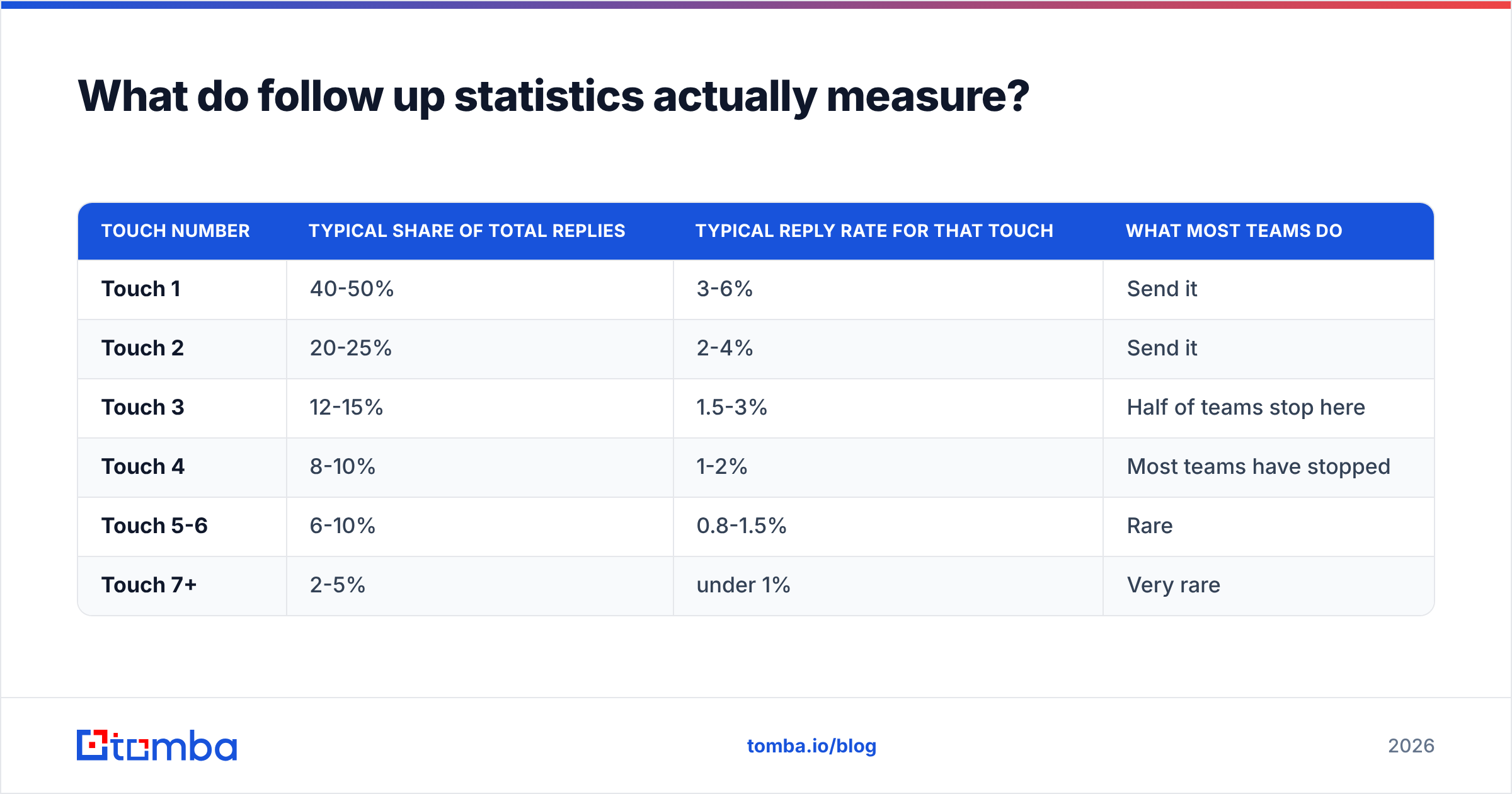
Here is the distribution pattern reported consistently across large outbound sequence datasets:
| Touch number | Typical share of total replies | Typical reply rate for that touch | What most teams do |
|---|---|---|---|
| Touch 1 | 40-50% | 3-6% | Send it |
| Touch 2 | 20-25% | 2-4% | Send it |
| Touch 3 | 12-15% | 1.5-3% | Half of teams stop here |
| Touch 4 | 8-10% | 1-2% | Most teams have stopped |
| Touch 5-6 | 6-10% | 0.8-1.5% | Rare |
| Touch 7+ | 2-5% | under 1% | Very rare |
Read row three carefully. Touches 3 through 6 account for roughly a third of all replies. If your sequence ends at touch two, you are structurally capped at losing that third — regardless of how good your copy is.
Why do so many reps stop at two touches?#
Three reasons, in order of how much damage they do.
- Perceived rejection. No reply reads as "no." It usually means the message landed during a meeting, a quarter close, or a vacation. Non-response is the default state of a busy inbox, not a verdict.
- Activity metrics reward new contacts. If a rep is measured on "prospects contacted," adding a new name scores the same as following up with an existing one — and feels more productive. The comp plan quietly kills persistence.
- Nothing new to say. Reps run out of angles by touch three, so touch four becomes "just bumping this to the top of your inbox," which converts poorly and feels bad to send.
The third one is the fixable one. A follow-up needs a reason to exist beyond your own pipeline anxiety. Trigger-based follow-ups — a funding round, a new hire in the buying committee, a competitor announcement, a relevant benchmark — outperform bumps by a wide margin because they reset the relevance clock.
What is the optimal follow-up cadence in 2026?#
Spacing matters more than count. The pattern that performs best in current benchmark data uses expanding intervals, because the further you get from the initial trigger, the lower the probability that today specifically is the right day.
A cadence that consistently holds up:
- Day 0 — Initial email. Full context, one specific ask, no attachments.
- Day 3 — Reply in-thread. Short. Add one new data point, not a restatement.
- Day 7 — Channel switch. Call or LinkedIn touch, referencing the email without guilt-tripping.
- Day 12 — New angle, new thread. Different value prop, different subject line. This is the touch most teams never send and it routinely outperforms touch 2.
- Day 20 — Social proof. A customer result from a comparable company, one paragraph.
- Day 28 — Permission close. "Should I close this out?" — historically one of the highest single-touch reply rates in any sequence, often 2-3x the touch before it.
Then stop, and requeue the contact in 90 days. Sequences that run past 10 touches inside a month generate complaint rates that damage domain reputation more than the marginal replies are worth.
A few timing details worth encoding:
- Business days only. Weekend sends distort your open data and rarely convert.
- Send window. Tuesday-Thursday, 7-10am recipient local time still leads most datasets, though the edge has narrowed as everyone piled in. Monday afternoon has quietly become underrated.
- Gap floor. Never follow up in under 48 hours. Sub-2-day gaps correlate strongly with spam complaints.
How much does list quality change these numbers?#
More than cadence does. This is the part most follow-up advice skips.
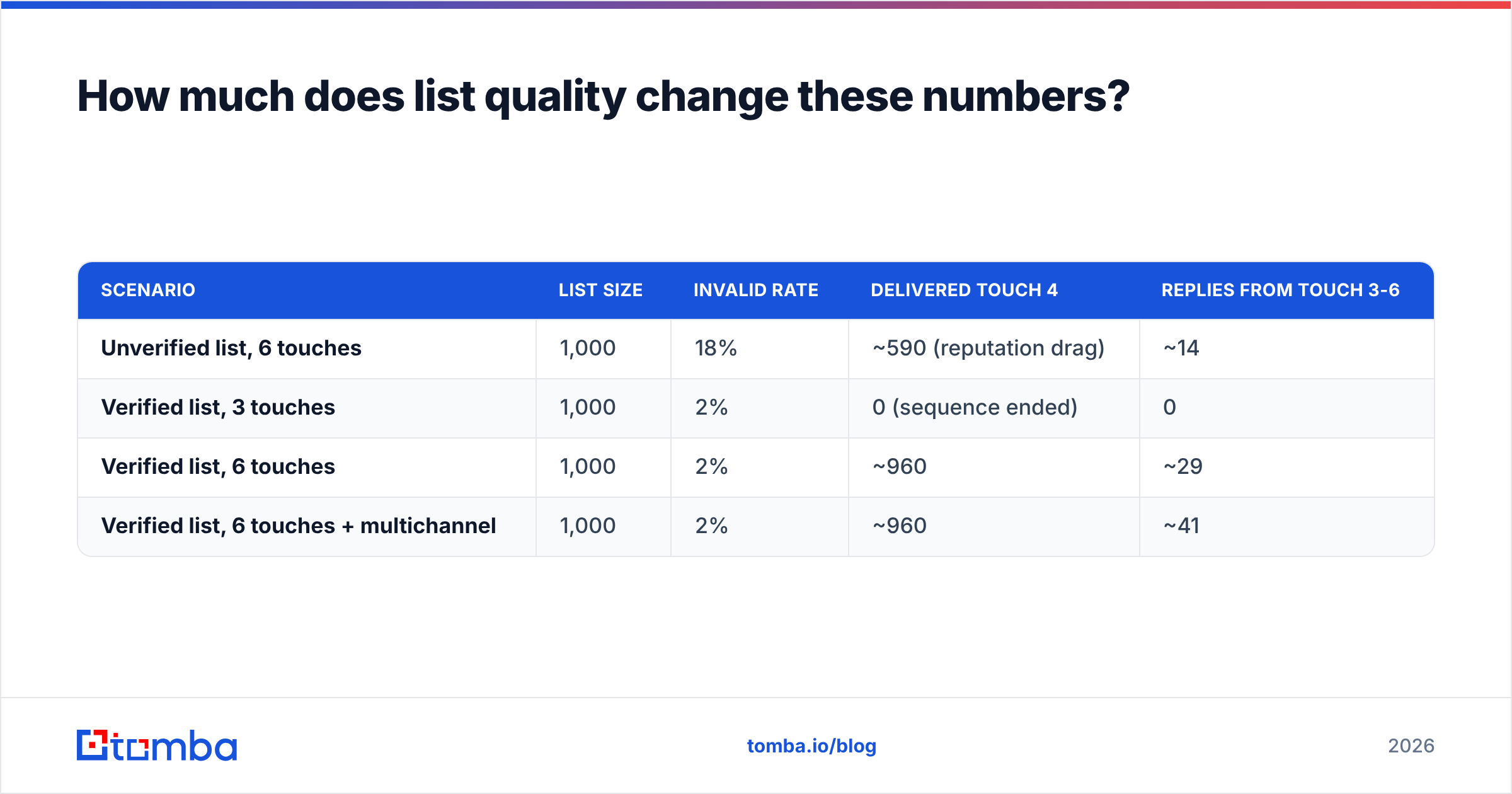
Every touch you send to a dead mailbox is a bounce. Bounce rate compounds across a sequence: a list with 15% invalid addresses sending 6 touches generates a bounce signal six times, and mailbox providers read that as spam behavior long before your prospects do. Once your sender reputation degrades, your valid contacts stop seeing touches 3-6 entirely — which is exactly where the replies you're chasing live.
The math is unforgiving:
| Scenario | List size | Invalid rate | Delivered touch 4 | Replies from touch 3-6 |
|---|---|---|---|---|
| Unverified list, 6 touches | 1,000 | 18% | ~590 (reputation drag) | ~14 |
| Verified list, 3 touches | 1,000 | 2% | 0 (sequence ended) | 0 |
| Verified list, 6 touches | 1,000 | 2% | ~960 | ~29 |
| Verified list, 6 touches + multichannel | 1,000 | 2% | ~960 | ~41 |
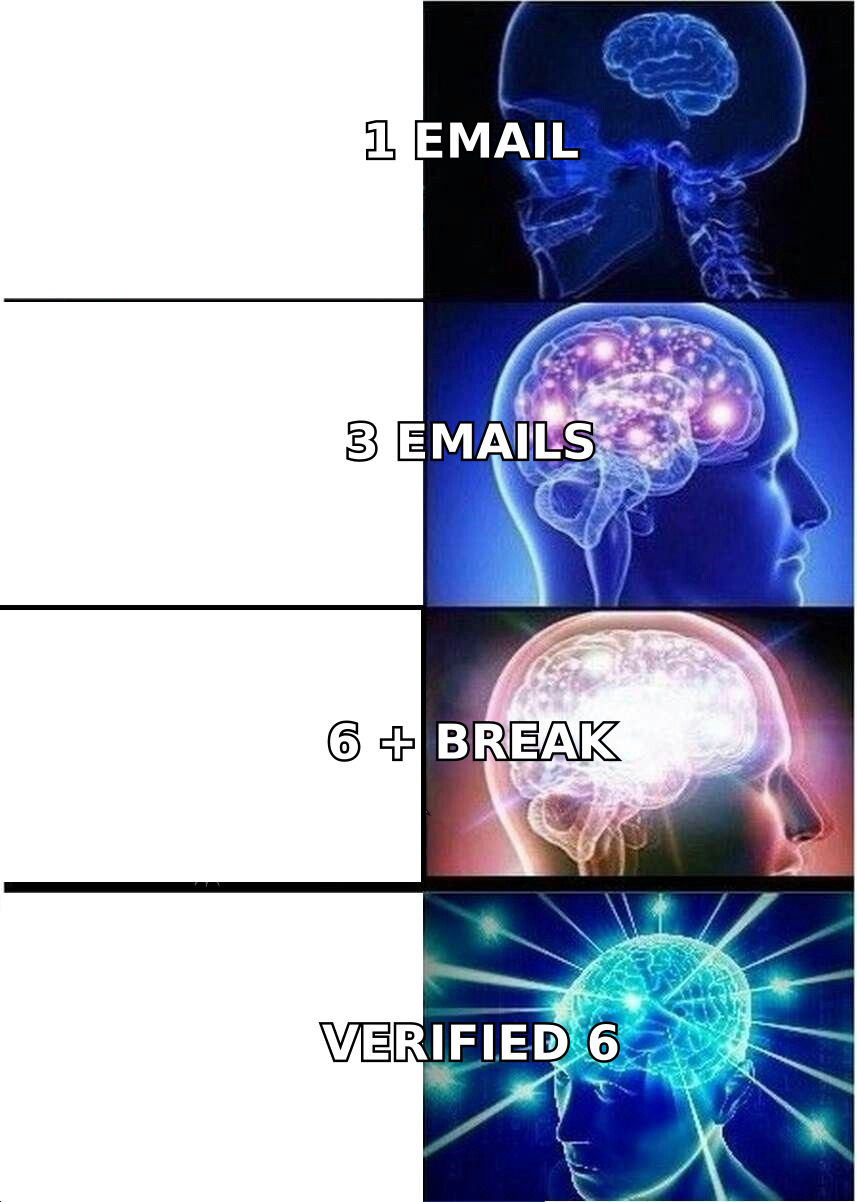
The verified 6-touch run more than doubles the late-sequence replies of the unverified one, from the same list size and the same copy. Run your list through an email verifier before you extend a cadence, not after you notice the bounce rate.
Catch-all domains deserve separate handling. They accept everything at the SMTP layer, so standard verification returns "unknown" and teams either drop them (losing real contacts) or blast them (inviting bounces). A dedicated catch-all verifier resolves a meaningful share of those, which matters because catch-alls skew toward mid-market and enterprise domains — the accounts you least want to discard.
Do multichannel follow-ups beat email-only?#
Yes, but not for the reason vendors imply.
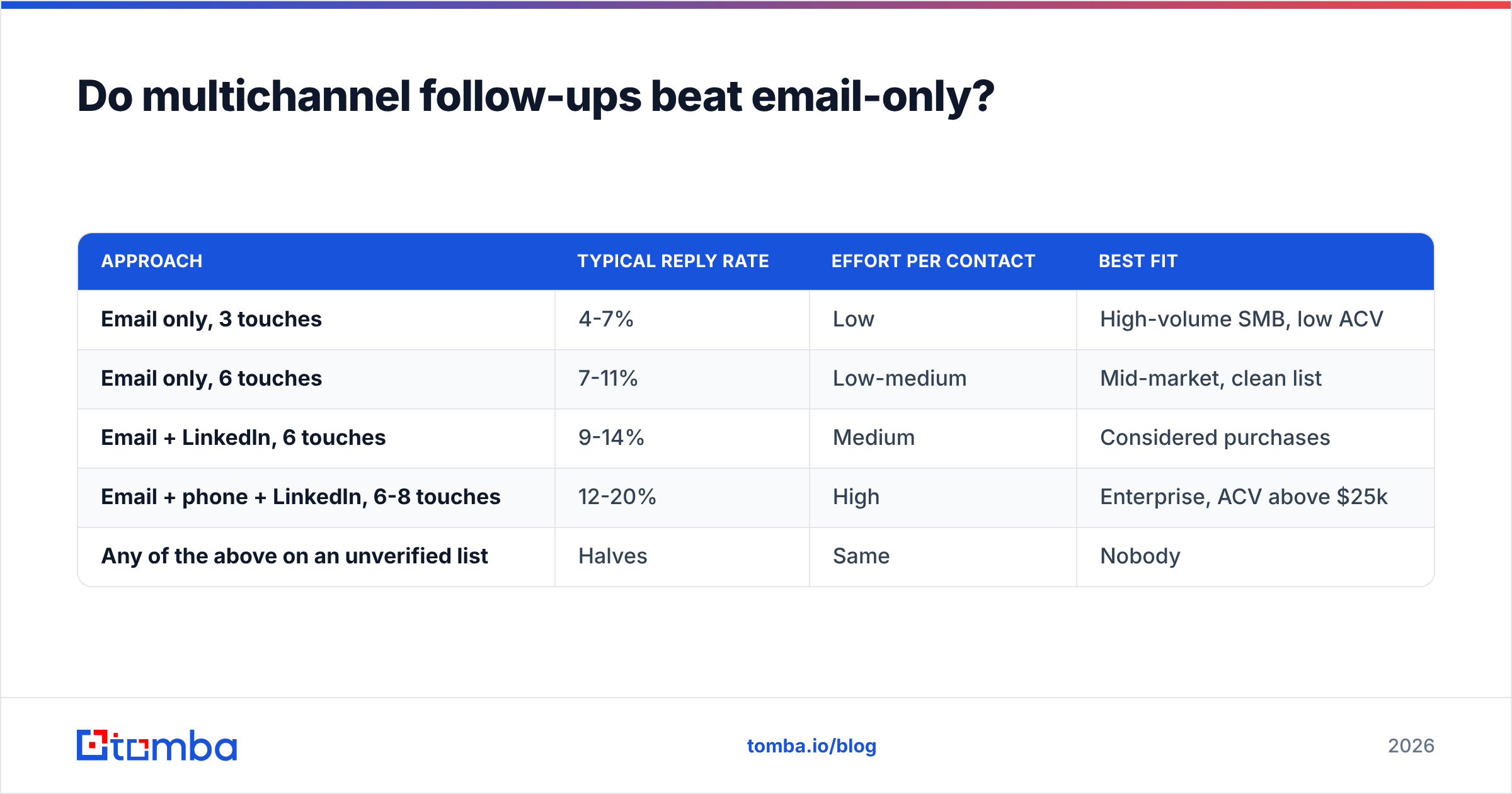
Adding channels does not multiply reply rate. What it does is raise the probability that at least one touch lands during a moment of attention. A prospect who ignores three emails may pick up a call because the phone forces a synchronous decision. A LinkedIn view makes the next email feel familiar rather than cold.
| Approach | Typical reply rate | Effort per contact | Best fit |
|---|---|---|---|
| Email only, 3 touches | 4-7% | Low | High-volume SMB, low ACV |
| Email only, 6 touches | 7-11% | Low-medium | Mid-market, clean list |
| Email + LinkedIn, 6 touches | 9-14% | Medium | Considered purchases |
| Email + phone + LinkedIn, 6-8 touches | 12-20% | High | Enterprise, ACV above $25k |
| Any of the above on an unverified list | Halves | Same | Nobody |
Two rules keep multichannel from becoming multi-annoying. First, sequence the channels, don't stack them — never email and call the same contact on the same day. Second, reference prior touches lightly or not at all. "Following up on my email and my call and my LinkedIn message" reads as pressure. Each touch should stand on its own value.
If phone is in the mix, the bottleneck is usually data, not willingness to dial. Direct-dial coverage varies enormously by provider and region; a phone finder that returns mobile numbers rather than switchboards is the difference between a connect rate that justifies the channel and one that doesn't. HubSpot's ongoing sales research and peer reviews on G2 are reasonable places to sanity-check coverage claims before you commit budget.
What follow-up benchmarks should your team track?#
Stop tracking "emails sent." Track these five instead:
- Cumulative reply rate by touch. The single most useful chart in outbound. If it's still climbing meaningfully at touch 5, your sequence is too short.
- Reply rate decay ratio. Touch N reply rate divided by touch N-1. When that ratio drops below roughly 0.4 two touches running, you've hit the useful end of the sequence.
- Bounce rate by touch. Should be near-flat. If it rises across a sequence, your data source is decaying mid-campaign.
- Negative reply rate. Unsubscribes plus "stop contacting me" per touch. When this crosses ~1.5% on a single touch, that touch is doing net harm.
- Meetings per 100 contacts, not per 100 emails. Volume metrics reward the wrong behavior. Contact-level metrics reward persistence.
Run these by segment. Enterprise buying committees legitimately need longer cadences than a 12-person startup; a single blended average hides both.
How do you build a follow-up engine that scales?#
Four steps, in order. Skipping step one is the most common and most expensive mistake.
- Source and verify before you sequence. Build the list from a source that returns confidence scores, then verify. Whether you use a domain search to map an account's contacts or bulk enrichment for an existing CRM export, the input quality caps everything downstream.
- Write six touches before you send one. If you can't articulate six distinct reasons to contact this segment, your targeting is too broad — fix the ICP, not the copy.
- Instrument per-touch, not per-campaign. Campaign-level reply rate tells you nothing about where to cut or extend.
- Set an explicit exit and a requeue date. "Should I close this out?" then a 90-day rest. Contacts who ignored you in Q1 convert at normal rates in Q3 when the trigger changes.
For teams running this at volume, the operational bottleneck is usually enrichment latency — waiting on data to refresh before the next touch fires. Wiring lookups directly into the sequence via an email finder API or a HubSpot integration removes the manual export-verify-reimport loop that quietly caps most teams at three touches.
Where do the numbers stop helping?#
Benchmarks tell you where the floor is, not where your ceiling should be. Three honest caveats:
Sample bias is everywhere. Sequence datasets come from sales-engagement platforms, so they over-represent teams already sophisticated enough to buy one. Your first sequence will underperform these numbers, and that's normal.
ACV changes everything. A $500/year product cannot economically justify an 8-touch multichannel cadence. A $150k enterprise deal justifies 15 touches across two quarters. Copying a benchmark from the wrong price band is worse than having no benchmark.
Reply rate is not revenue. A provocative subject line can double replies and halve meetings. Optimize for the metric closest to money that you can measure reliably — usually meetings held, not booked.
Providers vary too. Some data vendors, including BookYourData, lean toward pre-built list coverage; others prioritize real-time lookup accuracy. Match the model to your motion: pre-built lists suit broad campaigns, real-time verification suits account-based work where a single wrong address kills the sequence.
Ready to make your follow-ups land?#
Persistence only pays when the messages arrive. Before you extend a cadence from three touches to six, fix the input: source verified, deliverable addresses so every touch you plan actually reaches a human inbox.
Tomba Email Finder returns professional email addresses by domain, name, or company with confidence scoring, and pairs with built-in verification so your six-touch sequence doesn't burn your domain on touch two. Start on the free tier at 25 searches a month, or check Tomba pricing — Starter runs $49/mo, Growth $99/mo, and Pro $249/mo for teams running outbound at volume. Clean the list first, then let the follow-up statistics work in your favor.
Related guides#
Ready to find emails that actually work?
Join 150,000+ professionals who stopped guessing and started sending. Free credits on signup — no credit card required.
Get the Tomba newsletter
Practical outbound tactics and product updates — once every two weeks.
About the author