Following Up On Our Meeting: Emails That Actually Get Replies
Most post-meeting follow-ups die because they recap instead of advancing the deal. Here are the templates, timing rules, and structure that turn a good meeting into a signed next step.
TL;DR
- The phrase "following up on our meeting" is the weakest possible subject line — it announces effort, not value. Replace it with the decision the meeting produced.
- Send within 24 hours. Reply rates on post-meeting emails fall off a cliff after day two, when the meeting is no longer the most recent thing your prospect thought about.
- Every follow-up needs four parts: the agreed outcome, the open question, the specific next step with a date, and one piece of new value.
- Multi-threading beats persistence. One email to your champion is a bet; three emails to three stakeholders is a pipeline.
- Bad contact data kills more follow-ups than bad copy. If your email bounces on the CFO you were told to loop in, nothing else matters.
Why do most "following up on our meeting" emails fail?#
Because they're written for the sender, not the receiver.
You leave a call feeling good. You want to preserve momentum, so you open your inbox and type a recap: what you discussed, what you demoed, what you're excited about. That email arrives in a prospect's inbox alongside forty others, and it asks them to do exactly nothing. So they do nothing.
The failure has three causes, and they compound:
- The subject line describes your activity. "Following up on our meeting" tells the reader you did something. It doesn't tell them why opening the email is worth ten seconds.
- The body recaps instead of advancing. Your prospect was in the meeting. They don't need a transcript. They need to know what happens next and what's required of them.
- The ask is soft. "Let me know if you have questions" and "happy to jump on another call" both put the work of scheduling on the person with less incentive to do it.
There's a fourth cause that nobody talks about: you followed up with the wrong person, or you never got the email address of the right one. The VP of Engineering said "loop in our security lead" and you nodded, and then you never found their address, and the deal quietly died in procurement three weeks later.
What should a post-meeting follow-up email actually contain?#
Four blocks, in this order. Anything else is padding.
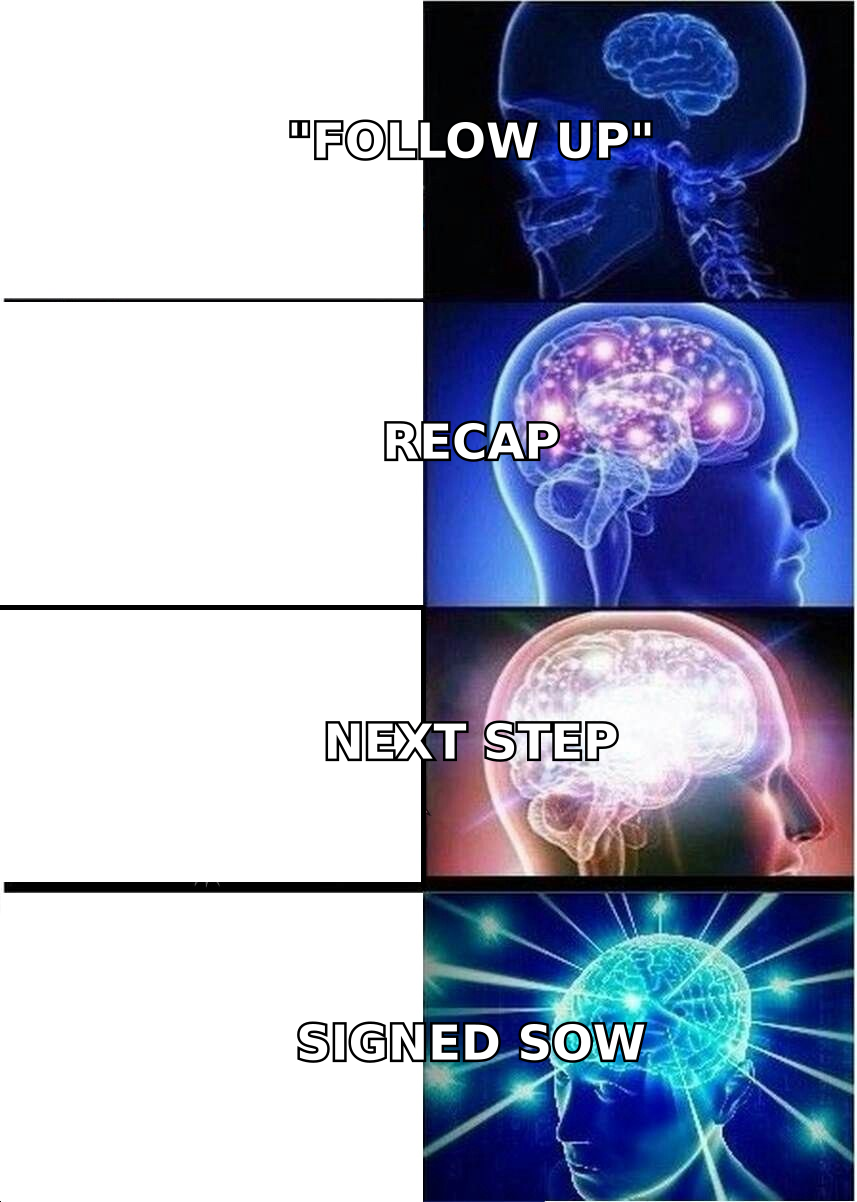
- The confirmed outcome — one sentence naming what you both agreed. "You're moving forward with a 14-day pilot on the Toronto team." Not "great chatting today."
- The open item you own — what you promised, and when it lands. "Security questionnaire back to you by Thursday."
- The open item they own — what you need, and by when. Be direct: "Can you send the SOC 2 requirements from your legal team by Friday?"
- One unit of new value — a benchmark, a customer story from their exact vertical, a doc that answers the objection they raised at minute 38. This is the only reason someone forwards your email internally.
Then close with a dated proposal, not an open invitation. "Does Tuesday the 3rd at 10am work for the technical review?" converts several times better than "let me know when works."
Keep the whole thing under 150 words. Post-meeting emails get read on phones between meetings, and a wall of text signals that replying will be work.
Which follow-up template should you use?#
Different meetings produce different next steps. Using one generic template across all of them is why your reply rate is flat.
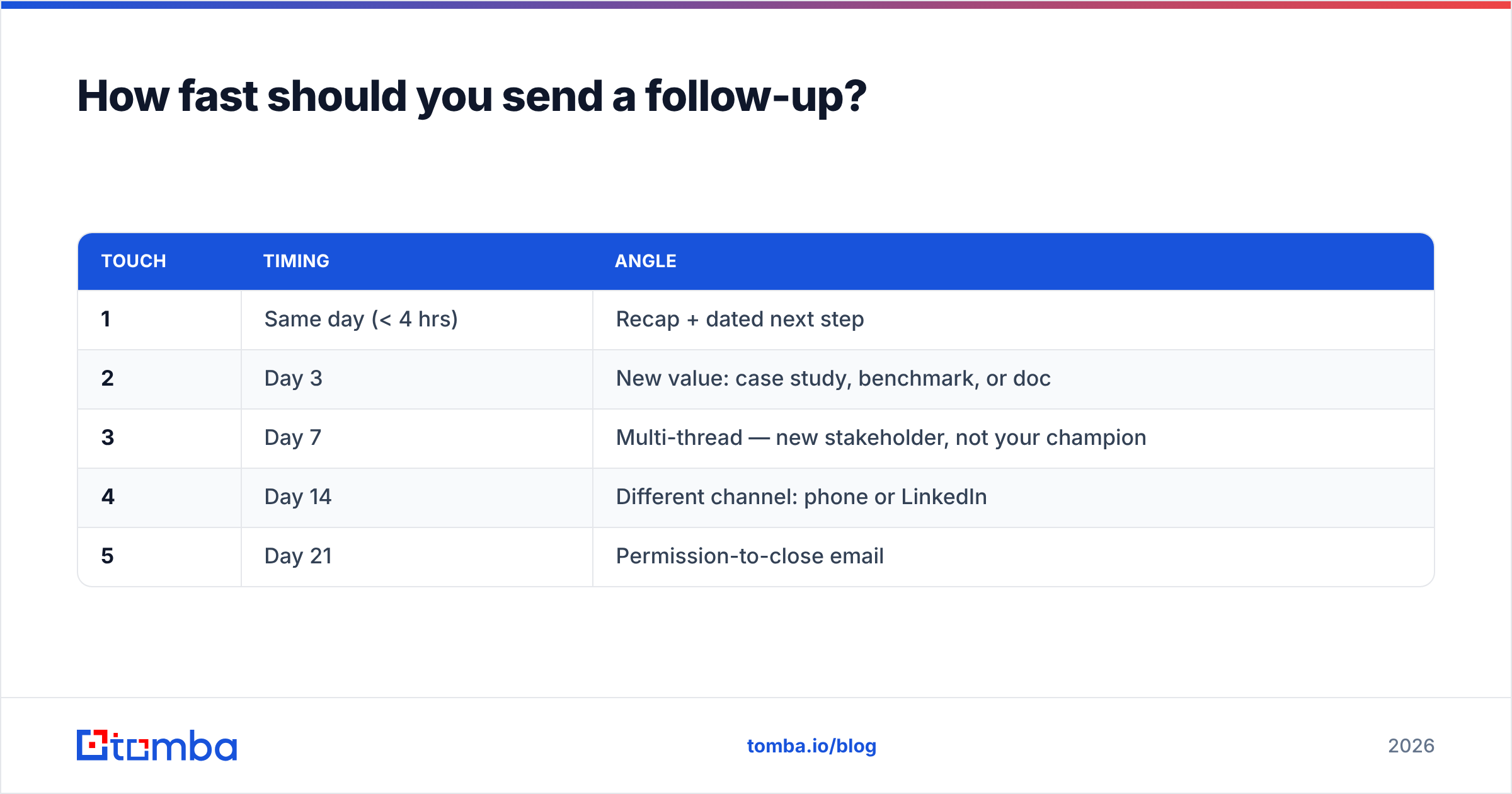
| Scenario | Subject line | Core ask | Send timing | Typical reply rate |
|---|---|---|---|---|
| Discovery call, warm | "Pilot scope for the Toronto team" | Confirm pilot dates | Within 4 hours | 45-60% |
| Demo, multiple stakeholders | "Answers to Priya's 3 questions" | Book technical review | Same day | 35-50% |
| Meeting where they went quiet | "The security doc you asked about" | Reopen with value only | 48 hours | 20-30% |
| Post-proposal, awaiting signature | "Two options on the SOW term" | Force a binary decision | 24 hours | 30-40% |
| Conference or event meeting | "The Snowflake migration thing" | Book a real call | Within 24 hours | 25-35% |
| Internal champion needs ammo | "One-pager for your CFO" | Enable them to sell up | Same day | 40-55% |
Reply rates above are directional ranges from B2B outbound teams, not guarantees. Your absolute numbers will vary with segment and relationship strength — the ratio between rows is the part that holds.
Template 1 — Discovery call, clear next step#
Subject: Pilot scope for the Toronto team
Hi Marcus,
Confirming what we landed on: 14-day pilot, Toronto CS team only, success measured on first-response time.
On me: pilot config doc to you by Wednesday.
On you: the current FRT baseline so we have something to compare against.
One thing I didn't mention — Zendesk-to-Slack routing cut FRT 31% for a team almost identical to yours. Two-paragraph breakdown attached.
Does Tuesday the 3rd at 10am work to kick off?
— Dana
Template 2 — They raised an objection you didn't fully answer#
Subject: The SSO question, properly answered
Hi Priya,
You asked whether SCIM provisioning works with Okta groups and I gave you a half-answer. The full one: yes, group-based, with nested groups supported since March. Docs link below.
That was the only blocker you named. If it's genuinely resolved, can we get the technical review on the calendar this week?
— Dana
Template 3 — Reviving a stalled thread#
Subject: The Q3 budget thing
Hi Marcus,
Last we spoke, the pilot was waiting on Q3 budget confirmation. Two possibilities: it's still pending, or priorities moved.
Either is fine — I'd just rather know which so I stop guessing. One word reply works.
— Dana
That third one works because it gives the prospect a graceful exit. Counterintuitively, offering an easy "no" raises your total response rate, because most silence isn't rejection — it's the cost of composing a reply.
How fast should you send a follow-up?#
Within 24 hours, and ideally within four.
The reason is memory, not etiquette. Your meeting occupies a specific slot in your prospect's working memory, and that slot gets overwritten by the next call, the next Slack thread, the next fire. An email that arrives while the context is still loaded gets a fast, easy reply. An email that arrives Thursday about a Monday meeting requires the reader to reconstruct the conversation before they can respond — and reconstruction is friction.
A workable cadence after the first send:
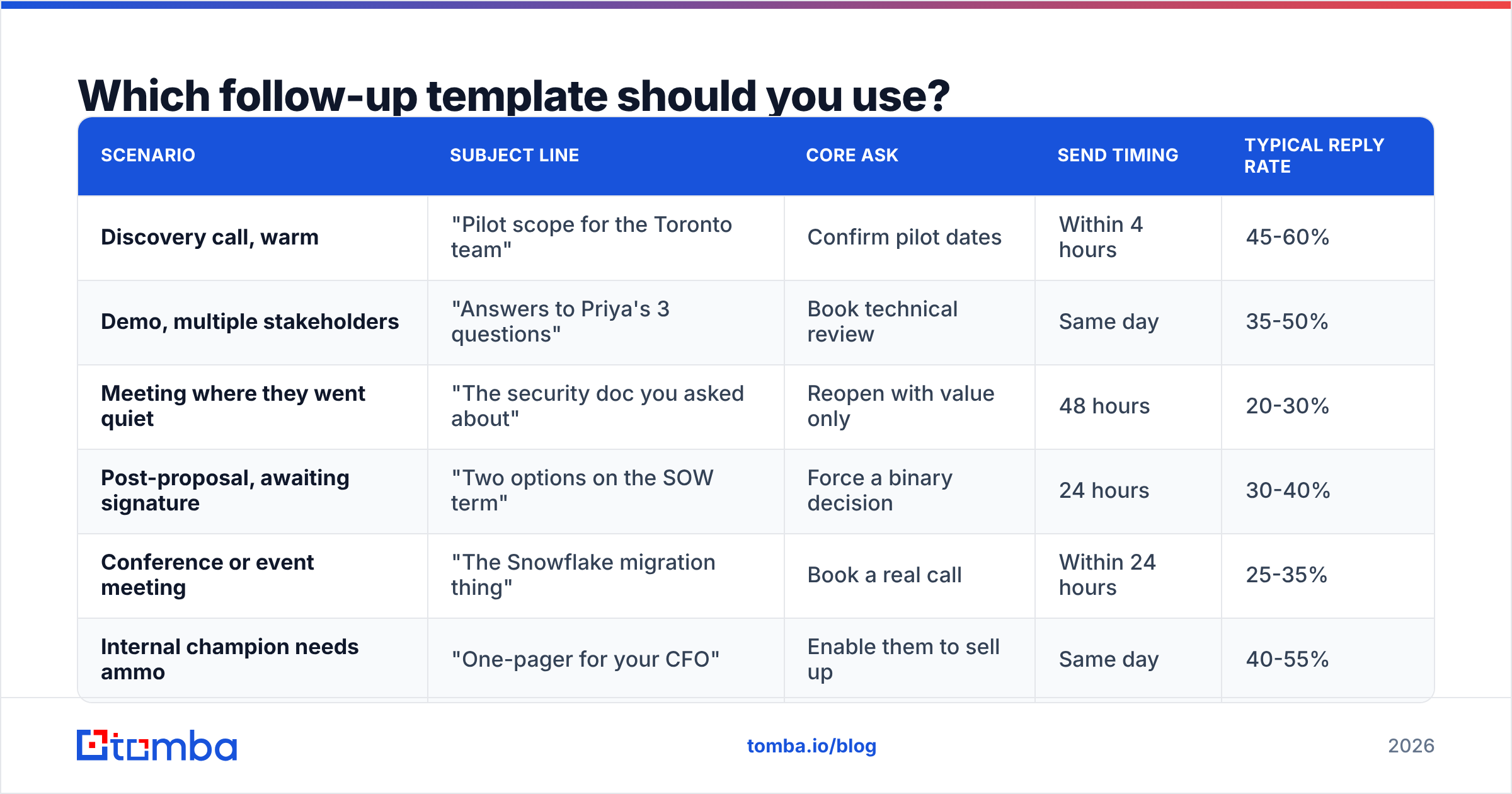
| Touch | Timing | Angle |
|---|---|---|
| 1 | Same day (< 4 hrs) | Recap + dated next step |
| 2 | Day 3 | New value: case study, benchmark, or doc |
| 3 | Day 7 | Multi-thread — new stakeholder, not your champion |
| 4 | Day 14 | Different channel: phone or LinkedIn |
| 5 | Day 21 | Permission-to-close email |
Do not send five variations of "just checking in." Each touch needs a distinct reason to exist. If you can't name the reason, skip the touch.
Is multi-threading better than following up with your champion?#
Yes, and it isn't close.
Gartner's B2B buying research has consistently found that a typical enterprise purchase involves six to ten decision-makers, each arriving with their own information. If your follow-up cadence touches exactly one of them, you're relying on your champion to do your selling in rooms you'll never enter — usually without the material they'd need to do it well.
Practical version: after a meeting, identify two people who were named but not present. The security lead. The finance approver. The team lead who will actually use the product. Then send each a short, role-specific email that references the meeting without name-dropping in a way that feels like an end-run around your champion.
Subject: Security review — following up from Marcus's team
Hi Sam,
Marcus mentioned you'd own the security review on our pilot. Rather than make you chase it, here's the SOC 2 report and our subprocessor list up front.
If anything's missing for your process, tell me and I'll get it this week.
The blocker here is almost never the copy. It's that you don't have Sam's email address. This is where an email finder earns its keep: give it a name and a company domain and you get a verified address in seconds, so a follow-up plan doesn't stall on a missing contact. For accounts where you know the company but not the people, domain search returns the addresses and role patterns across a domain, which is usually enough to identify who owns security or procurement.
Verify before you send. A hard bounce from a stranger at a company mid-deal is a genuinely bad look, and it can damage sender reputation on the domain you rely on for every other deal. Running new contacts through an email verifier before the first touch takes seconds.
What subject lines work for post-meeting emails?#
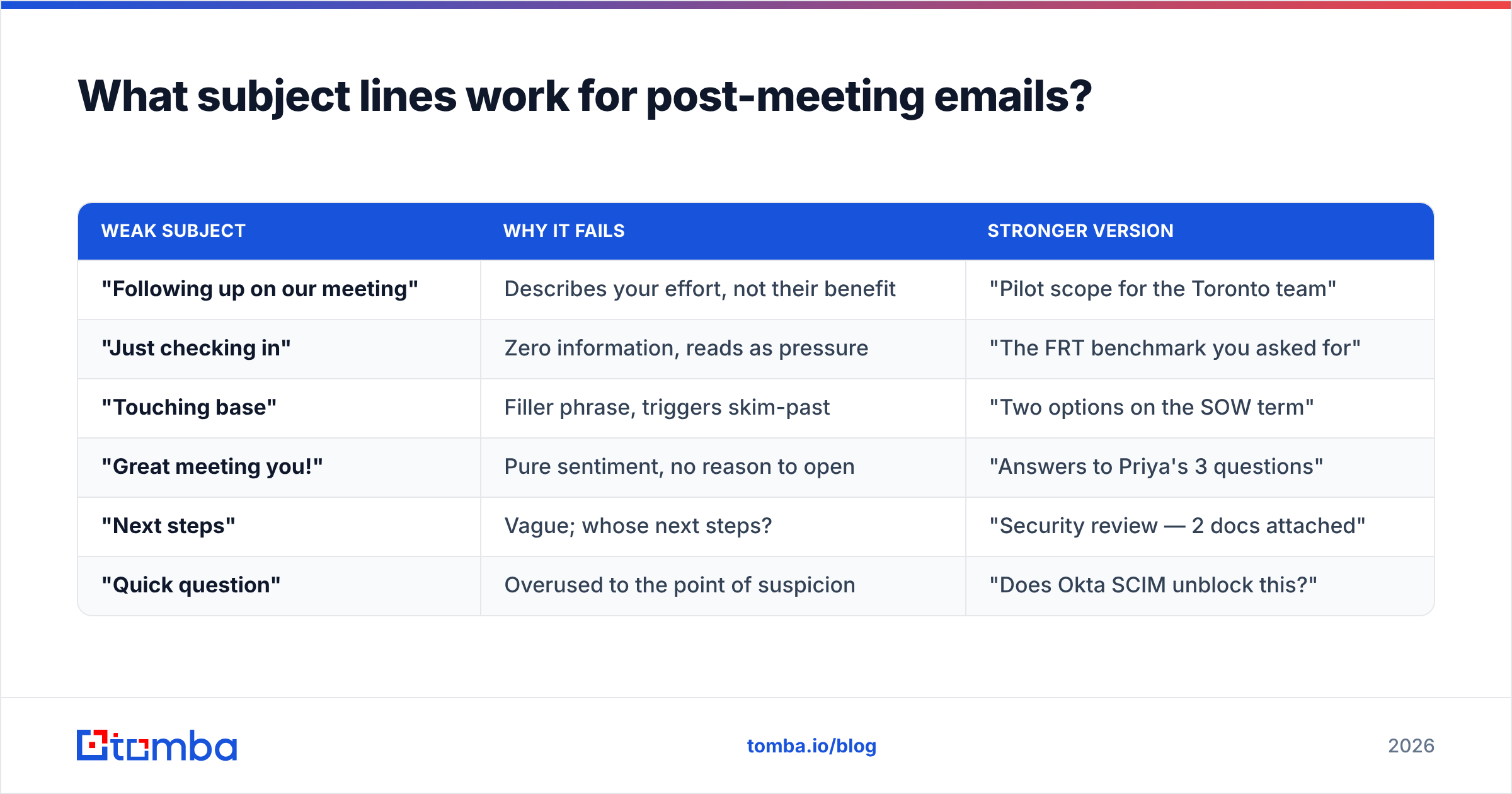
Specific ones. The test is whether the subject could only have been written after your particular meeting.
| Weak subject | Why it fails | Stronger version |
|---|---|---|
| "Following up on our meeting" | Describes your effort, not their benefit | "Pilot scope for the Toronto team" |
| "Just checking in" | Zero information, reads as pressure | "The FRT benchmark you asked for" |
| "Touching base" | Filler phrase, triggers skim-past | "Two options on the SOW term" |
| "Great meeting you!" | Pure sentiment, no reason to open | "Answers to Priya's 3 questions" |
| "Next steps" | Vague; whose next steps? | "Security review — 2 docs attached" |
| "Quick question" | Overused to the point of suspicion | "Does Okta SCIM unblock this?" |
Three rules that hold across segments:
- Reference something only you two know. "The Snowflake migration thing" beats any generic phrasing because it proves the email isn't automated.
- Front-load the noun. Mobile inboxes truncate around 35-40 characters. Put the object first.
- Skip your company name. It reads as a marketing send. Their name or the project name performs better.
If you want to pressure-test variants before sending, run them through a subject line tester rather than relying on instinct alone.
How do you follow up without sounding desperate?#
Change the shape of the ask, not the volume of the emails.
Desperation reads through three tells: repetition without new information, escalating apology ("sorry to bother you again"), and open-ended asks that hand all the work to them. Fix all three and you can follow up six times without ever feeling pushy.
- Bring something each time. A benchmark, a competitor teardown, an article about their market. Each email should be defensible as useful even if they never buy.
- Never apologize for following up. It frames your email as an imposition, which invites the reader to treat it as one.
- Ask binary questions. "Is the pilot still on for Q3, or has it moved?" is easier to answer than "any thoughts?"
- Give a real exit. The permission-to-close email — "should I close this out?" — reliably surfaces both dead deals and deals that were never actually dead.
- Vary the channel. A LinkedIn message after two unanswered emails often gets a reply the emails wouldn't have, because it changes the context. HubSpot's sales research has covered the multi-channel effect at length.
What tools help you follow up at scale?#
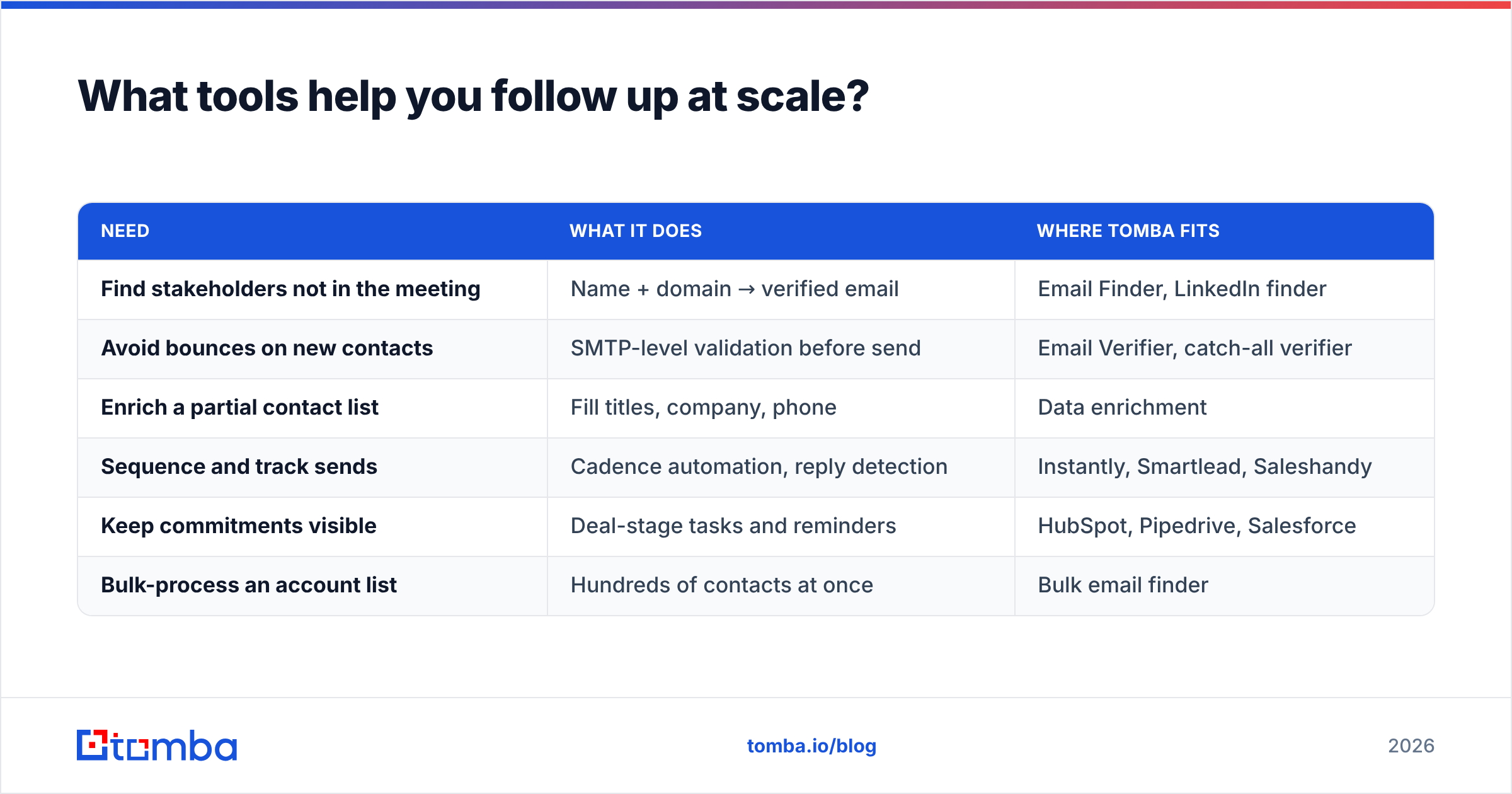
Follow-up quality degrades when you're running fifty open opportunities, because you stop remembering which meeting produced which commitment. Three categories of tooling fix different parts of that.
| Need | What it does | Where Tomba fits |
|---|---|---|
| Find stakeholders not in the meeting | Name + domain → verified email | Email Finder, LinkedIn finder |
| Avoid bounces on new contacts | SMTP-level validation before send | Email Verifier, catch-all verifier |
| Enrich a partial contact list | Fill titles, company, phone | Data enrichment |
| Sequence and track sends | Cadence automation, reply detection | Instantly, Smartlead, Saleshandy |
| Keep commitments visible | Deal-stage tasks and reminders | HubSpot, Pipedrive, Salesforce |
| Bulk-process an account list | Hundreds of contacts at once | Bulk email finder |
On cost: Tomba pricing starts with a free tier at 25 searches per month, then Starter at $49/mo, Growth at $99/mo, and Pro at $249/mo, with Enterprise custom. For contact-data alternatives with a different shape, BookYourData sells pay-as-you-go verified B2B lists, which suits teams that want a one-time list rather than an ongoing search quota — a genuinely different buying model, and the better fit for some workflows.
What no tool fixes: the decision about what to say. Automation multiplies whatever your follow-up template already is. A sharp four-block email sent to eight stakeholders builds pipeline. A vague "just checking in" sent to eight stakeholders builds a reputation.
What does a strong follow-up sequence look like end to end?#
Take a discovery call on Monday at 2pm with a VP of Support who mentioned a security lead and a finance approver.
- Monday, 4pm — Four-block email to the VP. Confirmed outcome, your deliverable, their deliverable, one benchmark, dated proposal for the technical review.
- Monday, 5pm — Find and verify emails for the security lead and finance approver. Two minutes of work.
- Tuesday, 9am — Role-specific email to the security lead with SOC 2 and subprocessor docs attached, referencing the VP by name.
- Thursday — Deliver your promised item on time, exactly as promised. This is the single highest-leverage trust signal in the whole sequence.
- Next Monday — If quiet, email the finance approver a one-page ROI summary. Not a pitch — the numbers their CFO will ask for.
- Day 14 — Phone or LinkedIn to the VP. Different channel, same short ask.
- Day 21 — Permission-to-close email. Whatever comes back, you now know where you stand.
Seven touches, three people, zero instances of "just following up." Every message either delivered something or asked one specific question. That's the whole method.
Get the contacts your follow-up plan depends on#
Great follow-up copy is worthless if it lands in the wrong inbox — or no inbox at all. The Tomba Email Finder turns a name and a company domain into a verified, deliverable email address in seconds, so the security lead your champion mentioned becomes a real contact instead of a note in your CRM. Start on the free tier with 25 searches a month, and scale to Starter at $49/mo when your follow-up sequences start covering entire buying committees instead of one hopeful champion.
Related guides#
Ready to find emails that actually work?
Join 150,000+ professionals who stopped guessing and started sending. Free credits on signup — no credit card required.
Get the Tomba newsletter
Practical outbound tactics and product updates — once every two weeks.
About the author