7 Best Followup CRM Alternatives for Contractors in 2026
Followup CRM is built for construction bid tracking, but it is not the only option. Here are seven alternatives compared on price, pipeline features, integrations, and data quality.
TL;DR
- Followup CRM is a niche, construction-focused sales CRM built around bid tracking and win-rate reporting — it is strong at that job and weak at almost everything outside it.
- Most teams leave for one of three reasons: they outgrow bid-only reporting, they need deeper integrations, or they need a CRM the whole company (not just estimating) will actually log into.
- The best replacement depends on whether you want construction-specific workflow (Buildertrend, JobTread, Knowify, Procore) or general sales horsepower (Pipedrive, HubSpot, Zoho CRM).
- Per-seat CRMs look cheaper on the sticker but scale linearly; flat-rate construction platforms look expensive at 3 users and cheap at 25.
- Switching CRMs fixes your workflow, not your data. Empty contact fields and bounced emails follow you into the new system unless you enrich and verify on the way in.
What is Followup CRM, and who actually uses it?#
Followup CRM is a sales CRM aimed squarely at commercial construction contractors — roofing, electrical, mechanical, specialty trades. Instead of the generic "lead → opportunity → closed won" pipeline every CRM ships with, it models the way contractors actually sell: you track bids, bid due dates, general contractors you are bidding to, estimators assigned, and win/loss reasons. Its headline reports are bid-hit-rate by GC, by estimator, and by project type.
That specificity is the whole pitch. If your sales motion is "we bid 400 jobs a year and want to know which GCs we actually win with," a horizontal CRM makes you build that from scratch with custom fields. Followup CRM ships it on day one.
The flip side is equally predictable. It is a small, focused vendor. The integration marketplace is thin compared to a HubSpot or a Pipedrive. Marketing automation, sequences, call logging, and deep reporting outside the bid table are limited or absent. Pricing is quote-based rather than published, which makes budget comparison harder than it should be. And if part of your revenue comes from service contracts, retrofits, or direct-to-owner work rather than hard-bid projects, you will be bending the tool to fit.
None of that makes it a bad product. It makes it a specialized one — and specialized tools get outgrown in specific, recognizable ways.
Why do teams look for Followup CRM alternatives?#
From conversations with sales ops folks who have run this migration, the reasons cluster:
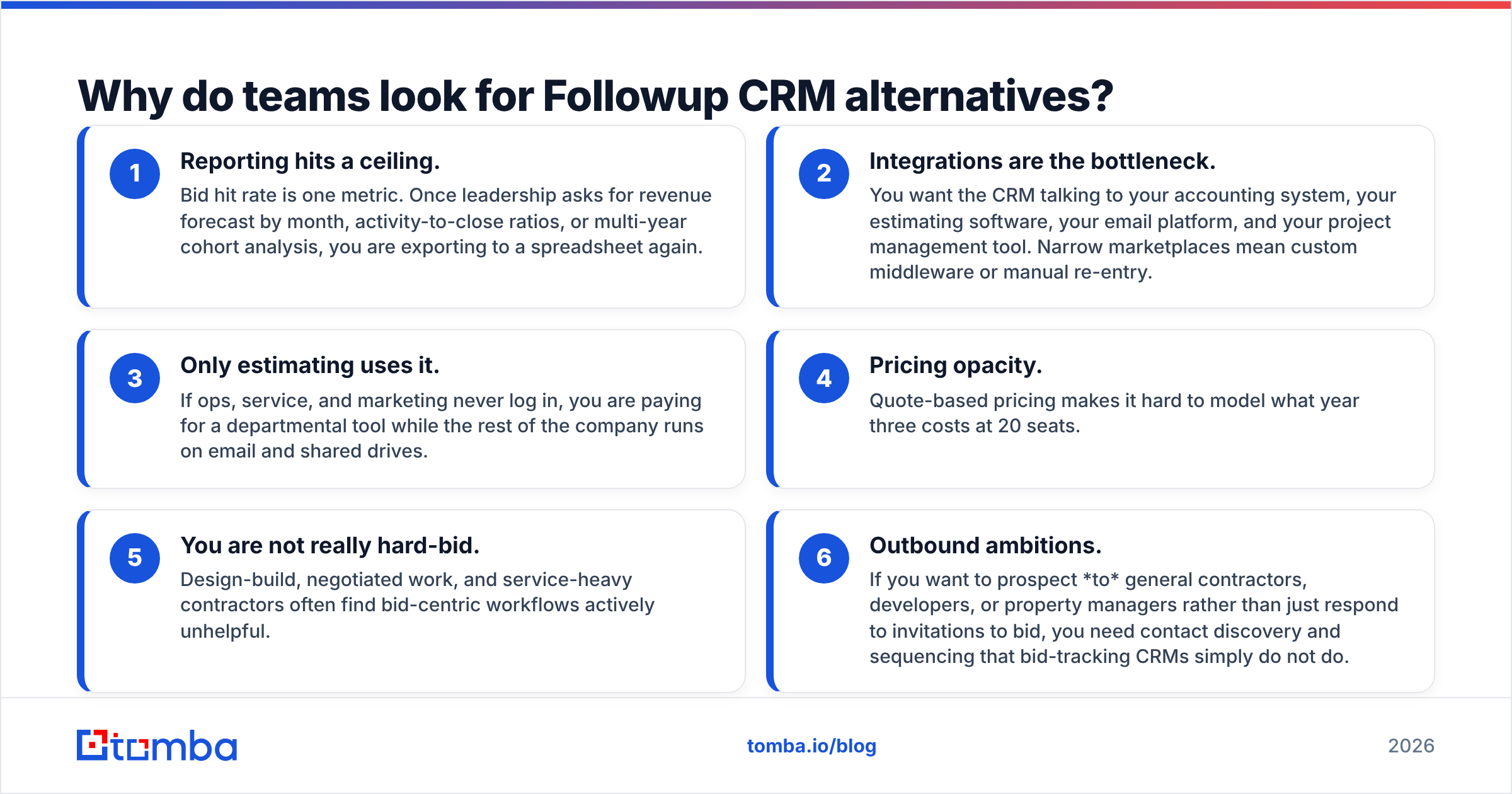
- Reporting hits a ceiling. Bid hit rate is one metric. Once leadership asks for revenue forecast by month, activity-to-close ratios, or multi-year cohort analysis, you are exporting to a spreadsheet again.
- Integrations are the bottleneck. You want the CRM talking to your accounting system, your estimating software, your email platform, and your project management tool. Narrow marketplaces mean custom middleware or manual re-entry.
- Only estimating uses it. If ops, service, and marketing never log in, you are paying for a departmental tool while the rest of the company runs on email and shared drives.
- Pricing opacity. Quote-based pricing makes it hard to model what year three costs at 20 seats.
- You are not really hard-bid. Design-build, negotiated work, and service-heavy contractors often find bid-centric workflows actively unhelpful.
- Outbound ambitions. If you want to prospect to general contractors, developers, or property managers rather than just respond to invitations to bid, you need contact discovery and sequencing that bid-tracking CRMs simply do not do.
What should you compare before you switch CRMs?#
Do not start with feature lists. Start with these six questions, in this order — they eliminate most of the market fast.
- Is your sales motion bid-driven or relationship-driven? Bid-driven favors construction-native tools. Relationship- and outbound-driven favors general sales CRMs with sequences and activity tracking.
- How many seats in 24 months, not today? Per-seat pricing at $15/user looks great at four users and hurts at forty. Flat-rate platforms invert that math.
- What must it integrate with? List your accounting, estimating, and email systems by name. Check each vendor's marketplace for those exact names before you demo anything.
- Who owns admin? Salesforce and HubSpot reward a dedicated admin. Pipedrive and monday CRM are survivable without one. Procore assumes you have implementation help.
- What does your contact data look like? Count the records in your current CRM with no email, no phone, or a bounced address. That number predicts your first-quarter results in the new system more than any feature does.
- What is the true exit cost? Data export format, historical activity retention, custom field mapping, and how many weeks of double entry you can tolerate.
What are the best Followup CRM alternatives in 2026?#
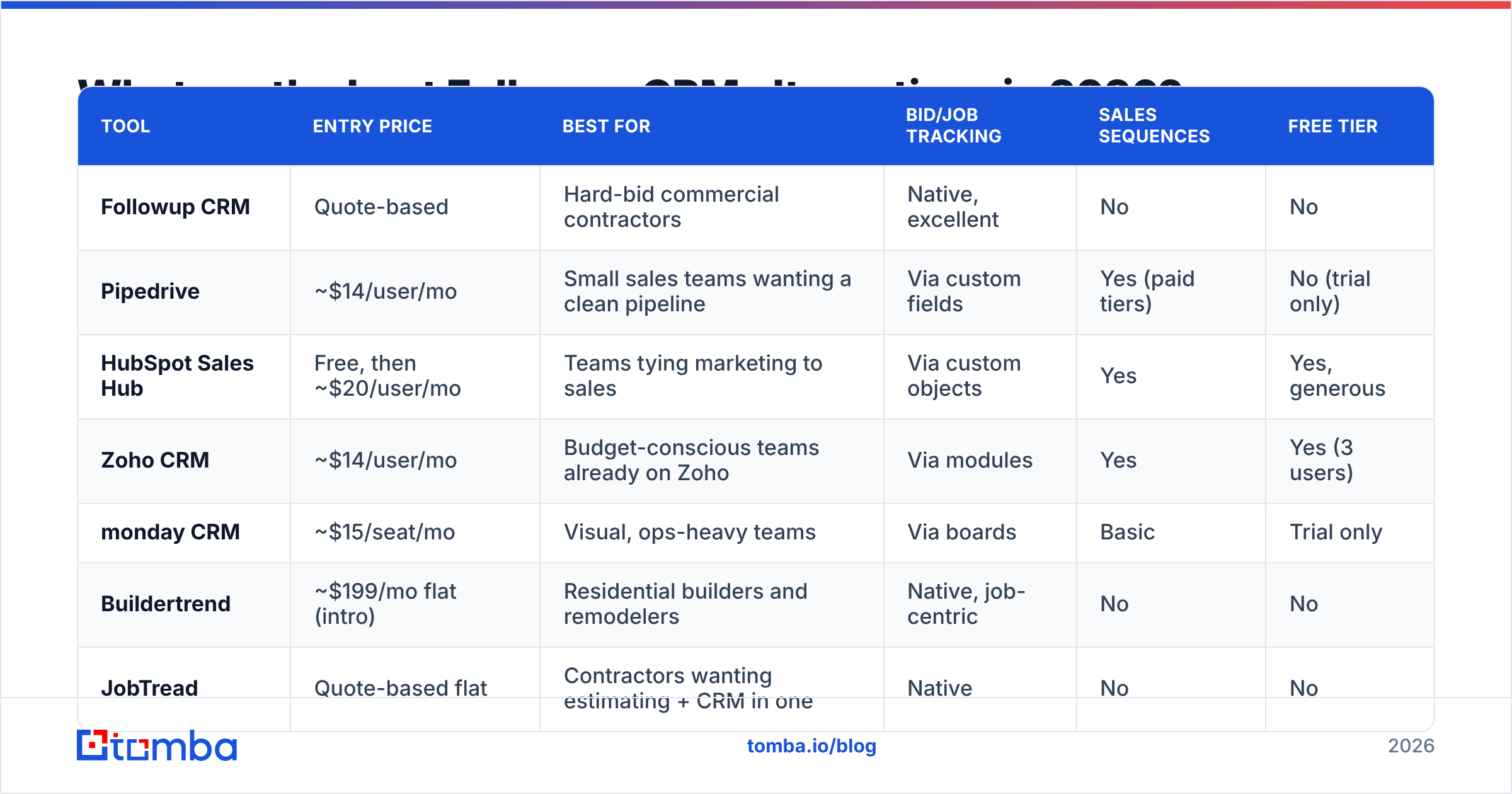
Here is the head-to-head. Pricing reflects publicly listed entry tiers at the time of writing and moves regularly — always confirm on the vendor's own pricing page before you budget.
| Tool | Entry price | Best for | Bid/job tracking | Sales sequences | Free tier |
|---|---|---|---|---|---|
| Followup CRM | Quote-based | Hard-bid commercial contractors | Native, excellent | No | No |
| Pipedrive | ~$14/user/mo | Small sales teams wanting a clean pipeline | Via custom fields | Yes (paid tiers) | No (trial only) |
| HubSpot Sales Hub | Free, then ~$20/user/mo | Teams tying marketing to sales | Via custom objects | Yes | Yes, generous |
| Zoho CRM | ~$14/user/mo | Budget-conscious teams already on Zoho | Via modules | Yes | Yes (3 users) |
| monday CRM | ~$15/seat/mo | Visual, ops-heavy teams | Via boards | Basic | Trial only |
| Buildertrend | ~$199/mo flat (intro) | Residential builders and remodelers | Native, job-centric | No | No |
| JobTread | Quote-based flat | Contractors wanting estimating + CRM in one | Native | No | No |
| Procore | Quote-based, enterprise | Large commercial GCs and subs | Native, project-first | No | No |
A few notes on the shortlist:
Pipedrive is the closest thing to a default answer for a contractor who wants a sales CRM rather than a construction platform. The pipeline UI is the best in the category, custom fields will happily model bid due dates and GC names, and the integration catalog is deep. You lose native construction reporting and rebuild it as filtered views. Worth it if outbound matters to you.
HubSpot Sales Hub wins on two things Followup CRM does not attempt: a real free tier that lets you migrate before you commit, and marketing–sales alignment in one database. Custom objects let you model bids properly on higher tiers. The trap is tier creep — the free CRM is genuinely free, but the features you will want six months in live on Professional. Check the HubSpot CRM tier chart carefully.
Zoho CRM is the value play. You get workflow automation, sequences, and reporting for roughly the same per-seat price as Pipedrive's entry tier, plus the rest of the Zoho suite if you want it. The interface is denser and the learning curve steeper.
monday CRM suits teams where the CRM has to double as an ops board. If your estimators, PMs, and admins already live in monday, adding CRM there beats a second login.
Buildertrend and JobTread are the residential and light-commercial answers. Both bundle CRM with estimating, scheduling, and client communication. If you are replacing three tools with one, the flat monthly rate stops looking expensive quickly.
Procore is the enterprise commercial answer. It is a project management platform with CRM attached, not the reverse. If you are a large sub or GC already running Procore for project delivery, extending it to preconstruction is a reasonable consolidation move. If you are eight people, it is overkill.
For neutral, buyer-written feedback across all of these, G2's CRM category is more useful than any vendor's case-study page.
Is a construction-specific CRM better than a general sales CRM?#
It depends entirely on where your revenue comes from, and the honest answer is that most contractors get this backwards.
If 95% of your pipeline arrives as an invitation to bid, a construction-specific CRM is correct. Your job is not lead generation; it is tracking, responding, and analyzing which invitations are worth chasing. Native bid tracking saves you months of configuration.
If you want to grow beyond your current GC relationships, a general sales CRM plus a prospecting layer wins. Bid-tracking tools have no concept of a sequence, no concept of a cold contact, and no way to help you find the preconstruction manager at a developer you have never worked with. That is a fundamentally different motion, and it needs different tooling.
Many mid-size contractors end up running both: a construction platform for job delivery and a lightweight sales CRM for business development. That is not a failure of tool selection — it is two genuinely different jobs.
How much does switching actually cost?#
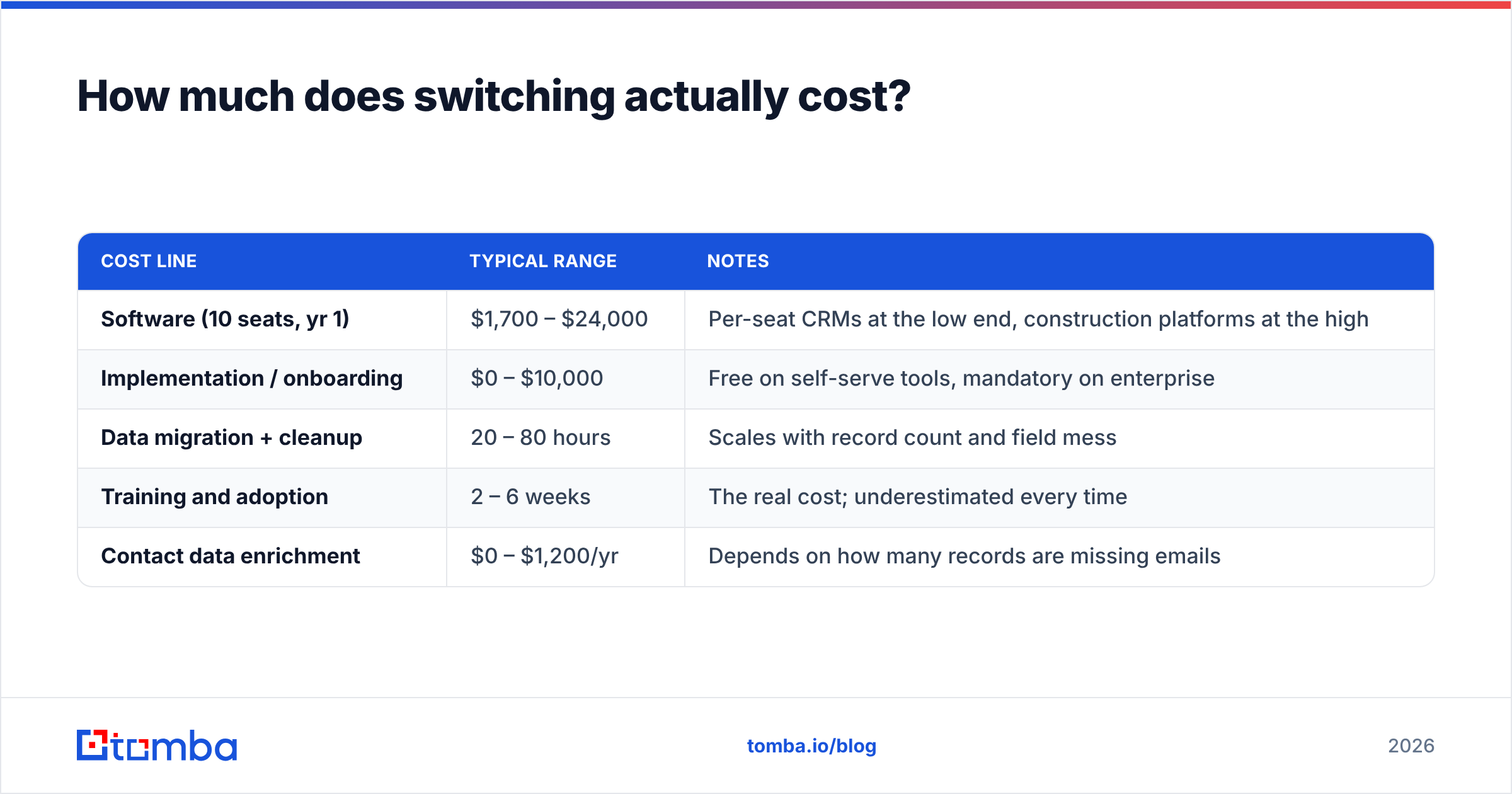
The license fee is the smallest line item. Budget for all five:
| Cost line | Typical range | Notes |
|---|---|---|
| Software (10 seats, yr 1) | $1,700 – $24,000 | Per-seat CRMs at the low end, construction platforms at the high |
| Implementation / onboarding | $0 – $10,000 | Free on self-serve tools, mandatory on enterprise |
| Data migration + cleanup | 20 – 80 hours | Scales with record count and field mess |
| Training and adoption | 2 – 6 weeks | The real cost; underestimated every time |
| Contact data enrichment | $0 – $1,200/yr | Depends on how many records are missing emails |
The one people skip is the last two rows. A CRM migration is the only time you will ever have full permission to touch every record you own. Use it.
What breaks when you migrate, and how do you avoid it?#
Three things break, reliably.
Custom fields do not map cleanly. Bid due date, GC contact, project value, and win/loss reason exist as first-class fields in a construction CRM and as custom fields everywhere else. Export a sample of 50 records first and map them by hand before you commit to a full migration. If the mapping is ugly at 50 records, it will be unusable at 5,000.
Historical activity gets orphaned. Emails, notes, and call logs often export as flat CSV with no relationship back to the deal. Ask each vendor, in writing, what the import supports. "We support CSV import" is not the same as "we support threaded activity history import."
Contact records arrive incomplete. This is the big one. Most CRMs that have been running for three years contain a majority of records with a company name, a person's name, and no reliable email address — or an address that stopped working when that estimator changed jobs. Import that as-is and your shiny new CRM is a shiny new list of dead ends.
The fix is mechanical. Before import, run your company list through a domain search to recover current contacts at each target company, then run every address — old and new — through an email verifier so you are not importing bounces. For larger lists, a bulk email finder handles thousands of rows in one pass rather than record by record.
Where does contact data fit into a CRM decision?#
Separate the two purchases in your head. A CRM stores and organizes what you know. It does not discover anything. Every CRM on the list above ships with an empty database and expects you to fill it.
That is why the strongest setups pair a mid-priced CRM with a dedicated data layer rather than paying enterprise prices for a CRM that bundles mediocre data. Tools like BookYourData offer prebuilt, filterable B2B lists when you want volume up front; providers like Tomba focus on finding and verifying specific people at specific companies when you already know who you are targeting. Both approaches are legitimate, and plenty of teams use one for list building and the other for precision.
For the precision side, the workflow is straightforward: identify the general contractors, developers, or facility managers you want in your pipeline, use an email finder to get the preconstruction or purchasing contact, enrich the record with title and company data via contact enrichment, and push it into your CRM. If you land on HubSpot, the HubSpot integration removes the CSV round trip entirely.
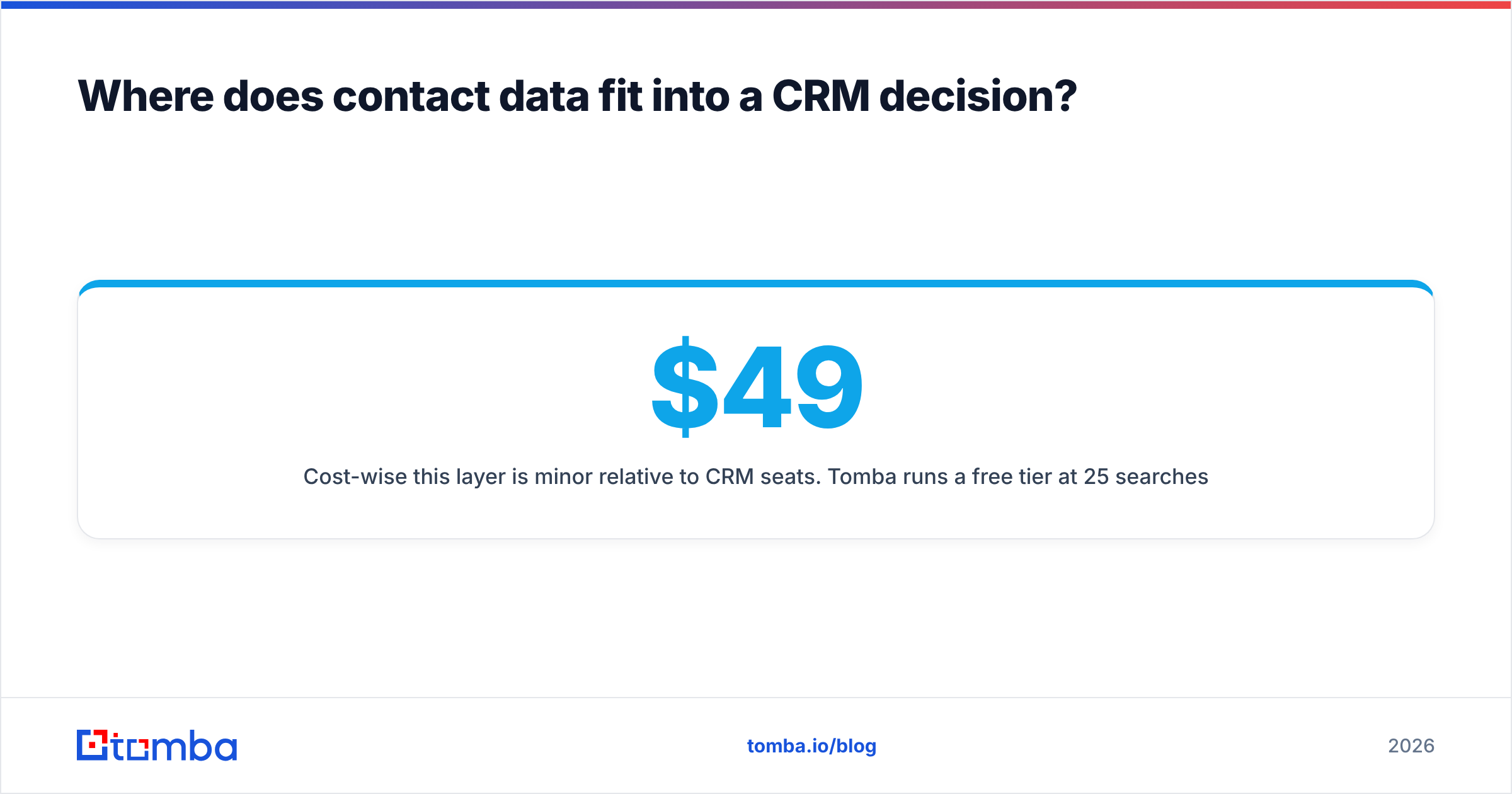
Cost-wise this layer is minor relative to CRM seats. Tomba runs a free tier at 25 searches per month, with Starter at $49/mo, Growth at $99/mo, and Pro at $249/mo — see Tomba pricing for the current breakdown. Compared to $200+/month per additional CRM seat, filling in the data those seats depend on is the cheaper half of the equation.
Frequently asked questions#
Is there a free Followup CRM alternative? Yes. HubSpot's free CRM tier and Zoho CRM's free plan (up to three users) both let you run a real pipeline at no cost. Neither offers native bid tracking, so you will configure custom fields.
What is the closest direct replacement for Followup CRM? For hard-bid commercial contractors, JobTread and Procore's preconstruction module are the nearest functional matches. For teams willing to configure, Pipedrive gets 80% of the way there at a fraction of the enterprise price.
Can I keep my bid history? Usually, in CSV form. Threaded email and note history is the piece that most often does not survive. Request a full export sample from your current vendor before signing anything new.
Should I migrate everything or start clean? Migrate open opportunities and active accounts. Archive the rest to cold storage. Importing five years of dead records into a new system just relocates the clutter.
Where to start#
Shortlist two tools, not six. Pick one construction-native platform and one general sales CRM, run both for two weeks with the same ten live opportunities, and let your estimators tell you which one they will actually update on a Friday afternoon. That test predicts adoption better than any feature matrix.
Whichever way it goes, do not import dirty data into a clean system. Run your account list through the Tomba Email Finder before migration day — recover the current decision-maker at every company on your list, verify each address so nothing bounces on your first send, and start your new CRM with records your team can actually act on. The free tier covers 25 searches a month if you want to test the accuracy on your own accounts before paying for anything.
Related guides#
Ready to find emails that actually work?
Join 150,000+ professionals who stopped guessing and started sending. Free credits on signup — no credit card required.
Get the Tomba newsletter
Practical outbound tactics and product updates — once every two weeks.
About the author