Follow-Up Email Format: Structure, Timing, and Examples
Most follow-ups fail on structure, not persistence. Here is the exact follow-up email format — subject line, opener, body, CTA — plus cadence timing and copy-paste examples that get replies in 2026.
TL;DR
- A follow-up email that works has four parts: a thread-consistent subject, a one-line context anchor, one new piece of value, and a single low-friction ask. Anything else is padding.
- "Just bumping this up" and "circling back" are the two highest-cost phrases in outbound — they signal you have nothing new to say and train the recipient to ignore the thread.
- The strongest cadence for cold sequences in 2026 is 4–6 touches over 18–24 days, with the second touch landing 2–3 days after the first, then widening.
- Follow-ups should be short: 40–90 words. Your first email earns attention; your follow-ups spend it.
- Keep follow-ups on the same thread for warm/inbound replies, and start a fresh thread with a new angle for cold sequences after touch three.
What is a follow-up email format?#
A follow-up email format is the repeatable structure you apply to every message after your first one — subject line handling, opening line, body, call to action, and signature — so each touch adds new information instead of repeating the last.
Most people treat follow-ups as reminders. That is the mistake. A reminder asks the recipient to do work they already declined to do. A well-formatted follow-up gives them a new reason to reply, which means the format has to carry new content, not just a new timestamp.
Here is the skeleton, in the order the reader's eye moves:
- Subject line — either
Re:the original thread, or a fresh subject that names the new angle. Never a subject that says "Following up." - Context anchor (1 line) — one clause that reminds them who you are and what the original ask was. No apology, no "I know you're busy."
- New value (1–3 lines) — a customer result, a benchmark, a relevant trigger event, a resource, or a reframed problem. This is the only part that changes materially between touches.
- Single CTA (1 line) — one question, answerable in under ten seconds. "Worth a look?" beats "Do you have 30 minutes Tuesday or Thursday?"
- Signature — trimmed. No banners, no six-line footer, no tracking-heavy image blocks on cold sends.
That is it. If your follow-up is longer than 90 words, one of those five parts has grown a tumor.

Why do most follow-up emails get ignored?#
Because they contain zero new information. The recipient already made a decision on your first email — usually "not now" or "not interesting" — and a message that repeats the same pitch asks them to re-litigate a decision they have already closed.
The four patterns that kill reply rates:
- The bump. "Just following up on my note below." You have added a line of text and a guilt trip. Nothing else.
- The apology opener. "Sorry to bother you again" tells the reader they were right to ignore you.
- The multi-ask. Three questions in one follow-up gets zero answers, because answering requires the reader to build a plan.
- The wall. A follow-up that is longer than the original email reads as desperation and gets archived on sight.
There is also a deliverability tax. Repeated low-engagement sends to the same address depress your sender reputation, and mailbox providers weigh recipient engagement heavily. A sequence where touches 3–6 get near-zero opens is actively teaching Gmail that your domain sends mail people do not want. Cutting a dead sequence short is a deliverability decision, not just a copy decision.
And a data problem sits underneath all of it: if 15% of your list is invalid, your follow-ups are bouncing into a spam-trap-shaped hole. Run the list through an email verifier before the sequence starts, not after touch four.
What does the ideal follow-up email structure look like?#
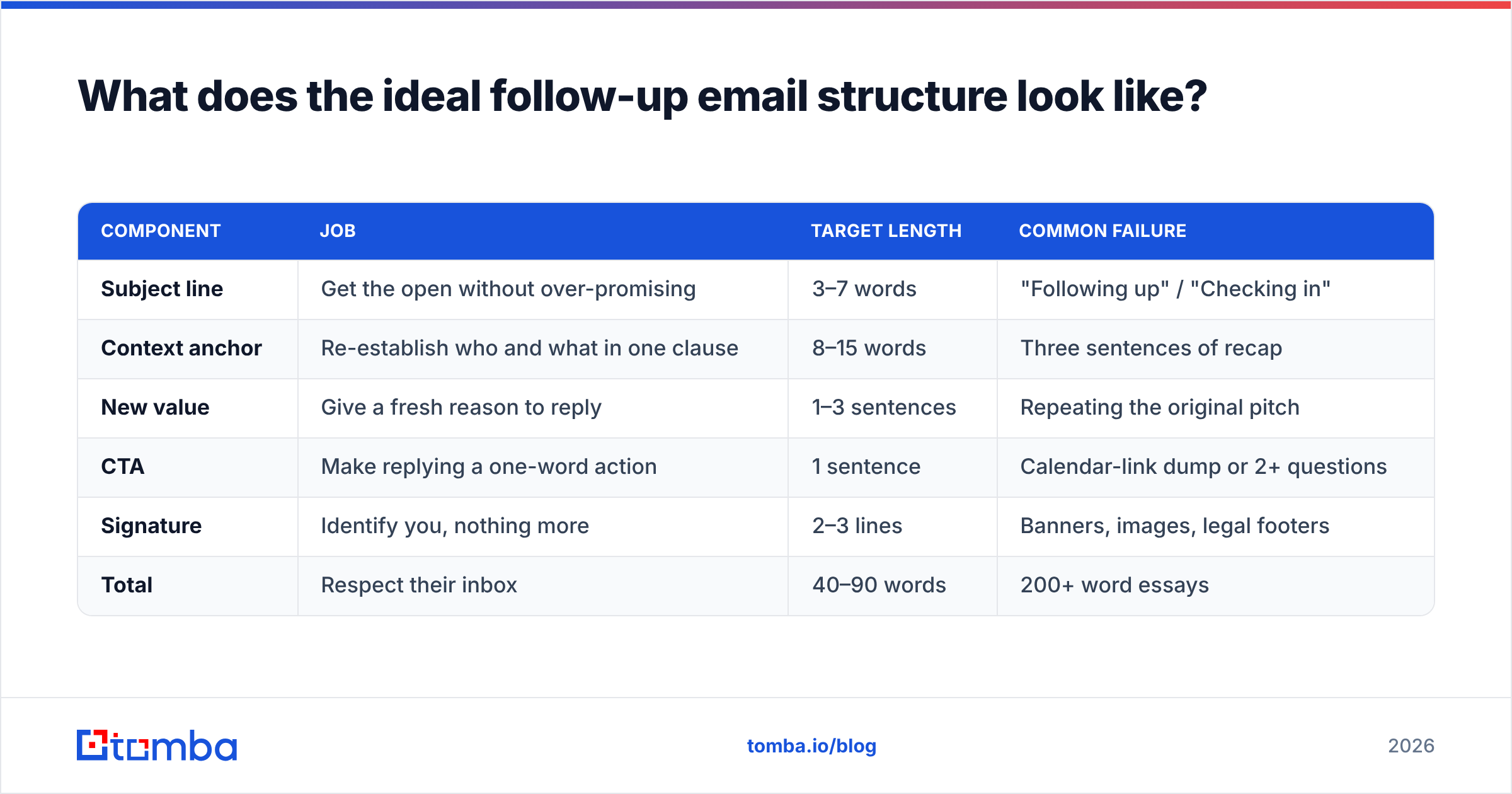
Below is the format broken into its components, with what each part must do and the most common failure mode.
| Component | Job | Target length | Common failure |
|---|---|---|---|
| Subject line | Get the open without over-promising | 3–7 words | "Following up" / "Checking in" |
| Context anchor | Re-establish who and what in one clause | 8–15 words | Three sentences of recap |
| New value | Give a fresh reason to reply | 1–3 sentences | Repeating the original pitch |
| CTA | Make replying a one-word action | 1 sentence | Calendar-link dump or 2+ questions |
| Signature | Identify you, nothing more | 2–3 lines | Banners, images, legal footers |
| Total | Respect their inbox | 40–90 words | 200+ word essays |
Two structural rules that matter more than any copy trick:
Rule one: one idea per touch. Touch two is the case study. Touch three is the objection pre-empt. Touch four is the resource. Touch five is the break-up. If you cram all four into touch two, you have nothing left and no reason to send again.
Rule two: escalate specificity, not volume. Touch one can be about the category. By touch four, you should be referencing something only true of their company — a hiring post, a product launch, a pricing page change, a new integration. Generic follow-ups get generic outcomes.
How long should you wait between follow-ups?#
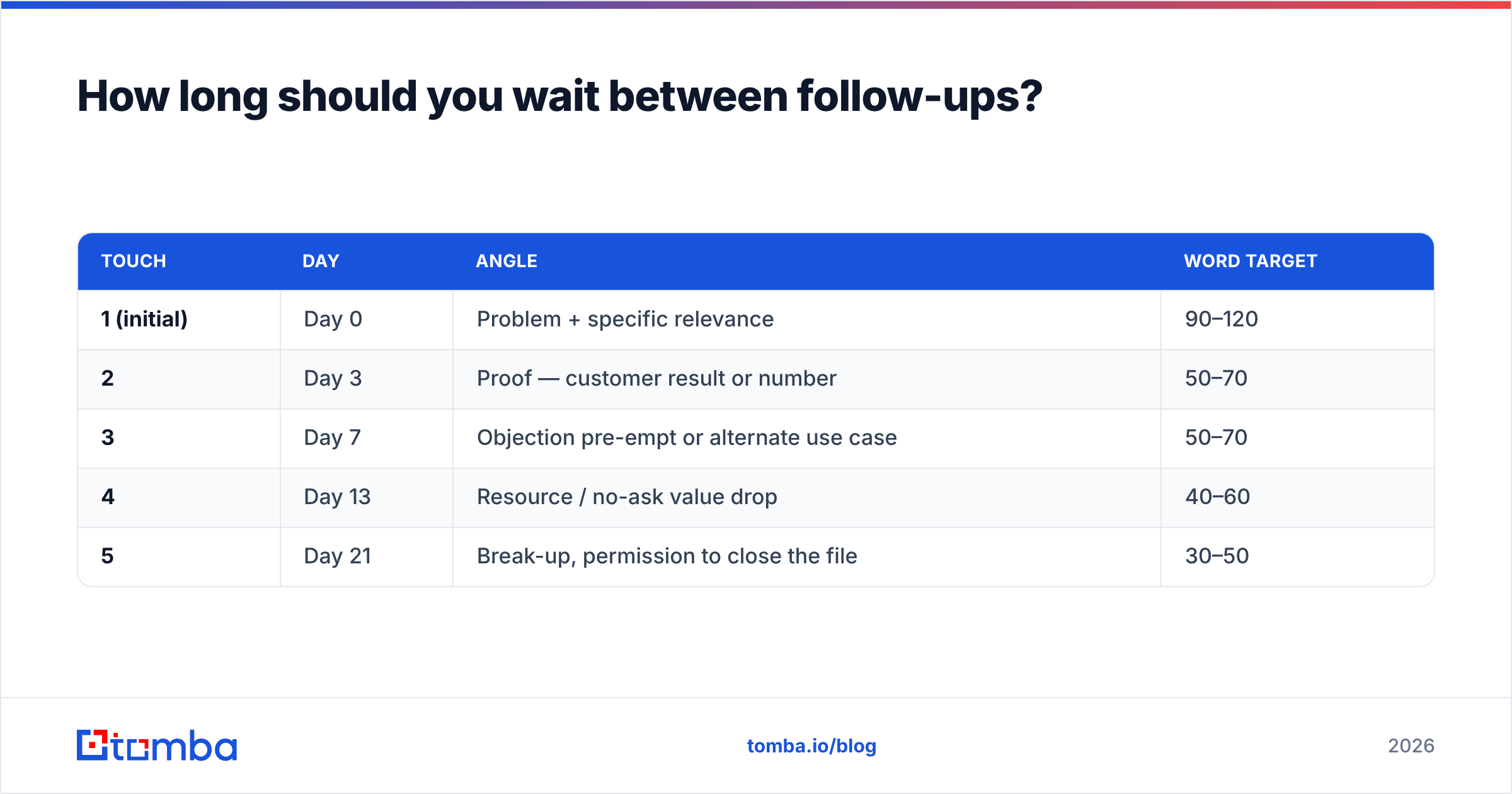
Start at 2–3 days, then widen the gaps. The compressed-then-widening cadence outperforms fixed intervals because early touches catch people who were genuinely busy, and later touches catch people whose priorities changed.
| Touch | Day | Angle | Word target |
|---|---|---|---|
| 1 (initial) | Day 0 | Problem + specific relevance | 90–120 |
| 2 | Day 3 | Proof — customer result or number | 50–70 |
| 3 | Day 7 | Objection pre-empt or alternate use case | 50–70 |
| 4 | Day 13 | Resource / no-ask value drop | 40–60 |
| 5 | Day 21 | Break-up, permission to close the file | 30–50 |
Adjust by context, not by superstition:
- Inbound / demo no-show: compress hard. Day 0, Day 1, Day 4, Day 10. Intent decays fast.
- Post-meeting follow-up: send within 24 hours, always same thread, always with the recap and next step written out.
- Enterprise / multi-stakeholder: widen. 4–5 days minimum between touches, and expect a 45–60 day cycle overall.
- After a "not now": stop the sequence and set a calendar reminder for the date they named. Continuing to sequence someone who gave you a real answer is how you lose the account permanently.
One more timing note: send-time optimization is over-hyped, but Tuesday–Thursday mornings in the recipient's timezone still outperform Monday and Friday for B2B. It is worth maybe 5–10% on open rate, not 5x. Do not spend a week testing it.
What are examples of follow-up email formats that work?#
Five templates mapped to the cadence above. Copy the structure, replace the specifics — the specifics are the whole point.
1. The proof follow-up (Day 3)
Subject: Re: [original subject]
Hi [Name] — following my note about [problem].
[Similar company] cut their [metric] by [number] in [timeframe] after fixing this. Their setup looked a lot like yours, right down to [specific detail].
Worth a 10-minute look?
[Your name]
2. The objection pre-empt (Day 7)
Subject: Re: [original subject]
Hi [Name] — most people in your seat tell me one of two things: "we already have a tool for this," or "it's not a priority this quarter."
If it's the first, the gap is usually [specific gap]. If it's the second, no problem — want me to check back in [month]?
[Your name]
3. The no-ask value drop (Day 13)
Subject: [Specific resource name] for [their company]
Hi [Name] — no ask here. We pulled together [benchmark / teardown / checklist] on [topic] and your team came to mind because of [trigger].
Link: [url]. Take it or ignore it, both fine.
[Your name]
4. The break-up (Day 21)
Subject: Closing the loop
Hi [Name] — I'll stop here so I'm not cluttering your inbox.
If [problem] moves up the list, reply with one word and I'll pick it back up. Otherwise, good luck with [specific initiative you know about].
[Your name]
5. The post-meeting recap (within 24 hours)
Subject: Re: [meeting title]
[Name] — thanks for the time. Quick recap:
- You're trying to [goal] by [date]
- Blocker is [blocker]
- Next step: I send [deliverable] by [day], you loop in [stakeholder]
Anything I got wrong?
[Your name]
That last one is the highest-leverage email in the whole list and the one most reps skip. A written recap with a named next step and a named stakeholder is how deals stay alive between calls.

Should you follow up in the same thread or start a new one?#
Same thread for warm contexts, new thread with a new angle for cold sequences after touch three.
Same-thread follow-ups (Re:) work when the recipient has already engaged — replied, opened repeatedly, attended a meeting, or downloaded something. The thread carries context, so your context anchor can be a single clause and the reader immediately knows the history.
New-thread follow-ups work better for cold outreach past touch three, for two reasons. First, a long unanswered thread visually signals "I've ignored this three times," which makes ignoring it a fourth time easier. Second, a fresh subject lets you lead with a genuinely different angle — which you should have anyway, per the one-idea-per-touch rule.
What not to do:
- Do not fake a reply by writing "Re:" on a thread that never existed. It is transparent and it damages trust before the conversation starts.
- Do not forward your own email with "^^" or "bumping this." It is the laziest possible signal.
- Do not switch threads and repeat the same pitch. A new thread with old content is worse than a bump, because now you have burned two subject lines.
What tooling do you need to run follow-ups at scale?#
You need three things: accurate contact data, a sequencing tool, and a way to measure per-touch reply rate rather than sequence-level reply rate.
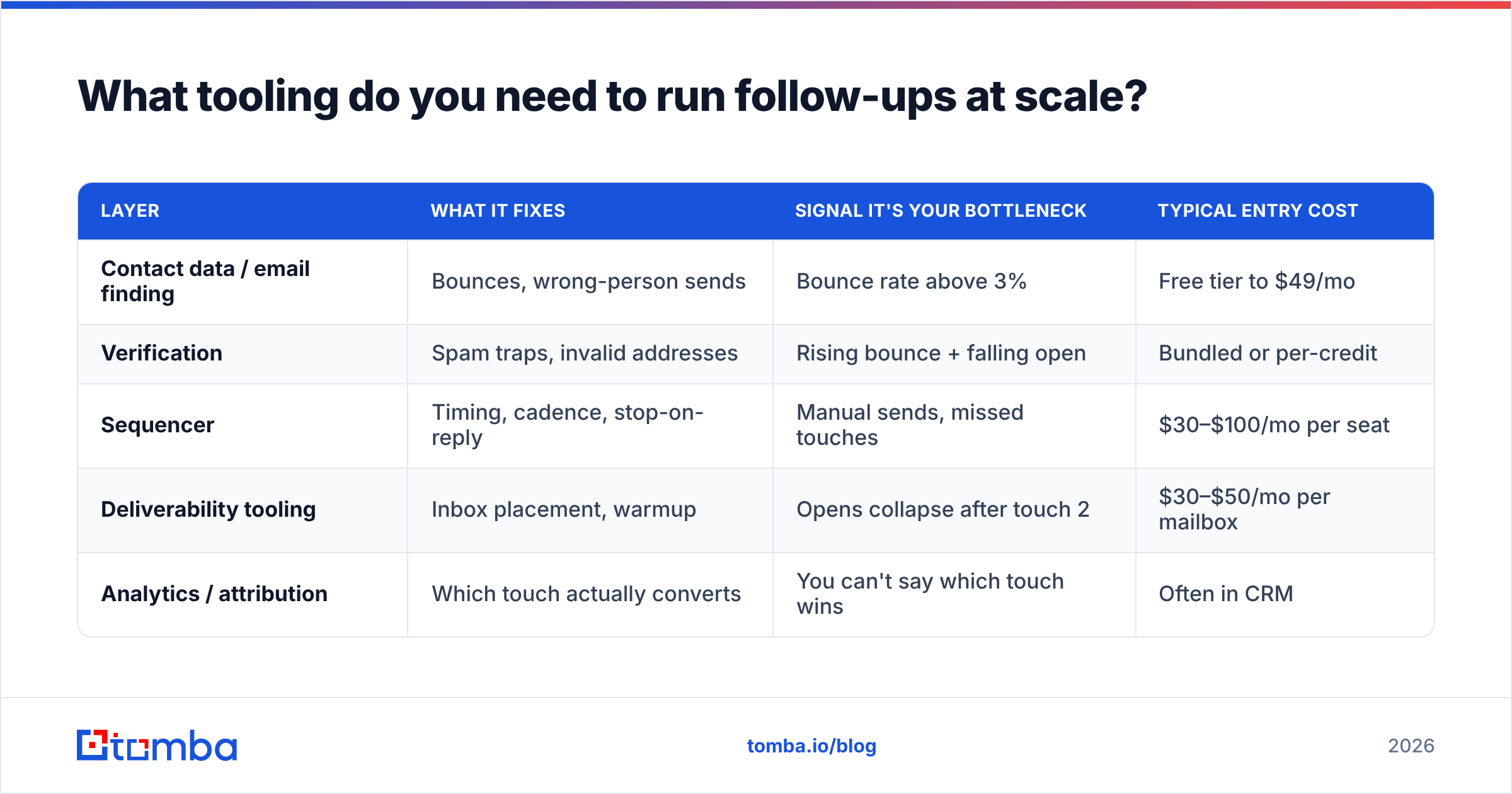
Here is how the common stack layers compare on what actually affects follow-up performance:
| Layer | What it fixes | Signal it's your bottleneck | Typical entry cost |
|---|---|---|---|
| Contact data / email finding | Bounces, wrong-person sends | Bounce rate above 3% | Free tier to $49/mo |
| Verification | Spam traps, invalid addresses | Rising bounce + falling open | Bundled or per-credit |
| Sequencer | Timing, cadence, stop-on-reply | Manual sends, missed touches | $30–$100/mo per seat |
| Deliverability tooling | Inbox placement, warmup | Opens collapse after touch 2 | $30–$50/mo per mailbox |
| Analytics / attribution | Which touch actually converts | You can't say which touch wins | Often in CRM |
Two vendor notes worth being honest about. If you need broad, ready-made B2B lists with firmographic filters, a database-first provider like BookYourData is a reasonable starting point — you are buying coverage and filters rather than per-domain precision. If you are working from a target account list and need verified addresses for specific named people, a finder-and-verifier approach fits better: you start from the domain and the name, then confirm the address before it enters the sequence. Both models are legitimate; they solve different halves of the problem.
For the finder path, domain search gets you every published address at a target company, and bulk email finder handles the list-level work when you are building a 500-account sequence. Feed those into your sequencer only after verification, so touch two is not landing on a dead mailbox.
On measurement: track reply rate per touch, not per sequence. If touch two pulls 4% and touches three through five pull 0.3% combined, your sequence is not "getting a 5% reply rate" — it is getting 4% from one email and burning your domain for the other three. Cut the dead touches and rewrite them, or shorten the sequence. Industry reply benchmarks published by review platforms like G2 and vendor research from HubSpot are useful directional context, but your own per-touch numbers are the only ones that should change your cadence.
What should you never put in a follow-up email?#
A short blocklist, ranked by how much damage each one does:
- "Just checking in" / "circling back" / "bumping this." Zero information. The reader's brain has learned to skip these phrases.
- Guilt framing. "I haven't heard back" and "did you get my last email?" put the reader on the defensive.
- Multiple CTAs. Pick one. A choice between two meeting times counts as one CTA; a choice between a meeting, a demo, and a resource does not.
- Fake urgency. "Prices go up Friday" on touch four, when they never opened touch one, is not urgency — it is noise.
- Attachments on cold sends. They hurt deliverability and rarely get opened. Link instead.
- Heavy tracking. Image-based open tracking on every touch is increasingly unreliable post-MPP and adds spam signal. Use it lightly or not at all.
- The unedited merge field.
Hi {{first_name}},is a sequence-ending mistake. Guard against it by verifying data quality before import — this is exactly the kind of failure a clean data enrichment step prevents.
How do you know your follow-up format is working?#
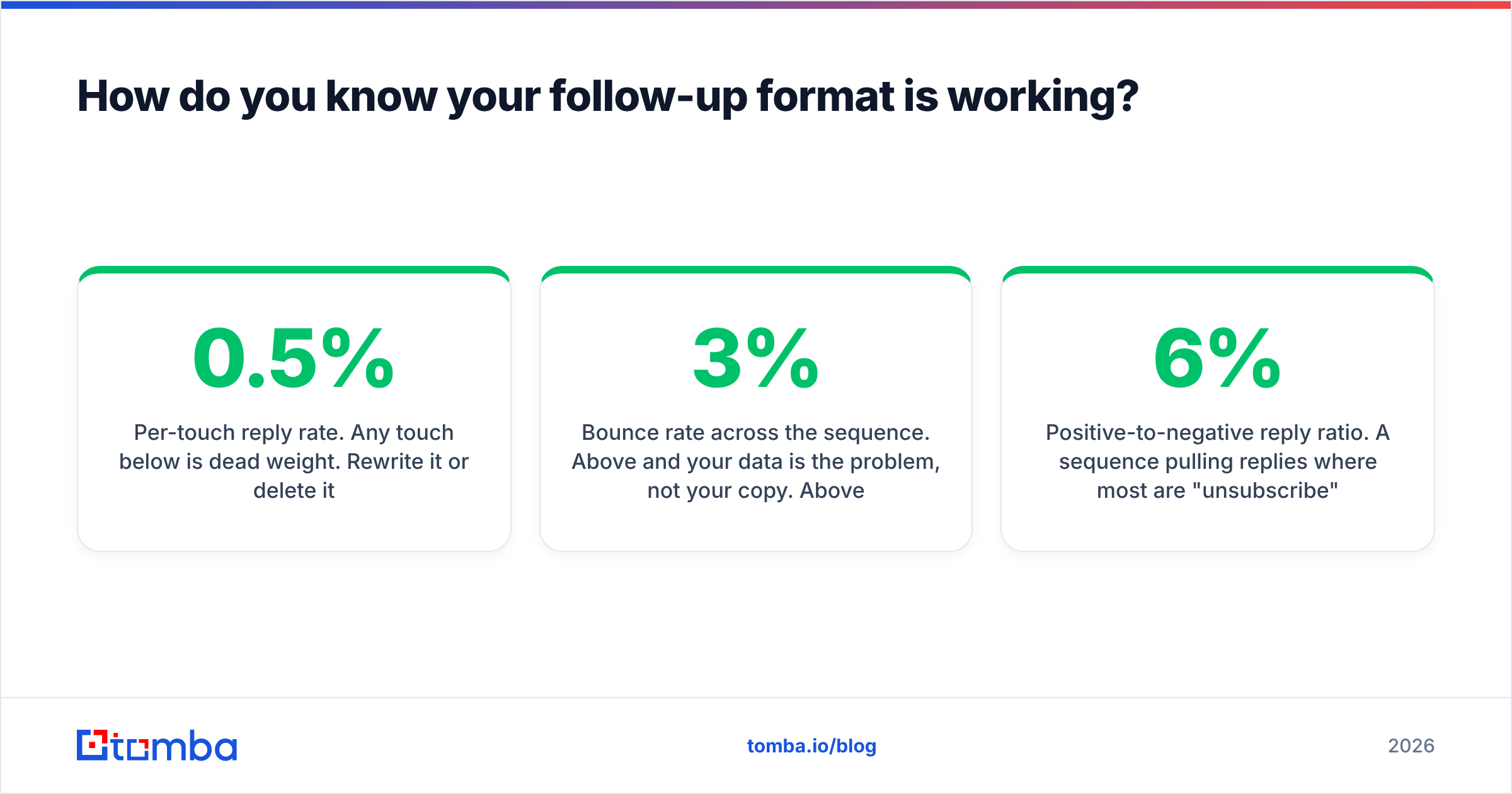
Three numbers, checked weekly:
- Per-touch reply rate. Any touch below 0.5% is dead weight. Rewrite it or delete it.
- Bounce rate across the sequence. Above 3% and your data is the problem, not your copy. Above 5% and you should pause the sequence entirely.
- Positive-to-negative reply ratio. A sequence pulling 6% replies where most are "unsubscribe" is worse than one pulling 2% all-positive.
If per-touch reply rate is fine but bounces are climbing, the fix is upstream of the copy. If bounces are clean and replies are flat, the fix is the format — usually the CTA, which is almost always asking for too much.
Getting the data right before you format anything#
The best-formatted follow-up in the world does nothing if it goes to jsmith@ at a company that uses john.smith@. Structure is the second problem; reaching a real person is the first.
If you are building sequences against a named account list, start with the Tomba Email Finder — give it a domain and a name, get back a verified professional address with a confidence score, then push it into your sequencer. The free tier covers 25 searches a month if you want to test the workflow on a handful of accounts first; paid plans start at $49/mo on Starter and scale to $99/mo on Growth. Full Tomba pricing is on the site. Clean data in, follow-ups that actually land.
Related guides#
Ready to find emails that actually work?
Join 150,000+ professionals who stopped guessing and started sending. Free credits on signup — no credit card required.
Get the Tomba newsletter
Practical outbound tactics and product updates — once every two weeks.
About the author