Forager vs Kaspr: Which B2B Contact Finder Wins in 2026?
Forager sells verified B2B emails at low cost. Kaspr sells LinkedIn mobile numbers. We compare accuracy, pricing, coverage, and workflow fit — plus where both fall short.
Forager vs Kaspr is a choice between two very different tools. Forager finds verified work emails in bulk. Kaspr pulls mobile numbers off LinkedIn. Here is how the two compare on accuracy, price, and coverage — and where each one leaves a gap.
TL;DR
- Forager is an email-first waterfall enrichment tool. You feed it names and domains. It runs several data sources and returns verified work emails, and you pay per valid result.
- Kaspr is a LinkedIn-first contact revealer. It is a Chrome extension that surfaces mobile numbers and emails while you browse profiles, Sales Navigator lists, and groups.
- They are not really the same product. If your channel is cold email at scale, Forager's model fits. If you cold call European prospects sourced from LinkedIn, Kaspr fits.
- Both have real gaps. Forager has thin phone coverage and no native LinkedIn workflow. Kaspr's email accuracy and non-EU coverage lag behind dedicated finders, and its credit system splits phone and email budgets.
- Want one API for email finding, verification, catch-all handling, and phone lookup? A general-purpose provider like Tomba is usually the cheaper way to consolidate.
Forager vs Kaspr: what each tool actually does#
Start with the honest framing: these two tools compete for the same budget line, not the same job.
Forager (forager.ai) positions itself as a contact data and waterfall enrichment layer. You give it a list — first name, last name, company domain. It queries a chain of underlying providers and keeps the first verified result. You are charged only for hits. That "pay for what lands" model is the pitch. It is built for two groups: RevOps teams enriching CRM records, and outbound teams filling CSVs before a sequence.
Kaspr (kaspr.io, acquired by Cognism in 2022) is the opposite shape. It lives in your browser. You open a LinkedIn profile, click the extension, and Kaspr returns phone numbers, mobile numbers, and email addresses for that person. It also pulls contacts in bulk from Sales Navigator searches and LinkedIn group member lists. Light sequencing and CRM sync are bolted on top.
So the real question is not "which tool is better." It is this: is your bottleneck finding verified emails at volume, or getting a mobile number for someone you already found on LinkedIn?

Forager vs Kaspr: how they compare head-to-head#
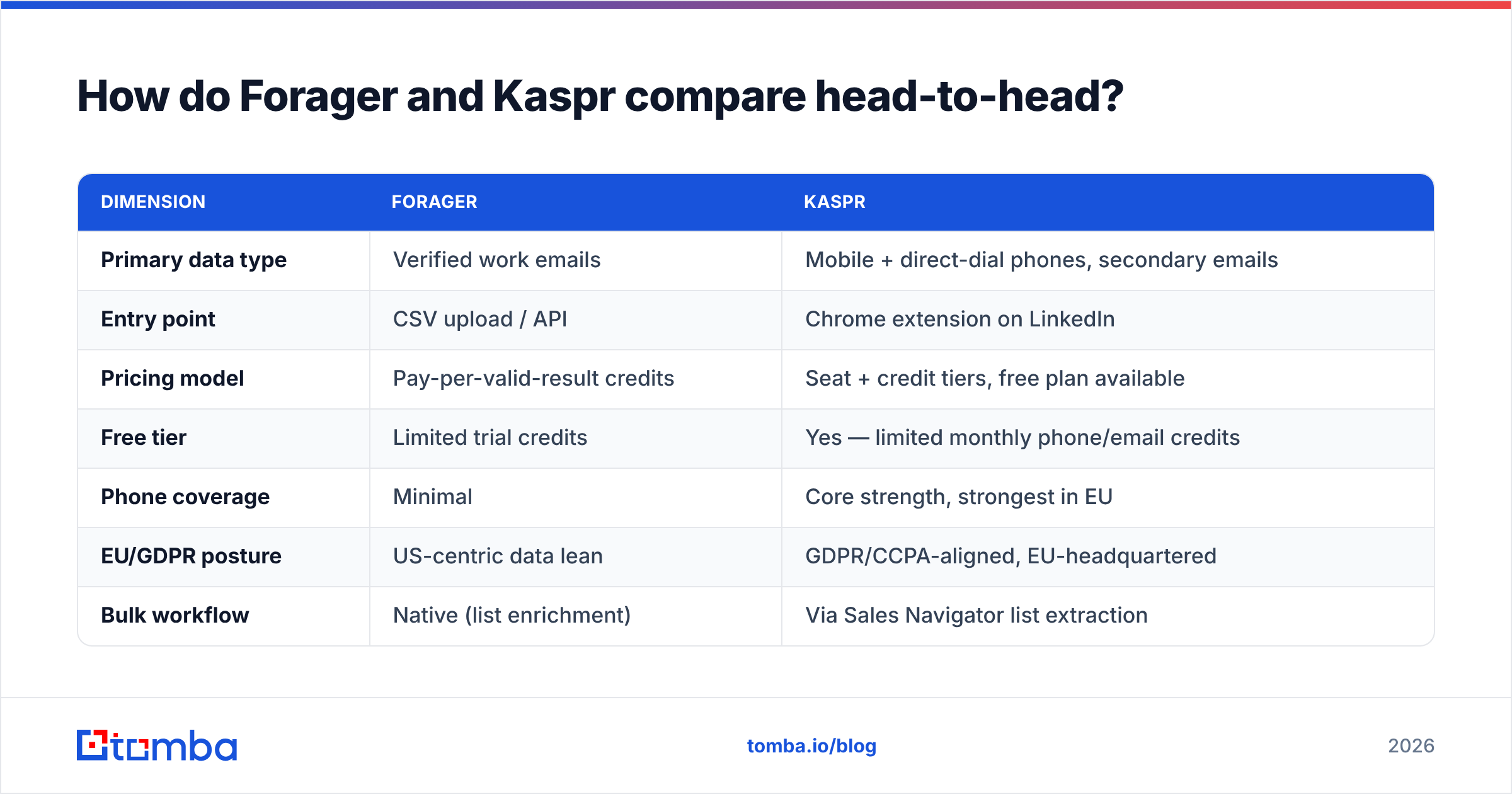
Here is the practical breakdown. Pricing moves, so treat these as directional and check both vendors before you sign.
| Dimension | Forager | Kaspr |
|---|---|---|
| Primary data type | Verified work emails | Mobile + direct-dial phones, secondary emails |
| Entry point | CSV upload / API | Chrome extension on LinkedIn |
| Pricing model | Pay-per-valid-result credits | Seat + credit tiers, free plan available |
| Free tier | Limited trial credits | Yes — limited monthly phone/email credits |
| Phone coverage | Minimal | Core strength, strongest in EU |
| EU/GDPR posture | US-centric data lean | GDPR/CCPA-aligned, EU-headquartered |
| Bulk workflow | Native (list enrichment) | Via Sales Navigator list extraction |
| API access | Yes | Yes, on higher tiers |
| Best for | Cold email at volume | Cold calling from LinkedIn |
| Weak spot | No LinkedIn-native flow, thin phone data | Email accuracy outside EU, credit fragmentation |
The table makes the split obvious. Forager is a batch tool. Kaspr is a browsing tool. Teams that buy both usually do so because neither covers the full contact record.
Which one is more accurate?#
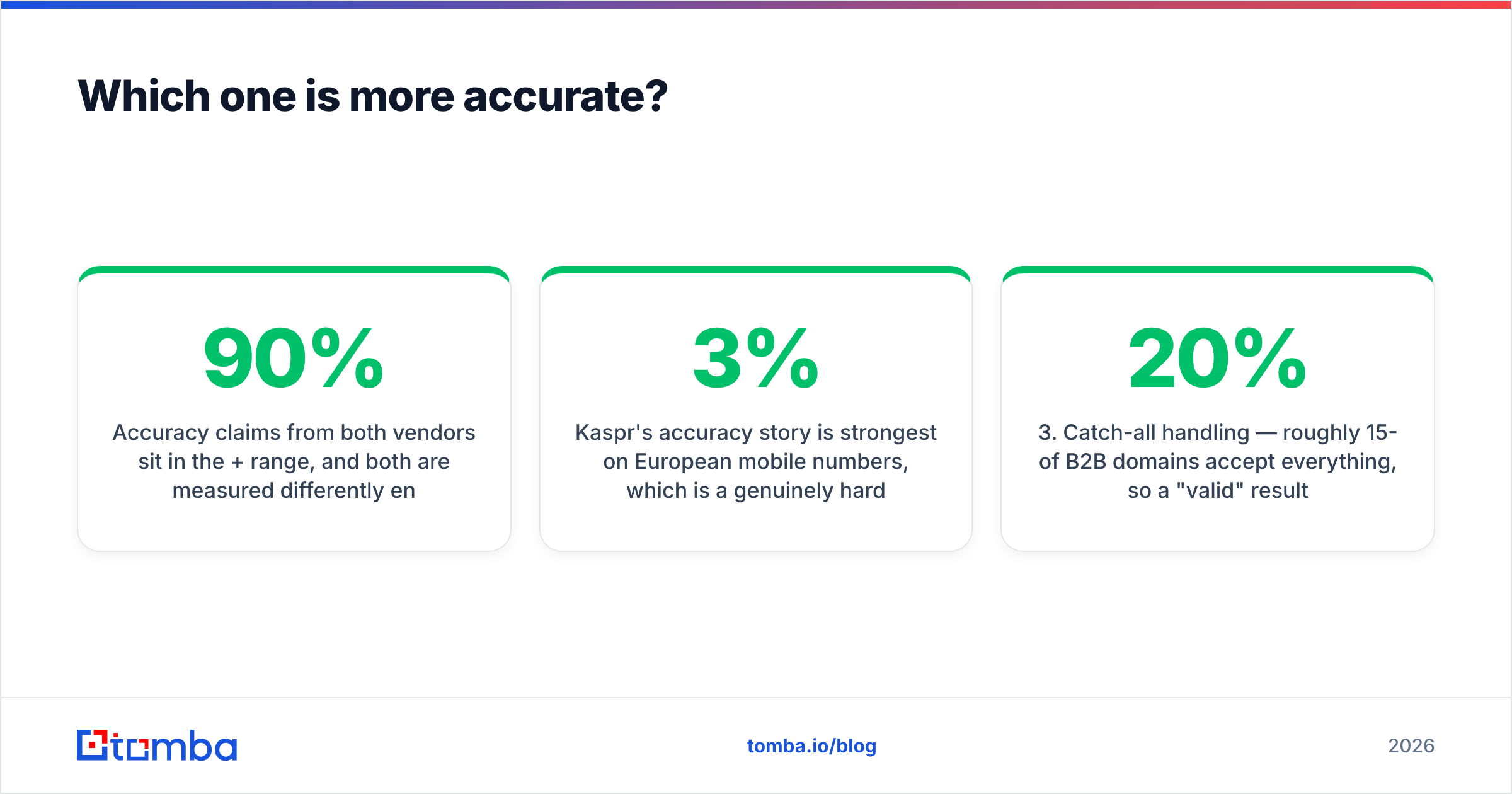
Both vendors claim accuracy above 90%. But each one measures it a different way, so the two numbers do not compare out of the box.
Forager's waterfall approach works well. Chaining providers lifts hit rate above any single source. And a miss costs you nothing but time, since you pay only for verified results. The catch: waterfall enrichment is only as fresh as its slowest source. Say a buyer changed jobs four months ago. If the underlying provider missed it, you get a confidently verified address at a company they left.
Kaspr is strongest on European mobile numbers. That data is hard to build, and it shows. The email side is weaker. In practice, teams run Kaspr emails through a dedicated email verifier before loading them into a sequence. Skip that step and bounce rates creep past 3% — the point where your sender reputation starts to suffer.
Three things actually drive accuracy here, and neither vendor controls all of them:
- Source freshness — how recently the record was observed, not how recently it was "verified."
- SMTP-level validation — whether the provider really pings the mail server, or just guesses a known company format.
- Catch-all handling — roughly 15-20% of B2B domains accept everything. A "valid" result on a catch-all domain tells you almost nothing without a dedicated catch-all verifier.
- Role-account filtering —
info@,sales@, andsupport@inflate hit-rate stats while producing near-zero replies.
Ask both vendors how they handle point three. The answer separates serious data providers from wrappers.
What does each one actually cost?#
Forager's pay-per-valid-result pricing looks clean on paper. It is harder to model than it looks. Your real cost per contact rides on list quality. Enrich a tidy list of mid-market SaaS companies and the rate looks great. Enrich a list of local service businesses and both hit rate and per-contact cost move against you.
Kaspr's pricing splits credits by type. Phone credits, email credits, and export credits are tracked separately on most tiers. So you can run out of the one you need while sitting on a pile of the ones you don't. Budget for the constraint, not the headline number.
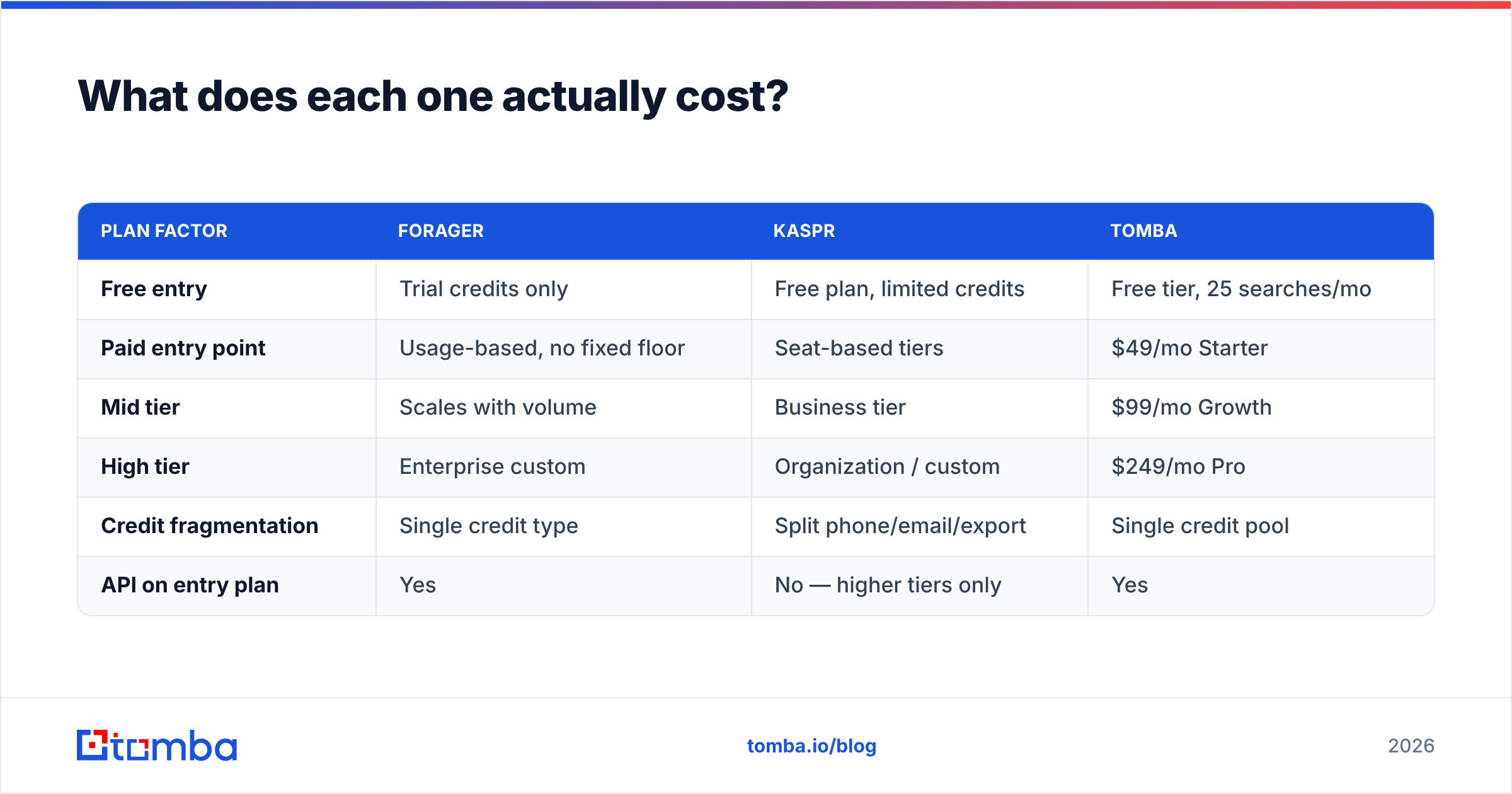
Here's how the cost structures compare against a general-purpose provider:
| Plan factor | Forager | Kaspr | Tomba |
|---|---|---|---|
| Free entry | Trial credits only | Free plan, limited credits | Free tier, 25 searches/mo |
| Paid entry point | Usage-based, no fixed floor | Seat-based tiers | $49/mo Starter |
| Mid tier | Scales with volume | Business tier | $99/mo Growth |
| High tier | Enterprise custom | Organization / custom | $249/mo Pro |
| Credit fragmentation | Single credit type | Split phone/email/export | Single credit pool |
| API on entry plan | Yes | No — higher tiers only | Yes |
The pattern worth noticing: fragmented credits and seat minimums are where "affordable" tools stop being affordable. A three-rep team on Kaspr pays for three seats, even if only one rep prospects daily. Want the same comparison with a single credit pool and API access from the entry tier? Check the full Tomba pricing page.
Is Kaspr better than Forager for cold calling?#
Yes — and it is not close. If your motion is dial-first, Kaspr's LinkedIn workflow is the reason to buy it.
The advantage is the browsing loop. A rep working a Sales Navigator list can reveal a number, add it to a sequence, and push it to CRM without leaving the tab. That saves real minutes per prospect. And minutes per prospect is the whole economics of an SDR team. Forager has no equivalent. You export a list, enrich it, re-import it, and lose the context that made you pick that prospect.
Where Kaspr's advantage narrows: coverage outside Western Europe. US mobile coverage is respectable but not category-leading. APAC coverage thins out fast. Is your ICP US-based and phone-led? Run a coverage test on 100 real target accounts before you commit. Or pair Kaspr with a dedicated phone finder that covers the gaps. Then check what you get with a phone validator, so reps don't burn dials on dead lines.
Is Forager better than Kaspr for cold email?#
For volume email work, Forager is the stronger of the two. One caveat applies, and it applies to every waterfall tool.
Waterfall enrichment optimizes for hit rate, not for deliverability. Those are different goals. A tool that returns an address for 92% of your list has done its job by its own definition — even if 6% of those addresses bounce. Your inbox provider does not care about the vendor's definition. Google and Microsoft both tightened their bulk-sender rules. Their guidance — see Google's sender guidelines — puts the bounce and spam-complaint burden on you.
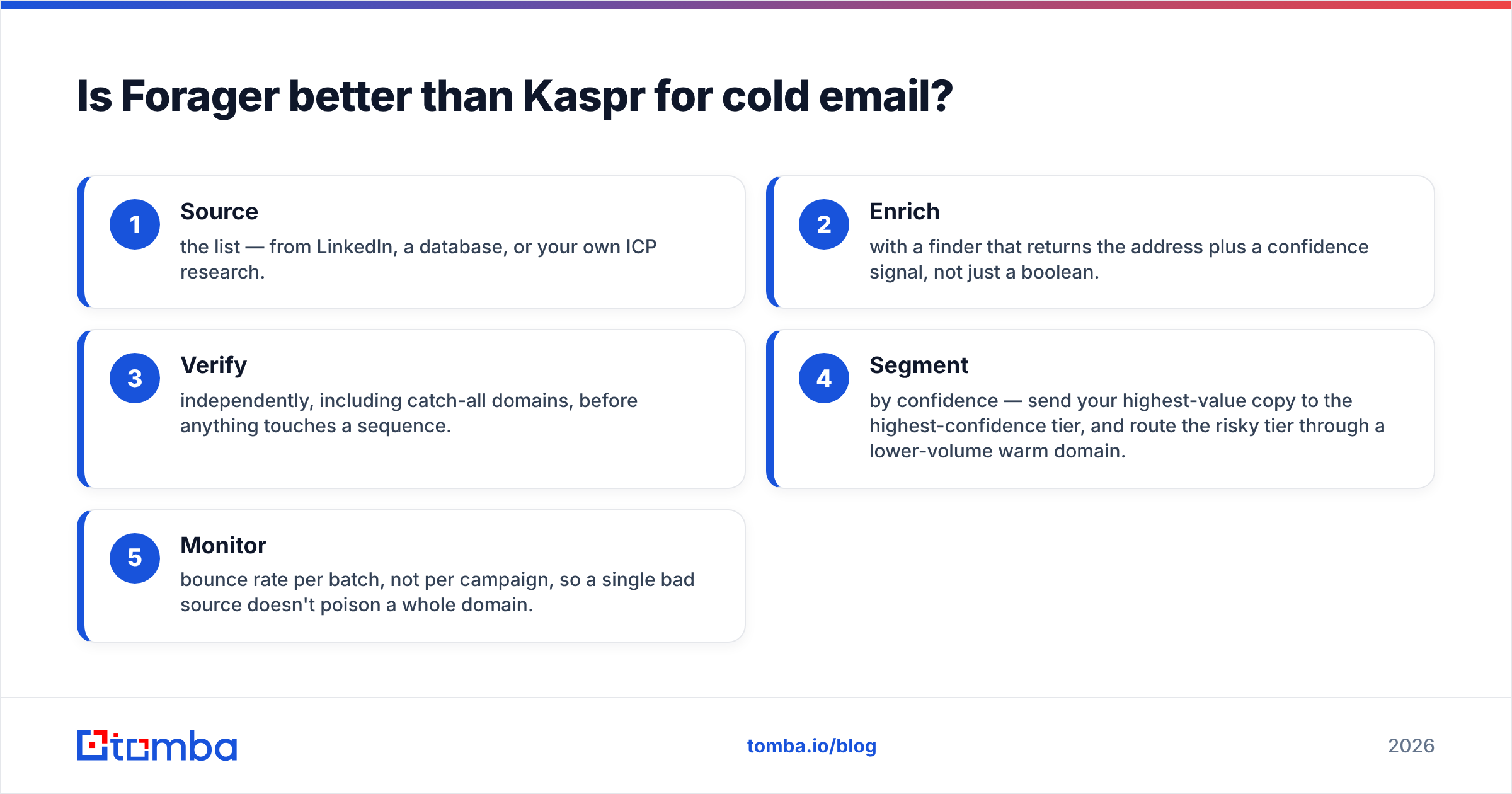
So the workflow that actually works looks like this:
- Source the list — from LinkedIn, a database, or your own ICP research.
- Enrich with a finder that returns the address plus a confidence signal, not just a boolean.
- Verify independently, catch-all domains included, before anything touches a sequence.
- Segment by confidence. Send your best copy to the top tier, and route the risky tier through a lower-volume warm domain.
- Monitor bounce rate per batch, not per campaign. One bad source should not poison a whole domain.
Neither Forager nor Kaspr covers all five steps well. Forager handles 2, partly handles 3, and ignores 4 and 5. Kaspr handles 1 and part of 2. That gap is why most teams end up with a third tool in the stack.
Where do both tools fall short?#
Three shared weaknesses show up again and again in user reviews on G2 and Capterra:
Credit waste on failed lookups. Even pay-per-valid models leak. Forager charges for verified results that turn out to be role accounts or departed employees. Kaspr burns credits on reveals that return a company switchboard instead of a direct line.
No unified contact record. Neither tool gives you email, phone, LinkedIn URL, and firmographics in one call. You get a slice. Stitching slices together across two vendors means two API contracts, two credit systems, and two rate limits. Plus a dedupe problem you own.
Workflow lock-in to one sourcing motion. Kaspr assumes you found the prospect on LinkedIn. Forager assumes you already have a name and domain. Neither helps when your input is a company website, a conference attendee list, or an article byline.
That last one matters more than it sounds. Real prospecting inputs are messy. A domain search returns every discoverable contact at a company. An author finder turns a byline into a real inbox. Both cover entry points these two tools simply don't have.
Should you use Forager, Kaspr, or something else?#
The Forager vs Kaspr decision comes down to your channel. In plain terms:
- Pick Kaspr if your reps live in LinkedIn, your ICP is European, and phone is your main channel. The in-browser workflow is worth the seat cost.
- Pick Forager if you enrich lists in batches, your channel is email, and you want usage-based pricing without seat minimums.
- Pick neither alone if you need both data types, run a mixed-geography ICP, or want enrichment inside your own product via API.
For that third case, consolidation usually wins on cost and on engineering time. One vendor means one email finder API contract, one credit pool, one rate limit, and one place to debug when the data looks wrong. It also lets you run bulk verify on the same records you just enriched, instead of exporting to a third tool and reconciling IDs later.
One more note for broad comparisons. Do you need a large pre-built contact database rather than on-demand lookup? Then tools like BookYourData sit in a different niche. Buying a list and resolving contacts one at a time are separate purchases, with separate risk profiles.
What should you test before you buy either one?#
Run the same 100-contact test on both. Not a vendor-supplied sample — your actual target accounts, awkward ones included.
Measure four things: hit rate, bounce rate after a real send, phone connect rate, and cost per usable contact (not per credit). Vendors optimize for the first metric. Your pipeline depends on the fourth.
Also test the failure modes. Feed each tool a list with 10 known-departed employees and 10 catch-all domains. A good provider flags both. A weak one returns confident, verified, wrong answers. That is worse than returning nothing, because you will act on it.
Finally, check the export. Can you get the raw data out, with confidence scores intact, in a format your CRM accepts? If that needs a middleware step, note it. Tools that make export painful are making a retention bet, not a product bet.
Ready to consolidate instead of stitching two vendors together? The Tomba Email Finder turns names and domains into verified work emails. You get confidence scoring, catch-all detection, and a single credit pool. That pool also covers verification, domain search, and phone lookup. Start on the free tier — 25 searches a month, no card — and run your own 100-contact test against whatever you use today. If the numbers hold up, the $49/mo Starter plan includes full API access from day one.
Related guides#
Ready to find emails that actually work?
Join 150,000+ professionals who stopped guessing and started sending. Free credits on signup — no credit card required.
Get the Tomba newsletter
Practical outbound tactics and product updates — once every two weeks.
About the author