Forager vs SignalHire (2026): Which Email Finder Wins?
Forager and SignalHire both promise verified B2B contacts, but they solve different problems. Here's the honest breakdown on accuracy, pricing, credit rollover, and which one fits your outbound motion in 2026.
Forager vs SignalHire comes down to one question: do you want clean work emails, or every possible way to reach a person? Forager is built for the first job. SignalHire is built for the second. This guide scores both on accuracy, credit burn, and real cost per usable contact.
TL;DR
- Forager is a lean, email-first finder. It returns verified work emails on a simple credit model. It is cheap to start and easy to hand to an SDR. Phone data, enrichment, and API tooling are thin.
- SignalHire is a contact database. You get email, direct dials, and a Chrome extension that works on LinkedIn. The feature set leans recruiting.
- Sending cold email at volume? Forager's per-email math usually wins. Need phone and email on one record? SignalHire covers more, but you pay for it.
- Both are weak on catch-all domains and API-first workflows. Those two gaps quietly wreck list quality at scale.
- Cheapest honest path: pick one for browsing, then run every list through a real verifier before it touches your sending domain.
What are Forager and SignalHire, actually?#
Forager is an email finder. Give it a name and a company, or just a domain. It returns a work email with a confidence signal. The product stays narrow on purpose: find the email, verify it, get out of the way. There is a web app, a bulk upload path, and browser lookup. Pricing runs on credits. A credit burns on a successful find, not on every guess. That detail matters more than most buyers expect.
SignalHire is a contact database with a search layer on top. It indexes people and returns work emails, personal emails, and phone numbers. A Chrome extension shows contact details while you browse LinkedIn or a company site. The tool has always had one foot in recruiting: candidate pipelines, ATS-style tracking, bulk profile reveals. That history shapes the data. Person-level coverage is strong. Company-level detail is patchy.
One line sums up the split: Forager answers "what is this person's work email?" SignalHire answers "how do I reach this person at all?"
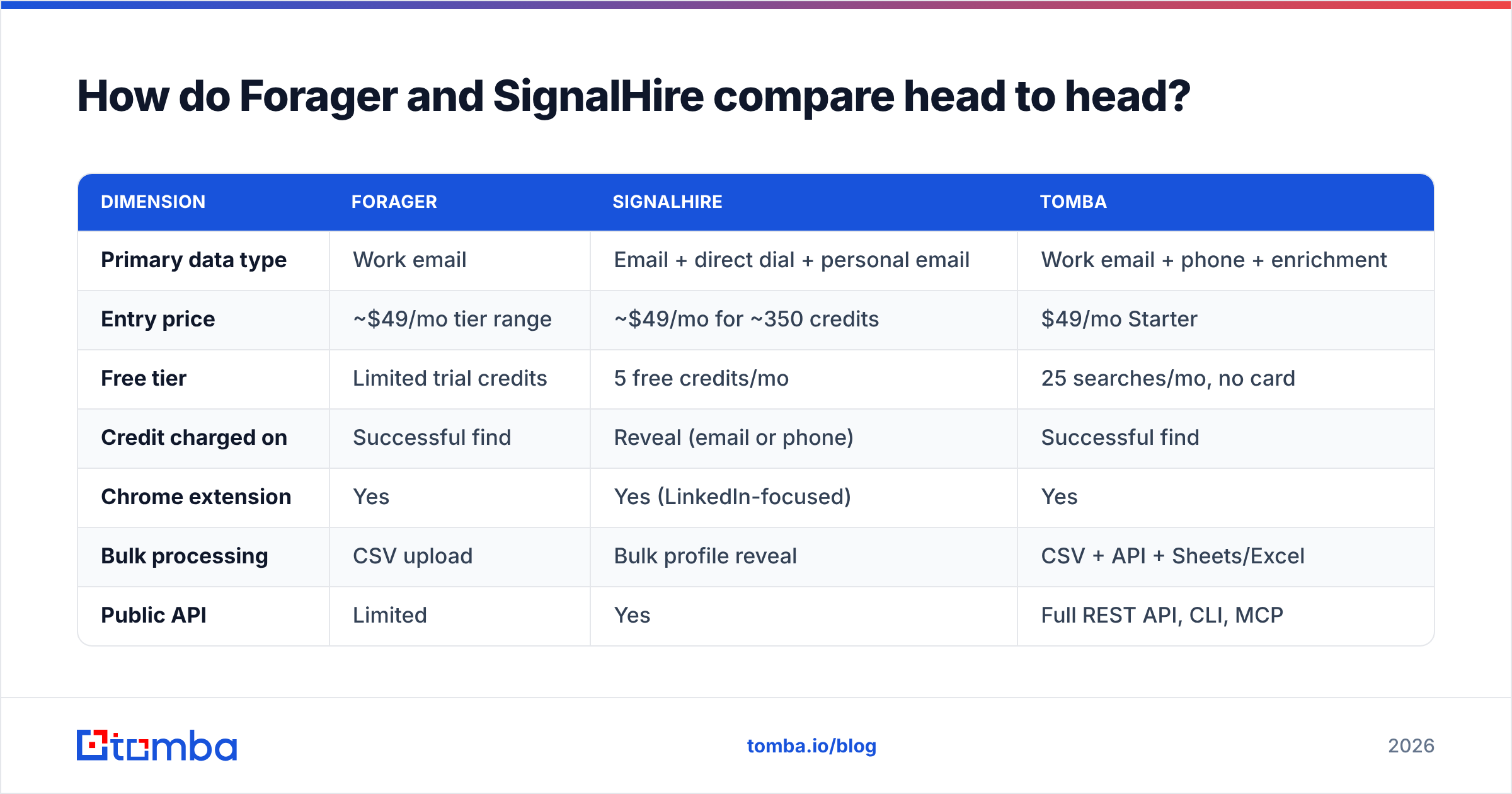
Forager vs SignalHire: how do they compare head to head?#
| Dimension | Forager | SignalHire | Tomba |
|---|---|---|---|
| Primary data type | Work email | Email + direct dial + personal email | Work email + phone + enrichment |
| Entry price | ~$49/mo tier range | ~$49/mo for ~350 credits | $49/mo Starter |
| Free tier | Limited trial credits | 5 free credits/mo | 25 searches/mo, no card |
| Credit charged on | Successful find | Reveal (email or phone) | Successful find |
| Chrome extension | Yes | Yes (LinkedIn-focused) | Yes |
| Bulk processing | CSV upload | Bulk profile reveal | CSV + API + Sheets/Excel |
| Public API | Limited | Yes | Full REST API, CLI, MCP |
| Catch-all handling | Basic | Basic | Dedicated catch-all verifier |
| Native CRM sync | Via Zapier | HubSpot, Salesforce, Zapier | HubSpot, Salesforce, Pipedrive, Make |
| Best-fit user | Cold-email SDR teams | Recruiters, multi-channel AEs | RevOps and API-driven teams |
Two things stand out. First, the sticker prices sit closer together than the marketing implies. The real variable is what triggers a credit burn. Second, SignalHire's phone coverage is a true edge. You still pay a credit whether or not the number connects.

Which one is more accurate?#
Accuracy here is three separate questions. Vendors love to merge them into one number.
- Hit rate — of the contacts you searched, how many returned any address? Forager does well on SMB and mid-market domains with clear patterns. It slips on enterprise domains with odd formats. SignalHire pulls from profile data, so it often returns something when a pattern finder returns nothing.
- Validity — of the addresses returned, how many accept mail? Forager's narrow focus pays off here, with more attention on SMTP-level checks. SignalHire returns more addresses. Some are old or personal, which drags the average down.
- Freshness — how old is the record? Contact databases decay 25–30% a year as people change jobs. That figure is cited across B2B data research, including Gartner's data quality coverage. A tool that checks live beats one that serves a cached record from 2023.

The honest read: SignalHire finds more contacts. Forager returns fewer bad ones. Neither one wins on accuracy in the abstract. If your ICP is 200-seat SaaS in North America, both land in the 80s on hit rate. If you sell to European enterprise or catch-all domains, both will let you down. Add a real email verifier as a second pass.

What does each one actually cost per usable contact?#
Cost per credit is a vanity metric. Cost per usable, deliverable contact is the number your CFO should see. Here is how to work it out.
- Start with plan cost ÷ credits. That is your nominal cost per credit.
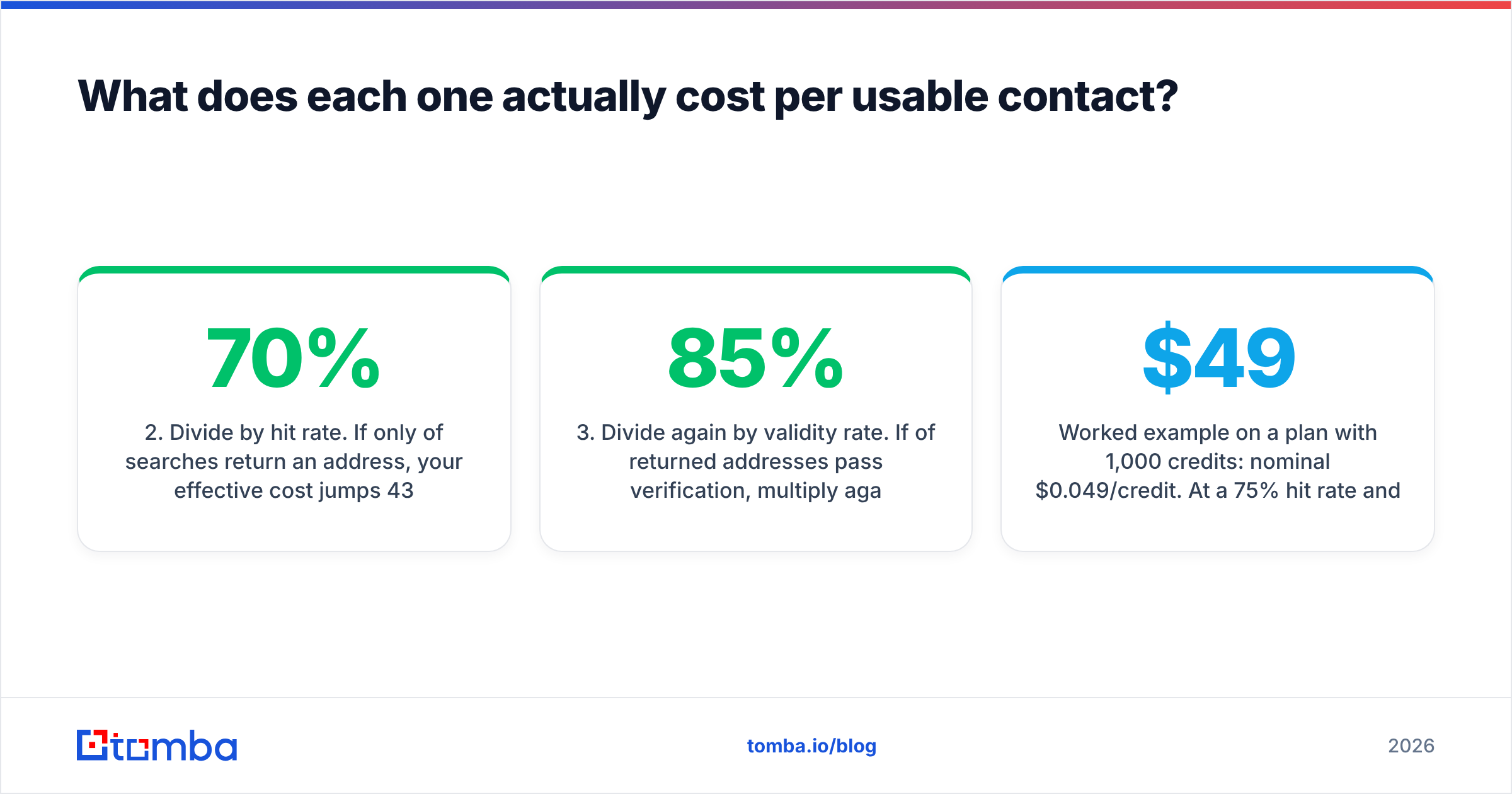
- Divide by hit rate. If only 70% of searches return an address, your real cost jumps 43%.
- Divide again by validity rate. If 85% of returned addresses pass verification, divide once more.
- Add the verification cost. A second-pass verifier is real spend per record.
- Count free credits as zero. Trial credits flatter month one and vanish in month two.
Worked example: a $49 plan with 1,000 credits. Nominal cost is $0.049 per credit. At a 75% hit rate and 88% validity, the true cost is about $0.074 per usable contact. That is a 51% premium over the sticker. Run the same math on your own domain list, not their demo list. The winner usually flips at least once.
SignalHire's phone reveals muddy this further. A dead line still burns a credit. If your reps are not calling, switching phone reveals off is the biggest cost lever on that platform.
Is Forager better than SignalHire for cold email?#
For pure cold email, Forager is the tighter fit. It is not close.
Cold email punishes bad data hard. A 5% bounce rate does not cost you 5% of pipeline. It costs you sender reputation, and that damage carries into every future campaign from that domain. Google and Microsoft both tightened bulk-sender rules in recent years. Google's own sender guidelines now set spam-rate limits in plain numbers.
Forager's output is narrow: work emails, verified, with a confidence tier. That maps cleanly to the risk. You import, you send. You do not spend an afternoon stripping personal Gmail addresses out of an export.
SignalHire earns its place when email alone falls short. Think recruiting outreach, where candidates ignore work inboxes. Or enterprise deals, where the sequence runs email, then LinkedIn, then a call. If your reps really do dial, the extra credit spend makes sense.
Where do both tools fall short?#
Three gaps show up again and again.
- Catch-all domains. About a fifth of B2B domains accept mail to any address. Standard SMTP checks then say yes to everything. Neither tool has a strong answer. A catch-all verifier that scores likelihood is the only real fix.
- API depth. Both are built for people clicking in a UI. Want enrichment fired by a CRM webhook, or a nightly warehouse refresh? You will hit rate limits and thin docs fast. Compare a full email finder API with SDKs, a CLI, and MCP support first.
- Compliance. Contact databases carry GDPR duties on lawful basis and deletion requests. SignalHire's site and Forager's site both publish policies. Ask how fast they honour a deletion request during the sales call, not during an audit.

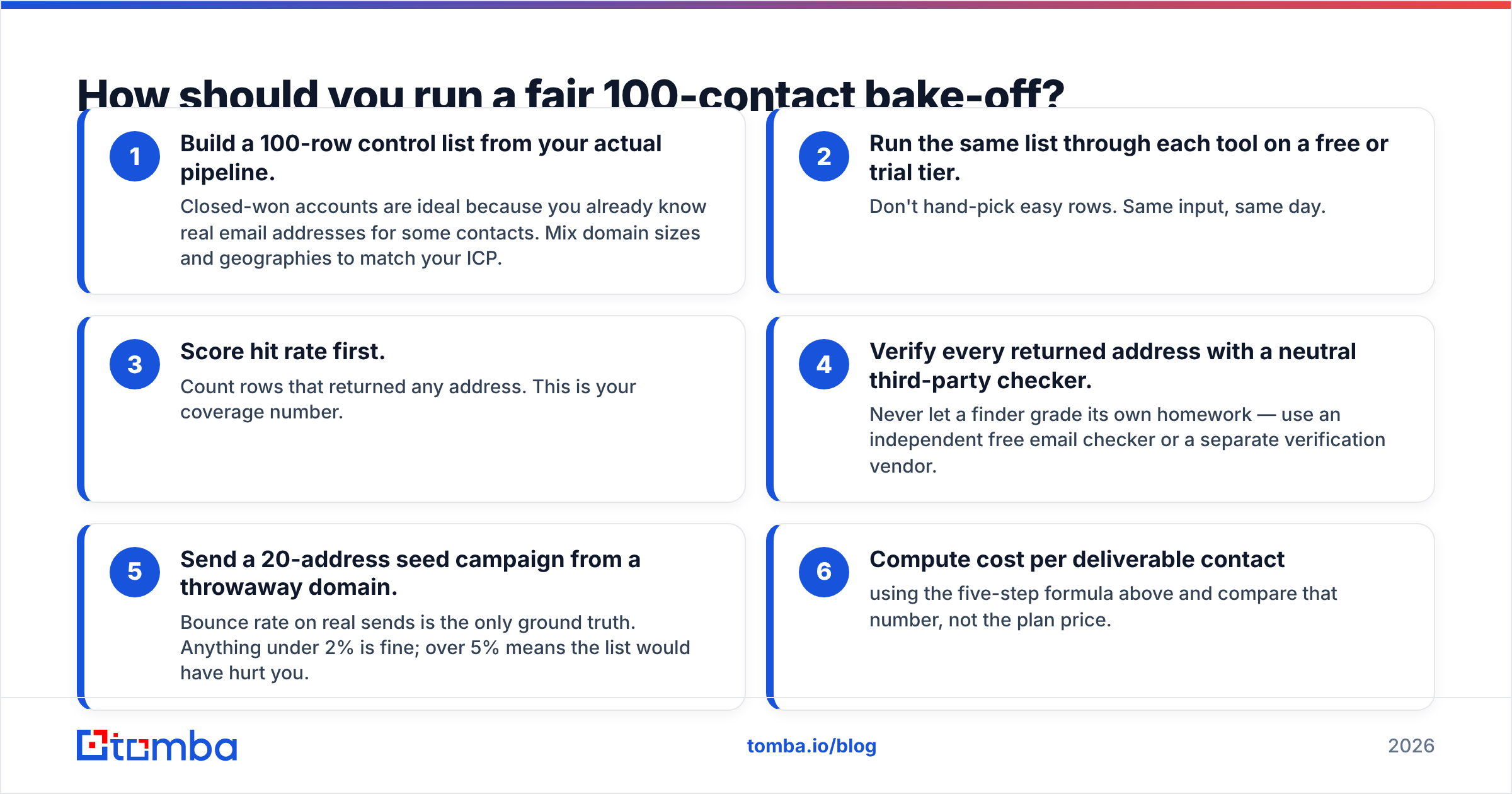
How should you run a fair Forager vs SignalHire bake-off?#
Vendor demos are rigged, though not on purpose. Vendors demo on domains they cover well. Run your own test instead. It takes about an hour.
- Build a 100-row list from your own pipeline. Closed-won accounts work best, since you already know some real addresses. Mix company sizes and regions.
- Run the same list through each tool on a free or trial tier. No hand-picked easy rows. Same input, same day.
- Score hit rate. Count the rows that returned any address. That is your coverage number.
- Verify every address with a neutral checker. Never let a finder grade its own homework. Use a free email checker or a separate vendor.
- Send a 20-address seed campaign from a throwaway domain. Real bounces are the only ground truth. Under 2% is fine. Over 5% means the list would have hurt you.
- Work out cost per deliverable contact with the five steps above. Compare that number, not the plan price.
Teams that run this test get surprised. The tool with the better marketing page often loses on step 6. And the gap between the two tools is usually smaller than the gap between verified once and verified twice.
What about the alternatives worth checking?#
Forager and SignalHire are not the only options. Treating this as a two-horse race usually costs you money.
- BookYourData sells curated, pay-as-you-go B2B lists with a bounce guarantee. It is not a per-search finder. If you would rather buy a clean segment than search name by name, price it alongside both tools.
- RocketReach and ContactOut sit close to SignalHire, especially on the LinkedIn extension workflow. If SignalHire's UI does not click, read a RocketReach alternative comparison before you renew.
- Tomba sits closest to Forager: email-first and verification-native. It adds the layer both tools lack — domain search for mapping a whole company, a bulk email finder for list work, and native integrations instead of Zapier duct tape.
The honest framing: this category now leans on similar data sources. What separates vendors in 2026 is verification rigour, fair credits, and how quietly the tool fits your stack. Peer review sites like G2's lead intelligence category help you spot support and billing complaints that never reach a pricing page.
Forager vs SignalHire: which should you choose?#
Decide on your channel mix, not on feature counts.
Choose Forager if: email is your main channel, your team lives in CSVs and sequencers, you want predictable credit burn, and you do not need phone numbers on the same record.
Choose SignalHire if: your reps really call, you recruit as well as sell, LinkedIn browsing starts your workflow, and you can trade lower average validity for higher raw coverage.
Choose neither if: you need an API-first pipeline, you process thousands of records a month, or catch-all domains fill much of your target list. That is a different tier of product. Forcing a browsing tool into that job is how teams burn a sending domain and a quarter of budget.
Whatever you pick, keep verification separate from discovery. The tool that found the address wants to call it valid. A second, independent check does not care.
Ready to test a third option against both?#
Your Forager vs SignalHire test should end on two numbers: accuracy per dollar, and how cleanly the data lands in your stack. Add Tomba Email Finder as a third entrant. The free tier gives 25 searches a month with no card. That is enough to score one control list against both tools on identical inputs.
Paid plans start at $49/mo for Starter, $99/mo for Growth, and $249/mo for Pro. Each one includes full REST API access, a CLI, and native HubSpot, Salesforce, and Pipedrive sync. See the full Tomba pricing page, then let your own 100-row test pick the winner.
Related guides#
Ready to find emails that actually work?
Join 150,000+ professionals who stopped guessing and started sending. Free credits on signup — no credit card required.
Get the Tomba newsletter
Practical outbound tactics and product updates — once every two weeks.
About the author