Forecasting Salesforce Deals: How Accurate Is It in 2026?
Forecasting Salesforce pipeline is only as accurate as the data behind it. Here is what Collaborative Forecasts does, where it breaks, and how it compares to Clari, Gong Forecast, and spreadsheets.
Forecasting Salesforce pipeline is easy to switch on and hard to trust. Salesforce adds up what your reps typed in. It does not check whether any of it is true. Here is what the native tools do, where they break, and what to fix first.
TL;DR
Salesforce forecasting (Collaborative Forecasts) is a rollup engine, not a prediction engine. It sums opportunity amounts by category, owner, and period. Accuracy comes from your data, not from the tool.
Three levers move forecast accuracy the most: a stage-to-category mapping everyone agrees on, close-date discipline, and complete contact data on every open deal.
Einstein Forecasting adds real prediction on top. It needs about 12 months of clean win/loss history before it beats a decent spreadsheet.
Clari, Gong Forecast, and BoostUp sell what the native module lacks: activity signals, weekly snapshots, and change tracking.
Fix input quality before you buy a forecasting layer. Missing contacts and stale accounts break every model downstream. That is a data problem, not a forecasting problem.
Forecasting Salesforce Pipeline: What It Actually Does#
Forecasting in Salesforce rolls up open and closed opportunity amounts into one revenue number for a period. It then splits that number by forecast category, rep, and role hierarchy.
Think of it like a restaurant's reservation book. The book tells you how many people said they are coming tonight. It does not tell you how many will show up. That depends on how honestly people book and how reliably they turn up. Salesforce forecasting is the reservation book. Your reps' habits are the show rate.
Salesforce ships three things that people all call "forecasting":
- Collaborative Forecasts — the native module, included in the license. Opportunities roll into categories (Pipeline, Best Case, Commit, Closed). Managers adjust the numbers, and the hierarchy rolls them up. Free with Professional and above, though feature depth varies by edition.
- Einstein Forecasting — a machine-learning layer inside Sales Cloud Einstein. It produces a predicted range and flags deals likely to slip. It needs a paid license and enough history to train on.
- Reports, dashboards, and custom rollups — what most teams actually run, because the native module rarely matches how they sell.
The difference matters. When a VP says "Salesforce forecasting is wrong," they almost never mean a bug. They mean garbage in, garbage out. Close dates sit in the past. Amounts have not moved since the discovery call. Deals carry no verified contact on the buying committee.
How Do Salesforce Forecast Categories Actually Work?#
Forecast categories are the spine of the whole system. Every stage maps to exactly one category. That mapping decides which bucket a deal's dollars land in.
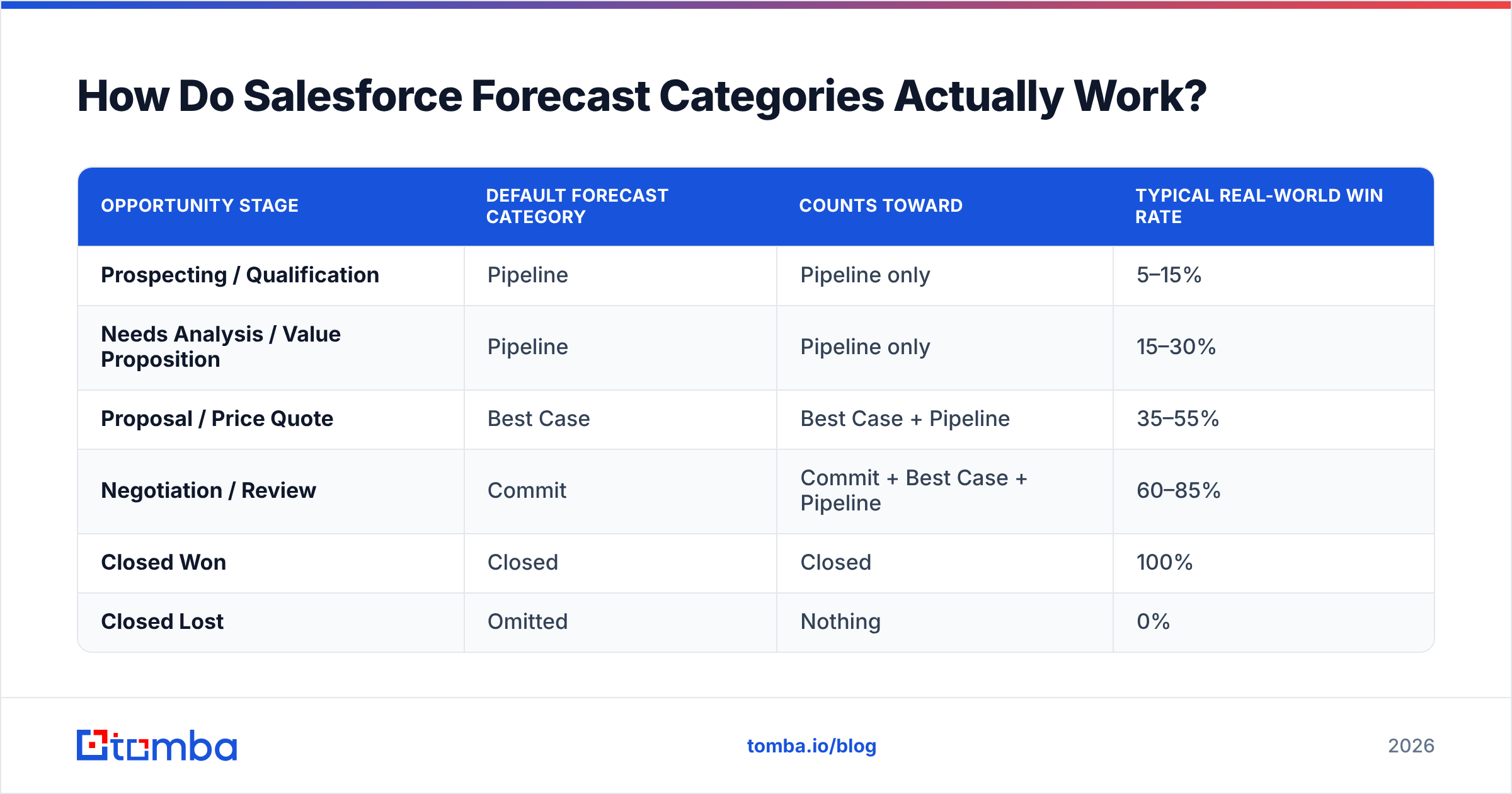
The default mapping looks like this:
| Opportunity stage | Default forecast category | Counts toward | Typical real-world win rate |
|---|---|---|---|
| Prospecting / Qualification | Pipeline | Pipeline only | 5–15% |
| Needs Analysis / Value Proposition | Pipeline | Pipeline only | 15–30% |
| Proposal / Price Quote | Best Case | Best Case + Pipeline | 35–55% |
| Negotiation / Review | Commit | Commit + Best Case + Pipeline | 60–85% |
| Closed Won | Closed | Closed | 100% |
| Closed Lost | Omitted | Nothing | 0% |
Two things break here constantly.
First: categories can be overridden per deal. A rep can drag a Prospecting deal into Commit. That is by design. Sometimes a rep knows something the stage does not. But set a rule for when overrides are allowed. Without one, Commit becomes wishful thinking.
Second: stage does not equal probability. Salesforce stores a default probability per stage, and most orgs never check it against real closed-won rates. Say your Proposal stage converts at 38% but Salesforce says 75%. Your weighted pipeline report is fiction.
The fix is boring and it works. Pull 12 months of closed opportunities. Work out the real conversion rate from each stage. Reset the probabilities, and do it every quarter. Salesforce's own Trailhead forecasting documentation covers the setup, but the calibration is on you.
Is Einstein Forecasting Worth the Extra License?#
Sometimes. The deciding factor is data volume, not company size.
Einstein trains on your past opportunity records and returns a predicted range instead of a plain rollup. It works well when you have a repeatable motion and lots of deals. It struggles when you sell six enterprise deals a year. Six data points a year is not a training set.
Check these rough thresholds before you buy:
- At least 12 months of closed history, ideally 24. Below that, the model has no seasonality to learn.
- A few hundred closed opportunities minimum. High-price, low-volume teams rarely clear this bar.
- Consistent stage usage. If you redefined the sales process eight months ago, the older half of your history teaches the model the wrong thing.
- Populated fields that matter. Amount, close date, stage history, activity, and contact roles. Thin records mean a weak signal.
Fail two or more of those and a well-built dashboard with recalibrated probabilities will beat the ML layer. It also costs nothing extra.
How Does Salesforce Forecasting Compare to Dedicated Tools?#
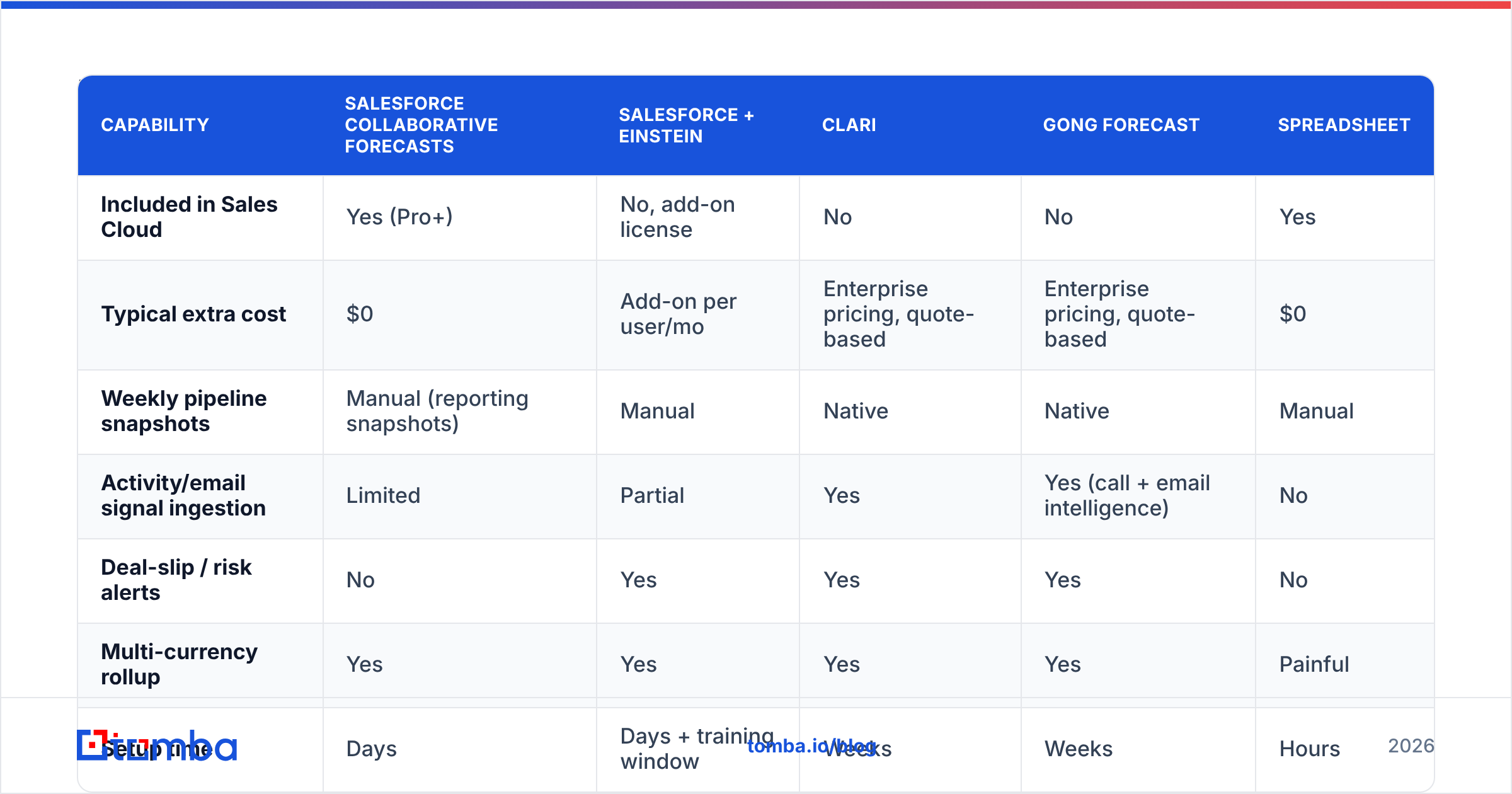
Here is the honest landscape. Salesforce forecasting is the default because it lives where your data lives. Dedicated platforms win on change tracking, activity capture, and one question the native module answers poorly: what changed since last week?
| Capability | Salesforce Collaborative Forecasts | Salesforce + Einstein | Clari | Gong Forecast | Spreadsheet |
|---|---|---|---|---|---|
| Included in Sales Cloud | Yes (Pro+) | No, add-on license | No | No | Yes |
| Typical extra cost | $0 | Add-on per user/mo | Enterprise pricing, quote-based | Enterprise pricing, quote-based | $0 |
| Weekly pipeline snapshots | Manual (reporting snapshots) | Manual | Native | Native | Manual |
| Activity/email signal ingestion | Limited | Partial | Yes | Yes (call + email intelligence) | No |
| Deal-slip / risk alerts | No | Yes | Yes | Yes | No |
| Multi-currency rollup | Yes | Yes | Yes | Yes | Painful |
| Setup time | Days | Days + training window | Weeks | Weeks | Hours |
| Best fit | Teams with clean CRM data | High-volume, repeatable motion | Enterprise RevOps with a forecast cadence | Teams already using Gong for calls | <10 reps, simple motion |
The same pattern shows up in every real evaluation I have seen. Teams buy Clari or Gong not because Salesforce cannot add numbers. They buy because nobody trusts the numbers being added. That is worth sitting with. If your CRM data is unreliable, a $60k platform just gives you a prettier view of unreliable data.
Review sites like G2's revenue-operations category help with pricing sanity checks, since most of these vendors publish nothing.
Why Do Salesforce Forecasts Miss, and What Actually Fixes It?#
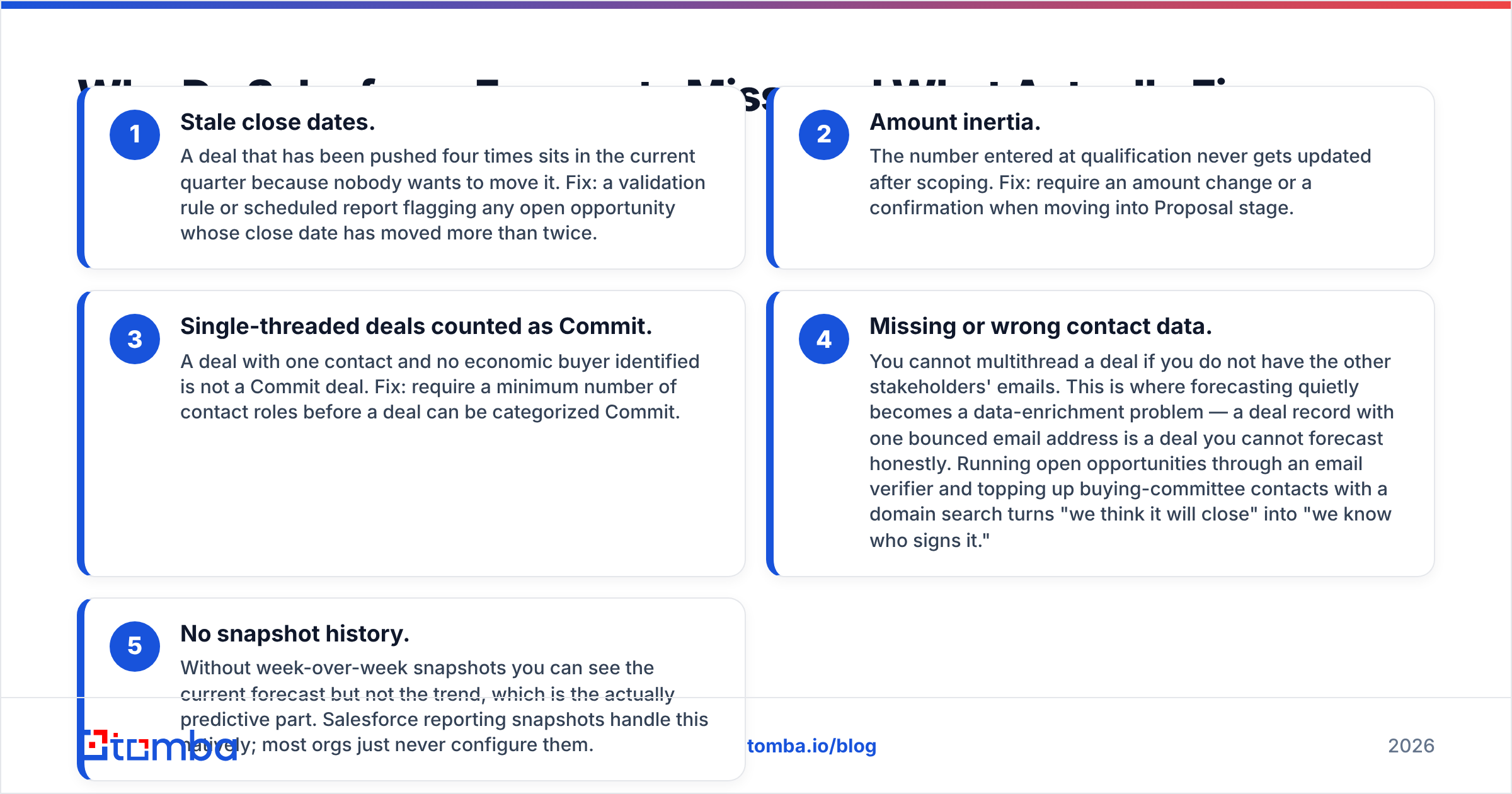
Five failure modes explain most of the gap between forecast and actual.
- Stale close dates. A deal pushed four times still sits in the current quarter because nobody wants to move it. Fix: flag any open deal whose close date has moved more than twice.
- Amount inertia. The number entered at qualification never changes after scoping. Fix: require an amount update or a confirmation when a deal moves into Proposal.
- Single-threaded deals counted as Commit. One contact and no economic buyer is not a Commit deal. Fix: require a minimum number of contact roles before a deal can be marked Commit.
- Missing or wrong contact data. You cannot multithread a deal without the other stakeholders' emails. This is where forecasting quietly turns into a data problem. A deal record with one bounced address is a deal you cannot forecast honestly. Run open opportunities through an email verifier, then top up the buying committee with a domain search. That turns "we think it will close" into "we know who signs it."
- No snapshot history. Without week-over-week snapshots you see the current forecast but not the trend. The trend is the predictive part. Salesforce reporting snapshots handle it natively, and most orgs never turn them on.
What Does a Reliable Forecast Cadence Look Like?#
The tool matters less than the ritual. This cadence works across most B2B teams:
- Monday, rep level. Each rep updates close dates, amounts, and next steps on every open deal in the current and next period. Fifteen minutes, non-negotiable.
- Tuesday, manager level. The manager reviews Commit and Best Case. They challenge anything single-threaded or quiet for 14 days, then submit an adjusted number.
- Wednesday, roll-up. The VP checks the total against quota coverage. Coverage below 3x triggers a pipeline-generation response, not a forecasting debate.
- Monthly, calibration. Compare last month's Commit to actual closed-won. Track the gap per manager. Coach the ones who over-commit, and coach the sandbaggers differently.
- Quarterly, data audit. Recalculate stage probabilities from actuals, purge dead deals, and re-enrich account and contact records so the next quarter starts clean.
Most teams underinvest in that last item. A quarterly pass with data enrichment across open pipeline fills in missing titles, verifies emails, and adds the second and third stakeholder. It does more for accuracy than any dashboard redesign.
How Should You Decide Between Native, Einstein, and a Third-Party Tool?#
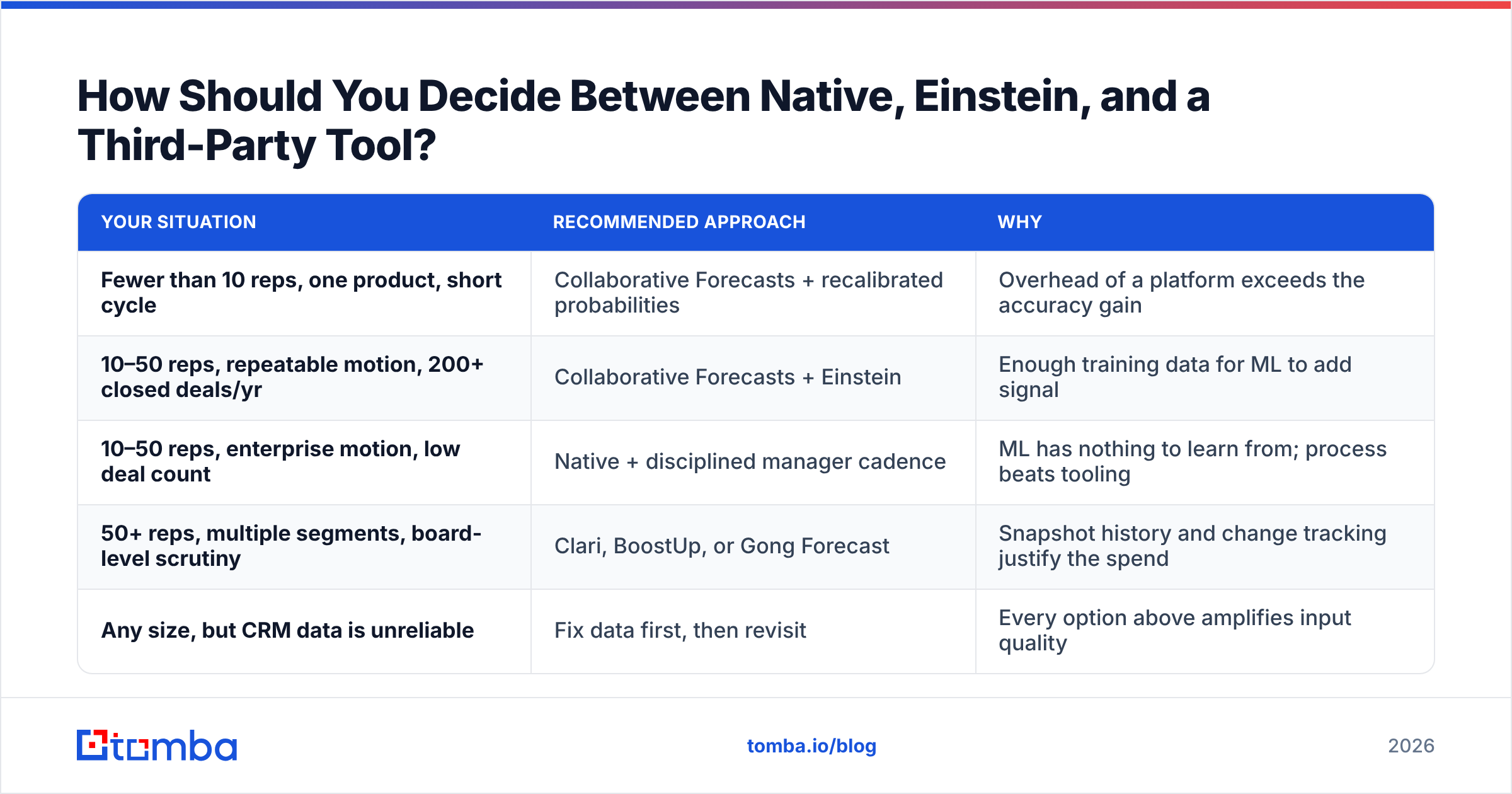
Work through this list in order when forecasting Salesforce pipeline, and stop at the first "yes."
| Your situation | Recommended approach | Why |
|---|---|---|
| Fewer than 10 reps, one product, short cycle | Collaborative Forecasts + recalibrated probabilities | Overhead of a platform exceeds the accuracy gain |
| 10–50 reps, repeatable motion, 200+ closed deals/yr | Collaborative Forecasts + Einstein | Enough training data for ML to add signal |
| 10–50 reps, enterprise motion, low deal count | Native + disciplined manager cadence | ML has nothing to learn from; process beats tooling |
| 50+ reps, multiple segments, board-level scrutiny | Clari, BoostUp, or Gong Forecast | Snapshot history and change tracking justify the spend |
| Any size, but CRM data is unreliable | Fix data first, then revisit | Every option above amplifies input quality |
That last row is not a throwaway. The most common expensive mistake in RevOps is buying a platform to solve a data problem. The platform will show you the problem more elegantly. It will not fix it.
What Are the Hidden Costs of Salesforce Forecasting?#
Three costs rarely make it into the business case.
Admin time. Category mapping, custom forecast types, and territory rollups all need an admin who knows both Salesforce and your sales process. Budget real hours, every quarter.
Edition gates. Several features are gated by edition, including custom forecast types, multi-level adjustments, and cumulative rollups. Check the current Salesforce Sales Cloud pricing page against the features your cadence needs before you pick a plan.
Change management. The forecast is a behavioral artifact. If reps believe an honest Commit gets them yelled at, they will sandbag. No config change fixes that. Forecast accuracy sits downstream of trust.
How Do You Keep Pipeline Data Clean Enough to Forecast On?#
Here is the practical list, in order of return on effort:
- Deduplicate accounts and contacts quarterly. Duplicates split pipeline and double-count revenue.
- Verify every contact email on open deals. A bounced address on a Commit deal means the relationship is thinner than the forecast implies. A bulk email finder turns this into a batch job instead of a manual slog.
- Enforce contact roles before Commit. Two named stakeholders minimum, with verified details.
- Enrich accounts at creation, not at close. Firmographics added early let you compare forecast accuracy by segment later.
- Snapshot weekly. Turn on Salesforce reporting snapshots so trend data exists when you need it.
- Audit orphan opportunities. An open deal with zero contacts is not forecastable. Enrich it or close it.
Teams that run this list see the forecast-to-actual gap narrow before they buy a single new tool. It is unglamorous work, and it is the work.
The Bottom Line#
Forecasting Salesforce pipeline works as a competent rollup wrapped around whatever data you feed it. Einstein adds real value once you have volume and history. Dedicated platforms add change tracking and activity signal that are hard to copy natively. Every one of those options rests on the same dependency: complete, verified contact and account data on every open deal.
Say your open pipeline holds deals with one contact, no verified email, and an amount nobody has touched in six weeks. Your forecast problem is a data problem in a forecasting costume.
Start there. Run your open opportunities through the Tomba Email Finder to fill in the buying-committee contacts your deals are missing. Verify what you already have, and give your forecast something solid to stand on. The free tier covers 25 searches a month, so you can test the approach on a handful of Commit deals first. Paid plans start at $49/mo, and full Tomba pricing covers bulk enrichment across the whole pipeline. Clean inputs first. Then argue about the forecast.
Related guides#
Ready to find emails that actually work?
Join 150,000+ professionals who stopped guessing and started sending. Free credits on signup — no credit card required.
Get the Tomba newsletter
Practical outbound tactics and product updates — once every two weeks.
About the author