How to Write a Formal Email for a Meeting Request in 2026
A formal meeting request only converts when the structure, the subject line, and the recipient are all right. Here are seven templates, a follow-up cadence, and the checks that keep your ask out of spam.
TL;DR
- A formal email for meeting request has six fixed parts: subject line, salutation, context, reason, specific time proposal, and a clean sign-off. Drop any one and reply rates fall.
- Propose two concrete slots instead of asking "when are you free?" — the recipient answers with one word instead of opening their calendar.
- Keep the body under 120 words. Executives read on mobile, and anything past the third short paragraph gets deferred and forgotten.
- Follow up twice — day 3 and day 7 — in the same thread. Most accepted meetings in B2B come from the second or third touch, not the first.
- The best-written request still fails if the address bounces. Verify the recipient before you send, not after.
What is a formal email for meeting request?#
A formal email for meeting request is a short, structured message that asks a specific person for a specific block of their time, at a stated purpose and a stated length. "Formal" here does not mean stiff Victorian prose. It means predictable structure, no slang, no assumed familiarity, and a clear ask that a stranger or a senior stakeholder can approve in under ten seconds.
Think of it like a hotel check-in card. Nobody enjoys filling one out, but the fields are always in the same order, so the clerk processes it without thinking. Your meeting request should be that easy to process.
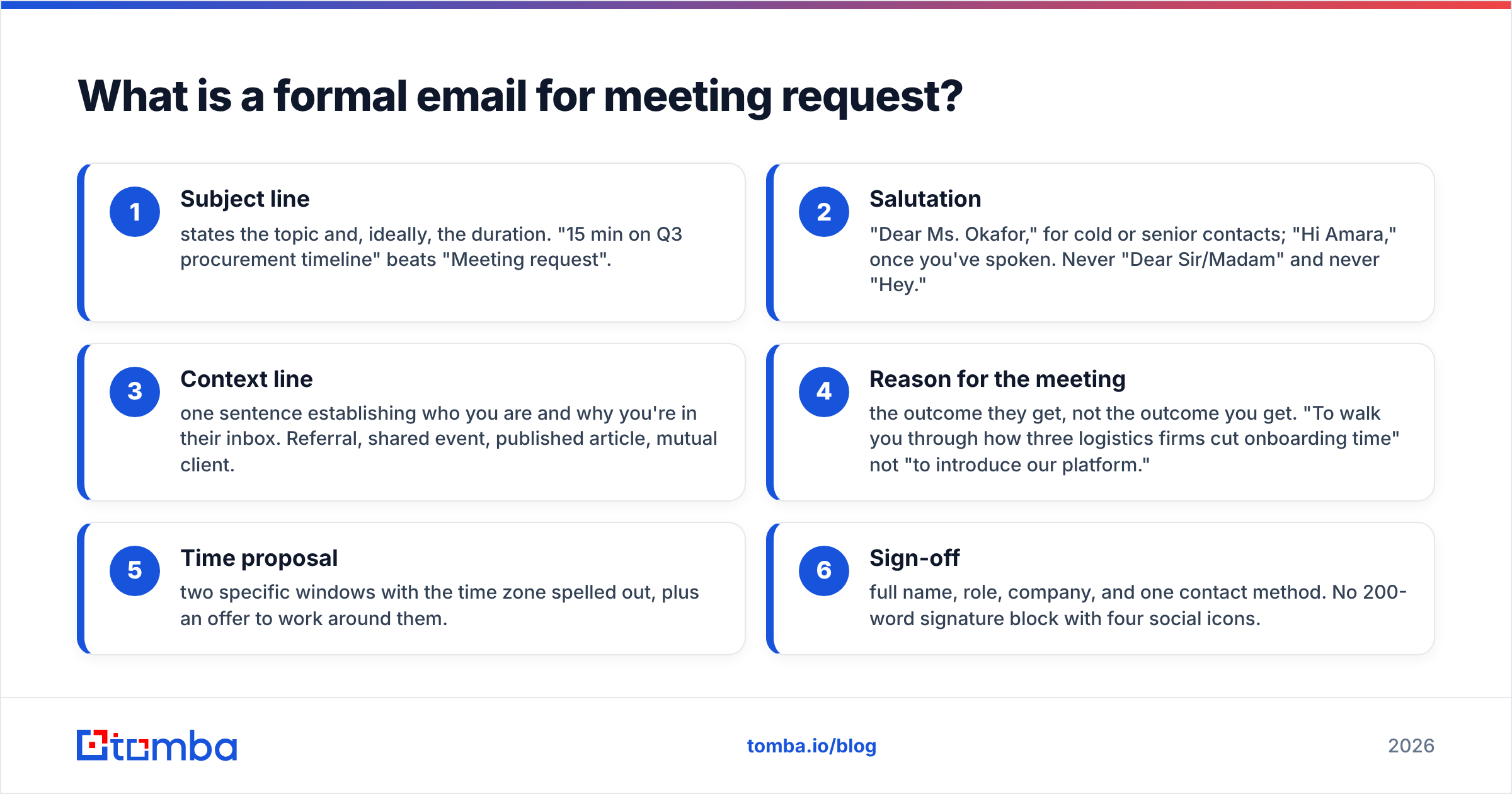
The six components, in order:
- Subject line — states the topic and, ideally, the duration. "15 min on Q3 procurement timeline" beats "Meeting request".
- Salutation — "Dear Ms. Okafor," for cold or senior contacts; "Hi Amara," once you've spoken. Never "Dear Sir/Madam" and never "Hey."
- Context line — one sentence establishing who you are and why you're in their inbox. Referral, shared event, published article, mutual client.
- Reason for the meeting — the outcome they get, not the outcome you get. "To walk you through how three logistics firms cut onboarding time" not "to introduce our platform."
- Time proposal — two specific windows with the time zone spelled out, plus an offer to work around them.
- Sign-off — full name, role, company, and one contact method. No 200-word signature block with four social icons.
What does a good meeting request email look like?#
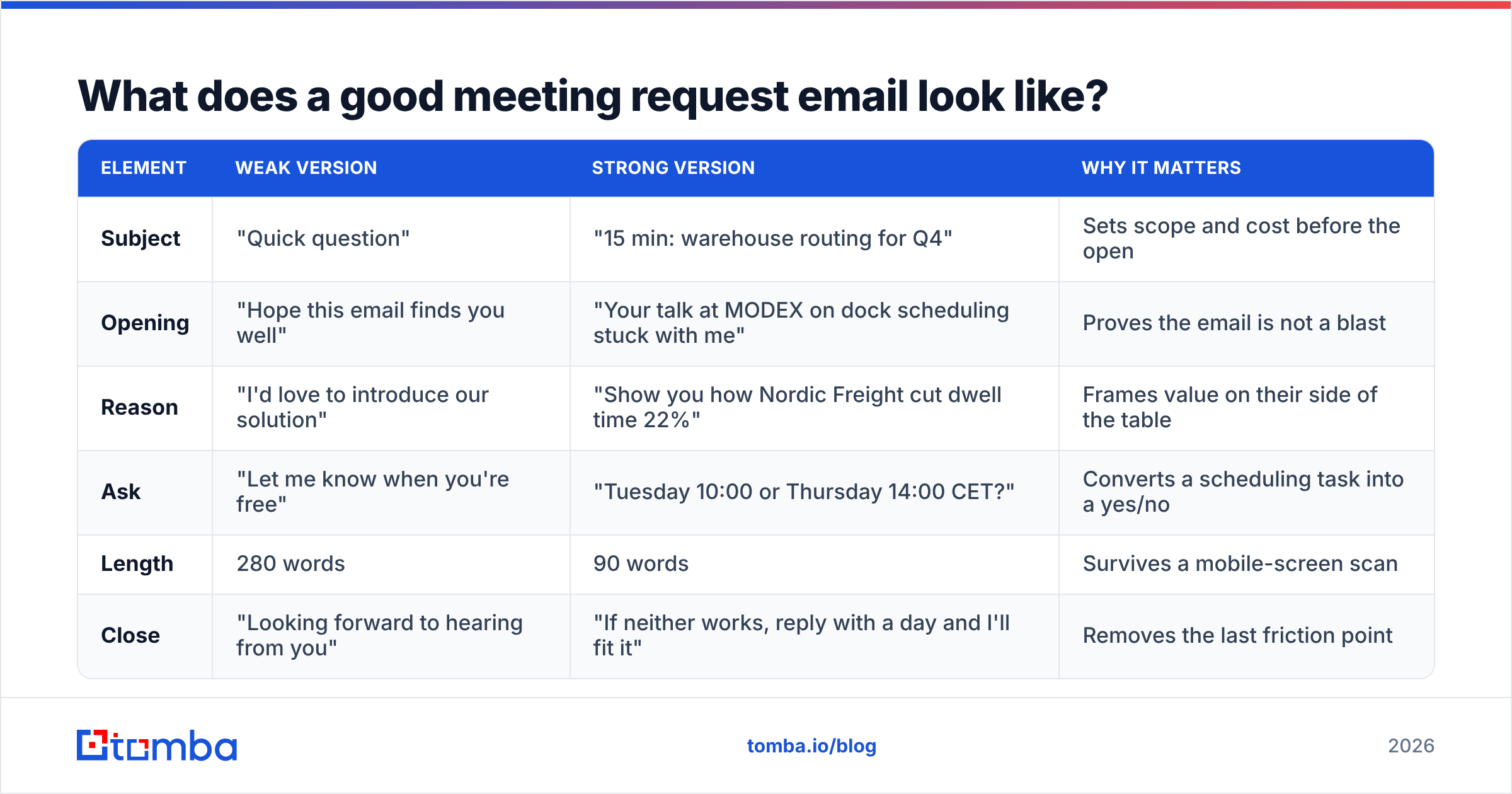
Here is the anatomy of a strong request against a weak one, line by line. The difference is rarely vocabulary — it's specificity.
| Element | Weak version | Strong version | Why it matters |
|---|---|---|---|
| Subject | "Quick question" | "15 min: warehouse routing for Q4" | Sets scope and cost before the open |
| Opening | "Hope this email finds you well" | "Your talk at MODEX on dock scheduling stuck with me" | Proves the email is not a blast |
| Reason | "I'd love to introduce our solution" | "Show you how Nordic Freight cut dwell time 22%" | Frames value on their side of the table |
| Ask | "Let me know when you're free" | "Tuesday 10:00 or Thursday 14:00 CET?" | Converts a scheduling task into a yes/no |
| Length | 280 words | 90 words | Survives a mobile-screen scan |
| Close | "Looking forward to hearing from you" | "If neither works, reply with a day and I'll fit it" | Removes the last friction point |
Notice that none of the strong versions are longer. Specificity is compression, not expansion.
How do you write the subject line?#
The subject line is the only part of your formal email for meeting request that most recipients will consciously evaluate. Treat it as its own deliverable.
Three patterns that hold up in B2B inboxes:
- Duration + topic — "20 min: renewals data migration". The number lowers perceived cost.
- Referral first — "Priya Raman suggested I reach out". Borrowed trust outperforms every clever hook.
- Their words back — quote a phrase from their earnings call, job posting, or conference talk. It signals research in six characters of proof.
Avoid anything that reads like marketing: no "Unlock", no "Revolutionary", no exclamation points, no ALL CAPS, no "Re:" fakery on a first contact. If you want a second opinion before sending, run the line through a subject line generator and then sanity-check it against a spam checker — trigger words in a subject line still push otherwise clean mail into the promotions tab.
What are the best formal meeting request templates?#
Copy these, then replace every bracket. A template you don't customize is worse than no template, because it reads as automated and gets filed accordingly.
1. Cold outreach to a senior stakeholder
Subject: 15 min on [specific process] at [Company]
Dear [Ms./Mr. Last Name],
I lead [function] at [Your Company], where we work with [two named peer companies] on [narrow problem].
[One sentence of evidence — a metric, a case, a public signal from their company.]
Would Tuesday 10:00 or Thursday 14:00 [time zone] work for a 15-minute call? If neither fits, name a day and I'll work around it.
Best regards,
[Full name] · [Role] · [Company] · [Phone]
2. Warm referral
Subject: [Referrer name] suggested we speak
Dear [First Name],
[Referrer], [their role at their company], mentioned you're rebuilding [initiative] this quarter and thought a short conversation would be useful.
We helped [Referrer's company] with [specific outcome]. Happy to share what transferred and what didn't.
20 minutes on Wednesday or Friday afternoon?
3. Internal cross-department request
Subject: 30 min — Q3 handoff between Support and RevOps
Hi [First Name],
Support is seeing [concrete issue] on accounts that come through [process]. I'd like to map the handoff with you so we can fix it before renewals season.
Agenda: current flow (10 min), failure points (10 min), owner assignment (10 min).
I've held Thursday 11:00 on both our calendars — decline if it doesn't work and I'll reschedule.
4. Follow-up after an event
Subject: Following up from [Event] — [specific topic you discussed]
Dear [First Name],
We spoke briefly at [Event] about [detail only the two of you would remember]. You mentioned [their pain point].
I put together [short, specific artifact]. Worth 15 minutes next week to walk through it?
5. Requesting a meeting with a client's new decision-maker
Subject: Intro call — [Your Company] and [Their Company] account
Dear [First Name],
Congratulations on the [new role]. My team has supported [Their Company] on [scope] since [year], working most closely with [predecessor].
I'd like 20 minutes to share the current state of the account and hear how your priorities differ. Monday 15:00 or Wednesday 09:00 [time zone]?
6. Vendor or partnership request
Subject: Partnership fit — [Your Company] × [Their Company]
Dear [First Name],
We both sell into [shared segment], and roughly [number] of our customers already run [their product].
I'd like to explore a referral arrangement. 25 minutes in the next two weeks — what does your calendar look like?
7. Second follow-up (the one most people skip)
Subject: (reply in the same thread)
Hi [First Name],
Circling back on this one. If timing is wrong, tell me a month and I'll come back then. If it's not a fit at all, a one-word reply saves us both the loop.
More long-form variants live in the Tomba cold email templates library if you need a different tone register.
Formal vs semi-formal vs casual: which register should you use?#
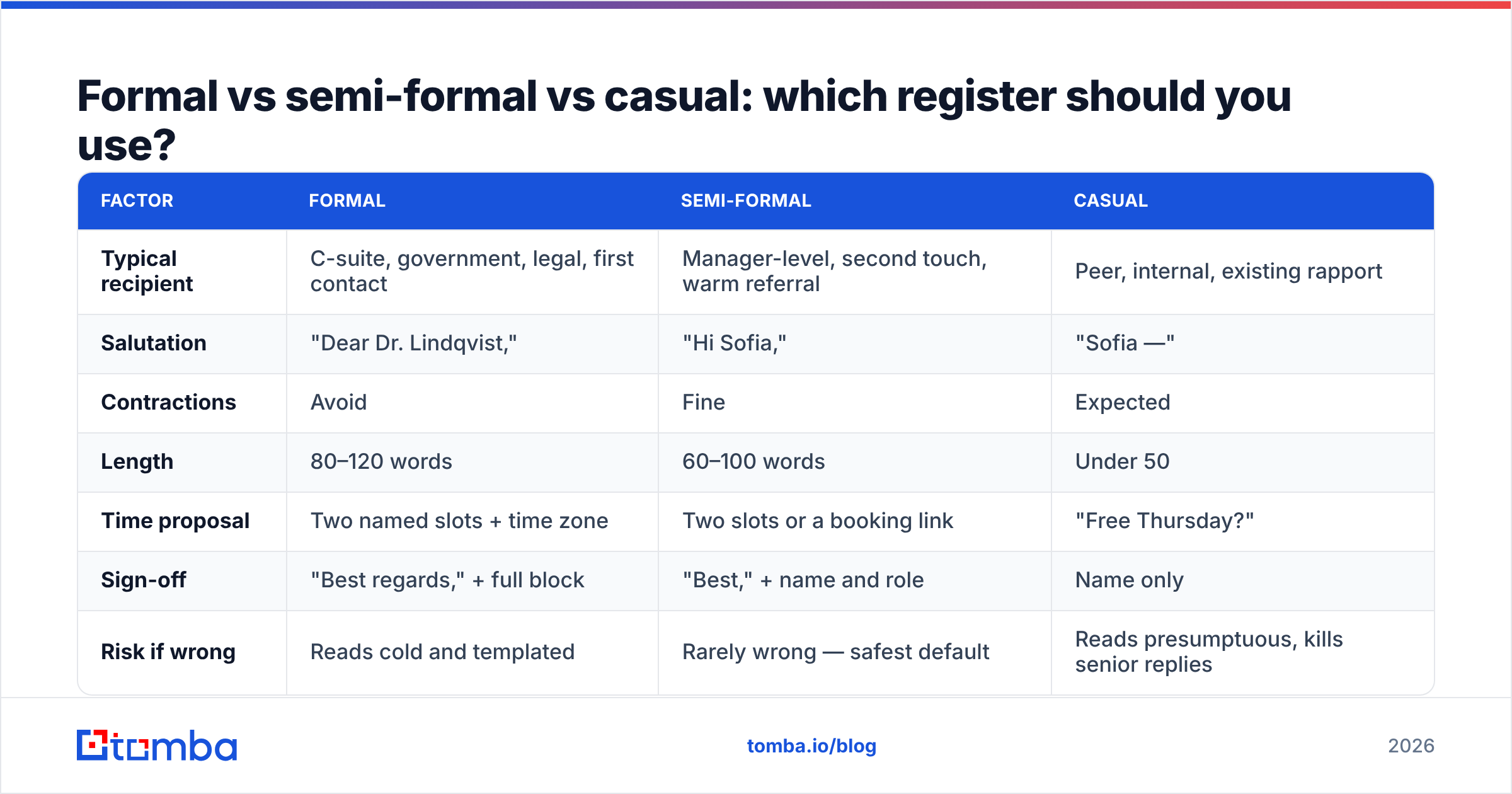
Register is a function of relationship distance and organizational seniority, not personal preference. Getting it wrong costs you more than a typo would.
| Factor | Formal | Semi-formal | Casual |
|---|---|---|---|
| Typical recipient | C-suite, government, legal, first contact | Manager-level, second touch, warm referral | Peer, internal, existing rapport |
| Salutation | "Dear Dr. Lindqvist," | "Hi Sofia," | "Sofia —" |
| Contractions | Avoid | Fine | Expected |
| Length | 80–120 words | 60–100 words | Under 50 |
| Time proposal | Two named slots + time zone | Two slots or a booking link | "Free Thursday?" |
| Sign-off | "Best regards," + full block | "Best," + name and role | Name only |
| Risk if wrong | Reads cold and templated | Rarely wrong — safest default | Reads presumptuous, kills senior replies |
When in doubt, write semi-formal. It survives being read by a CFO and by a 26-year-old ops lead without embarrassing you in either direction. Broader conventions on tone and structure are covered well in the netiquette literature if you want the background.
How do you follow up without being annoying?#
Two follow-ups, same thread, both shorter than the original. That's the whole system.
- Day 3 — one line. "Bumping this in case it slipped past. Tuesday or Thursday still open?"
- Day 7 — offer an exit. "If the timing is off, say so and I'll circle back next quarter."
- Stop. A third and fourth nudge on a meeting request damages your sender reputation more than it converts.
Reply-rate data from sales teams consistently shows the second touch carrying a meaningful share of booked meetings — HubSpot's sales research covers the cadence math in depth. The practical point is that stopping at one email leaves most of your meetings on the table, and going past three burns the relationship.
If scheduling ping-pong is the actual bottleneck rather than the ask itself, a booking link from something like Calendly removes the round trip — but only include it after they've said yes. Leading with a booking link on a cold formal request reads as "my time matters more than yours."
What makes meeting request emails fail?#
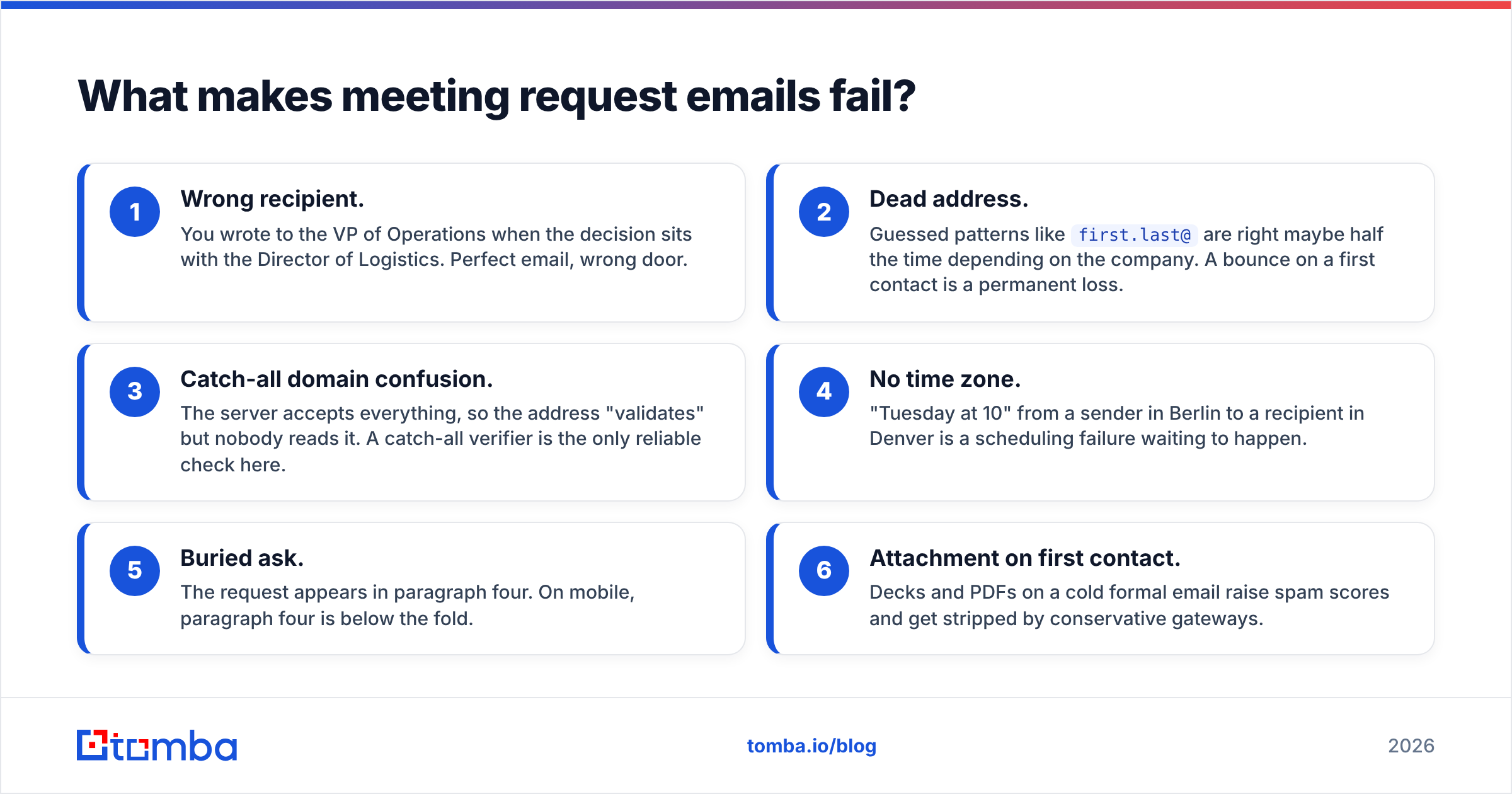
Most failures are not writing failures. They're routing failures.
- Wrong recipient. You wrote to the VP of Operations when the decision sits with the Director of Logistics. Perfect email, wrong door.
- Dead address. Guessed patterns like
first.last@are right maybe half the time depending on the company. A bounce on a first contact is a permanent loss. - Catch-all domain confusion. The server accepts everything, so the address "validates" but nobody reads it. A catch-all verifier is the only reliable check here.
- No time zone. "Tuesday at 10" from a sender in Berlin to a recipient in Denver is a scheduling failure waiting to happen.
- Buried ask. The request appears in paragraph four. On mobile, paragraph four is below the fold.
- Attachment on first contact. Decks and PDFs on a cold formal email raise spam scores and get stripped by conservative gateways.
Fixing 1 through 3 is a data problem, not a copy problem. Before a campaign of meeting requests goes out, run the list through an email verifier and confirm you have the right named person at the right domain via domain search. A 90-word template sent to a confirmed inbox beats a beautifully argued 300-word letter sent to info@.
How do you find the right person to send it to?#
Start from the company, not the person. Pull the org's public email pattern, list the contactable roles at that domain, then narrow to the one whose job description contains your problem. Job titles on LinkedIn and on the careers page tell you more about who actually owns a process than the org chart does.
A practical sequence:
- Identify the function, not the seniority. Who is measured on the metric you'd improve?
- Confirm the person through a recent post, talk, hiring ad, or press mention. This also gives you the context line for your opener.
- Resolve the address with an email finder rather than a permutation guess.
- Verify before send. Anything below a high-confidence score gets held back, not gambled on.
- Enrich the record so your CRM has role, company size, and timezone — the last one directly determines the two slots you propose.
If you're sending at volume, a bulk email finder run and a single verification pass will save you more meetings than another round of subject-line A/B testing will.
Ready to send requests that actually land?#
Write the 90-word version. Propose two slots. Follow up twice. But before any of that, make sure the message has somewhere real to land — the Tomba Email Finder resolves the right contact at a domain and verifies it in the same step, so your carefully written meeting request reaches a human instead of a bounce log. The free tier covers 25 searches a month; paid plans start at $49/mo on the Starter tier, with details on the Tomba pricing page.
Related guides#
Ready to find emails that actually work?
Join 150,000+ professionals who stopped guessing and started sending. Free credits on signup — no credit card required.
Get the Tomba newsletter
Practical outbound tactics and product updates — once every two weeks.
About the author