Formal Introduction Email Template: 9 Examples That Get Replies
Nine formal introduction email templates for cold outreach, warm intros, new account managers, and executive contacts — plus the structure that decides whether you get a reply or a delete.
TL;DR
- A formal introduction email template has five parts: a specific subject line, a one-line reason you're writing, credibility in one sentence, one ask, and a low-friction close. Everything else is padding.
- Formal does not mean stiff. "Dear Sir or Madam" and "I hope this email finds you well" are the two fastest ways to get archived.
- Match register to context: regulated industries, cold executive outreach, and first-touch partnership emails earn formality. A warm referral does not.
- The templates below cover cold intros, warm referrals, new account manager handoffs, vendor introductions, and post-event follow-ups.
- Templates fail more often on the address than the copy. A verified, role-correct recipient beats better prose every time.
What Is a Formal Introduction Email?#
A formal introduction email is a first-contact message that establishes who you are, why you're reaching out, and what you want — using professional register, complete sentences, and no assumed familiarity.
Think of it like knocking on an office door versus walking into a friend's kitchen. Both get you inside, but only one works when nobody knows your face yet. Formality is the knock: it signals you understand you haven't been invited.
The distinction matters because most "formal" templates floating around are actually just long. Length is not formality. A three-sentence email that uses the recipient's correct title, states a precise reason for writing, and makes one clear request is more formal than four paragraphs of throat-clearing.
Here's what separates the two registers in practice:
- Salutation — Formal uses "Dear [First Name]" or "Dear Dr. [Last Name]". Casual uses "Hi [First]" or "Hey". Never use "Dear Sir or Madam" — it tells the reader you didn't find out who they are.
- Reason line — Formal states the trigger explicitly ("I'm writing regarding your Q3 expansion into the DACH region"). Casual leans on shared context that may not exist.
- Credibility — Formal cites a role, a company, or a mutual connection in one sentence. Casual skips it and hopes the signature does the work.
- The ask — Formal names the specific next step and its cost in time ("a 15-minute call next Tuesday or Wednesday"). Casual says "let me know if you're interested," which is not an ask.
- Sign-off — Formal uses "Best regards" or "Sincerely" with a full signature block. Casual uses "Cheers" or nothing.
- Length — Formal targets 90–130 words. Anything longer reads as a proposal, not an introduction.
When Should You Use a Formal Introduction Email Template?#
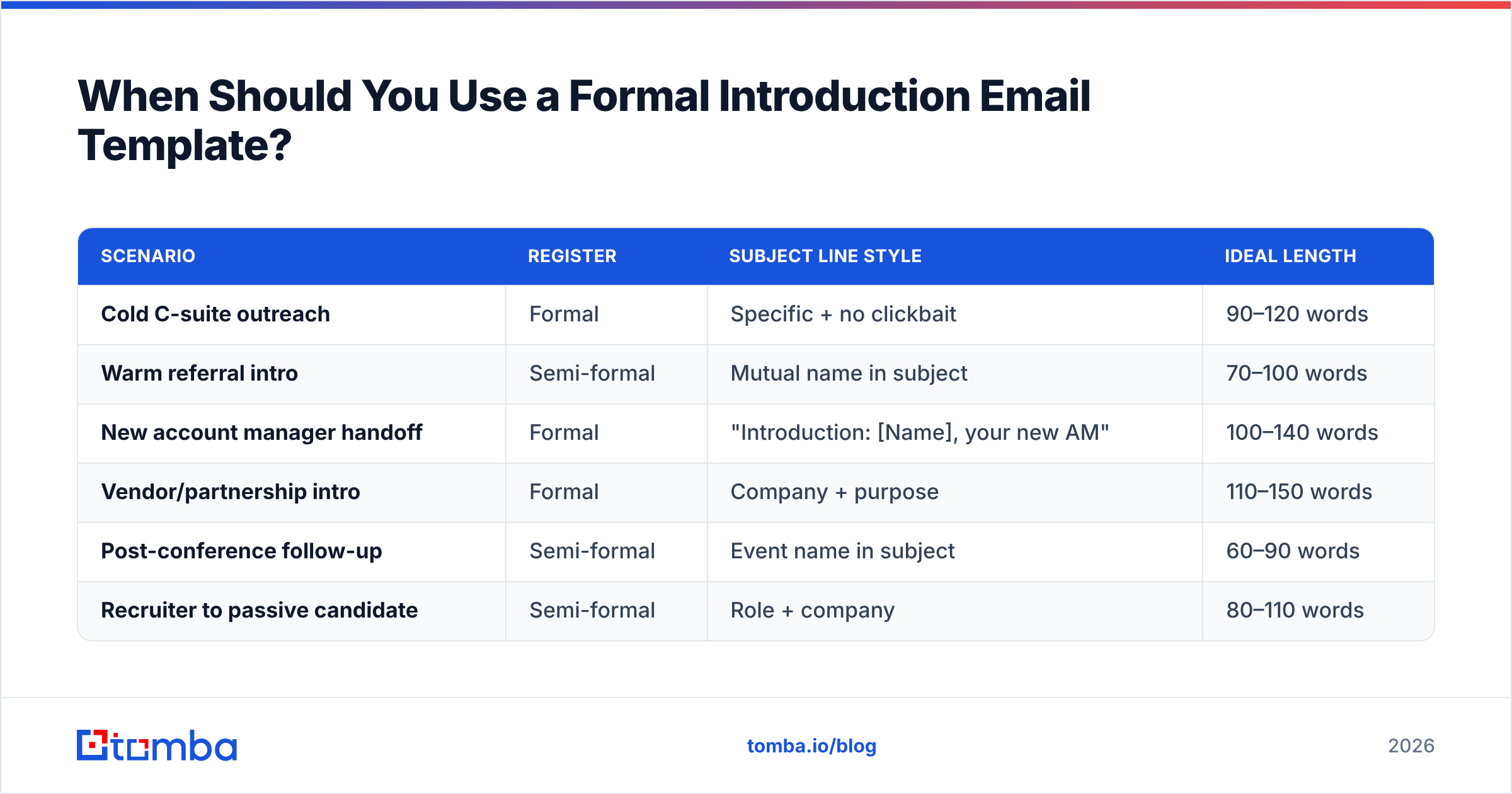
Use formal register when any of these are true: the recipient is two or more levels senior to you, the industry is regulated (legal, finance, healthcare, government, pharma), the email will be forwarded internally, or you're representing a company rather than yourself.
Use a warmer register when a mutual contact has already vouched for you, when you're in a fast-moving sector where formality reads as distance (early-stage SaaS, agencies, creative), or when the prospect has already engaged with your content.
| Scenario | Register | Subject line style | Ideal length |
|---|---|---|---|
| Cold C-suite outreach | Formal | Specific + no clickbait | 90–120 words |
| Warm referral intro | Semi-formal | Mutual name in subject | 70–100 words |
| New account manager handoff | Formal | "Introduction: [Name], your new AM" | 100–140 words |
| Vendor/partnership intro | Formal | Company + purpose | 110–150 words |
| Post-conference follow-up | Semi-formal | Event name in subject | 60–90 words |
| Recruiter to passive candidate | Semi-formal | Role + company | 80–110 words |
The register question gets over-thought. If you're genuinely unsure, default to formal and drop one notch on the second email once you've seen how they write back. Mirroring is cheap and effective.

What Does a Formal Introduction Email Template Look Like?#
Here are the templates. Each is written to be pasted and edited, not admired. Square brackets mark variables.
Template 1 — Cold introduction to a senior decision-maker#
Subject: Question about [Company]'s [specific initiative]
Dear [First Name],
I'm [Your Name], [title] at [Company]. We work with [2–3 comparable companies] on [narrow problem].
I read that [Company] is [specific, verifiable trigger — funding round, hire, product launch, regulatory change]. Teams at that stage usually hit [specific friction], and we typically cut that by [concrete outcome].
Would you be open to a 15-minute call on Tuesday or Thursday next week? If [colleague's name/role] is the better contact, I'm happy to redirect.
Best regards,
[Full signature block]
Why it works: the trigger line proves you did research, the outcome is specific, and the redirect offer removes the "wrong person" objection that kills most cold intros.
Template 2 — Warm referral introduction#
Subject: [Mutual contact] suggested I reach out
Dear [First Name],
[Mutual contact] mentioned you're rebuilding [function] at [Company] and thought a short conversation might be useful.
I lead [your function] at [Company]. We handled a similar rebuild for [comparable company] — the sticking point was [specific issue], and we solved it by [approach].
If it's relevant, I have 20 minutes free Wednesday afternoon. If not, no follow-up from me.
Best regards,
[Signature]
The "no follow-up from me" line raises reply rates because it removes the fear of a six-email sequence.
Template 3 — New account manager introduction#
Subject: Introduction: [Your Name], your new account manager at [Company]
Dear [First Name],
I'm taking over as your account manager from [Previous AM], effective [date]. [Previous AM] has walked me through your account, including [specific detail that proves the handoff was real].
My priorities for the first 30 days: [item one], [item two], and understanding what [Previous AM] may not have flagged.
Could we book 25 minutes in the next two weeks? Here's my calendar: [link].
Best regards,
[Signature]
Handoff emails fail when they're generic. The specific-detail line is the whole email.
Template 4 — Vendor or partnership introduction#
Subject: [Your Company] + [Their Company]: [specific integration or use case]
Dear [First Name],
I'm [Name], [title] at [Company]. We build [one-line description] for [audience].
A number of our customers also use [their product], and they've asked whether [specific integration or joint use case] is possible. Before we build anything, I'd like to understand whether that's a direction you're open to.
Would a 30-minute call with you or your partnerships lead make sense?
Best regards,
[Signature]
Template 5 — Post-event follow-up#
Subject: Following up from [Event Name]
Dear [First Name],
We spoke briefly at [Event] on [day] about [specific topic from the conversation].
You mentioned [their stated problem]. I've since put together [resource/note/answer] that addresses it directly — attached, no strings.
If it's useful and you'd like to go deeper, I'm free [two windows].
Best regards,
[Signature]
The remaining four variants — introducing a colleague, introducing yourself to a new team, recruiter-to-candidate, and re-introduction after a long gap — follow the same skeleton: trigger, credibility, one ask, easy exit. If you need a starting library, the cold email templates collection covers most first-touch scenarios, and the subject line generator is useful for the part most people rush.
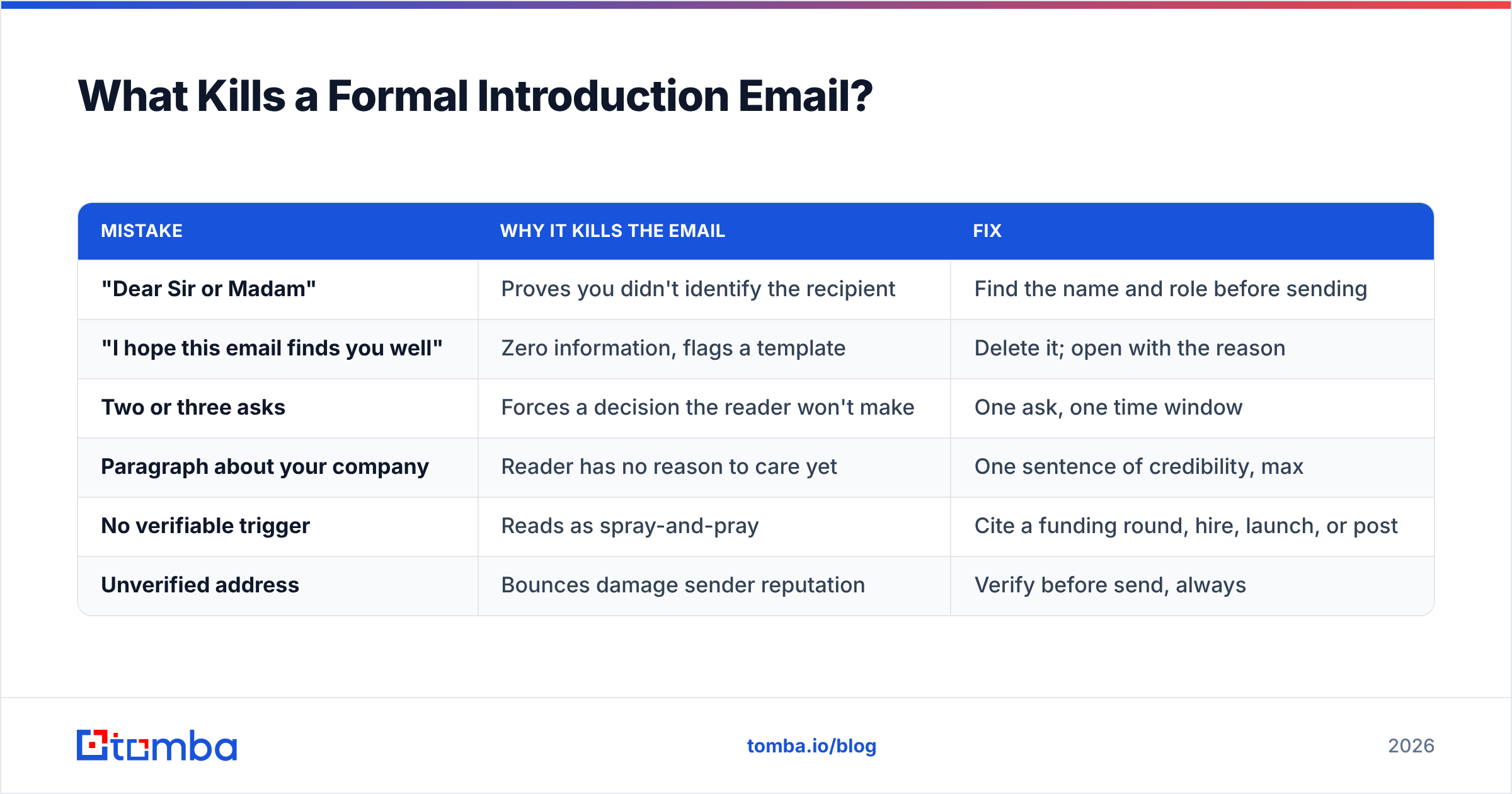
What Kills a Formal Introduction Email?#
Six patterns account for most non-replies. None of them are about grammar.
| Mistake | Why it kills the email | Fix |
|---|---|---|
| "Dear Sir or Madam" | Proves you didn't identify the recipient | Find the name and role before sending |
| "I hope this email finds you well" | Zero information, flags a template | Delete it; open with the reason |
| Two or three asks | Forces a decision the reader won't make | One ask, one time window |
| Paragraph about your company | Reader has no reason to care yet | One sentence of credibility, max |
| No verifiable trigger | Reads as spray-and-pray | Cite a funding round, hire, launch, or post |
| Unverified address | Bounces damage sender reputation | Verify before send, always |
That last row is the one most template articles ignore. A perfectly written formal introduction sent to firstname@company.com when the pattern is f.lastname@company.com produces a hard bounce. Enough of those and your domain's sender reputation degrades, which means even your correctly addressed emails start landing in spam. According to HubSpot's email marketing research, list quality is consistently among the strongest predictors of inbox placement.
The practical sequence: find the address, verify it, then write. Running an email verifier pass before a send is the cheapest insurance in outbound. For domains that accept everything and reveal nothing, a catch-all verifier gives you a probability score rather than a false green light.

How Formal Should You Actually Be by Region and Industry?#
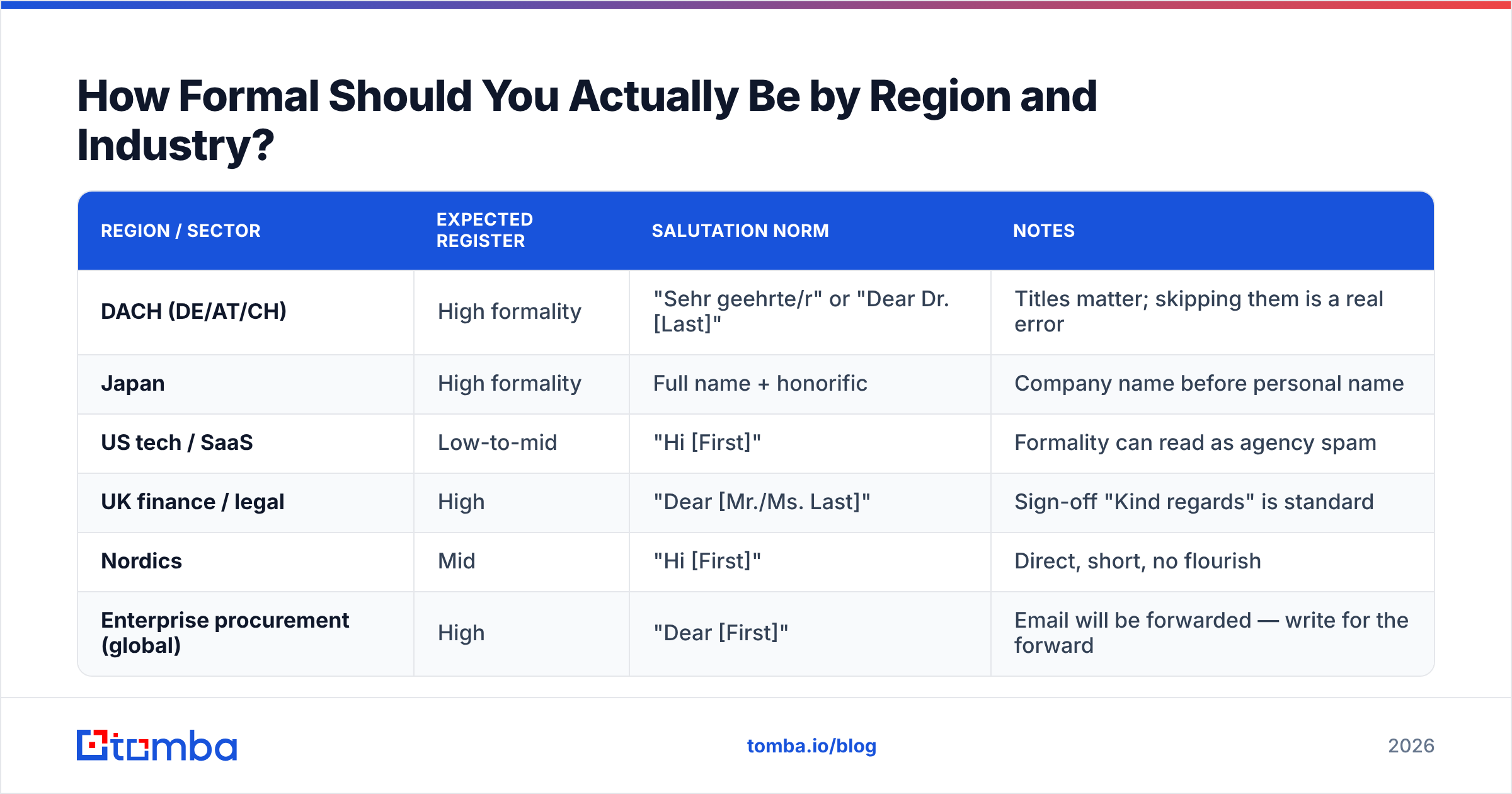
Register expectations are not universal. What reads as respectful in Frankfurt reads as cold in Austin.
| Region / sector | Expected register | Salutation norm | Notes |
|---|---|---|---|
| DACH (DE/AT/CH) | High formality | "Sehr geehrte/r" or "Dear Dr. [Last]" | Titles matter; skipping them is a real error |
| Japan | High formality | Full name + honorific | Company name before personal name |
| US tech / SaaS | Low-to-mid | "Hi [First]" | Formality can read as agency spam |
| UK finance / legal | High | "Dear [Mr./Ms. Last]" | Sign-off "Kind regards" is standard |
| Nordics | Mid | "Hi [First]" | Direct, short, no flourish |
| Enterprise procurement (global) | High | "Dear [First]" | Email will be forwarded — write for the forward |
The forwarding point deserves emphasis. Any introduction email sent into an enterprise buying committee will be pasted into Slack or forwarded with three words on top. Write the email so it still makes sense when a stranger reads it with no context. That is the real reason formal introductions use complete sentences and explicit nouns instead of pronouns.
Do Formal Templates Still Get Replies in 2026?#
Yes — but the win comes from targeting, not tone. Reply rate is roughly a function of three multipliers: is the address real, is the person the right person, and is the reason for writing specific.
Tone is a distant fourth. A blunt three-line email to the right operations lead beats an elegantly formal paragraph sent to a marketing intern.
That reorders the work. Most people spend 80% of their effort on wording and 20% on list building. Invert it. Concretely:
- Identify the role, not the company. "VP Operations at a 200-person logistics firm" is a target. "Logistics companies" is not.
- Find the person and the address. Use a domain search to pull the verified contacts and email pattern for a company in one pass, rather than guessing formats.
- Verify before writing. A bounce costs more than a bad sentence.
- Find the trigger. Funding, hiring, a product page change, a conference talk. No trigger, no email.
- Then write. With the first four done, the template above takes four minutes to fill in.
- Send in small batches. 20–40 per day per mailbox, warmed. Volume without warmup is how good copy ends up in spam.
For teams doing this at scale, the bulk email finder handles step two across a whole list, and the Tomba API pushes the same lookups into a CRM or sequencing tool so reps never touch a spreadsheet. If you'd rather stay in the browser, the Tomba Chrome extension surfaces addresses on company sites and profiles as you research.
What Does This Cost to Run?#
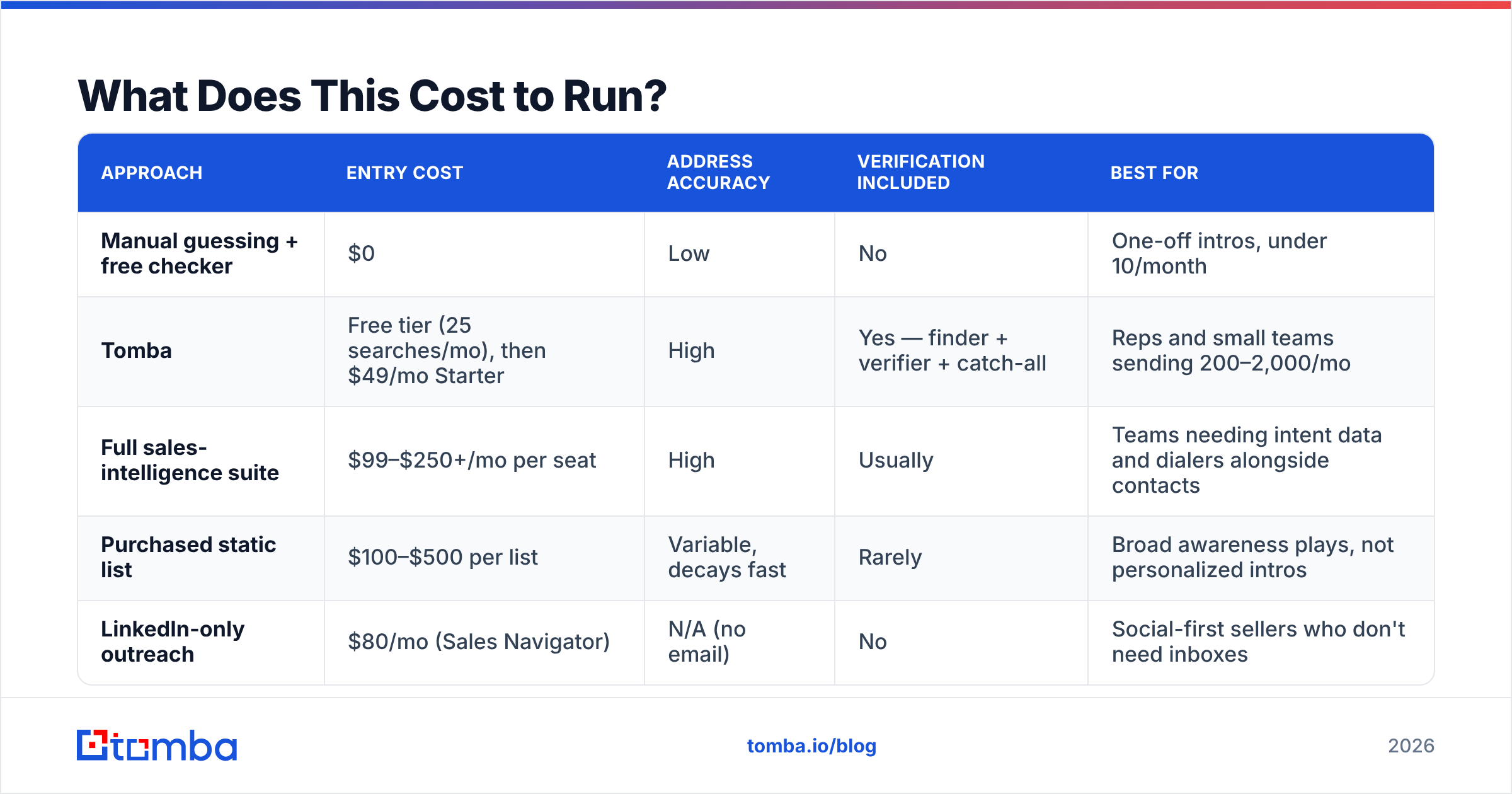
Introduction emails are cheap to write and expensive to send badly. The main line item is contact data. Here's how the common approaches compare on the dimensions that actually affect a first-touch campaign.
| Approach | Entry cost | Address accuracy | Verification included | Best for |
|---|---|---|---|---|
| Manual guessing + free checker | $0 | Low | No | One-off intros, under 10/month |
| Tomba | Free tier (25 searches/mo), then $49/mo Starter | High | Yes — finder + verifier + catch-all | Reps and small teams sending 200–2,000/mo |
| Full sales-intelligence suite | $99–$250+/mo per seat | High | Usually | Teams needing intent data and dialers alongside contacts |
| Purchased static list | $100–$500 per list | Variable, decays fast | Rarely | Broad awareness plays, not personalized intros |
| LinkedIn-only outreach | $80/mo (Sales Navigator) | N/A (no email) | No | Social-first sellers who don't need inboxes |
On the middle tier, BookYourData is a solid option if you want pay-as-you-go, verified B2B records without a subscription commitment — it's a genuinely different purchase model from credit-based finders, and it suits teams that buy contacts in occasional bursts rather than continuously. Which one fits depends on whether your prospecting is steady-state or campaign-shaped.
Tomba's own pricing runs Free (25 searches/mo), Starter at $49/mo, Growth at $99/mo, and Pro at $249/mo, with Enterprise quoted per volume. The relevant point for introduction emails is that finding and verifying sit in the same plan, so you're not stitching two vendors together for a single send.
Independent review sites are worth a look before you commit to any of these — G2's email-finder category carries enough recent reviews to sanity-check vendor claims about match rates.
How Do You Test Whether Your Template Works?#
Track three numbers per template, not one.
- Bounce rate. Above 3% and your data process is broken, not your copy. Fix this first; nothing else is measurable until it's clean.
- Open rate. This measures your subject line and sender reputation, nothing else. Note that Apple Mail Privacy Protection inflates it — treat it as directional.
- Reply rate. The only number that matters. Segment it by template and by trigger type so you learn which reason for writing pulls, not just which wording.
Run one variable at a time. Change the subject line for two weeks, hold the body constant, then swap the body. Most people change five things at once and learn nothing.
A reasonable benchmark for a well-targeted formal introduction with a real trigger: 1–2% bounce, 40–55% open, 6–12% reply. If your reply rate is under 3% with clean data, the problem is targeting — you're writing good emails to people who have no reason to care.
Get the Address Right Before You Get the Words Right#
The best formal introduction email template in the world is worthless if it lands on a dead mailbox or the wrong person's desk. Start there.
Tomba Email Finder gives you the verified, role-correct address behind a name and domain — with the pattern detection, verification, and catch-all scoring built into the same workflow, so your introduction reaches an actual human on the first send. Start on the free tier at 25 searches a month, and only pay once you know the data holds up.
Related guides#
Ready to find emails that actually work?
Join 150,000+ professionals who stopped guessing and started sending. Free credits on signup — no credit card required.
Get the Tomba newsletter
Practical outbound tactics and product updates — once every two weeks.
About the author