Free AI Email Generator: 9 Tools Tested and Ranked 2026
Most free AI email generators write grammatically perfect emails that nobody answers. Here is what the free tiers actually include, which ones produce sendable drafts, and how to fix the 20% the model always gets wrong.
TL;DR
- "Free AI email generator" means two completely different products: one generates email addresses (patterns like
first.last@company.com), the other generates email copy. Search intent splits roughly down the middle, so check which one you landed on before you sign up. - Every free tier tested here writes clean, grammatical English. None of them writes a specific email — the specificity has to come from the data you feed the prompt.
- Free limits in 2026 are tighter than they were in 2024: most vendors cap you at 5–25 generations per month or gate the good model behind a paid plan.
- AI copy plus an unverified list is the fastest way to burn a sending domain. Generate the draft, then verify the address before it enters a sequence.
- Best free combo for cold outreach: a general LLM for the first draft, a purpose-built cold email generator for structure, and a verifier for the list.
What is a free AI email generator?#
A free AI email generator is any tool that takes a short input — a name, a company, a goal, a tone — and returns a finished email you can copy into your sending tool, at no cost up to some monthly limit.
Think of it like a sous-chef who has read every cookbook but has never tasted your food. It can chop, sequence, and plate faster than you can. It cannot tell you whether the dish is right for the person eating it. That judgment stays with you, and it is the part that determines whether you get a reply.
Technically, most of these tools are thin wrappers around a large language model with a system prompt tuned for email. The wrapper adds three things worth paying attention to: a structured input form (so you cannot forget the call to action), a tone selector, and sometimes a library of proven frameworks (AIDA, PAS, before-after-bridge). The model itself is usually the same one you could reach for free through a chat interface.
Which kind of "email generator" do you actually need?#
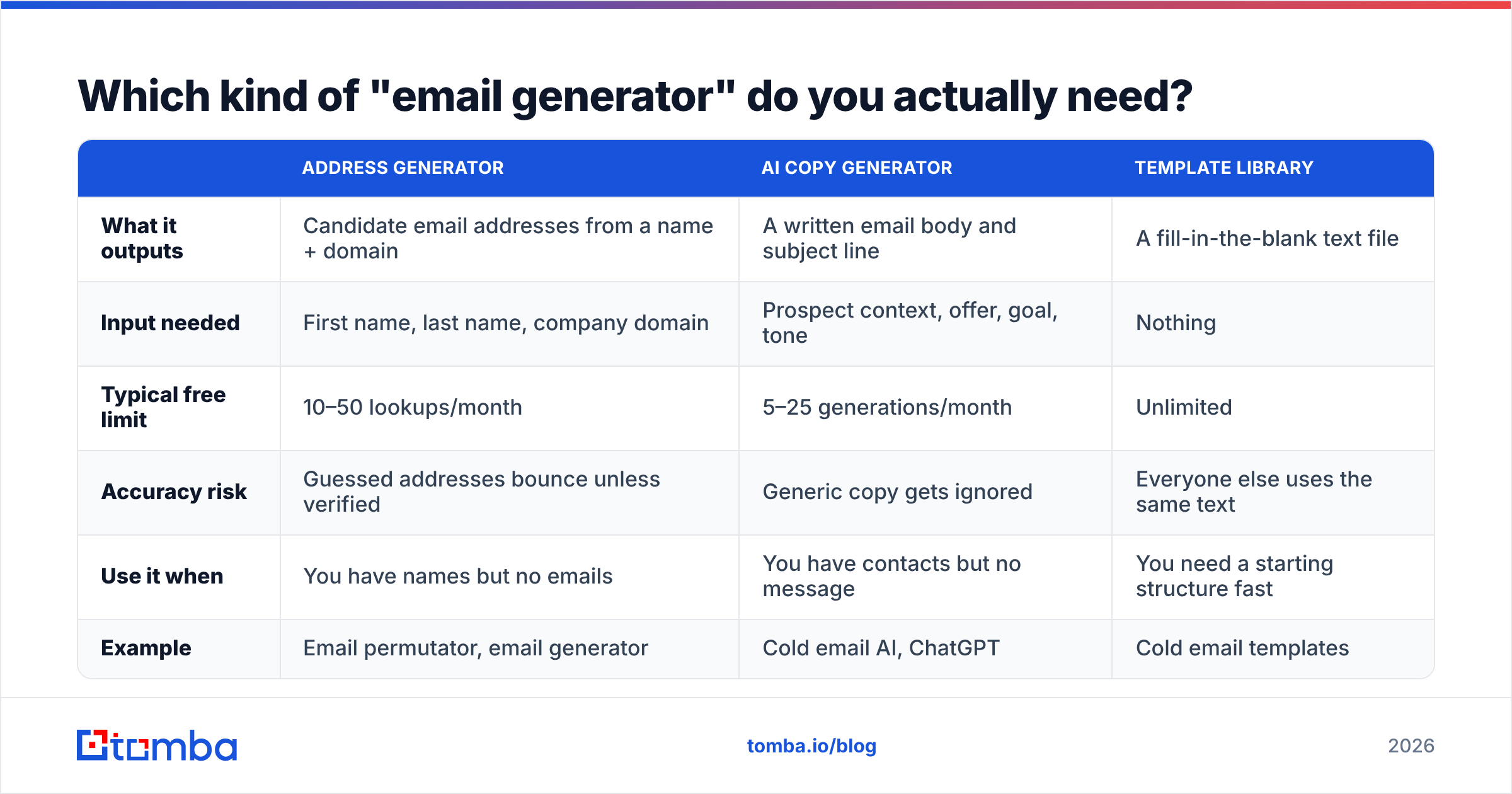
This is the most common mistake in this search. Three different product categories share the phrase, and they solve unrelated problems.
| Address generator | AI copy generator | Template library | |
|---|---|---|---|
| What it outputs | Candidate email addresses from a name + domain | A written email body and subject line | A fill-in-the-blank text file |
| Input needed | First name, last name, company domain | Prospect context, offer, goal, tone | Nothing |
| Typical free limit | 10–50 lookups/month | 5–25 generations/month | Unlimited |
| Accuracy risk | Guessed addresses bounce unless verified | Generic copy gets ignored | Everyone else uses the same text |
| Use it when | You have names but no emails | You have contacts but no message | You need a starting structure fast |
| Example | Email permutator, email generator | Cold email AI, ChatGPT | Cold email templates |
If you searched this term while staring at a spreadsheet of names with no email column, you want the first column. If you are staring at a list of verified contacts and a blank compose window, you want the second. Most people running outbound need both, in that order.
One hard rule for the first column: a generated address is a hypothesis, not a contact. Permutators produce 8–20 plausible combinations per person. Sending to all of them is how you get a 40% bounce rate and a burned domain. Run the candidates through an email verifier and keep only what resolves.
How do the free AI email generators compare in 2026?#
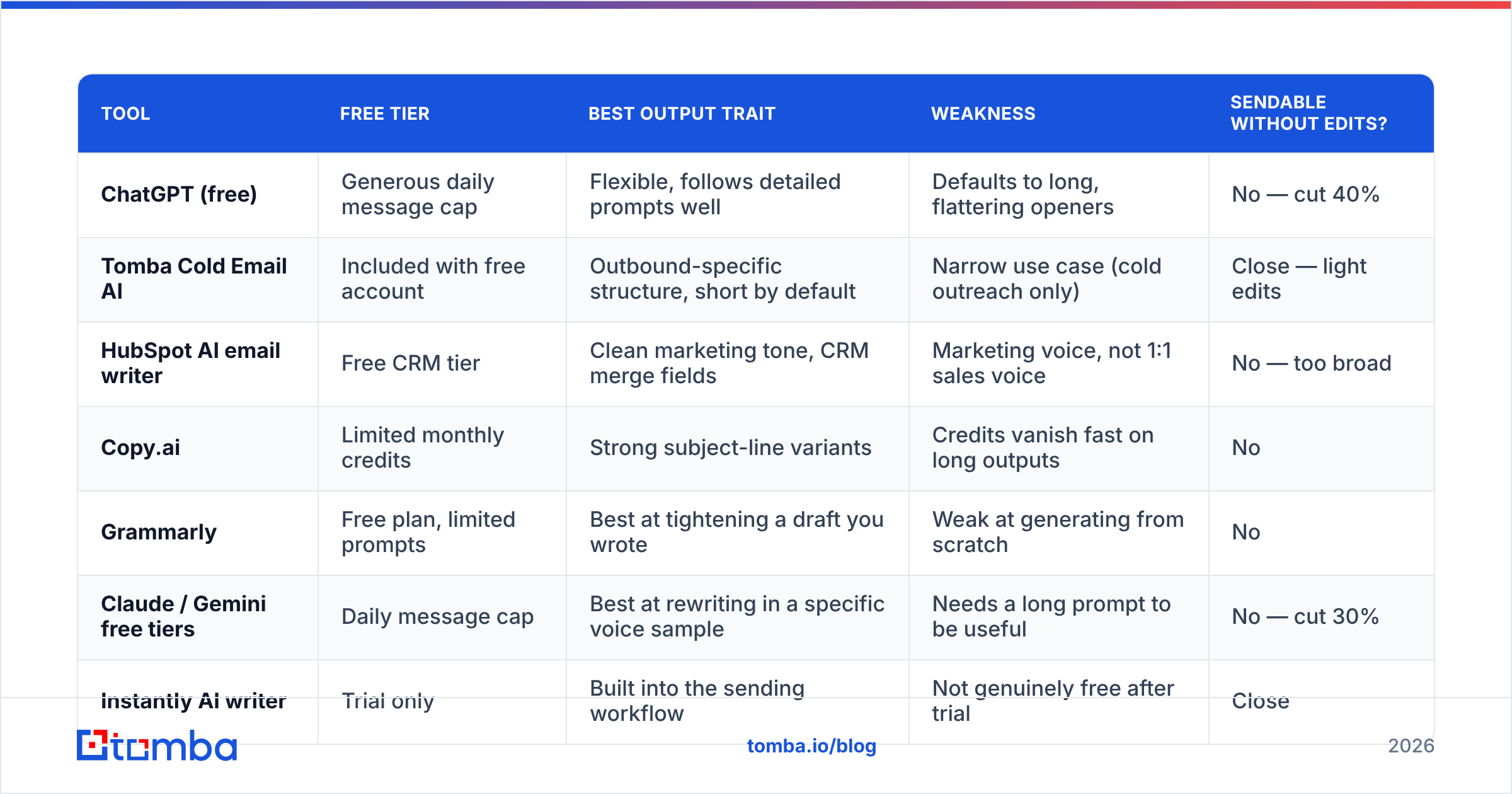
Tested on the same brief: a 90-word cold email to a Head of RevOps at a 200-person SaaS company, offering a data-quality audit, with one clear ask. Scoring is subjective but consistent — same brief, same reviewer, same rubric (specificity, length discipline, subject line quality, spam-trigger density).
| Tool | Free tier | Best output trait | Weakness | Sendable without edits? |
|---|---|---|---|---|
| ChatGPT (free) | Generous daily message cap | Flexible, follows detailed prompts well | Defaults to long, flattering openers | No — cut 40% |
| Tomba Cold Email AI | Included with free account | Outbound-specific structure, short by default | Narrow use case (cold outreach only) | Close — light edits |
| HubSpot AI email writer | Free CRM tier | Clean marketing tone, CRM merge fields | Marketing voice, not 1:1 sales voice | No — too broad |
| Copy.ai | Limited monthly credits | Strong subject-line variants | Credits vanish fast on long outputs | No |
| Grammarly | Free plan, limited prompts | Best at tightening a draft you wrote | Weak at generating from scratch | No |
| Claude / Gemini free tiers | Daily message cap | Best at rewriting in a specific voice sample | Needs a long prompt to be useful | No — cut 30% |
| Instantly AI writer | Trial only | Built into the sending workflow | Not genuinely free after trial | Close |
| Lavender | Free scoring tier | Scores your draft, teaches you why | Coaching tool, not a generator | N/A |
| Subject line generator | Free, unlimited | Fast subject-line iteration | Subject lines only | N/A |
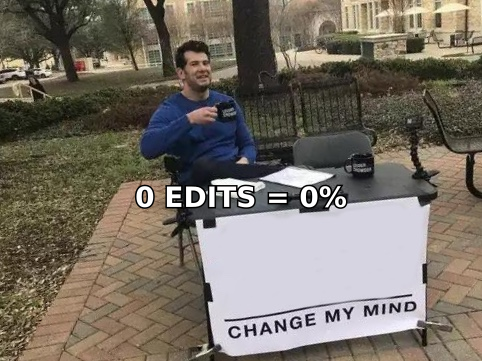
The honest summary: no free tool produced a draft I would send unedited to a named prospect. Two produced drafts that were 80% of the way there. The gap is always the same — the model does not know anything true and specific about the recipient, so it fills the space with plausible filler.
What do you actually get on a free tier?#
Free tiers narrowed sharply between 2024 and 2026 as inference costs got passed through. Expect one of four patterns:
- Credit-capped — a fixed number of generations per month (5–25 is typical). Long outputs eat credits faster than short ones, which quietly punishes exactly the use case you signed up for.
- Model-downgraded — unlimited-ish usage, but on the vendor's cheapest model. Output is noticeably flatter: more adverbs, weaker specificity, worse instruction-following on length limits.
- Feature-gated — generation is free, but exporting, saving to CRM, or bulk mode requires a paid seat. Fine if you write one email at a time; useless at 200 prospects.
- Trial-in-disguise — 7 or 14 days labeled "free," full feature access, card required. Perfectly legitimate, but do not build a workflow on it.
Before you commit, check the vendor's own pricing page rather than a roundup — including Tomba pricing, where the free tier includes 25 searches per month and paid plans start at $49/mo. Roundups (this one included) go stale within a quarter.
Do AI-generated emails still get replies in 2026?#
Yes — but the baseline moved. When recipients see hundreds of AI-shaped emails a week, the shape itself became a negative signal.
Four patterns that now read as machine-written to an experienced buyer:
- The flattery opener. "I was really impressed by your recent work at [Company]" with nothing specific after it. If you cannot name the thing, delete the sentence.
- The rule of three. "Faster, cheaper, and more reliable." Models love triads. Humans writing quickly rarely produce them.
- Perfect symmetry. Three paragraphs of near-identical length, each with one sentence of setup and one of payoff.
- Hedged confidence. "This could potentially help streamline your workflow." Real senders make claims or ask questions; they rarely do both at half strength.
The fix is not to write worse English. It is to feed the generator one true, checkable fact about the recipient — a job posting, a product launch, a conference talk, a stack change — and instruct it to build the first line around that fact only. Specificity is the only thing the model cannot invent for you, and it is the only thing that moves response rate.
How do you prompt a free AI email generator properly?#
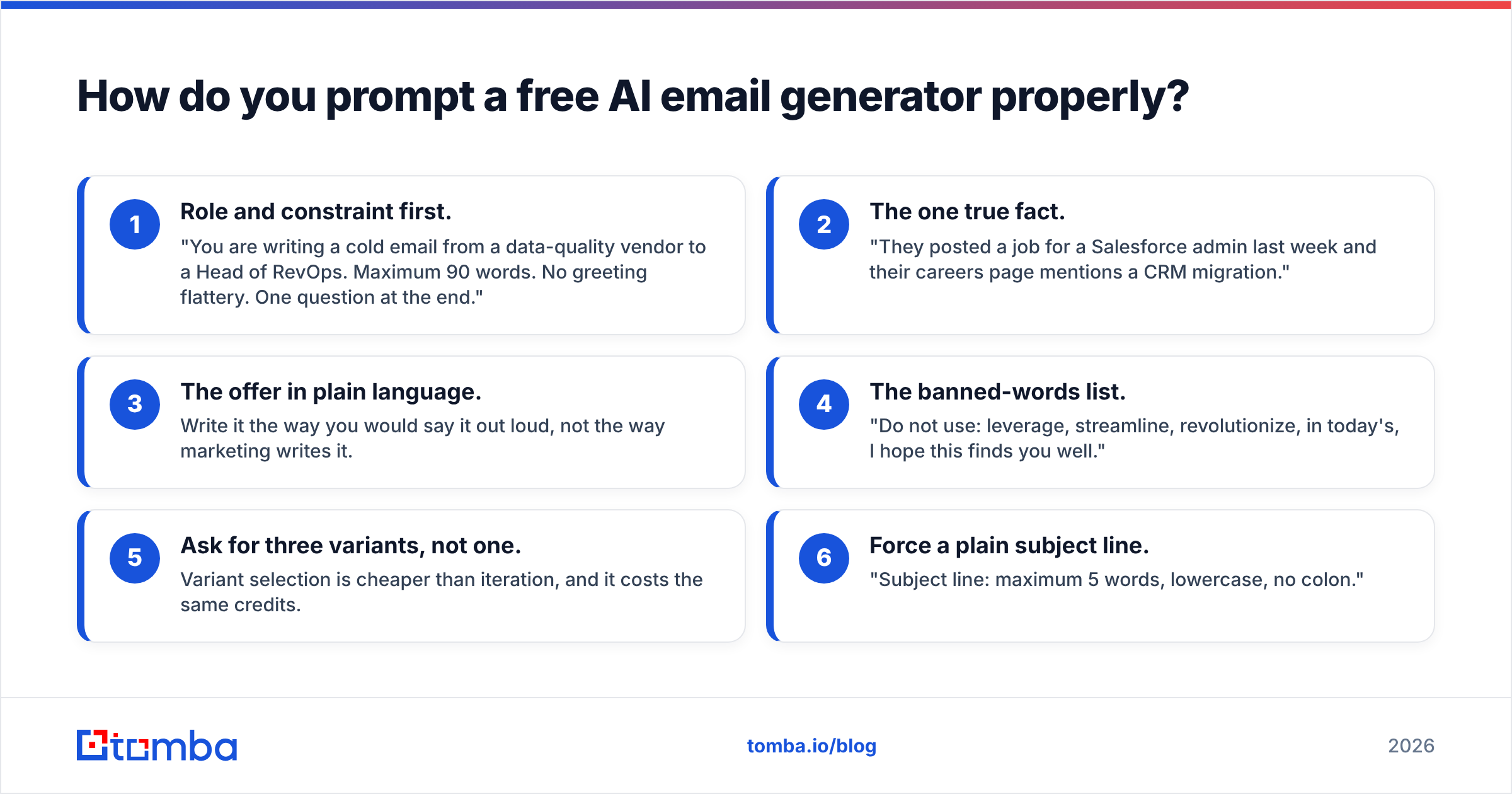
Most people give the tool three words and judge it on the result. Give it a brief instead. Here is the structure that produced the best output across every tool tested:
- Role and constraint first. "You are writing a cold email from a data-quality vendor to a Head of RevOps. Maximum 90 words. No greeting flattery. One question at the end."
- The one true fact. "They posted a job for a Salesforce admin last week and their careers page mentions a CRM migration."
- The offer in plain language. Write it the way you would say it out loud, not the way marketing writes it.
- The banned-words list. "Do not use: leverage, streamline, revolutionize, in today's, I hope this finds you well."
- Ask for three variants, not one. Variant selection is cheaper than iteration, and it costs the same credits.
- Force a plain subject line. "Subject line: maximum 5 words, lowercase, no colon."
That brief takes 60 seconds to write and it is reusable — swap only step 2 per prospect. If you want to sanity-check the result before it enters a sequence, run it through a spam checker and a subject line tester. Both are free and both catch things a language model will not flag about itself.
Vendor documentation is worth reading here too. OpenAI's ChatGPT product docs explain the free-tier model differences, Grammarly documents what its free plan covers, and HubSpot publishes the merge-field behavior of its free AI writer.
Where do free AI email generators actually break?#
Three failure modes, in order of how expensive they are:
1. They cannot validate a claim. If you tell the model your product cuts onboarding time by 60%, it will repeat that number confidently in every email. If the number is wrong, it is now wrong 400 times, in writing, to your ICP.
2. They have no idea whether the address exists. This is the expensive one. A perfectly written email to a dead mailbox is worse than no email — it is a bounce, and bounces compound into a sender reputation problem that takes weeks to unwind. AI copy quality has zero influence on email deliverability; list quality has almost all of it.
3. They flatten your voice. Run 200 emails through the same free generator and every one sounds like the same mid-tier consultant. Buyers who receive two of them notice. Rotate frameworks, or write the first and last sentence yourself.
There is a fourth, softer failure: over-reliance. If you never write the email yourself, you never learn what your buyers respond to, and you lose the ability to judge whether the AI draft is any good. Generate, then edit — the editing is where the learning lives.
How do you combine AI copy with verified contact data?#
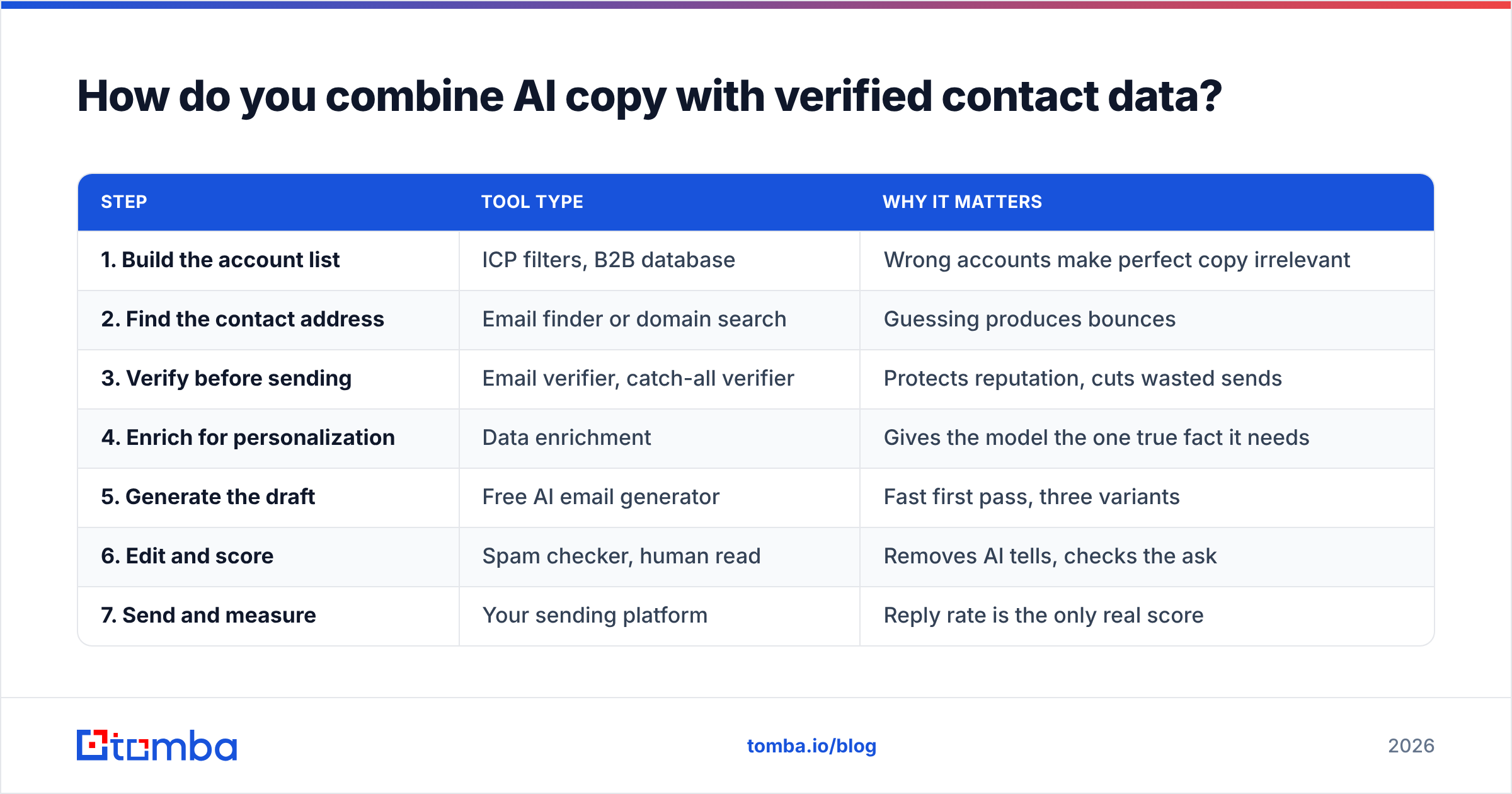
The workflow that survives contact with a real sending domain looks like this:
| Step | Tool type | Why it matters |
|---|---|---|
| 1. Build the account list | ICP filters, B2B database | Wrong accounts make perfect copy irrelevant |
| 2. Find the contact address | Email finder or domain search | Guessing produces bounces |
| 3. Verify before sending | Email verifier, catch-all verifier | Protects reputation, cuts wasted sends |
| 4. Enrich for personalization | Data enrichment | Gives the model the one true fact it needs |
| 5. Generate the draft | Free AI email generator | Fast first pass, three variants |
| 6. Edit and score | Spam checker, human read | Removes AI tells, checks the ask |
| 7. Send and measure | Your sending platform | Reply rate is the only real score |
Notice that the AI generator sits at step 5 of 7. It is a productivity multiplier on a process that already works, not a replacement for the four steps in front of it. Teams that skip steps 2–4 and lean entirely on step 5 are the reason "AI outbound doesn't work" became a common opinion.
If you run this at volume, both ends of the workflow can be automated: the Tomba API handles finding and verification programmatically, and bulk email finder jobs handle list-sized batches without manual lookups.
Which free AI email generator should you pick?#
- You write a handful of high-value emails per week. Use a general LLM free tier with the six-step brief above. Full control, no credit anxiety, best output quality when prompted properly.
- You run cold outbound at volume. Use a purpose-built cold email generator for structure, then edit. The narrower system prompt keeps drafts short, which is the single highest-leverage variable in cold email.
- You already have a draft. Skip generation entirely. A grammar and tone tool will improve your own writing faster than a generator will replace it.
- You need addresses, not copy. You are in the wrong category — go to an email finder and a verifier, and come back for copy afterwards.
- You have zero budget and 500 prospects. Free tiers will not carry you. Prioritize spending on verified data over spending on copy tools; bad copy to a good list still books meetings, and perfect copy to a bad list books nothing.
One last framing. The value of a free AI email generator is that it removes the blank page, which is the slowest part of writing. It does not remove the research, and it does not remove the judgment. Treat the output as a 70% draft written by a fast, confident intern who has never met your buyer, and you will get real leverage out of it.
Ready to give your AI drafts something true to say? Copy is only as good as the contact behind it. Tomba Email Finder locates verified professional email addresses by name, domain, or company — so the email your AI generator wrote actually lands in a real inbox instead of a bounce log. Start on the free tier with 25 searches per month, and scale to Starter at $49/mo when your list outgrows it.
Related guides#
Ready to find emails that actually work?
Join 150,000+ professionals who stopped guessing and started sending. Free credits on signup — no credit card required.
Get the Tomba newsletter
Practical outbound tactics and product updates — once every two weeks.
About the author