Free Blacklist Checker Tools in 2026: What They Miss
Most free blacklist checkers scan 80+ RBLs and tell you nothing useful. Here's which lists actually block your mail, how the free tools compare, and the delisting playbook that works.
TL;DR
- A free blacklist checker queries dozens of DNS-based blocklists (DNSBLs/RBLs) for your sending IP or domain. Most return 80+ results — but only about six of those lists meaningfully affect whether your cold email lands.
- Spamhaus (ZEN, SBL, CSS, DBL), Barracuda, Invaluement, and Proofpoint are the listings worth panicking about. SORBS-style aggregators and UCEPROTECT Level 2/3 are usually noise.
- Free tools differ mostly in what they check (IP vs domain vs both), how they present results, and whether they bundle SPF/DKIM/DMARC diagnostics alongside the RBL scan.
- Getting delisted is the easy part. Staying delisted means fixing the input: bounce rate, spam-trap hits, and the quality of the list you imported.
- A blacklist check is a smoke alarm, not a fire department. Pair it with verification and sane volume ramping or you'll be back on the list in three weeks.
What is a free blacklist checker, and what does it actually check?#
A blacklist checker is a lookup tool. You give it an IP address or a domain; it fires DNS queries at a list of blocklist providers and reports which ones return a "listed" response.
Think of it like running a name through several different bouncer clipboards at once. Each club (blocklist operator) keeps its own list, built from its own evidence — spam traps, honeypots, user complaint feeds, malware telemetry, or plain reputation modelling. A checker doesn't judge anything itself. It just reads the clipboards back to you.
The mechanics are simple enough that the underlying data is genuinely free: a DNS-based blackhole list is queried by reversing the IP octets and appending the list's zone. Your mail server does this on every inbound connection. A web-based checker just does it for you, in bulk, with a nicer UI.
That's why "free" is normal here rather than suspicious. What you pay for in commercial deliverability suites is monitoring — continuous checks, alerting, historical trend lines, and seed-list inbox placement testing. The lookup itself costs a fraction of a cent.
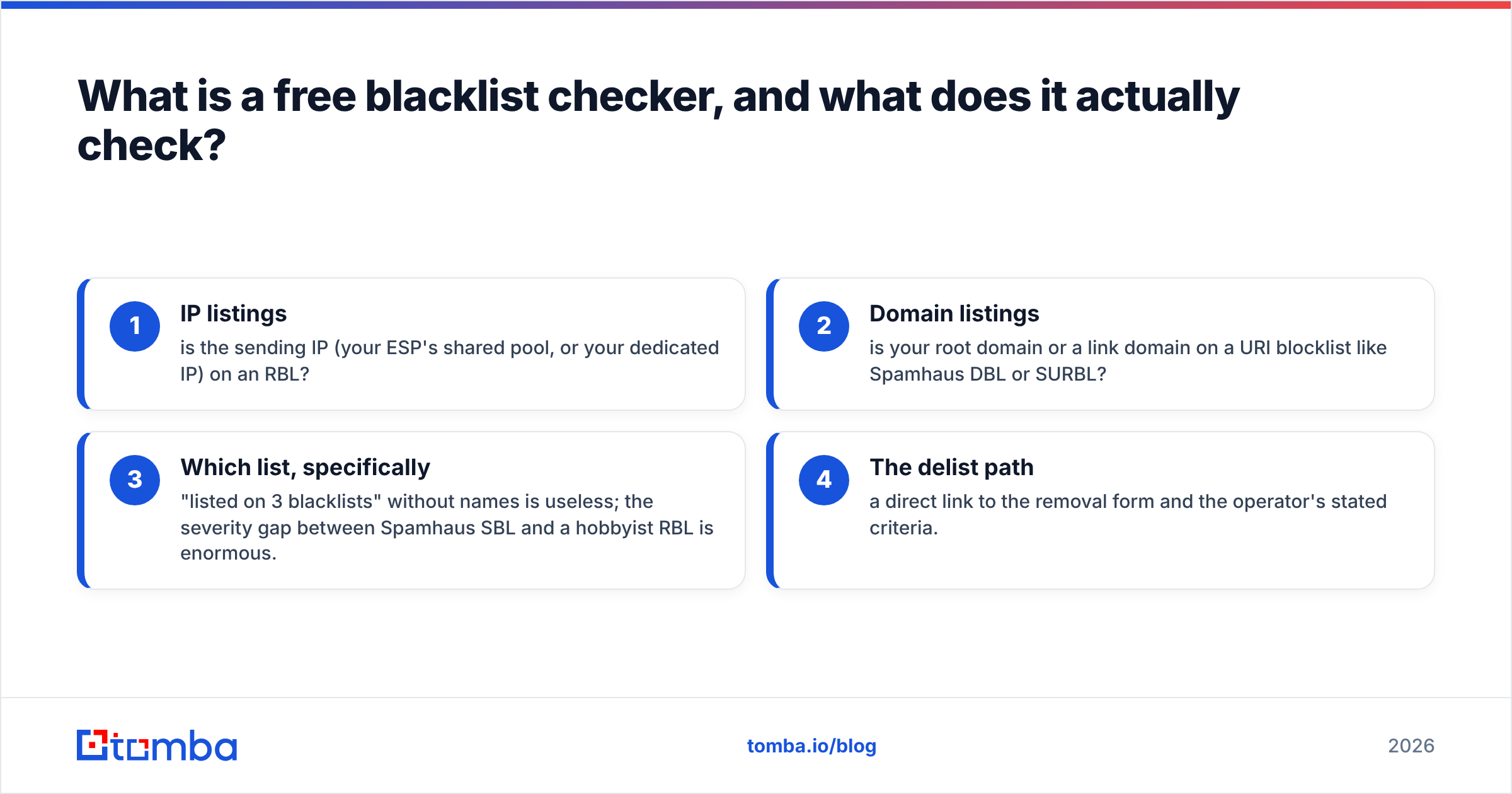
The four things any blacklist checker should tell you:
- IP listings — is the sending IP (your ESP's shared pool, or your dedicated IP) on an RBL?
- Domain listings — is your root domain or a link domain on a URI blocklist like Spamhaus DBL or SURBL?
- Which list, specifically — "listed on 3 blacklists" without names is useless; the severity gap between Spamhaus SBL and a hobbyist RBL is enormous.
- The delist path — a direct link to the removal form and the operator's stated criteria.
Anything beyond that — SPF/DKIM alignment checks, MX validation, reverse DNS, TLS support — is a bonus, and a valuable one, because in practice a blacklist listing is rarely an isolated event.
Which blacklists actually affect inbox placement?#
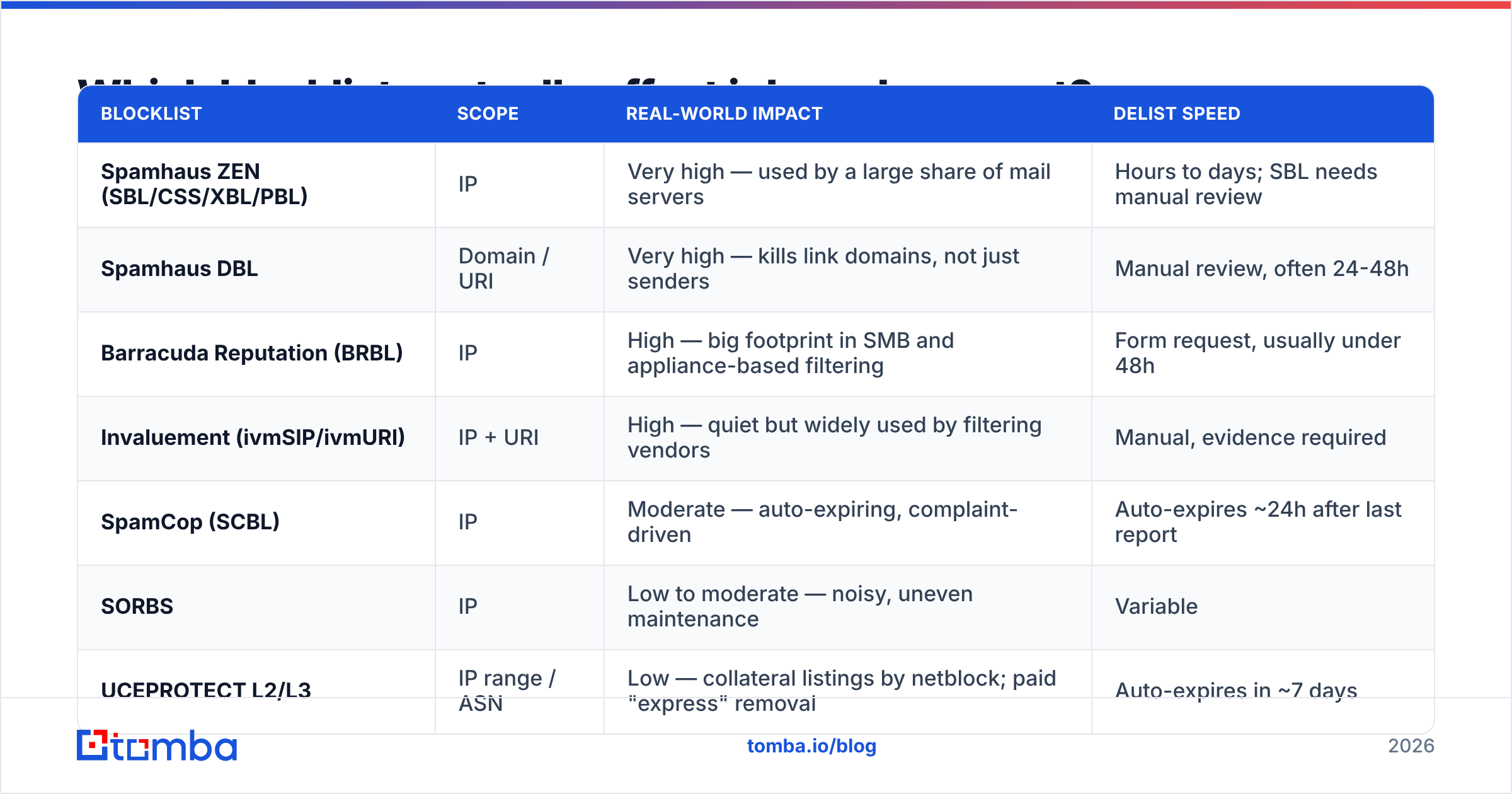
Here's the part most guides skip. A typical free scan checks 80 to 100 zones. Fewer than ten of them influence what Gmail, Outlook, or a corporate Proofpoint gateway does with your message.
| Blocklist | Scope | Real-world impact | Delist speed |
|---|---|---|---|
| Spamhaus ZEN (SBL/CSS/XBL/PBL) | IP | Very high — used by a large share of mail servers | Hours to days; SBL needs manual review |
| Spamhaus DBL | Domain / URI | Very high — kills link domains, not just senders | Manual review, often 24-48h |
| Barracuda Reputation (BRBL) | IP | High — big footprint in SMB and appliance-based filtering | Form request, usually under 48h |
| Invaluement (ivmSIP/ivmURI) | IP + URI | High — quiet but widely used by filtering vendors | Manual, evidence required |
| SpamCop (SCBL) | IP | Moderate — auto-expiring, complaint-driven | Auto-expires ~24h after last report |
| SORBS | IP | Low to moderate — noisy, uneven maintenance | Variable |
| UCEPROTECT L2/L3 | IP range / ASN | Low — collateral listings by netblock; paid "express" removal | Auto-expires in ~7 days |
Two rules follow from that table.
Rule one: triage by list, not by count. A dashboard screaming "LISTED ON 4 BLACKLISTS" where all four are UCEPROTECT Level 3, SORBS DUHL, and two zones nobody has queried since 2014 is a non-event. One quiet Spamhaus CSS listing is a real outage.
Rule two: UCEPROTECT Level 2 and 3 list by netblock and ASN, not by you. If you're on a shared IP pool at a large ESP, you can be listed because a neighbour three /24s away sent junk. Paying for express delisting solves nothing — the listing auto-expires, and the model is widely criticised for exactly this reason. Spamhaus itself publishes clear listing criteria and a free removal path, which is a decent benchmark for judging any operator's legitimacy.
How do the free blacklist checkers compare in 2026?#
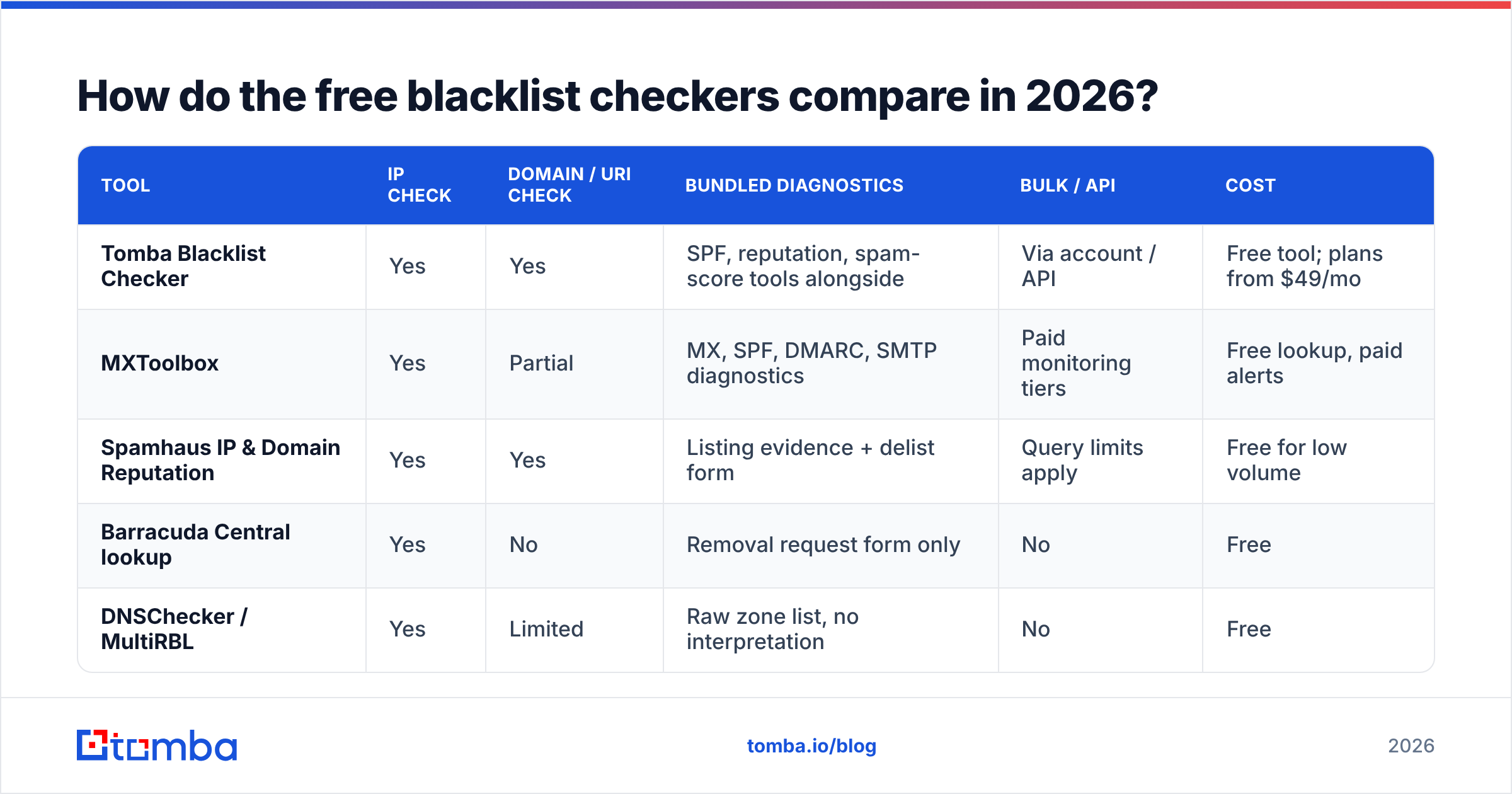
The differences come down to coverage breadth, whether domain-level lists are included, and what diagnostics ride along.
| Tool | IP check | Domain / URI check | Bundled diagnostics | Bulk / API | Cost |
|---|---|---|---|---|---|
| Tomba Blacklist Checker | Yes | Yes | SPF, reputation, spam-score tools alongside | Via account / API | Free tool; plans from $49/mo |
| MXToolbox | Yes | Partial | MX, SPF, DMARC, SMTP diagnostics | Paid monitoring tiers | Free lookup, paid alerts |
| Spamhaus IP & Domain Reputation | Yes | Yes | Listing evidence + delist form | Query limits apply | Free for low volume |
| Barracuda Central lookup | Yes | No | Removal request form only | No | Free |
| DNSChecker / MultiRBL | Yes | Limited | Raw zone list, no interpretation | No | Free |
A few honest notes on that grid.
MXToolbox is the default for a reason. Its blacklist lookup is the most-linked tool in the category, and the surrounding diagnostics (MX record check, SMTP test, DMARC lookup) are genuinely useful when you're triaging a delivery incident at 2am. The catch is that ongoing monitoring and alerting sit behind a paid plan, and its domain-level coverage is thinner than its IP coverage.
Spamhaus's own lookup is the authoritative source for Spamhaus listings. If a third-party checker says you're on SBL, verify at the source before you act — cached DNS results and stale mirrors produce false positives more often than people assume.
MultiRBL-style tools maximise zone count. That sounds better than it is. Scanning 200 zones mostly generates listings you should ignore, and the tools rarely rank severity.
Tomba's blacklist checker sits in the same free tier as its other diagnostics — the sender reputation checker, SPF checker, and spam score checker. The practical benefit isn't a longer zone list; it's that the four checks live in one place, so you can go from "am I listed?" to "is my authentication broken?" to "does my copy trip filters?" without hopping between four vendors.
If you want vendor-neutral corroboration on which deliverability suites do what, G2's email deliverability category is a reasonable starting point — read the reviews for the monitoring features, not the star ratings.
Why did you get blacklisted in the first place?#
A listing is a symptom. Treat it as a diagnosis and you'll re-list within a month.
The realistic causes, roughly in order of how often they bite cold-email senders:
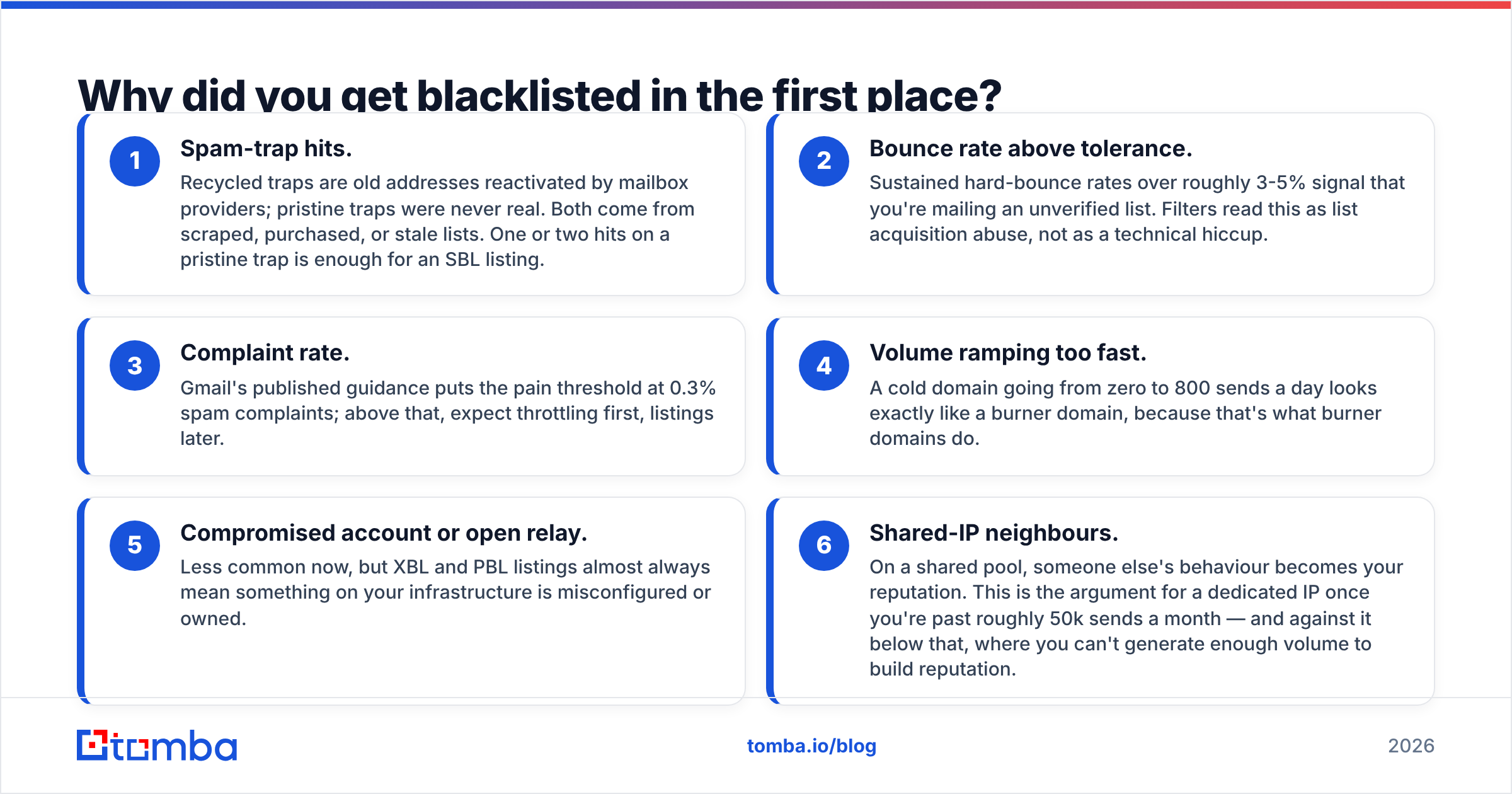
- Spam-trap hits. Recycled traps are old addresses reactivated by mailbox providers; pristine traps were never real. Both come from scraped, purchased, or stale lists. One or two hits on a pristine trap is enough for an SBL listing.
- Bounce rate above tolerance. Sustained hard-bounce rates over roughly 3-5% signal that you're mailing an unverified list. Filters read this as list acquisition abuse, not as a technical hiccup.
- Complaint rate. Gmail's published guidance puts the pain threshold at 0.3% spam complaints; above that, expect throttling first, listings later.
- Volume ramping too fast. A cold domain going from zero to 800 sends a day looks exactly like a burner domain, because that's what burner domains do.
- Compromised account or open relay. Less common now, but XBL and PBL listings almost always mean something on your infrastructure is misconfigured or owned.
- Shared-IP neighbours. On a shared pool, someone else's behaviour becomes your reputation. This is the argument for a dedicated IP once you're past roughly 50k sends a month — and against it below that, where you can't generate enough volume to build reputation.
Cause one and cause two share a root: list quality. Which is why a blacklist checker without an email verifier upstream is a bit like a fire alarm in a house where you keep leaving the stove on.
How do you get delisted, and how long does it take?#
The removal process varies by operator, but the shape is consistent: fix the cause, submit the request, wait, verify.
Step 1 — Confirm the listing at the source. Run the check at the operator's own lookup, not a third-party mirror. Note the listing zone and the returned reason code.
Step 2 — Stop sending from the affected IP or domain immediately. Continuing to send while listed reinforces the evidence and can escalate a soft listing to a hard one. Pause the campaign, don't just slow it.
Step 3 — Fix the actual cause before requesting removal. Purge unverified addresses. Rotate credentials if XBL suggests compromise. Fix your SPF record, DKIM signing, and DMARC policy — misaligned authentication doesn't cause listings directly, but it removes every benefit of the doubt.
Step 4 — Submit the removal request with specifics. "Please delist, we're legitimate" gets ignored. "We identified 1,400 unverified addresses imported on 12 March, purged them, and now verify at import" gets read. Operators are volunteers or small teams processing thousands of requests; evidence moves you to the front.
Step 5 — Ramp back slowly. Restart at 20-30% of your prior volume, targeting your most engaged segment first, and climb over two to three weeks.
Typical timelines: SpamCop expires automatically about 24 hours after the last complaint. Barracuda usually processes requests within a business day. Spamhaus SBL and CSS involve manual review and can take one to three days — longer if you've been listed before. UCEPROTECT Level 1 expires in about a week on its own; ignore the express-delisting upsell.
One caution: repeated listing-and-delisting cycles on the same IP build a pattern operators can see. Two removals in six months is recoverable. Five is a signal to change your sourcing, not your IP.
Can a free blacklist checker replace deliverability monitoring?#
No — and it's worth being precise about the gap.
A blacklist checker tells you about public listings. The majority of filtering decisions at Gmail, Outlook, and Yahoo are made by internal reputation systems that publish nothing. You can be perfectly clean on every RBL and still land in Promotions or Spam because your engagement signals are weak.
What a free checker gives you:
- Point-in-time listing status for an IP or domain
- A delisting starting point when something breaks
- A cheap weekly hygiene ritual that costs five minutes
What it doesn't give you:
- Continuous monitoring with alerts — you only know when you check
- Inbox placement data — listed-clean is not the same as inboxing
- Provider-side reputation — for that you need Google Postmaster Tools and Microsoft SNDS, both free and both more predictive of Gmail/Outlook outcomes than any RBL scan
- Root-cause diagnostics — the checker sees the listing, not the 2,000 dead addresses that caused it
A workable weekly routine: check Postmaster Tools for domain reputation and spam rate, run a blacklist check on your sending IP and domain, glance at bounce rate by segment, and verify any list before it enters a sequence. Fifteen minutes, and it catches almost everything before it becomes a listing.
What should you actually do differently on Monday?#
Concretely: move the check upstream. Blacklist checking is reactive by nature — the damage is already done by the time a listing appears. The controllable variable is what enters your sequences.
That means verifying every address at import rather than at send time, capping new-domain volume until engagement data exists, segmenting by engagement so your best-performing recipients carry the reputation load, and treating any bounce rate above 3% as a stop-work condition rather than a rounding error.
None of that is exciting. All of it is cheaper than a Spamhaus review queue.
If the root cause of your listings is list quality — and for cold outbound it usually is — fix the source rather than the symptom. Tomba's Email Finder returns verified professional addresses with a confidence score attached, so the contacts entering your sequence have been checked before they cost you a bounce. The free tier covers 25 searches a month if you want to test the accuracy against a sample of your current list; paid plans start at $49/mo, with full details on the Tomba pricing page. Run your worst-performing segment through it, compare the bounce rates, and let the numbers decide.
Related guides#
Ready to find emails that actually work?
Join 150,000+ professionals who stopped guessing and started sending. Free credits on signup — no credit card required.
Get the Tomba newsletter
Practical outbound tactics and product updates — once every two weeks.
About the author