Free Bulk Email Address Checker: What Actually Works in 2026
Free bulk email verification sounds great until you hit the 100-email cap or the catch-all wall. Here's what free checkers really do, where they break, and when paying beats scraping by.
TL;DR
- A free bulk email address checker will clean a few hundred addresses per month at best. Every credible provider caps free tiers between 25 and 250 verifications — the "unlimited free bulk checker" results on page one are almost all syntax validators, not SMTP checkers.
- Syntax and MX checks are genuinely free because they cost nothing to run. SMTP handshake, catch-all detection, and role/disposable classification cost money, so they sit behind paid tiers.
- Catch-all domains are where free tools quietly fail. They return "valid" or "unknown" for addresses that will bounce, and roughly 15-20% of B2B domains are catch-all.
- The practical play: use free tiers to test accuracy on a 50-address sample, then pay for the volume run. Bounces cost more than credits.
- If your list came from scraping, verification is a bandage. Sourcing verified addresses at the point of discovery is cheaper than cleaning garbage afterward.
What is a free bulk email address checker?#
A free bulk email address checker is a tool that takes a list of email addresses — usually a CSV upload or a pasted block of text — and tells you which ones are likely to accept mail, without charging you for the run.
Think of it like a bouncer checking IDs at the door. Some bouncers just glance at whether the card has the right shape and a hologram (syntax check). Some scan the barcode against a database (MX and domain checks). And some actually call the DMV to confirm the record exists (SMTP verification). All three are called "checking IDs." Only the third one catches a good fake.
That distinction is the entire story of free vs. paid verification. Here is what runs at each layer:
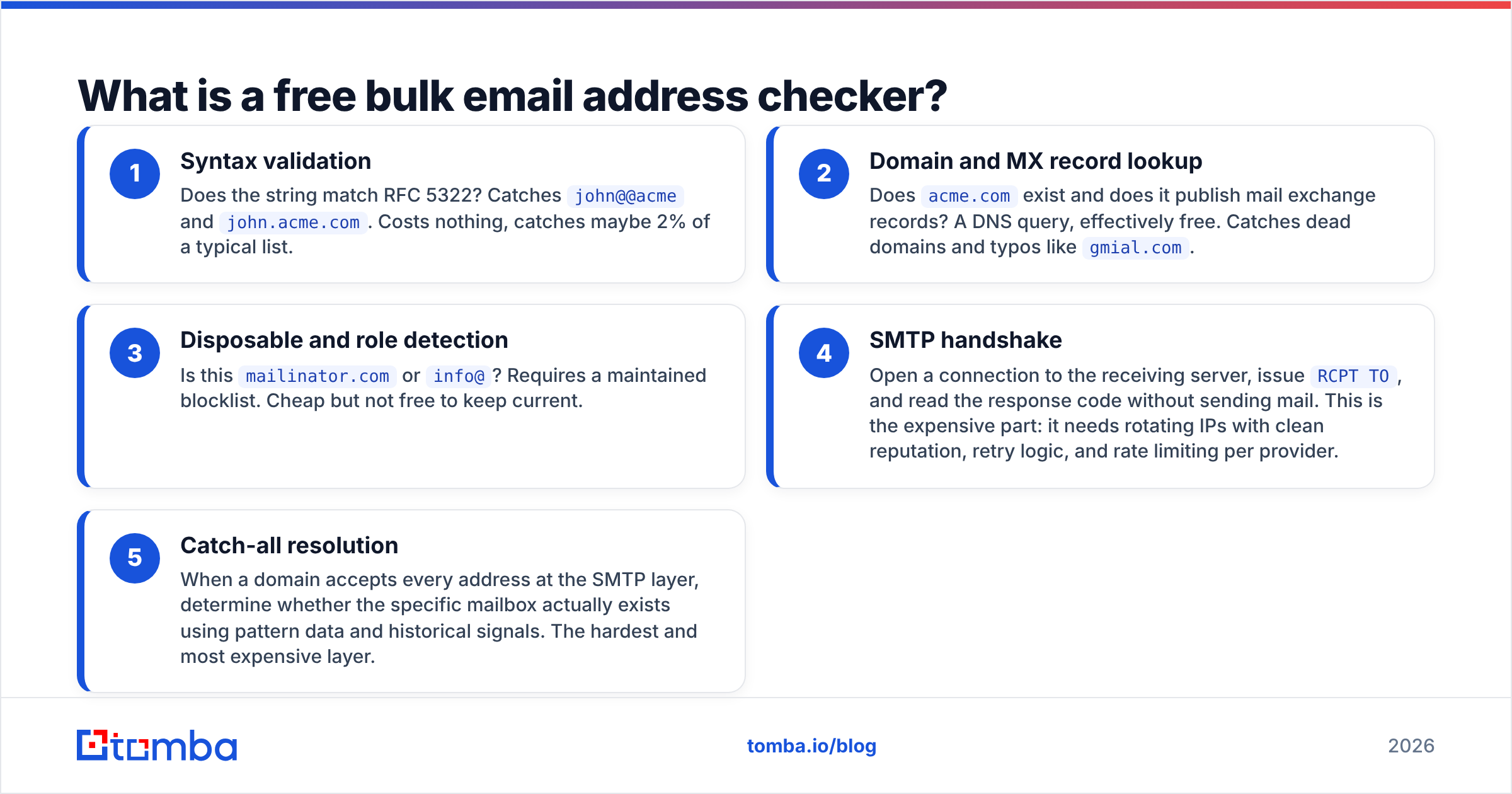
- Syntax validation — Does the string match RFC 5322? Catches
john@@acmeandjohn.acme.com. Costs nothing, catches maybe 2% of a typical list. - Domain and MX record lookup — Does
acme.comexist and does it publish mail exchange records? A DNS query, effectively free. Catches dead domains and typos likegmial.com. - Disposable and role detection — Is this
mailinator.comorinfo@? Requires a maintained blocklist. Cheap but not free to keep current. - SMTP handshake — Open a connection to the receiving server, issue
RCPT TO, and read the response code without sending mail. This is the expensive part: it needs rotating IPs with clean reputation, retry logic, and rate limiting per provider. - Catch-all resolution — When a domain accepts every address at the SMTP layer, determine whether the specific mailbox actually exists using pattern data and historical signals. The hardest and most expensive layer.
Free tools reliably do steps 1 and 2. Most do step 3. Very few do step 4 at any volume, and step 5 is almost universally paid.

How much does "free" actually get you in 2026?#
Not much, and the numbers are worth memorizing before you plan a campaign around them.
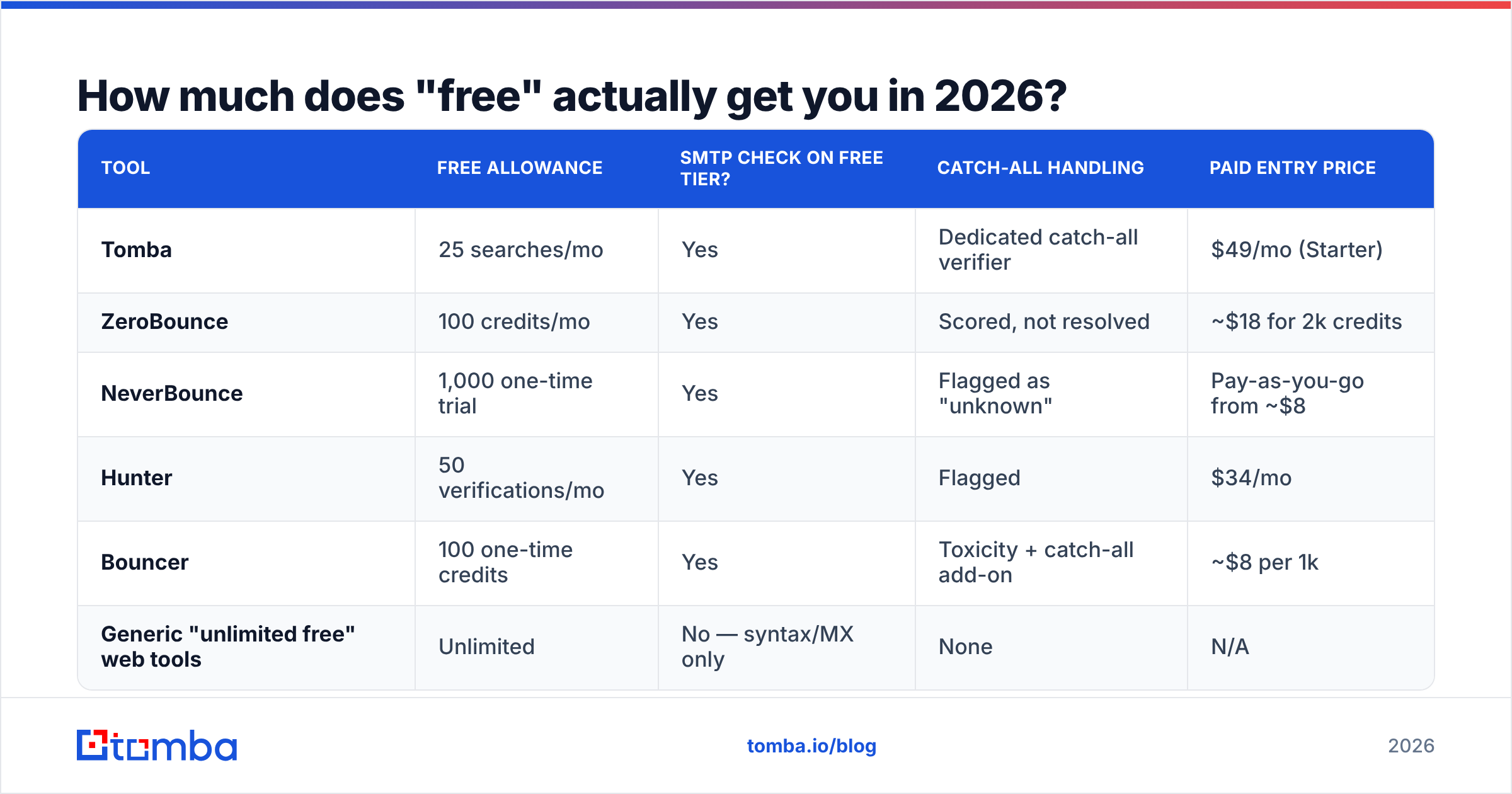
| Tool | Free allowance | SMTP check on free tier? | Catch-all handling | Paid entry price |
|---|---|---|---|---|
| Tomba | 25 searches/mo | Yes | Dedicated catch-all verifier | $49/mo (Starter) |
| ZeroBounce | 100 credits/mo | Yes | Scored, not resolved | ~$18 for 2k credits |
| NeverBounce | 1,000 one-time trial | Yes | Flagged as "unknown" | Pay-as-you-go from ~$8 |
| Hunter | 50 verifications/mo | Yes | Flagged | $34/mo |
| Bouncer | 100 one-time credits | Yes | Toxicity + catch-all add-on | ~$8 per 1k |
| Generic "unlimited free" web tools | Unlimited | No — syntax/MX only | None | N/A |
Pricing shifts; check each vendor's page before you budget. The pattern does not shift: anyone offering unlimited free bulk verification is running regex, not SMTP. Regex tells you an address is well-formed. It tells you nothing about whether a human reads it.
Run the math on a 5,000-address list. At 100 free credits per month across three different free tiers, you'd need roughly 17 months to verify it. Meanwhile the list decays — industry estimates put B2B database decay somewhere around 22-30% per year as people change jobs. Your list rots faster than free credits accumulate.
Which addresses do free checkers get wrong?#
Three categories, and they are the three that hurt most.
Catch-all domains. A catch-all (or "accept-all") server returns a 250 OK for every recipient, real or not. About one in six B2B domains runs this way, and it's more common at enterprises with legacy Exchange setups. A free checker sees the 250 and reports "valid" or shrugs with "unknown." You send, and the message lands in a nowhere-bin — or bounces two days later when the internal routing gives up. A dedicated catch-all verifier uses pattern history and secondary signals to make an actual call instead of guessing.
Greylisted and rate-limited servers. Google Workspace and Microsoft 365 both throttle SMTP probes aggressively. A free tool running from a shared IP pool gets soft-blocked partway through your batch, and every address after the block returns "unknown." You interpret that as a data problem. It's a rate-limit problem.
Recently-departed employees. The mailbox still exists — forwarded to a manager, or kept alive for six months. SMTP says valid. Your email reaches a person who has zero authority to buy. Verification cannot fix this; only fresh sourcing can, which is why data source quality matters more than verification depth.
The uncomfortable conclusion: a clean verification report is not the same thing as a good list. Verification removes bounces. It does not add relevance.
Is a free bulk checker good enough for cold email?#
It depends entirely on your list size and your sending infrastructure's tolerance for bounces.
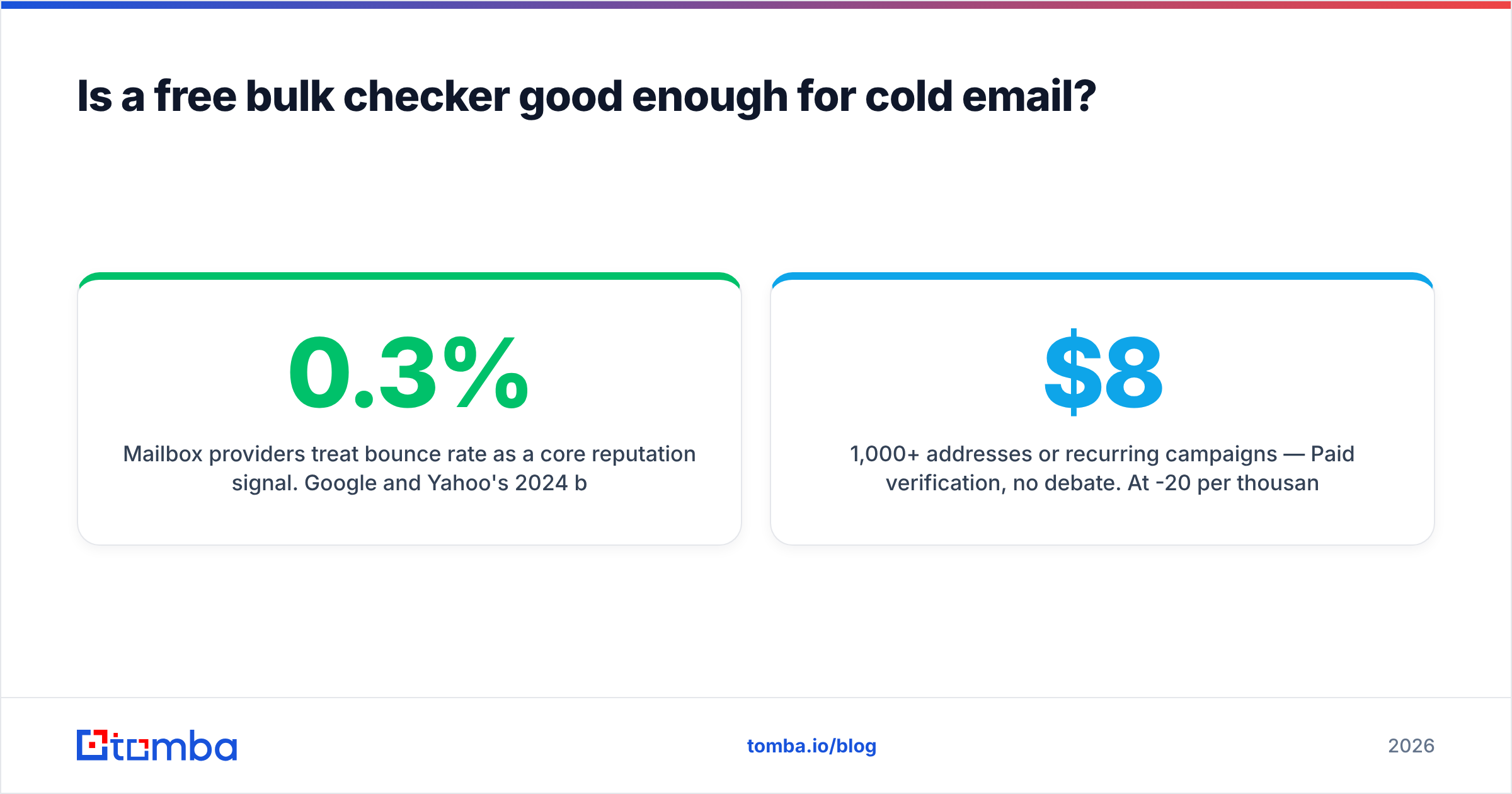
Mailbox providers treat bounce rate as a core reputation signal. Google and Yahoo's 2024 bulk-sender requirements set a hard spam-complaint threshold of 0.3%, and while neither publishes an official bounce ceiling, the operational consensus among deliverability practitioners is to stay under 2% — under 1% if you're on a new domain. Cross that repeatedly and your sender reputation degrades, inbox placement drops, and no amount of clever subject-line work brings it back quickly.
Here's the decision framework:
- Under 100 addresses, one-time send — Free tier is fine. Use one provider's free credits, accept the catch-all ambiguity, and send.
- 100 to 1,000 addresses, occasional sends — Free tiers as a sample test only. Verify 50 addresses on two providers, compare their verdicts against each other, then buy credits from whichever disagreed less with reality.
- 1,000+ addresses or recurring campaigns — Paid verification, no debate. At $8-20 per thousand, verification costs less than one wasted hour of an SDR's time, and far less than a burned sending domain.
- Any volume on a warming domain — Paid, plus manual review. New domains have zero reputation buffer. One bad batch sets warmup back weeks.
If you're at the second or third tier, running a bulk verify pass against your CSV before it ever touches your sequencer is the cheapest insurance in the stack.
What should you check before trusting any verification result?#
Test the tool before you trust it. This takes twenty minutes and saves entire campaigns.
Build a control list of 50 addresses where you already know the answer:
- 10 known-good addresses — your own team, addresses you've had replies from in the last 30 days.
- 10 known-dead addresses — people who left companies you tracked, addresses that bounced in the past.
- 10 catch-all domain addresses — mix real mailboxes with obviously fake ones (
zzqq@theirdomain.com) at the same domain. - 10 role addresses —
info@,sales@,support@. These are valid but usually worthless for outbound. - 10 free-provider addresses — Gmail, Outlook, Yahoo. Test whether the tool handles consumer domains at all.
Run that list through every candidate. The catch-all block is the revealing one: a tool that marks zzqq@theirdomain.com as "valid" is telling you it does not resolve catch-alls, whatever the marketing page says. A tool that marks everything at that domain "unknown" is at least honest. A tool that correctly splits real from fake at a catch-all domain is worth paying for.
Also check the response format. You want per-address status codes, not just a filtered download — you need to know why an address was dropped, so you can decide whether "unknown" means discard or means try once.

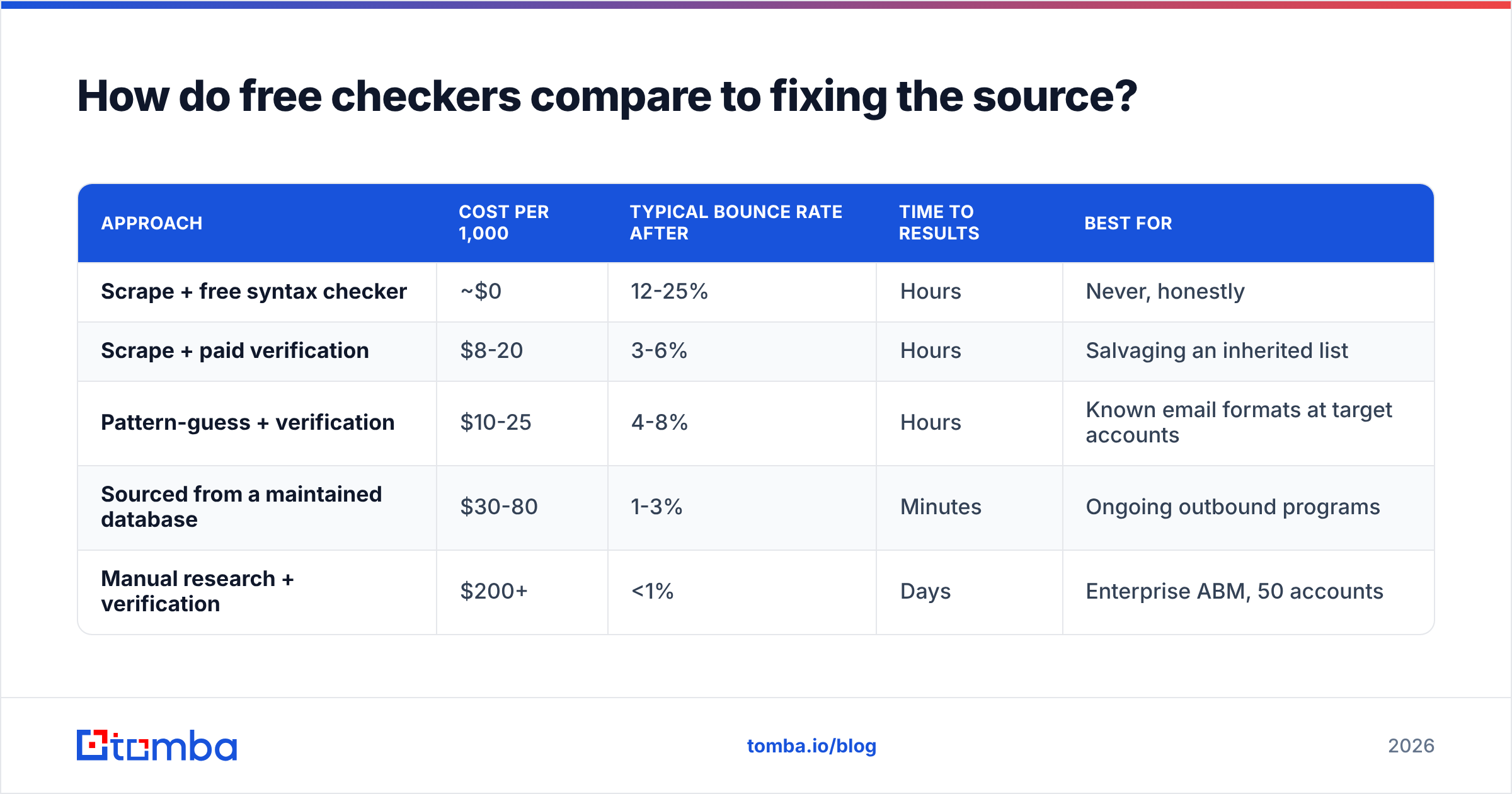
How do free checkers compare to fixing the source?#
Verification is downstream cleanup. The upstream question is where the addresses came from.
| Approach | Cost per 1,000 | Typical bounce rate after | Time to results | Best for |
|---|---|---|---|---|
| Scrape + free syntax checker | ~$0 | 12-25% | Hours | Never, honestly |
| Scrape + paid verification | $8-20 | 3-6% | Hours | Salvaging an inherited list |
| Pattern-guess + verification | $10-25 | 4-8% | Hours | Known email formats at target accounts |
| Sourced from a maintained database | $30-80 | 1-3% | Minutes | Ongoing outbound programs |
| Manual research + verification | $200+ | <1% | Days | Enterprise ABM, 50 accounts |
The middle rows are where most teams live, and where the free-tool question usually comes up. But note the pattern: the bounce rate you end up with correlates more strongly with sourcing method than with verification spend. Verifying a scraped list gets you to 3-6%. Sourcing properly gets you to 1-3% before you verify anything.
Tools like BookYourData built their model around this — sell pre-verified contacts rather than raw records plus a cleanup step, and the bounce guarantee becomes the product. It's a legitimately different philosophy from the find-then-verify workflow, and for teams buying lists rather than building them, it removes the verification step from the equation entirely.
If you're building rather than buying, the equivalent move is to verify at discovery time. When you use a domain search to pull contacts at a target company, the addresses arrive with confidence scores attached — you're not exporting a raw list and then paying a second vendor to grade it. Same for individual lookups through an email finder, where the verification step is folded into the result rather than bolted on afterward.
What's the honest verdict on free bulk email checkers?#
Free bulk email address checkers are useful for exactly two jobs: evaluating a vendor before you pay them, and cleaning small one-off lists. They are not a strategy.
The math is brutally simple. A thousand-address list costs $8-20 to verify properly. The same list, unverified, produces 100-250 bounces, and each bounce is a small deposit into a reputation account you cannot easily refill. Deliverability practitioners at Validity and elsewhere have documented for years that reputation recovery takes weeks of reduced sending — you are trading $15 for a multi-week throttle.
Three rules worth adopting:
- Never treat "unknown" as "valid." Segment unknowns into a separate low-priority batch, or drop them. On a warming domain, drop them.
- Re-verify anything older than 90 days. A verification result is a snapshot, not a permanent property. Job changes invalidate addresses silently.
- Verify on the way in, not on the way out. Cleaning at import is cheap. Cleaning after a bounce report is expensive and late.
And be skeptical of any free tool that returns results suspiciously fast. A genuine SMTP verification pass on 1,000 addresses takes minutes, because it involves real network round-trips with rate limits. Instant results mean regex. Reviews on G2 are a reasonable sanity check here — look specifically for reviewers mentioning catch-all accuracy, not overall star ratings.
Where should you start?#
Start with a 50-address control test on whatever free tier you can get, then commit to one paid workflow rather than juggling three free ones.
If you're finding contacts and verifying them as separate steps with separate vendors, you're paying twice and introducing a handoff where data quality degrades. Tomba's Email Finder returns addresses with confidence scoring built in, backed by the same verification stack that powers the standalone email verifier — including catch-all resolution rather than a shrug. The free tier gives you 25 searches a month to run your control test, and Tomba pricing starts at $49/mo when you're ready to run real volume.
Test it against your known-good and known-dead lists first. That's the only benchmark that matters.
Related guides#
Ready to find emails that actually work?
Join 150,000+ professionals who stopped guessing and started sending. Free credits on signup — no credit card required.
Get the Tomba newsletter
Practical outbound tactics and product updates — once every two weeks.
About the author