Free Email Address Finder: 9 Tools Tested and Ranked (2026)
Every email finder advertises a free plan. Almost none of them tell you how few credits you get, how stale the data is, or what breaks at scale. Here is the honest breakdown for 2026.
TL;DR
- A free email address finder is fine for low-volume, high-intent prospecting — roughly 10 to 50 lookups a month. It is not a lead-gen engine.
- The real differences between free tiers are credit count, whether verification is bundled, and whether the API is included. Most people only check the first one.
- Accuracy on free plans is usually identical to paid plans at the same vendor. You are buying volume, not quality. That is good news.
- Free credits that reset monthly (Tomba, Hunter) beat one-time trial credits (RocketReach, many enrichment tools) if you prospect continuously.
- The hidden cost of "free" is unverified output. An unverified free result that bounces costs you more in sender reputation than the credit saved.
What is a free email address finder?#
A free email address finder is a tool that takes what you already know about a person — usually a full name plus a company domain, or a LinkedIn profile URL — and returns their work email address without charging you. It does this by combining two things: a database of previously observed addresses, and a pattern engine that predicts the likely format for that domain (first.last@, flast@, f.last@, and so on).
The "free" part is almost always a metered tier of a paid product, not a genuinely free service. Vendors give away a small monthly allowance because email finding has strong retention: once your prospecting workflow depends on a tool, switching is annoying. That is the trade. You get real data at zero cost, and the vendor gets a shot at converting you when your volume grows.
Two things worth knowing up front. First, free tiers rarely restrict data quality — you get the same index a paying customer gets, just less of it. Second, free tiers frequently restrict verification, which is the part that actually protects your deliverability. That asymmetry is where most people get burned.
How does an email address finder actually work?#
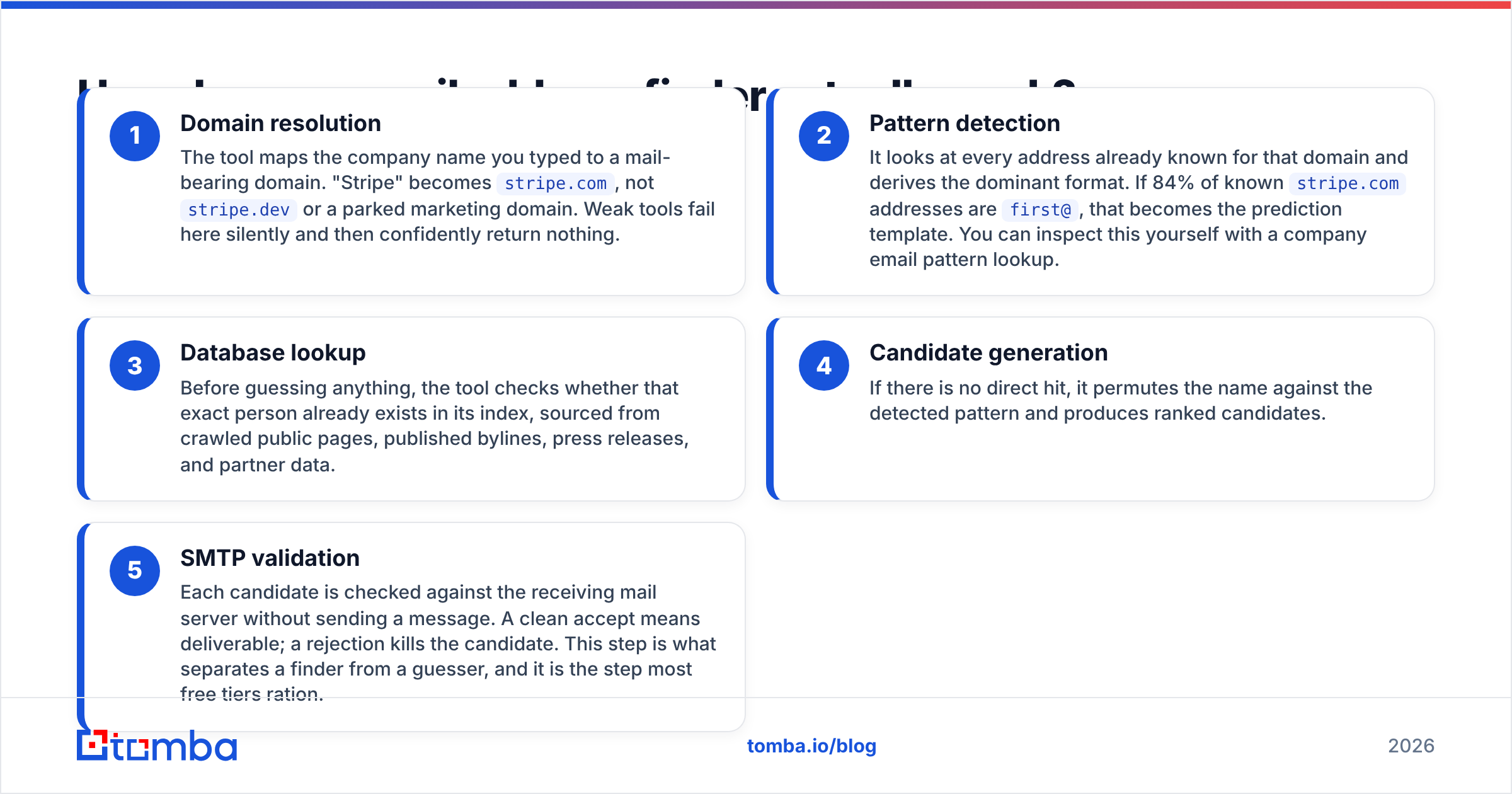
Understanding the mechanics tells you exactly where free plans cut corners. Every serious email finder runs some version of this five-step chain:
- Domain resolution — The tool maps the company name you typed to a mail-bearing domain. "Stripe" becomes
stripe.com, notstripe.devor a parked marketing domain. Weak tools fail here silently and then confidently return nothing. - Pattern detection — It looks at every address already known for that domain and derives the dominant format. If 84% of known
stripe.comaddresses arefirst@, that becomes the prediction template. You can inspect this yourself with a company email pattern lookup. - Database lookup — Before guessing anything, the tool checks whether that exact person already exists in its index, sourced from crawled public pages, published bylines, press releases, and partner data.
- Candidate generation — If there is no direct hit, it permutes the name against the detected pattern and produces ranked candidates.
- SMTP validation — Each candidate is checked against the receiving mail server without sending a message. A clean accept means deliverable; a rejection kills the candidate. This step is what separates a finder from a guesser, and it is the step most free tiers ration.
Steps 1 through 4 are cheap. Step 5 costs the vendor money and risk, which is why "50 free searches" and "50 free verifications" are usually two separate budgets.

How accurate are free email finders in 2026?#
Accuracy on a free plan is generally the same as accuracy on a paid plan from the same vendor — but accuracy varies enormously between vendors, and it varies by segment.
Three patterns hold consistently:
Enterprise domains resolve better than SMB domains. A 4,000-person company has thousands of public addresses feeding the pattern engine. A 12-person agency using Google Workspace with a first-name-only convention may have zero public addresses, so every tool is guessing from the same void.
Catch-all domains inflate reported accuracy. A catch-all server accepts mail for every address at the domain, including nonsense. Tools that count "SMTP accepted" as "valid" will report high accuracy on catch-all domains while quietly handing you addresses that route to nowhere. Roughly a fifth of B2B domains are catch-all, so this matters. A dedicated catch-all verifier is the only honest way to handle these, and almost no free tier includes one.
Coverage and accuracy are different metrics. A tool that returns an answer for 90% of your list at 70% accuracy is worse than one that returns 60% at 96% accuracy — the second one is telling you when it does not know. Treat a low hit rate with high confidence scoring as a feature, not a failure.

When you evaluate any free email address finder, build a 50-row control list from people whose addresses you already know — past customers, ex-colleagues, contacts in your CRM. Run it through each candidate tool. Measure hit rate, exact-match rate, and false positives separately. It takes an hour and it will contradict at least one vendor's marketing page.
Which free email address finder should you use?#
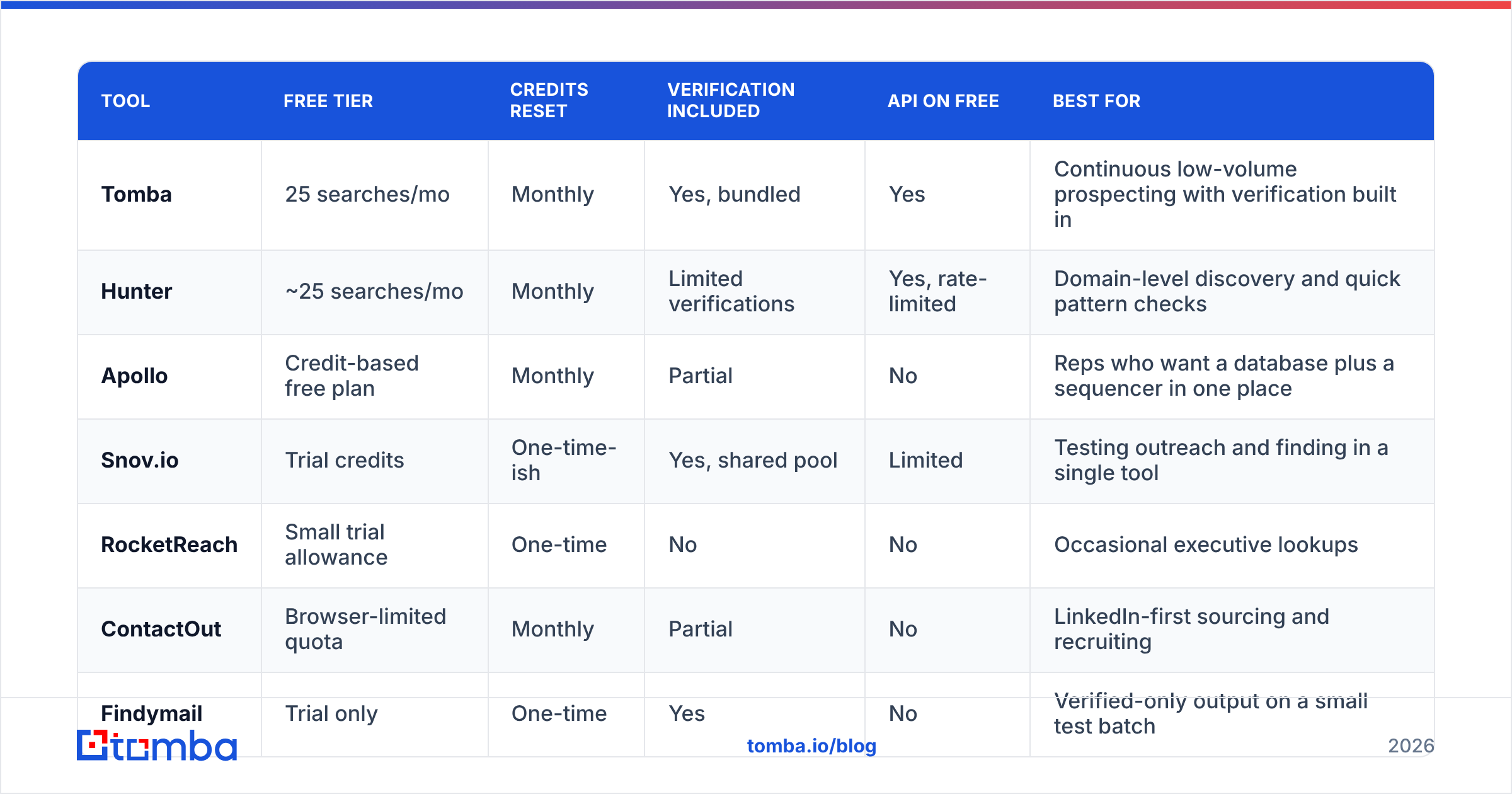
Here is the practical comparison. Free-tier allowances change often, so treat these as directional and confirm on each vendor's own pricing page before you commit a workflow to one.
| Tool | Free tier | Credits reset | Verification included | API on free | Best for |
|---|---|---|---|---|---|
| Tomba | 25 searches/mo | Monthly | Yes, bundled | Yes | Continuous low-volume prospecting with verification built in |
| Hunter | ~25 searches/mo | Monthly | Limited verifications | Yes, rate-limited | Domain-level discovery and quick pattern checks |
| Apollo | Credit-based free plan | Monthly | Partial | No | Reps who want a database plus a sequencer in one place |
| Snov.io | Trial credits | One-time-ish | Yes, shared pool | Limited | Testing outreach and finding in a single tool |
| RocketReach | Small trial allowance | One-time | No | No | Occasional executive lookups |
| ContactOut | Browser-limited quota | Monthly | Partial | No | LinkedIn-first sourcing and recruiting |
| Findymail | Trial only | One-time | Yes | No | Verified-only output on a small test batch |
| BookYourData | Free sample records | One-time | Yes | No | Sampling a prebuilt list before buying by the record |
| Free permutators | Unlimited guesses | N/A | No | N/A | Generating candidates you then verify elsewhere |

A few notes on reading that table honestly.
Monthly reset beats one-time trial for anyone prospecting continuously. Twenty-five searches a month, forever, is 300 a year. A one-time 50-credit trial is 50, total, and then a paywall. If your outbound is a steady trickle rather than a burst, the smaller recurring allowance is worth more.
Bundled verification is the sleeper feature. A finder that returns unverified addresses is handing you a liability. If the free tier does not verify, you will end up pairing it with a separate email verifier anyway, which means two free tiers, two quotas, and two failure points.
API access on a free tier is rare and valuable if you are technical. It lets you prototype an enrichment flow against real data before you commit budget. The Tomba API is available on the free plan, which is unusual at this price point — most vendors gate the API behind their first paid tier.
BookYourData deserves a mention as a different shape of solution. Rather than finding one address at a time, it sells verified records from a prebuilt B2B database with a pay-per-record model and free sample records to evaluate quality. If your problem is "I need 2,000 verified contacts in a defined ICP" rather than "I need this one person's email," a database purchase is often the more sensible route than grinding through free finder credits.
What does a free email finder actually cost you?#
Nothing in dollars. Potentially quite a lot in deliverability.
Every hard bounce is a signal to receiving mail servers that you do not know who you are emailing. Google and Microsoft both weight bounce rate heavily in inbox placement decisions, and their published guidance for bulk senders makes the spam-complaint and authentication thresholds explicit — Google's sender guidelines are the reference document here. Cross a bounce rate of about 3% on a cold list and you are not sending cold email anymore, you are sending to spam folders.
That is the real math on free tiers. If a free tool gives you 50 unverified addresses and 9 of them bounce, you have an 18% bounce rate on that batch. The credits were free. The three weeks of degraded sender reputation were not.
The rule that follows: never send to an unverified free-tier result. Either use a finder that verifies as part of the search, or push every result through a verification step before it touches your sequencer. A free email checker handles one-off cases; anything above a handful of contacts needs a proper verification pass.
How do you get the most out of a free plan?#
Free credits are a scarce resource. Spend them like one.
- Do the free work first. Domain, pattern, and public-page checks cost nothing. Run an email permutator and a pattern lookup before you burn a metered search. If the domain has an obvious
first.last@convention and the person's name is unambiguous, you may not need a credit at all — just a verification. - Batch by domain, not by person. Most tools charge per search. One domain search that returns 14 people at a company costs one credit; 14 individual person searches cost 14. If you are targeting accounts rather than individuals, domain search is dramatically more credit-efficient.
- Deduplicate before you search. Overlapping lists from LinkedIn exports, event attendee sheets, and your CRM are full of repeats. Running them through a deduplicate email list pass first can cut credit consumption by 15 to 30% on a messy list.
- Skip role addresses entirely.
info@,sales@, andsupport@are trivially guessable and almost never worth a credit. They also have terrible reply rates. - Stack complementary free tiers, carefully. Using one tool's free searches and another's free verifications is legitimate and works. Creating multiple accounts to farm credits violates every vendor's terms and gets your domain flagged. Do the first, not the second.
- Track your own hit rate. Log which domains fail. After 200 lookups you will know which segments your chosen tool is weak on, and you can route those to a different method rather than wasting credits on repeat failures.
Is a free email finder enough for real outbound?#
No, and the arithmetic is simple.
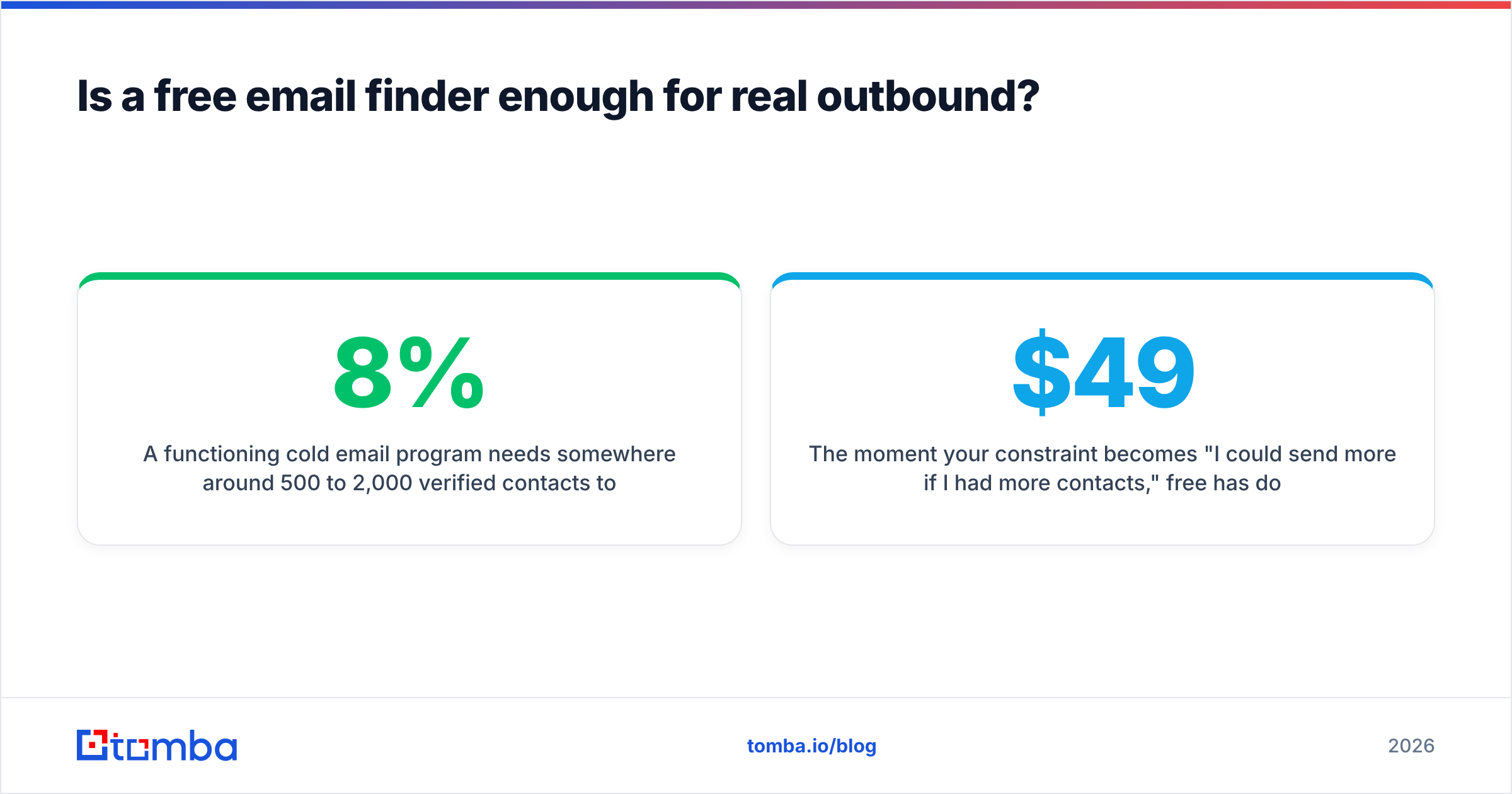
A functioning cold email program needs somewhere around 500 to 2,000 verified contacts per month to produce a predictable pipeline. Reply rates on well-targeted, well-written cold email land in the 3 to 8% range for most B2B categories, and only a fraction of those replies are positive. Work backward from a target of five qualified conversations a month and you need hundreds of contacts, not dozens.
Twenty-five free searches gets you nowhere near that. What free tiers are genuinely good for:
- Evaluating a vendor before paying. Run your control list, measure the real hit rate, then decide.
- High-intent, low-volume outreach. Ten dream accounts researched properly beats a thousand sprayed. If you are doing genuinely targeted account-based outreach, 25 quality lookups a month may be your entire requirement.
- Filling gaps in an existing list. You have 800 contacts from a partner and 40 are missing emails. Free tier handles that.
- Founder-led sales in month one. Before you have budget, before you have a process. Entirely reasonable.
The moment your constraint becomes "I could send more if I had more contacts," free has done its job and you should pay. At that point the question is which paid tier, and the honest answer depends on volume. Tomba's pricing starts at $49/mo for Starter, $99/mo for Growth, and $249/mo for Pro, with the free tier at 25 searches a month sitting underneath — which makes upgrading a continuous decision rather than a cliff. Compare that structure against alternatives on G2's email finder category before you commit, and weigh cost per verified contact rather than cost per credit. Those are very different numbers once you account for bounces.
What should you look for when comparing free tiers?#
Five questions, in order of how much they matter:
- Does it verify, or just guess? If the output has no confidence score and no SMTP check, it is a permutator with a nicer interface.
- Do credits reset monthly? One-time trials are marketing, not a free tier.
- What counts as a credit? Some vendors charge for searches that return nothing. That is a meaningful difference at low volume.
- Can you export? A free tier that shows you addresses on screen but blocks CSV export is designed to waste your time.
- Does the free plan reflect the paid product? If the free tier runs on a stale index and paid runs on live data, your evaluation is worthless.
Anything else — Chrome extension, Google Sheets add-on, CRM integrations — is a convenience layer. Useful, but do not let it decide the comparison. Data quality and honest verification are the only two things that survive contact with a real campaign.
Where should you start?#
Start free, measure honestly, upgrade when volume forces the issue.
If you want a free email address finder that includes verification rather than selling it back to you separately, Tomba's Email Finder gives you 25 searches a month on the free plan, with API access included and the same data index paying customers use. Build your 50-row control list, run it, and check the numbers yourself — that is the only benchmark that counts.
Related guides#
Ready to find emails that actually work?
Join 150,000+ professionals who stopped guessing and started sending. Free credits on signup — no credit card required.
Get the Tomba newsletter
Practical outbound tactics and product updates — once every two weeks.
About the author