Free Email Finder App: What Actually Works in 2026
Most free email finder apps hand you 25-50 credits and a hit rate nobody publishes. Here's what the free tiers actually give you, where they break, and how to run a real prospecting list without paying on day one.
TL;DR
- A free email finder app is a lead-generation tool that returns professional email addresses from a name, domain, or LinkedIn profile without asking for a card. Free tiers in 2026 land between 25 and 100 credits a month.
- Credits are not the number that matters. Whether the tool verifies what it finds, and whether a failed lookup burns a credit, decides how many usable emails you actually walk away with.
- Tomba's free plan gives 25 searches a month with verification included, plus browser extension, Sheets, and API access — the same pipeline paid users get, just metered.
- Free tiers are a sampling mechanism, not a growth plan. Past roughly 60-80 verified contacts a month, a $49/mo starter tier is cheaper than the hours you spend stitching free tools together.
- Never send to a free-tool export without running it through a verifier. Unverified scraped addresses are the fastest way to torch a new sending domain.
What is a free email finder app?#
A free email finder app takes something you already know — a full name plus a company domain, a company domain on its own, or a LinkedIn URL — and returns the professional email address attached to it. The free part means a metered allowance of lookups per month with no credit card required.
Think of it like a library card. You get real access to the whole collection, but you can only check out a few books at a time, and the rare-books room stays locked. The engine behind a free tier is usually the same engine paid customers use. What changes is the meter, the export format, and sometimes whether verification runs at all.
Under the hood, three mechanisms do the work:
- Pattern inference. The tool knows that acme.com uses
first.last@, because it has seen hundreds of acme.com addresses. It applies that pattern to your target's name. This is why a company email pattern lookup is often the first step. - Crawled and sourced records. Public web pages, press releases, GitHub commits, conference bios, author bylines. A domain search surfaces every address a provider has on file for a given company.
- SMTP-level verification. The tool opens a conversation with the recipient mail server and asks whether the mailbox exists, without sending anything. This is the step that separates a guess from a deliverable address.
A tool that does step 1 and skips step 3 is an email generator, not a finder. Both exist for free. Only one is safe to send to.
Which free email finder apps have real free tiers in 2026?#
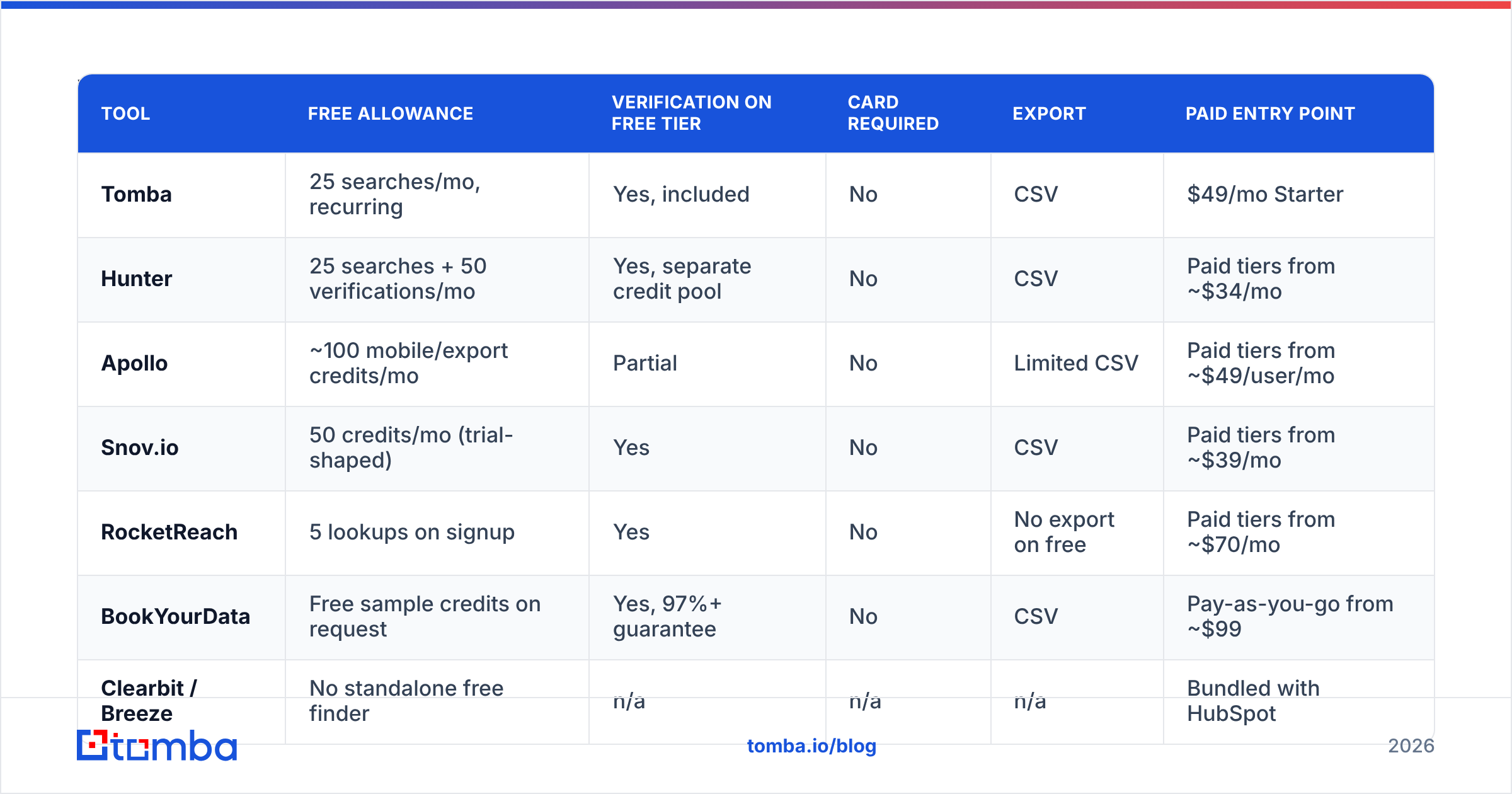
The word "free" covers three very different things: a permanently free tier, a time-limited trial, and a free browser extension that gates the export. Here's how the main options compare on what you get without paying.
| Tool | Free allowance | Verification on free tier | Card required | Export | Paid entry point |
|---|---|---|---|---|---|
| Tomba | 25 searches/mo, recurring | Yes, included | No | CSV | $49/mo Starter |
| Hunter | 25 searches + 50 verifications/mo | Yes, separate credit pool | No | CSV | Paid tiers from ~$34/mo |
| Apollo | ~100 mobile/export credits/mo | Partial | No | Limited CSV | Paid tiers from ~$49/user/mo |
| Snov.io | 50 credits/mo (trial-shaped) | Yes | No | CSV | Paid tiers from ~$39/mo |
| RocketReach | 5 lookups on signup | Yes | No | No export on free | Paid tiers from ~$70/mo |
| BookYourData | Free sample credits on request | Yes, 97%+ guarantee | No | CSV | Pay-as-you-go from ~$99 |
| Clearbit / Breeze | No standalone free finder | n/a | n/a | n/a | Bundled with HubSpot |
Two things stand out. First, "credits" mean different things per vendor — some charge you for a search that returns nothing, some don't. Second, the free tiers that include verification (Tomba, Snov.io, BookYourData) hand you a shorter but cleaner list than the ones that hand you volume and let you sort out the bounces yourself.
If you want a broader read on which providers hold up under real testing, G2's email finder category aggregates thousands of verified reviews and is a reasonable sanity check against vendor marketing.
How accurate are free email finder apps?#
Accuracy on a free tier is the same as accuracy on a paid tier from the same vendor — the database doesn't get worse because you're not paying. What changes is your ability to catch the inaccuracy, because free plans often ration verification separately from search.

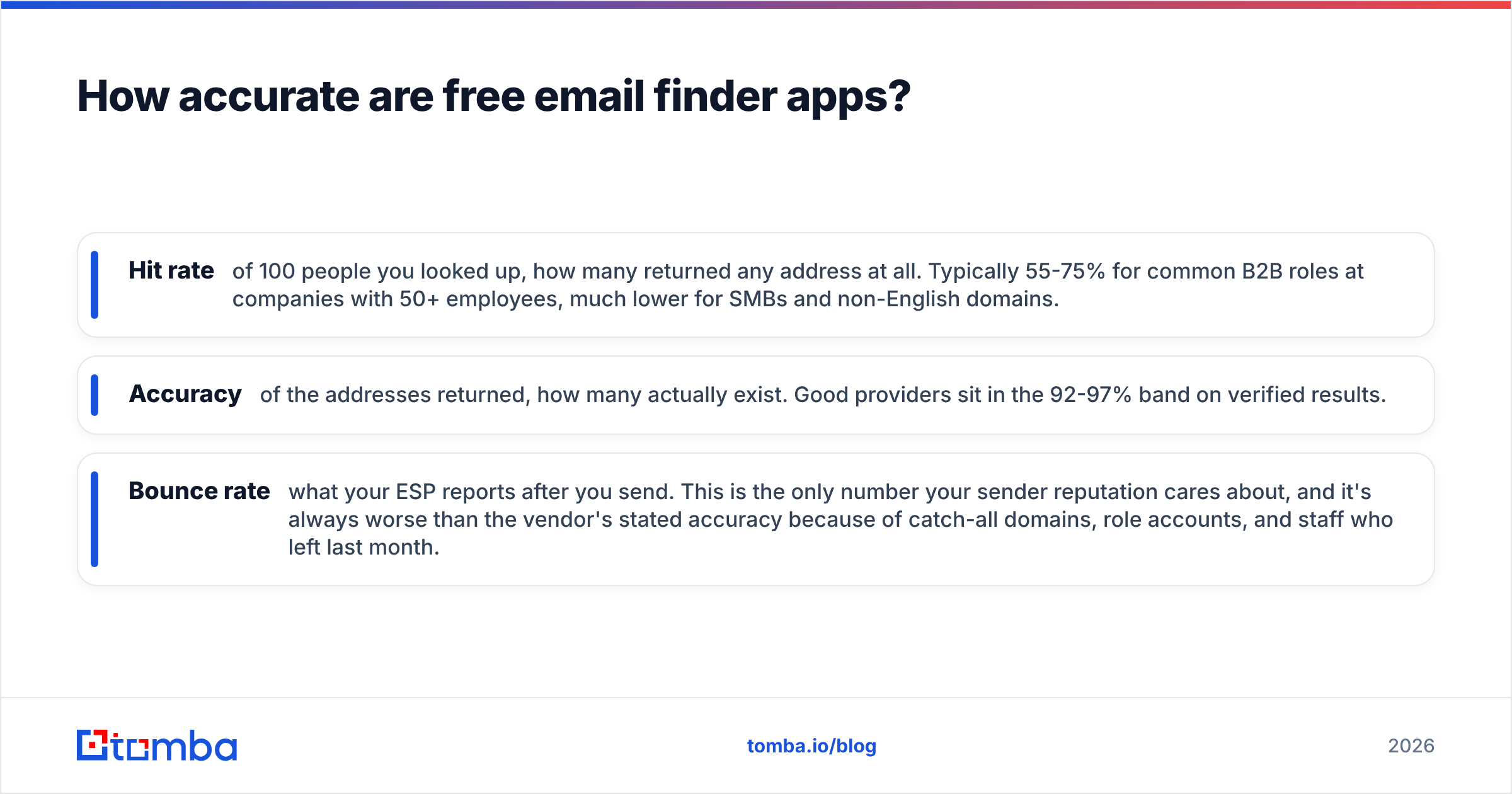
Three numbers to keep straight, because vendors blur them deliberately:
- Hit rate — of 100 people you looked up, how many returned any address at all. Typically 55-75% for common B2B roles at companies with 50+ employees, much lower for SMBs and non-English domains.
- Accuracy — of the addresses returned, how many actually exist. Good providers sit in the 92-97% band on verified results.
- Bounce rate — what your ESP reports after you send. This is the only number your sender reputation cares about, and it's always worse than the vendor's stated accuracy because of catch-all domains, role accounts, and staff who left last month.
Catch-all domains are where free tools quietly fail. A catch-all server accepts mail to any address at the domain, so a naive SMTP check returns "valid" for asdfgh@company.com. Tools that flag these honestly will mark the result "accept-all" or "risky" instead of green. Tools that don't will inflate their own accuracy stats. If your target list is heavy on enterprise domains, run results through a catch-all verifier before you trust a single green checkmark.
The practical rule: treat any address a free tool returns without an explicit verification status as a hypothesis, not a fact. Push it through an email verifier and drop anything that isn't confirmed deliverable.
What are the real limits of a free email finder app?#
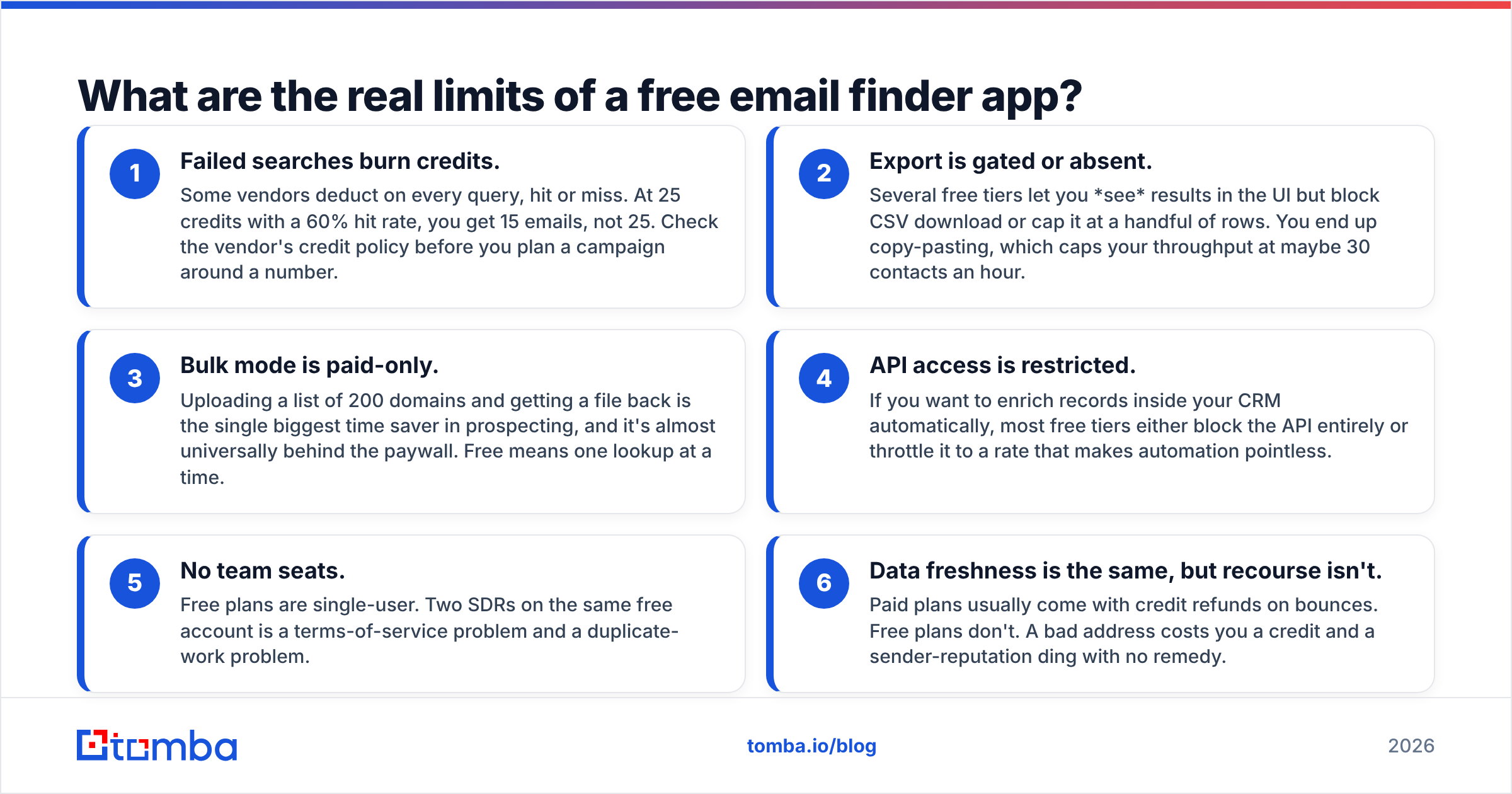
The credit cap is the limit everyone sees on the pricing page. The ones that actually cost you time are further down:
- Failed searches burn credits. Some vendors deduct on every query, hit or miss. At 25 credits with a 60% hit rate, you get 15 emails, not 25. Check the vendor's credit policy before you plan a campaign around a number.
- Export is gated or absent. Several free tiers let you see results in the UI but block CSV download or cap it at a handful of rows. You end up copy-pasting, which caps your throughput at maybe 30 contacts an hour.
- Bulk mode is paid-only. Uploading a list of 200 domains and getting a file back is the single biggest time saver in prospecting, and it's almost universally behind the paywall. Free means one lookup at a time.
- API access is restricted. If you want to enrich records inside your CRM automatically, most free tiers either block the API entirely or throttle it to a rate that makes automation pointless.
- No team seats. Free plans are single-user. Two SDRs on the same free account is a terms-of-service problem and a duplicate-work problem.
- Data freshness is the same, but recourse isn't. Paid plans usually come with credit refunds on bounces. Free plans don't. A bad address costs you a credit and a sender-reputation ding with no remedy.
Tomba's free tier is deliberately shaped to avoid the worst of these: verification is included rather than metered separately, the CSV export works, and the Tomba API plus the Chrome extension are reachable on the free plan. You still get 25 searches — but they're 25 usable ones.
Is a free email finder app enough for real outbound?#
For most teams, no — and the crossover point arrives faster than people expect.
Do the arithmetic on your own funnel. A typical cold sequence needs roughly 200-400 verified contacts a month to generate a predictable meeting count at a 30-40% open rate and 3-6% reply rate. A 25-credit free tier covers about 6% of that. Even stacking three free tiers gets you to maybe 100 finds a month, at the cost of three logins, three export formats, and a dedup step.
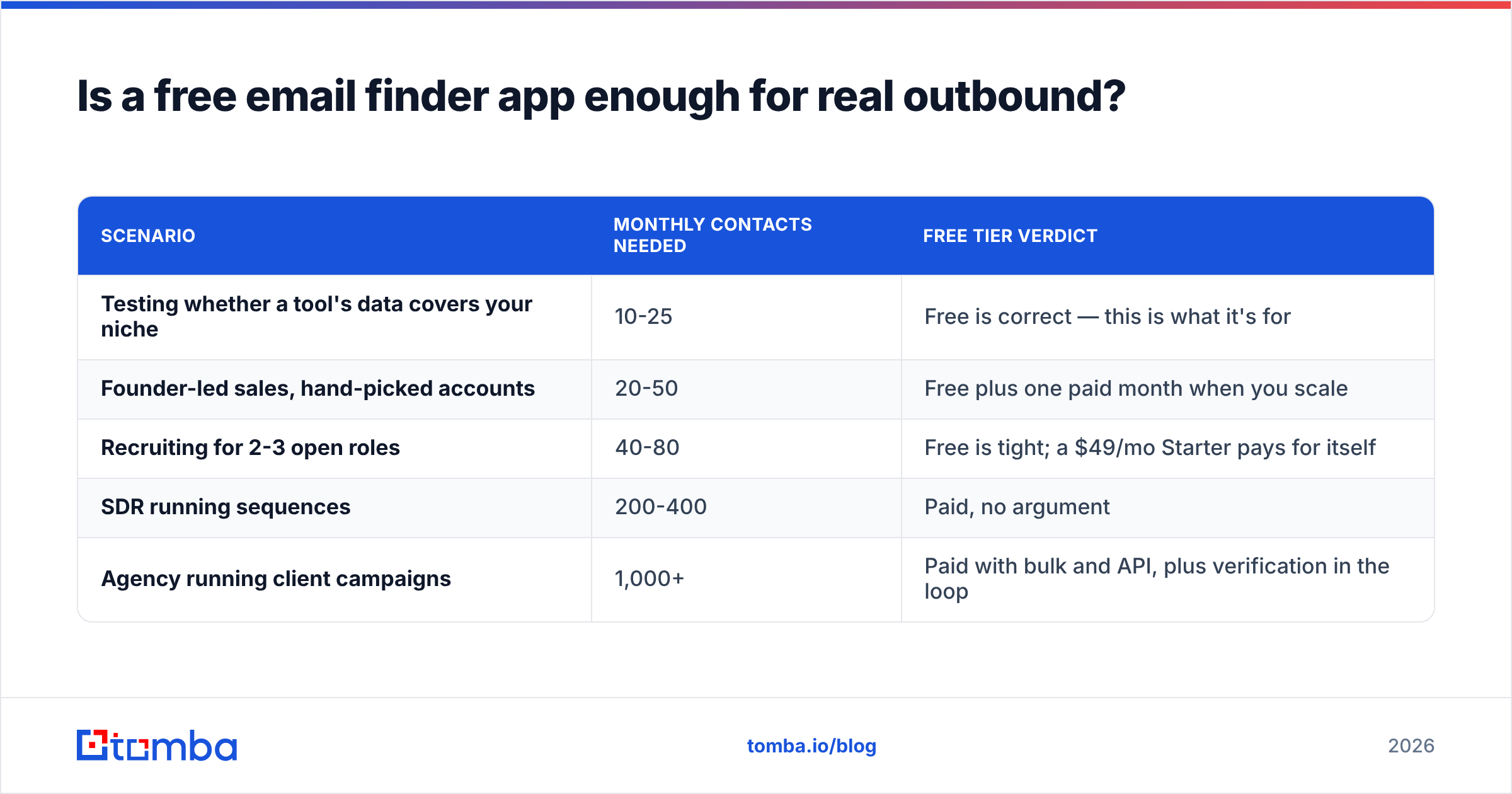
Here's the honest breakdown of when free is genuinely the right call versus when it's a false economy:
| Scenario | Monthly contacts needed | Free tier verdict |
|---|---|---|
| Testing whether a tool's data covers your niche | 10-25 | Free is correct — this is what it's for |
| Founder-led sales, hand-picked accounts | 20-50 | Free plus one paid month when you scale |
| Recruiting for 2-3 open roles | 40-80 | Free is tight; a $49/mo Starter pays for itself |
| SDR running sequences | 200-400 | Paid, no argument |
| Agency running client campaigns | 1,000+ | Paid with bulk and API, plus verification in the loop |
The hidden cost of stretching a free tier is your own hours. If you're spending three hours a month copy-pasting addresses out of a UI to avoid a $49 charge, you've valued your time at under $17/hour. Check Tomba pricing against that math — Starter is $49/mo, Growth $99/mo, Pro $249/mo — and decide honestly.
How do you get the most out of a free tier?#
Treat your 25 credits like ammunition, not like a buffet. The sequence below routinely doubles the usable output of a free plan.
Step 1 — Narrow before you search. Never burn a credit on a guess. Confirm the person still works there (LinkedIn, the company's team page, a recent press mention) before you look them up. Half of all wasted credits go to people who changed jobs.
Step 2 — Start with domain search, not name search. One domain search query on a 40-person company returns the company's email pattern plus a batch of known addresses. That's one credit for structural intelligence you can apply to every future contact at that account.
Step 3 — Use free unmetered tools for the mechanical parts. Pattern derivation, deduplication, and format checks don't need to consume finder credits. Run a free email checker on syntax and MX records first, and use remove duplicates before anything hits your finder.
Step 4 — Verify everything before it enters your sequencer. This is non-negotiable. Google and Yahoo's bulk-sender requirements have made bounce rate a hard gate rather than a soft signal — Google's sender guidelines put the spam-complaint threshold at 0.3% and expect senders to keep bounces low. One bad free-tool export can put a new domain in the penalty box for weeks.
Step 5 — Stack tiers deliberately, not randomly. If you do combine free plans, assign each one a job: one for domain-level discovery, one for individual lookups, one for verification. Overlapping tools waste credits on the same records.
Step 6 — Log what didn't work. Track hit rate per vendor per segment. After 100 lookups you'll know which provider actually covers your market, and that's the one worth paying for. This is the real return on a free tier: a purchase decision backed by your own data instead of a G2 star rating.
Which free email finder app should you choose?#
Match the tool to the job rather than chasing the biggest credit number:
- Testing data coverage in a specific niche — pick the tool with verification included on free, so your test measures real deliverability rather than raw guesses. Tomba and Snov.io both qualify.
- One-off lookups while browsing LinkedIn — a browser extension matters more than credit volume. Look for one that works inline on profile pages, like the LinkedIn finder.
- Enriching an existing spreadsheet — you need a Sheets add-on or API, which rules out most free tiers immediately. Tomba's Google Sheets add-on works on free.
- Bulk lists of 100+ — no free tier serves this well. Compare paid entry points instead, and weigh a pay-as-you-go database provider like BookYourData against a subscription finder depending on whether your need is recurring or one-shot.
- Developer workflows — free API access is rare and valuable. If you're building enrichment into a product, the free tier's API rate limit tells you more about the vendor than its marketing page does.
One more filter worth applying: read the vendor's data-sourcing page. Providers that document where records come from and how often they refresh — see Tomba's data sources page as an example of the format — are giving you something to audit. Providers that say "proprietary AI" and nothing else are not. Under GDPR, the ICO's guidance on legitimate interests makes sourcing transparency your problem too, not just the vendor's.
Frequently asked questions#
Do free email finder apps sell your search data? Some do. Others use your searches to improve their pattern database, which is standard and usually disclosed. Read the privacy policy for the phrase "aggregated" or "improve our services" and decide if that's acceptable for your target list.
Can a free email finder app find personal Gmail addresses? Generally no, and you should be wary of one that claims to. B2B finders are built around corporate domains where a pattern exists. Personal inbox targeting is a different, murkier category with real legal exposure.
Will using a free tier hurt my email deliverability? Only if you skip verification. The tool doesn't touch your domain reputation — your bounce rate does. A verified 15-contact list is infinitely safer than an unverified 200-contact one.
What happens when I hit the credit limit? Nothing dramatic. Searches stop returning results until the monthly reset. No tool in this comparison auto-charges a free account, and none of them require a card to sign up.
Start with 25 free, verified searches#
If you want to test whether a provider's data actually covers your market before spending anything, start with the Tomba Email Finder free plan: 25 searches a month, verification included on every result, CSV export, browser extension, and API access — no card. Run 25 lookups against accounts you already know, check the hit rate against your own list, and let that number decide whether $49/mo is worth it. That's a purchase decision based on your data, which beats anyone's comparison table, including this one.
Related guides#
Ready to find emails that actually work?
Join 150,000+ professionals who stopped guessing and started sending. Free credits on signup — no credit card required.
Get the Tomba newsletter
Practical outbound tactics and product updates — once every two weeks.
About the author