Free Email Finder Extension: 7 Chrome Tools Tested in 2026
Free email finder extensions promise prospecting from any browser tab. Here is what they actually deliver in 2026 — credit limits, real accuracy, permission risks, and the point where free stops working.
TL;DR
- A free email finder extension is a browser add-on that pulls a work email for the person or company page you are looking at, using a vendor's index plus pattern matching — not magic.
- Free tiers in 2026 cluster around 25–50 lookups per month. Anything advertising "unlimited free emails" is either scraping public pages you could scrape yourself, or monetising your browsing data.
- Accuracy varies far more than credit counts do. A 70%-accurate extension with 100 free credits is worse than an 95%-accurate one with 25.
- Check permissions before you install. "Read and change all your data on all websites" is a real cost that never shows up on a pricing page.
- Free extensions are for spot checks and small lists. Once you are building lists of 200+ per week, an API or bulk workflow costs less per verified contact than your own time.
What is a free email finder extension?#
A free email finder extension is a Chrome, Edge, or Firefox add-on that sits in your toolbar and returns a professional email address for whoever is on screen. You open a company site, a LinkedIn profile, or a team page, click the icon, and the extension returns something like first.last@company.com with a confidence score attached.
Under the hood, none of these tools "discover" an email at the moment you click. They do three things in sequence, and understanding that sequence tells you exactly where each tool will fail.
Think of it like a phone book that also knows the local naming customs. If the book already has the entry, you get an exact answer. If it does not, the tool guesses from the pattern used by everyone else at that company, then rings the number to check whether it connects.
How does a free email finder extension actually find an email?#
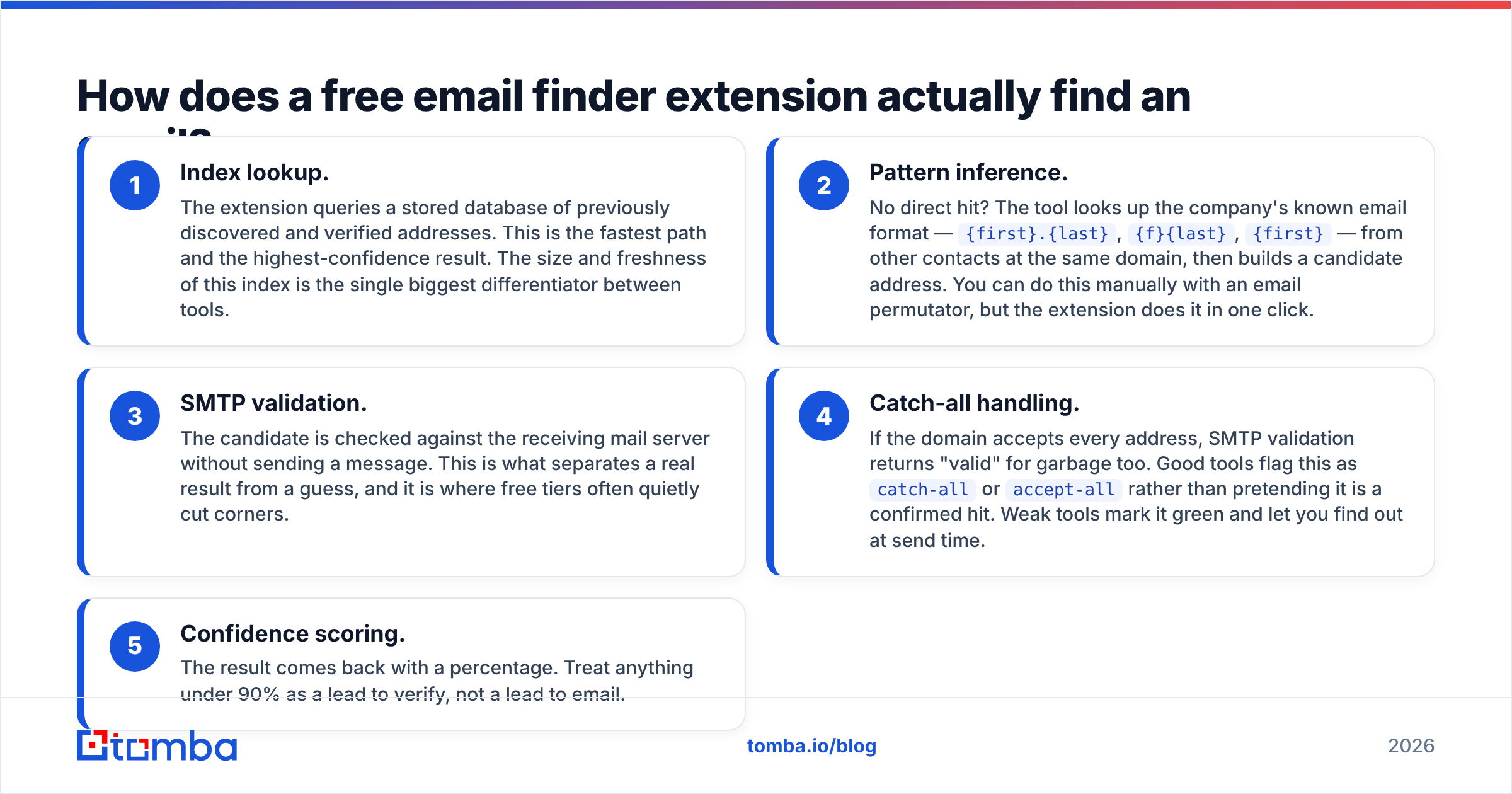
Here is the pipeline nearly every vendor runs, from fastest to slowest:
- Index lookup. The extension queries a stored database of previously discovered and verified addresses. This is the fastest path and the highest-confidence result. The size and freshness of this index is the single biggest differentiator between tools.
- Pattern inference. No direct hit? The tool looks up the company's known email format —
{first}.{last},{f}{last},{first}— from other contacts at the same domain, then builds a candidate address. You can do this manually with an email permutator, but the extension does it in one click. - SMTP validation. The candidate is checked against the receiving mail server without sending a message. This is what separates a real result from a guess, and it is where free tiers often quietly cut corners.
- Catch-all handling. If the domain accepts every address, SMTP validation returns "valid" for garbage too. Good tools flag this as
catch-alloraccept-allrather than pretending it is a confirmed hit. Weak tools mark it green and let you find out at send time. - Confidence scoring. The result comes back with a percentage. Treat anything under 90% as a lead to verify, not a lead to email.
Steps 3 and 4 are the expensive ones. When a vendor offers a very generous free tier, it is usually because they are skipping or throttling those steps.

Which free email finder extensions are worth installing in 2026?#
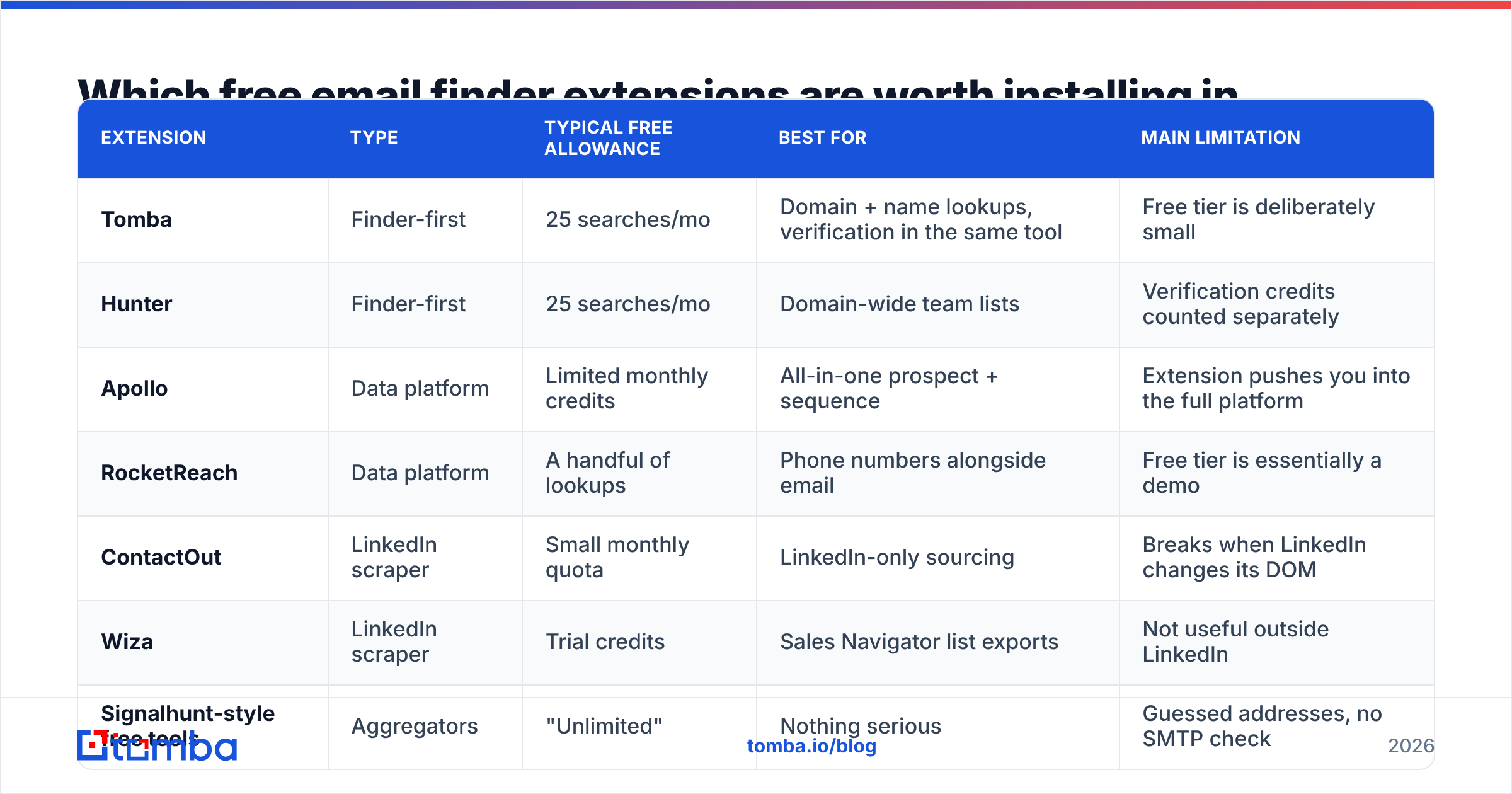
The extension market has consolidated. Most of what is left falls into three groups: data-platform extensions (a thin front-end for a huge sales database), finder-first extensions (email discovery is the product), and LinkedIn scrapers (built for one site only).
| Extension | Type | Typical free allowance | Best for | Main limitation |
|---|---|---|---|---|
| Tomba | Finder-first | 25 searches/mo | Domain + name lookups, verification in the same tool | Free tier is deliberately small |
| Hunter | Finder-first | 25 searches/mo | Domain-wide team lists | Verification credits counted separately |
| Apollo | Data platform | Limited monthly credits | All-in-one prospect + sequence | Extension pushes you into the full platform |
| RocketReach | Data platform | A handful of lookups | Phone numbers alongside email | Free tier is essentially a demo |
| ContactOut | LinkedIn scraper | Small monthly quota | LinkedIn-only sourcing | Breaks when LinkedIn changes its DOM |
| Wiza | LinkedIn scraper | Trial credits | Sales Navigator list exports | Not useful outside LinkedIn |
| Signalhunt-style free tools | Aggregators | "Unlimited" | Nothing serious | Guessed addresses, no SMTP check |
Free allowances change. Check the vendor's own page before you plan around a number — Tomba pricing starts free at 25 searches per month and moves to $49/mo (Starter), $99/mo (Growth), and $249/mo (Pro), and competitors adjust their tiers regularly. Cross-check current terms on G2 or the vendor site — hunter.io publishes its limits openly, for example.

How accurate are free email finder extensions?#
Accuracy is the number that matters, and it is the number vendors are vaguest about. Two things get conflated constantly:
- Hit rate — of 100 people you searched, how many returned any address at all.
- Accuracy — of the addresses returned, how many actually deliver.
A tool can post a 95% hit rate by guessing aggressively and still bounce a third of your sends. The combination you want is a moderate hit rate with high accuracy, because a null result costs you nothing while a bad address costs you sender reputation.

Run your own test before committing. It takes twenty minutes:
- Pick 30 contacts you already have confirmed emails for — customers, past leads, people who have replied to you.
- Search each one through the extension without looking at your known answer.
- Score exact matches, wrong matches, and no-results separately.
- Repeat across two industries. Accuracy on SaaS companies with public team pages tells you nothing about accuracy on manufacturing or healthcare, where far less is indexed.
Anything with under 85% exact-match accuracy on your own segment is not worth the free credits. And regardless of the tool, run the output through an email verifier before it hits a sequence. Verification is cheap; a bounce spike is not.
What is the catch with "unlimited" free email finder extensions?#
There is always a catch, and it is one of four:
You are the product. Some free extensions require broad host permissions and collect browsing telemetry, which is then sold or used to build the very database they query. If a tool asks to read data on all sites and has no paid tier, ask yourself what pays for the servers.
The emails are guessed, not verified. Generating john.smith@acme.com requires no database and no cost. An unlimited free tool is often a glorified permutator with a nicer UI. You can do this yourself for free with a company email pattern checker, and at least then you know what you are getting.
The extension is abandonware. LinkedIn scrapers break every time the site ships a layout change. Check the "last updated" date on the Chrome Web Store listing. Anything untouched for more than six months is a liability.
Free credits are a trial in disguise. Several "free" extensions give you 5–10 lookups once, not monthly. That is a demo, not a free plan. Read whether the allowance resets.

Free extension vs paid API: which one do you need?#
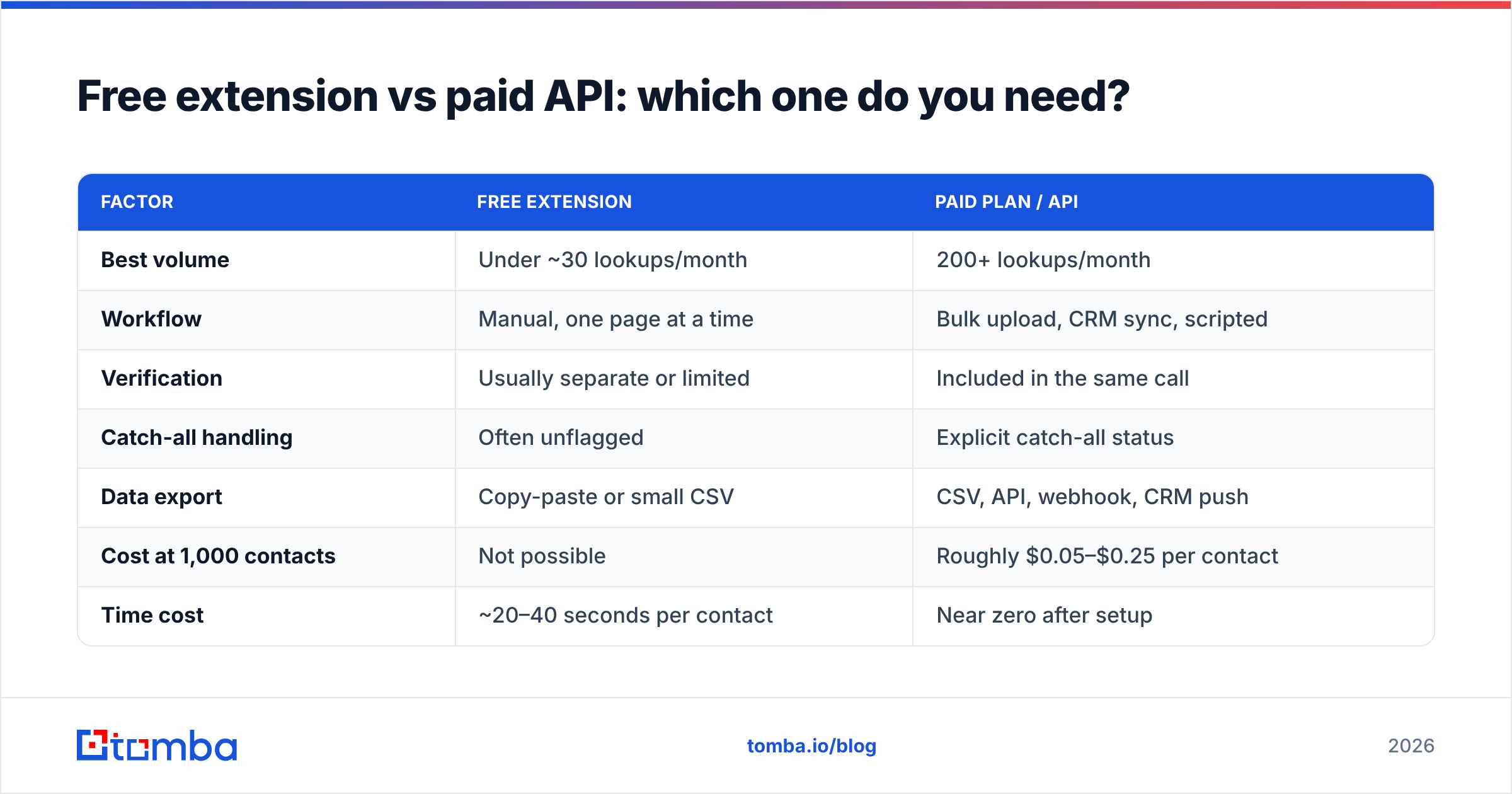
The break-even point is simpler than it looks. It is about volume and repeatability, not budget.
| Factor | Free extension | Paid plan / API |
|---|---|---|
| Best volume | Under ~30 lookups/month | 200+ lookups/month |
| Workflow | Manual, one page at a time | Bulk upload, CRM sync, scripted |
| Verification | Usually separate or limited | Included in the same call |
| Catch-all handling | Often unflagged | Explicit catch-all status |
| Data export | Copy-paste or small CSV | CSV, API, webhook, CRM push |
| Cost at 1,000 contacts | Not possible | Roughly $0.05–$0.25 per contact |
| Time cost | ~20–40 seconds per contact | Near zero after setup |
Do the arithmetic on your own time. Forty seconds per contact across 500 contacts is over five hours of clicking. At any realistic hourly rate, that beats the price of a Starter plan several times over — which is exactly why the free tier exists as a sampling mechanism rather than a business model.
The middle path most teams land on: keep the extension installed for ad-hoc lookups during research and meetings, and move repeatable list-building to bulk email finder runs or the Tomba API inside your own scripts.
What should you check before installing any extension?#
Run this checklist before you click "Add to Chrome". It takes two minutes and has saved more than one security review.
- Permissions scope. Does it need access to all sites, or only the domains it works on? Narrow scope is a good sign.
- Data policy. Does the vendor state what it does with pages you visit? A vague policy on a free product is a red flag.
- Update cadence. Last-updated date within 90 days, ideally.
- Review pattern. Ignore the star average. Read the one-star reviews from the last three months — that is where broken functionality shows up first.
- Company behind it. A named company with a paid product has an incentive to keep your data clean. An anonymous developer with an "unlimited free" tool does not.
- Export path. If you cannot get results out as CSV or into your CRM, you will be retyping data by hand, which defeats the point.
If your organisation has a security policy on browser extensions, this is also the list your IT team will ask about. Getting ahead of it is faster than getting an extension removed after rollout.
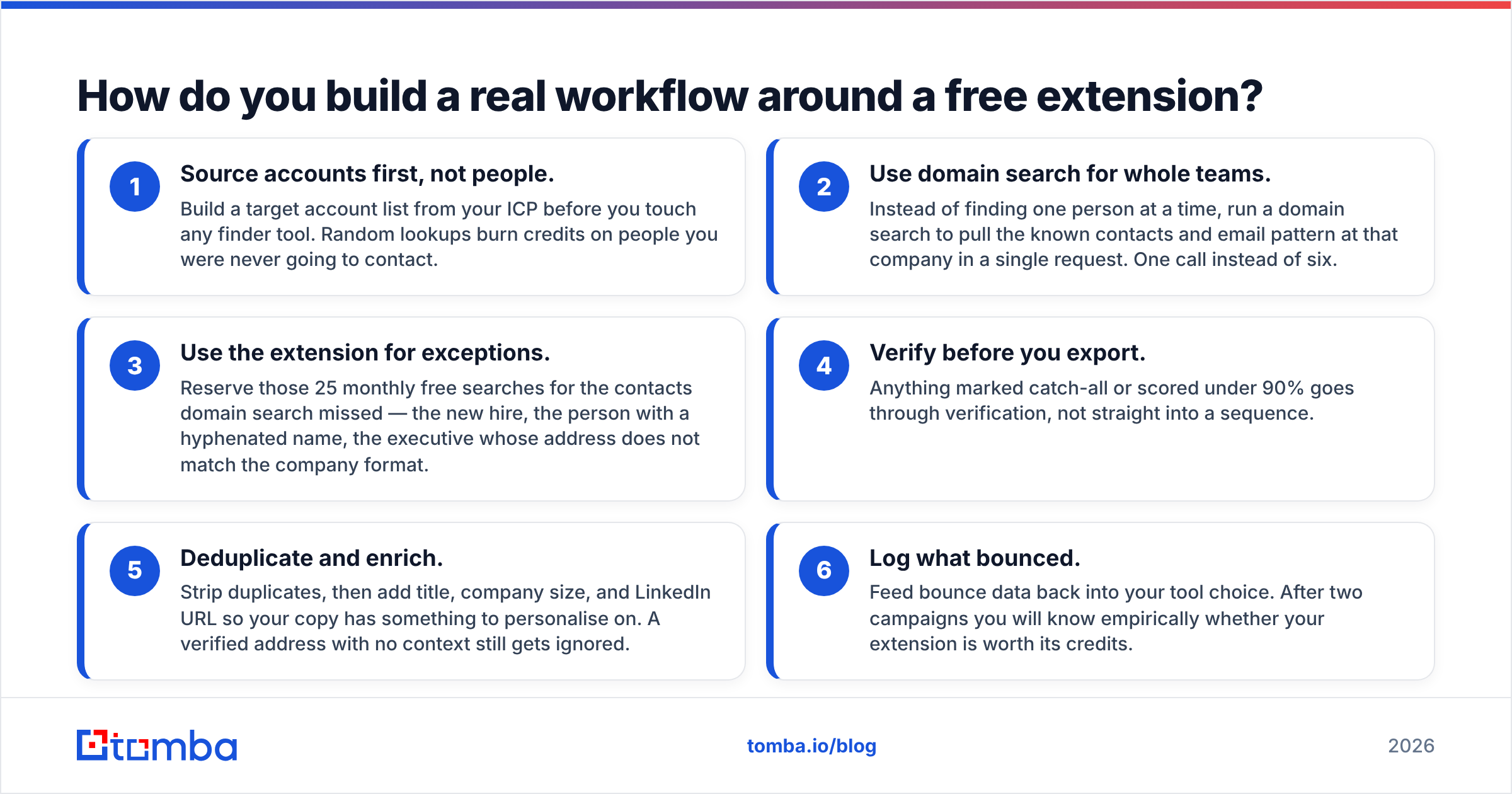
How do you build a real workflow around a free extension?#
An extension is one step in a pipeline, not the pipeline. Here is a workflow that stays within free and low tiers as long as possible:
- Source accounts first, not people. Build a target account list from your ICP before you touch any finder tool. Random lookups burn credits on people you were never going to contact.
- Use domain search for whole teams. Instead of finding one person at a time, run a domain search to pull the known contacts and email pattern at that company in a single request. One call instead of six.
- Use the extension for exceptions. Reserve those 25 monthly free searches for the contacts domain search missed — the new hire, the person with a hyphenated name, the executive whose address does not match the company format.
- Verify before you export. Anything marked catch-all or scored under 90% goes through verification, not straight into a sequence.
- Deduplicate and enrich. Strip duplicates, then add title, company size, and LinkedIn URL so your copy has something to personalise on. A verified address with no context still gets ignored.
- Log what bounced. Feed bounce data back into your tool choice. After two campaigns you will know empirically whether your extension is worth its credits.
The teams that get good results from free tools are not the ones who found a secret unlimited extension. They are the ones who narrowed their list far enough that 25 high-confidence lookups a month is genuinely enough.
Which free email finder extension should you pick?#
Match the tool to the job rather than the credit count:
- You research companies more than individuals — pick a finder-first extension with strong domain coverage and pair it with domain search.
- You live in LinkedIn Sales Navigator — a LinkedIn-native extension will have better hit rates on profiles, but budget for it breaking periodically, and export to a verifier before sending.
- You need email plus phone — data-platform extensions cover both, though free phone credits are usually minimal.
- You are testing whether outbound works at all — start with the smallest free tier from a vendor whose paid plan you could actually afford at scale. There is no point proving a workflow on a tool you will have to abandon.
Whatever you choose, hold it to the same standard: exact-match accuracy above 85% on your segment, explicit catch-all flagging, an export path, and a permissions request you would be comfortable explaining to your security team.
Ready to test one on your own list?#
Install the Tomba Chrome extension and run the 30-contact accuracy test above using the free plan's 25 monthly searches — no card, no trial clock. If the hit quality holds up on your segment, the same index is available through domain search, bulk lookups, and the API when you outgrow one-at-a-time clicking. Start with the Tomba Email Finder and let the bounce rate decide whether it earns a paid slot in your stack.
Related guides#
Ready to find emails that actually work?
Join 150,000+ professionals who stopped guessing and started sending. Free credits on signup — no credit card required.
Get the Tomba newsletter
Practical outbound tactics and product updates — once every two weeks.
About the author