Free Email Finder Website: 9 Tools Tested and Ranked 2026
Every free email finder website gives something away and takes something back. Here is what 9 popular free tiers actually deliver in 2026, where the accuracy drops, and when paying beats stitching free tools together.
TL;DR
- A free email finder website is a lead-gen tool that gives you a monthly credit allowance (usually 10–50 lookups) instead of a trial that expires. The credits reset; the limits do not.
- The real cost of "free" is rarely the credit count. It is missing verification, blocked CSV exports, no API access, and no catch-all handling.
- Tomba's free tier gives 25 searches per month with verification included, which is the most useful shape of a free plan: fewer credits, but the credits you spend return usable data.
- One-off web tools (permutators, extractors, pattern checkers) are genuinely unlimited and free because they do not query a database. Pair them with a small verified plan and you cover most solo-prospecting needs.
- If you send more than roughly 100 cold emails a month, free tiers stop being a budget decision and start being a deliverability risk.
What is a free email finder website, exactly?#
A free email finder website is a browser-based tool that takes a name plus a company domain (or just a domain) and returns the professional email address associated with it, at no cost, up to a monthly cap.
Think of it like a supermarket sample counter. The sample is real food, and it is genuinely free, but the portion is calibrated to make you want the full plate. Every vendor in this category runs the same playbook: give away enough lookups to prove the data is good, cap it before you can run a campaign.
There are two distinct things people mean by "free" here, and conflating them is why so many buyers end up disappointed:
- Freemium database access. You get an account with a recurring credit allowance against the vendor's contact database. Tomba, Hunter, Snov.io, and Skrapp all work this way. Credits reset monthly.
- Free utility tools. Stateless calculators that never touch a paid database: email permutators, email extractors, pattern checkers, syntax validators. These are usually unlimited because they cost the vendor almost nothing to run.
The second category is honestly free forever. The first category is a metered sample. You need both, and you need to know which one you are using at any given moment.
How does a free email finder website actually find the address?#
No tool "looks up" an email in some central registry, because no such registry exists. Here is what happens between your click and the result:
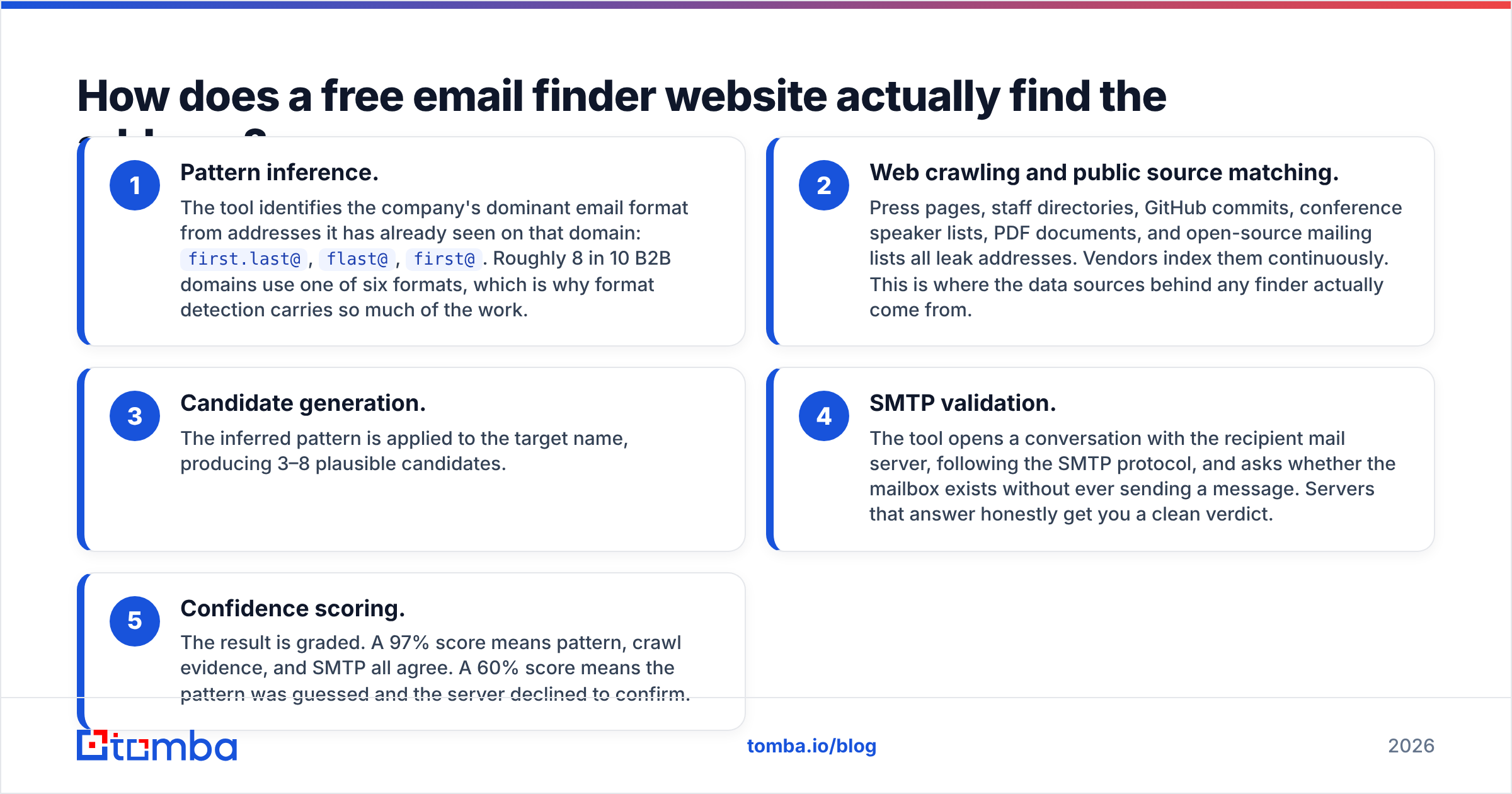
- Pattern inference. The tool identifies the company's dominant email format from addresses it has already seen on that domain:
first.last@,flast@,first@. Roughly 8 in 10 B2B domains use one of six formats, which is why format detection carries so much of the work. - Web crawling and public source matching. Press pages, staff directories, GitHub commits, conference speaker lists, PDF documents, and open-source mailing lists all leak addresses. Vendors index them continuously. This is where the data sources behind any finder actually come from.
- Candidate generation. The inferred pattern is applied to the target name, producing 3–8 plausible candidates.
- SMTP validation. The tool opens a conversation with the recipient mail server, following the SMTP protocol, and asks whether the mailbox exists without ever sending a message. Servers that answer honestly get you a clean verdict.
- Confidence scoring. The result is graded. A 97% score means pattern, crawl evidence, and SMTP all agree. A 60% score means the pattern was guessed and the server declined to confirm.
The difference between a good free email finder website and a bad one lives almost entirely in steps 4 and 5. Plenty of free tools stop at step 3 and hand you a guess dressed up as a result.

Which free email finder websites give the most in 2026?#
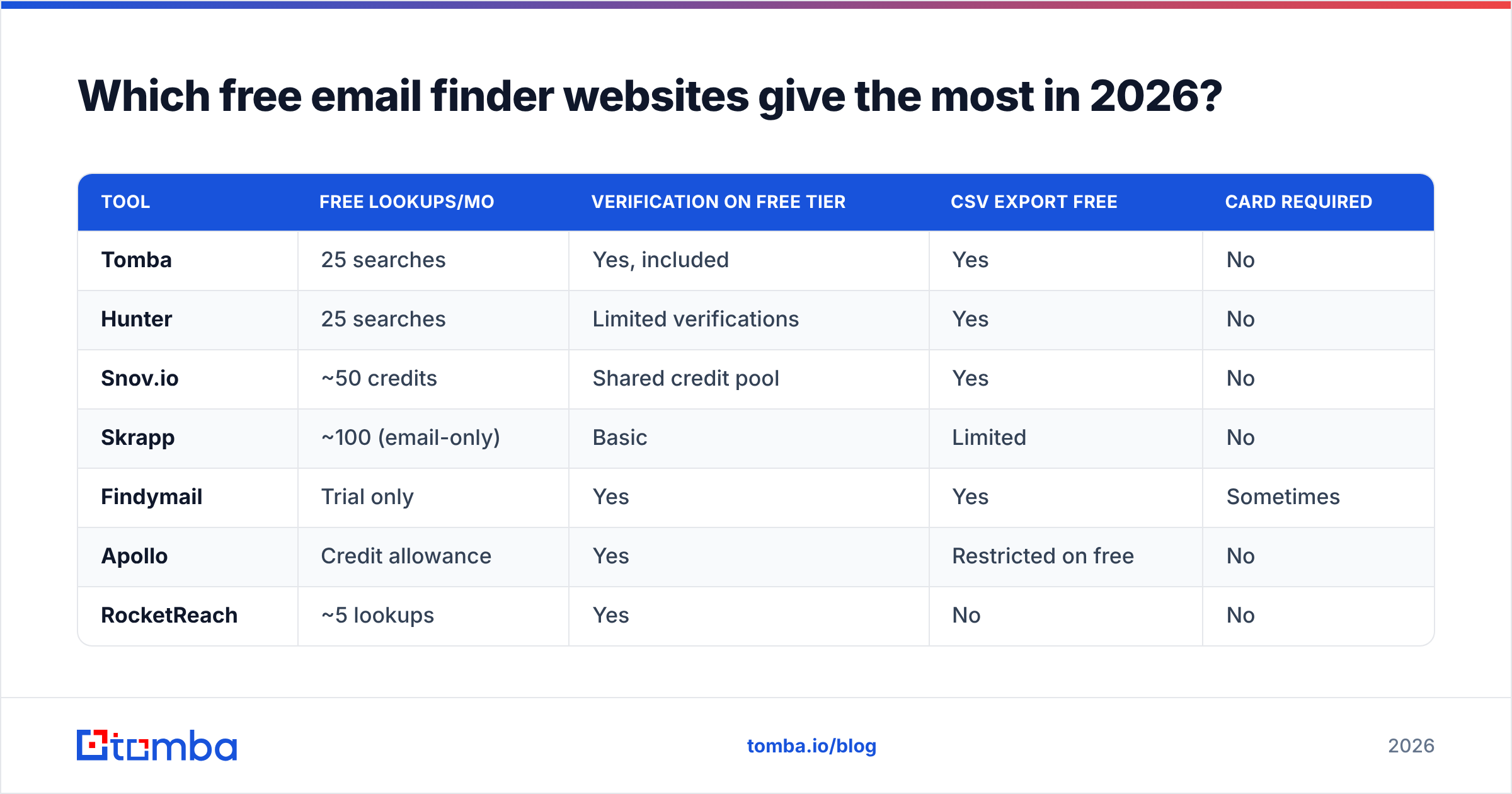
Free allowances change often, so treat this as a shape-of-the-market snapshot and confirm on each vendor's pricing page before you commit. What matters more than the raw credit number is the second and third columns: a credit that returns an unverified guess is not worth a credit that returns a confirmed mailbox.
| Tool | Free lookups/mo | Verification on free tier | CSV export free | Card required |
|---|---|---|---|---|
| Tomba | 25 searches | Yes, included | Yes | No |
| Hunter | 25 searches | Limited verifications | Yes | No |
| Snov.io | ~50 credits | Shared credit pool | Yes | No |
| Skrapp | ~100 (email-only) | Basic | Limited | No |
| Findymail | Trial only | Yes | Yes | Sometimes |
| Apollo | Credit allowance | Yes | Restricted on free | No |
| RocketReach | ~5 lookups | Yes | No | No |
| ContactOut | ~2–3 credits/day | Yes | No | No |
| BookYourData | Free sample records | Yes, verified data | Sample file | No |
Two entries deserve context rather than a raw ranking. Skrapp's larger headline number covers email-only lookups; enrichment fields are metered separately, so the effective allowance is smaller than it looks. BookYourData is not a freemium finder at all: it is a pay-as-you-go verified B2B database that lets you pull a free sample before buying. If your problem is "I need 2,000 verified contacts in a defined ICP once," that model is often cleaner than burning six months of free tiers across four accounts.

How accurate is a free email finder website?#
Accuracy on a free tier is usually identical to accuracy on the paid tier of the same vendor, because it is the same database and the same verification stack. What changes is how much of the result you are allowed to see.
Across the category, expect roughly:
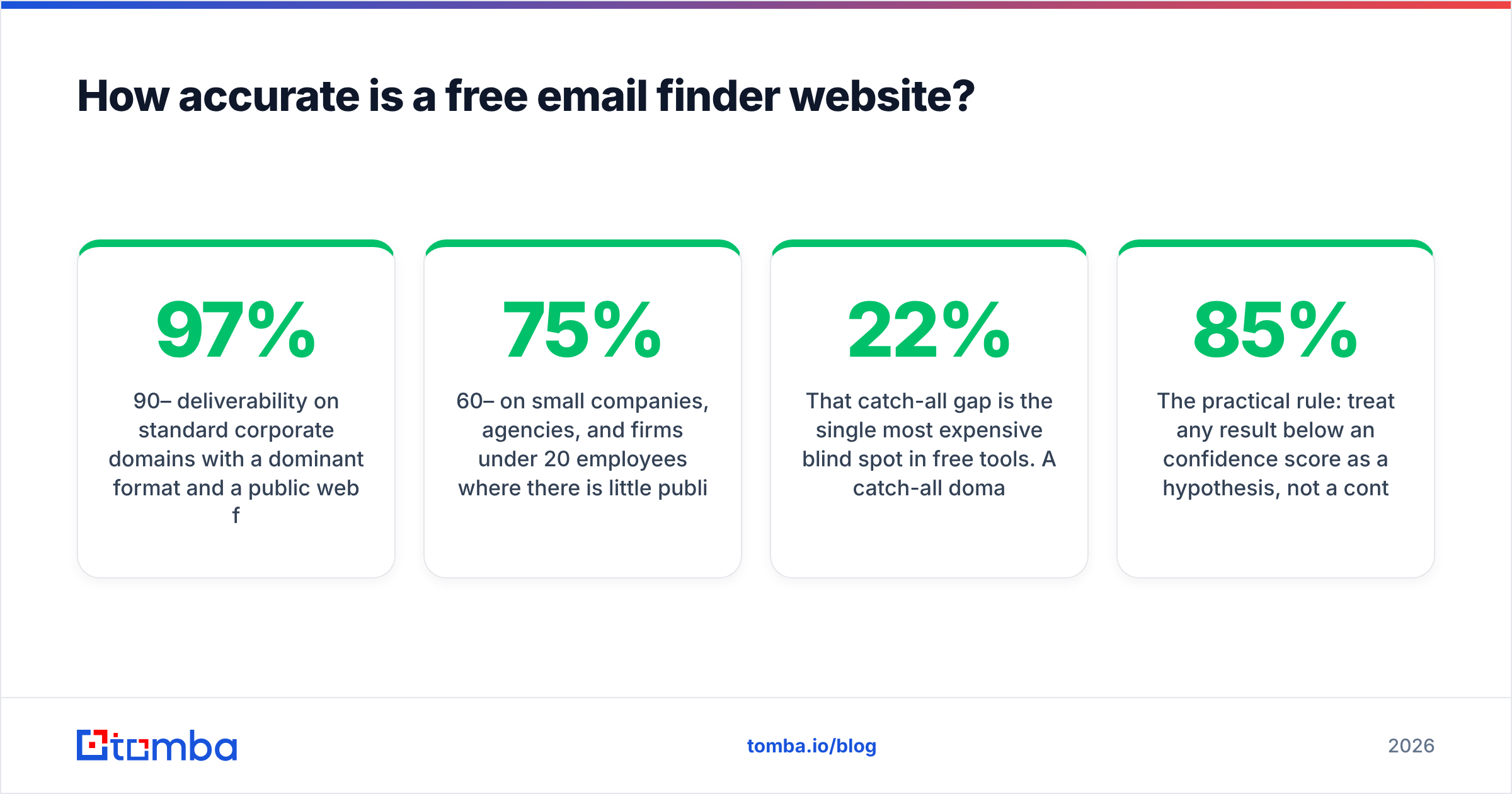
- 90–97% deliverability on standard corporate domains with a dominant format and a public web footprint.
- 60–75% on small companies, agencies, and firms under 20 employees where there is little public evidence to crawl.
- Near zero certainty on catch-all domains unless the tool runs a dedicated catch-all check, which most free tiers do not.

That catch-all gap is the single most expensive blind spot in free tools. A catch-all domain accepts every address at SMTP time, which means a naive verifier marks nonsense.string@company.com as valid. You export 200 "verified" contacts, send, and watch a 22% bounce rate torch your sender reputation. Anything you pull from a catch-all domain needs a catch-all verifier before it enters a sequence, full stop.
The practical rule: treat any result below an 85% confidence score as a hypothesis, not a contact. Run it through an email verifier before it touches your sending domain.
What are the hidden limits nobody advertises?#
The credit number is the headline. These are the clauses underneath it:
- Export locks. Several tools let you search freely in the UI and then block the CSV download until you upgrade. You can see the data; you cannot use it at scale.
- No API access. Free tiers almost universally exclude the API. If you planned to wire lookups into a workflow, a Tomba API key on a paid tier is the only realistic path.
- Shared credit pools. Snov.io-style models charge finds and verifications from the same bucket, so 50 credits might mean 25 usable contacts.
- Rate limits. Two or three lookups per day sounds fine until you are researching a 40-account list on a Tuesday.
- Domain caps. Some free plans limit how many results a single domain search returns, showing you 5 of 60 employees.
- Data retention. A handful of free tiers clear your saved lists after 30 days.
None of this is dishonest. It is just the price of the sample, and it is worth reading before you build a workflow on top of it.

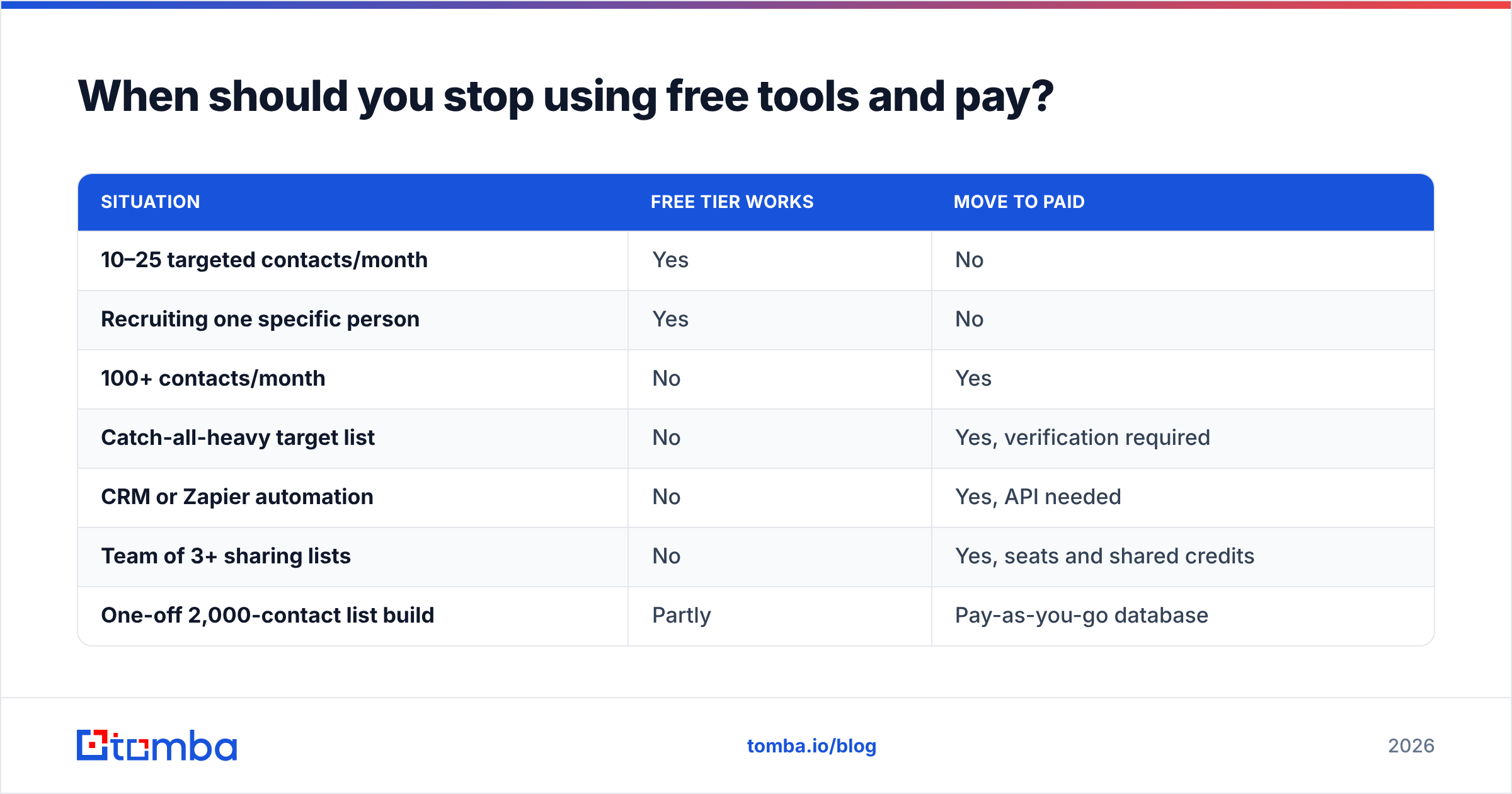
When should you stop using free tools and pay?#
There is a clean threshold, and it is about risk rather than budget. Once your monthly send volume passes roughly 100 cold emails, the cost of a single bad list exceeds the cost of a starter plan, because a damaged sending domain takes weeks to rehabilitate.
| Situation | Free tier works | Move to paid |
|---|---|---|
| 10–25 targeted contacts/month | Yes | No |
| Recruiting one specific person | Yes | No |
| 100+ contacts/month | No | Yes |
| Catch-all-heavy target list | No | Yes, verification required |
| CRM or Zapier automation | No | Yes, API needed |
| Team of 3+ sharing lists | No | Yes, seats and shared credits |
| One-off 2,000-contact list build | Partly | Pay-as-you-go database |
For reference, entry-level paid plans in this category cluster between $39 and $99 per month. Tomba pricing starts at $49/mo for Starter, $99/mo for Growth, and $249/mo for Pro, with the free 25-search tier sitting underneath permanently. Hunter, listed on G2's lead intelligence category alongside most tools here, sits in a similar band. The differentiator at this price point is rarely raw database size; it is whether verification and catch-all handling are bundled or billed separately.
How do you squeeze the most out of free credits?#
If you are staying on free tiers, sequence your work so that paid credits are spent last and only on confirmed targets.
- Start with the free utilities. Run the company through a pattern checker first. If the format is already known, you may not need a lookup credit at all.
- Batch by domain, not by person. One domain search returns multiple contacts for a similar credit cost to one person lookup. Prospect company-first.
- Stack accounts legitimately. Using Tomba's 25 free searches alongside another vendor's free tier is fine and gives you cross-vendor confirmation when both return the same address.
- Verify before you spend. Guess the address with a permutator, then verify the candidates. Verification credits are usually cheaper than discovery credits.
- Never send to a single unverified guess. If your only evidence is a pattern, either verify it or skip the contact. A 3% bounce ceiling is not a suggestion; mailbox providers enforce it.
- Log everything in one sheet. Free tiers do not give you good list management, so keep your own source of truth and deduplicate before every send.
Is a free email finder website enough for real outbound?#
For solo founders, recruiters chasing named candidates, freelancers pitching 10 agencies a month, and anyone validating a market before committing budget: yes, comfortably. Twenty-five verified addresses a month is a real amount of targeted outreach if you write good emails.
For anything resembling a sales motion: no. Not because free tools are worse at finding addresses, but because they deliberately withhold the parts that make outbound safe at volume — bulk processing, catch-all verification, exports, and API access. Those are exactly the features that keep a list clean, and a clean list is the whole game.
The honest framing is that a free email finder website is a research instrument, not an infrastructure layer. Use it to answer "what is this person's address?" Use a paid plan to answer "are these 800 addresses safe to send to on Monday?"
Where should you start?#
Begin with the free tier that includes verification rather than the one with the biggest credit number, because unverified volume is a liability, not an asset. Test the same 10 contacts across two vendors, compare confidence scores against reality, and let your own bounce data pick the winner.
If you want a free tier that returns verified results rather than pattern guesses, start with the Tomba Email Finder. You get 25 searches a month at no cost, with verification and catch-all detection built into the same result, so the addresses you export are addresses you can actually send to. When your volume outgrows the free plan, Starter at $49/mo adds bulk processing and API access without changing the data pipeline underneath.
Related guides#
Ready to find emails that actually work?
Join 150,000+ professionals who stopped guessing and started sending. Free credits on signup — no credit card required.
Get the Tomba newsletter
Practical outbound tactics and product updates — once every two weeks.
About the author