Free Email List Checker: How to Clean Your List in 2026
Free email list checkers are real, but every one of them has a ceiling. Here's what the free tiers actually give you, where they quietly fail, and when paying beats scraping credits together.
TL;DR
- A free email list checker works fine for a one-off list of 50–500 addresses. Past that, every free tier hits a credit wall, a rate limit, or a "results locked until you upgrade" screen.
- The free tools that matter split into two groups: syntax/MX checkers (instant, unlimited, shallow) and SMTP verifiers (accurate, slow, credit-limited). Know which one you're actually using.
- Catch-all domains are where free tools quietly fail. They return "unknown" or — worse — "valid" and you eat the bounce.
- Budget math: at roughly 25–100 free credits per tool per month, stitching together five free checkers costs you more time than a $49/mo plan saves you money.
- Verify before you import, not after your first campaign bounces at 12% and your domain reputation is already dented.
What Is a Free Email List Checker?#
A free email list checker is a tool that takes a list of email addresses and tells you which ones will actually deliver — without charging you, at least not for the first N addresses.
Think of it like a bouncer checking IDs at the door. Some bouncers glance at the card and wave you through (syntax check). Some scan it against a database (MX/domain check). And some call the issuing office to confirm the ID is real (SMTP verification). All three "check IDs." Only the third one stops a fake from getting in.
That distinction is the whole article. Most tools advertised as "free email list checker" only do the first two, because those are cheap to run. Real SMTP verification costs the vendor money on every single lookup, which is exactly why free tiers are capped.
Here's what each layer catches:
- Syntax validation — Is
john@@acme,coma structurally legal address? Catches typos and malformed entries. Free everywhere, unlimited, catches maybe 3% of a typical list. - Domain and MX record check — Does
acme.comexist and does it have mail servers configured? Catches dead companies and typo'd domains (gmial.com). Cheap, usually free. - Disposable and role detection — Is this
mailinator.com, orinfo@,support@,noreply@? Role accounts inflate your bounce and complaint rates. Most free tiers include this. - SMTP mailbox ping — Does the actual mailbox exist on that server? This is the expensive one. Requires connection pools, rotating IPs, and reputation management on the vendor's side.
- Catch-all resolution — The domain accepts everything, so SMTP tells you nothing. Resolving these needs pattern intelligence and historical data, which almost no free tier offers.
- Deduplication and normalization — Stripping Gmail dots and plus-aliases, merging duplicates. Trivially free but skipped by half the tools out there.
If a free checker gives you steps 1–3 and calls it "verification," you still have an unverified list. That's not a scam — it's just a naming problem the whole industry shares.

How Accurate Is a Free Email Checker Really?#
Accuracy depends entirely on which of those six layers ran, and vendors rarely say which ones they used on the free plan.
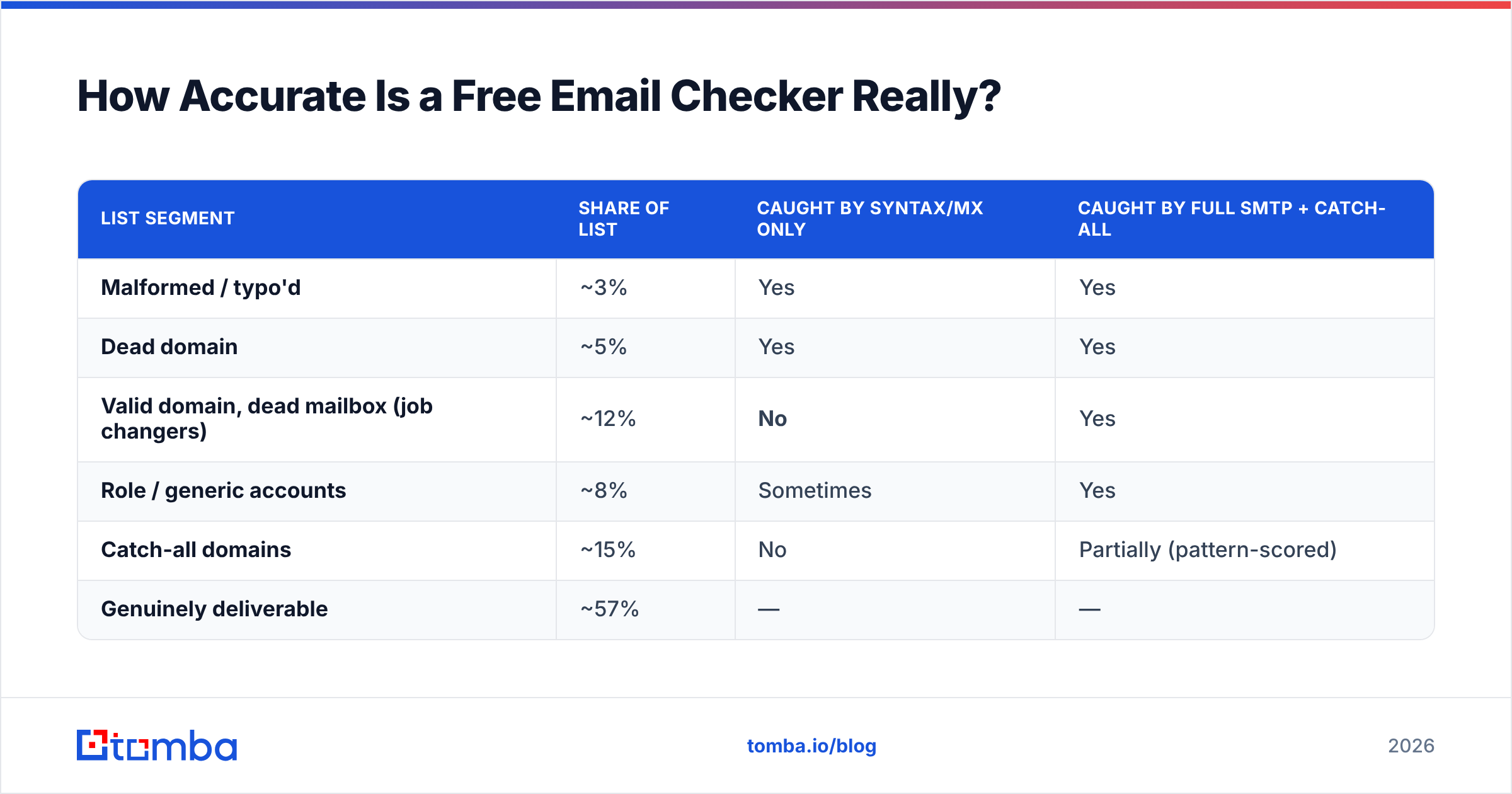
A realistic breakdown of a cold 5,000-row B2B list that's about nine months stale:
| List segment | Share of list | Caught by syntax/MX only | Caught by full SMTP + catch-all |
|---|---|---|---|
| Malformed / typo'd | ~3% | Yes | Yes |
| Dead domain | ~5% | Yes | Yes |
| Valid domain, dead mailbox (job changers) | ~12% | No | Yes |
| Role / generic accounts | ~8% | Sometimes | Yes |
| Catch-all domains | ~15% | No | Partially (pattern-scored) |
| Genuinely deliverable | ~57% | — | — |
The 12% row is the one that matters. Job changers are invisible to any tool that doesn't ping the mailbox. If you run a free syntax-only checker on this list, it hands back a "clean" 92% and you send into a 20%+ bounce rate. Mailbox providers start throttling you somewhere around 2–3%.

The second thing free tiers hide is how they score uncertainty. A paid verifier returns valid / invalid / catch-all / unknown with a confidence number. Free tiers frequently collapse catch-all and unknown into valid because a green checkmark converts better than a shrug. Read the status vocabulary before you trust the output — if the tool only returns two states, it's guessing on at least 15% of your list.
Practical rule: if the tool returns results instantly on 5,000 rows, it did not do SMTP verification. Real mailbox pings take seconds per address and get batched. Instant means shallow.
Screenshot placeholder: side-by-side verification result panels showing a four-state result set (valid / invalid / catch-all / unknown) versus a two-state pass/fail output.
Which Free Email List Checkers Are Worth Using in 2026?#
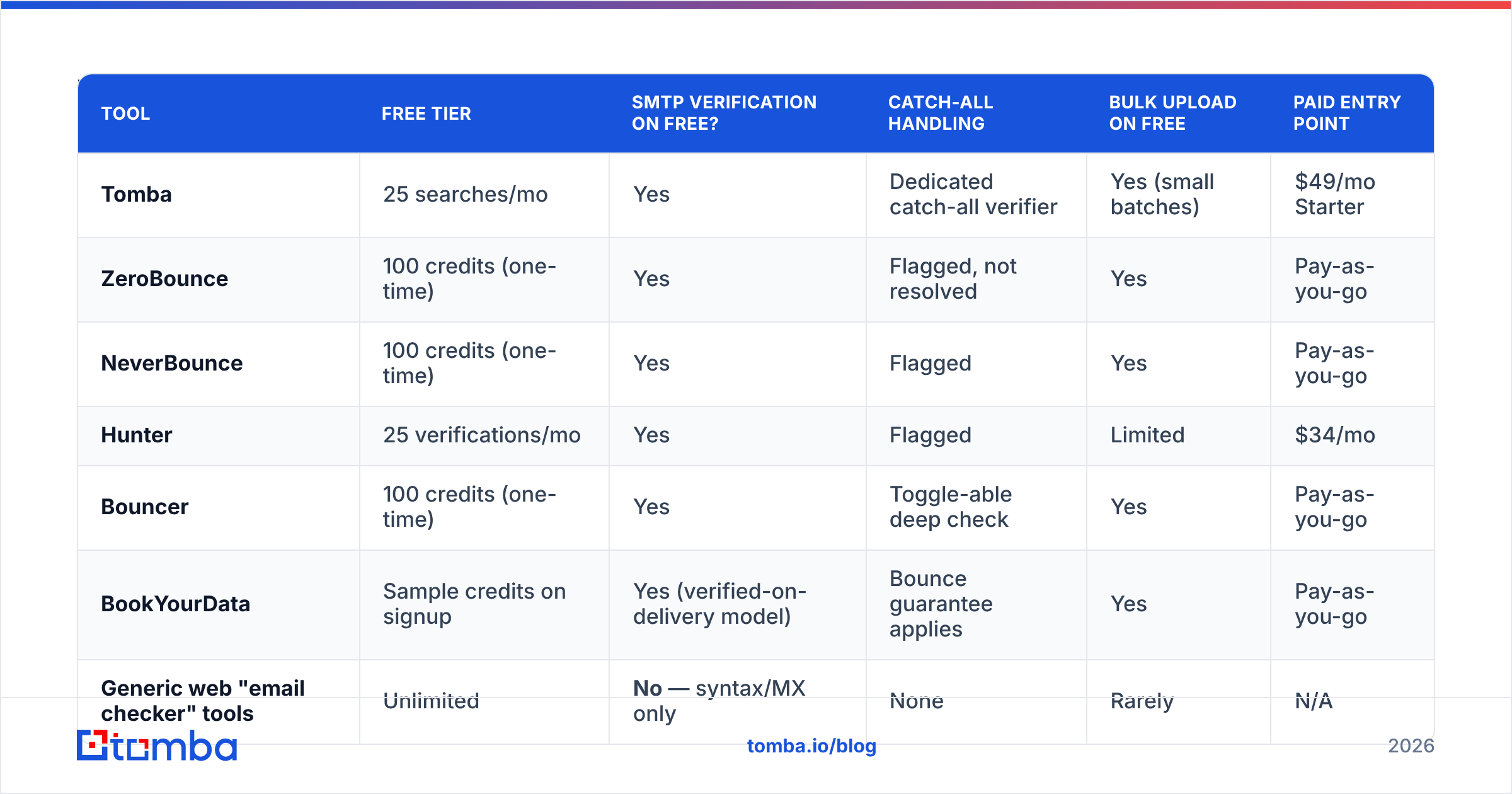
Here's the honest comparison of what the free tiers actually give you. Prices and limits reflect publicly listed plans as of early 2026 — always check the vendor page before committing, since free tiers change quietly.
| Tool | Free tier | SMTP verification on free? | Catch-all handling | Bulk upload on free | Paid entry point |
|---|---|---|---|---|---|
| Tomba | 25 searches/mo | Yes | Dedicated catch-all verifier | Yes (small batches) | $49/mo Starter |
| ZeroBounce | 100 credits (one-time) | Yes | Flagged, not resolved | Yes | Pay-as-you-go |
| NeverBounce | 100 credits (one-time) | Yes | Flagged | Yes | Pay-as-you-go |
| Hunter | 25 verifications/mo | Yes | Flagged | Limited | $34/mo |
| Bouncer | 100 credits (one-time) | Yes | Toggle-able deep check | Yes | Pay-as-you-go |
| BookYourData | Sample credits on signup | Yes (verified-on-delivery model) | Bounce guarantee applies | Yes | Pay-as-you-go |
| Generic web "email checker" tools | Unlimited | No — syntax/MX only | None | Rarely | N/A |
Two patterns jump out.
First, "free" almost always means one-time, not recurring. ZeroBounce, NeverBounce, and Bouncer give you a signup bonus. Once it's spent, it's spent. Tomba and Hunter give you a monthly reset, which is genuinely more useful if you're verifying a trickle of contacts rather than one big dump. That monthly-reset model is the difference between a trial and a free plan — worth checking on the Tomba pricing page and on any competitor's before you build a workflow around it.
Second, BookYourData takes a different angle entirely — it verifies at the point of delivery and backs it with a bounce guarantee, so you're not verifying a list you already own, you're buying one that arrives pre-checked. If your problem is "I have no list yet," that's a cleaner path than acquiring garbage and then paying to clean it. If your problem is "I have 40,000 rows in HubSpot from 2023," you need a verifier, not a data vendor.

The unlimited free web tools deserve a specific warning. They're useful — genuinely — for checking a single address you typed by hand, or for a fast syntax pass before upload. Tomba's own free email checker is in this category for one-off lookups. But running a 10,000-row list through a syntax-only tool and calling it clean is how deliverability incidents start.
Can You Stack Free Tiers to Verify a Big List?#
You can. It's a bad trade, and here's the arithmetic.
Say you have 5,000 addresses. Stacking the free tiers above gets you roughly 350 one-time credits plus ~50/month recurring. To cover 5,000 rows you'd need to:
- Sign up for 12–15 separate tools with distinct emails
- Split the list into chunks matching each tool's cap
- Normalize four or five different CSV export formats and status vocabularies
- Reconcile disagreements — tool A says valid, tool D says catch-all
- Repeat next month when the list ages
Realistically that's six to ten hours of your time. At any reasonable loaded hourly rate, you've spent $300–600 of labor to avoid a $49 charge, and you're left with a list scored by five different confidence models that don't agree.

Where free-tier stacking does make sense:
- Under 500 addresses total. One tool's monthly free allowance plus a signup bonus covers you.
- Spot-checking a purchased list before you buy more. Run 100 random rows through a free SMTP verifier. If more than 10% come back invalid, walk away from the vendor.
- Evaluating vendors. Run the same 100-row control list through three free tiers and compare. This is the single best use of free credits — you're buying information about the tools, not cleaning data.
- Pre-flight syntax pass. Free unlimited syntax/MX check before you spend paid credits, so you're not paying to verify
bob@gmial.com.
That last one is underrated. Strip the obvious garbage with free tools, then spend paid credits only on the survivors. On a stale list that alone can cut your paid verification bill by 8–10%.
What About Catch-All Domains?#
Catch-all domains are the single biggest gap between free and paid verification, and the reason "unknown" results pile up.
A catch-all (or "accept-all") domain is configured to accept mail for any address at that domain — ceo@acme.com, nonexistent@acme.com, asdfgh@acme.com all get a 250 OK at the SMTP layer. The server isn't lying; it's just deferring the bounce decision until after acceptance. Common at enterprises using certain gateway configurations.
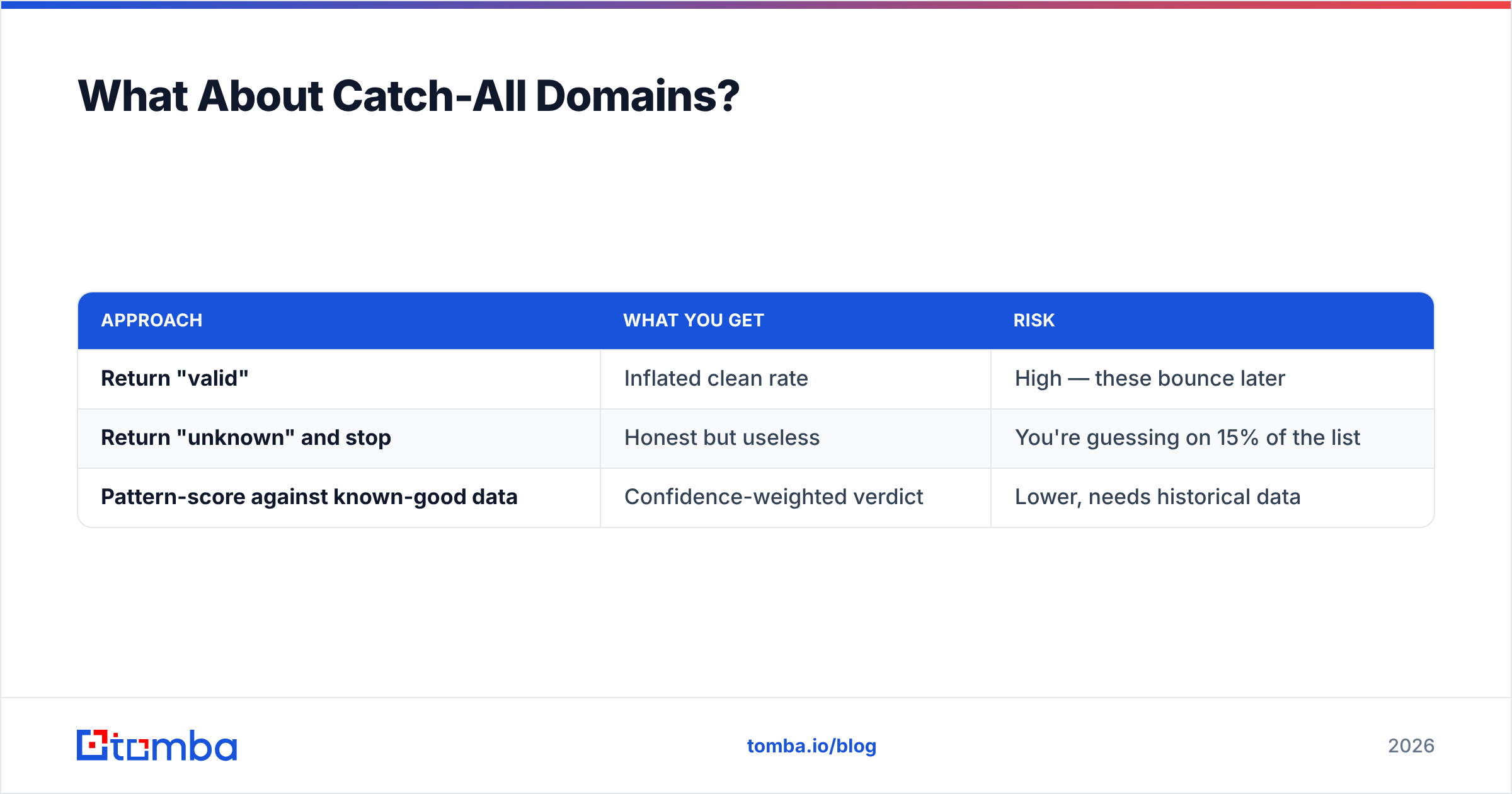
Roughly 15–20% of B2B domains are catch-all. Free tools handle them one of three ways:
| Approach | What you get | Risk |
|---|---|---|
| Return "valid" | Inflated clean rate | High — these bounce later |
| Return "unknown" and stop | Honest but useless | You're guessing on 15% of the list |
| Pattern-score against known-good data | Confidence-weighted verdict | Lower, needs historical data |
Only the third approach is actually useful, and it requires a corpus of confirmed-deliverable addresses to compare patterns against — which is exactly the asset free tools don't have. If a domain's confirmed-valid addresses all follow first.last@, then j.smith@ is suspicious and john.smith@ isn't. That's a data problem, not a protocol problem.
Tools with a dedicated catch-all verifier run this pattern layer explicitly rather than dumping the address into an "unknown" bucket. When you're comparing free tiers, ask specifically what happens to catch-all rows — it's the fastest way to separate a real verifier from a syntax checker with good marketing.
For deeper background on why bounces compound into reputation damage, Google's Postmaster Tools documentation lays out the sender guidelines that mailbox providers actually enforce, and it's worth reading before you plan any volume.
Screenshot placeholder: Google Postmaster Tools domain reputation graph showing a drop from "High" to "Medium" following a high-bounce send.
When Should You Stop Using Free and Pay?#
Four triggers. If any one applies, free-tier stitching is costing you more than it saves.
- You verify more than ~500 addresses per month. Past this, credit management is a part-time job.
- You need API access. Almost no free tier exposes a usable API with a workable rate limit. If verification needs to happen inside your signup flow or CRM sync, you need a paid key. An email verification API that runs on record creation prevents bad data instead of cleaning it later.
- Your list feeds a cold campaign. Bounce damage is asymmetric: a $49 verification bill versus weeks of reduced inbox placement across every domain you send from. The math is never close.
- You need an audit trail. Regulated industries and enterprise procurement want documented verification with timestamps. Free tiers don't produce that.
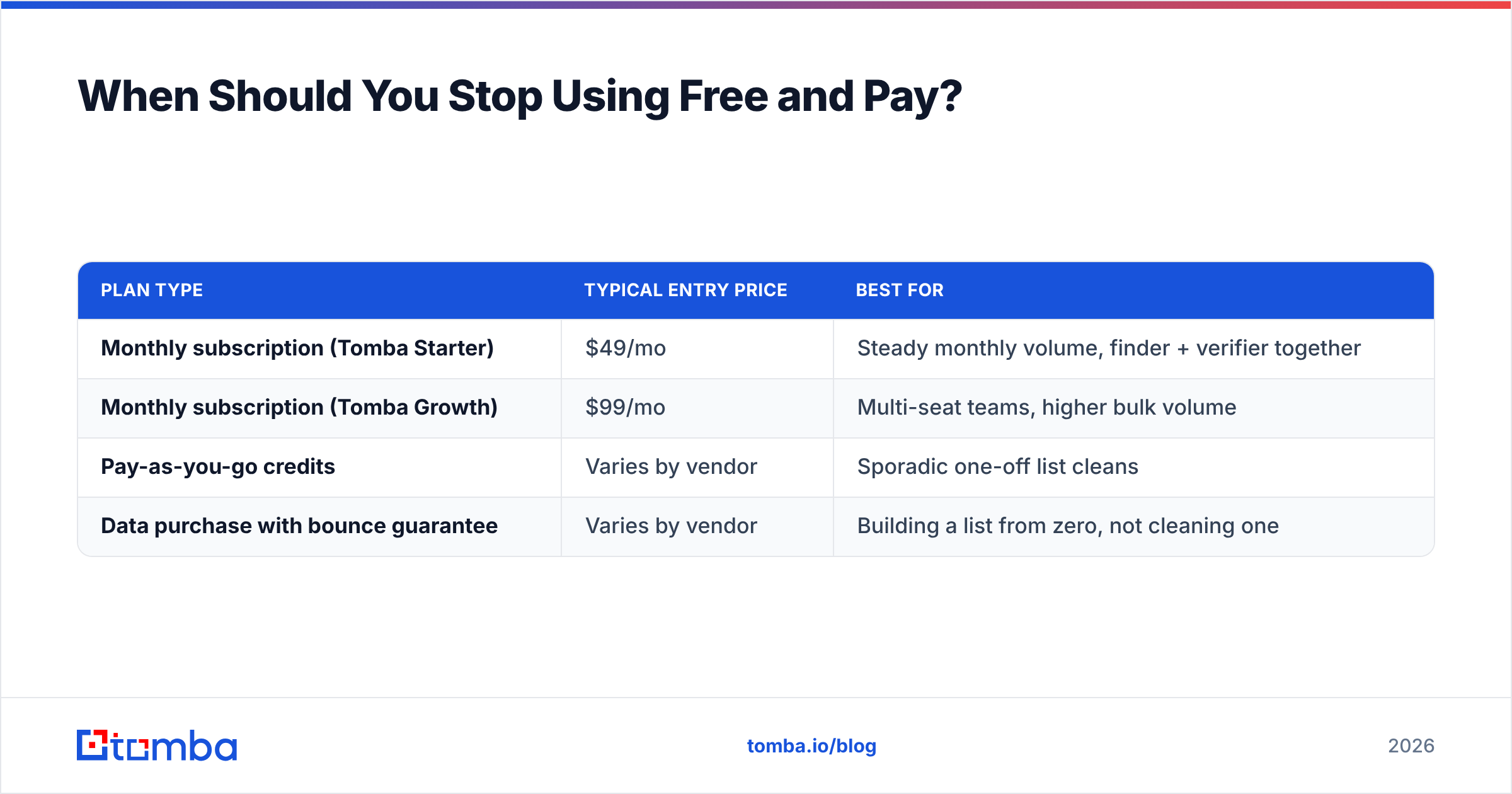
If you're at the paid threshold, the practical comparison across the market at entry level:
| Plan type | Typical entry price | Best for |
|---|---|---|
| Monthly subscription (Tomba Starter) | $49/mo | Steady monthly volume, finder + verifier together |
| Monthly subscription (Tomba Growth) | $99/mo | Multi-seat teams, higher bulk volume |
| Pay-as-you-go credits | Varies by vendor | Sporadic one-off list cleans |
| Data purchase with bounce guarantee | Varies by vendor | Building a list from zero, not cleaning one |
Note the distinction in row one: a lot of verification vendors sell only verification. If you're also sourcing contacts, a combined tool means one credit pool instead of two subscriptions. Running domain search to find contacts at a target company and verifying them in the same pass is meaningfully less friction than exporting a CSV between two vendors. G2's email verification category is a reasonable place to sanity-check current pricing across the field, since vendor pages tend to obscure per-credit costs.
What's the Right Workflow for a Clean List?#
Put together, the sequence that actually works:
- Deduplicate and normalize first — free, instant, and shrinks what you pay to verify. Strip plus-aliases, lowercase everything, merge Gmail dot variants.
- Run a free syntax + MX pass — removes malformed addresses and dead domains at zero cost.
- Verify survivors with SMTP — this is where you spend credits. Only on rows that survived step 2.
- Segment by result, don't just delete —
validsends now,catch-allgoes to a low-volume warm segment,unknowngets re-checked in 30 days,invalidand role accounts get suppressed. - Re-verify on a cadence — B2B data decays around 2–3% per month from job changes alone. A list verified in January is measurably worse by June.
- Verify at the point of capture — the endgame. An API call at form submission or CRM record creation means you never accumulate a dirty list in the first place.
Step 4 is where most teams leave value on the table. Deleting every catch-all row throws away real prospects — a meaningful share of them are deliverable. Send to them separately, at low volume, and let actual delivery data tell you which domains are safe.
Ready to Actually Clean Your List?#
Free email list checkers earn their place: for one-off lookups, for pre-flight syntax passes, and for evaluating vendors before you commit. Use them for that. Just don't confuse a syntax check with verification, and don't spend a workday stitching together credit allowances to dodge a bill smaller than one hour of your time.
If you want find-and-verify in one place, start with the Tomba Email Finder — the free tier gives you 25 searches a month with real SMTP verification behind them, not just a regex pass, and Starter runs $49/mo when you outgrow it. Run your control list through it, compare the results against whatever you're using now, and let the bounce rate settle the argument.
Related guides#
Ready to find emails that actually work?
Join 150,000+ professionals who stopped guessing and started sending. Free credits on signup — no credit card required.
Get the Tomba newsletter
Practical outbound tactics and product updates — once every two weeks.
About the author