Free Email Tracker in 2026: 9 Tools Tested and Compared
Free email trackers promise open rates, click maps, and real-time alerts. In 2026, most of that data is distorted by privacy proxies and bots. Here is what still works, which free tools are worth installing, and when to stop trusting the pixel.
TL;DR
- A free email tracker embeds a 1x1 tracking pixel in your message and logs a hit when the recipient's client loads it. That is the whole mechanism, and it is why the data breaks so easily.
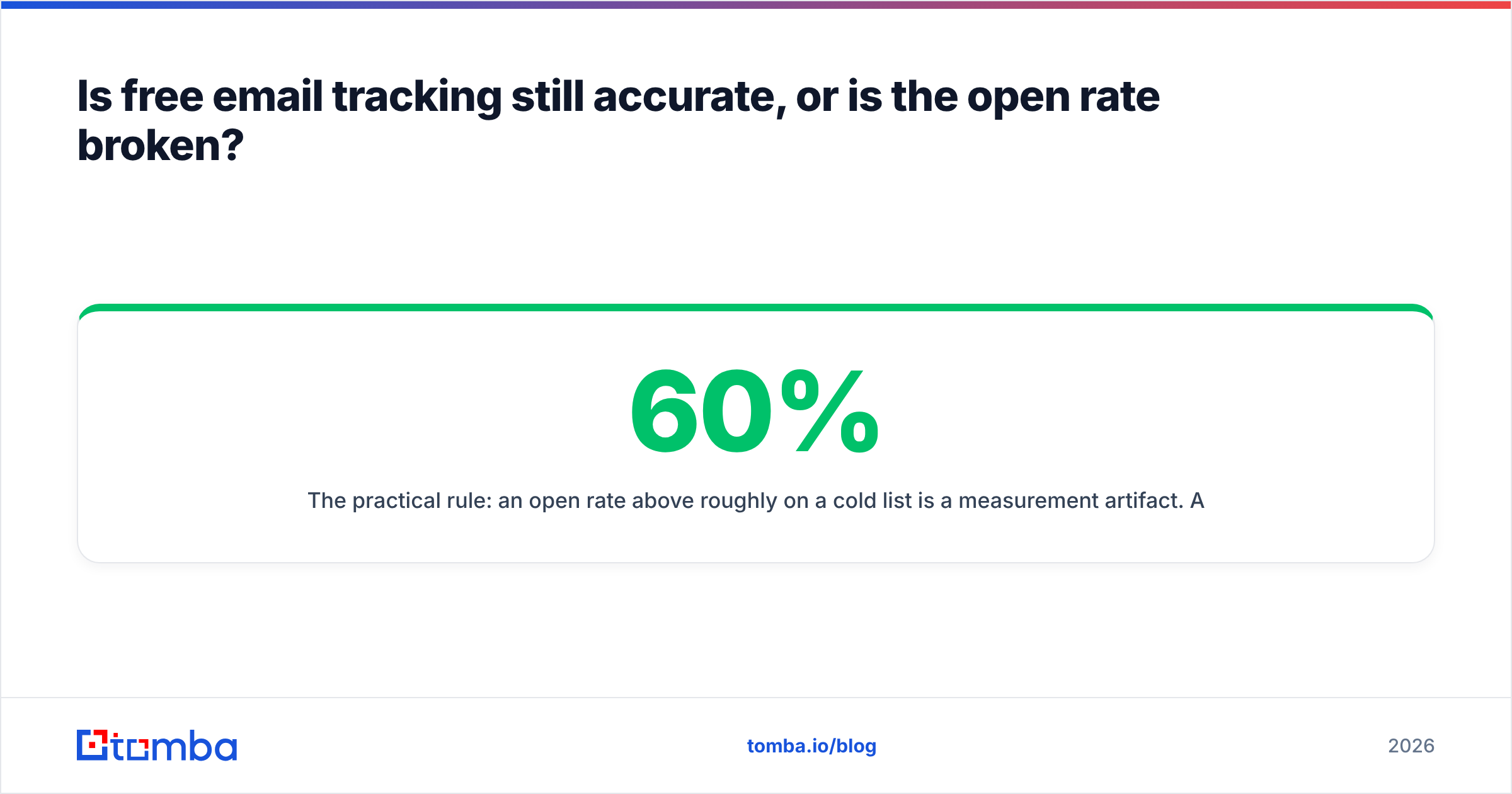
- Apple Mail Privacy Protection, Gmail image proxying, and corporate link scanners inflate open rates for a large share of B2B lists. Treat any open rate above roughly 60% as a measurement artifact, not a win.
- Free tiers are genuinely useful for one thing: timing. Knowing that a specific reply-worthy prospect opened your message three times in ten minutes still beats guessing.
- Mailtrack, Streak, and HubSpot's free sales tools cover most solo use cases at $0. Paid tiers mostly buy you team reporting, not better accuracy.
- Tracking a bad address tells you nothing. Verify the address first, then track — bounce data is a harder signal than any pixel.
What is a free email tracker, and how does it actually work?#
A free email tracker is a browser extension or add-on that tells you when someone opens the email you sent and, usually, when they click a link inside it. Most run inside Gmail or Outlook, add a small checkmark next to sent messages, and push a desktop notification when a hit lands.
Think of it like the read receipt on a delivery slip — except the courier only marks it delivered if the recipient happens to unwrap the package in front of a camera. Plenty of people open the box in the dark.
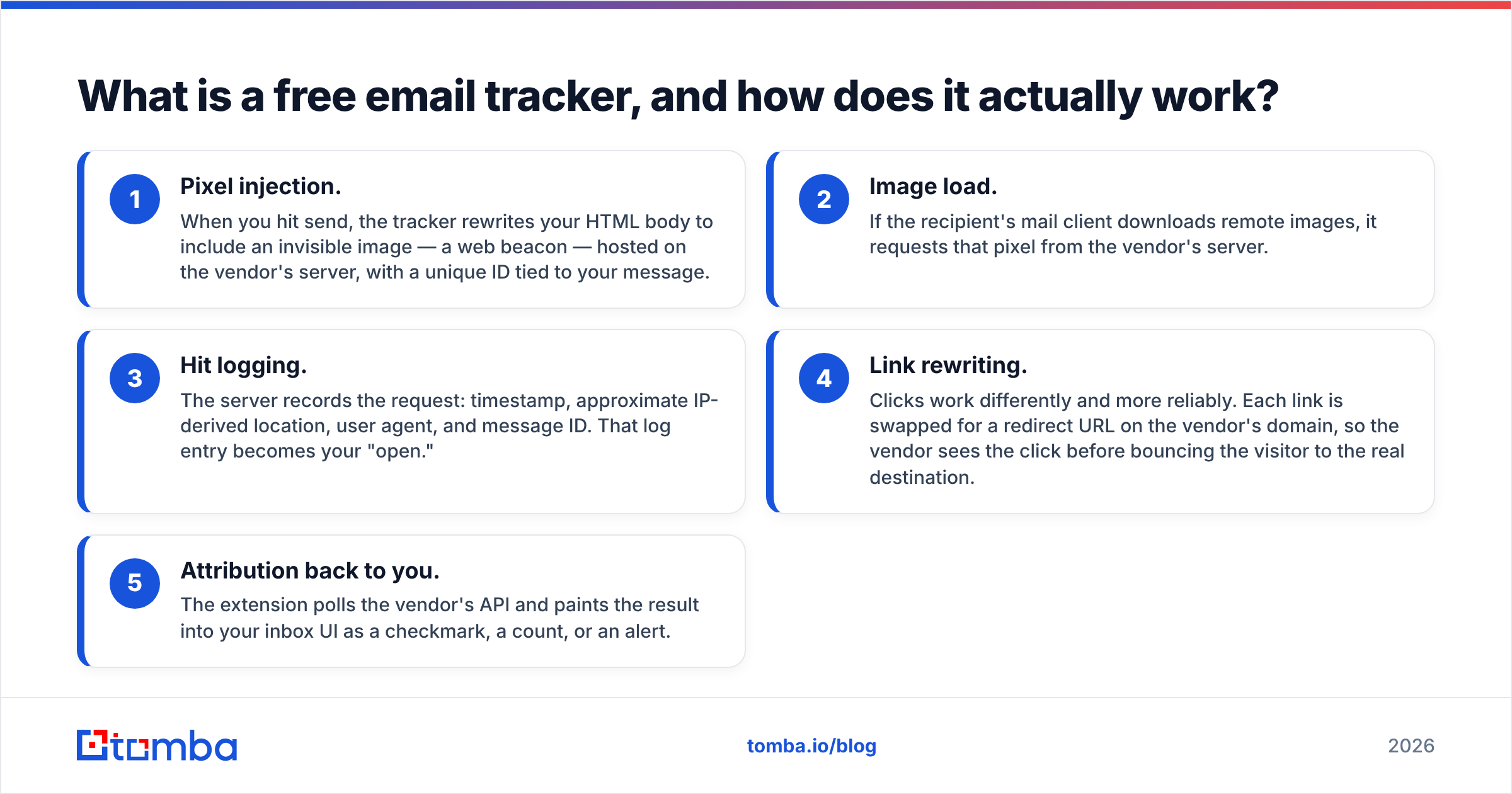
Here is the actual sequence, step by step:
- Pixel injection. When you hit send, the tracker rewrites your HTML body to include an invisible image — a web beacon — hosted on the vendor's server, with a unique ID tied to your message.
- Image load. If the recipient's mail client downloads remote images, it requests that pixel from the vendor's server.
- Hit logging. The server records the request: timestamp, approximate IP-derived location, user agent, and message ID. That log entry becomes your "open."
- Link rewriting. Clicks work differently and more reliably. Each link is swapped for a redirect URL on the vendor's domain, so the vendor sees the click before bouncing the visitor to the real destination.
- Attribution back to you. The extension polls the vendor's API and paints the result into your inbox UI as a checkmark, a count, or an alert.
Nothing in that chain confirms a human read anything. It confirms that something fetched an image. That distinction is the entire story of email tracking in 2026.
What can a free email tracker actually tell you — and what can't it?#
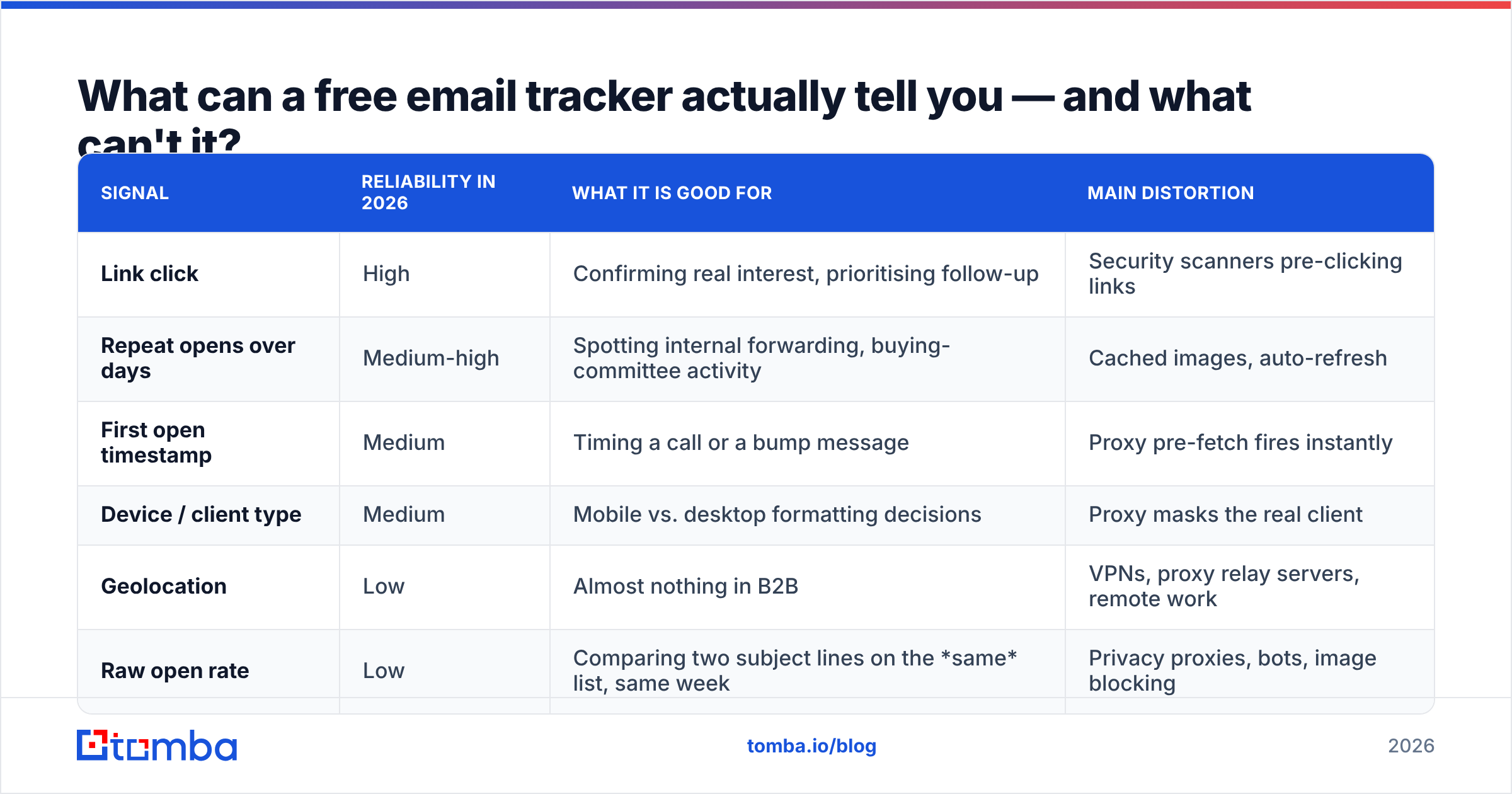
Sort the signals by how much load they can bear. Not all tracking data is equally rotten.
| Signal | Reliability in 2026 | What it is good for | Main distortion |
|---|---|---|---|
| Link click | High | Confirming real interest, prioritising follow-up | Security scanners pre-clicking links |
| Repeat opens over days | Medium-high | Spotting internal forwarding, buying-committee activity | Cached images, auto-refresh |
| First open timestamp | Medium | Timing a call or a bump message | Proxy pre-fetch fires instantly |
| Device / client type | Medium | Mobile vs. desktop formatting decisions | Proxy masks the real client |
| Geolocation | Low | Almost nothing in B2B | VPNs, proxy relay servers, remote work |
| Raw open rate | Low | Comparing two subject lines on the same list, same week | Privacy proxies, bots, image blocking |
The pattern: anything requiring deliberate action from a human (a click) survives. Anything triggered passively by software (an image load) is now noise wrapped around a thin core of signal.
The trap is that open rate is the number every free tracker puts on the dashboard first, in the biggest font. It is the least trustworthy number on the screen, and it is the one people screenshot for their manager.
Which free email trackers are worth installing in 2026?#
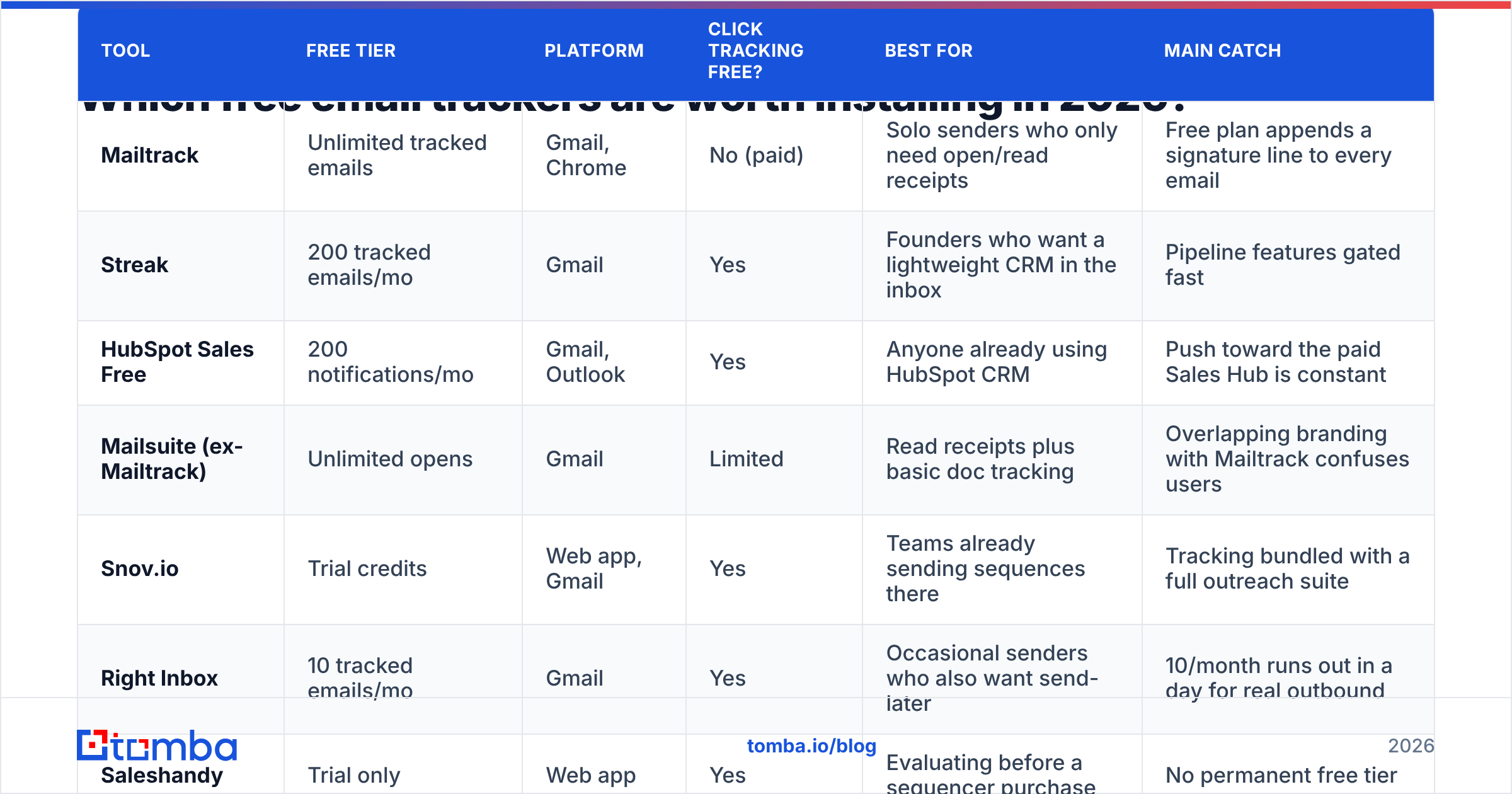
Free tiers move around, so check the vendor page before you commit a workflow to one. As of this writing, this is the landscape for individual senders and small teams.
| Tool | Free tier | Platform | Click tracking free? | Best for | Main catch |
|---|---|---|---|---|---|
| Mailtrack | Unlimited tracked emails | Gmail, Chrome | No (paid) | Solo senders who only need open/read receipts | Free plan appends a signature line to every email |
| Streak | 200 tracked emails/mo | Gmail | Yes | Founders who want a lightweight CRM in the inbox | Pipeline features gated fast |
| HubSpot Sales Free | 200 notifications/mo | Gmail, Outlook | Yes | Anyone already using HubSpot CRM | Push toward the paid Sales Hub is constant |
| Mailsuite (ex-Mailtrack) | Unlimited opens | Gmail | Limited | Read receipts plus basic doc tracking | Overlapping branding with Mailtrack confuses users |
| Snov.io | Trial credits | Web app, Gmail | Yes | Teams already sending sequences there | Tracking bundled with a full outreach suite |
| Right Inbox | 10 tracked emails/mo | Gmail | Yes | Occasional senders who also want send-later | 10/month runs out in a day for real outbound |
| Saleshandy | Trial only | Web app | Yes | Evaluating before a sequencer purchase | No permanent free tier |
| Gmelius | 7-day trial | Gmail | Yes | Shared-inbox teams | Tracking is a side feature, not the product |
| Yesware | 10 tracked emails/mo | Gmail, Outlook | Yes | Testing enterprise-style reporting | Free tier is a demo, not a plan |
Two honest observations after using most of these.
First, the free tiers are nearly identical in accuracy, because they all use the same pixel technique against the same privacy defenses. Paying more does not buy you a better pixel. It buys you seats, reporting rollups, CRM sync, and sequence automation. If open accuracy is what you want, no price point fixes it.
Second, watch the branding tax. Several free plans — Mailtrack's is the well-known example — append a "Sent with Mailtrack" line to your outgoing message. On a personal note that is harmless. On a cold email to a VP of Engineering, it announces that you are tracking them and that you are not paying for the tool. Check Mailtrack's own plan page before you roll it out to a team, and read recent user reviews on G2's email tracking category rather than trusting a listicle from 2023.
If you want the option most likely to survive a year without a billing surprise, HubSpot's free email tracking is the safest default: no signature injection, works in both Gmail and Outlook, and the notification cap resets monthly.
Is free email tracking still accurate, or is the open rate broken?#
Open rate is broken as an absolute number and still mildly useful as a relative one. Three forces did the damage.
Apple Mail Privacy Protection. Since 2021, Apple Mail pre-loads remote content through its own proxy for users who opted in, regardless of whether the person ever looked at the message. Every one of those becomes a logged "open," usually within minutes of delivery, from an Apple-owned IP. On B2B lists where iPhone-based Apple Mail usage is common, this alone can add 20 to 40 points to a reported open rate.
Gmail image proxying. Google has cached and served remote images through googleusercontent.com for over a decade. That defeats geolocation and device fingerprinting outright, and it means a cached image may or may not re-fire on the second look. Your "repeat open" count is partly a caching artifact.
Security appliances. Corporate mail gateways and link-protection services fetch every image and pre-click every link to check for malware. Enterprise domains are the worst offenders — exactly the accounts you most want to read correctly. A cluster of opens and clicks landing within four seconds of delivery, from a datacenter IP, is a scanner, not a buyer.
The practical rule: an open rate above roughly 60% on a cold list is a measurement artifact. A 95% open rate is not a triumph, it is a broken instrument. If two subject lines tested on the same list in the same week show 41% and 52%, that gap probably means something. If you compare this quarter's 78% against last year's 34%, you are comparing two different measurement regimes.
Does email tracking hurt deliverability?#
It can, and the mechanism is worth understanding before you install anything.
Tracking pixels and rewritten links both introduce third-party domains into your message. Spam filters weigh domain reputation, and free-tier tracking domains are shared across thousands of senders — including the careless ones. A shared redirect domain that got burned by a spam operation last week is now in your links this week.
Three mitigations, in order of effort:
- Send plain-ish HTML. Fewer images and a single tracked link beats a template full of remote assets. Run a draft through a spam checker before you commit a sequence to it.
- Use a custom tracking domain if your tool offers one. Most paid sequencers do; most free trackers do not. This is one of the more defensible reasons to upgrade.
- Turn open tracking off entirely for cold outbound and keep click tracking only. You lose the least reliable signal and remove the pixel that some filters flag. Plenty of experienced outbound teams have made this trade and reported no loss in useful information.
The bigger deliverability lever is upstream anyway. Sending to invalid or stale addresses drives bounce rates, and bounce rate does far more damage to sender reputation than a tracking pixel ever will. A list cleaned through an email verifier before send protects your domain more than any tracker setting.
When should you pay instead of using a free email tracker?#
Stay free if you are a single sender doing fewer than ~200 tracked emails a month, you only need timing signals, and you can live with a monthly cap or a signature line.
Upgrade when any of these become true:
- You have a team. Free tiers are per-seat, per-inbox, with no shared reporting. Three reps on three free plans produce three incompatible spreadsheets.
- You need CRM attribution. Knowing an open happened is worthless if it never lands on the contact record. Native sync — through a HubSpot integration or the equivalent — is what turns activity into pipeline data.
- You want a custom tracking domain. Shared tracking domains are a real deliverability liability at volume.
- You are sending sequences, not one-offs. At that point you are buying a sequencer that happens to track, not a tracker.
- You need retention. Most free tiers keep 30 days of history. Quarterly analysis needs more.
Notice what is not on that list: accuracy. No paid tier fixes proxy-inflated opens, because nobody can.
What is a better signal than an open?#
Rank your prospect signals by how much human intent each requires. Opens sit near the bottom. Here is what sits above them, roughly in ascending order of value:
- Click on a non-CTA link — mild interest, some scanner risk
- Click on a pricing or demo link — strong, hard to fake by a scanner in most setups
- Repeat clicks across separate days — someone came back, or forwarded it internally
- Reply of any kind, including "no" — the only signal that confirms a human read the message
- Inbound site visit from the target company — website visitor reveal turns anonymous traffic into an account name
- A booked meeting — the only one that pays rent
If your process optimises for opens, you will write subject lines that trick people into loading images. If it optimises for replies, you will write emails that earn a response. The tools you install quietly decide which of those you end up doing, because the metric on the dashboard becomes the metric in the standup. Track your response rate as the headline number and demote opens to a supporting diagnostic.
How do you build a tracking workflow that does not lie to you?#
A workable setup, in order:
Step 1 — Verify before you send. Every bounce is a wasted send and a reputation hit, and a tracked bounce shows up as "never opened," which looks like a copy problem when it is a data problem. Clean the list first.
Step 2 — Track clicks, treat opens as ambient. Configure alerts on clicks only. Let opens accumulate in the background for weekly trend comparison, and never quote them to anyone outside your team without the caveat.
Step 3 — Filter machine activity. Discard any open or click that lands within about ten seconds of delivery, or that comes from an obvious datacenter range. Some tools do this automatically; most free ones do not. If yours does not, add a mental filter.
Step 4 — Act on clusters, not single hits. One open means nothing. Four opens across two days from two device types means the message got forwarded, and that is a call worth making today.
Step 5 — Close the loop on the outcome. Log which tracked signals actually preceded a reply. After 200 sends you will know whether clicks predict replies on your list, or whether they are noise too. Nobody else's benchmark can answer that for your market.
Where does data quality fit into all of this?#
Tracking measures what happens after the send. It cannot rescue a send aimed at the wrong person or a mistyped address.
The uncomfortable math: if 18% of your list is invalid, your reported open rate is calculated against a denominator that includes addresses no human will ever see. Your subject-line A/B test is measuring noise. Fixing the input data changes the numbers more than switching trackers ever will — and it is cheaper. Compare a month of a mid-tier tracking subscription against Tomba pricing, where the free tier covers 25 searches a month and Starter runs $49/mo, and the value per dollar sits clearly on the data side.
Get the address right, confirm it is deliverable, then let the pixel tell you about timing. In that order, tracking is a useful supplement. In the reverse order, it is a very confident-looking dashboard built on sand.
Start with data you can trust. A tracker can only report on emails that reach a real person. Use the Tomba Email Finder to source verified professional addresses by name and domain, run them through verification before your first send, and let your free tracker do the one job it is still good at — telling you when to follow up. The free plan gives you 25 searches a month to test the difference on your own list.
Related guides#
Ready to find emails that actually work?
Join 150,000+ professionals who stopped guessing and started sending. Free credits on signup — no credit card required.
Get the Tomba newsletter
Practical outbound tactics and product updates — once every two weeks.
About the author