Free Email Tracker for Gmail: 7 Tools Tested in 2026
Free Gmail trackers all promise open notifications. Few tell you how much of that data is noise. Here's what each free plan actually gives you, what it silently limits, and when open tracking stops being worth the risk.
TL;DR
- A free email tracker for Gmail is almost always a 1x1 transparent image (a tracking pixel) plus a redirect link — nothing more sophisticated than that.
- Free plans differ less on features than on limits: tracked emails per month, whether they force a "Sent with X" signature, how long history is kept, and whether team reporting exists at all.
- Open rates in 2026 are structurally inflated by Apple Mail Privacy Protection and Gmail's image proxy. Treat opens as a weak signal, clicks as a medium signal, replies as the only one that pays rent.
- Mailtrack/Mailsuite and Streak cover most solo use cases for free. HubSpot's free tier wins if you want tracking wired into a CRM. Right Inbox and Snov.io are the "free but capped" tier.
- Tracking tells you what happened after send. It does nothing about the bigger leak: bad addresses. Verify first, then track.
What is a free email tracker for Gmail?#
A free email tracker for Gmail is a browser extension or Gmail add-on that tells you when a recipient opens your message and, usually, when they click a link inside it. It bolts onto the Gmail compose window, adds a checkmark or eye icon, and pushes a desktop or in-inbox notification when the pixel fires.
The mechanics are unglamorous. When you enable tracking, the extension injects a 1x1 transparent image hosted on the vendor's server into your HTML email. That image URL contains a unique ID tied to your message. When the recipient's mail client loads images, it requests that file, the vendor's server logs the request, and you get an "opened" event. It's the same web beacon technique marketers have used since the late 1990s.
Link tracking works differently and more reliably: the extension rewrites your URLs to route through the vendor's domain, logs the click, then 302-redirects the recipient to the real destination. A click requires deliberate human action, so it is far harder to fake or inflate than an image load.
That distinction — pixel loads versus deliberate actions — is the single most important thing to understand before you pick a tool. Everything else is packaging.
How does Gmail email tracking actually work under the hood?#
Four steps, every time, regardless of which tool you install:
- Injection. The extension appends
<img src="https://tracker.example/o/abc123.gif" width="1" height="1">to your message body before send. Some tools hide it in the signature block, which is why free tiers love forcing their branding on you. - Proxy fetch. Gmail does not let the recipient's browser hit the tracker directly. Google's image proxy (
googleusercontent.com) fetches and caches the image server-side. This is why the IP address and "device" data in most free trackers is worthless for Gmail-to-Gmail sends. - Logging. The vendor records a timestamp, the message ID, and whatever metadata survived the proxy. Repeated loads become "opened 4 times" — which often just means the recipient scrolled past the thread four times, or a security scanner prefetched it.
- Notification. You get a toast, a Gmail sidebar update, or a digest email.
Two systemic distortions break this chain in 2026:
- Apple Mail Privacy Protection (MPP) pre-loads every remote image on Apple Mail regardless of whether the human read anything. Any recipient on Apple Mail registers as an open, immediately, always. Depending on your ICP, that's 30-55% of your list producing fake positives.
- Corporate security gateways (Mimecast, Proofpoint, Microsoft Defender) detonate links and fetch images in sandboxes before delivery. You get an "open" and sometimes a "click" from a machine, seconds after send, from a datacenter.
The practical rule: an open that lands within 90 seconds of send, from a recipient you have never spoken to, is a robot until proven otherwise.
Which free email tracker for Gmail should you actually install?#
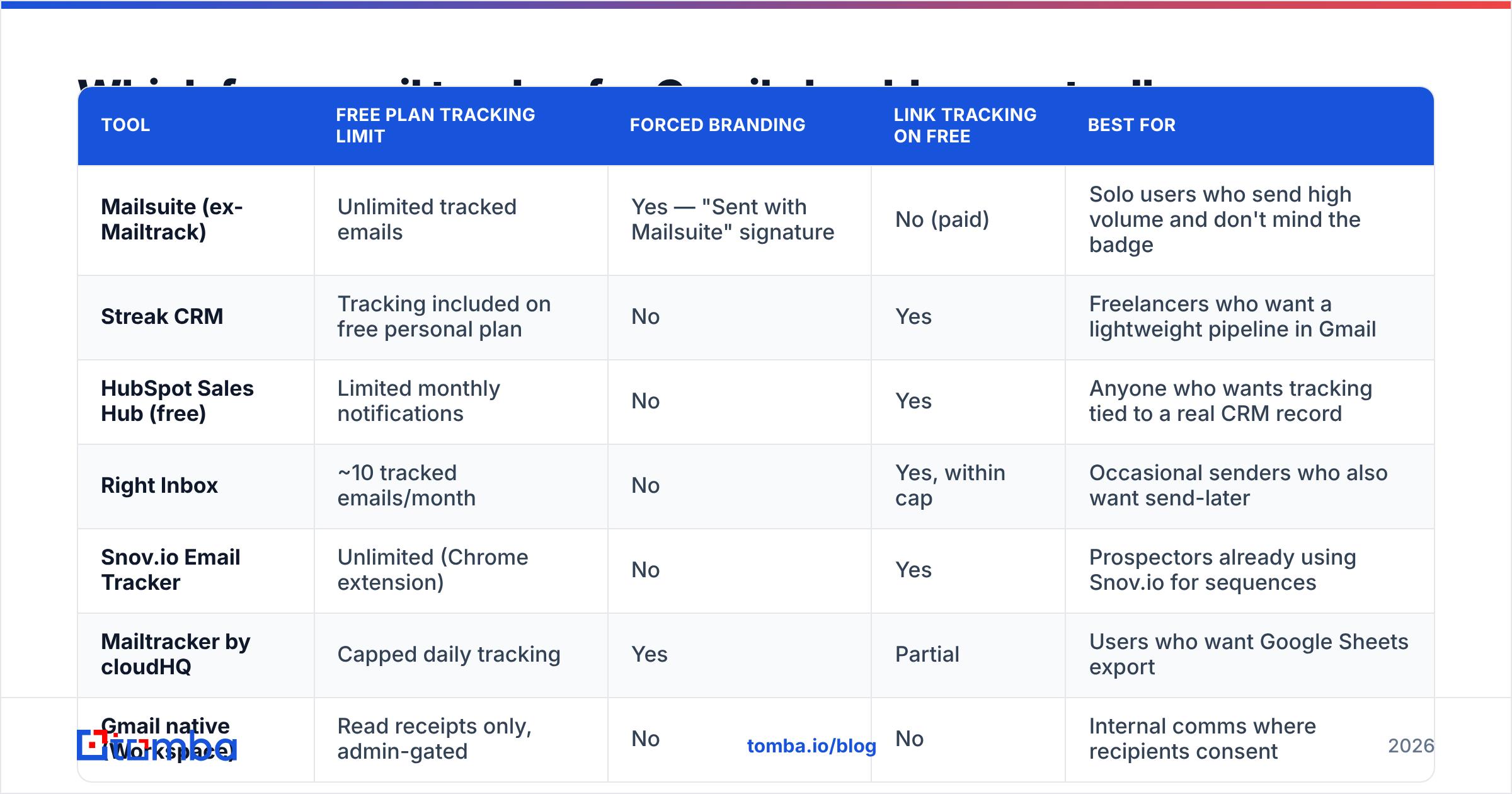
Here is the honest comparison. Free-plan limits change often, so verify on each vendor's pricing page before you commit a workflow to one.
| Tool | Free plan tracking limit | Forced branding | Link tracking on free | Best for |
|---|---|---|---|---|
| Mailsuite (ex-Mailtrack) | Unlimited tracked emails | Yes — "Sent with Mailsuite" signature | No (paid) | Solo users who send high volume and don't mind the badge |
| Streak CRM | Tracking included on free personal plan | No | Yes | Freelancers who want a lightweight pipeline in Gmail |
| HubSpot Sales Hub (free) | Limited monthly notifications | No | Yes | Anyone who wants tracking tied to a real CRM record |
| Right Inbox | ~10 tracked emails/month | No | Yes, within cap | Occasional senders who also want send-later |
| Snov.io Email Tracker | Unlimited (Chrome extension) | No | Yes | Prospectors already using Snov.io for sequences |
| Mailtracker by cloudHQ | Capped daily tracking | Yes | Partial | Users who want Google Sheets export |
| Gmail native (Workspace) | Read receipts only, admin-gated | No | No | Internal comms where recipients consent |
A few notes the table can't carry:
- Mailsuite's free tier is genuinely unlimited, which is rare. The trade is the signature line, and it changes how recipients read you. If you're pitching a $40k contract, that badge signals "I am tracking you" in the loudest possible way.
- Streak bundles tracking into a Gmail-native CRM. If you already live in threads, this is the least disruptive option. Their product documentation is clear about where the free plan stops.
- HubSpot free is the only one where an open event can automatically append to a contact timeline you'll still have in two years. Free tiers are documented on hubspot.com. Notification caps reset monthly.
- Native Gmail read receipts exist only on Google Workspace, must be enabled by an admin, and prompt the recipient to consent. Almost no one accepts. Useful for legal or HR confirmations, useless for sales.
What do free plans actually take away?#
Vendors rarely advertise the removals. These are the five that matter, in the order they'll bite you:
- History window. Free tiers commonly keep 7-30 days of tracking history. Your Q3 pipeline review has no data because the events expired in Q2.
- Team visibility. Free means one seat, one inbox. There is no shared view of who touched which account, so two reps can pitch the same buyer in the same week.
- Link tracking. Several tools give away open tracking but paywall click tracking — the opposite of what you want, since clicks are the more trustworthy signal.
- Custom tracking domain. Free plans route your links through the vendor's shared domain. If another user of that domain gets blacklisted, your links inherit the reputation damage. Check yours against a blacklist checker if replies suddenly dry up.
- Exports and API. No CSV, no webhook, no way to push an "opened 3x" signal into your CRM or scoring model. The data stays trapped in a Gmail sidebar.
Point 4 is the one people underestimate. Shared tracking domains are a known contributor to spam placement, and email deliverability problems caused by a rewritten link are invisible from inside Gmail — your message looks fine in Sent.
Is open tracking still worth it in 2026?#
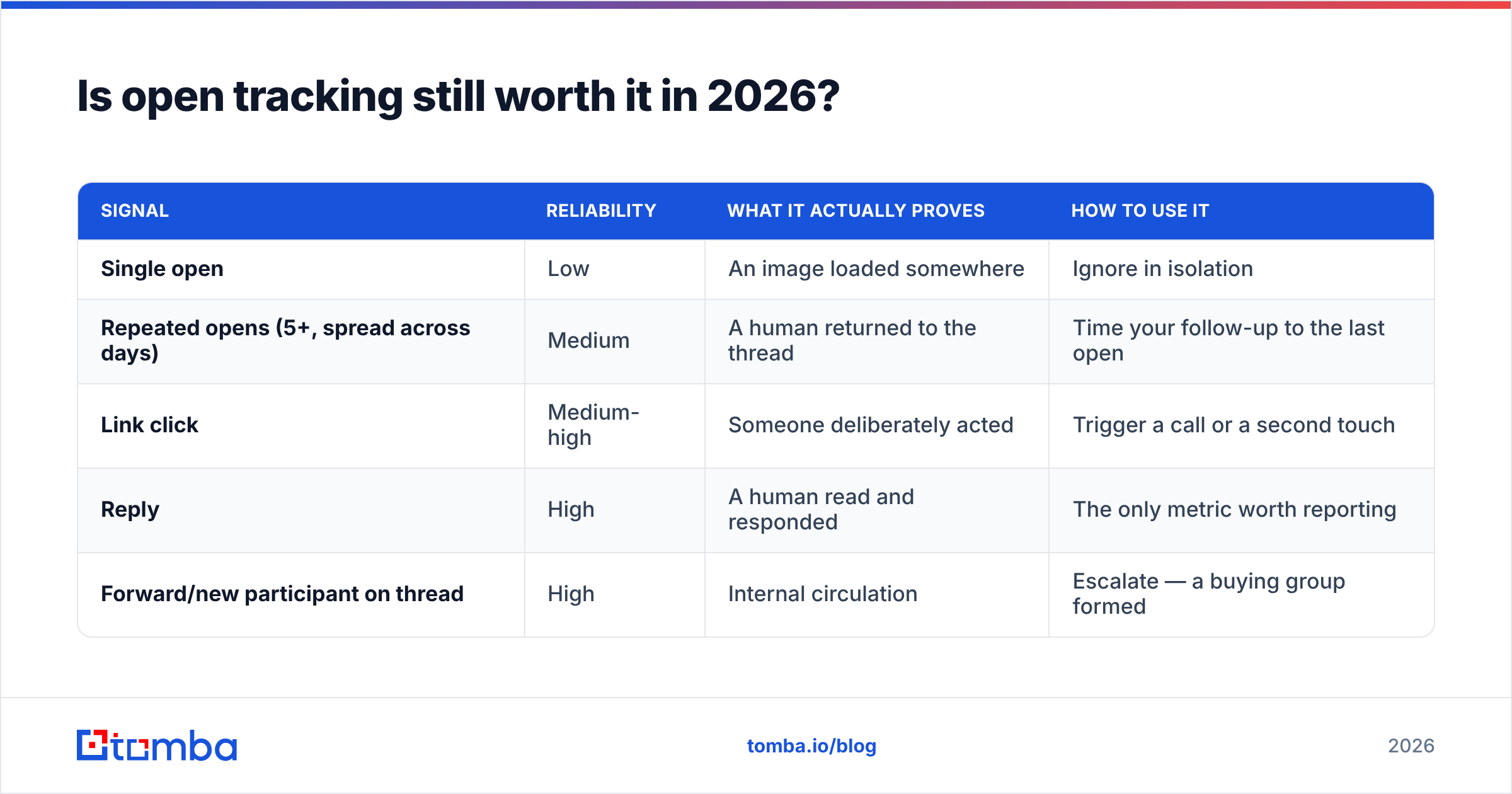
Partly. The honest breakdown by signal type:
| Signal | Reliability | What it actually proves | How to use it |
|---|---|---|---|
| Single open | Low | An image loaded somewhere | Ignore in isolation |
| Repeated opens (5+, spread across days) | Medium | A human returned to the thread | Time your follow-up to the last open |
| Link click | Medium-high | Someone deliberately acted | Trigger a call or a second touch |
| Reply | High | A human read and responded | The only metric worth reporting |
| Forward/new participant on thread | High | Internal circulation | Escalate — a buying group formed |
If your team reports open rate as a KPI, you are reporting Apple's image cache. The useful reframe: use opens as timing data, not interest data. "Opened three times yesterday at 8pm" is a decent reason to call at 8am. "Open rate is 62%" is not a reason to do anything.
For anyone tracking response rate seriously, wire the tracker's click events into whatever you use for scoring and let opens be a soft tiebreaker.

How do you install a free Gmail tracker without hurting deliverability?#
Tracking pixels and rewritten links both add spam-filter risk. Five rules keep the cost low:
- Never track internal or transactional mail. Tracking a colleague's calendar confirmation adds a remote image to a message that should be plain text. Turn it off by default and enable per-message.
- Skip tracking on the first cold touch. Your first email to a stranger should be as close to plain text as possible — no pixel, no rewritten links, ideally no links at all. Add tracking from email two onward, once you've cleared the first filter pass.
- Use a custom tracking domain the moment you can afford it. A subdomain like
links.yourcompany.comisolates your reputation. This is the single highest-value paid upgrade in any tracking tool. - Check your HTML weight. Some extensions inject bloated signature blocks. Run the message through a spam checker before you make it a template.
- Audit quarterly. Extensions update, permissions expand, and a tracker that once only read compose windows may now request full mailbox access. Review what you granted at your Google Account permissions page.
One more: if you're sending more than roughly 50 cold emails a day from a personal Gmail, a tracker extension is the wrong layer. Gmail's sending limits and reputation model aren't built for it. Move to a dedicated sending platform with its own tracking and per-domain reputation controls.
What's the difference between a Gmail tracker and a sales engagement platform?#
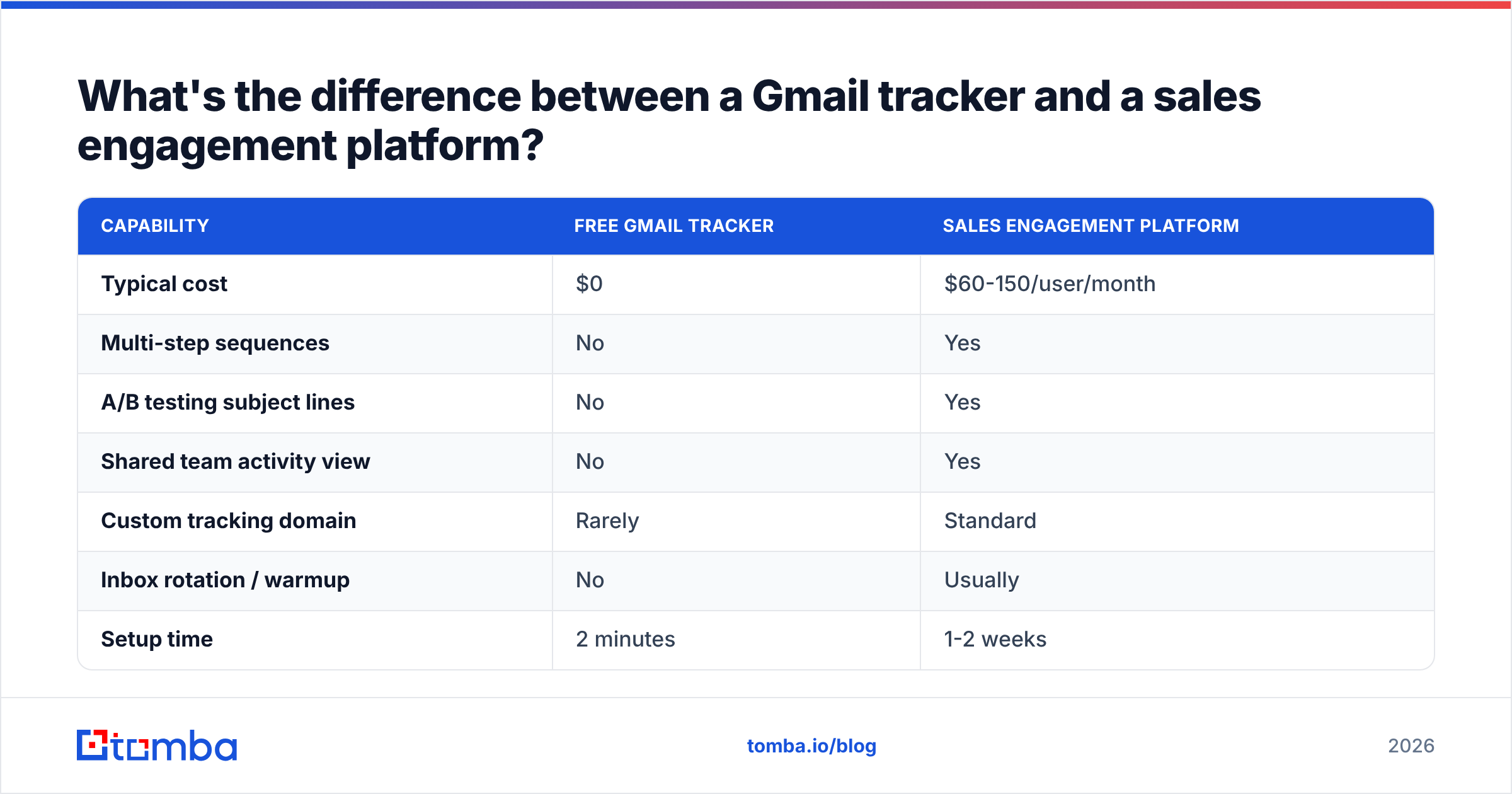
A tracker answers "did this one email get opened?" A sales engagement platform answers "which of the 400 people in this sequence are worth my Tuesday?"
| Capability | Free Gmail tracker | Sales engagement platform |
|---|---|---|
| Typical cost | $0 | $60-150/user/month |
| Multi-step sequences | No | Yes |
| A/B testing subject lines | No | Yes |
| Shared team activity view | No | Yes |
| Custom tracking domain | Rarely | Standard |
| Inbox rotation / warmup | No | Usually |
| Setup time | 2 minutes | 1-2 weeks |
For one person sending 10-30 targeted emails a day, a free tracker plus a disciplined follow-up habit beats a platform you'll use at 10% capacity. Past two reps or 100 sends a day, the free tracker stops being free — it starts costing you in duplicated outreach and missing data.
Does tracking fix your outbound, or hide the real problem?#
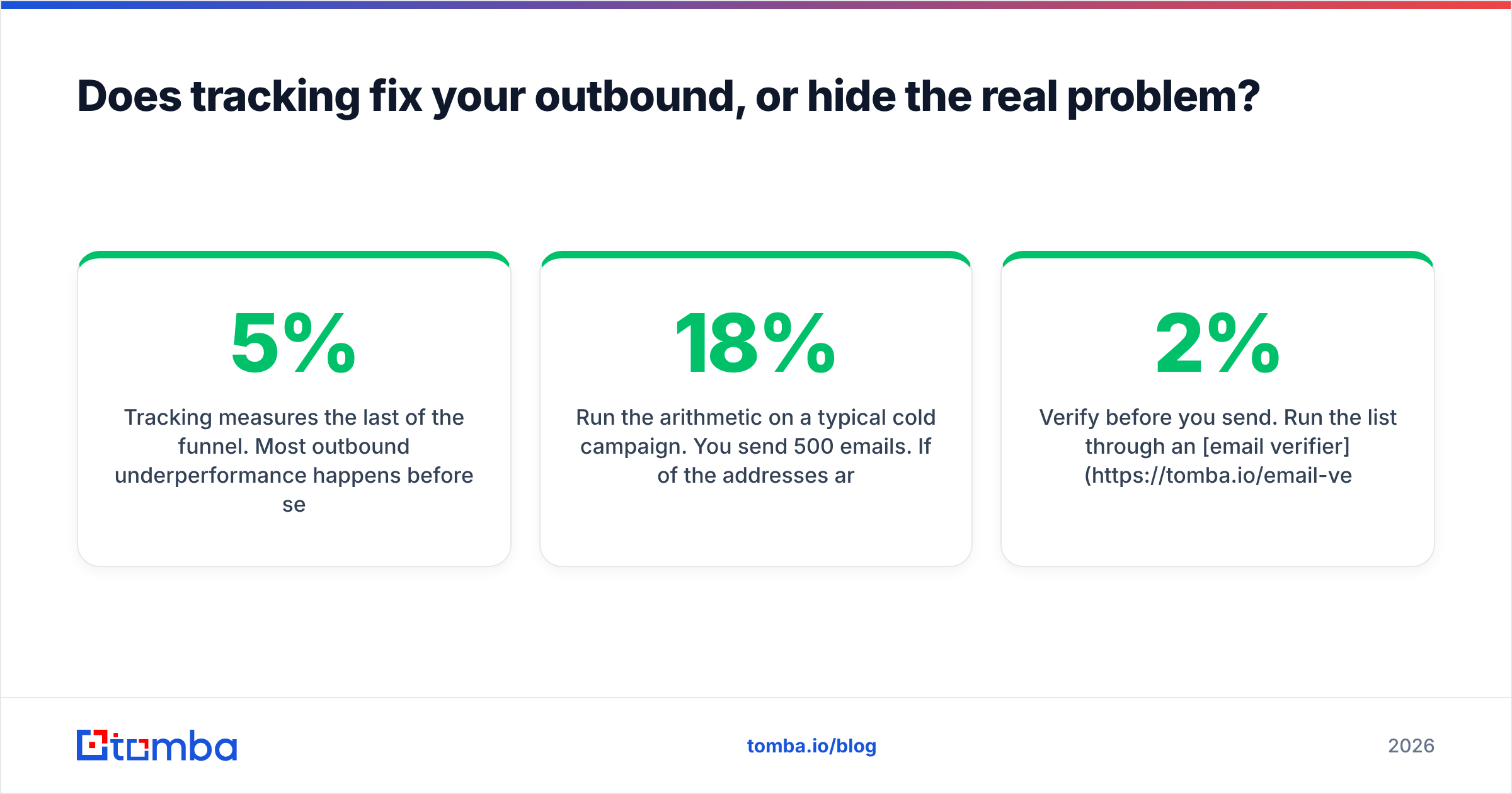
Tracking measures the last 5% of the funnel. Most outbound underperformance happens before send.
Run the arithmetic on a typical cold campaign. You send 500 emails. If 18% of the addresses are stale — a normal decay rate for scraped or year-old B2B lists — 90 of those bounce or land in a graveyard mailbox. Your tracker reports on 410 real deliveries but calculates its percentages against 500, and every bounce chips away at your sender reputation, pushing more of the remaining 410 toward spam.
No amount of open-rate dashboarding recovers those 90 contacts. The fix is upstream:
- Verify before you send. Run the list through an email verifier so bounces stay under 2%. This does more for your numbers than any tracker.
- Source addresses that are current. A stale list is the root cause, not a symptom. Pulling fresh contacts with an email finder beats scraping a 2023 export.
- Check sender health separately. A sender reputation checker tells you whether your domain is the problem before you blame your copy.
Order of operations matters: verified list → clean sending setup → tracking. Reversing that gives you very precise measurements of a broken process.
How should you choose, in one paragraph?#
If you send a handful of important emails a day and want zero friction, install Mailsuite and accept the signature, or use Streak if you want a light pipeline alongside it. If you already have or plan to have a CRM, start with HubSpot's free tier so your events land on a contact record instead of in a notification you'll dismiss. If you're building an outbound motion for a team, skip free trackers entirely — budget for a platform with a custom tracking domain from day one. And whichever you pick, configure it to notify you on clicks and replies, not on every pixel load, or you'll train yourself to ignore the one notification that mattered.
Fix the input before you measure the output. A tracker can only report on emails that reach a real person. Tomba's Email Finder sources verified professional addresses by name, domain, or company, with confidence scoring on every result so you know what you're sending into before the pixel ever fires. The free tier covers 25 searches a month, and paid plans start at $49/mo — see Tomba pricing for the full breakdown. Clean the list first; the open rates take care of themselves.
Related guides#
Ready to find emails that actually work?
Join 150,000+ professionals who stopped guessing and started sending. Free credits on signup — no credit card required.
Get the Tomba newsletter
Practical outbound tactics and product updates — once every two weeks.
About the author