Free Email Validation Software: 9 Tools Tested for 2026
Every free email validation tool caps something — credits, accuracy, catch-all handling, or API access. Here's what nine free tiers actually deliver in 2026, and the exact point where free stops being enough.
TL;DR
- Free email validation software is real and useful, but every vendor caps something: monthly credits, catch-all resolution, API access, or bulk uploads. Know which cap you're hitting before you pick.
- Free tiers cluster around 25–1,000 credits/month. Anything advertising "unlimited free" is either rate-limited to uselessness or harvesting your list.
- Syntax and MX checks are commodity — every free tool does them. The paid gap is catch-all handling, role-account detection, and greylisting retries.
- For a one-off list of a few hundred contacts, free is genuinely enough. Past ~2,000 addresses/month or any API automation, free tiers become the bottleneck.
- Validate at capture, not just before send. The cheapest bounce is the one you never imported.
What is free email validation software?#
Free email validation software checks whether an email address can actually receive mail — without charging you for the first batch of checks. Think of it like a bouncer at the door of your send: it looks at the address, confirms the domain exists, opens a conversation with the receiving mail server, and reports back whether the mailbox is real, dead, risky, or unknowable.
Under the hood, nearly every tool runs the same five-layer sequence. The differences between vendors show up in how deep they go past layer three.
- Syntax check — Is the string a legal address per RFC 5322? Catches typos like
john@@acme.comand trailing spaces. Free everywhere, worth almost nothing on its own. - Domain and MX record lookup — Does
acme.comresolve, and does it publish mail exchange records? Kills dead domains and parked pages. Also free everywhere. - Disposable and role detection — Is this
mailinator.com, or is itinfo@,sales@,noreply@? Role accounts aren't invalid, but they tank reply rates and inflate complaint risk. Free tiers often skip role flagging. - SMTP handshake — The tool opens a connection to the receiving server and asks whether the mailbox exists, without sending a message. This is where quality diverges: IP reputation, retry logic, and greylisting handling decide whether you get a real answer or a shrug.
- Catch-all resolution — Some domains accept mail for every address, so the SMTP answer is always "yes." Resolving these takes pattern data and historical engagement signals. Almost no free tier does this well.
If a tool stops at layer two, it is a syntax checker with marketing. That's fine for cleaning a signup form; it will not save a cold campaign.
Why does email validation matter more in 2026 than it did in 2023?#
Because mailbox providers got stricter and the penalty curve got steeper.
Google and Yahoo's bulk-sender requirements pushed the tolerated spam-complaint rate to 0.3%, and both now enforce authentication and one-click unsubscribe on volume senders. Microsoft followed with tighter thresholds for high-volume domains. A list with 8% invalid addresses doesn't just waste sends — it signals to filters that you're mailing a purchased or stale list, and your email deliverability degrades for every subsequent campaign, including the ones going to good addresses.
The practical rule most senders now use: keep hard bounces under 2% per campaign, and under 1% if you're on shared infrastructure. Hitting that with an unvalidated B2B list is close to impossible, because B2B contact data decays roughly 25–30% per year through job changes alone.
Validation isn't hygiene theater. It's the cheapest lever you have on sender reputation.
How do the free tiers actually compare?#
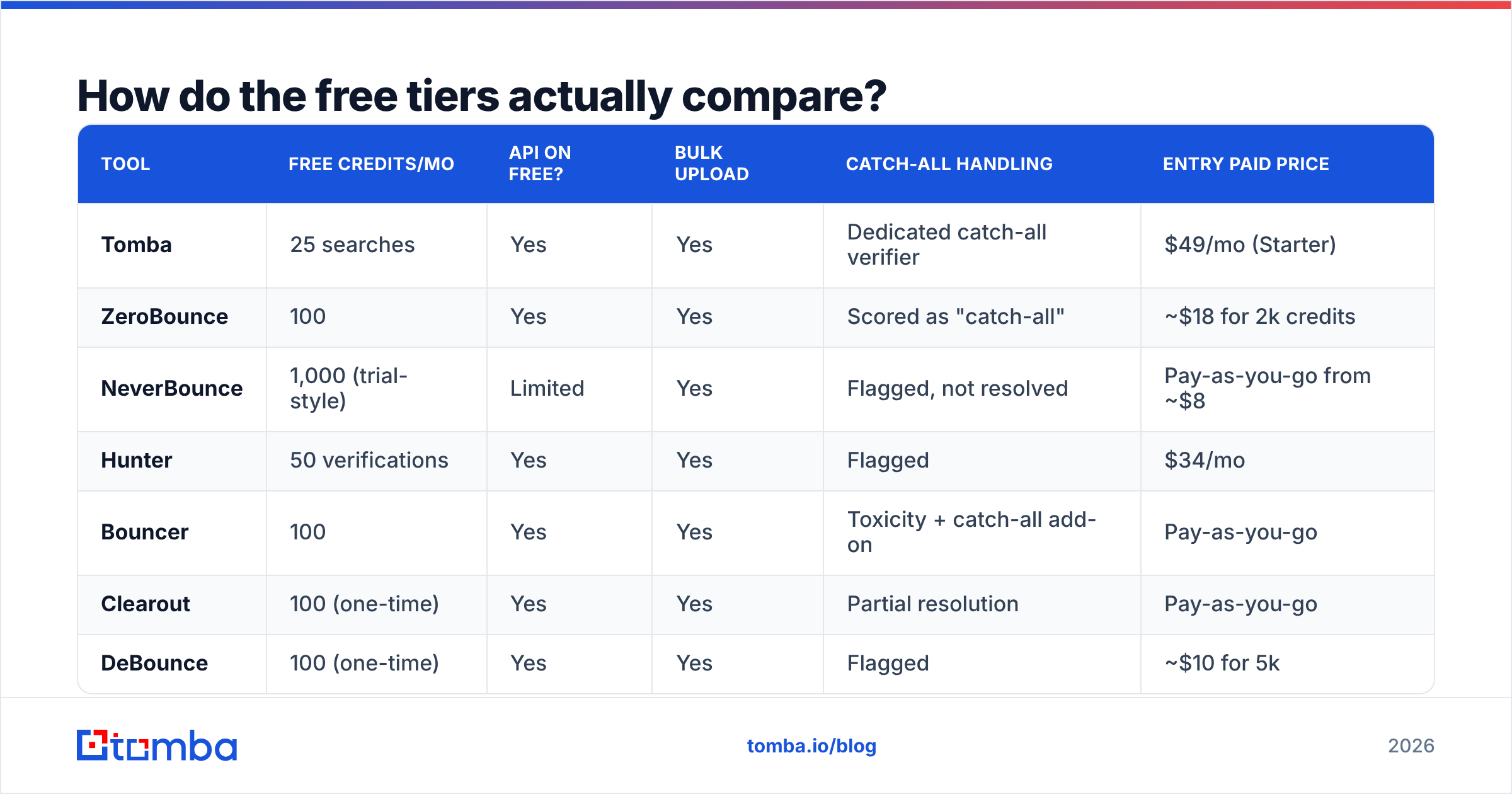
Here's the part vendors bury on their pricing pages. The table below reflects publicly advertised free allowances and entry paid pricing as of early 2026 — always re-check before committing, since free tiers get trimmed quietly.

| Tool | Free credits/mo | API on free? | Bulk upload | Catch-all handling | Entry paid price |
|---|---|---|---|---|---|
| Tomba | 25 searches | Yes | Yes | Dedicated catch-all verifier | $49/mo (Starter) |
| ZeroBounce | 100 | Yes | Yes | Scored as "catch-all" | ~$18 for 2k credits |
| NeverBounce | 1,000 (trial-style) | Limited | Yes | Flagged, not resolved | Pay-as-you-go from ~$8 |
| Hunter | 50 verifications | Yes | Yes | Flagged | $34/mo |
| Bouncer | 100 | Yes | Yes | Toxicity + catch-all add-on | Pay-as-you-go |
| Clearout | 100 (one-time) | Yes | Yes | Partial resolution | Pay-as-you-go |
| DeBounce | 100 (one-time) | Yes | Yes | Flagged | ~$10 for 5k |
| EmailListVerify | 100 (one-time) | No | Yes | Flagged | Pay-as-you-go |
| MailTester-style free checkers | Rate-limited single lookups | No | No | None | n/a |

Three patterns fall out of this table.
One-time versus recurring is the biggest hidden variable. Several vendors advertise "100 free credits" that never refill. That's a trial, not a free tier. Tomba's 25/month, ZeroBounce's 100/month, and Bouncer's monthly allowance actually recur — which matters if your use case is a trickle of 20 new contacts a week rather than one big cleanup.
API access on the free tier separates toys from tools. If you want validation at form-submit time, or inside a Zapier integration, you need a key on the free plan. Tools that gate the API behind payment force you into manual CSV round-trips.
Nobody solves catch-all for free. Catch-all domains are 15–25% of typical B2B lists depending on vertical, and they're the single largest source of "verified" addresses that still bounce. If your list skews enterprise, budget for a dedicated catch-all verifier rather than accepting a blanket "risky" label on a quarter of your contacts.
Is free email validation software accurate enough for cold outreach?#
For a first pass, yes. For the send itself, usually not — and the reason is structural, not conspiratorial.
Accuracy in SMTP verification depends heavily on the reputation of the IPs doing the probing. Receiving servers rate-limit, greylist, and outright block unknown probers. A vendor running free-tier checks through a shared, heavily-used pool gets more ambiguous responses than the same vendor running paid checks through warm, rotated infrastructure. That's why the same address can come back "valid" on a paid run and "unknown" on a free one.
What that means in practice:
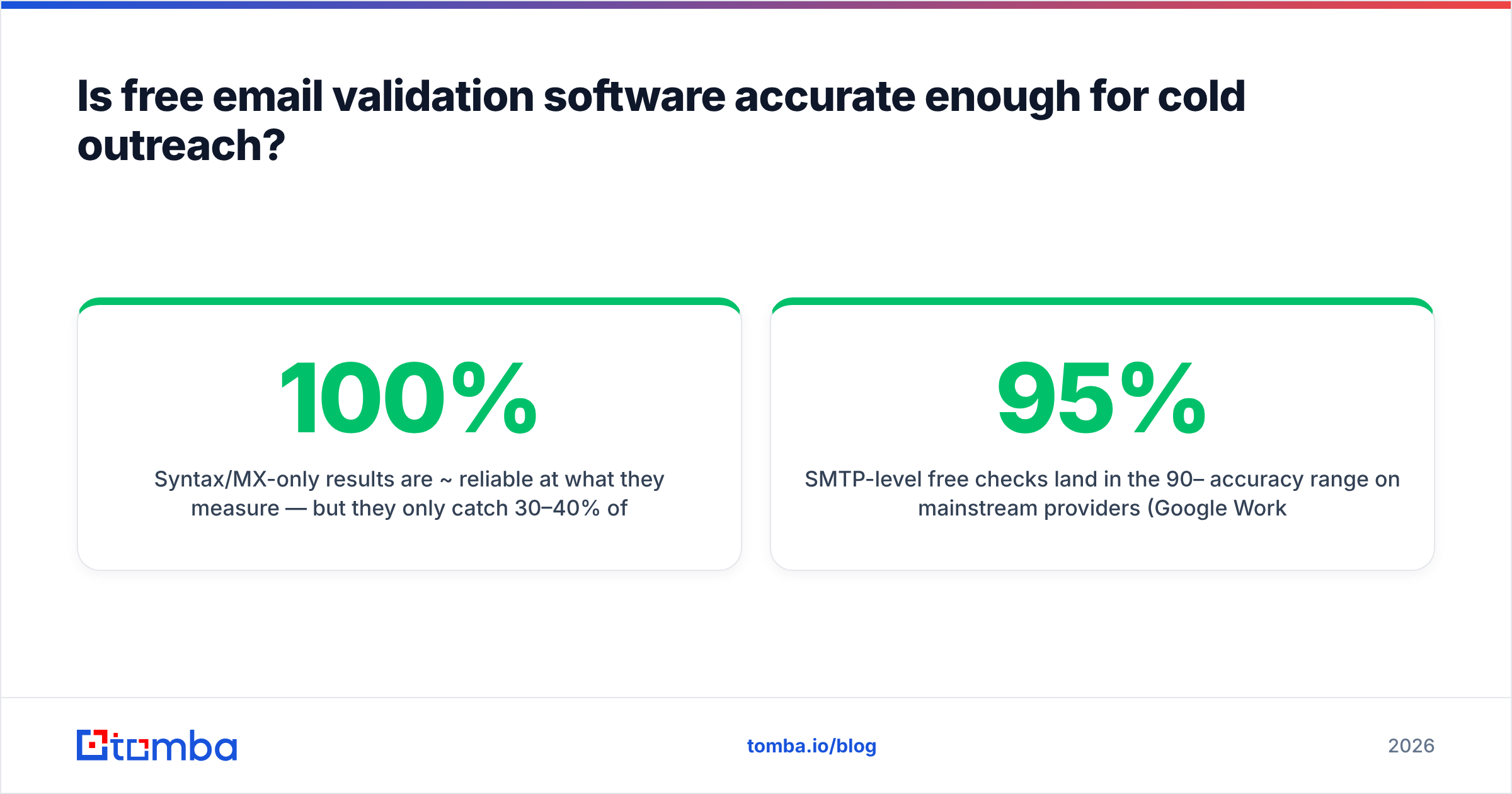
- Syntax/MX-only results are ~100% reliable at what they measure — but they only catch 30–40% of the bad addresses in a typical stale list.
- SMTP-level free checks land in the 90–95% accuracy range on mainstream providers (Google Workspace, Microsoft 365) and drop sharply on self-hosted or regionally-hosted domains.
- Anything marked "unknown" or "risky" on a free tier should be treated as unsendable unless you re-check it with a paid pass, because you have no way to distinguish "server refused to answer" from "mailbox doesn't exist."
The honest workflow: run everything through free validation to strip the obvious dead weight, then pay for a verified pass on the survivors before they enter a sequence. Cleaning 5,000 addresses down to 3,800 for free, then paying to verify 3,800 instead of 5,000, is a real saving.
Independent review data on G2's email verification category is a reasonable sanity check on vendor claims, though be aware that review volume correlates with marketing spend more than with accuracy.
What's the difference between validating and finding emails?#
They're adjacent, and conflating them is the most common mistake in this category.
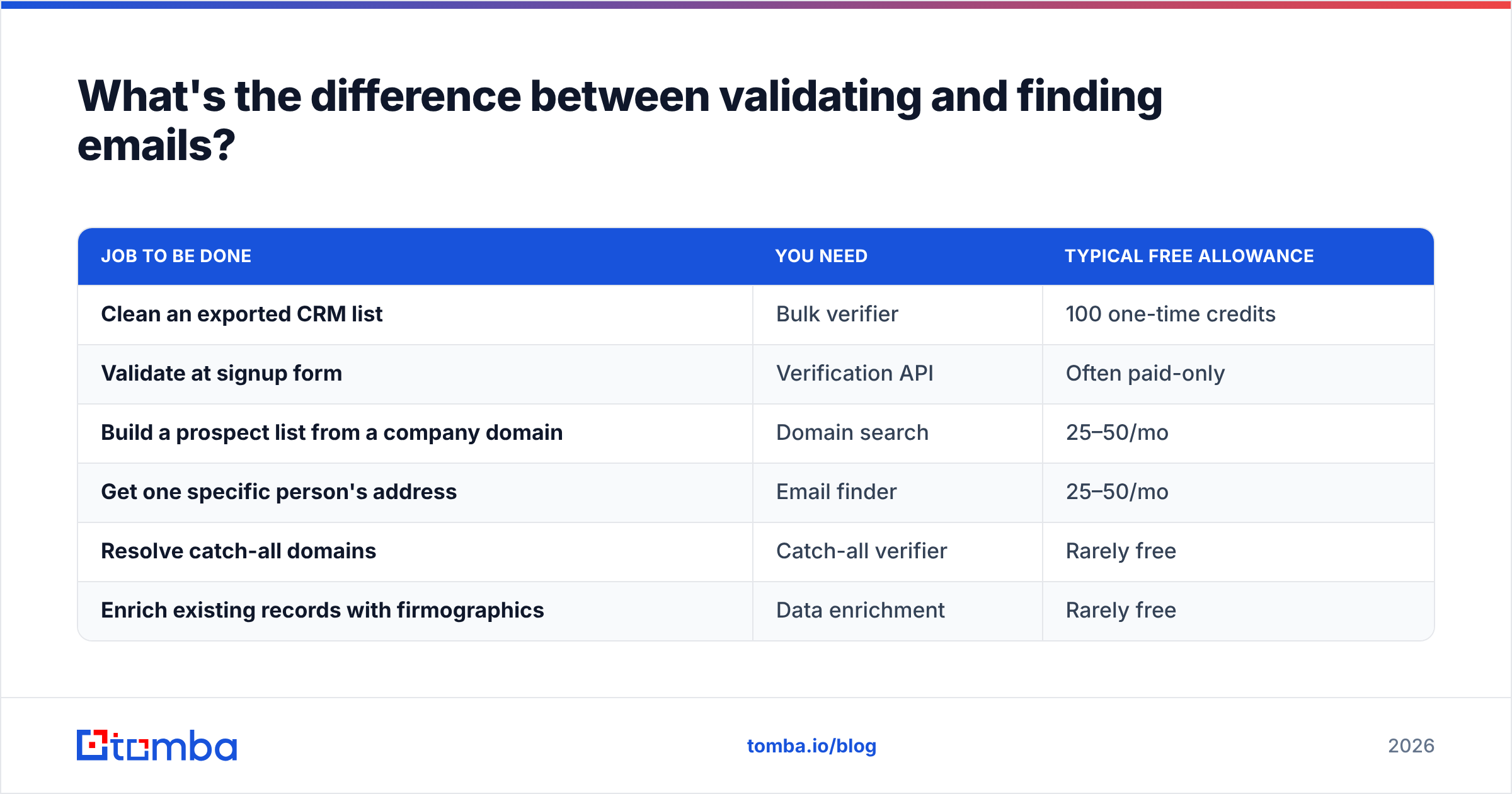
Validation takes an address you already have and asks "will this deliver?" Finding takes a name and a company and produces an address that didn't previously exist in your CRM. Most teams need both, and buying two separate tools is how budgets bloat.
| Job to be done | You need | Typical free allowance |
|---|---|---|
| Clean an exported CRM list | Bulk verifier | 100 one-time credits |
| Validate at signup form | Verification API | Often paid-only |
| Build a prospect list from a company domain | Domain search | 25–50/mo |
| Get one specific person's address | Email finder | 25–50/mo |
| Resolve catch-all domains | Catch-all verifier | Rarely free |
| Enrich existing records with firmographics | Data enrichment | Rarely free |
Platforms that do both — find and verify in one pass — remove a step you'd otherwise do manually. When a finder returns an address it has already verified, the confidence score is doing double duty. When you use a finder from vendor A and a verifier from vendor B, you pay twice and reconcile two different scoring schemes.
If you only ever need to check addresses that already exist, a pure verifier is cheaper. If you're building lists, a combined platform wins on both price and workflow.

What should you actually do with your free credits?#
Free tiers are small. Spend them where the information value is highest, not on the first 25 rows of your CSV.
- Test the hard cases first. Pull 25 addresses you already know the answer to — five that bounced last quarter, five that replied, five role accounts, five catch-all domains, five obvious typos. A vendor that correctly grades those 25 will handle the other 5,000. A vendor that marks your known-good contacts "risky" is guessing.
- Check your highest-value segment. If 40 accounts represent 80% of pipeline, validate those before you touch the long tail. A bounce on a target account costs more than a bounce on a cold lead.
- Validate at the point of capture. Wire a validation call into your signup form or lead-gen flow so bad addresses never enter the database. This is where a free API key earns its keep — you're spending a credit per new record, not per list cleanup.
- Re-verify anything older than 90 days. B2B decay is continuous. A list you cleaned in January is measurably dirtier by April.
- Segment, don't just delete. "Invalid" gets removed. "Risky" and "catch-all" go into a separate, low-volume sequence sent from a secondary domain — you still get some of that pipeline without risking your primary sending reputation.
- Log the results. Track bounce rate per source. If a particular list-building method produces 9% bounces post-validation, the problem is upstream of your verifier.
When does free stop being enough?#
Four clear signals:
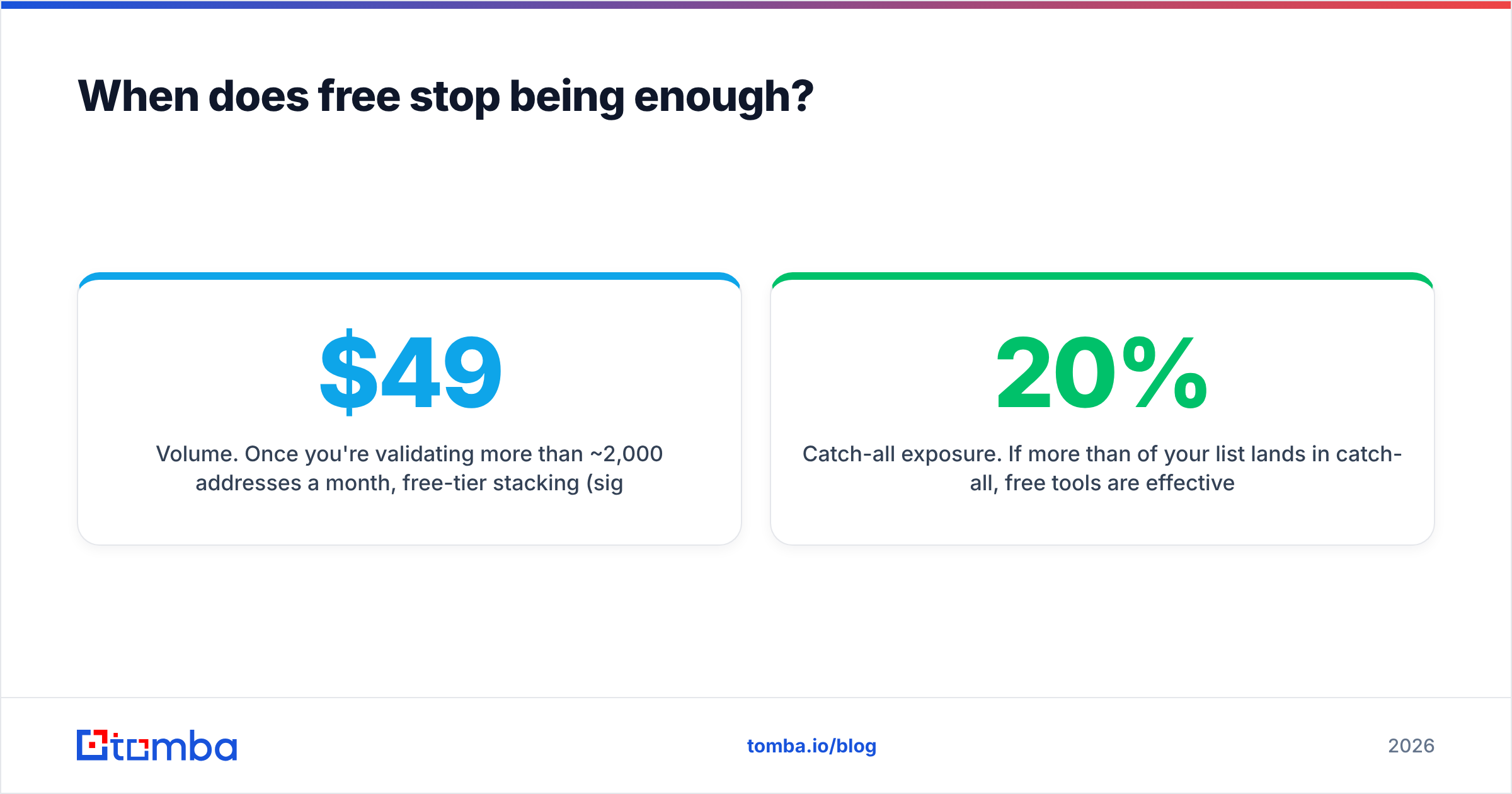
Volume. Once you're validating more than ~2,000 addresses a month, free-tier stacking (signing up for five vendors) costs more time than a $49/mo plan costs money. Tomba's pricing starts at $49/mo for Starter, $99/mo for Growth, and $249/mo for Pro — the same tiering shape you'll find across the category.
Automation. The moment validation needs to happen without a human clicking upload, you need reliable API quota and rate limits. Free-tier APIs are throttled hard enough to break real-time form validation.
Catch-all exposure. If more than 20% of your list lands in catch-all, free tools are effectively blind on a fifth of your addressable market.
Compliance and audit. Regulated industries need retention controls, DPAs, and processing records. Free tiers rarely include them, and most free vendors reserve the right to use submitted data for their own database improvement — read the terms before uploading customer records. Vendors publishing clear data sources documentation are the ones worth trusting with a list.
For context on how bounce classification works at the protocol level, Wikipedia's bounce message article is a decent primer on hard versus soft failures, and ZeroBounce's own documentation is a reasonable reference on how a mature verifier structures its result codes.
Which free email validation software should you start with?#
Pick based on your bottleneck, not on the biggest advertised number:
- One-off cleanup of a big list — a pay-as-you-go verifier with a 100-credit trial. Test on your hard cases, then buy credits.
- Recurring small volume — a tool with genuinely monthly free credits, so you're not re-registering every quarter.
- Finding plus verifying — a combined platform, so one credit does both jobs.
- Developer workflow — free API access is non-negotiable; check rate limits before you build.
Then measure. Run 200 addresses through two tools and compare against actual send results. Vendor-published accuracy figures are marketing; your bounce rate is data.
If your real problem is that you don't have enough addresses to validate in the first place, start upstream. The Tomba Email Finder returns verified professional addresses from a name and domain, with 25 free searches a month and no card required — so you can build a clean list instead of cleaning a dirty one. Run a company domain through it, check the confidence scores against contacts you already know, and see how many bounces you were about to pay for.
Related guides#
Ready to find emails that actually work?
Join 150,000+ professionals who stopped guessing and started sending. Free credits on signup — no credit card required.
Get the Tomba newsletter
Practical outbound tactics and product updates — once every two weeks.
About the author