Free Email Verification Code: How to Verify Emails in 2026
Regex catches typos. SMTP catches dead mailboxes. Neither catches catch-alls. Here is what a free email verification code can actually do in 2026 — with working snippets, real API limits, and the point where free stops paying.
TL;DR
- "Free email verification code" means two different things: the OTP digits you email a new user, and the code/API you run to check whether an address is real. This guide covers both, with most of the depth on the second.
- Free code (regex + MX lookup) catches roughly 20–30% of bad addresses — typos, fake domains, dead domains. It cannot tell you if
sarah@realcompany.comhas a mailbox. - Raw SMTP handshake code used to close that gap. In 2026 it mostly doesn't: Google, Microsoft, and every major provider accept-then-bounce or greylist unknown IPs.
- Free API tiers (Tomba 25/mo, ZeroBounce 100 one-time, Debounce 100 one-time) are fine for testing and tiny lists. Above ~1,000 addresses a month, paid is cheaper than the bounces.
- The honest rule: use free code to reject garbage at the signup form, use a paid verifier before you send cold email at volume.
What does "free email verification code" actually mean?#
Two searches hide behind the same phrase, and they need opposite answers.
Meaning one — the OTP. You're building signup and you want to email a six-digit code, have the user paste it back, and mark the address confirmed. There's no vendor to buy here. You generate the code, hash it, store it with an expiry, and send it. Cost: whatever your SMTP provider charges. The "free" part is trivially true.
Meaning two — verification code you run. You have a list of addresses (leads, form submissions, an old CRM export) and you want to know which ones will bounce before you send. You're looking for a script, a library, or a free API tier. This is where the answer gets uncomfortable, because free code and accurate results diverge hard after the first check.
If you came for meaning one, jump to the OTP section near the end. Everything before it is meaning two.
What can free email verification code actually check?#
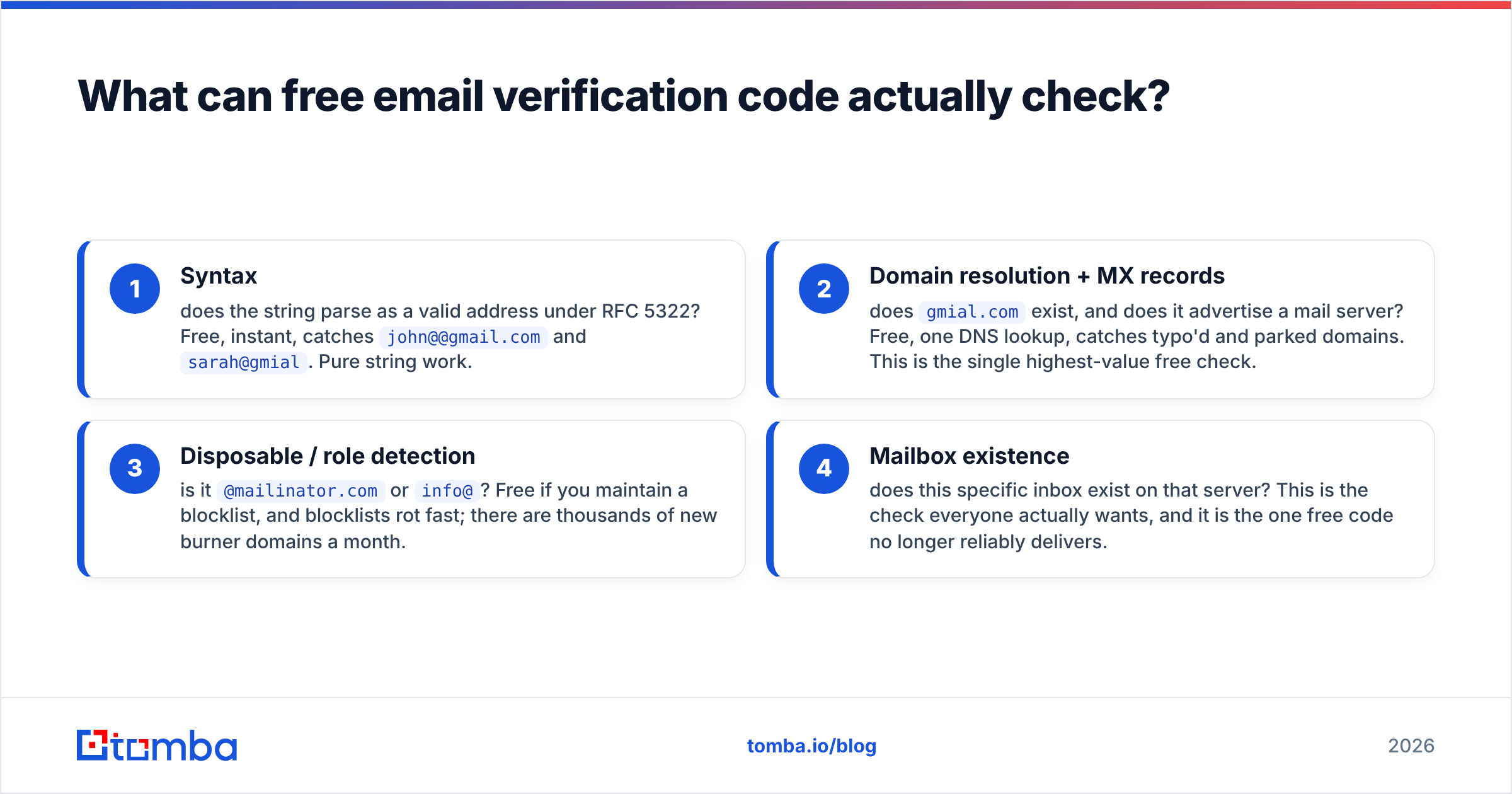
Verification is a stack of checks, and each layer costs more to run than the one above it. Free code buys you the top two layers cleanly, the third unreliably, and the fourth not at all.
- Syntax — does the string parse as a valid address under RFC 5322? Free, instant, catches
john@@gmail.comandsarah@gmial. Pure string work. - Domain resolution + MX records — does
gmial.comexist, and does it advertise a mail server? Free, one DNS lookup, catches typo'd and parked domains. This is the single highest-value free check. - Disposable / role detection — is it
@mailinator.comorinfo@? Free if you maintain a blocklist, and blocklists rot fast; there are thousands of new burner domains a month. - Mailbox existence — does this specific inbox exist on that server? This is the check everyone actually wants, and it is the one free code no longer reliably delivers.
Here's the part most tutorials skip: layers 1–3 reject maybe a quarter of a bad list. If your list is scraped or aged, the majority of your bounces are layer-4 problems — real domains, dead people, closed mailboxes, decommissioned aliases.

How do you write free email verification code in Python or Node?#
Short version: forty lines gets you syntax plus MX. Here's the Python shape.
import re, dns.resolver

PATTERN = re.compile(r"^[A-Za-z0-9._%+-]+@[A-Za-z0-9.-]+\.[A-Za-z]{2,}$")

def verify(address: str) -> dict:
    if not PATTERN.match(address):
        return {"email": address, "status": "invalid", "reason": "syntax"}
    domain = address.rsplit("@", 1)[1]
    try:
        records = dns.resolver.resolve(domain, "MX")
    except Exception:
        return {"email": address, "status": "invalid", "reason": "no_mx"}
    return {"email": address, "status": "unknown", "reason": "mx_ok",
            "mx": str(records[0].exchange)}
Note the return value on success: unknown, not valid. That's the honest label. You've proven the domain can receive mail. You have proven nothing about the mailbox.
Node is the same idea with dns.promises.resolveMx. Both run in single-digit milliseconds per address once DNS is warm, and both are genuinely free forever. Cache MX results by domain — on a 10,000-row B2B list you'll typically see 3,000–6,000 unique domains, so caching cuts your lookups by more than half.
Two warnings on the regex. First, do not paste the "full RFC 5322 compliant" monster regex you'll find on Stack Overflow — it accepts addresses no mail server will ever route and it's a ReDoS liability. Second, the simple pattern above rejects a small number of legitimate exotic addresses (quoted local parts, new TLDs beyond a few characters are fine, but plus-addressing and unicode need care). For a signup form, being slightly permissive and confirming by OTP beats being strict and blocking real users. The Wikipedia entry on email address syntax is a good reference for the edge cases.
Does free SMTP verification still work in 2026?#
Mostly no, and this is the single biggest change from the tutorials still ranking on page one.
The classic trick: open a TCP connection to the domain's mail server on port 25, say HELO, issue MAIL FROM and RCPT TO, and read the response code. A 250 meant the mailbox exists; a 550 meant it doesn't. Elegant, free, and for about fifteen years, accurate.
What breaks it now:
- Port 25 is blocked outbound on AWS, GCP, Azure, DigitalOcean, and every consumer ISP. Your script hangs, times out, and reports false negatives.
- Accept-all responses. Google Workspace and Microsoft 365 — which together host the majority of B2B mailboxes — return
250for addresses that don't exist, then bounce asynchronously. Your code records a valid address; your ESP records a hard bounce three hours later. - Greylisting and rate limits. Unknown IPs get
451 try again later. Hammer the server and you land on a blocklist that will follow your sending domain around. - Reputation damage. Probing mailboxes from the same IP range you send from is a good way to hurt your own sender reputation.
Commercial verifiers solve this with infrastructure you can't replicate on a weekend: large rotating IP pools with warmed reputation, provider-specific handshake logic, and — critically — historical bounce data on hundreds of millions of addresses that lets them answer without probing at all. That last part is the real moat, and no amount of free code substitutes for it.
How accurate is free code versus a paid verifier?#
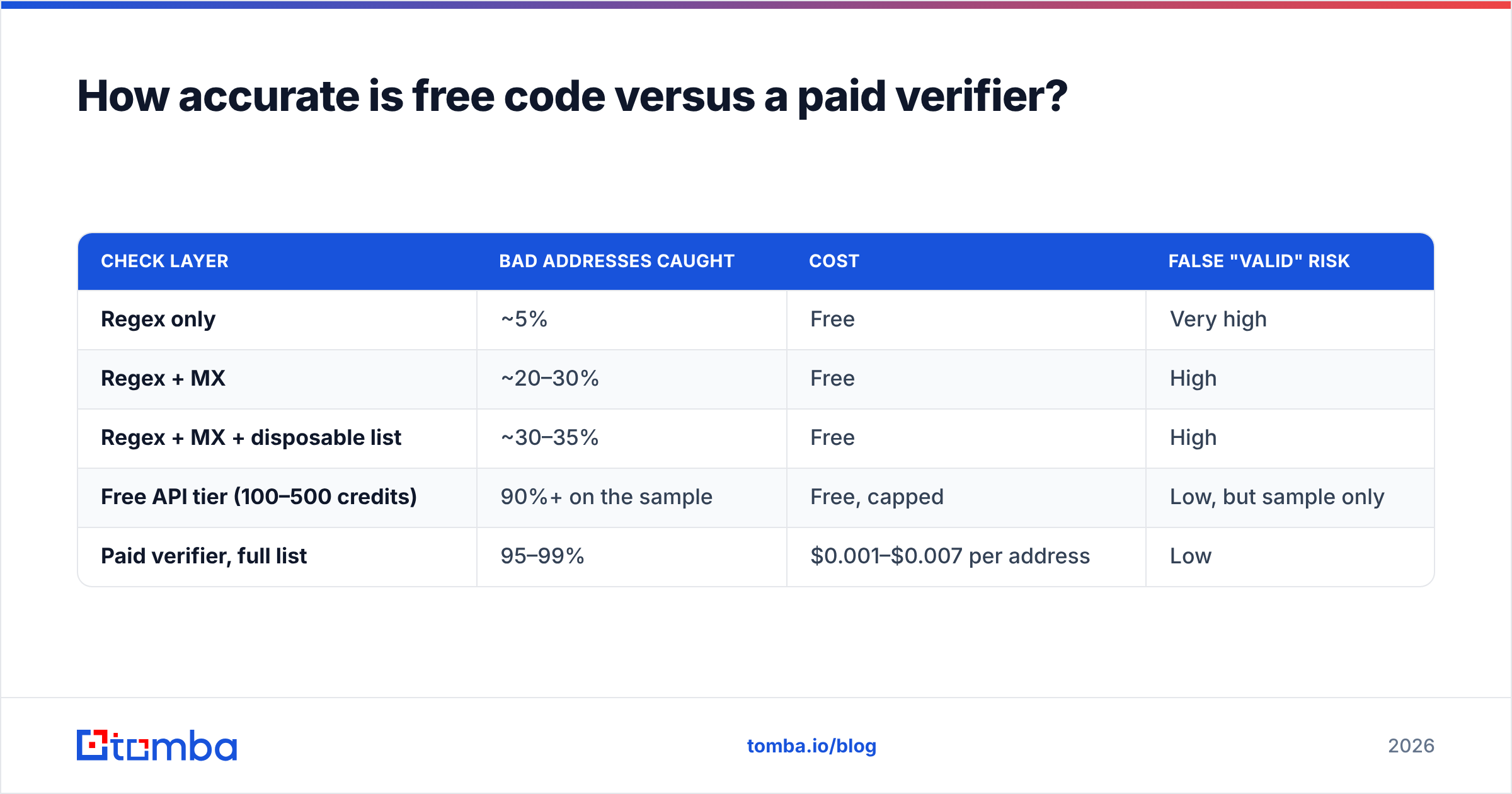
Expect roughly this split on a typical scraped B2B list of 10,000 addresses:
| Check layer | Bad addresses caught | Cost | False "valid" risk |
|---|---|---|---|
| Regex only | ~5% | Free | Very high |
| Regex + MX | ~20–30% | Free | High |
| Regex + MX + disposable list | ~30–35% | Free | High |
| Free API tier (100–500 credits) | 90%+ on the sample | Free, capped | Low, but sample only |
| Paid verifier, full list | 95–99% | $0.001–$0.007 per address | Low |
The economics decide it, not the ideology. Verifying 10,000 addresses at $0.004 costs $40. Sending to 10,000 unverified addresses with a 22% bounce rate — normal for an unverified scraped list — costs you your domain reputation, and recovering that takes six to eight weeks of throttled sending. Forty dollars is not the expensive line item.

Accuracy claims from vendors are all self-reported, so treat the marketing numbers as a ceiling and test on your own list. Every serious provider gives you enough free credits to run a 100-address sample against addresses whose deliverability you already know. Do that before you buy anything — it takes twenty minutes and it's the only benchmark that describes your data.
Which free email verification APIs are worth using in 2026?#
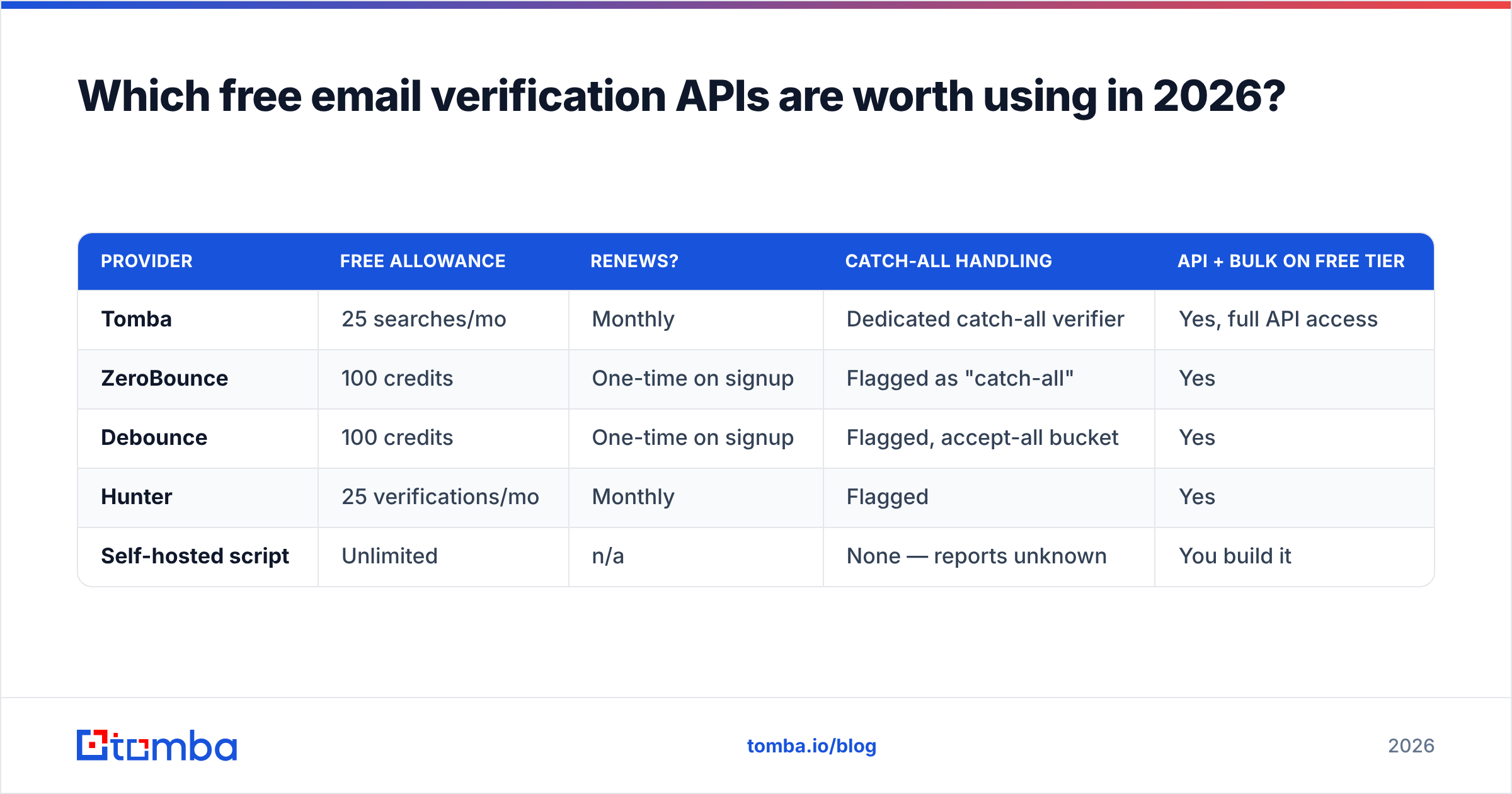
If you want mailbox-level results without building infrastructure, you're calling someone's API. Here's what the free tiers actually give you.
| Provider | Free allowance | Renews? | Catch-all handling | API + bulk on free tier |
|---|---|---|---|---|
| Tomba | 25 searches/mo | Monthly | Dedicated catch-all verifier | Yes, full API access |
| ZeroBounce | 100 credits | One-time on signup | Flagged as "catch-all" | Yes |
| Debounce | 100 credits | One-time on signup | Flagged, accept-all bucket | Yes |
| Hunter | 25 verifications/mo | Monthly | Flagged | Yes |
| Self-hosted script | Unlimited | n/a | None — reports unknown | You build it |

A few notes on reading that table honestly. One-time credits are for evaluation, not operation — 100 credits burns down in a single afternoon of testing. Monthly-renewing tiers like Tomba's and Hunter's are smaller but survive as a permanent low-volume tool, which is the better shape if you verify a handful of addresses a week. And "free API access" matters more than the credit count: a tier that gives you 500 credits through a web UI only is useless if you're wiring verification into a signup form.
Check current terms on the vendors' own pages before you commit — ZeroBounce and Debounce both revise their free allowances periodically, and third-party roundups (including this one) go stale. Cross-referencing recent reviews on G2 is a fast sanity check on whether a provider's support and uptime match its marketing.
For the layer free code genuinely cannot touch, a dedicated catch-all verifier is the honest answer — accept-all domains are the single largest bucket of "unknown" results on any B2B list, and resolving them requires historical engagement data rather than a live probe.
When should you stop using free verification code?#
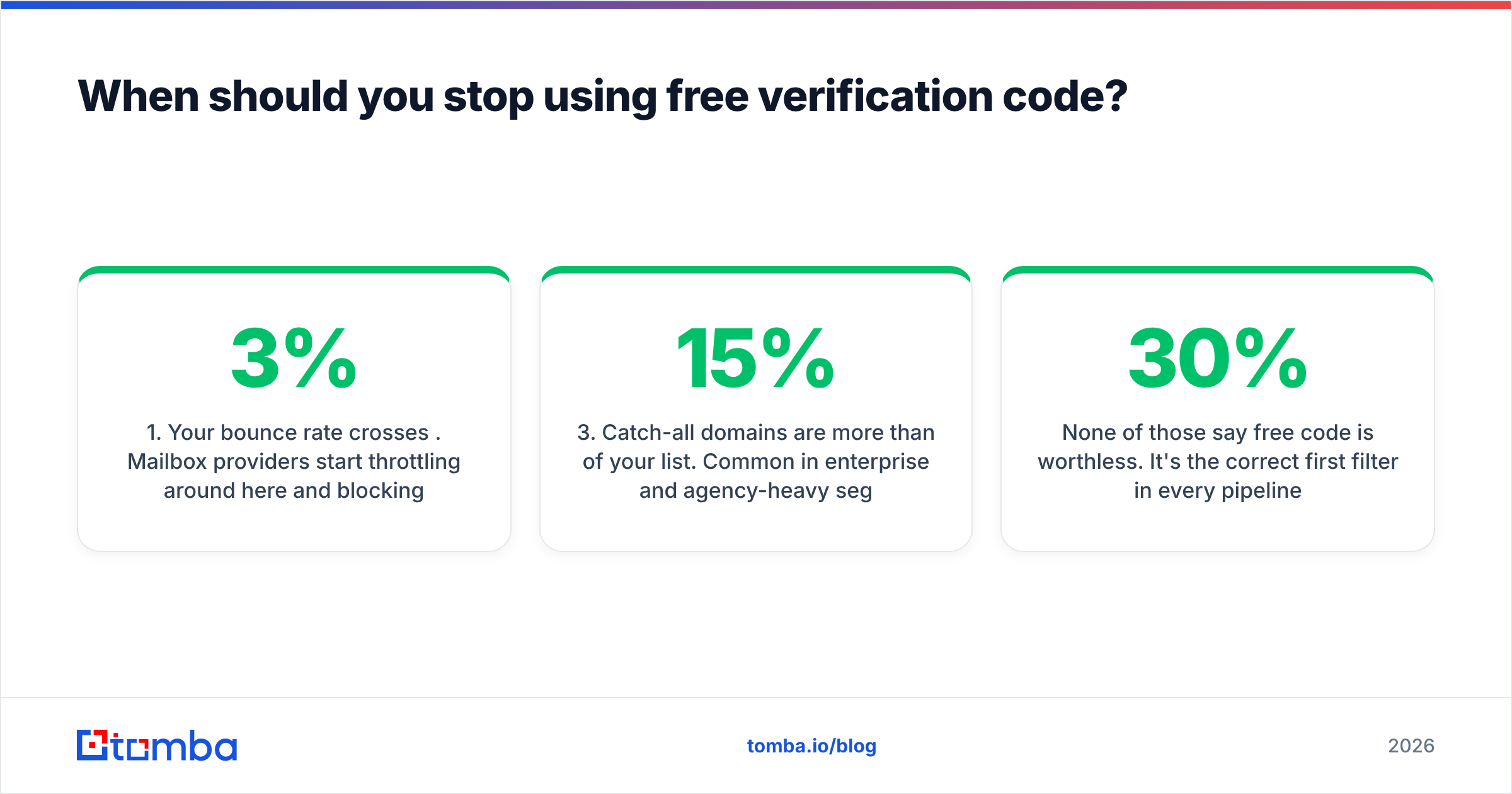
Five signals, in the order they usually arrive:
- Your bounce rate crosses 3%. Mailbox providers start throttling around here and blocking around 5%. Free code will not get you under 3% on a cold list. This is the hard trigger.
- You're verifying more than ~1,000 addresses a month. Below that, free tiers plus caching genuinely cover you. Above it, you're spending engineering hours to save single-digit dollars.
- Catch-all domains are more than 15% of your list. Common in enterprise and agency-heavy segments. Your free script marks all of them
unknown, which means you're guessing on a sixth of your outreach. - You need verification inline, at signup, in under 500ms. DNS lookups from your app server are fine; SMTP probes are not — they time out and block the request thread.
- Someone else depends on the result. The moment a sales team acts on your verification output, "probably fine" becomes a data-quality problem with a name attached to it.
None of those say free code is worthless. It's the correct first filter in every pipeline — run regex and MX locally, drop the obvious garbage for free, and only spend API credits on what survives. On a typical list that cuts your paid verification bill by 20–30% before you spend a cent. Pair the local filter with a hosted email verifier for the survivors and you get near-paid accuracy at roughly two-thirds of the price.
How do you build a free email verification code (OTP) flow?#
Back to the other meaning. If you're emailing a confirmation code, here's the minimum correct implementation:
- Generate with a CSPRNG, not
Math.random()or Python'srandom. Six digits is fine —secrets.randbelow(900000) + 100000in Python,crypto.randomIntin Node. - Hash before storing. Treat the code like a password. Store a hash plus
user_id,expires_at, andattempts. A plaintext OTP column is a breach waiting to be embarrassing. - Expire in 10 minutes and allow at most 5 attempts. Rate-limit issuance per address and per IP, or you've built a free spam cannon pointed at other people's inboxes.
- Invalidate on use. Single-use, always. Delete the row or mark it consumed inside the same transaction that confirms the account.
- Verify the address exists before you send. This is where the two meanings meet: run your regex and MX check on the address at submit time. Sending OTPs to non-existent domains generates bounces against your transactional sending domain, and transactional reputation is the one you can least afford to lose.
That last point is why teams end up doing both jobs at once. A cheap syntax-plus-MX gate on the signup form removes most typo'd addresses before they ever become a bounce, and it costs you one DNS lookup. If you'd rather not write it, the free email checker does the same check in a browser tab for one-off testing, and the Tomba API does it programmatically when you want the mailbox-level answer too.
What's the practical setup for 2026?#
Layer it, and stop treating "free" as a binary.
Run syntax and MX validation in your own code — it's free forever, it's fast, and it's the correct first pass. Skip raw SMTP probing entirely; it's unreliable, it's blocked on most hosts, and it puts your sending IP at risk for a result you can't trust anyway. Send whatever survives to a hosted verifier, and pay attention specifically to the catch-all bucket, because that's the segment where free and paid diverge most.
For low volume, a monthly-renewing free tier is a permanent tool, not a trial. For anything above a thousand addresses a month, price the bounces before you price the credits — the credits will lose that comparison every time. Compare current Tomba pricing against your own bounce math rather than against competitors' headline numbers; the plan that's right for a 500-address-a-month founder is not the one that's right for a team running 50,000.
Start with the free tier and a hundred addresses you already know the answer for. Tomba's free plan includes 25 searches a month with full API access, and the Tomba Email Finder sits alongside the verifier — so once you've confirmed which addresses are real, you can fill the gaps in the same workflow instead of stitching two vendors together. Run your regex-and-MX script first, send the survivors through the API, and let the numbers on your own list decide whether free is still enough.
Related guides#
Ready to find emails that actually work?
Join 150,000+ professionals who stopped guessing and started sending. Free credits on signup — no credit card required.
Get the Tomba newsletter
Practical outbound tactics and product updates — once every two weeks.
About the author