Free Email Verifier Chrome Extension: The 2026 Buyer's Guide
Most free email verifier Chrome extensions cap you at 25-50 checks a month and quietly stop at catch-all domains. Here's what each one actually validates, where the free tiers break, and how to pick.
TL;DR
- A free email verifier Chrome extension is a browser add-on that checks whether an address can actually receive mail — syntax, MX records, and an SMTP handshake — without you leaving LinkedIn, a company site, or your CRM.
- Every "free" extension has a hard ceiling. Tomba's free tier gives 25 searches/month, Hunter gives 25 verifications, NeverBounce and ZeroBounce give one-time credit grants (100 and 100 respectively) rather than a monthly refill.
- The single biggest quality difference between extensions is catch-all handling. Roughly 15-20% of B2B domains accept every address at the SMTP layer, and most free tools return "accept-all" and shrug.
- Browser-based SMTP verification is not real-time in the extension itself — the extension calls a vendor API. That means your verification quality is the vendor's data quality, not the browser's.
- Use a free extension for spot-checks and one-off prospecting. The moment you're verifying more than ~50 addresses a month, the math flips to a paid tier or a bulk API.
What Is a Free Email Verifier Chrome Extension?#
It's a browser add-on that sits in your toolbar and answers one question: will this email address bounce?
Think of it like a bouncer checking IDs at the door. The syntax check is glancing at the format — does it look like an ID at all? The MX check is confirming the issuing office exists. The SMTP handshake is calling that office and asking "does this person work here?" Some offices answer honestly. Some say yes to everyone (that's a catch-all). Some refuse to pick up the phone (that's a greylist or rate limit).
Technically, the extension does almost none of that work locally. Chrome extensions cannot open raw SMTP sockets — the browser sandbox forbids it. What the extension actually does is scrape the page context (a LinkedIn profile, a company About page, a CRM record), send the candidate address to the vendor's API over HTTPS, and render the verdict in a popup. The verification happens on the vendor's mail servers, using their IP pool and their historical bounce data.
That distinction matters more than any UI feature. Two extensions with identical interfaces can return wildly different verdicts because one vendor has warm, well-reputed verification IPs and years of bounce feedback, and the other is running a thin wrapper over a public DNS lookup.
What a Real Verification Actually Checks#
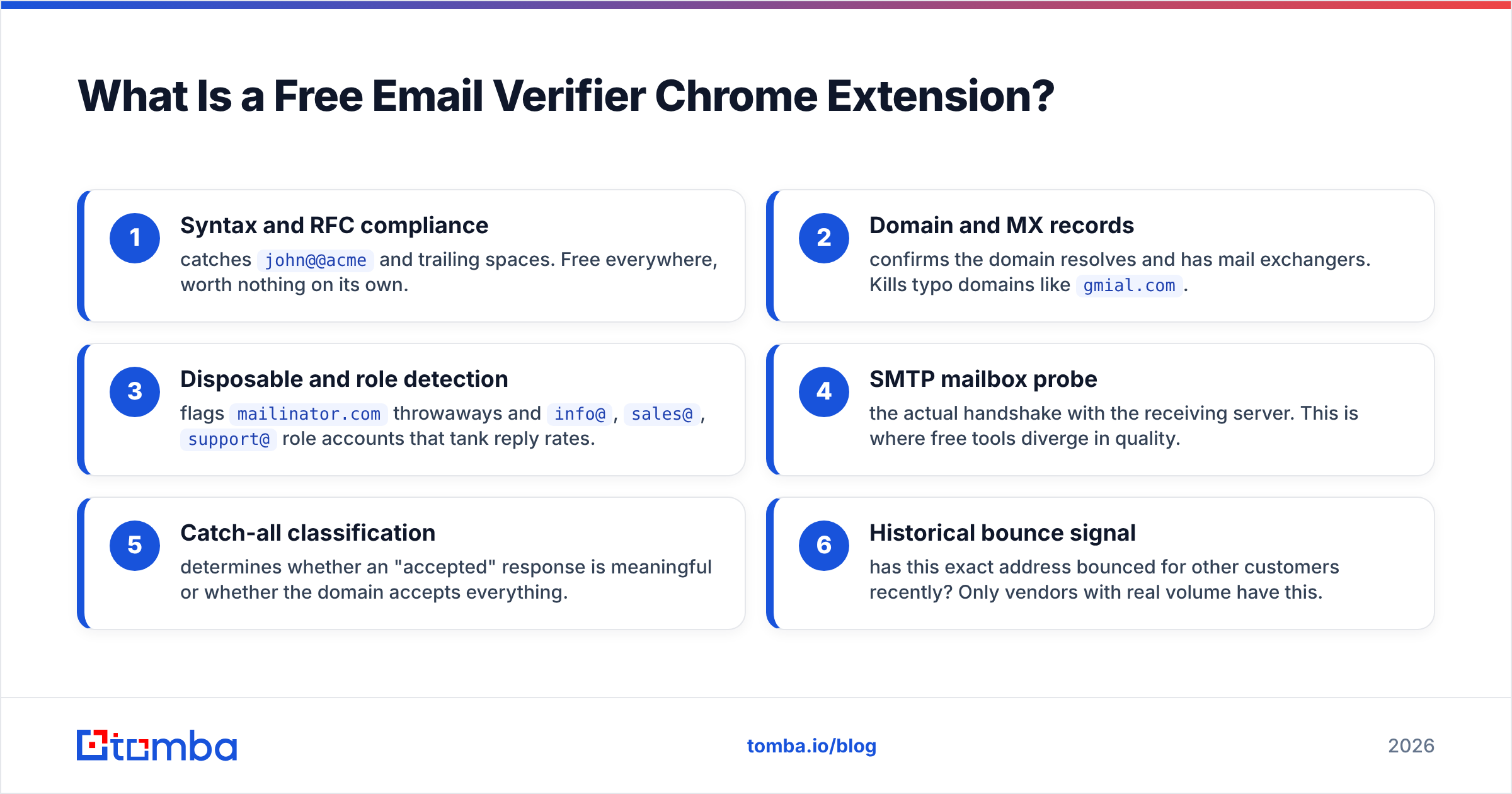
- Syntax and RFC compliance — catches
john@@acmeand trailing spaces. Free everywhere, worth nothing on its own. - Domain and MX records — confirms the domain resolves and has mail exchangers. Kills typo domains like
gmial.com. - Disposable and role detection — flags
mailinator.comthrowaways andinfo@,sales@,support@role accounts that tank reply rates. - SMTP mailbox probe — the actual handshake with the receiving server. This is where free tools diverge in quality.
- Catch-all classification — determines whether an "accepted" response is meaningful or whether the domain accepts everything.
- Historical bounce signal — has this exact address bounced for other customers recently? Only vendors with real volume have this.
If an extension only does steps 1-3, it's a syntax checker wearing a verifier's name tag. You can get that from a free email checker in a browser tab without installing anything.

Which Free Email Verifier Chrome Extensions Are Worth Installing?#
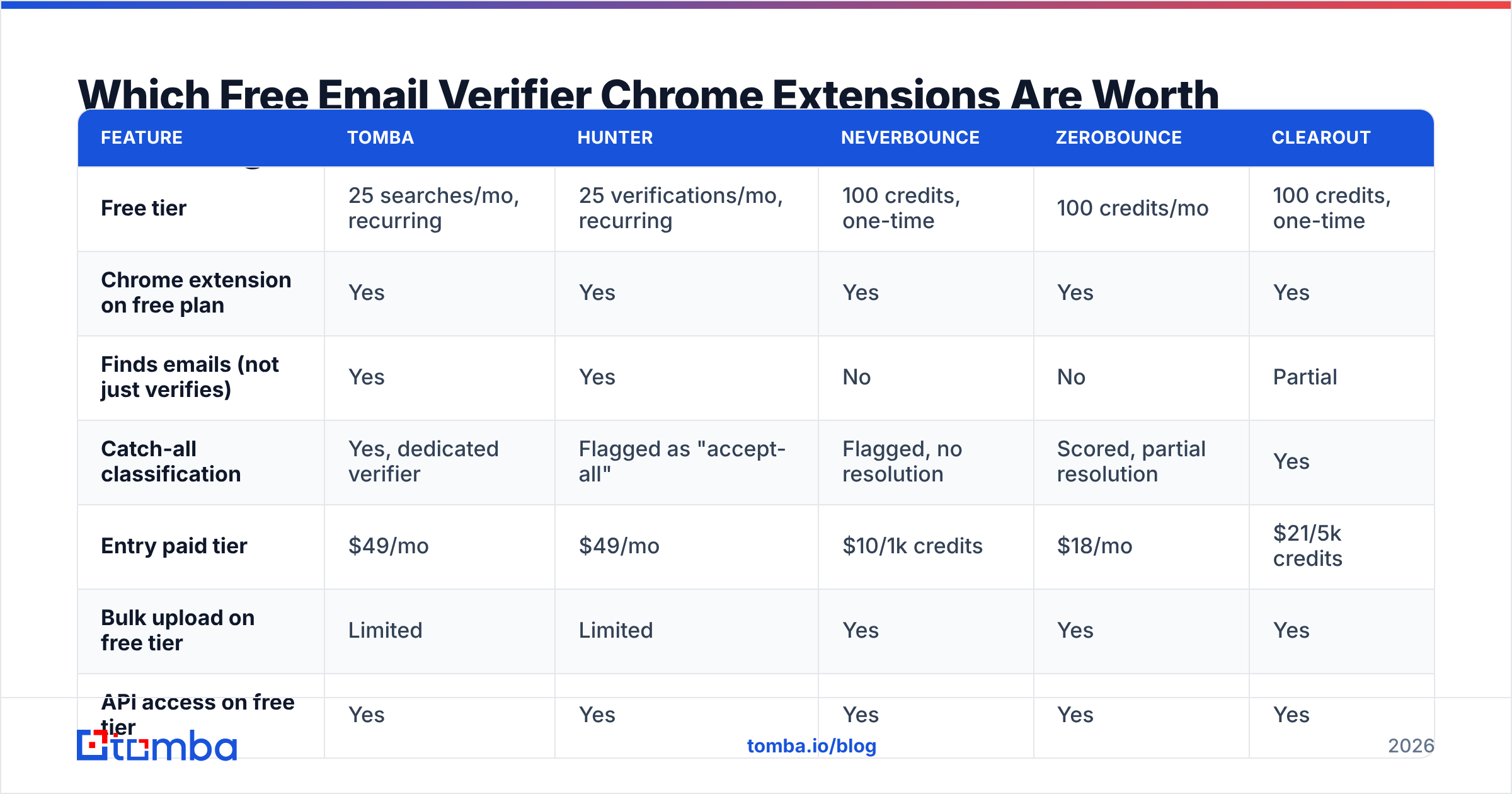
Here's how the main options compare on the things that actually determine whether your list bounces. Free-tier numbers are the published entry limits as of early 2026 — check each vendor's pricing page before you commit, since credit grants shift.

| Feature | Tomba | Hunter | NeverBounce | ZeroBounce | Clearout |
|---|---|---|---|---|---|
| Free tier | 25 searches/mo, recurring | 25 verifications/mo, recurring | 100 credits, one-time | 100 credits/mo | 100 credits, one-time |
| Chrome extension on free plan | Yes | Yes | Yes | Yes | Yes |
| Finds emails (not just verifies) | Yes | Yes | No | No | Partial |
| Catch-all classification | Yes, dedicated verifier | Flagged as "accept-all" | Flagged, no resolution | Scored, partial resolution | Yes |
| Entry paid tier | $49/mo | $49/mo | $10/1k credits | $18/mo | $21/5k credits |
| Bulk upload on free tier | Limited | Limited | Yes | Yes | Yes |
| API access on free tier | Yes | Yes | Yes | Yes | Yes |
| Best for | Find + verify in one pass | Domain-first prospecting | Cleaning existing lists | Cleaning existing lists | High-volume validation |

The split is clear once you look at it this way: finders with verification built in (Tomba, Hunter) versus pure list-cleaners (NeverBounce, ZeroBounce, Clearout). If your workflow is "I'm on a LinkedIn profile and I need this person's email, verified, right now," the pure cleaners don't help — they have nothing to verify until you already have an address. If your workflow is "I exported 40,000 rows from an old CRM and half of them are dead," the cleaners are purpose-built and cheaper per address.
Mixing the two is common and fine. Plenty of teams find with one tool and bulk-clean with another before a big send.
[Screenshot placeholder: Tomba Chrome extension popup open on a LinkedIn profile, showing the found address with a green "deliverable" badge and confidence score]
How Do the Free Tiers Actually Break?#
Free tiers are honest about their credit counts and quiet about everything else. Four failure modes show up repeatedly.
The credit definition trap. A "credit" is not always one verification. Some vendors charge a credit for a lookup that returns nothing. Others charge for catch-all checks at a higher rate because the resolution work is more expensive. Read what consumes a credit before you burn 25 of them discovering it.
One-time versus recurring. NeverBounce and Clearout give you a one-time grant. Once it's gone, it's gone — the free tier becomes a demo, not a tool. Tomba and Hunter refill monthly, which means a low-volume user can genuinely operate free indefinitely. That's a meaningful difference if you're a founder doing ten outreach emails a week.
The catch-all wall. This is the one that costs money. When a domain is configured as catch-all, the SMTP server accepts every address, so a standard probe returns "valid" for asdfghjkl@company.com. Most free tiers return accept-all or unknown and stop there. You either send blind and risk the bounce, or you skip the lead. Resolving catch-alls requires additional signals — historical delivery data, pattern confidence, secondary probes — and that's typically where free stops and paid begins. A dedicated catch-all verifier is the difference between discarding 18% of your list and using it.
Rate limiting that looks like accuracy. When receiving servers greylist or throttle a vendor's verification IPs, the vendor returns unknown rather than retrying. On a free tier, retries usually aren't included. So you get a soft "we're not sure" that reads like a real verdict but is really a resource decision.
What "Deliverable" Actually Means#
No verifier guarantees delivery. What a good verifier tells you is that at the moment of the check, the mailbox existed and the server was willing to accept mail for it. Mailboxes get deactivated. Employees leave. Servers change policy. A verification is a snapshot, not a warranty.
Practically: verify within 7-14 days of sending. A list verified in January and mailed in June has drifted — B2B email data decays at roughly 22-30% per year according to widely cited industry estimates, driven mostly by job changes. Re-verify before every major send, not once at import.

Is a Chrome Extension Better Than a Bulk Verifier or an API?#
Depends entirely on where your addresses come from.
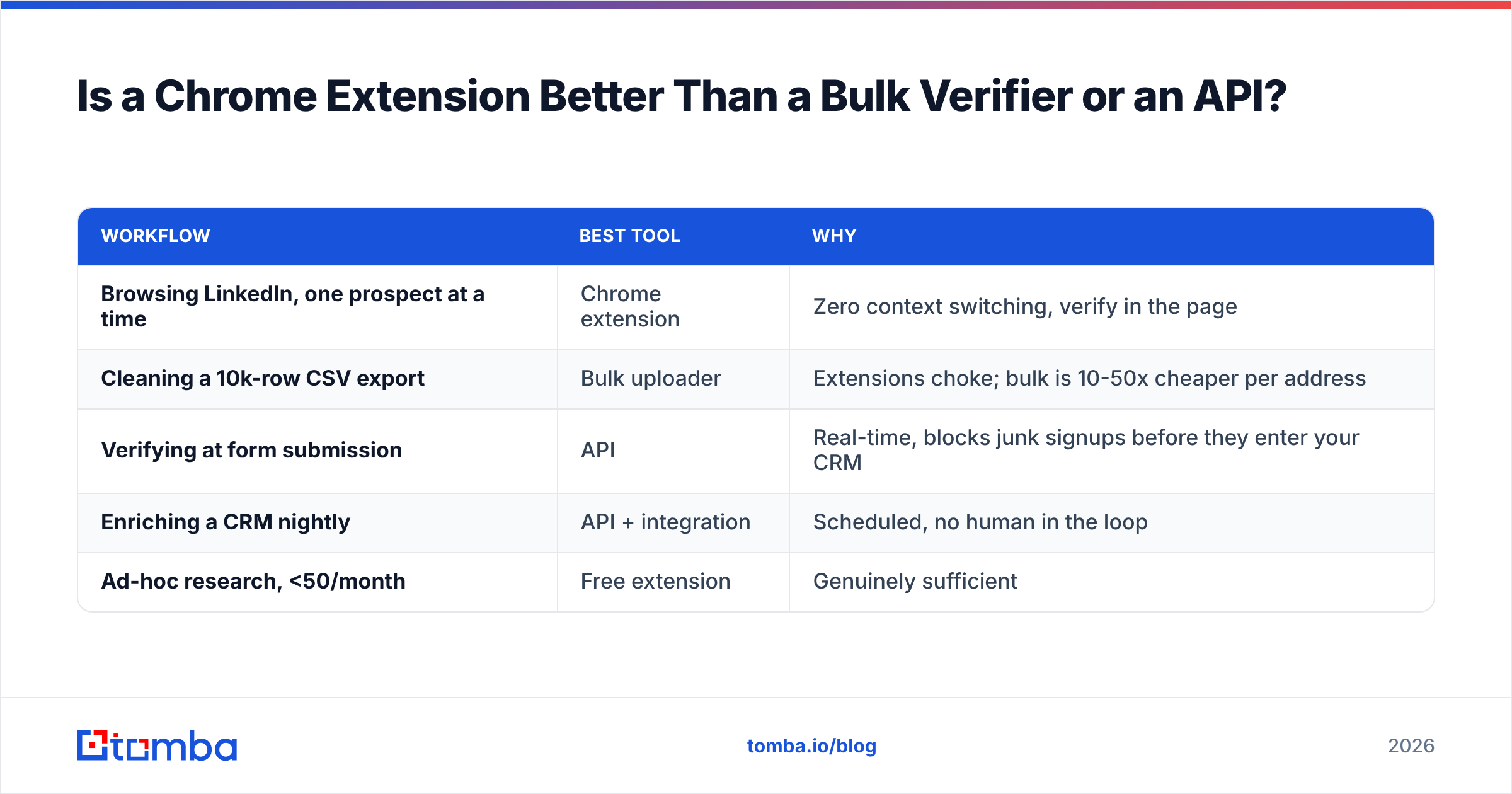
| Workflow | Best tool | Why |
|---|---|---|
| Browsing LinkedIn, one prospect at a time | Chrome extension | Zero context switching, verify in the page |
| Cleaning a 10k-row CSV export | Bulk uploader | Extensions choke; bulk is 10-50x cheaper per address |
| Verifying at form submission | API | Real-time, blocks junk signups before they enter your CRM |
| Enriching a CRM nightly | API + integration | Scheduled, no human in the loop |
| Ad-hoc research, <50/month | Free extension | Genuinely sufficient |
The extension wins on friction, loses on throughput. If you're processing more than a few dozen addresses at a sitting, you're using a screwdriver as a hammer. A bulk email finder handles the same job at a fraction of the per-record cost, and an email verification API removes the human entirely.
Where the extension genuinely earns its place: the moment of discovery. You're reading a case study, you find the VP of Ops who wrote it, and you want her address verified before you write the email. That's a five-second job in an extension and a fifteen-minute job in any other workflow.
What Should You Check Before Installing One?#
Chrome extensions get broad permissions. Treat the install like hiring a contractor with a key to your house.
- Permission scope. An email verifier needs to read the page you're on. It does not need "read and change all your data on all websites" plus browsing history. Check the permission list at install; if it wants more than the job requires, skip it.
- Where verification happens. Vendor API (fine, disclosed) versus a third-party relay you've never heard of (not fine). The privacy policy should name the processor.
- Data retention on prospects. Some tools add every address you look up to their shared database. That's how the database grows, and it's legitimate — but you should know it, especially under GDPR where you may be a joint controller. Look at the vendor's data sources disclosure.
- Chrome Web Store signals. Review count, last-updated date, and developer identity. An extension that hasn't shipped an update in 18 months is running against a browser that has. Check the Chrome Web Store listing directly rather than trusting a marketing page's screenshot.
- Independent reviews. Vendor sites all claim 95%+ accuracy. G2 and Capterra reviews are noisier but harder to stage, and the one-star reviews usually tell you exactly where the free tier stops.
[Screenshot placeholder: Chrome extension permissions dialog showing requested access scopes, with "read your browsing history" highlighted]
How Do You Get the Most Out of 25 Free Credits?#
Twenty-five verifications a month sounds useless. It isn't, if you spend them on the right addresses.
- Never verify a pattern you already trust. If you've confirmed
first.last@acme.comworks for three people at Acme, the fourth almost certainly follows the same pattern. Use a company email pattern lookup instead of burning a credit. - Verify the first contact at each new domain, not every contact. One credit establishes the pattern; the rest of the org follows it. Twenty-five credits can cover twenty-five companies, not twenty-five people.
- Skip role accounts entirely.
info@,hello@,sales@are almost always deliverable and almost always ignored. Don't spend a credit confirming that a shared inbox exists. - Free syntax-and-MX checks first, paid SMTP second. Run candidates through a free tool to kill obvious dead domains, then spend real credits only on survivors. This routinely cuts credit consumption 30-40%.
- Batch your verification to just before you send. Verifying on discovery and sending three weeks later wastes the check. Verify in the same session you write the email.
- Watch for the catch-all early. If a domain returns accept-all, no amount of re-verification changes it. Note it, decide your risk tolerance for that domain once, and move on.
Done well, 25 credits covers a focused week of prospecting into a defined account list. Done badly — verifying every scraped address indiscriminately — you'll exhaust them in an afternoon and learn nothing.
When Should You Actually Pay?#
The break-even is simpler than vendors make it look. Take your monthly verification volume and the cost of a bounce.
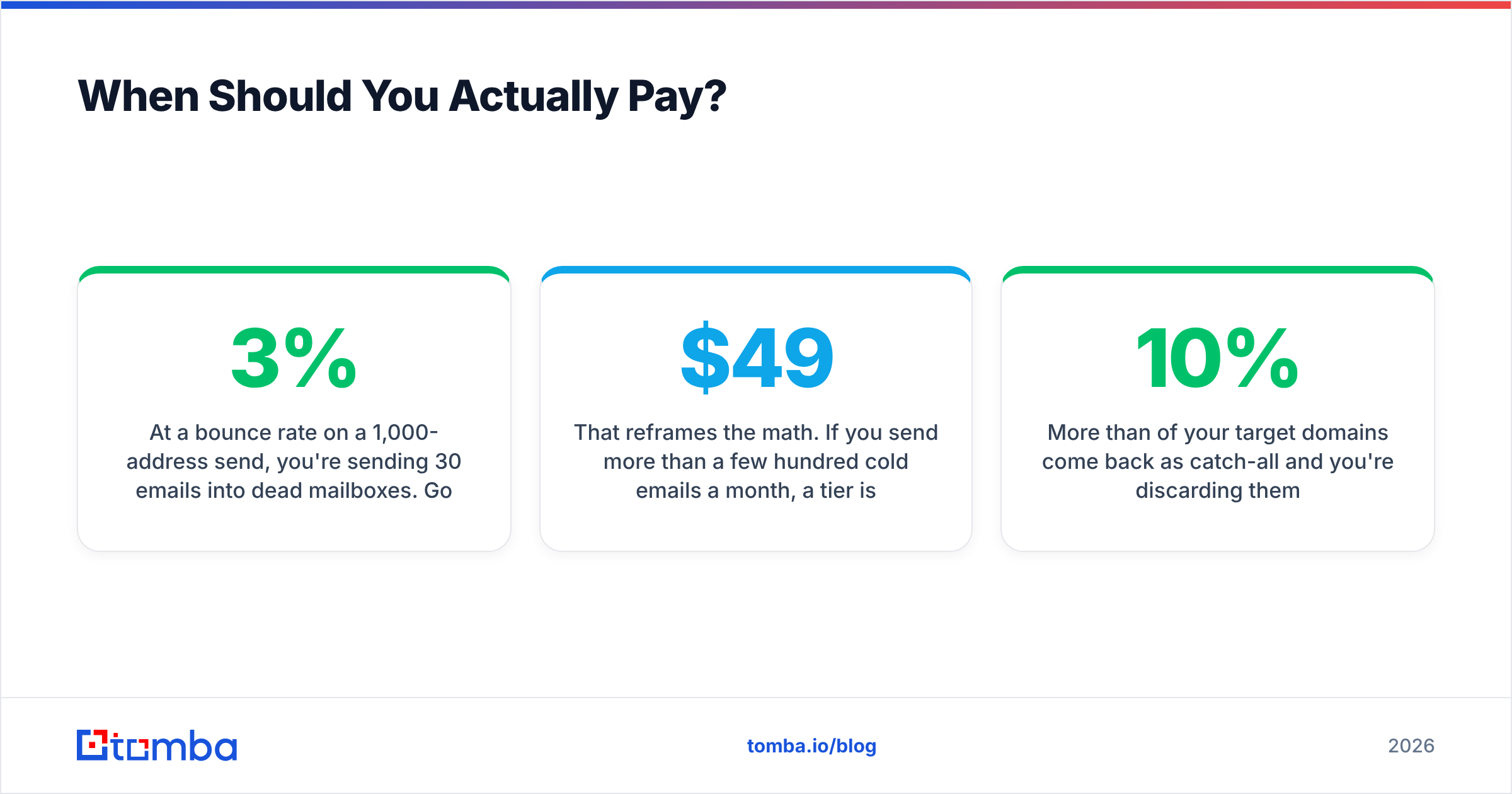
At a 3% bounce rate on a 1,000-address send, you're sending 30 emails into dead mailboxes. Google and Microsoft both enforce bounce thresholds — sustained rates above roughly 2-4% start degrading sender reputation, which suppresses inbox placement for the good addresses too. The cost of a bad verifier isn't the 30 bounces. It's the several hundred legitimate emails that land in spam afterward.
That reframes the math. If you send more than a few hundred cold emails a month, a $49/mo tier isn't an upgrade — it's insurance on the deliverability of everything else you send. Tomba pricing starts at $49/mo for Starter, $99/mo for Growth, and $249/mo for Pro, with the free tier at 25 searches/month for anyone genuinely below that threshold.
Signals it's time to upgrade:
- You hit your credit ceiling before the 20th of the month, twice running.
- More than 10% of your target domains come back as catch-all and you're discarding them.
- You've started keeping a spreadsheet to track which addresses you've already verified — that's the tool's job.
- Someone else on your team needs access and you're sharing a login.
The Bottom Line#
A free email verifier Chrome extension is a real tool with a real ceiling. For spot-checking a handful of prospects a week, browsing LinkedIn and confirming an address before you write, it's the right instrument and you should not pay for more. The recurring-refill free tiers (Tomba, Hunter) let a low-volume user operate indefinitely; the one-time-grant tiers are extended demos, and you should treat them as such.
What free tiers won't do is resolve catch-all domains, retry throttled probes, or survive contact with a real list. Those are the exact things that determine whether your next send lands in inboxes or in a bounce report — and they're where the paid line sits for a reason.
Start with the free tier. Prospect for a month. If you're not hitting the ceiling, you've found your tool. If you are, you've learned something more useful than any comparison table: you have enough volume that verification quality is now a revenue variable.
Try it on your own list. The Tomba Email Finder finds and verifies in a single pass — the extension pulls the address from LinkedIn or a company page, runs it through the same SMTP and catch-all pipeline as the API, and returns a confidence score before you write a word. The free tier includes 25 searches/month with no card required, and everything scales into bulk verification and the API when your volume outgrows the browser.
Related guides#
Ready to find emails that actually work?
Join 150,000+ professionals who stopped guessing and started sending. Free credits on signup — no credit card required.
Get the Tomba newsletter
Practical outbound tactics and product updates — once every two weeks.
About the author