Free Sales Pipeline Template: Build a Pipeline That Closes
A free sales pipeline template only works if the stages, exit criteria, and data feeding it are right. Here's the template, the stage definitions, and when a spreadsheet stops being enough.
TL;DR
- A free sales pipeline template is worth using only if it enforces exit criteria — the objective proof a deal earned its next stage. Without that, you've built a colorful to-do list.
- Six stages cover almost every B2B motion: Prospect → Contacted → Qualified → Demo/Eval → Proposal → Closed. More than eight stages and reps stop updating it.
- Spreadsheet templates (Google Sheets, Excel, Notion) work up to roughly 3 reps and 150 open deals. Past that, manual entry decay kills forecast accuracy.
- Your pipeline is only as good as the contact data entering it — bad emails inflate "Contacted" and produce a fake top-of-funnel.
- The fastest upgrade isn't a better template. It's verified contact data at stage one so your conversion rates mean something.
What Is a Sales Pipeline Template, and What Should It Actually Do?#
A sales pipeline template is a structured view of every open opportunity, organized by the stage it occupies, with the value, owner, and next action attached to each one.
Think of it like a hospital triage board. The board itself doesn't heal anyone. Its job is to make sure nobody is forgotten, everyone is sorted by severity, and any nurse walking in can tell in ten seconds who needs attention now. A pipeline template does the same for revenue: it makes the state of every deal legible to someone who wasn't in the call.
Most free templates fail at exactly one thing — they give you stage names but not stage definitions. So "Qualified" means whatever each rep felt like that Tuesday, and your 40% stage-to-stage conversion rate is a number built on vapor.
A pipeline template that earns its place does five things:
- Defines exit criteria per stage — a written, binary test a deal must pass to advance ("budget holder named and confirmed on a call").
- Forces a next step with a date — every open deal has one, or it's flagged stalled.
- Tracks stage age — how many days a deal has sat where it is, not just where it is.
- Weights the forecast — value × historical stage conversion rate, not the rep's optimism.
- Separates created date from last-activity date — the single fastest way to spot zombie deals.
If your current template misses three of those five, that's the reason your forecast is wrong, not the tool.
What Stages Should Your Free Sales Pipeline Template Use?#
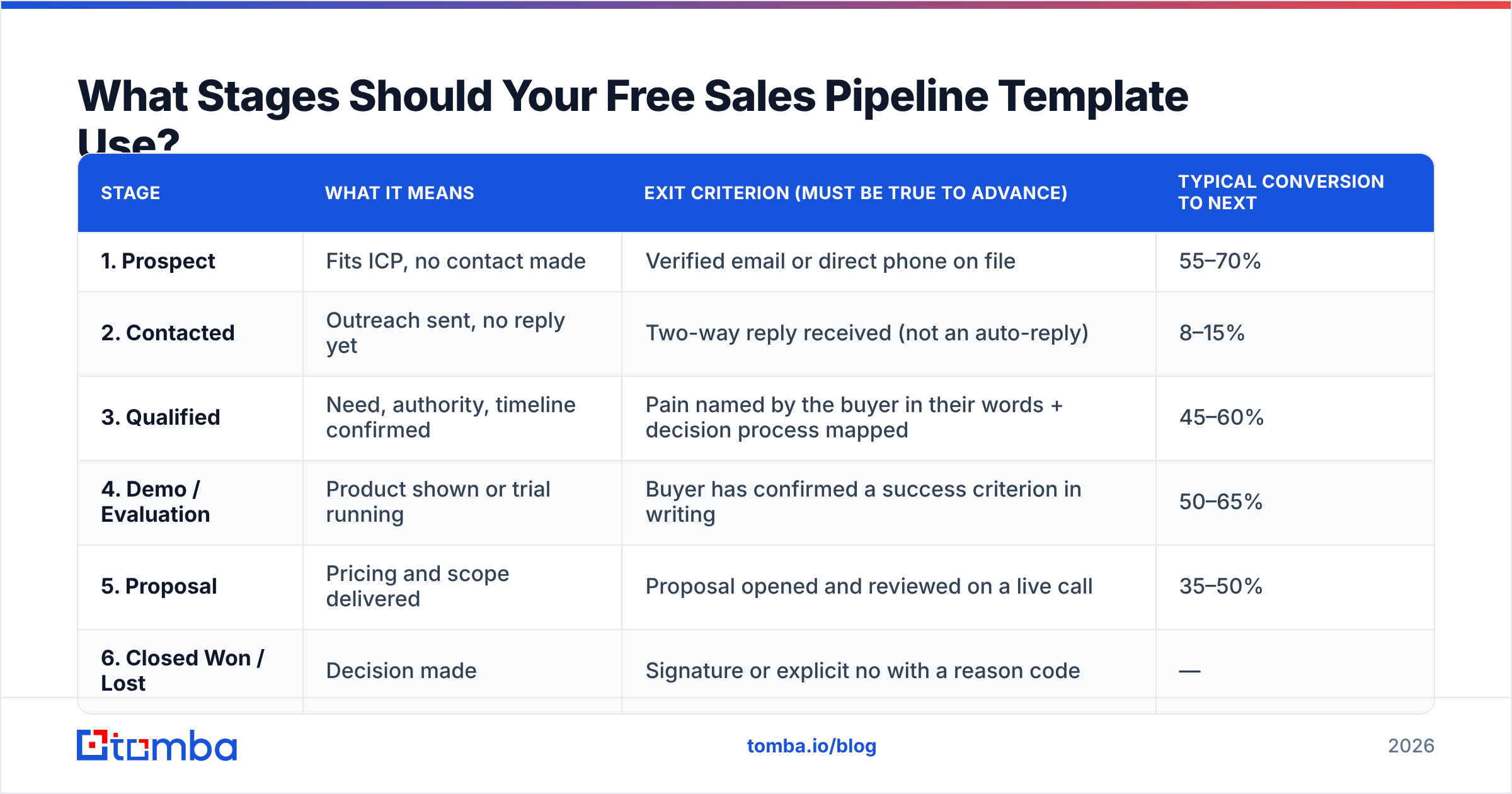
Use six. Here's the set that works across SaaS, agency, and services motions, with the exit criterion that lets a deal move forward.
| Stage | What it means | Exit criterion (must be true to advance) | Typical conversion to next |
|---|---|---|---|
| 1. Prospect | Fits ICP, no contact made | Verified email or direct phone on file | 55–70% |
| 2. Contacted | Outreach sent, no reply yet | Two-way reply received (not an auto-reply) | 8–15% |
| 3. Qualified | Need, authority, timeline confirmed | Pain named by the buyer in their words + decision process mapped | 45–60% |
| 4. Demo / Evaluation | Product shown or trial running | Buyer has confirmed a success criterion in writing | 50–65% |
| 5. Proposal | Pricing and scope delivered | Proposal opened and reviewed on a live call | 35–50% |
| 6. Closed Won / Lost | Decision made | Signature or explicit no with a reason code | — |
Two rules make this table work instead of decorate a wall.
Rule one: stages describe buyer behavior, not seller activity. "Sent proposal" is something you did. "Proposal reviewed on a live call" is something they did. Only buyer actions predict revenue. This is the single most common defect in free templates you'll download — most of them list seller tasks and then wonder why the forecast misses.
Rule two: a deal can move backward. If the champion leaves and you're back to mapping the org, drag it to Qualified. Pipelines that only move right are lying to you by design.
Free Sales Pipeline Template: The Columns to Copy#
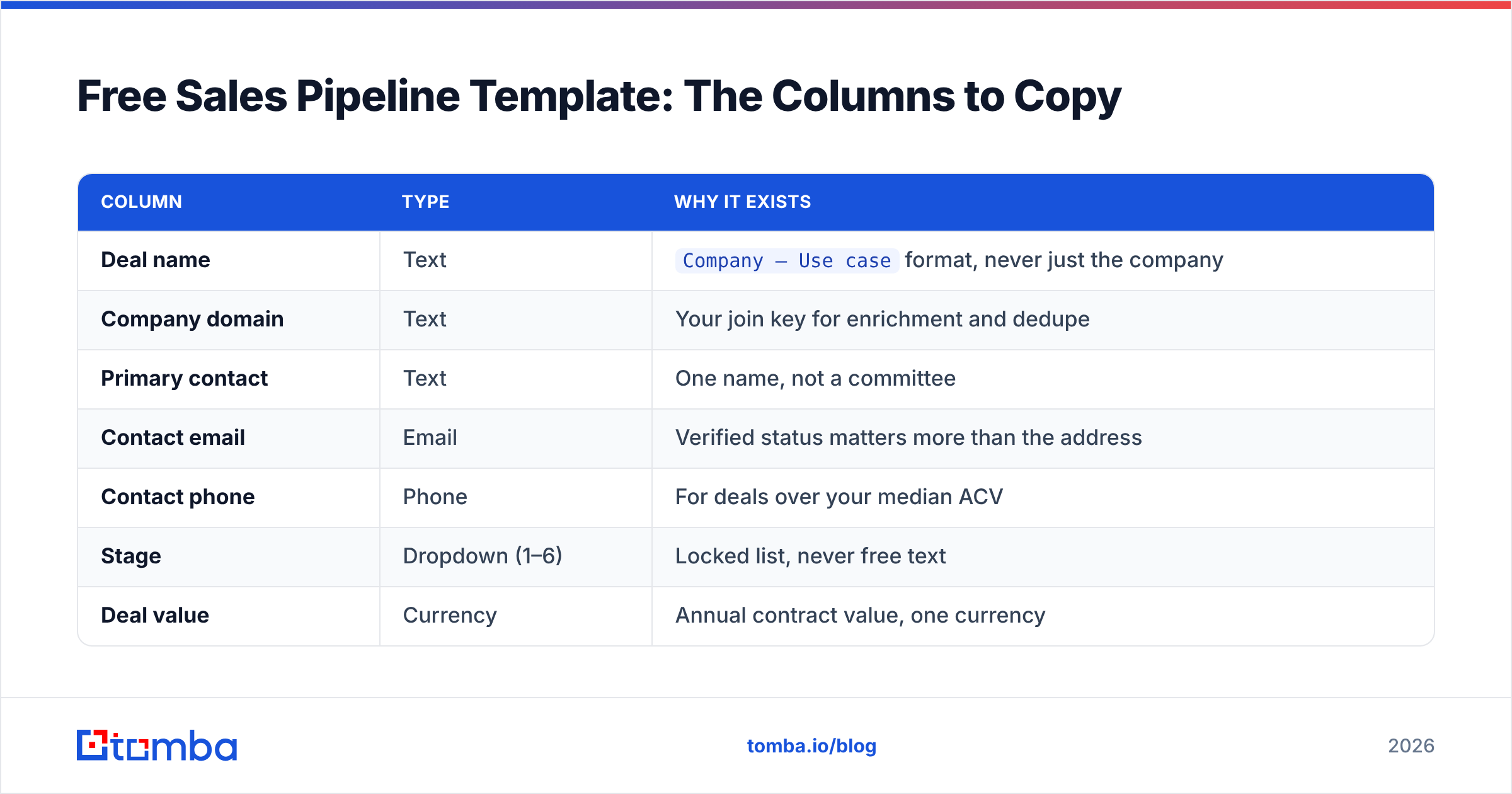
Build this in Google Sheets, Excel, Airtable, or Notion. Fifteen columns, no more.
| Column | Type | Why it exists |
|---|---|---|
| Deal name | Text | Company – Use case format, never just the company |
| Company domain | Text | Your join key for enrichment and dedupe |
| Primary contact | Text | One name, not a committee |
| Contact email | Verified status matters more than the address | |
| Contact phone | Phone | For deals over your median ACV |
| Stage | Dropdown (1–6) | Locked list, never free text |
| Deal value | Currency | Annual contract value, one currency |
| Probability % | Auto | Lookup from stage, not typed by the rep |
| Weighted value | Formula | Deal value × Probability |
| Owner | Dropdown | One name, always |
| Created date | Date | Never edited |
| Stage entry date | Date | Overwritten on every stage change |
| Days in stage | Formula | TODAY() − Stage entry date |
| Next step | Text | Must contain a verb |
| Next step date | Date | Past date = auto-flag red |
The formula that does the most work is the weighted forecast. In Sheets:
=SUMPRODUCT(G2:G200, VLOOKUP(F2:F200, StageProbs!A:B, 2, FALSE))
Keep the probability table on a separate tab and update it quarterly from your own closed-won history. Borrowed industry averages are a placeholder, not an answer. If 30 of your last 100 Proposal-stage deals closed, your Proposal probability is 30% — regardless of what any blog says.
Add one conditional format rule: highlight the row red when Days in stage > 2× your median for that stage. That one rule surfaces more rot than any dashboard.
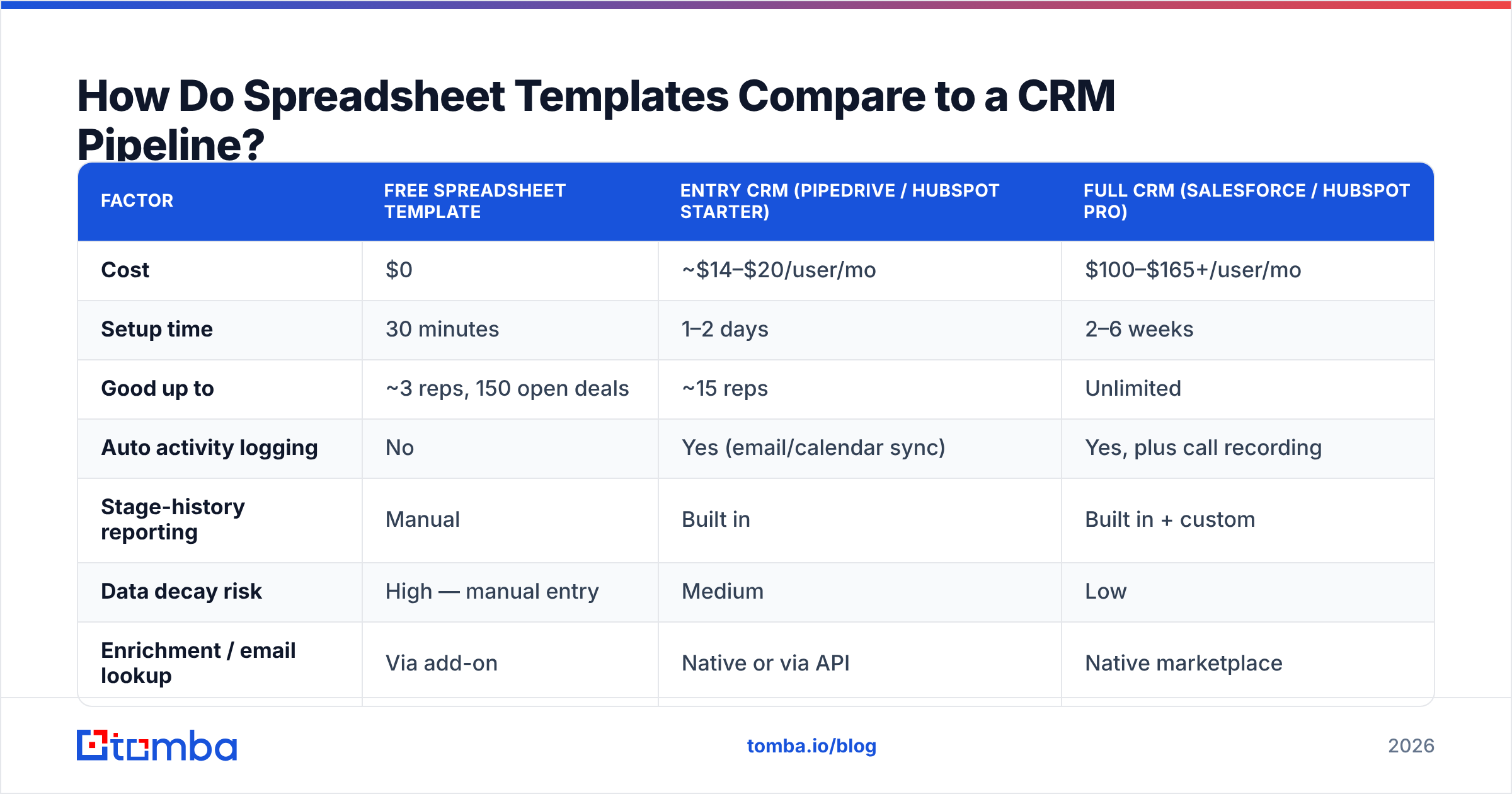
How Do Spreadsheet Templates Compare to a CRM Pipeline?#
Honest answer: the spreadsheet wins early and loses fast.
| Factor | Free spreadsheet template | Entry CRM (Pipedrive / HubSpot Starter) | Full CRM (Salesforce / HubSpot Pro) |
|---|---|---|---|
| Cost | $0 | ~$14–$20/user/mo | $100–$165+/user/mo |
| Setup time | 30 minutes | 1–2 days | 2–6 weeks |
| Good up to | ~3 reps, 150 open deals | ~15 reps | Unlimited |
| Auto activity logging | No | Yes (email/calendar sync) | Yes, plus call recording |
| Stage-history reporting | Manual | Built in | Built in + custom |
| Data decay risk | High — manual entry | Medium | Low |
| Enrichment / email lookup | Via add-on | Native or via API | Native marketplace |
| Forecast reliability | Depends entirely on rep hygiene | Good | Good, with attribution |
The tipping point is not headcount — it's update latency. Measure how many hours pass between a call ending and the pipeline reflecting it. Under four hours, your spreadsheet is fine. Over 24 hours consistently, you're forecasting from fiction and a CRM will pay for itself in one quarter. HubSpot's own sales research has documented for years that reps spend roughly a third of their time actually selling; every manual field you add to a template eats into that share.
If you stay in Sheets, at least automate the top of the funnel. A Sheets email finder add-on populates contact columns directly in the tab you already live in, which removes the copy-paste step that causes most stale-row problems.
Why Does Bad Contact Data Break Even a Perfect Pipeline Template?#
Because stage one is where your denominator is set, and a wrong denominator corrupts every ratio downstream.
Run the arithmetic. You load 500 prospects. If 22% of the email addresses are invalid — a realistic figure for scraped or aged lists — then 110 of those deals can never reply. They still sit in "Contacted." Your Contacted → Qualified conversion rate reads 9% when the true rate against reachable humans is 11.5%. You then set quota, headcount, and pipeline coverage targets off a number that is 22% pessimistic in one direction and dangerously misleading in the other: you conclude your messaging is broken and rewrite the sequence, when the actual defect was the list.
Bounces compound the damage. Sustained hard-bounce rates above 2% start pulling down sender reputation, which suppresses delivery to the valid addresses in the same send. So the bad data doesn't just fail — it takes good deals with it.
Three fixes, in order of return:
- Verify before the first send. Run every address through an email verifier and drop anything that isn't deliverable. Route catch-all domains to a separate cohort so they don't contaminate your rate math.
- Enrich at row creation, not at outreach time. Pull role, company size, and domain when the deal is created. Half-filled rows are the ones reps skip.
- Track a "data quality" column. Verified / Catch-all / Unverified. Segment every conversion report by it. You'll find your real conversion rate hiding under the average within one week.

How Do You Fill the Template Without Buying a Database?#
Most teams stall not on structure but on supply — the template is ready and there's nothing to put in it. Three approaches, cheapest first.
- Domain-first sourcing. Build a target account list from your closed-won patterns (industry, size, tech stack), then run domain search to pull the named roles at each company. This produces a pipeline sorted by fit rather than by whoever answered a form.
- Pattern-based construction. When you know the person but not the address, a company email pattern check tells you the format the company uses, and verification confirms the specific address. Cheaper than a database seat for low volume.
- Bulk fill for existing lists. If you already have a name-and-company CSV from an event or a partner, bulk email finder processing fills the contact columns in one pass instead of one lookup at a time.
- API into the sheet. For teams that already automate, the Tomba API can populate the contact columns as rows are created, so the pipeline is never waiting on a human to paste an address.
A note on account-based lists: peers like BookYourData take the opposite approach — buy a pre-built, filtered list up front rather than assemble it per account. That's a legitimate model, and for teams targeting a large, well-defined segment it's often faster than sourcing account by account. The trade-off is freshness control: with a database purchase you inherit the vendor's refresh cadence, while with on-demand lookup you're verifying at the moment of use. Pick based on how fast your segment's contacts turn over. Both feed the same template.
What Metrics Should You Read Off the Template Weekly?#
Five numbers. Reading more than five weekly means you read none of them.
- Pipeline coverage — open weighted pipeline ÷ quota for the period. Below 3× and you have a sourcing problem, not a closing problem.
- Stage-to-stage conversion — computed from your own history, refreshed quarterly.
- Median days in stage — per stage. A rising median in one stage points at a specific broken step, usually a missing exit criterion.
- Stalled deal count — deals with a next-step date in the past. This is your cleanup queue.
- Slipped deals — deals whose close date moved this week. Two slips and the deal is not real; ask the disqualifying question.
The fifth is the one teams skip and the one that predicts a missed quarter earliest. Gartner's sales research has repeatedly found that buying groups now involve many stakeholders across a long, non-linear process — which means repeated slippage is usually a sign you're missing a stakeholder, not that the buyer is slow. When a close date moves twice, stop forecasting it and go find who you haven't met.
One process note: hold a 30-minute weekly pipeline review with the template on screen, and change something in it live. Reviews where nothing gets edited train the team that the pipeline is a reporting artifact rather than a working tool. Move deals, kill zombies, rewrite next steps in the room. Consistency here matters more than which CRM or spreadsheet holds the data — a mediocre template reviewed weekly beats a perfect one reviewed quarterly, every time.
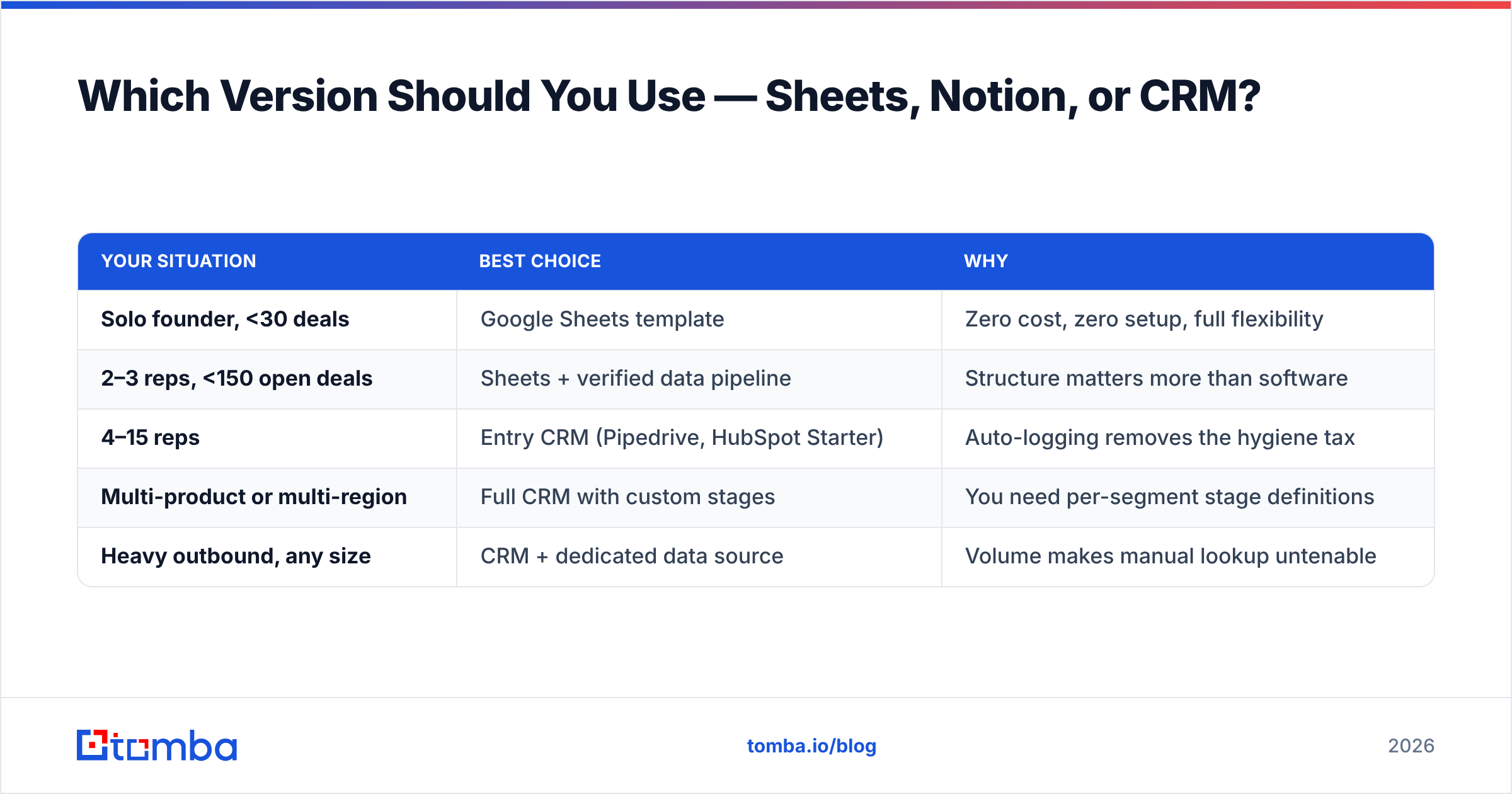
Which Version Should You Use — Sheets, Notion, or CRM?#
| Your situation | Best choice | Why |
|---|---|---|
| Solo founder, <30 deals | Google Sheets template | Zero cost, zero setup, full flexibility |
| 2–3 reps, <150 open deals | Sheets + verified data pipeline | Structure matters more than software |
| 4–15 reps | Entry CRM (Pipedrive, HubSpot Starter) | Auto-logging removes the hygiene tax |
| Multi-product or multi-region | Full CRM with custom stages | You need per-segment stage definitions |
| Heavy outbound, any size | CRM + dedicated data source | Volume makes manual lookup untenable |
Whichever row you're in, build the template before you choose the tool. Migrating a well-defined six-stage process into a CRM takes an afternoon. Migrating an undefined one takes a quarter and a consultant, because you end up designing the process inside a config screen at $150 an hour.
For the free version: copy the fifteen columns above into a new sheet, add the stage-probability tab, set the two conditional-format rules, and start. You'll know within three weeks whether your constraint is structure, activity, or data.
Where Should You Start This Week?#
Do these four things in order:
- Write your six stage definitions with binary exit criteria. One page. Get every rep to sign off.
- Build the fifteen-column sheet and load your current open deals into it.
- Compute your real stage probabilities from your last 50 closed deals.
- Verify every contact email in the sheet and tag its status.
Step four is the one with the shortest payback. If a fifth of your "Contacted" rows can't receive mail, every other improvement you make is measured against a broken baseline.
Fill the top of your pipeline with contacts that actually resolve. Tomba's Email Finder locates professional email addresses by name, domain, or company and returns a confidence score with each result, so your Prospect and Contacted stages hold reachable people rather than guesses. The free tier gives you 25 searches a month to test it against your own target accounts before spending anything; paid plans start at $49/mo on Starter and $99/mo on Growth — see Tomba pricing for the full breakdown. Build the template first, then feed it data you can trust.
Related guides#
Ready to find emails that actually work?
Join 150,000+ professionals who stopped guessing and started sending. Free credits on signup — no credit card required.
Get the Tomba newsletter
Practical outbound tactics and product updates — once every two weeks.
About the author