Free Sales Tracking Software in 2026: Real Options Compared
Most free sales tracking software is a trial in disguise. Here's what actually stays free in 2026, where each tool breaks, and how to build a pipeline stack that costs $0 until it shouldn't.
TL;DR
- Genuinely free sales tracking software exists in 2026, but almost every option caps one of three things: contact records, seats, or reporting depth. Pick the tool whose cap you will hit last.
- HubSpot's free CRM remains the most complete free pipeline tracker for small teams; Zoho Bigin and Freshsales are the strongest low-cost step-ups; Google Sheets is still viable under ~200 open deals.
- "Free" almost never includes the data layer. A free CRM with no contacts in it tracks nothing — you still need a way to find and verify emails and phone numbers.
- The real cost of free tools is migration debt. Choose one with a clean CSV export and an open API so leaving is a Tuesday, not a quarter.
- Budget rule of thumb: stay free until you have 3+ reps or 100+ active deals. After that, paid tiers pay for themselves in forecast accuracy alone.
What Is Sales Tracking Software, Exactly?#
Sales tracking software is the system of record for deals in motion. Think of it as the scoreboard at a stadium: it does not play the game, but without it nobody agrees on the score. It records who the prospect is, what stage the deal sits in, what was said last, what happens next, and what the whole thing is worth.
That is a narrower job than "CRM." A full CRM also handles marketing automation, support tickets, and customer lifecycle. Sales tracking is the pipeline slice: stages, activities, forecast.
Concretely, any tool worth calling sales tracking software needs to handle five jobs:
- Contact and company records — one row per human, deduplicated, with enrichment fields you can filter on.
- Deal pipeline with stages — drag-and-drop or list view, with a value and close date attached to each deal.
- Activity logging — calls, emails, meetings, notes, ideally captured automatically rather than typed in by hand.
- Task and follow-up reminders — the single highest-ROI feature, because most lost deals are lost to silence, not objections.
- Reporting — pipeline by stage, win rate, activity per rep, and forecast against quota.
If a "free CRM" is missing #4 or #5, it is a contact list with extra steps.
Wait — that placeholder should render as an image:
Is Free Sales Tracking Software Actually Free?#
Sometimes. The honest answer is that "free" splits into four very different business models, and knowing which one you are signing up for saves you a painful migration later.
Free forever, feature-capped. HubSpot, Zoho, and Agile CRM give you a permanently free tier with real limits on automation, reporting, and custom fields. You can run a two-person team on these indefinitely. The catch is that the upgrade cliff is steep — HubSpot's jump from free to Sales Hub Professional is one of the more talked-about pricing complaints on G2.
Free forever, seat-capped. Bitrix24 and a few open-source options let you use nearly everything but limit how many users can log in. Fine for a founder-led sales motion, painful at five reps.
Free trial dressed as free. Fourteen or thirty days, then a card. Nothing wrong with it, but do not build your pipeline in one of these expecting to stay.
Free and self-hosted. EspoCRM, SuiteCRM, Odoo Community. Genuinely free software, genuinely not free time. Budget a weekend for setup and a recurring line item for a $10–40/mo VPS plus your own patching.
The single most common mistake: teams pick a free tier based on the feature list and get blocked six months later by a limit they never read — 1,000 records, two pipelines, one email sequence, no custom reports.
Which Free Sales Tracking Tools Are Worth Using in 2026?#
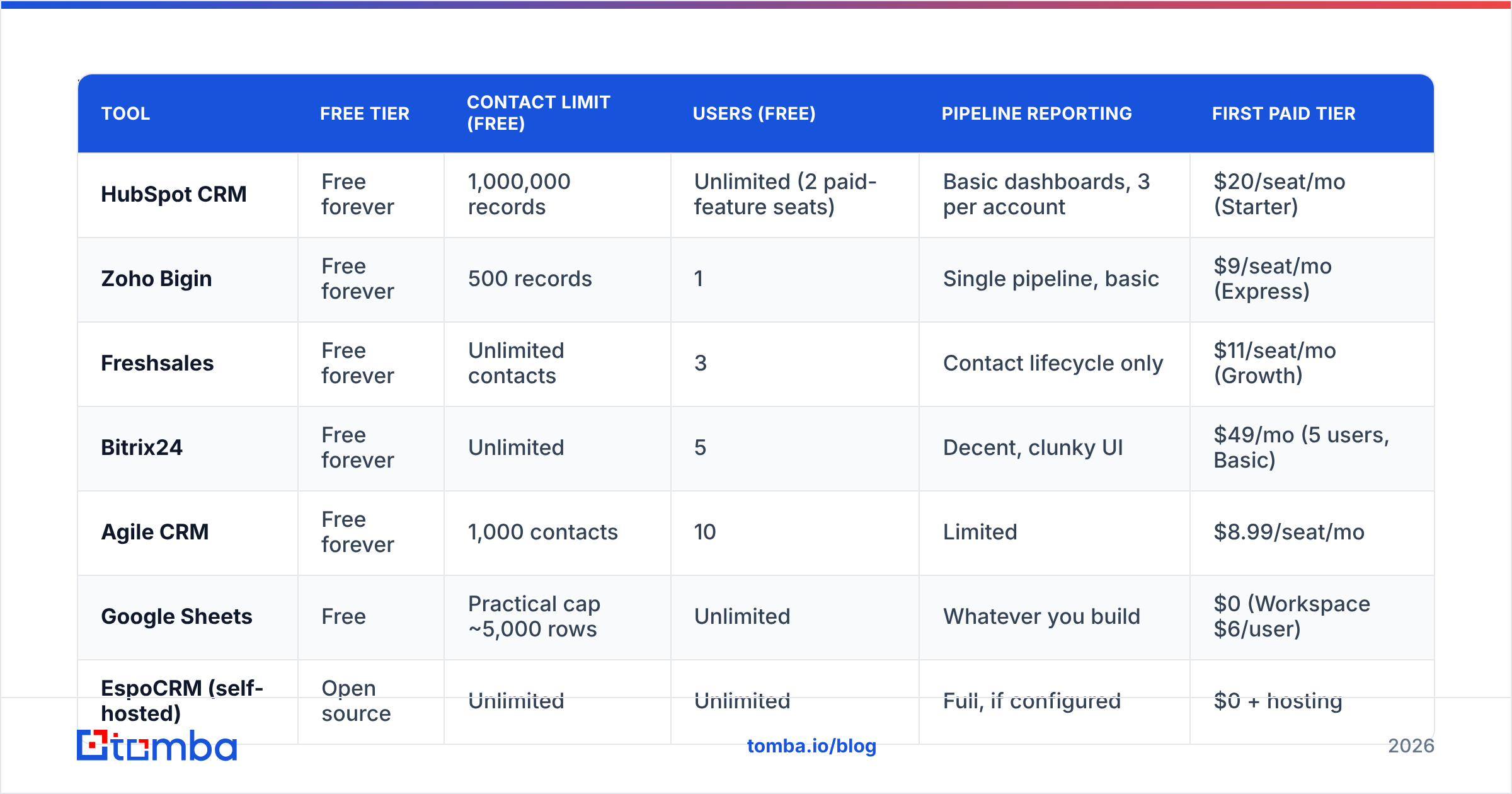
Here is the comparison that matters. Prices reflect published list rates as of early 2026; always confirm on the vendor's own pricing page before committing.
| Tool | Free tier | Contact limit (free) | Users (free) | Pipeline reporting | First paid tier |
|---|---|---|---|---|---|
| HubSpot CRM | Free forever | 1,000,000 records | Unlimited (2 paid-feature seats) | Basic dashboards, 3 per account | $20/seat/mo (Starter) |
| Zoho Bigin | Free forever | 500 records | 1 | Single pipeline, basic | $9/seat/mo (Express) |
| Freshsales | Free forever | Unlimited contacts | 3 | Contact lifecycle only | $11/seat/mo (Growth) |
| Bitrix24 | Free forever | Unlimited | 5 | Decent, clunky UI | $49/mo (5 users, Basic) |
| Agile CRM | Free forever | 1,000 contacts | 10 | Limited | $8.99/seat/mo |
| Google Sheets | Free | Practical cap ~5,000 rows | Unlimited | Whatever you build | $0 (Workspace $6/user) |
| EspoCRM (self-hosted) | Open source | Unlimited | Unlimited | Full, if configured | $0 + hosting |
Read that table as a set of trade-offs rather than a ranking:
- HubSpot wins on record ceiling and polish. Its free tier is unusually generous — a million records is not a limit you will hit. What you will hit is reporting depth and the absence of sequences.
- Freshsales is the best free option if you need three seats today. Unlimited contacts on free is rare.
- Zoho Bigin has the most brutal free cap (500 records, one user) but the softest upgrade at $9/seat. If you know you will pay eventually, starting here is cheaper than starting on HubSpot.
- Bitrix24 gives five free users, which no one else does, in exchange for a UI that feels like enterprise software from 2014.
- Google Sheets is underrated below ~200 open deals. Zero learning curve, infinite customization, and every rep already knows it. It fails on activity logging and reminders.
What Do Free Tiers Actually Take Away?#
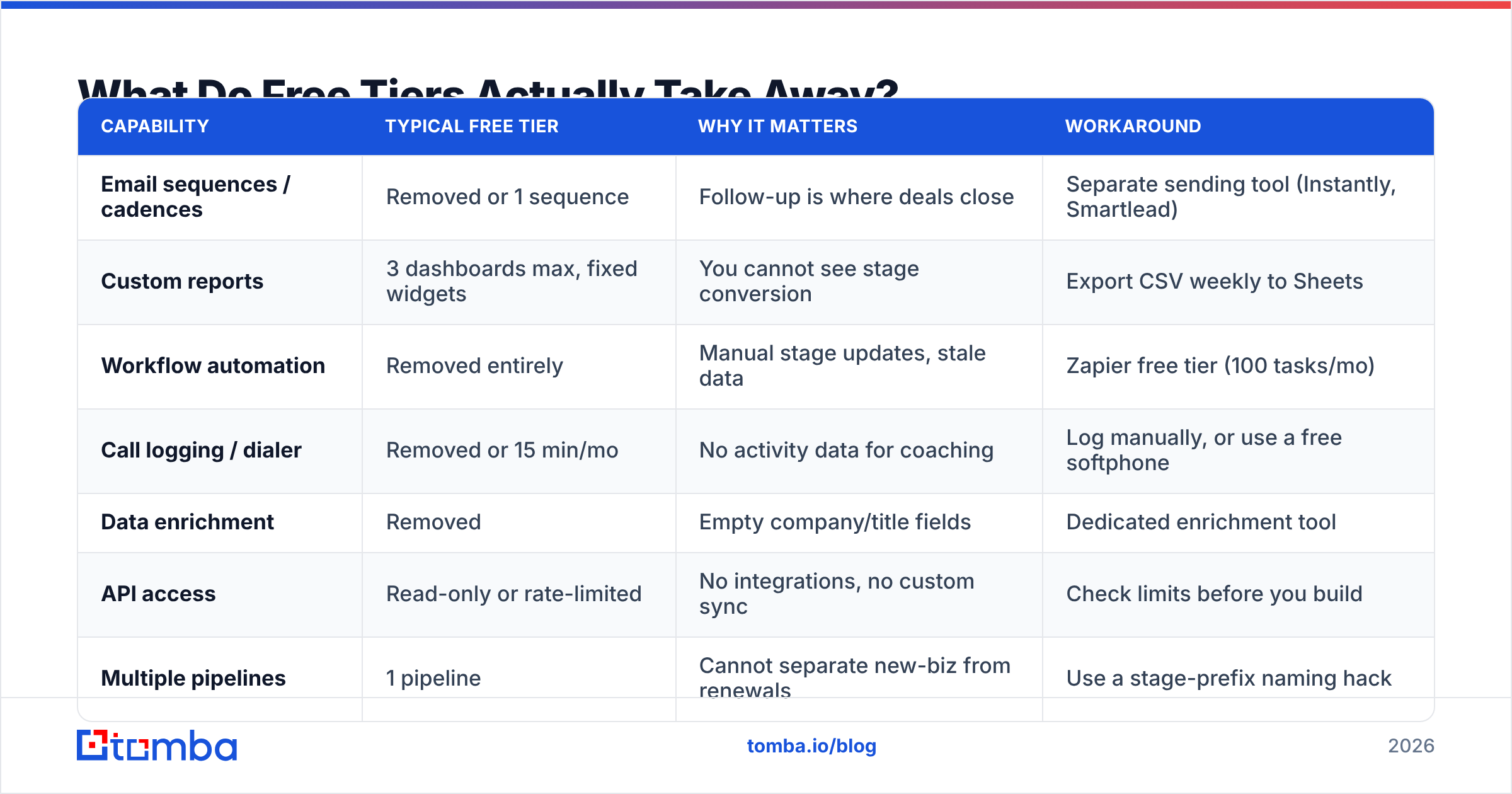
The feature lists are marketing. Here is what disappears in practice, and how much it costs you.
| Capability | Typical free tier | Why it matters | Workaround |
|---|---|---|---|
| Email sequences / cadences | Removed or 1 sequence | Follow-up is where deals close | Separate sending tool (Instantly, Smartlead) |
| Custom reports | 3 dashboards max, fixed widgets | You cannot see stage conversion | Export CSV weekly to Sheets |
| Workflow automation | Removed entirely | Manual stage updates, stale data | Zapier free tier (100 tasks/mo) |
| Call logging / dialer | Removed or 15 min/mo | No activity data for coaching | Log manually, or use a free softphone |
| Data enrichment | Removed | Empty company/title fields | Dedicated enrichment tool |
| API access | Read-only or rate-limited | No integrations, no custom sync | Check limits before you build |
| Multiple pipelines | 1 pipeline | Cannot separate new-biz from renewals | Use a stage-prefix naming hack |
The one that quietly hurts most is data enrichment. A free CRM will happily store a contact named "unknown" at "unknown.com" with no email. It tracks the deal fine. It just cannot help you start one.
Where Does the Contact Data Come From?#
This is the gap nobody selling free CRM software wants to discuss: the software is free because the data is not included.
Every free tier above assumes you already have names, emails, and phone numbers. Getting those is a separate problem with a separate budget. Your options:
- Manual research — free, and roughly 3–6 minutes per verified contact. At 200 prospects a month that is a part-time job.
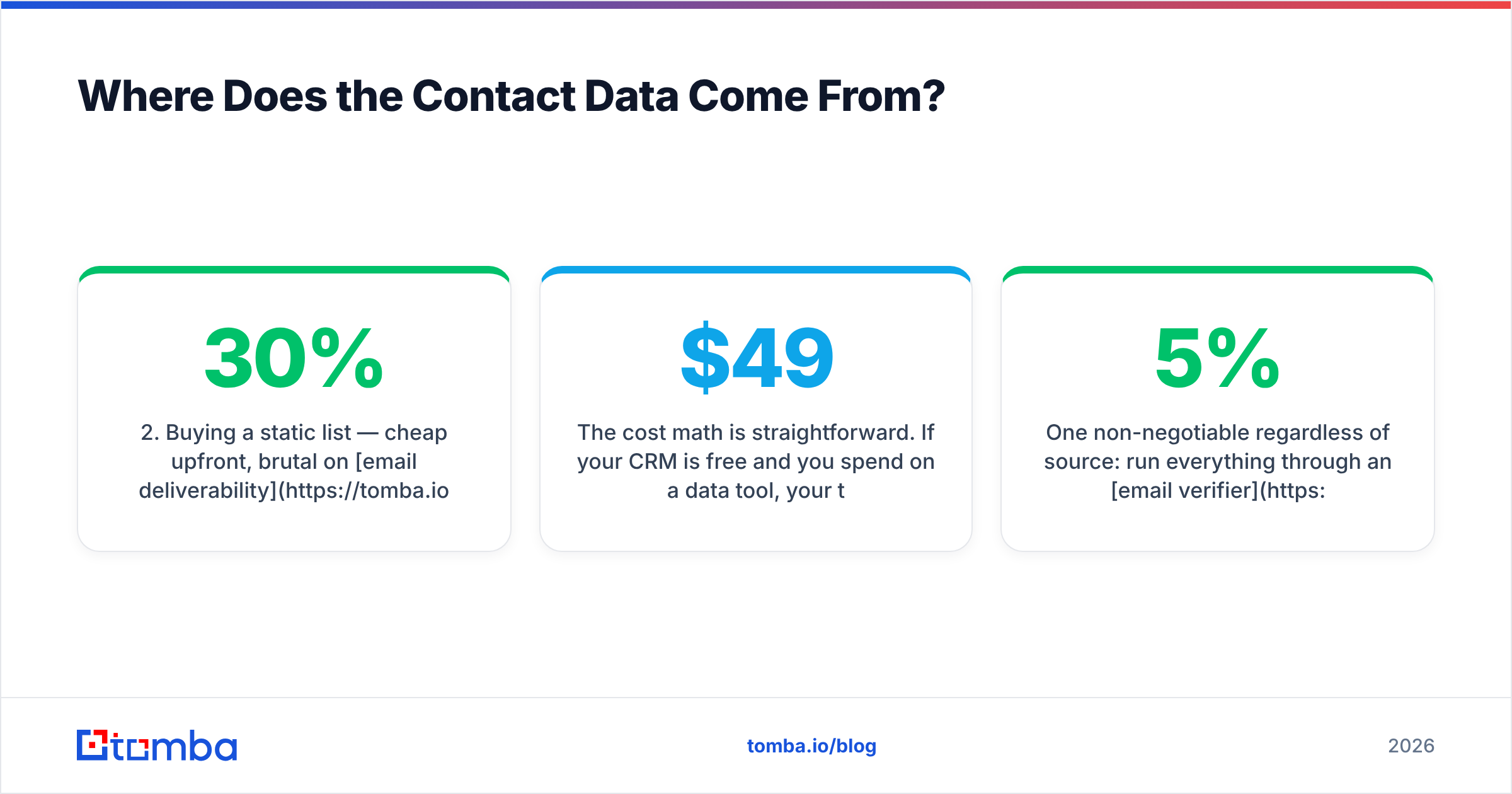
- Buying a static list — cheap upfront, brutal on email deliverability. Decay rates on purchased B2B lists run 20–30% annually.
- Dedicated finder + verifier — you search a domain or a name, get a verified address, and push it into the CRM. This is where tools like Tomba's email finder and domain search sit, alongside peers like BookYourData, which takes a curated-database approach rather than a live-search one. Both models are legitimate; they solve slightly different problems. If you need every contact at one target company, domain search wins. If you need a pre-built list for a defined ICP, a curated database is faster.
The cost math is straightforward. If your CRM is free and you spend $49/mo on a data tool, your total sales stack costs $49/mo — less than one hour of a rep's time. Tomba pricing starts with a free tier at 25 searches/month, then $49/mo for Starter, $99/mo for Growth, and $249/mo for Pro. Compare that against the 4 hours/week a rep burns hand-hunting emails and the arithmetic makes itself.
One non-negotiable regardless of source: run everything through an email verifier before it touches your sending tool. A 5% bounce rate is the difference between landing in the inbox and landing in a Google Postmaster reputation graph you do not want to look at.

How Do You Set Up Free Sales Tracking That Does Not Break?#
Five steps, in order. Skipping step 1 is why most free CRM rollouts die in month two.
- Define your stages before you touch software. Five to seven stages, each with an exit criterion a stranger could verify ("demo completed and next step booked," not "interested"). Write them down. Stages you cannot audit produce forecasts you cannot trust.
- Pick the tool by your last-hit limit. Estimate contacts, seats, and deals at 12 months out. Whichever free tier survives that number longest is your answer — not whichever has the nicest onboarding video.
- Wire the data layer first. Connect your enrichment and finding tools before importing anything. Tomba's HubSpot integration and Zapier integration both handle this; so does a simple CSV workflow via bulk email finder if you are starting with a domain list.
- Import clean, not fast. Deduplicate before upload. Verify every email. Standardize company names. A free CRM has no data-hygiene tooling to save you later, so the import is your only clean slate.
- Set one reporting ritual. Weekly pipeline review off the same view, every week. The report does not need to be sophisticated — it needs to be identical week over week so trends are visible.
A practical note on step 4: most free tiers cap import batch sizes (HubSpot at 1,048,576 rows per file but with stricter API limits; Bigin far lower). Split large files rather than fighting the importer.
When Should You Stop Using Free Software?#
Three triggers. Any one of them means the free tier is now costing you more than the paid tier would.
Trigger 1: three or more people touch the same deal. Free tiers rarely have record-level permissions or proper activity attribution. When two reps both think they own an account, you have a revenue problem, not a tooling preference.
Trigger 2: you cannot answer "why did we lose?" from data. If loss reasons are anecdotal, your reporting is too shallow. Paid tiers unlock stage-conversion analysis, and that single report usually reveals a fixable leak worth more than the subscription.
Trigger 3: manual data entry exceeds 3 hours/rep/week. That is roughly $300–600/month in loaded cost per rep, at which point $20–50/seat for automation is obviously cheaper. Track it for two weeks before you argue about it.
Research from Gartner on sales technology adoption consistently finds that adoption failure — not feature gaps — kills CRM projects. A free tool your team actually uses beats a paid one they route around. That cuts both ways: do not upgrade to solve a discipline problem.
What Does a Full Free-First Stack Look Like?#
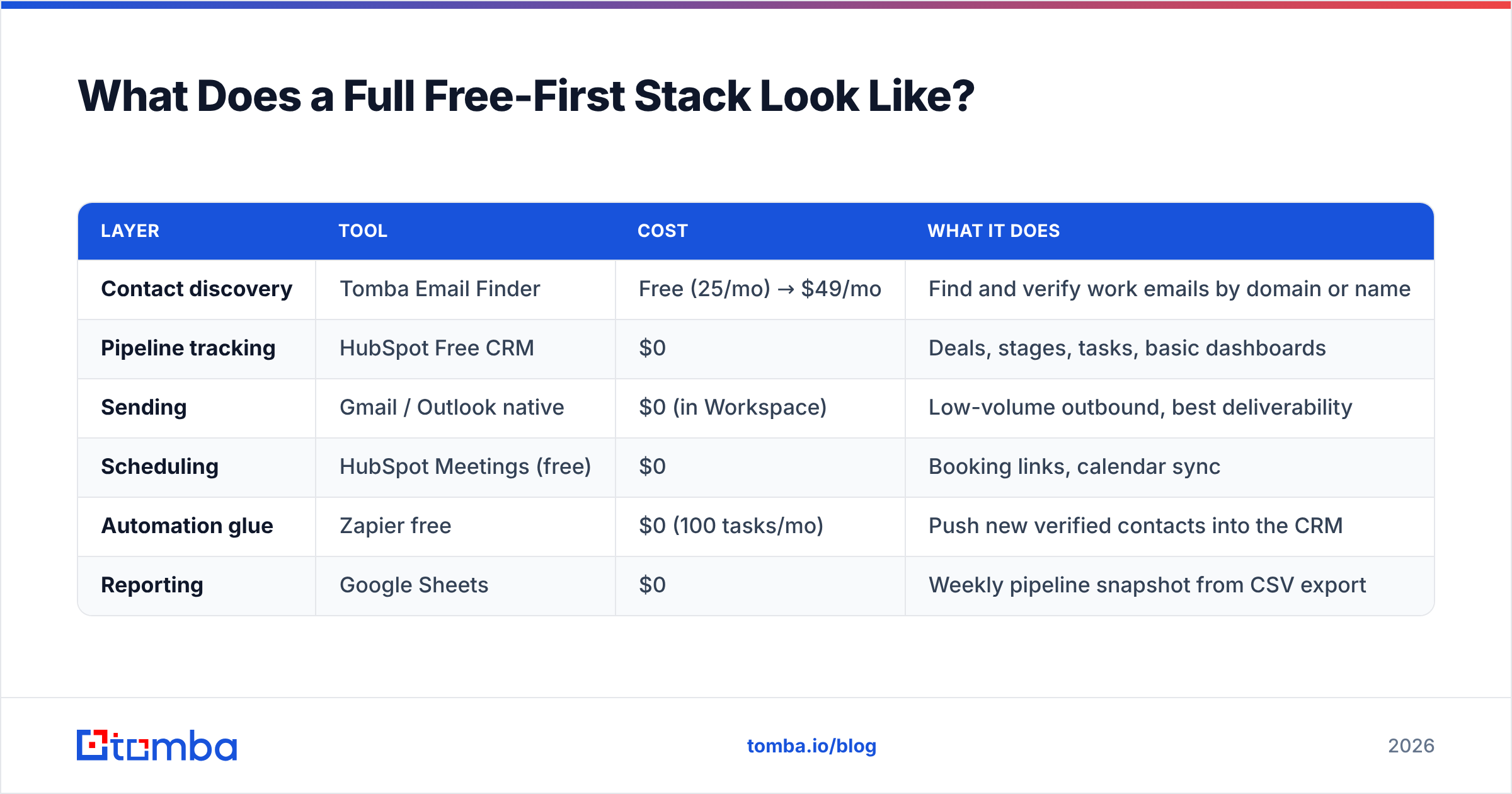
Here is a stack that runs at roughly $49/month total and covers find → verify → track → follow up:
| Layer | Tool | Cost | What it does |
|---|---|---|---|
| Contact discovery | Tomba Email Finder | Free (25/mo) → $49/mo | Find and verify work emails by domain or name |
| Pipeline tracking | HubSpot Free CRM | $0 | Deals, stages, tasks, basic dashboards |
| Sending | Gmail / Outlook native | $0 (in Workspace) | Low-volume outbound, best deliverability |
| Scheduling | HubSpot Meetings (free) | $0 | Booking links, calendar sync |
| Automation glue | Zapier free | $0 (100 tasks/mo) | Push new verified contacts into the CRM |
| Reporting | Google Sheets | $0 | Weekly pipeline snapshot from CSV export |
Scale that up and the first thing you pay for is data volume, not software seats — which is the correct order. Seats scale with headcount; data scales with ambition.
If you are working from LinkedIn rather than domains, swap the discovery layer for a LinkedIn finder workflow. If you are chasing catch-all domains that other tools mark "risky," a dedicated catch-all verifier recovers contacts most stacks discard.
What Are the Common Mistakes With Free CRM Tools?#
- Treating the free tier as permanent architecture. Build assuming you will migrate. Keep a monthly CSV export somewhere you control.
- Over-customizing early. Custom fields you cannot report on are worse than no fields. Start with the defaults for 60 days.
- Logging activities inconsistently. Half-logged activity data is worse than none, because it produces confidently wrong reports.
- Importing unverified emails. Every bounce degrades your sender reputation, and sender reputation is the one asset you cannot buy back.
- Confusing a pipeline with a forecast. Pipeline is what exists. Forecast is what closes. Free tiers give you the first and let you mistake it for the second.
Verdict: Which Free Sales Tracking Software Should You Pick?#
If you want a single answer: HubSpot's free CRM for teams of 1–5, Freshsales if you need three seats with unlimited contacts, Google Sheets if you have fewer than 200 open deals and hate software.
But the tool choice matters less than the input. A perfectly configured free CRM with 40 half-complete contact records will not produce revenue. The same CRM with 400 verified, enriched, correctly-targeted contacts will. Software organizes effort; it does not create prospects.
Start with the data layer, then pick whichever free pipeline tool survives your 12-month growth estimate. Revisit in two quarters using the three upgrade triggers above.
Fill your free CRM with contacts that actually respond. Tomba Email Finder finds verified professional email addresses by domain, name, or company — 25 free searches a month, no card required, and a clean export into whichever pipeline tracker you land on. Free tracking software is only as good as the pipeline you put in it.
Related guides#
Ready to find emails that actually work?
Join 150,000+ professionals who stopped guessing and started sending. Free credits on signup — no credit card required.
Get the Tomba newsletter
Practical outbound tactics and product updates — once every two weeks.
About the author