Freelance Cold Email Template: 7 Proven Examples for 2026
Most freelance cold emails die because they read like a resume. Here are 7 templates that book discovery calls, the personalization rules behind them, and the follow-up cadence that does the real work.
TL;DR
- A freelance cold email template is worth about 20% of your result. Targeting and the first line carry the other 80%.
- The highest-reply freelance emails are 60–110 words, name one specific observation, and ask for a reply — not a call.
- Lead with a problem the prospect already knows they have. Never open with "I'm a freelance [role] with X years of experience."
- Three to four short follow-ups typically double total replies. Most freelancers stop after one and blame the template.
- Verify every address before sending. A 6% bounce rate on a fresh domain will bury your inbox faster than any bad subject line.
What makes a freelance cold email template different from a sales rep's?#
A freelance cold email template has to do a job an SDR's template never does: prove you exist, prove you are competent, and prove you are low-risk — all before the prospect finishes the second sentence.
An account executive at a funded SaaS company borrows credibility from the logo in their signature. You do not have that. You have one thing the SDR does not, though: you can talk about the actual work. You can point at a specific broken page, a specific gap in their content, a specific ad running with a broken landing page. That specificity is the whole edge, and it is why copy-paste templates fail freelancers harder than they fail sales teams.
Three practical consequences:
- Your emails must be shorter. An SDR can afford three sentences of setup. You cannot. Every sentence that is not about the prospect burns trust you have not earned yet.
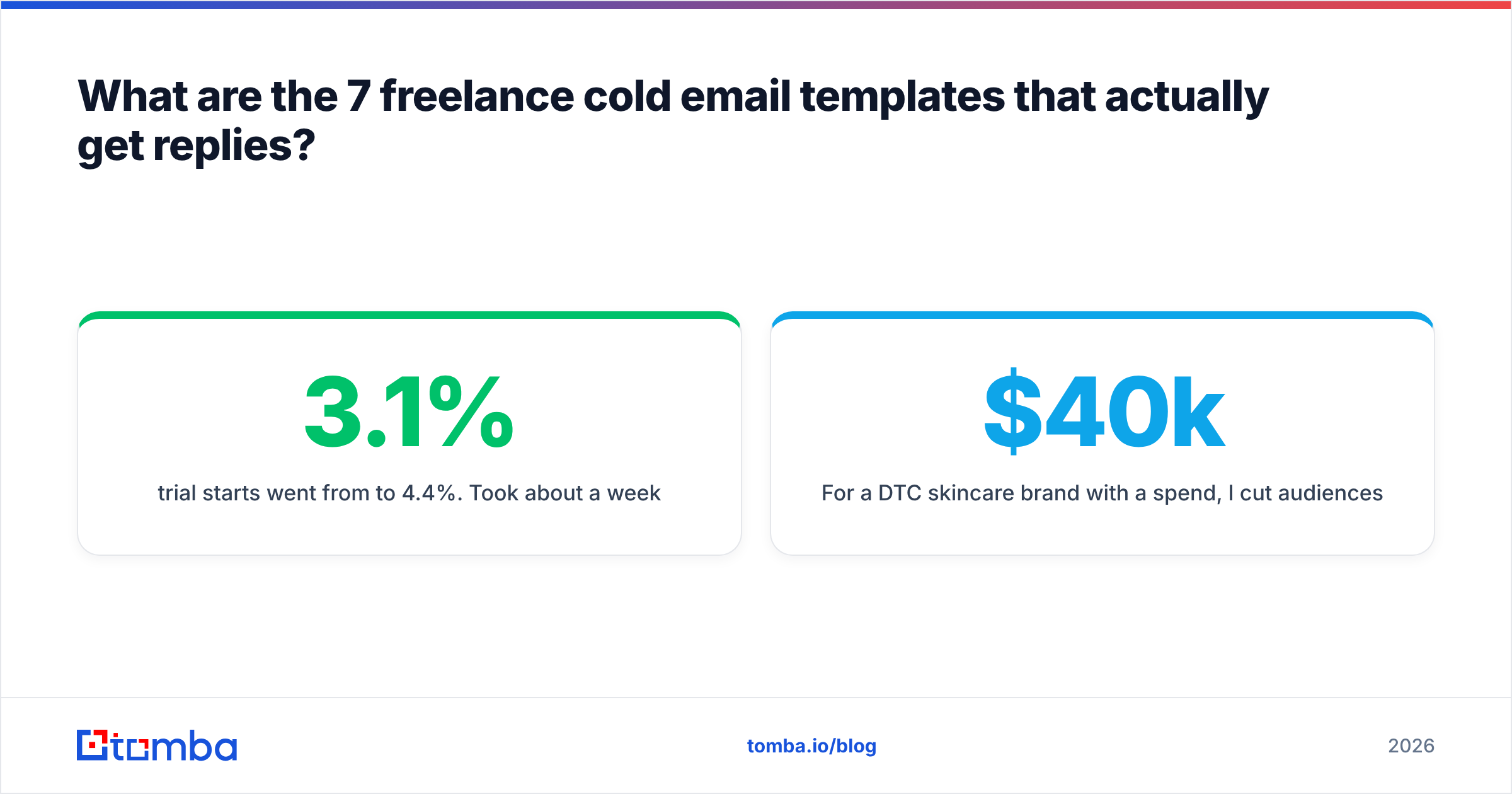
- Your proof must be concrete. "I helped a client increase conversions" is noise. "I rebuilt the pricing page for a 40-person HR SaaS and their trial starts went from 3.1% to 4.4%" is evidence.
- Your ask must be tiny. "Do you have 30 minutes Thursday?" asks for a calendar commitment from a stranger. "Worth a look?" asks for one word.
Does cold email still work for freelancers in 2026?#
Yes, but the margin for sloppiness is gone. Google and Microsoft both tightened bulk-sender enforcement, and shared-domain reputation now punishes low-engagement sending within days rather than months. The freelancers still winning are sending 20–40 highly targeted emails a day from a warmed domain, not 500 scraped blasts.
What has changed since 2023:
- Authentication is table stakes. SPF, DKIM, and DMARC are no longer optional for anyone sending outside a one-off personal thread. Run your domain through an SPF checker before your first campaign.
- AI-generated openers are recognizable. Prospects have now read thousands of "I noticed you're scaling your team — impressive growth!" lines. Generic AI personalization reads worse than no personalization.
- Volume is a liability. Reply rate per 100 emails is up for tight lists and down sharply for broad ones. The freelancers reporting 8–15% reply rates are almost universally sending under 50 a day.
The upside for freelancers is real: unlike agencies, you do not need 200 clients. Ten replies a month, three calls, one signed retainer is a viable year. That math means you can afford to spend four minutes per email — and four minutes is enough to make a template invisible.
What are the 7 freelance cold email templates that actually get replies?#
Each of these has a specific job. Do not mix them.
1. The observation template (best cold-open default)#
Subject: your pricing page

Hi Dana,

Your pricing page loads the plan comparison below the fold on mobile —
on an iPhone 15 you have to scroll twice before you see a price.

I rebuilt the same section for a 40-person HR SaaS last quarter and
trial starts went from 3.1% to 4.4%. Took about a week.

Want me to send the 3 specific changes I'd make to yours?

— Sam
Why it works: the observation is verifiable in ten seconds, the proof is numeric, and the ask is a low-cost yes.
2. The recent-trigger template#
Subject: congrats on the Series A — one thought

Hi Marcus,

Saw the raise last week. Usually the next six months means content
volume triples and someone on the team quietly becomes the editor.

I write long-form technical content for infrastructure companies —
most recently 12 pieces for [Company], 4 of which rank top-3 for
their target terms.

If you're hiring for that, worth a quick reply? If not, I'll leave
you alone.

— Priya
3. The portfolio-gap template (for designers and developers)#
Subject: quick note on your onboarding flow

Hi Alex,

I signed up for a trial yesterday. Between the email confirmation
and the dashboard there are 6 screens and no way to skip.

I've attached nothing — just this: two of your three closest
competitors ask for 2 fields and defer the rest. Happy to send a
teardown of the flow if useful.

— Jordan
4. The referral-adjacent template#
Subject: Nadia suggested I reach out

Hi Tom,

Nadia at [Company] mentioned you're handling the migration off
Marketo. I did that exact migration for her team in March —
about 90 days end to end, no gap in sends.

If you want the project plan we used, I'll send it over. No pitch.

— Chris
5. The results-first template (for performance work)#
Subject: 4.2x ROAS, same budget

Hi Renata,

For a DTC skincare brand with a $40k/mo spend, I cut audiences
from 22 to 6 and moved ROAS from 1.8 to 4.2 in nine weeks.

You're running the same broad-interest structure I started with
there — I can see it in the ad library.

Want the breakdown?

— Ade
6. The re-engagement template (past leads, lapsed clients)#
Subject: picking this back up?

Hi Lena,

We talked in February about the docs rewrite and it got parked
behind the replatform. That's usually done by now.

Still on the roadmap? I have capacity from the 15th.

— Sam
7. The soft-close follow-up#
Subject: re: your pricing page

Hi Dana,

Closing the loop on this. If the pricing page isn't a priority
this quarter, no problem — should I check back in Q3, or is this
just not a fit?

— Sam
The seventh one is not a template so much as a permission slip. It consistently outperforms every "just bumping this" follow-up because it gives the prospect a graceful exit, and people reply to exits.
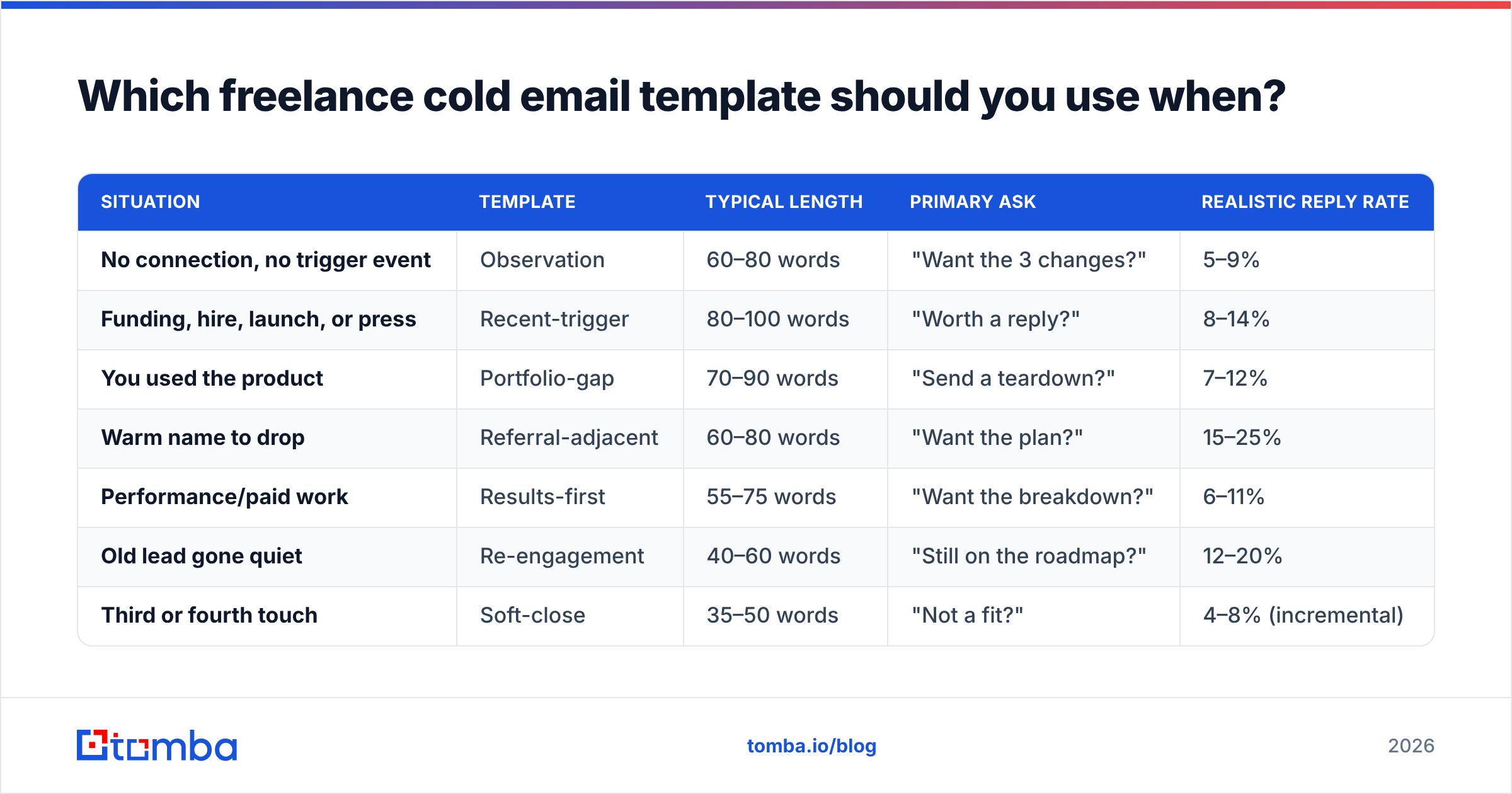
Which freelance cold email template should you use when?#
| Situation | Template | Typical length | Primary ask | Realistic reply rate |
|---|---|---|---|---|
| No connection, no trigger event | Observation | 60–80 words | "Want the 3 changes?" | 5–9% |
| Funding, hire, launch, or press | Recent-trigger | 80–100 words | "Worth a reply?" | 8–14% |
| You used the product | Portfolio-gap | 70–90 words | "Send a teardown?" | 7–12% |
| Warm name to drop | Referral-adjacent | 60–80 words | "Want the plan?" | 15–25% |
| Performance/paid work | Results-first | 55–75 words | "Want the breakdown?" | 6–11% |
| Old lead gone quiet | Re-engagement | 40–60 words | "Still on the roadmap?" | 12–20% |
| Third or fourth touch | Soft-close | 35–50 words | "Not a fit?" | 4–8% (incremental) |
Treat those reply rates as a directional range, not a promise. They come from freelance senders working lists under 300 contacts with verified addresses; a scraped 5,000-row list will halve every number in that column.
How do you personalize a template without spending 20 minutes per email?#
The trap is thinking personalization means research. It mostly means observation. Here is the four-minute version:
- Open the product, not the About page. Sign up for the trial, load the pricing page on mobile, read the docs. Thirty seconds of using the thing beats ten minutes of reading their blog.
- Find one asymmetry. Something they do that their two closest competitors do not, or vice versa. This is the single most reply-generating sentence type in freelance cold email.
- Name a number. Six screens. Two scrolls. Twenty-two audiences. Numbers signal you actually looked; adjectives signal you did not.
- Write the proof line before the pitch line. Your credibility sentence should contain a client type, an intervention, and an outcome. If any of the three is missing, rewrite it.
- Cut every sentence that starts with "I". Aim for at most one. This alone fixes most freelance cold emails.
- Read it aloud. If it sounds like a cover letter, delete and restart from the observation.
If you want a starting library to adapt rather than write from scratch, Tomba's cold email templates collection covers the common freelance angles, and the subject line tester will flag the spam-adjacent phrasing that quietly kills open rates.
How do you find the right person to email — and not their info@ inbox?#
The best template sent to info@ is a wasted send. Freelancers lose more pipeline to bad addresses than to bad copy, and the failure is silent: no bounce notification you actually read, no reply, no signal.
The workflow that holds up:
- Identify the role, not the person, first. For a website rebuild that is usually Head of Marketing or Head of Growth at 20–200 headcount, and the founder below 20.
- Pull the company's contact pattern. Most companies use one predictable format. A domain search returns the known addresses at a company plus the dominant format, which lets you construct the one you need when it is not already indexed.
- Resolve the individual address. Name plus domain into an email finder gets you the specific mailbox with a confidence score attached. Anything under a strong confidence score goes to the verification step, not to your sequence.
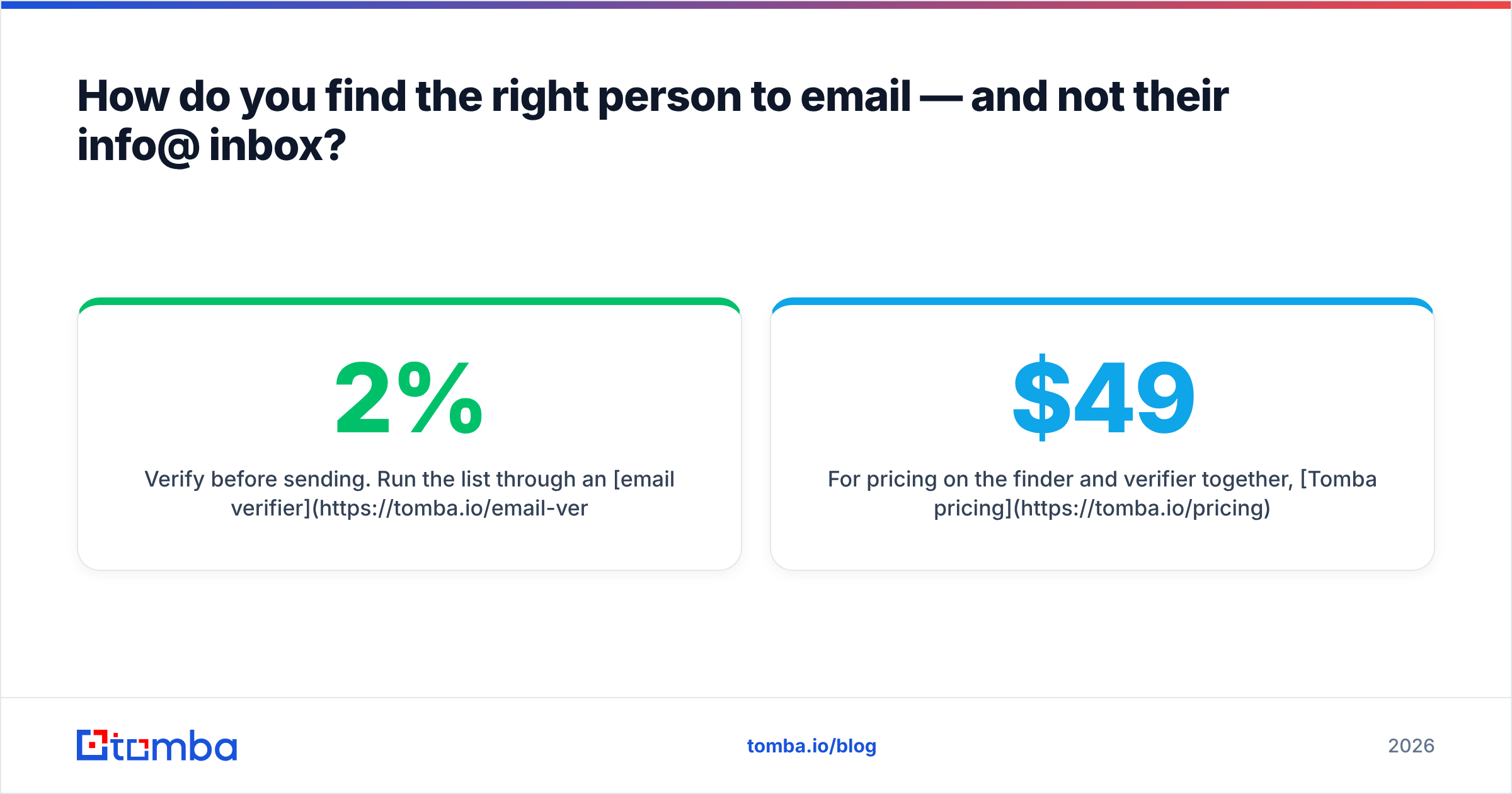
- Verify before sending. Run the list through an email verifier and drop everything that is not deliverable. Keeping bounces under 2% is the single cheapest protection for a freelancer's sending domain.
- Handle catch-all domains separately. Catch-all servers accept everything, which means standard verification returns "unknown." Send to those in a small, separate batch so a bad guess does not contaminate your main sequence stats.
For pricing on the finder and verifier together, Tomba pricing starts with a free tier at 25 searches a month, then $49/mo on Starter and $99/mo on Growth — which is the tier most solo freelancers running 300–800 lookups a month land on.
What follow-up cadence works for freelance cold email?#
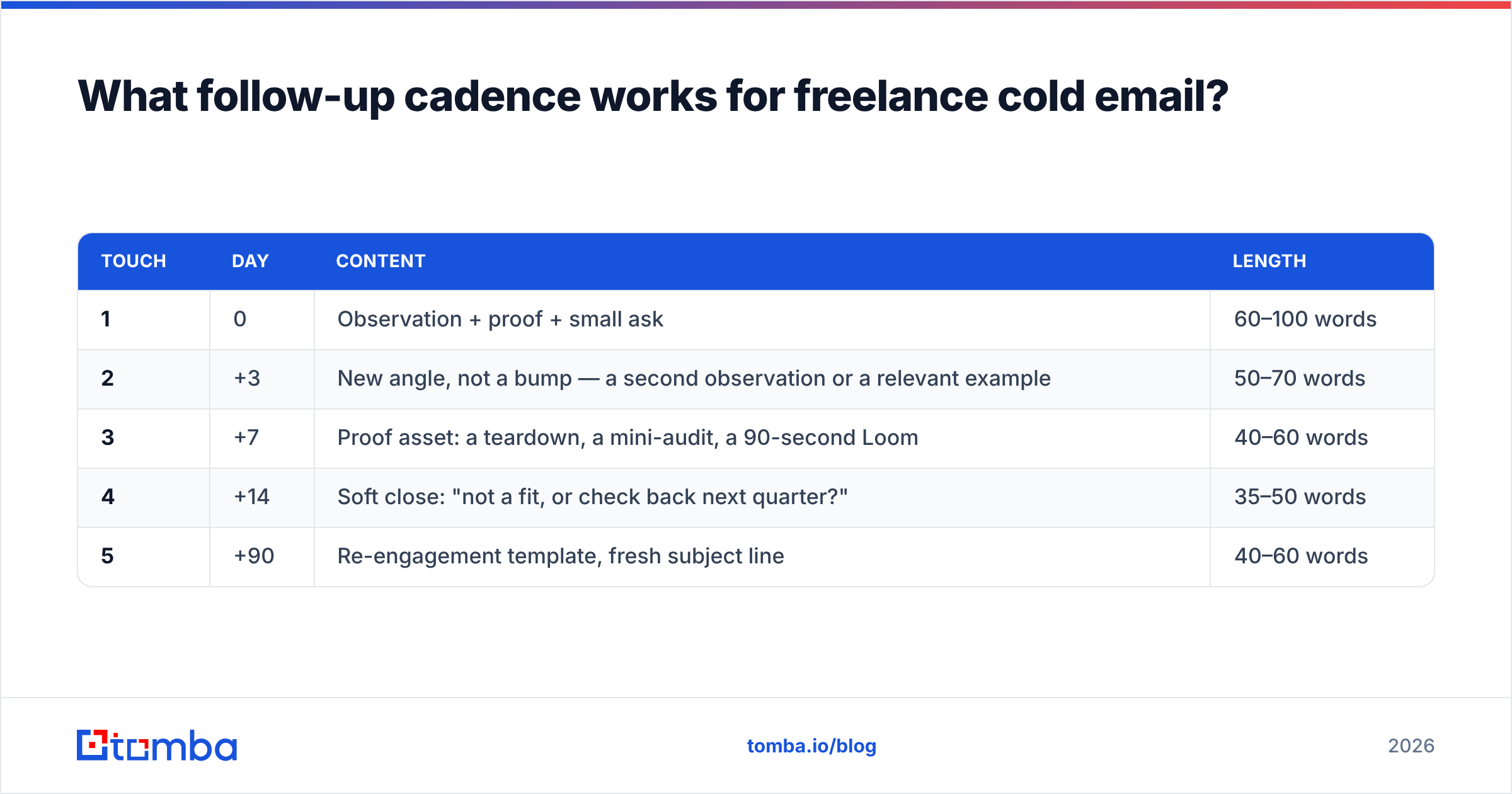
Most of your replies are not in email one. They are in emails two through four.
| Touch | Day | Content | Length |
|---|---|---|---|
| 1 | 0 | Observation + proof + small ask | 60–100 words |
| 2 | +3 | New angle, not a bump — a second observation or a relevant example | 50–70 words |
| 3 | +7 | Proof asset: a teardown, a mini-audit, a 90-second Loom | 40–60 words |
| 4 | +14 | Soft close: "not a fit, or check back next quarter?" | 35–50 words |
| 5 | +90 | Re-engagement template, fresh subject line | 40–60 words |
Two rules make this cadence work. Change the angle every time — a bump that says "just following up" teaches the prospect you have nothing to add. And keep every touch in the same thread except the day-90 one, which should start fresh so it does not read as a two-month-old ghost.
What kills freelance cold emails fastest?#
- The resume opener. "I'm a freelance web developer with 8 years of experience specializing in..." Delete on sight.
- Attachments on the first touch. They trigger filters and they signal effort you should not be spending on a stranger.
- Calendar links in email one. Ask for a reply. Send the link after they reply.
- Multiple links. One link maximum in a cold email, none is better on the first touch.
- Unverified sending. No SPF, no DKIM, no warmup, brand-new domain, 200 sends on day one. This is how freelancers end up in spam permanently. HubSpot's sales resources cover the fundamentals well, and it is worth reading the CAN-SPAM requirements before your first campaign — a physical address and a working opt-out are legally required in the US, and GDPR adds a legitimate-interest test in the EU.
- Sending from your primary domain. If your portfolio site is
yourname.com, buyyournamestudio.comfor outbound and warm it for three weeks first. - No list hygiene. Deduplicate before you import. Two emails to the same person on the same day ends the conversation before it starts.
Should freelancers use AI to write cold emails?#
Use it for structure, not for the first line. The observation sentence — the one that proves you looked — has to come from you, because that is the only part a model cannot fabricate credibly. What AI is genuinely good at: compressing a 140-word draft into 80, generating five subject-line variants, and catching the passive voice that makes freelance emails sound apologetic.
A reasonable split is 80% human on touch one and heavier AI assistance on touches two through four, where the job is variation rather than insight. If you want a drafting starting point, the AI cold email writer will give you a skeleton to cut down — the operative word being cut. Whatever comes out, you should be deleting a third of it. Independent reviews on G2 are also a fast way to sanity-check whichever sending tool you pair with your list, since deliverability behavior varies far more between platforms than feature lists suggest.
Ready to send templates to people who actually exist?#
The templates above are the easy part — you can adapt all seven in an afternoon. The hard part is a list of real, verified, correctly-targeted decision-makers, because a perfect email to a dead address is indistinguishable from a bad email.
Start with the Tomba Email Finder: give it a name and a company domain and get the verified professional address back with a confidence score, so your day-one sends land in an inbox instead of a bounce log. The free tier covers 25 searches a month — enough to test all seven templates against a small, tight list before you spend anything.
Related guides#
Ready to find emails that actually work?
Join 150,000+ professionals who stopped guessing and started sending. Free credits on signup — no credit card required.
Get the Tomba newsletter
Practical outbound tactics and product updates — once every two weeks.
About the author