Freshworks vs Salesforce: Which CRM Wins in 2026?
Salesforce owns the enterprise. Freshworks undercuts it on price and setup time. Here's the honest breakdown of cost, admin overhead, AI features, and which one actually fits your sales team in 2026.
TL;DR
- Salesforce wins on ceiling, Freshworks wins on floor. If you need custom objects, complex territory rules, and a partner ecosystem, Salesforce is still the safest bet. If you need a working CRM in two weeks without hiring an admin, Freshworks CRM (Freshsales) gets you there faster and cheaper.
- Real cost gap is bigger than list price. Salesforce Sales Cloud Enterprise runs $165/user/month; Freshsales Enterprise is $71/user/month. Add a certified admin ($90k–$130k/yr) or an implementation partner ($15k–$60k) to the Salesforce side and the delta widens.
- Both ship AI now. Salesforce has Agentforce and Einstein; Freshworks has Freddy AI. Salesforce's is deeper and more expensive; Freshworks' is included at higher tiers and good enough for scoring, summaries, and email drafts.
- Team-size rule of thumb: under 30 reps → Freshworks. 30–100 reps with a real RevOps function → either. 100+ reps, multi-product, multi-region → Salesforce.
- Neither one finds your leads. Both CRMs store contacts; they don't source verified work emails. That gap gets filled by an email finder feeding the CRM.
What are Freshworks and Salesforce, actually?#
Salesforce is the operating system of enterprise revenue. Freshworks is the appliance you plug in and use on Monday.
Salesforce started as SaaS CRM in 1999 and became a platform: Sales Cloud, Service Cloud, Marketing Cloud, Data Cloud, plus AppExchange with thousands of third-party apps and a certified-consultant economy on top. Every part of it is configurable, which is the strength and the tax.
Freshworks (NASDAQ: FRSH) sells a suite — Freshdesk for support, Freshservice for ITSM, and Freshsales (marketed as Freshworks CRM / Freshsales Suite) for sales. Freshsales bundles pipeline, sequences, built-in phone and email, and Freddy AI scoring into one interface with far fewer knobs.
The framing that matters: Salesforce is a platform you build on; Freshworks is a product you use. Ask which of those two your company is staffed to do.
How do Freshworks and Salesforce compare on price and features?#
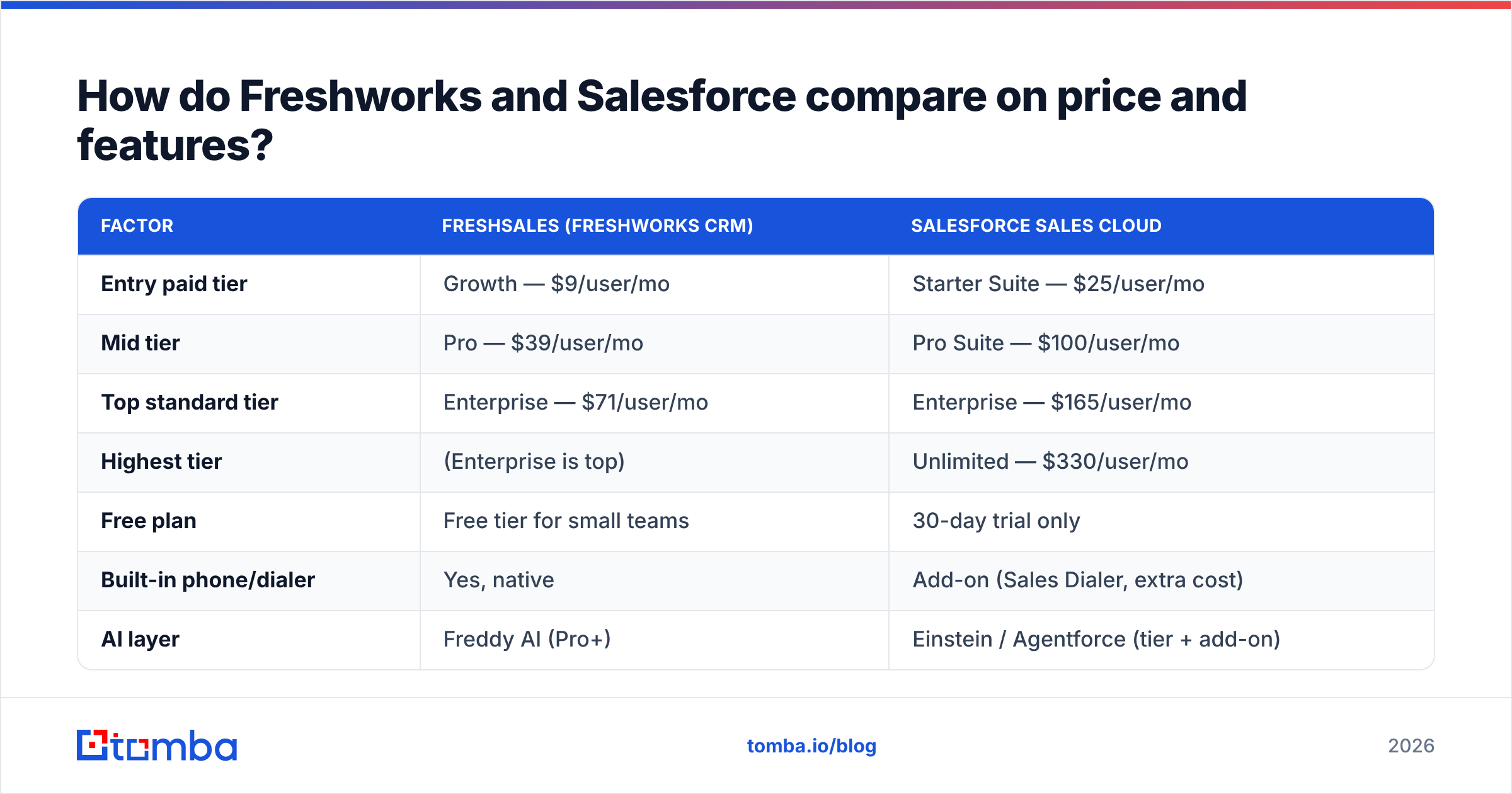
Here's the head-to-head on published list pricing as of 2026. All prices are per user, per month, billed annually.
| Factor | Freshsales (Freshworks CRM) | Salesforce Sales Cloud |
|---|---|---|
| Entry paid tier | Growth — $9/user/mo | Starter Suite — $25/user/mo |
| Mid tier | Pro — $39/user/mo | Pro Suite — $100/user/mo |
| Top standard tier | Enterprise — $71/user/mo | Enterprise — $165/user/mo |
| Highest tier | (Enterprise is top) | Unlimited — $330/user/mo |
| Free plan | Free tier for small teams | 30-day trial only |
| Built-in phone/dialer | Yes, native | Add-on (Sales Dialer, extra cost) |
| AI layer | Freddy AI (Pro+) | Einstein / Agentforce (tier + add-on) |
| Typical time to live | 1–3 weeks | 6 weeks–6 months |
| Dedicated admin needed | Rarely | Almost always at 50+ seats |
| App marketplace | ~1,000+ apps | AppExchange, 4,000+ apps |
| Custom objects | Limited | Extensive |
| Annual contract lock-in | Monthly option available | Usually 1–3 years |
Two numbers do most of the work in that table. At 25 reps, Freshsales Enterprise costs roughly $21,300/year. Salesforce Enterprise at the same headcount is about $49,500/year — before the admin, before the integration partner, before Sales Dialer, before Data Cloud credits.
What does implementation actually cost?#
Budget 1.5x the license fee for Salesforce in year one, and roughly 0.2x for Freshworks.
That's the honest version of what buyers discover post-signature. Break it into the five line items nobody puts in the deck:
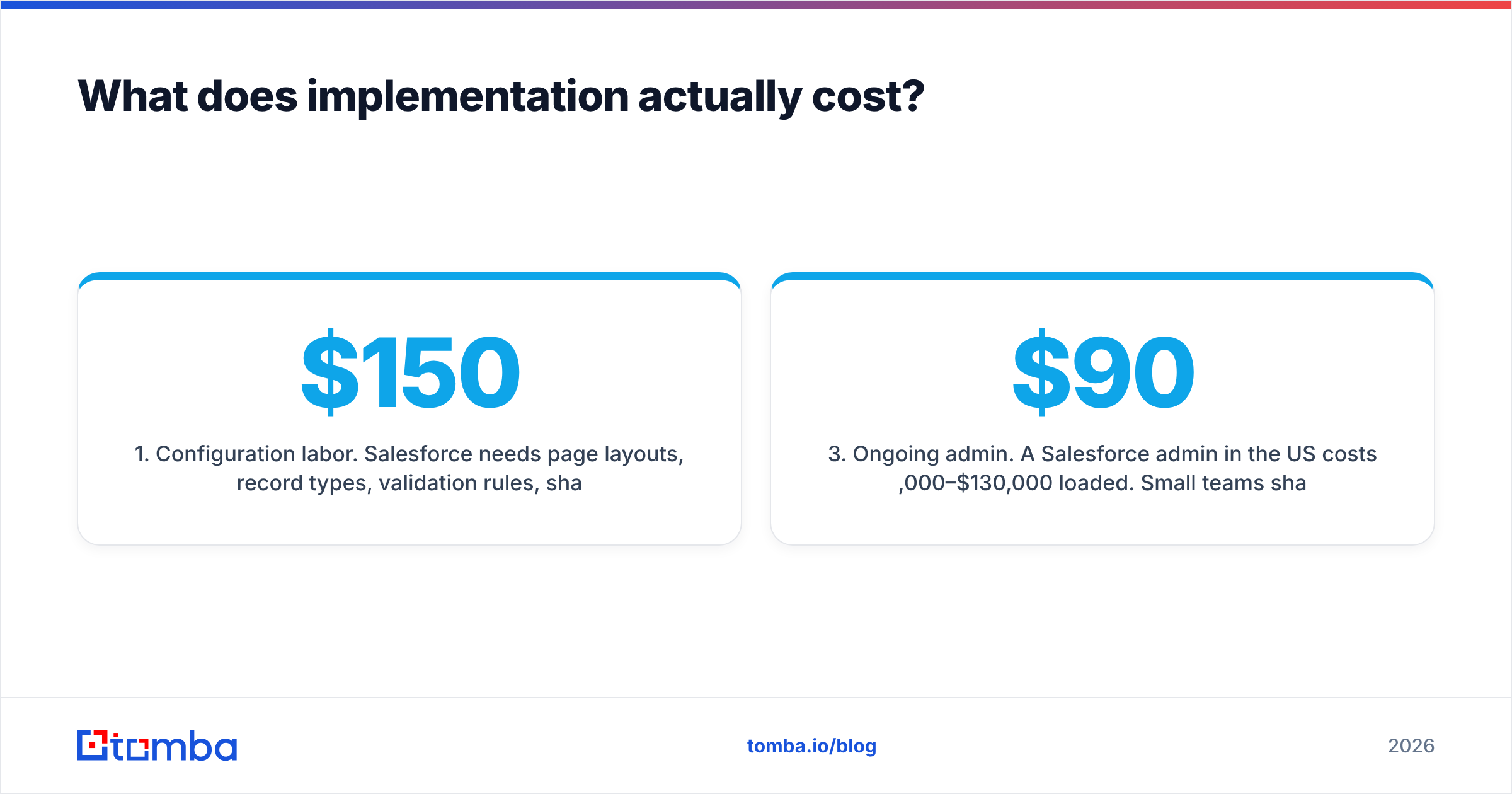
- Configuration labor. Salesforce needs page layouts, record types, validation rules, sharing rules, and flows built to match your process. Partner rates run $150–$250/hr; a mid-market rollout lands between $15,000 and $60,000. Freshsales ships with an opinionated default pipeline you adjust in the UI.
- Data migration. Same problem for both — dedupe, field mapping, historical activity. Salesforce's stricter object model means more mapping work but cleaner results. Plan on 2–6 weeks either way if you're leaving a legacy CRM.
- Ongoing admin. A Salesforce admin in the US costs $90,000–$130,000 loaded. Small teams share the role with a RevOps generalist; past 75 seats it becomes a full-time job. Freshworks teams typically get by with a sales ops person spending a few hours a week.
- Integration surface. Salesforce connects to everything, but half those connectors are paid third-party middleware. Freshworks covers the common stack (Slack, Google Workspace, Zoom, Mailchimp, Zapier) natively and leans on Zapier integration for the long tail.
- Change management. Rep adoption is the actual failure mode. Salesforce's UI is dense; Freshsales is closer to a modern SaaS app. If your reps abandoned the last CRM, weight this heavily.
Salesforce's own Sales Cloud pricing page lists the license tiers cleanly, but implementation cost is scoped per-deal by partners — the gap between list and landed is the entire argument for Freshworks at small scale.
Is Salesforce worth the premium?#
Yes — if you have the complexity to justify it, and no if you're buying it as a status purchase.
Salesforce earns its price in five specific situations:
- Multi-product, multi-region revenue. Territory management, complex quota rollups, and multi-currency forecasting are genuinely hard problems Salesforce solved a decade ago.
- CPQ and complex quoting. Configure-price-quote with approval chains, product bundles, and amendment logic. Freshworks has quotes; it doesn't have Revenue Cloud.
- Deep customization. Custom objects, Apex, Lightning Web Components. If your business model doesn't fit a standard opportunity object, you need a platform.
- Ecosystem dependency. Your ABM tool, your CS platform, and your BI stack all have first-class Salesforce connectors and second-class everything-else connectors.
- Board and buyer expectations. Enterprise procurement, SOC 2/FedRAMP requirements, and PE-backed reporting standards often assume Salesforce.
Where the premium is not worth it: a 15-person team selling one product on a two-call cycle. You'll use 12% of the platform and pay for 100% of it. G2's CRM category reviews show the same pattern year after year — Salesforce scores high on capability and low on ease of setup; Freshworks inverts that.
Where does Freshworks genuinely win?#
Freshworks wins on time-to-value, bundled telephony, and total cost at sub-50 headcount.
Speed to live. Most Freshsales rollouts are functional inside three weeks. Import contacts, define stages, turn on sequences, done. There's no partner statement of work.
Native phone and email. Freshsales includes a cloud phone with call recording, voicemail drop, and local numbers at the Pro tier. On Salesforce, dialing is an add-on or a third-party tool like Aircall. For SDR-heavy teams, that's a real line-item difference — and it pairs with a phone finder when your list is email-only.
Unified suite. If you're also running Freshdesk for support, the shared contact record between sales and support is clean out of the box. Salesforce gets there with Service Cloud, at Service Cloud prices.
Freddy AI at no extra line item. Lead scoring, deal insights, email draft assistance, and call summaries are included from Pro up. Salesforce's Agentforce is more powerful and more granular, but it's consumption-priced on top of your licenses.
Honest limitation: Freshworks' reporting is weaker. Complex cross-object reports, custom report types, and dashboard drilldowns are where Salesforce still runs away with it. If your CRO lives in dashboards, test this before you commit.
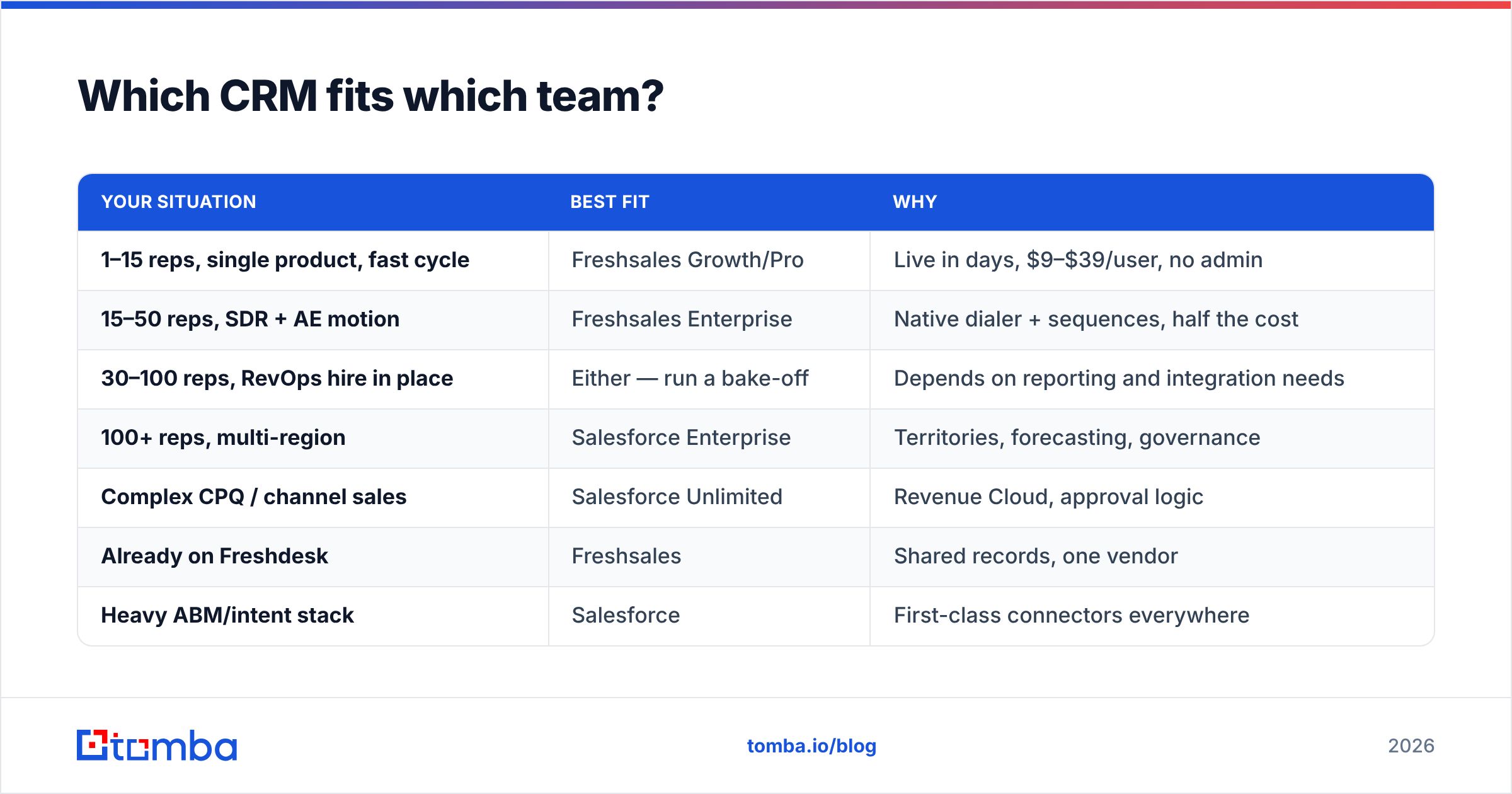
Which CRM fits which team?#
Match the tool to your operating reality, not your aspiration.
| Your situation | Best fit | Why |
|---|---|---|
| 1–15 reps, single product, fast cycle | Freshsales Growth/Pro | Live in days, $9–$39/user, no admin |
| 15–50 reps, SDR + AE motion | Freshsales Enterprise | Native dialer + sequences, half the cost |
| 30–100 reps, RevOps hire in place | Either — run a bake-off | Depends on reporting and integration needs |
| 100+ reps, multi-region | Salesforce Enterprise | Territories, forecasting, governance |
| Complex CPQ / channel sales | Salesforce Unlimited | Revenue Cloud, approval logic |
| Already on Freshdesk | Freshsales | Shared records, one vendor |
| Heavy ABM/intent stack | Salesforce | First-class connectors everywhere |
One migration caution worth pricing in: leaving Salesforce is harder than leaving Freshworks. Custom Apex, embedded reports, and partner-built flows don't port. Leaving Freshsales is mostly a CSV export. Optionality has value when you're not sure what your GTM looks like in three years.
What about AI — Freddy vs Agentforce?#
Salesforce is further ahead on agentic AI; Freshworks is further ahead on AI you'll actually turn on.
Agentforce lets you build autonomous agents that take actions across your Salesforce data — qualifying inbound, drafting outreach, updating records, escalating cases. It's genuinely capable and it's consumption-billed, which means costs scale with usage in ways that need monitoring. Einstein forecasting and opportunity scoring sit underneath it.
Freddy AI is narrower: predictive contact and deal scoring, next-best-action nudges, email content assistance, and call transcription/summary. It's on by default at Pro and above, which is why adoption tends to be higher — nobody has to file a request to enable it.
The practical read: if you have a data team that will tune models and build agents, Salesforce's ceiling is meaningfully higher. If your AI ambition is "score my leads and stop making reps write follow-ups from scratch," Freddy covers it without a separate budget line. Gartner's CRM research is worth reading before you buy AI you won't staff.

What neither CRM does for you?#
Both store contacts. Neither one creates them.
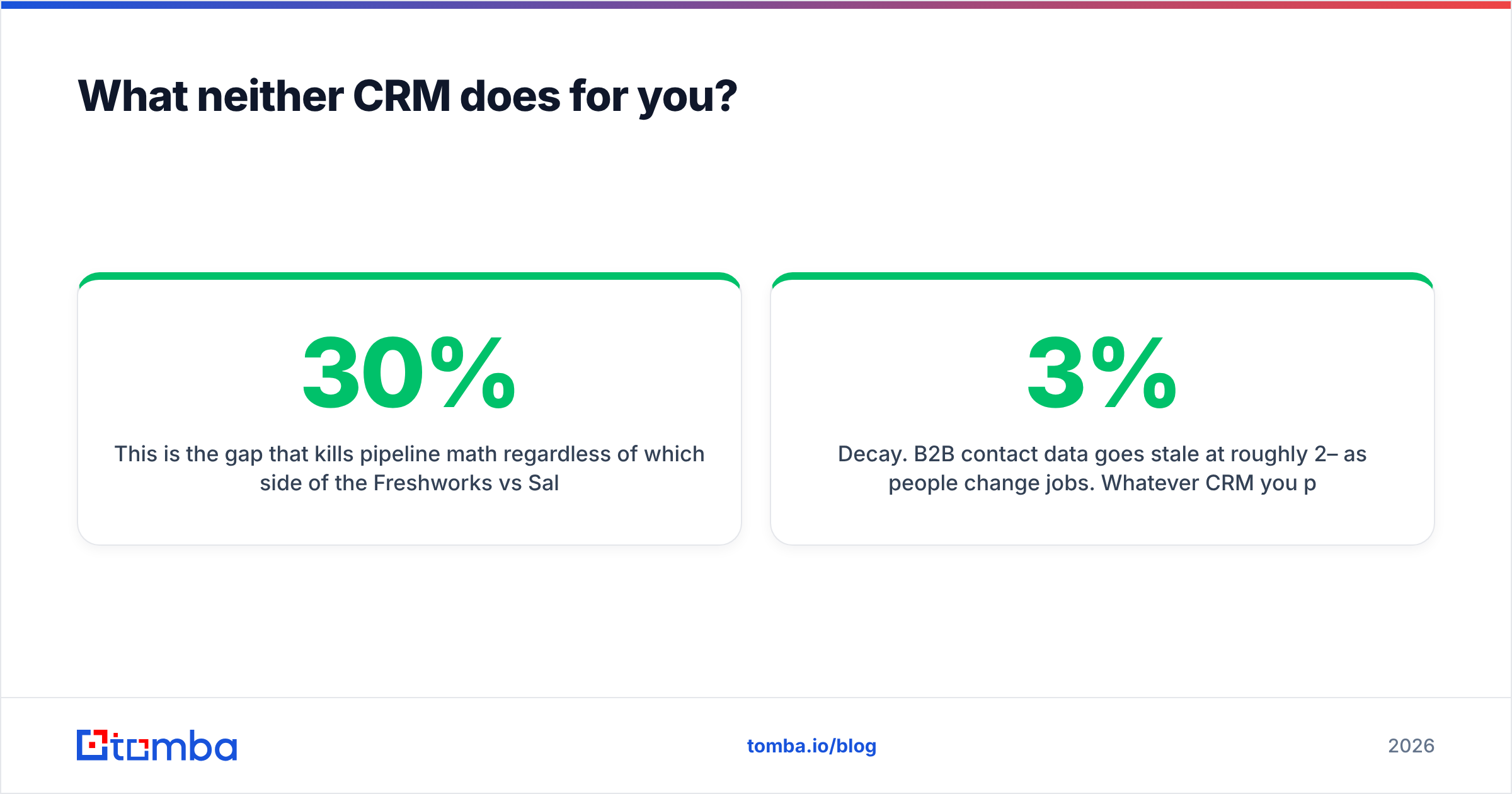
This is the gap that kills pipeline math regardless of which side of the Freshworks vs Salesforce decision you land on. Your CRM is a system of record; it inherits whatever data quality your sourcing process produces. Import a list with 30% bad emails and you now have a $165/user/month database of bounces.
Three specific failure points to plan around:
- Sourcing. Salesforce Data Cloud and Freshworks both offer enrichment, but neither is a primary email discovery engine. You still need a tool that goes from company domain + person name to a verified work address. A domain search run against your ICP account list is usually the fastest path to a clean import.
- Verification. Salesforce won't tell you an address is dead until a sequence bounces and your sender reputation takes the hit. Running an email verifier before import is cheaper than repairing email deliverability after.
- Decay. B2B contact data goes stale at roughly 2–3% per month as people change jobs. Whatever CRM you pick, budget for a quarterly re-verification pass on your active segments — a bulk verify run against your open-pipeline contacts catches most of it.
The tooling stack that actually works looks like: finder → verifier → CRM → sequencer. Both Freshworks and Salesforce sit in the third slot. Neither vendor will tell you they're not the first two.
What's the verdict?#
Pick Freshworks if you're under 50 reps, want to be live this month, value a native dialer, and would rather spend money on headcount than on a Salesforce admin. The $9 Growth tier is a legitimately good starting point for a small team, and the $71 Enterprise tier does most of what a mid-market org needs.
Pick Salesforce if you have complexity that a configurable platform solves — territories, CPQ, multi-cloud, custom objects, an ecosystem of tools that assume SFDC — and you have or will hire the person to run it. Do not buy Salesforce and then not staff it. That's the most common and most expensive version of this mistake.
Run a bake-off if you're in the 30–100 rep band. Take your ten hardest reporting questions and your three ugliest process requirements, and make both vendors demo against them with your data. The answer becomes obvious within a week.
Whichever CRM you land on, the pipeline it holds is only as good as the contact data going in. Tomba's Tomba Email Finder turns a company domain and a name into a verified work email, with a free tier at 25 searches/month and paid plans starting at $49/mo — see the full Tomba pricing breakdown. Push results straight into either CRM via the Tomba API or the HubSpot integration-style native connectors, and stop paying enterprise per-seat rates to store addresses that bounce.
Related guides#
Ready to find emails that actually work?
Join 150,000+ professionals who stopped guessing and started sending. Free credits on signup — no credit card required.
Get the Tomba newsletter
Practical outbound tactics and product updates — once every two weeks.
About the author