Friendly Follow Up Email: Templates and Timing That Work
Most follow-ups fail because they nag instead of adding value. Here are the timing rules, 9 templates, and sequence structures that get replies without burning the relationship.
TL;DR
- A friendly follow up email works when it adds something new — a resource, a data point, a relevant trigger — not when it just asks "did you see my last email?"
- Send follow-up #1 at 2-3 business days, then space subsequent touches wider: 4, 7, then 14 days. Compressed sequences read as pressure.
- Reply rates climb through touch 4-5 in most B2B sequences, then flatten. Sending 9 emails does not beat sending 5 well-written ones.
- Subject line choice matters less than whether you reply in-thread. In-thread follow-ups keep context and avoid re-triggering spam filters.
- Bad data destroys follow-up performance before copy ever gets a chance. Verify addresses first, then worry about the words.
What Is a Friendly Follow Up Email, Exactly?#
A friendly follow up email is a second (or third, or fourth) message sent after an initial outreach or meeting that re-opens the conversation without applying pressure. The word "friendly" is doing real work here — it signals a tone that assumes good faith on the recipient's part rather than treating silence as rejection.
The practical difference shows up in one sentence. Compare:
- Pressure version: "I've reached out twice and haven't heard back. Are you the right person?"
- Friendly version: "Figured this got buried — no worries either way. One thing that might be useful: [specific resource]."
Both are follow-ups. Only one leaves the door open.
Here's the framing that helps most: think of a follow-up like knocking on a neighbor's door. If nobody answers, you don't knock harder and shout. You leave a note, come back later, and maybe bring something useful next time. Technically, a follow-up sequence is a spaced set of touchpoints designed to catch the recipient in a moment when your message is relevant — because relevance is mostly a timing problem, not a persuasion problem.
The Four Elements Every Good Follow-Up Contains#
- A low-friction opener — one line that acknowledges the gap without guilt-tripping. "Know inbox season is brutal" beats "Following up on my email below."
- A new piece of value — a benchmark, a customer example, a short teardown, a relevant news item. If you have nothing new, you're not ready to send.
- A single, tiny ask — one question that can be answered in under ten words. "Worth a look, or should I close the loop?"
- A graceful exit — explicit permission to say no. Counterintuitively, this raises reply rates because it removes the social cost of responding.
Why Do Most Follow-Up Emails Get Ignored?#
Because they contain zero new information. A follow-up that says "just bumping this to the top of your inbox" asks the recipient to do work — reread the original, decide, respond — while giving them nothing in return. That's a bad trade and they know it.
The second-biggest cause is invisible: the email never arrived. Follow-ups compound deliverability problems. If your first email bounced or landed in spam, every subsequent send to that address hurts your sender reputation further. Mailbox providers read repeated sends to dead addresses as a spammer signal, and Google's own bulk sender guidelines put a hard 0.3% spam-complaint threshold on senders.
The third cause is cadence. Reps who send day 1, day 2, day 3, day 4 read as automated — because they usually are. Human follow-up has irregular, widening gaps. Machine follow-up has metronomic ones, and recipients pattern-match that instantly.
How Long Should You Wait Before Following Up?#
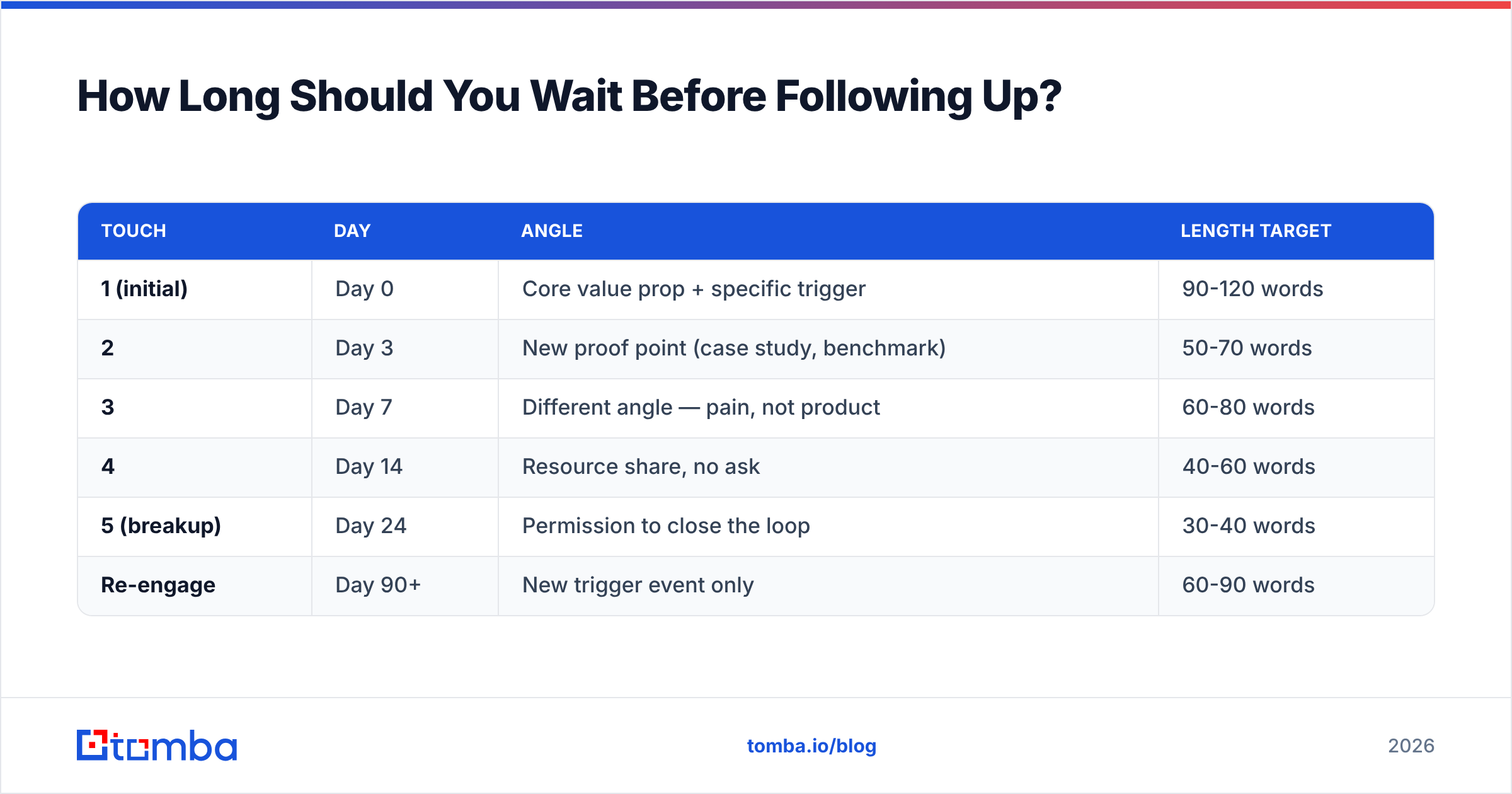
Two to three business days for the first follow-up, then widen. The logic: your first email either got read and deprioritized, or never got seen at all. Two days is long enough that you're not interrupting, short enough that context survives.
Here's a cadence structure that holds up across most B2B contexts:
| Touch | Day | Angle | Length target |
|---|---|---|---|
| 1 (initial) | Day 0 | Core value prop + specific trigger | 90-120 words |
| 2 | Day 3 | New proof point (case study, benchmark) | 50-70 words |
| 3 | Day 7 | Different angle — pain, not product | 60-80 words |
| 4 | Day 14 | Resource share, no ask | 40-60 words |
| 5 (breakup) | Day 24 | Permission to close the loop | 30-40 words |
| Re-engage | Day 90+ | New trigger event only | 60-90 words |
Notice the word counts shrink. Later follow-ups should get shorter, not longer. A rep who writes a 250-word fourth follow-up is arguing with someone who isn't in the room.
Timing Adjustments by Context#
- Post-demo follow-up: 24 hours, not 3 days. Momentum is the asset.
- Post-conference: 2-4 days, and reference something specific from the conversation or you'll blur into the other 40 emails they got.
- Inbound lead who filled a form: Within 5 minutes for the first touch. Harvard Business Review's classic response-time study found firms responding within an hour were nearly 7x more likely to qualify the lead.
- Cold outbound to enterprise: Stretch everything. 4, 9, 18 days. Enterprise buyers have longer attention cycles and shorter tempers.
- Renewal or upsell to an existing customer: 5-7 days, and never use a template they've seen in your marketing emails.
What Does a Friendly Follow Up Email Actually Look Like?#
Nine templates below. Adapt the brackets — sending these verbatim is how you end up in a Reddit thread about bad outreach.
1. The value-add bump (Touch 2)
Subject: (reply in-thread)
Hi [Name] — figured my last note landed during a busy stretch.
Unrelated to my ask: [Company] just published [specific thing], and it lines up with what you mentioned about [topic] on [source]. Sharing in case it's useful.
Still happy to walk through [thing] if it's relevant — otherwise no follow-up needed.
2. The specific-observation follow-up
Noticed [Company] is hiring three SDRs this quarter. Usually that means the data side is about to get painful — that's the part we handle.
Worth 12 minutes?
3. The post-demo recap
Thanks for the time today. Three things I said I'd send: [1], [2], [3].
You mentioned [objection] — here's how [similar company] handled it: [one sentence].
Next step on my end is [X]. Anything you need from me before [date]?
4. The "wrong person" ask
Hi [Name] — quick one. If [topic] isn't yours, would you point me to whoever owns it? Happy to stop emailing you either way.
5. The pattern-interrupt
I've sent two emails about [product]. Neither landed, which usually means I got the problem wrong.
Is [assumed pain] actually a thing at [Company], or am I off?
6. The resource drop (no ask)
No pitch here. We pulled reply-rate data from [N] outbound campaigns and the [specific finding] surprised us. Two-page summary attached.
That's it. Have a good week.
7. The trigger-event re-engage
Saw the [funding round / new hire / product launch]. Congrats.
Last time we spoke, [reason it wasn't a fit]. That may have changed — worth revisiting?
8. The breakup
Closing the loop on this one so I stop cluttering your inbox.
If [problem] moves up the list later, I'm easy to find.
9. The referral nudge
[Mutual contact] mentioned you're rebuilding the outbound motion at [Company]. They thought this might be worth a look.
Free [day] or [day]?
For more starting points, our cold email templates library covers first-touch structures you can pair with these follow-ups, and the subject line generator helps when you do need to break thread.
Should You Reply In-Thread or Start a New Subject Line?#
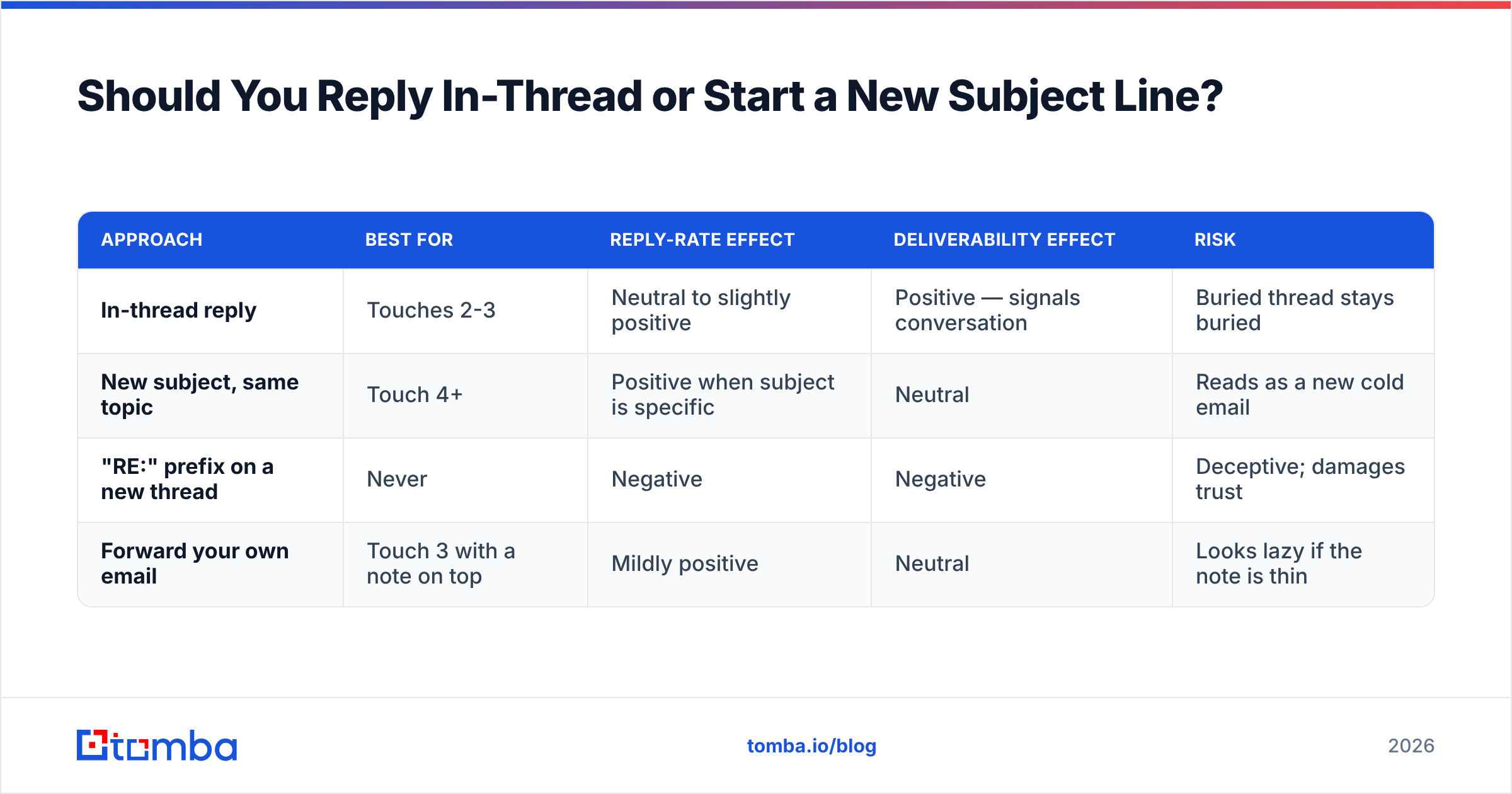
Reply in-thread for touches 2 and 3. Break thread for touch 4 or later.
In-thread replies preserve context, keep the original value prop one scroll away, and avoid the deliverability penalty of repeatedly hitting an address with fresh-thread cold emails. They also look like a normal human conversation, because that's what they are.
The argument for breaking thread later: if three in-thread messages produced nothing, the thread itself is dead — buried, muted, or filtered. A new subject line gets a fresh shot at the preview pane.
| Approach | Best for | Reply-rate effect | Deliverability effect | Risk |
|---|---|---|---|---|
| In-thread reply | Touches 2-3 | Neutral to slightly positive | Positive — signals conversation | Buried thread stays buried |
| New subject, same topic | Touch 4+ | Positive when subject is specific | Neutral | Reads as a new cold email |
| "RE:" prefix on a new thread | Never | Negative | Negative | Deceptive; damages trust |
| Forward your own email | Touch 3 with a note on top | Mildly positive | Neutral | Looks lazy if the note is thin |
The "RE:" fake-thread trick deserves a specific warning: it's a short-term reply-rate bump that costs you the relationship the moment they notice. And they notice.
How Many Follow-Ups Are Too Many?#
Five to six total touches in an initial sequence, then stop and re-engage on a trigger. Past touch six, incremental reply rate is small and unsubscribe/complaint risk climbs.
The math most reps get wrong: sequences show cumulative reply lift through roughly touch 4-5, and the curve flattens hard after. Sending nine emails doesn't get you nine emails' worth of replies — it gets you five emails' worth of replies plus four emails' worth of complaints.
There's also a compounding cost people ignore. Every extra send to an unengaged address teaches Gmail and Outlook that your domain sends mail nobody wants. That damage doesn't stay in one campaign — it follows your domain into the next one. Running a spam checker on your templates before launch catches the obvious triggers, but nothing rescues a sequence built on a list you never verified.
Which Tools Help You Send Better Follow-Ups?#
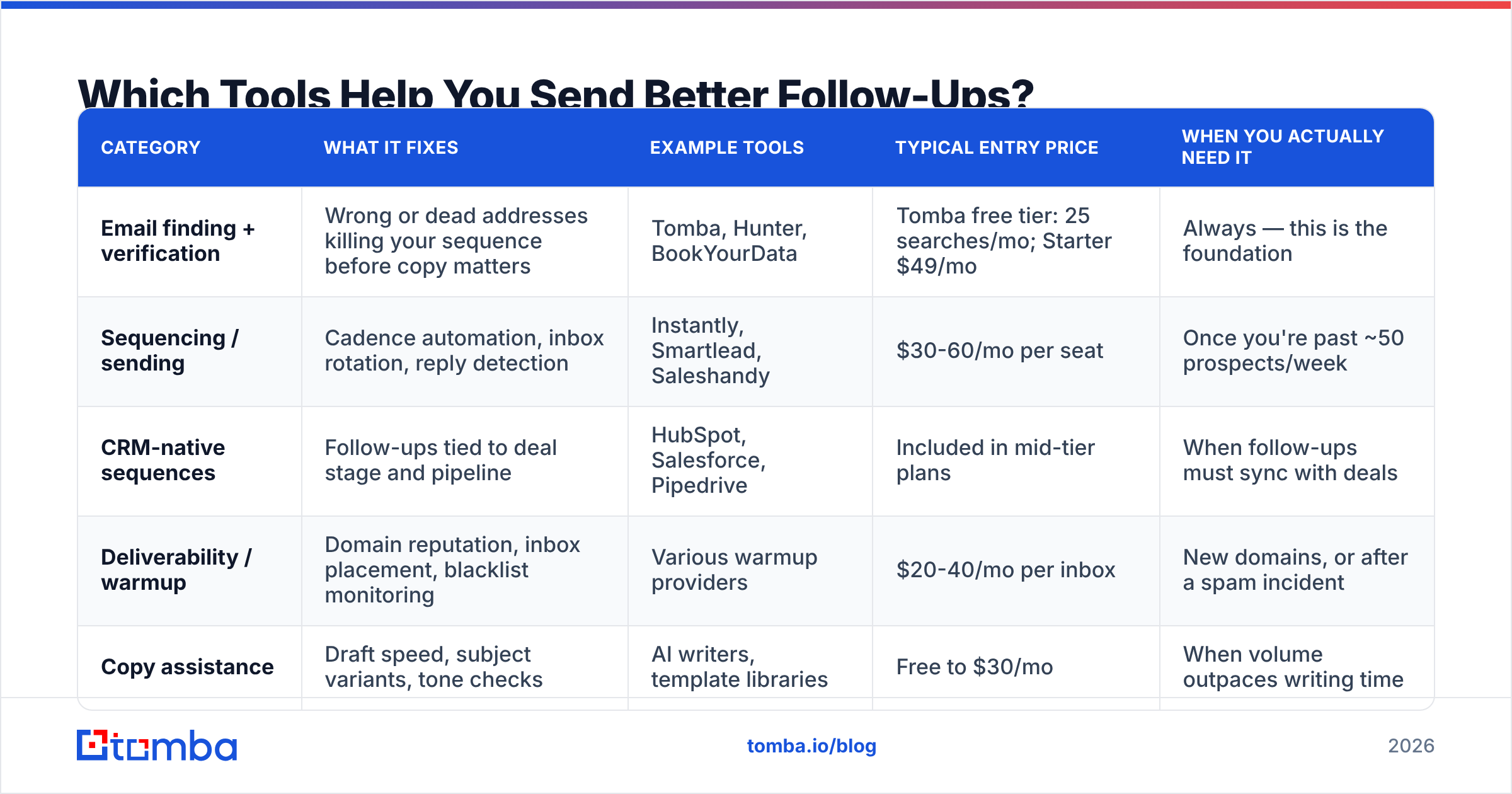
Follow-up quality has three inputs: data accuracy, sequencing, and copy. Different tool categories handle each, and reps routinely buy the wrong one for the problem they actually have.
| Category | What it fixes | Example tools | Typical entry price | When you actually need it |
|---|---|---|---|---|
| Email finding + verification | Wrong or dead addresses killing your sequence before copy matters | Tomba, Hunter, BookYourData | Tomba free tier: 25 searches/mo; Starter $49/mo | Always — this is the foundation |
| Sequencing / sending | Cadence automation, inbox rotation, reply detection | Instantly, Smartlead, Saleshandy | $30-60/mo per seat | Once you're past ~50 prospects/week |
| CRM-native sequences | Follow-ups tied to deal stage and pipeline | HubSpot, Salesforce, Pipedrive | Included in mid-tier plans | When follow-ups must sync with deals |
| Deliverability / warmup | Domain reputation, inbox placement, blacklist monitoring | Various warmup providers | $20-40/mo per inbox | New domains, or after a spam incident |
| Copy assistance | Draft speed, subject variants, tone checks | AI writers, template libraries | Free to $30/mo | When volume outpaces writing time |
A note on sequencing: buying an automation platform before your list is clean is the most common ordering mistake in outbound. You'll automate the delivery of emails to addresses that don't exist, and every one of those bounces charges your domain reputation. Clean data first. Always.
If you're building lists from scratch, a domain search pulls the contacts at a target company in one pass, and running them through an email verifier before the first send removes the bounce risk that would otherwise compound across five follow-up touches. For teams working existing spreadsheets, the bulk email finder handles the same job at list scale.
What Mistakes Kill Friendly Follow-Ups?#
Six patterns account for most failed sequences:
- The guilt opener. "I haven't heard back from you" makes silence the recipient's fault. It isn't. They were busy.
- Repeating the original pitch. If the first version didn't work, a restatement won't either. Change the angle, not the volume.
- Fake urgency. "Last chance" from a stranger reads as a discount ad. Real deadlines are fine; invented ones cost credibility.
- Multi-question asks. Three questions in a follow-up means three decisions. One question means one decision, and decisions are what you're competing for.
- Ignoring engagement signals. If someone opened four times and clicked twice but didn't reply, they need a different message than a total non-opener. Most sequences send both people the same thing.
- Following up on a bad address. The silent killer. You interpret non-response as disinterest when the email hit a catch-all domain and vanished. A catch-all verifier tells you whether the address is actually resolvable before you spend five touches on nothing.
That last one deserves emphasis because it's misdiagnosed constantly. Teams rewrite copy for months while the real problem is that 20-30% of their list was never reachable. Reviewing your data sources and verification workflow is less glamorous than A/B testing subject lines, and it usually moves the number more. Peer-reviewed vendor comparisons on G2's sales intelligence category are a reasonable starting point when you're evaluating options.
How Do You Measure Whether Follow-Ups Are Working?#
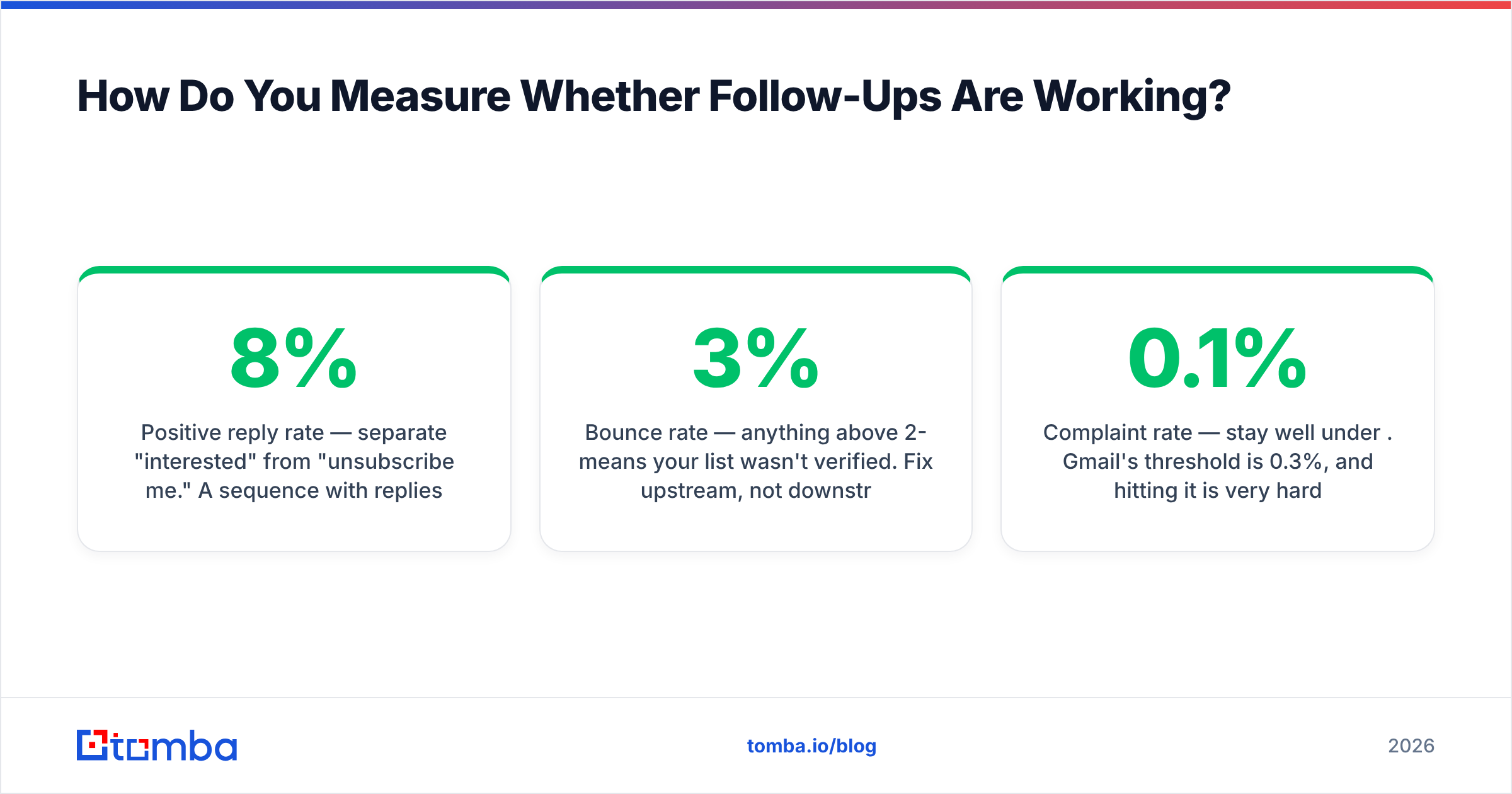
Track four numbers, per touch, not per campaign:
- Reply rate by touch position — tells you where the sequence dies. If touch 3 outperforms touch 1, your first email is the problem, not your persistence.
- Positive reply rate — separate "interested" from "unsubscribe me." A sequence with 8% replies where half are angry is worse than 4% clean.
- Bounce rate — anything above 2-3% means your list wasn't verified. Fix upstream, not downstream.
- Complaint rate — stay well under 0.1%. Gmail's threshold is 0.3%, and hitting it is very hard to recover from.
Segment by persona while you're at it. VPs reply to touch 2; individual contributors often reply to touch 4. Averaging them together hides both patterns and leads you to optimize for a person who doesn't exist.
Where Should You Start?#
Start with the list, then the cadence, then the copy — in that order. Reversing it is why most teams plateau.
Pull the right contacts, confirm the addresses resolve, then build a five-touch sequence with widening gaps and one new idea per email. That combination outperforms clever copy on a dirty list every time, and it's a much shorter project than most people assume.
Tomba's Email Finder gives you verified, deliverable addresses before you write a single follow-up — search by domain, name, or company, with verification built into the same workflow so bounces don't compound across your sequence. The free tier includes 25 searches a month if you want to test accuracy against your own known contacts first; paid plans start at $49/mo, and you can see full Tomba pricing before committing. Get the data right, and your friendly follow-ups start landing where they're supposed to.
Related guides#
Ready to find emails that actually work?
Join 150,000+ professionals who stopped guessing and started sending. Free credits on signup — no credit card required.
Get the Tomba newsletter
Practical outbound tactics and product updates — once every two weeks.
About the author