Friendly Reminder Email Template: 12 Examples That Get Replies
Most reminder emails fail because they apologize for existing. Here are 12 friendly reminder email templates — payment, meeting, deadline, follow-up — plus the timing rules and send-order logic that actually get replies in 2026.
TL;DR
- A friendly reminder email template works when it is short, names one specific action, and gives a dated deadline. Everything else is decoration.
- "Just following up" and "Sorry to bother you" measurably lower response odds because they signal the message is optional. Replace them with context plus a single ask.
- Timing beats wording. Payment reminders land best 3 days before due, on the due date, then +7 / +14 / +30. Meeting reminders land 24 hours and 1 hour out.
- Reply in the same thread for follow-ups you already started; open a fresh thread with a new subject line for payments and deadlines.
- If your reminders bounce or vanish, the problem is the address, not the copy. Clean the list before you blame the template.
What Makes a Friendly Reminder Email Template Actually Work?#
A reminder email has one job: make the next action so obvious and so low-friction that replying is easier than ignoring you. Most reminders fail that test because they spend the first three lines apologizing for existing.
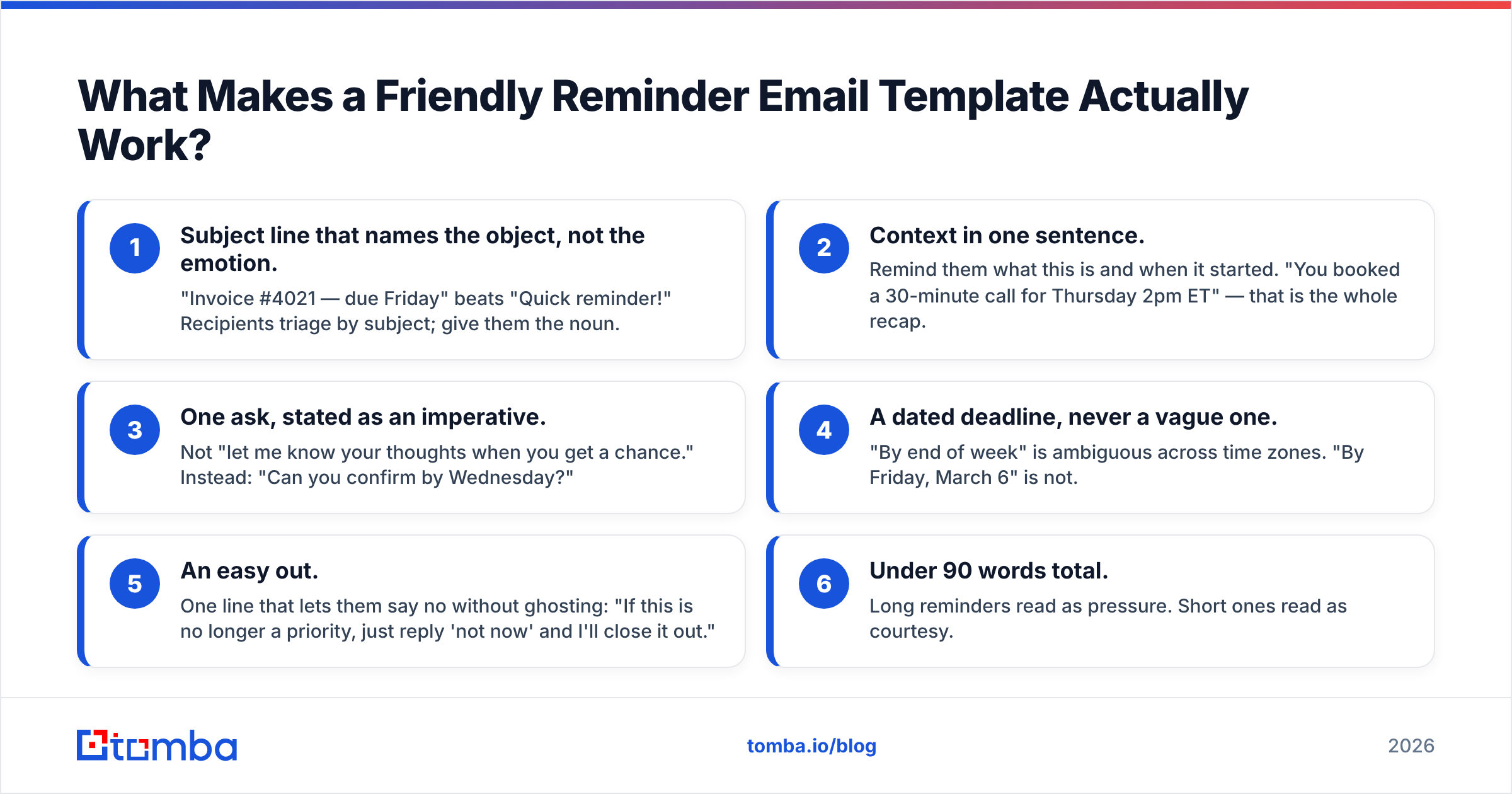
Here is the anatomy that survives testing across payment chasing, meeting confirmations, and sales follow-ups:
- Subject line that names the object, not the emotion. "Invoice #4021 — due Friday" beats "Quick reminder!" Recipients triage by subject; give them the noun.
- Context in one sentence. Remind them what this is and when it started. "You booked a 30-minute call for Thursday 2pm ET" — that is the whole recap.
- One ask, stated as an imperative. Not "let me know your thoughts when you get a chance." Instead: "Can you confirm by Wednesday?"
- A dated deadline, never a vague one. "By end of week" is ambiguous across time zones. "By Friday, March 6" is not.
- An easy out. One line that lets them say no without ghosting: "If this is no longer a priority, just reply 'not now' and I'll close it out."
- Under 90 words total. Long reminders read as pressure. Short ones read as courtesy.
That six-part shape is the template. Everything below is that skeleton wearing different clothes.
Wait — that is not the meme. Here it is:
Why Do Most Reminder Emails Get Ignored?#
Three failure modes account for nearly every dead reminder.
Failure 1: The apology opener. "Sorry to bother you again" tells the reader you believe your message has low value. They will agree with you. Cut it. You are not bothering anyone by asking about work you both agreed to.
Failure 2: No specific ask. "Let me know if you have any questions" is not an ask — it is a conversational cul-de-sac. There is nothing to reply to. Every reminder needs exactly one verb aimed at the recipient: confirm, approve, pay, sign, pick a time.
Failure 3: The reminder never arrived. This is the invisible one. If a contact left the company six months ago, your beautifully written reminder is bouncing into a void or silently routing to a catch-all. Before you A/B test subject lines, run the list through an email verifier and confirm the addresses are still live. Chasing a dead mailbox with better copy is the outbound equivalent of shouting louder at a disconnected phone.
There is a fourth, quieter failure: sending reminders from a domain with poor sender reputation. Reminders are frequently short, link-light, and sent in bursts — a profile that some filters treat as suspicious. If your reply rate on reminders collapsed all at once, check placement before you rewrite anything.
What Are the Best Friendly Reminder Email Templates by Scenario?#
Copy these, swap the bracketed fields, and cut anything that does not apply. Each one is deliberately shorter than you expect.
1. Gentle payment reminder (before due date)#
Subject: Invoice #[4021] — due [Friday, March 6]
Hi [Name],
Quick heads-up that invoice #[4021] for [$2,400] is due [Friday, March 6]. Payment link is here: [link].
If it is already in your approval queue, no action needed — just let me know and I'll stop the reminders.
Thanks,
[You]
2. Overdue payment reminder (7 days past)#
Subject: Invoice #[4021] — 7 days past due
Hi [Name],
Invoice #[4021] ([$2,400]) was due on [March 6] and is showing as unpaid on our side.
Can you confirm the payment status, or point me to whoever handles AP? Happy to resend the invoice in any format your system needs.
[You]
3. Meeting reminder (24 hours out)#
Subject: Tomorrow 2:00pm ET — [Topic]
Hi [Name],
Reminder that we're on for tomorrow, [Thursday March 5], 2:00–2:30pm ET. Link: [link].
Agenda: [one line]. If tomorrow no longer works, here's my calendar to rebook: [link].
[You]
4. Deadline reminder (internal or client deliverable)#
Subject: [Deliverable] due [Wednesday] — anything blocking?
Hi [Name],
[Deliverable] is due [Wednesday, March 11]. Checking in early in case something is blocking it on your end.
If you need an extra day, tell me now and I'll adjust the schedule. If it's on track, a thumbs-up is enough.
[You]
5. Sales follow-up reminder (after a proposal)#
Subject: Re: [Proposal — Company Name]
Hi [Name],
Following the proposal I sent on [March 1] — where did it land internally?
Three ways I can help: revise the scope, get you a reference from [similar company], or pause this until [Q3]. Which one?
[You]
6. Event or webinar reminder (1 hour out)#
Subject: Starting in 1 hour — [Event Name]
Hi [Name],
[Event Name] starts at [3:00pm ET]. Join here: [link].
Can't make it live? Reply "recording" and I'll send the replay tomorrow.
[You]
7. Document or signature reminder#
Subject: [Contract] — one signature left
Hi [Name],
The [MSA] is signed on our side and waiting on yours: [link]. Takes about 40 seconds.
If legal needs changes, send them over and I'll turn them around today.
[You]
8. Final reminder / breakup email#
Subject: Closing the loop on [topic]
Hi [Name],
I've reached out a few times about [topic] and haven't heard back, which usually means the timing is wrong.
I'll stop here. If it becomes relevant again, reply to this email and I'll pick it right back up.
[You]
Four more variations — a no-show reminder, a renewal reminder, a survey nudge, and a referral ask — follow the same skeleton: subject names the object, one sentence of context, one imperative ask, one easy out. If you want pre-built versions to start from, Tomba's cold email templates library covers the outbound-specific ones, and the subject line generator is useful for the reminder-specific problem of writing a subject that reads as informative rather than nagging.
How Should Reminder Timing Change by Use Case?#
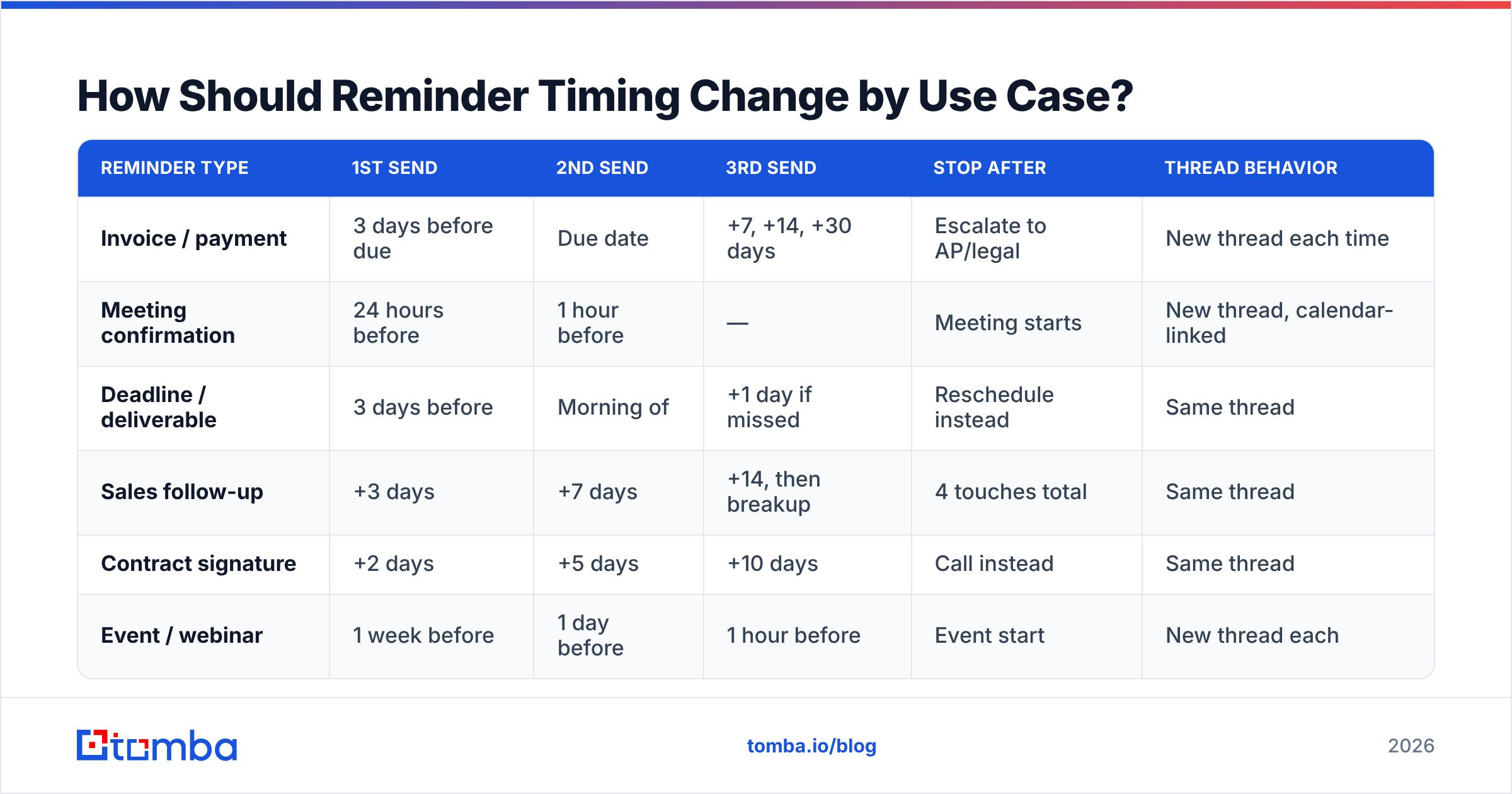
Timing is the variable most people never tune, and it moves reply rates more than word choice does.
| Reminder type | 1st send | 2nd send | 3rd send | Stop after | Thread behavior |
|---|---|---|---|---|---|
| Invoice / payment | 3 days before due | Due date | +7, +14, +30 days | Escalate to AP/legal | New thread each time |
| Meeting confirmation | 24 hours before | 1 hour before | — | Meeting starts | New thread, calendar-linked |
| Deadline / deliverable | 3 days before | Morning of | +1 day if missed | Reschedule instead | Same thread |
| Sales follow-up | +3 days | +7 days | +14, then breakup | 4 touches total | Same thread |
| Contract signature | +2 days | +5 days | +10 days | Call instead | Same thread |
| Event / webinar | 1 week before | 1 day before | 1 hour before | Event start | New thread each |
Two rules explain most of that table.
Rule one: match the reminder to the decision cycle. Invoices move through AP queues on weekly cycles, so weekly spacing matches reality. Sales decisions move on deal-stage cycles, so 3/7/14 spacing gives internal conversations room to happen. Meeting reminders are pure logistics — they only need to arrive when someone can act on them.
Rule two: same thread for relationships, new thread for transactions. A sales follow-up in the same thread gives context and shows continuity. A payment reminder in a new thread with a fresh, specific subject line is far more likely to get triaged into an AP workflow instead of buried under 14 replies.
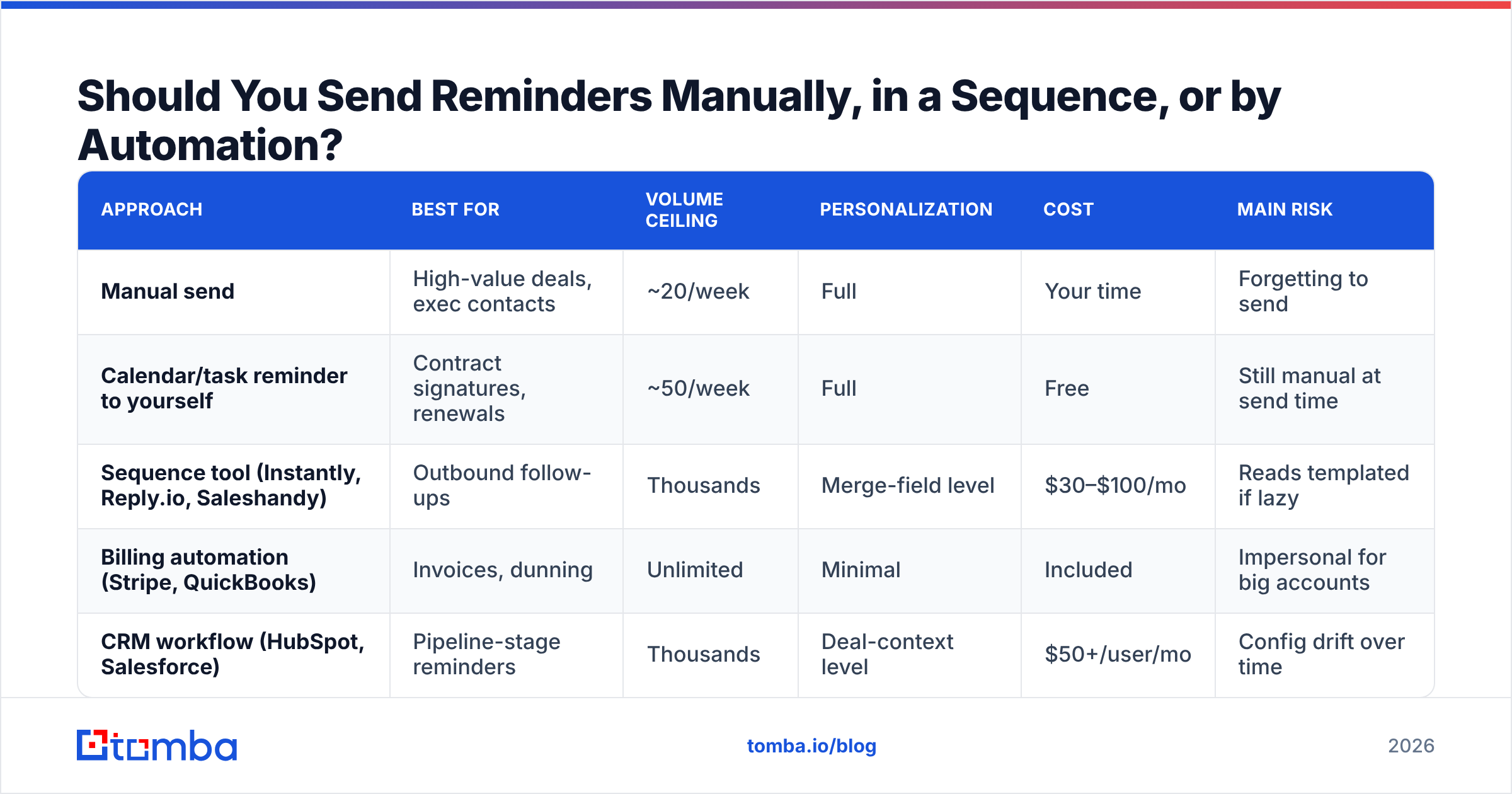
Should You Send Reminders Manually, in a Sequence, or by Automation?#
Depends entirely on volume and consequence. Here is the honest comparison.
| Approach | Best for | Volume ceiling | Personalization | Cost | Main risk |
|---|---|---|---|---|---|
| Manual send | High-value deals, exec contacts | ~20/week | Full | Your time | Forgetting to send |
| Calendar/task reminder to yourself | Contract signatures, renewals | ~50/week | Full | Free | Still manual at send time |
| Sequence tool (Instantly, Reply.io, Saleshandy) | Outbound follow-ups | Thousands | Merge-field level | $30–$100/mo | Reads templated if lazy |
| Billing automation (Stripe, QuickBooks) | Invoices, dunning | Unlimited | Minimal | Included | Impersonal for big accounts |
| CRM workflow (HubSpot, Salesforce) | Pipeline-stage reminders | Thousands | Deal-context level | $50+/user/mo | Config drift over time |
The practical answer for most B2B teams is a split: automate the transactional reminders (invoices, event reminders, webinar joins) and hand-send the ones where the relationship carries the money. A $60,000 renewal does not deserve a merge field. A $400 invoice does not deserve twenty minutes of your attention.
If you run reminders through a sequence tool, HubSpot's own research on email frequency is a reasonable baseline for how many touches an audience tolerates before unsubscribes climb. And if you are unsure whether a given tool handles reminder-style short emails well, G2's sales engagement category has enough verified reviews to separate the marketing claims from the workflow reality.
What Should You Never Put in a Reminder Email?#
A short blacklist, each item earned through measurable damage.
- "Just checking in." Zero information. It tells the reader you have nothing new to say, which invites them to have nothing new to reply.
- "Per my last email." Reads as passive-aggressive to almost everyone. If you need to reference a prior message, quote the specific line instead.
- Guilt framing. "I haven't heard back from you" makes the recipient the defendant. "Where did this land internally?" makes them a collaborator.
- Multiple asks. Two questions in one reminder cuts your reply rate because now replying requires composing, not confirming.
- Attachments in reminder #2 and beyond. Repeated attachments to a non-responder increases spam signals. Link instead.
- Fake urgency. "Last chance!" on the fourth reminder about a deadline that was never real trains people to ignore you permanently.
- A wall of text. If your reminder needs scrolling on mobile, it is a proposal, not a reminder.
One more that gets overlooked: do not send reminders to addresses you have not confirmed. Every reminder to a dead mailbox is a hard bounce, and a bounce rate above roughly 2% starts damaging email deliverability for every message you send afterward — including the ones going to real people. Reminder campaigns are especially exposed to this because they target older contacts by definition. That contact was accurate when they signed up nine months ago; there is no guarantee they still work there.
How Do You Make Sure Reminders Reach the Right Person?#
The best reminder template in the world fails if it lands in an unmonitored inbox. Three checks worth building into the workflow:
- Verify before the sequence starts, not after it fails. Run the list through verification and drop the invalids. This takes minutes and prevents the bounce spiral.
- Re-find the contact when someone goes silent across three reminders. Silence often means departure, not disinterest. Use domain search to see who currently holds that role at the company and restart with the right person rather than escalating pressure on someone who no longer works there.
- Route AP and procurement reminders to the function, not the individual. For invoices, an
ap@oraccounting@address is usually more reliable than a named contact whose job it is to forward it there anyway. A company email pattern check tells you the format that org uses in seconds.
There is also a soft signal worth reading: if a contact opens your reminders but never replies, the copy is fine and the priority is wrong — try a different ask or a different stakeholder. If a contact never opens at all, that is a deliverability or address problem, and no rewrite fixes it.
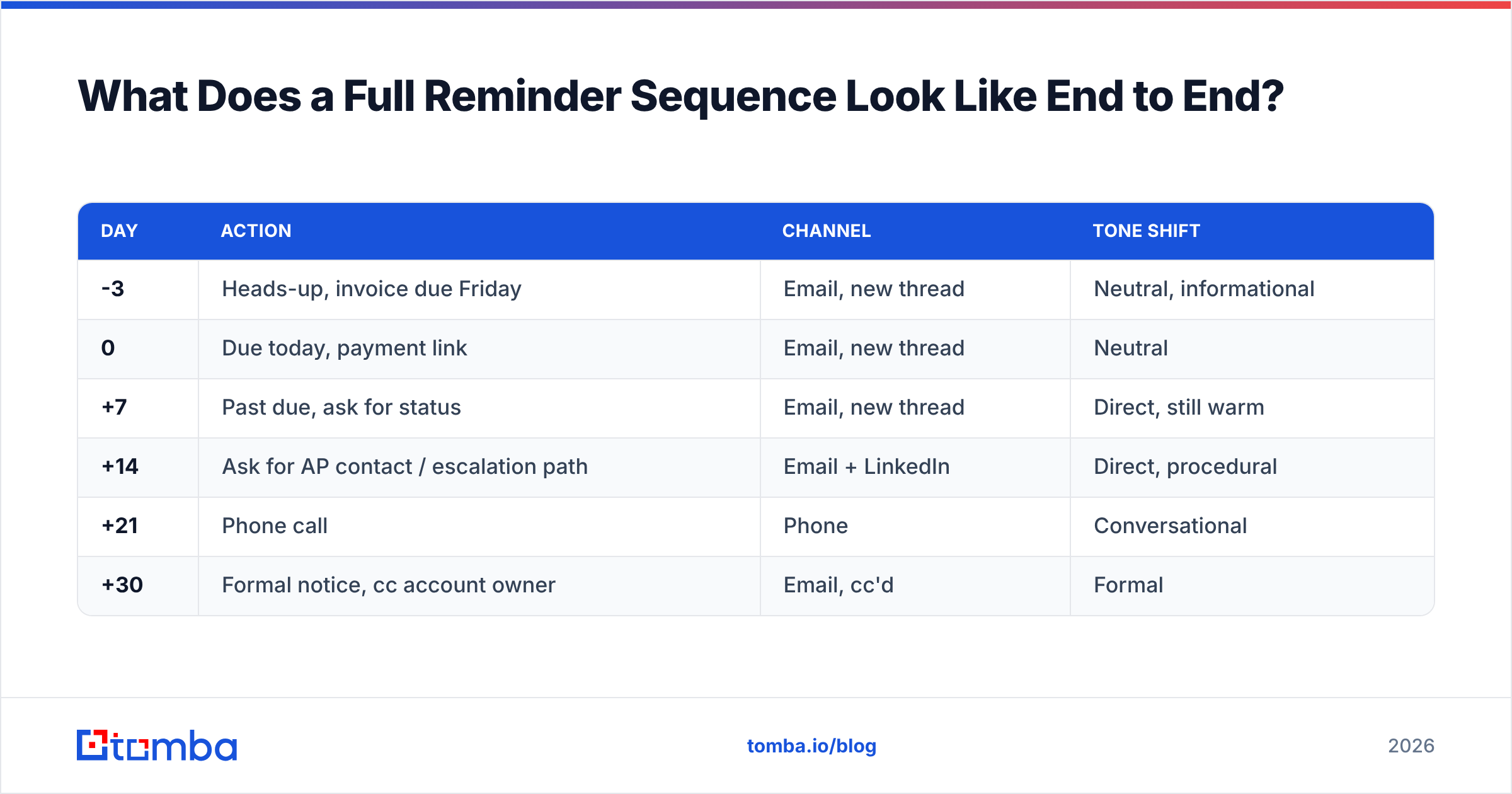
What Does a Full Reminder Sequence Look Like End to End?#
Take an unpaid invoice for $2,400, 60-day terms, mid-size client, named AP contact.
| Day | Action | Channel | Tone shift |
|---|---|---|---|
| -3 | Heads-up, invoice due Friday | Email, new thread | Neutral, informational |
| 0 | Due today, payment link | Email, new thread | Neutral |
| +7 | Past due, ask for status | Email, new thread | Direct, still warm |
| +14 | Ask for AP contact / escalation path | Email + LinkedIn | Direct, procedural |
| +21 | Phone call | Phone | Conversational |
| +30 | Formal notice, cc account owner | Email, cc'd | Formal |
Notice what does not change: none of these are angry, and none of them are apologetic. The tone moves from informational to procedural to formal, and the ask stays exactly one item wide the whole way down. If you need the phone number for that day-21 call and it is not in your CRM, a phone finder closes that gap faster than digging through the company's contact page.
For sales follow-ups the same structure applies with different spacing: +3 informational, +7 value-add (send something useful, not another nudge), +14 direct ask, +21 breakup. Four touches, then stop. The data on multi-touch outbound consistently shows diminishing returns past four to six touches on a single thread, and the reputational cost of touch seven exceeds any reply you might extract from it.
Frequently Asked Questions#
Is "friendly reminder" or "gentle reminder" better in a subject line? Neither, usually. Both are filler that pushes the useful information out of the visible subject preview. "Invoice #4021 — due Friday" outperforms "Friendly reminder about your invoice" because it survives mobile truncation with meaning intact.
How many reminders is too many? For sales: four, then a breakup email. For invoices: as many as your terms allow, but escalate channel rather than repeating email. For internal deadlines: two, then a conversation.
Should reminders be plain text or HTML? Plain text for one-to-one reminders. Reminders are supposed to feel personal, and a branded header undermines that. Use HTML only for high-volume transactional reminders like event notifications, where consistency matters more than intimacy.
Does adding "please" help? Marginally, and only when paired with a specific ask. "Please confirm by Wednesday" is fine. "Please let me know your thoughts" is still a dead end regardless of the please.
Start With Addresses That Work#
The best friendly reminder email template is worth nothing if the address is stale. Reminder campaigns hit older contacts by nature, which makes them the single most bounce-prone thing most teams send — and a bounce spiral on reminders damages the deliverability of every campaign that follows.
Run your contacts through Tomba's Email Finder to confirm current addresses before your next reminder sequence goes out, and re-find contacts who have gone silent across multiple touches. The free tier covers 25 searches a month if you just want to spot-check a list; paid plans start at $49/mo on Tomba pricing when you need volume. Fix the addresses first, then worry about the subject line.
Related guides#
Ready to find emails that actually work?
Join 150,000+ professionals who stopped guessing and started sending. Free credits on signup — no credit card required.
Get the Tomba newsletter
Practical outbound tactics and product updates — once every two weeks.
About the author