G-Lock EasyMail7 Pricing, Reviews, Pros and Cons (2026)
A neutral breakdown of G-Lock EasyMail7 pricing: what the one-time license really costs over three years, where the Windows-only desktop model still wins, and where it quietly costs you deliverability.
TL;DR — G-Lock EasyMail7 pricing is a one-time license, not a monthly SaaS bill.
- G-Lock EasyMail7 is a Windows desktop email marketing client with its own sending engine. You pay once per edition instead of paying per contact forever.
- The hidden costs are real. You still pay for upgrade renewals, your own SMTP relay, a Windows machine that stays on, and the deliverability work nobody does for you.
- Reviews split hard. Budget power users like the control and the unlimited-contact model. Everyone else dislikes the dated look, the Windows-only rule, and slow support.
- It fits if you mail your own opt-in list, already run a relay (Amazon SES, SendGrid, your own mail server), and know SPF, DKIM, and bounce handling.
- It is a bad fit if you want managed deliverability, native CRM sync, a Mac, or a team of five people sharing campaigns.
What is G-Lock EasyMail7?#
G-Lock EasyMail7 is an email marketing app from G-Lock Software, a long-running independent vendor. It is not a hosted web app like Mailchimp or Brevo. It installs on Windows as a client-server pair. The EasyMail7 Server queues and sends. The client is where you build lists, design messages, and launch campaigns.
That design choice shapes everything, including G-Lock EasyMail7 pricing. The sending engine runs on your machine or your VPS. So no vendor charges you per stored contact. You can load a 200,000-record list and the software will not blink. What matters is where the mail leaves from. That is either the built-in direct send mode or an outside SMTP relay you set up.
You get full control. You also get full responsibility.
The four things EasyMail7 actually does:
- List management — import from CSV, Excel, Access, or ODBC; segment with filters; store unlimited contacts on your own disk.
- Message composition — an HTML editor, templates, merge tags, plain-text versions, and attachments.
- Sending — direct delivery, your own SMTP, or a third-party relay, with throttling and account rotation.
- Tracking and bounce processing — opens, clicks, and a bounce handler that reads a mailbox and cleans your list.
That last item decides whether a campaign works at all. For a primer, see our glossary entry on email deliverability.
How does G-Lock EasyMail7 pricing work in 2026?#
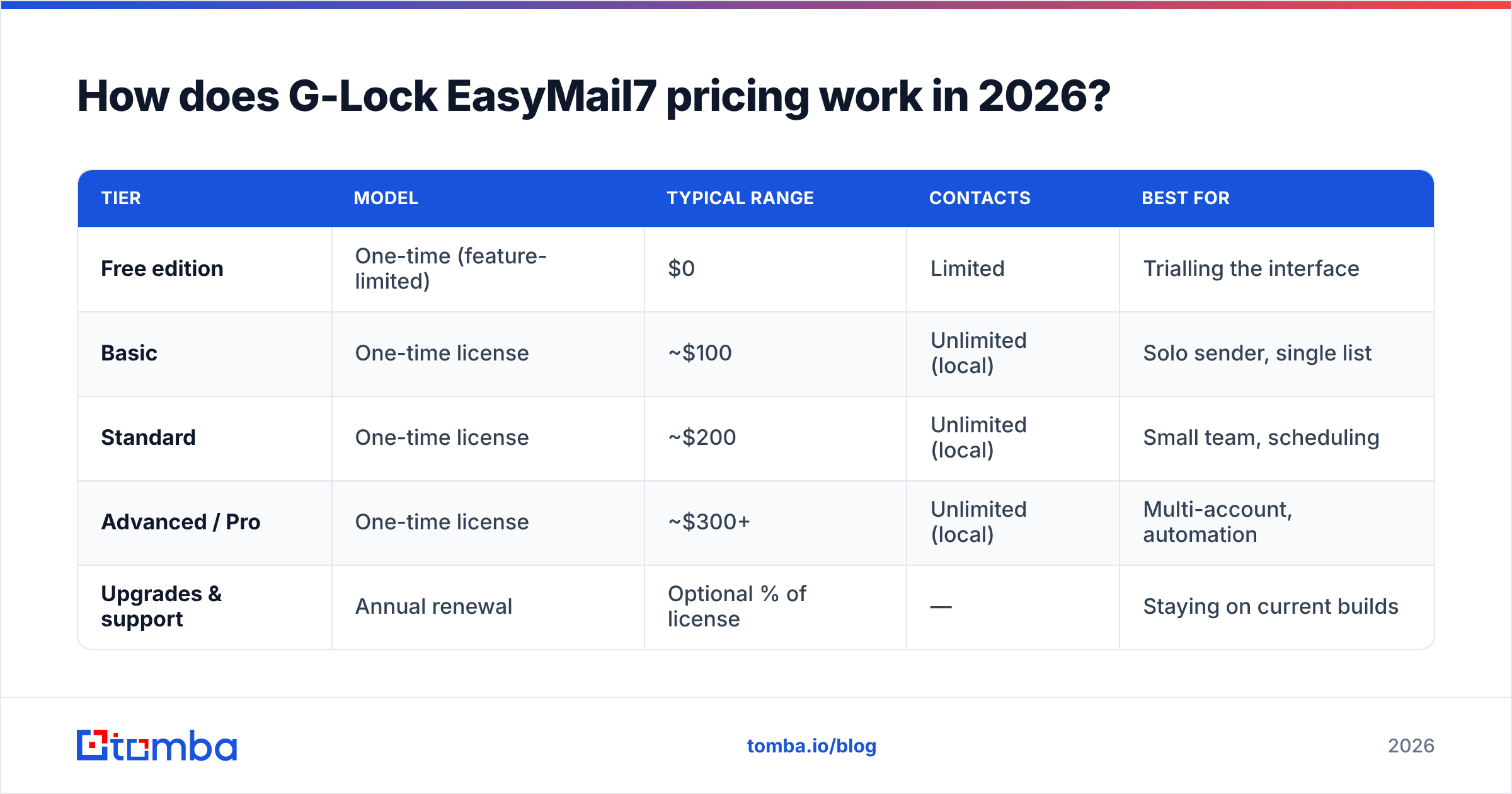
Conclusion first: you buy a perpetual license and pay for upgrades. There is no subscription. That is the main reason people shortlist it.
G-Lock has renamed its editions and moved its price points several times. The numbers are not always posted on one clean page. So treat the table below as the ballpark you should expect to be quoted. Confirm current figures on the vendor's own order page before you buy. The shape of G-Lock EasyMail7 pricing has held steady: a limited free edition, a mid tier for solo senders, and a top tier that unlocks scheduling, unlimited accounts, and automation.
| Tier | Model | Typical range | Contacts | Best for |
|---|---|---|---|---|
| Free edition | One-time (feature-limited) | $0 | Limited | Trialling the interface |
| Basic | One-time license | ~$100 | Unlimited (local) | Solo sender, single list |
| Standard | One-time license | ~$200 | Unlimited (local) | Small team, scheduling |
| Advanced / Pro | One-time license | ~$300+ | Unlimited (local) | Multi-account, automation |
| Upgrades & support | Annual renewal | Optional % of license | — | Staying on current builds |
Three things to weigh before you compare that to a SaaS invoice:
- Unlimited contacts is a storage claim, not a sending claim. The license does not buy you a place in the inbox. Your relay's reputation and your list hygiene do that.
- A perpetual license still ages out. Windows changes. TLS rules change. Gmail's bulk sender rules change. You will need a current build. So the optional maintenance fee is really a required one over three years.
- SMTP is a separate line item. Amazon SES, SendGrid, Mailgun, or a dedicated relay will run $10–$100+ per month by volume. Direct send mode is free in theory. In practice it is a deliverability minefield from a home or generic cloud IP.

Is a one-time license actually cheaper than a SaaS ESP?#
Sometimes. It depends on list size and send frequency. Most buyers lowball the running costs.
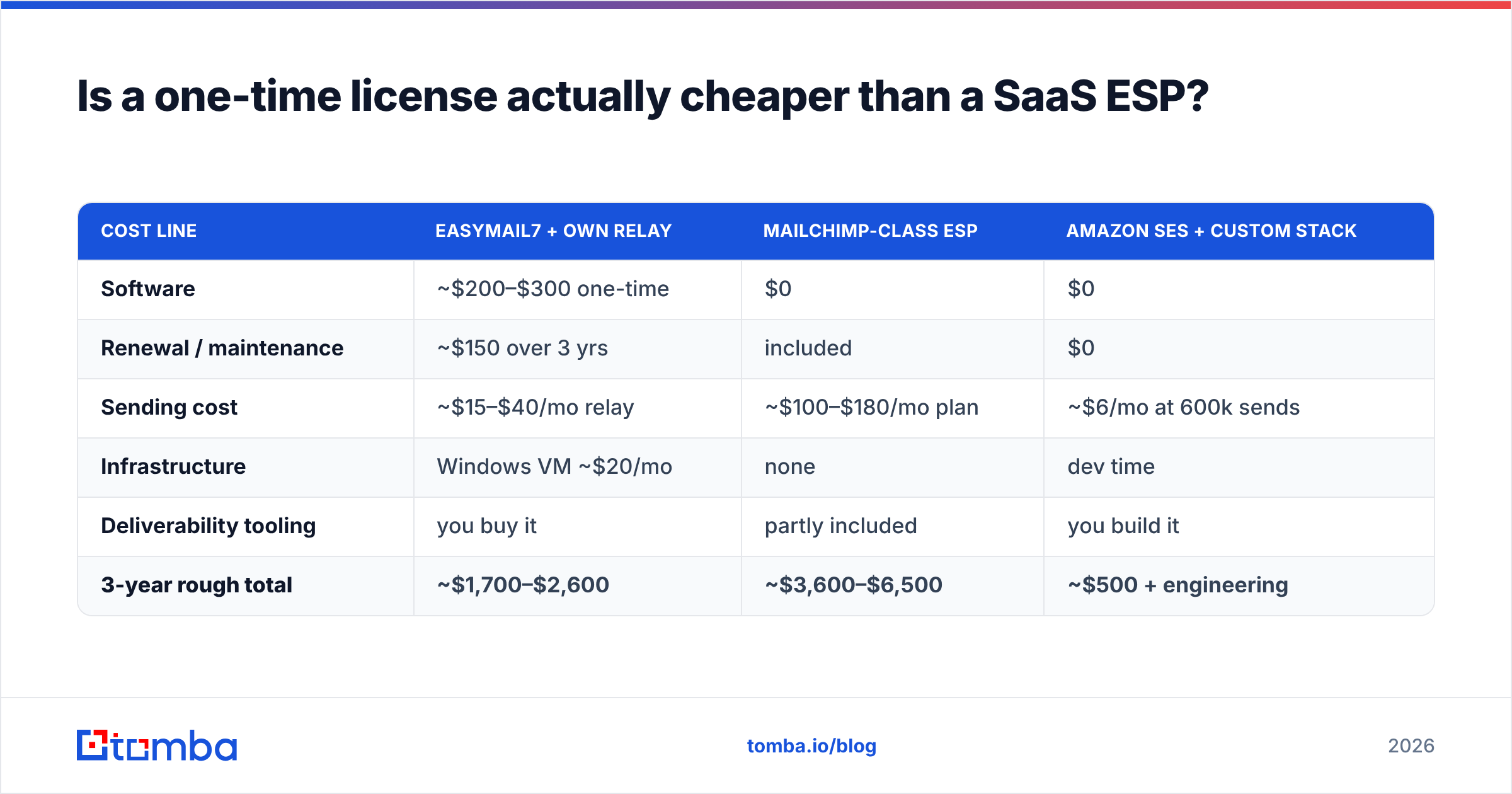
Here is a rough three-year total for a 25,000-contact list sent twice a month:
| Cost line | EasyMail7 + own relay | Mailchimp-class ESP | Amazon SES + custom stack |
|---|---|---|---|
| Software | ~$200–$300 one-time | $0 | $0 |
| Renewal / maintenance | ~$150 over 3 yrs | included | $0 |
| Sending cost | ~$15–$40/mo relay | ~$100–$180/mo plan | ~$6/mo at 600k sends |
| Infrastructure | Windows VM ~$20/mo | none | dev time |
| Deliverability tooling | you buy it | partly included | you build it |
| 3-year rough total | ~$1,700–$2,600 | ~$3,600–$6,500 | ~$500 + engineering |
On paper, G-Lock EasyMail7 pricing beats a mid-market ESP at that list size. It loses badly to raw SES if you have an engineer. And it loses on everything that is not money. There is no managed IP warmup, no compliance tooling, no built-in consent capture, and no team permissions.
One cost never makes the spreadsheet: bad data. Say 18% of your 25,000 contacts are stale. That is a normal decay rate for a two-year-old B2B list. You then burn reputation on 4,500 bounces before one useful email lands. That cost is the same whether you paid $300 once or $180 a month. So run the list through an email verifier before import, whatever tool you pick.
What do G-Lock EasyMail7 reviews actually say?#
Reviews are thin next to the big SaaS platforms. That is a signal on its own. This is a niche, long-tail product with a loyal base, not a growth-stage company. Scan the listings on G2 and Capterra, plus old forum threads. The same themes repeat.
What reviewers praise:
- No per-contact tax. The most common line in happy reviews is some version of "I stopped paying $200 a month." G-Lock EasyMail7 pricing is the whole draw.
- Data ownership. Lists sit on your machine. No vendor can suspend your account and hold the list.
- Personalization depth. Merge fields, conditional blocks, and ODBC sources go past the entry tier of most ESPs.
- Multi-account rotation. Handy and legitimate for agencies that mail for several clients from separate signed domains.
What reviewers criticize:
- The interface looks old. It reads like a Windows desktop app from an earlier era, because it is one.
- Windows only. No macOS, no Linux, no browser. A Mac team needs a VM or a Windows VPS.
- Slow support. Email only, and slower than users expect from a paid product.
- Delivery setup is on you. SPF, DKIM, DMARC, reverse DNS, and throttling. None of it is pre-set.
- Guilt by association. Spammers like desktop bulk mailers. Some blocklists give the whole category extra scrutiny. That is unfair to honest users, and still real.
That last point matters. A tool does not get you filtered. Behavior does. But a self-hosted sender with no warmup history starts at zero trust. Check your setup with an SPF checker. Watch your sender reputation from day one, not after the first campaign flops.
What are the biggest pros and cons?#
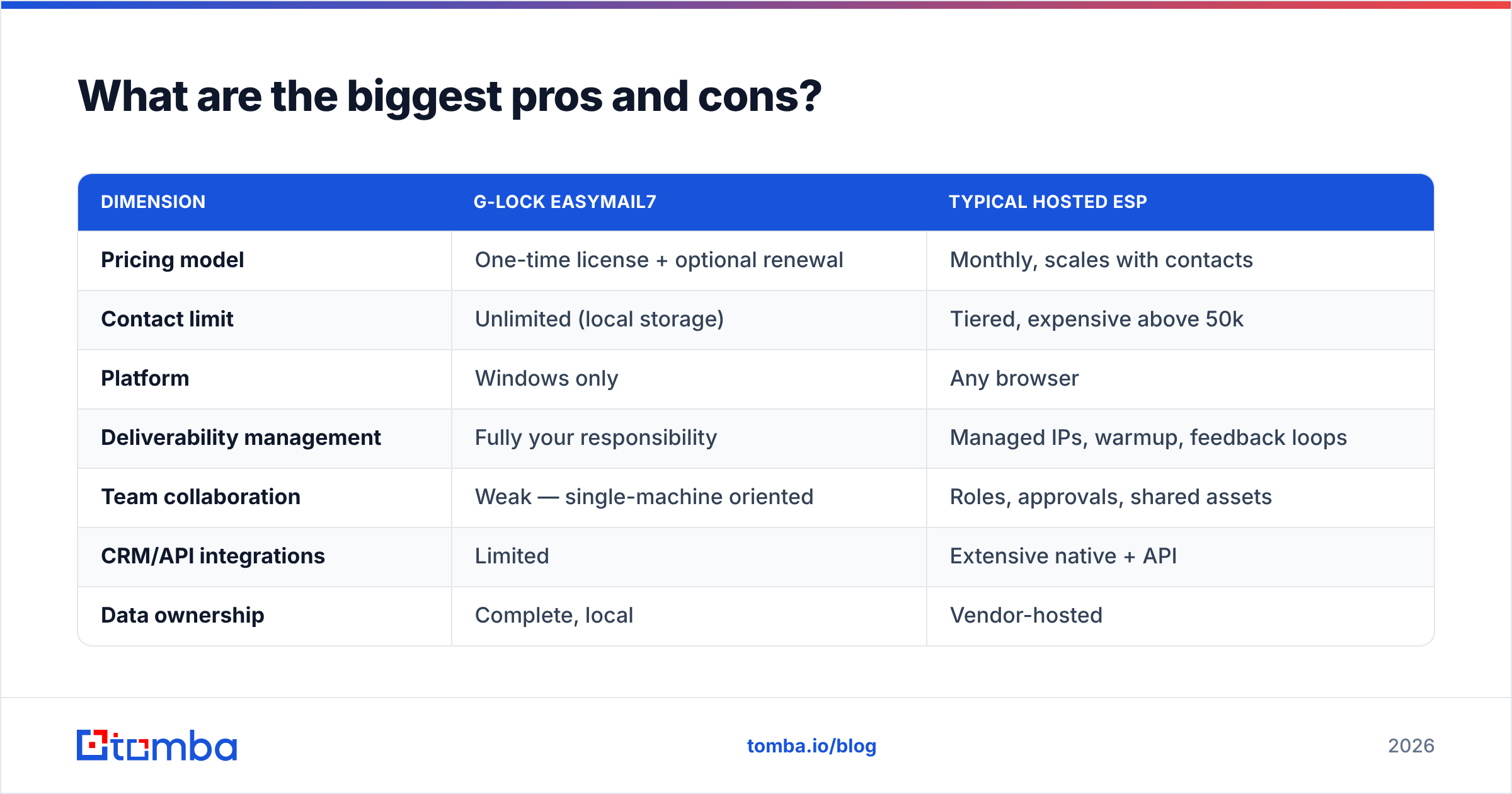
The table below puts G-Lock EasyMail7 pricing and features next to a typical hosted ESP.
| Dimension | G-Lock EasyMail7 | Typical hosted ESP |
|---|---|---|
| Pricing model | One-time license + optional renewal | Monthly, scales with contacts |
| Contact limit | Unlimited (local storage) | Tiered, expensive above 50k |
| Platform | Windows only | Any browser |
| Deliverability management | Fully your responsibility | Managed IPs, warmup, feedback loops |
| Team collaboration | Weak — single-machine oriented | Roles, approvals, shared assets |
| CRM/API integrations | Limited | Extensive native + API |
| Data ownership | Complete, local | Vendor-hosted |
| Compliance tooling | Manual (you build unsubscribe flows) | Built-in consent + suppression |
| Support | Email, slower | Chat/phone on paid tiers |
| Best-fit sender | Technical solo/agency, own opt-in list | Marketing team, mixed skill levels |

Who should buy G-Lock EasyMail7 — and who should skip it?#
Buy it if all of these are true:
- You already run Windows as your main work setup, or you can rent a cheap Windows VPS.
- You own a real opt-in list — customers, subscribers, event sign-ups. Not a scraped or bought file.
- Someone on your side knows DNS. SPF, DKIM, and DMARC are not optional in 2026. Gmail and Yahoo enforce them.
- Your list is big and your sends are rare. That is the exact shape where per-contact SaaS pricing hurts most, and where G-Lock EasyMail7 pricing looks best.
- You want your data to stay local, for regulatory reasons or for peace of mind.
Skip it if any of these are true:
- You run cold B2B outbound. A desktop mass mailer is the wrong tool. You want a sequencer with per-mailbox sending, reply detection, and automatic backoff.
- Your team is on Mac, or more than two people touch campaigns.
- You need Salesforce or HubSpot sync as a real feature, not a CSV round-trip.
- Nobody on the team can watch deliverability.
For cold outbound, the tool question sits below the data question. A sequencer with a clean, verified, permission-based list beats any mass mailer with a dirty one. A bulk email finder and a verification pass will lift reply rates more than new sending software ever does.
How does list quality change the EasyMail7 math?#
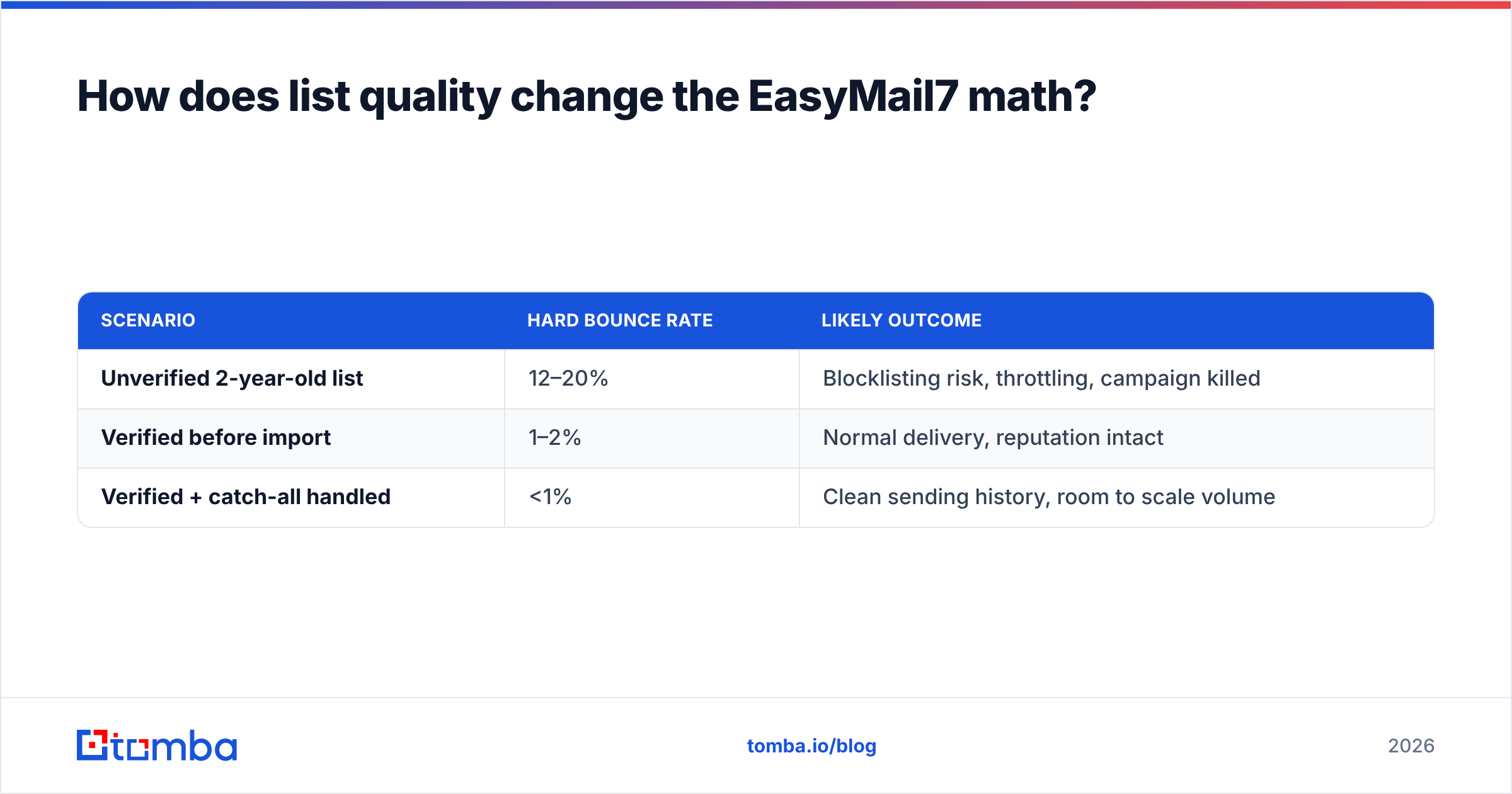
A lot. Self-hosted sending has no safety net. Bad addresses hurt you twice as much here as on a managed platform.
Run the numbers on a 10,000-address send:
| Scenario | Hard bounce rate | Likely outcome |
|---|---|---|
| Unverified 2-year-old list | 12–20% | Blocklisting risk, throttling, campaign killed |
| Verified before import | 1–2% | Normal delivery, reputation intact |
| Verified + catch-all handled | <1% | Clean sending history, room to scale volume |
Mailbox providers read a spike in unknown-user bounces as a clear spam signal. On a hosted ESP, the vendor's risk team pauses you before real damage lands. On EasyMail7, nothing stops you. You find out your domain is toxic three campaigns later. No line in G-Lock EasyMail7 pricing covers that repair bill.
Two practical guardrails, whatever platform you land on:
- Verify at import, not at send. Catch invalid, role-based, disposable, and catch-all addresses before they enter your list.
- Re-verify anything older than 90 days. B2B contact data decays about 2% to 2.5% a month from job changes alone.
Sourcing new contacts instead of mailing an existing base? The order is find → verify → enrich → send. A domain search pulls the addresses at a target company. Verification filters them. Only then does your sending tool matter. Compare that cost to the license itself. Tomba pricing starts free at 25 searches a month and runs $49 a month on Starter. That is a rounding error next to a burned sending domain.
What are the best G-Lock EasyMail7 alternatives?#
Match the tool to the job:
- Newsletters to an owned list, non-technical team → Brevo, MailerLite, or Mailchimp. You pay for managed deliverability, and you get it.
- High volume with engineers on hand → Amazon SES or Postmark behind a thin custom UI. Cheapest per email by far.
- Cold B2B outbound → a real sequencer with mailbox rotation and reply handling. Not a mass mailer.
- Transactional → Postmark or SES. Different reputation pool, different rules.
- You only need contact data, not another sender → a data platform. BookYourData ships curated B2B lists. Tomba focuses on live discovery and verification.
Do not treat "email marketing software" as one category. Sending infrastructure, campaign UI, sequencing, and contact data are four separate buys. Vendors bundle them in different ways. EasyMail7 sells the middle two and assumes you have the rest handled.
The bottom line#
G-Lock EasyMail7 pricing is honest, and the tool solves one clear problem: mailing a large owned list without paying per-contact rent. If you are technical, on Windows, and strict about permission and hygiene, the one-time license really does undercut a mid-market ESP over three years.
It is not a shortcut. Every job a hosted platform does quietly — warmup, IP reputation, feedback loops, suppression — becomes yours. Budget for it in hours, not dollars.
And fix the input first. The biggest win for most senders is not a new mailer. It is mailing addresses that exist and belong to people who will care. Start with the Tomba Email Finder. Find verified professional addresses by domain, name, or company, confirm them before they touch your list, and let your sending tool do the one job it is good at.
Related guides#
Ready to find emails that actually work?
Join 150,000+ professionals who stopped guessing and started sending. Free credits on signup — no credit card required.
Get the Tomba newsletter
Practical outbound tactics and product updates — once every two weeks.
About the author