G Lock EasyMail7 vs UpLead: Honest 2026 Feature Comparison
One tool sends your email. The other tells you who to send it to. Here's an honest breakdown of G-Lock EasyMail7 vs UpLead — pricing, data quality, deliverability, and which one your outbound stack actually needs in 2026.
G Lock EasyMail7 vs UpLead looks like a head-to-head test. It isn't one. One tool sends email. The other tells you who to email. Here is what each does, what it costs, and which gap in your outbound stack it fills.
TL;DR
- G-Lock EasyMail7 and UpLead are not really competitors. EasyMail7 is a Windows-based email sending app. UpLead is a cloud B2B contact database. One is the gun, the other is the ammunition.
- Pick EasyMail7 if you already own a clean opt-in list, want a one-time perpetual license instead of a subscription, and can run your own SMTP setup on a Windows machine.
- Pick UpLead if your problem is "I don't know who to email." It sells verified contact records with intent and technographic filters, starting around $99/mo.
- Neither tool does both jobs well. Most teams buy two products anyway. That is why cheaper data layers like Tomba (free tier, then $49/mo) get paired with a modern sending platform.
- The real question isn't EasyMail7 vs UpLead. It is: where is my bottleneck — data or delivery?
G Lock EasyMail7 vs UpLead: what are these tools, really?#
Start here, because the comparison only makes sense once you accept that these two products barely overlap.
G-Lock EasyMail7 is desktop email marketing software from G-Lock Software. It installs on a Windows machine or a Windows server. Your lists live locally, in its own database. It sends campaigns through an SMTP service you connect yourself: Amazon SES, SendGrid, Mailgun, your own relay, or a host's SMTP. It also handles list segmentation, merge tags, HTML templates, bounce processing, unsubscribes, and open/click tracking. You buy the license once instead of paying a monthly fee per contact.
UpLead is the opposite shape. It is a browser-based B2B prospecting database. You filter by industry, headcount, revenue, job title, location, technology used, and intent signals. Then you export contact records with emails and direct dials. The pitch is real-time email verification at export time. UpLead advertises 95% data accuracy and gives credits back on bad records. It does not send campaigns. You export to CSV or push to a CRM, then send from somewhere else.
So the honest framing of G Lock EasyMail7 vs UpLead is simple: sending engine versus data source. Buy one and expect the other's job, and you will be unhappy within a week.
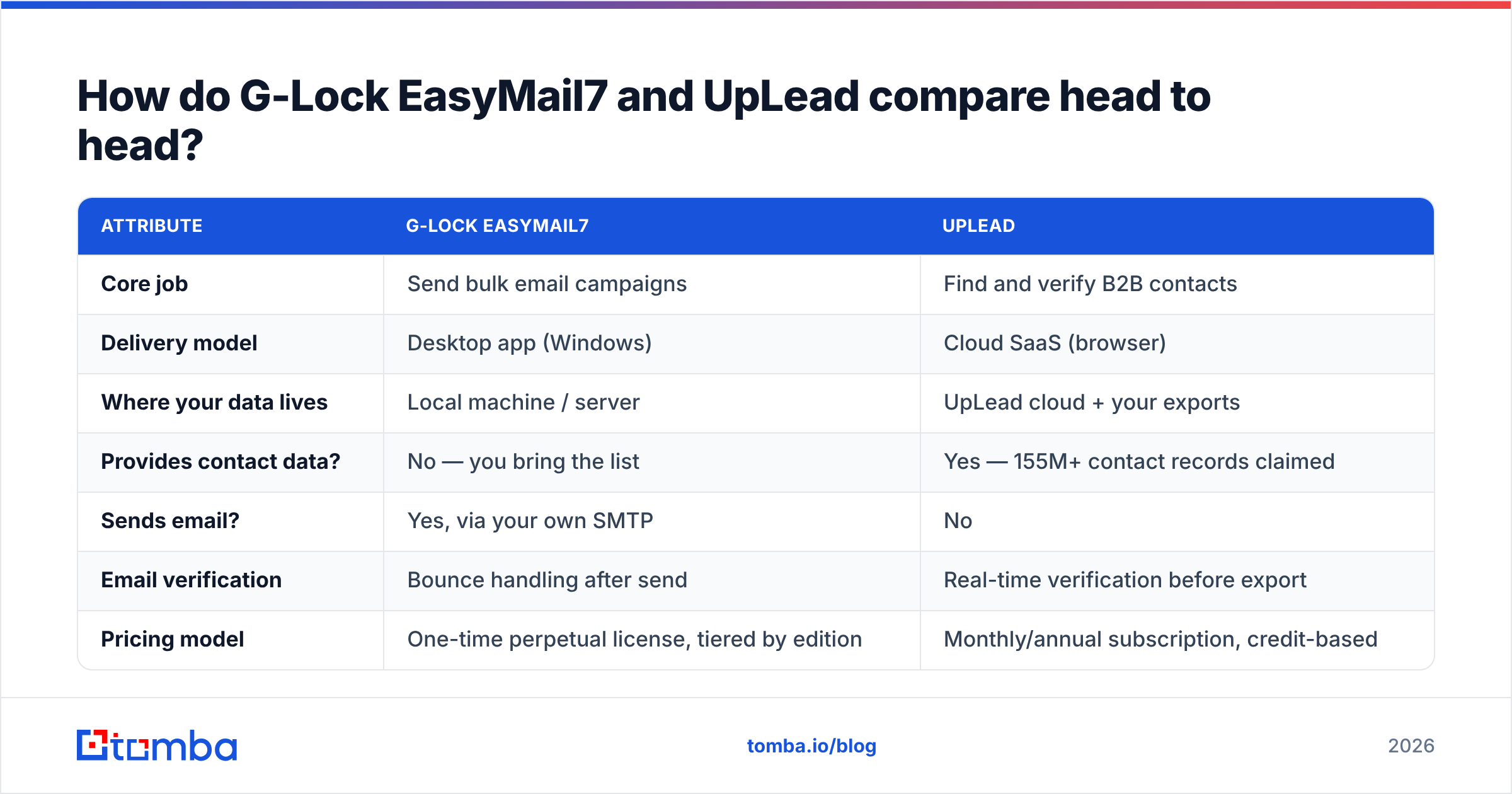
How do G-Lock EasyMail7 and UpLead compare head to head?#
| Attribute | G-Lock EasyMail7 | UpLead |
|---|---|---|
| Core job | Send bulk email campaigns | Find and verify B2B contacts |
| Delivery model | Desktop app (Windows) | Cloud SaaS (browser) |
| Where your data lives | Local machine / server | UpLead cloud + your exports |
| Provides contact data? | No — you bring the list | Yes — 155M+ contact records claimed |
| Sends email? | Yes, via your own SMTP | No |
| Email verification | Bounce handling after send | Real-time verification before export |
| Pricing model | One-time perpetual license, tiered by edition | Monthly/annual subscription, credit-based |
| Entry price | Free edition available; paid licenses are a one-off purchase | ~$99/mo (Essentials), ~$199/mo (Plus) |
| Free tier | Yes, limited free edition | 7-day trial with a handful of credits |
| API access | Limited | Yes, on higher tiers |
| Best for | List owners who want to control infrastructure | Teams who need net-new prospects |
| Weakest point | Windows-only, dated UI, you own deliverability risk | Expensive per contact, no sending layer |
Read that table twice and the choice usually makes itself. If the "Provides contact data?" row is your blocker, EasyMail7 cannot help you at any price. If the "Sends email?" row is your blocker, UpLead cannot help you at any price.
Which one has the data problem solved?#
Only UpLead is in the data business. So this section is really about one question: is UpLead's data worth the price, and can you get the same record cheaper?
UpLead's model is credit-based. A credit is spent when you reveal a contact record. The key difference is timing. Verification runs when you reveal the record, not when the database was last refreshed. That cuts your bounce rate. Static list vendors, by contrast, sell you a CSV that was scraped eighteen months ago. The credit-back guarantee on invalid emails is a real commitment, not marketing decoration.
The catch is unit economics. On the entry plan, about 170 credits for $99/mo works out to roughly $0.58 per revealed contact. That is fine for surgical, high-ACV account-based outreach. It hurts when you run volume prospecting and burn 3,000 contacts a month.
That gap is why many teams split the job. They use a database for discovery (who exists in this segment?). Then they switch to a cheaper email finder once they know the company and the person. Domain-level lookups through domain search cost a fraction of a database credit and return the same mailbox.

A practical accuracy checklist, whichever vendor you pick:
- Check the verification timestamp, not the database size. "155M contacts" is a vanity number. "Verified in the last 30 days" predicts your bounce rate.
- Test on your own known-good sample. Take 50 contacts whose emails you have confirmed, run them through the tool, and measure agreement. Vendor accuracy stats are self-reported.
- Separate catch-all domains from valid ones. Catch-all servers accept everything, so naive verifiers mark them "valid." A dedicated catch-all verifier tells you which ones truly deliver.
- Re-verify before every send, not at import. B2B data decays 2–3% per month through job changes alone. A list bought in January is much worse by April.
- Watch the credit-refund terms. Most guarantees only cover hard bounces reported within a window. Soft bounces and role accounts rarely qualify.
What does each one cost in 2026?#
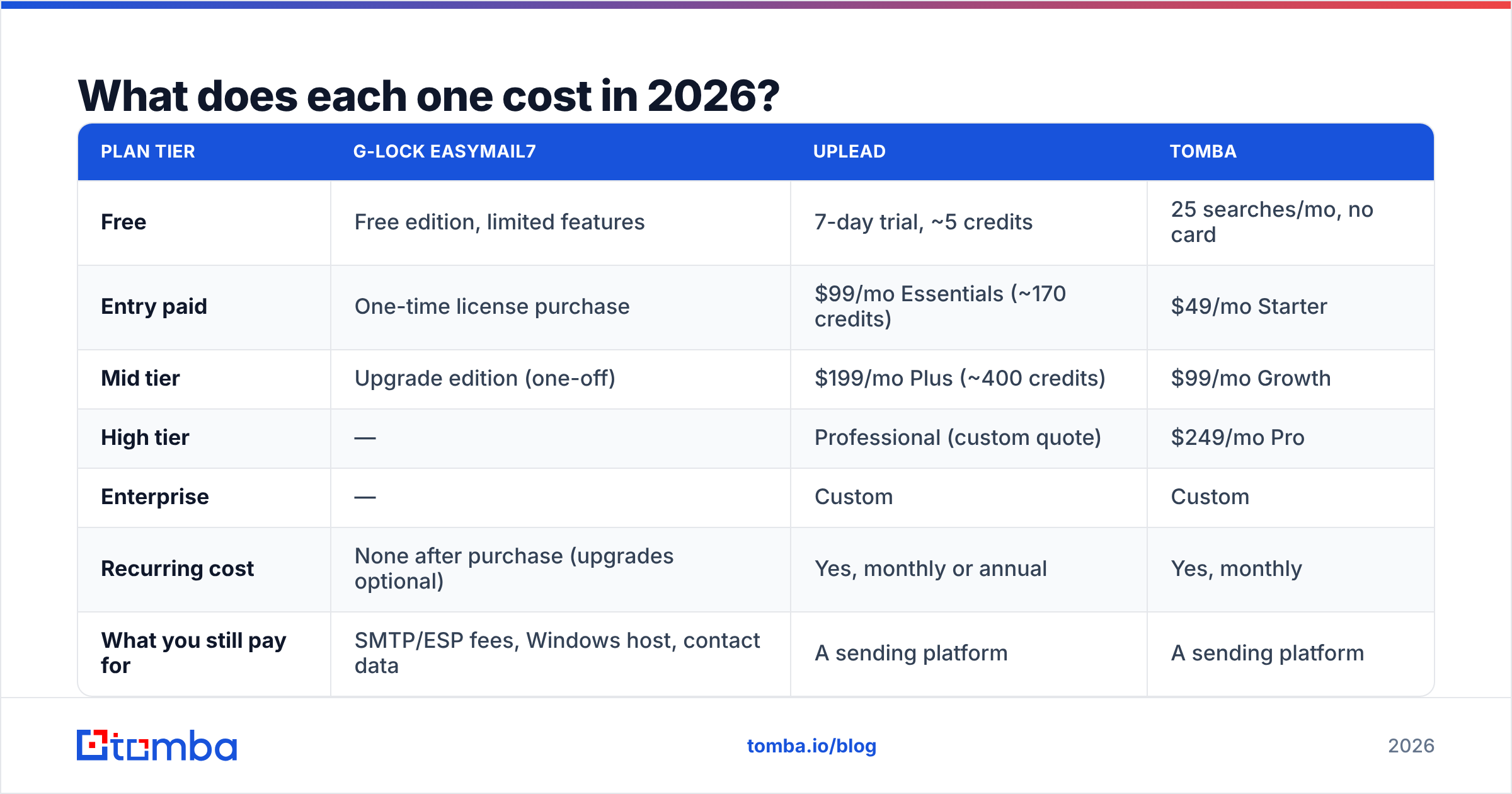
Pricing is where G Lock EasyMail7 vs UpLead stops being an apples-to-apples question. One is a one-time purchase. The other is a monthly subscription.
| Plan tier | G-Lock EasyMail7 | UpLead | Tomba |
|---|---|---|---|
| Free | Free edition, limited features | 7-day trial, ~5 credits | 25 searches/mo, no card |
| Entry paid | One-time license purchase | $99/mo Essentials (~170 credits) | $49/mo Starter |
| Mid tier | Upgrade edition (one-off) | $199/mo Plus (~400 credits) | $99/mo Growth |
| High tier | — | Professional (custom quote) | $249/mo Pro |
| Enterprise | — | Custom | Custom |
| Recurring cost | None after purchase (upgrades optional) | Yes, monthly or annual | Yes, monthly |
| What you still pay for | SMTP/ESP fees, Windows host, contact data | A sending platform | A sending platform |
Two things to flag honestly.
First, EasyMail7's one-time license is genuinely cheaper over a few years if your needs stay static. But the license is not the whole cost. You still pay an SMTP provider per thousand emails. You still need a machine that stays on. You still need to source contacts somewhere.
Second, UpLead's floor is $99/mo, and there is no real free tier. The trial is a demo, not a working allowance. If you are a solo founder testing an outbound motion, that is a real barrier. For reference, Tomba pricing starts with a permanent free tier of 25 searches a month, then a $49/mo Starter plan. That is the tier most people weigh against UpLead's Essentials.
Is G-Lock EasyMail7 still worth it in 2026?#
It depends on how much you value control over convenience.
The case for it. You own your data. Nothing sits in a vendor's cloud, which matters for some compliance rules. There is no per-contact pricing, so a 200,000-record opt-in list costs the same to mail as a 2,000-record one. You choose the SMTP path, so you can route segments through different relays. And a perpetual license means no vendor can triple your bill at renewal.
The case against it. It is Windows-only, and the interface shows its age rather than 2026 design conventions. You also absorb every deliverability risk: SPF, DKIM, DMARC alignment, IP warming, seed testing, feedback loops. Modern ESPs handle much of that for you. Google and Yahoo have tightened their bulk-sender rules too, which now cover enforced authentication, one-click unsubscribe, and a spam-complaint ceiling. Run your own stack and you own that compliance. Get it wrong and your domain reputation takes the hit, not a vendor's.
If you go this route, budget real time for infrastructure hygiene. Run an SPF checker on your sending domain before the first campaign. Treat email deliverability as an ongoing job, not a one-time setup. Know the legal floor, too. The CAN-SPAM Act sets minimum rules for commercial email in the US, and GDPR sets a much higher bar in the EU.
For most teams under 20 people, a hosted sending platform is the safer choice. EasyMail7 fits operators who have a specific reason to keep sending in-house.
Which should you pick for your use case?#
Find your situation below.
- You have a large opt-in list and no prospecting need. → EasyMail7. You're paying UpLead for a problem you don't have. Buy the license, wire up SES, and re-verify the list first with an email verifier so you don't torch a fresh domain.
- You have no list and need to build a pipeline from zero. → UpLead, or a cheaper finder if you already know your target accounts. EasyMail7 gives you nothing until you solve data.
- You're doing ABM against 200 named accounts. → Skip broad databases. Run domain search on each target company and enrich the few decision-makers. Database credits are wasted on a known account list.
The remaining cases turn on volume and on who owns the infrastructure.
- You're running high-volume outbound (5,000+ contacts/mo). → UpLead's credit math breaks down fast. Pair a volume-priced finder with a bulk email finder workflow, then send through a dedicated cold-email platform with inbox rotation.
- You're a developer building lead gen into a product. → Neither. You want an email finder API with predictable per-call pricing, not a desktop app or a UI-first database.
- Compliance requires data stays on your infrastructure. → EasyMail7 is one of the few serious options left in this category. That's its genuine moat.

What does a complete outbound stack actually look like?#
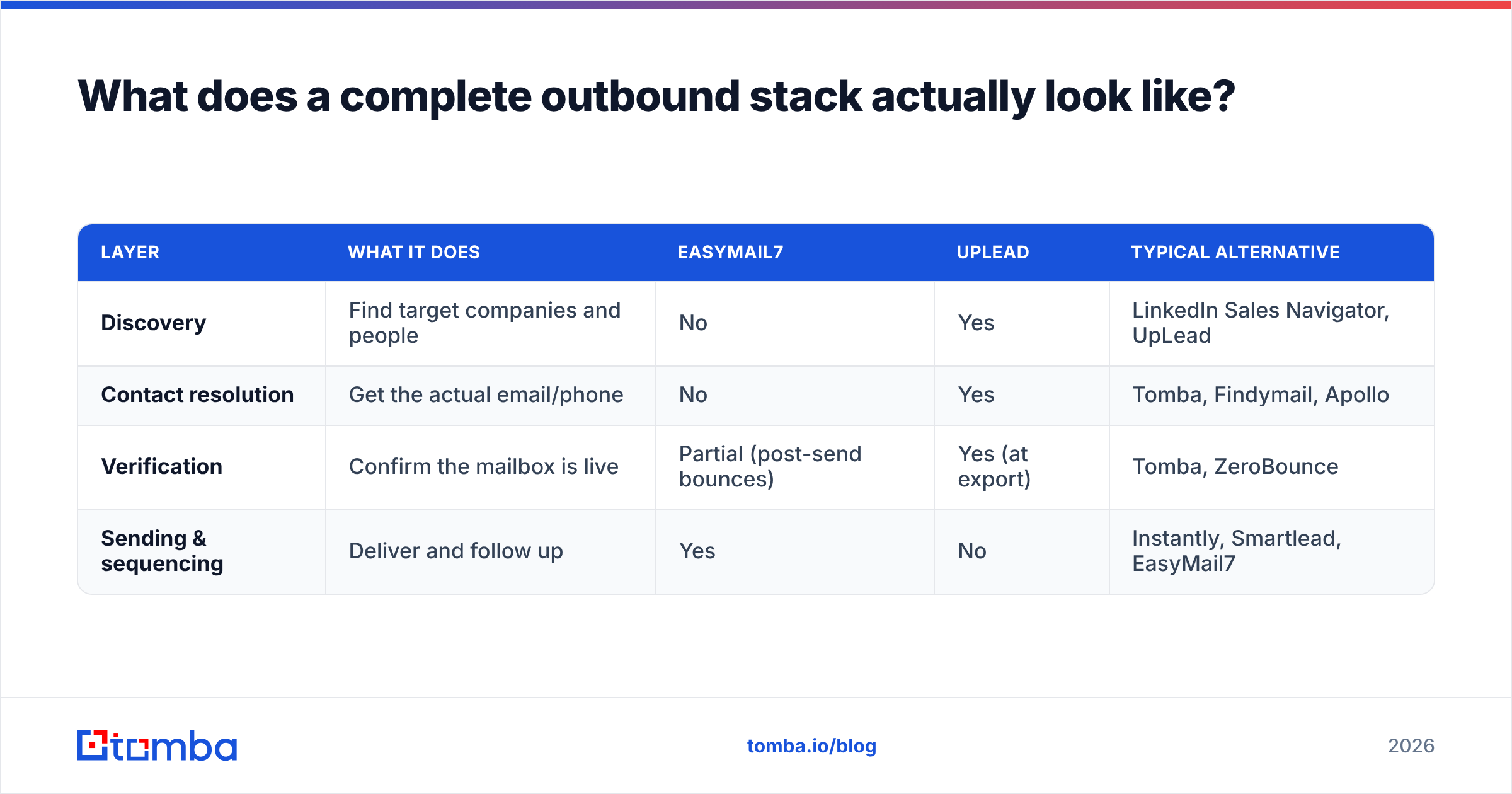
Neither product is a stack. Here are the four layers, so you can see which slot each one fills.
| Layer | What it does | EasyMail7 | UpLead | Typical alternative |
|---|---|---|---|---|
| Discovery | Find target companies and people | No | Yes | LinkedIn Sales Navigator, UpLead |
| Contact resolution | Get the actual email/phone | No | Yes | Tomba, Findymail, Apollo |
| Verification | Confirm the mailbox is live | Partial (post-send bounces) | Yes (at export) | Tomba, ZeroBounce |
| Sending & sequencing | Deliver and follow up | Yes | No | Instantly, Smartlead, EasyMail7 |
Once you map it this way, the "vs" framing collapses. You could run UpLead for discovery and EasyMail7 for sending and have a coherent, if slightly unusual, stack. The two products complement each other more than they compete.
Teams overspend when they buy an all-in-one platform for all four layers. Then they find the bundled data is weaker than a dedicated provider's, and the bundled sender is weaker than a dedicated sender's. Unbundling usually costs less and performs better. The catch is that you must connect the layers properly, through integrations or a CRM, rather than shuffling CSVs by hand.
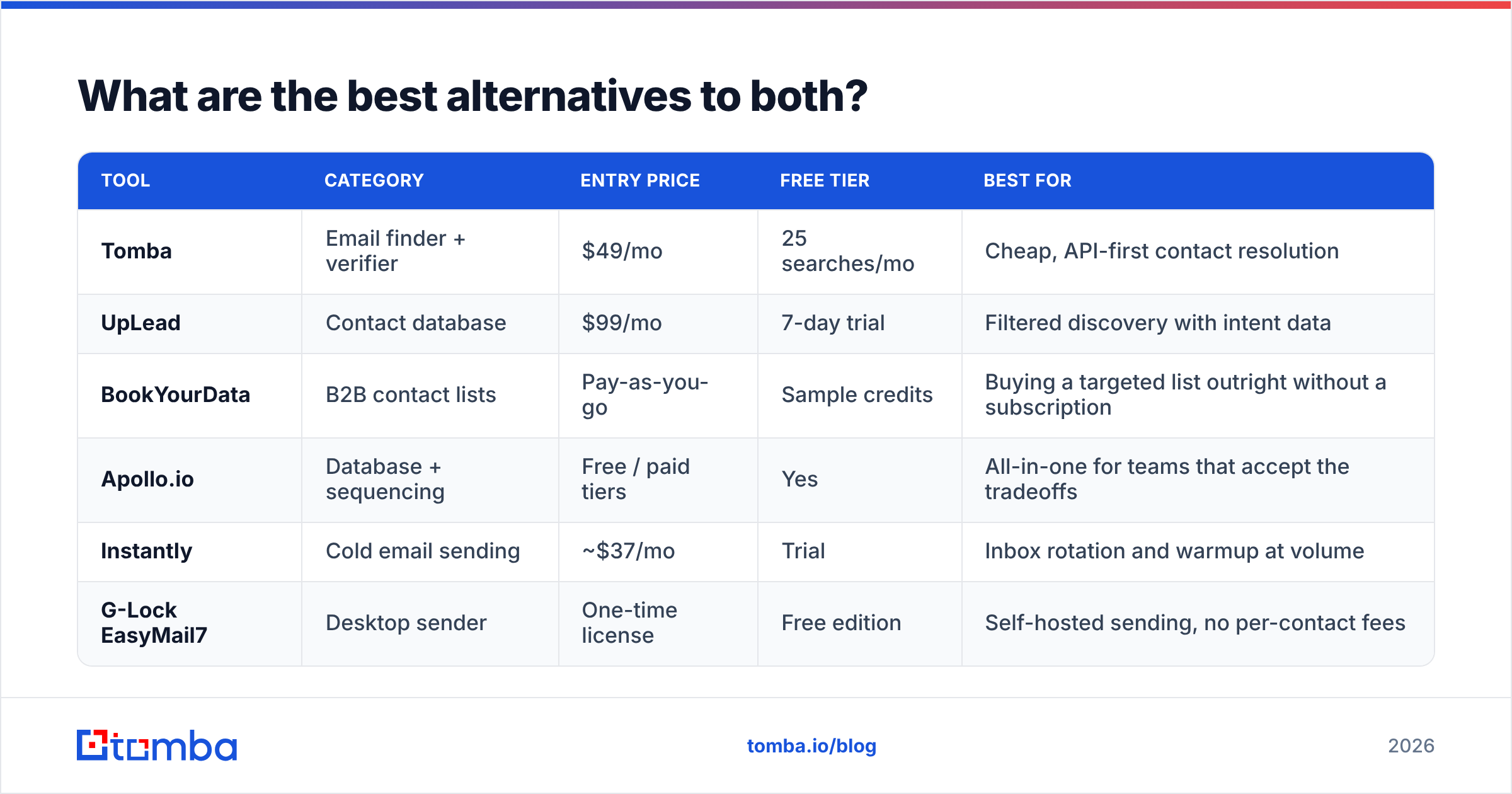
What are the best alternatives to both?#
| Tool | Category | Entry price | Free tier | Best for |
|---|---|---|---|---|
| Tomba | Email finder + verifier | $49/mo | 25 searches/mo | Cheap, API-first contact resolution |
| UpLead | Contact database | $99/mo | 7-day trial | Filtered discovery with intent data |
| BookYourData | B2B contact lists | Pay-as-you-go | Sample credits | Buying a targeted list outright without a subscription |
| Apollo.io | Database + sequencing | Free / paid tiers | Yes | All-in-one for teams that accept the tradeoffs |
| Instantly | Cold email sending | ~$37/mo | Trial | Inbox rotation and warmup at volume |
| G-Lock EasyMail7 | Desktop sender | One-time license | Free edition | Self-hosted sending, no per-contact fees |
A note on the sending side. If EasyMail7's Windows dependency is the dealbreaker but the economics appeal to you, look at cloud senders that price by mailbox instead of by contact. If UpLead's credit pricing is the dealbreaker but you like the filtering, an Apollo alternative comparison is a useful next read. Apollo covers similar ground at a different price point. BookYourData is worth a look when you want a one-off targeted list without a monthly seat. The pay-as-you-go model suits campaign-based buyers.
Frequently asked questions#
Can UpLead send emails? No. It exports contacts. You need a separate sending platform — which could be EasyMail7, an ESP, or a cold-email tool.
Can EasyMail7 find email addresses? No. It manages and sends to lists you already have. Sourcing is a separate purchase.
Is EasyMail7's free edition usable for real campaigns? For very small lists and testing, yes. Feature limits and send caps make it a trial-grade tool rather than a production one for most teams.
Which has better deliverability? Neither owns it outright. UpLead cuts bounces by giving you verified addresses. EasyMail7 hands you the infrastructure controls, and the responsibility with them. Deliverability is mostly a function of list quality, authentication, and sending behavior — not the logo on your software.
Is UpLead worth $99/mo? If you close four-figure deals and need 150 net-new verified contacts a month, easily. If you run volume prospecting on a thin margin, do the per-contact math against a dedicated finder first.
The bottom line#
G Lock EasyMail7 vs UpLead isn't a fair fight, because it isn't the same fight. EasyMail7 wins if your constraint is sending economics and infrastructure control. UpLead wins if your constraint is not knowing who to contact. Buy the wrong one and you don't get a worse version of what you needed. You get nothing you needed.
If your real bottleneck is contact data, and $99/mo is hard to justify before you have proven the channel, start smaller. The Tomba Email Finder gives you 25 free searches a month with no card. It finds verified professional addresses by name, domain, or company. It runs through a UI, a Chrome extension, Google Sheets, or an API, so it plugs into whatever sender you choose. Prove the motion first. Then decide which layer deserves a bigger budget.
Related guides#
Ready to find emails that actually work?
Join 150,000+ professionals who stopped guessing and started sending. Free credits on signup — no credit card required.
Get the Tomba newsletter
Practical outbound tactics and product updates — once every two weeks.
About the author