Gamalogic vs GetProspect: Which Email Finder Wins in 2026?
Gamalogic and GetProspect solve the same problem from opposite ends: one is a verification-first API, the other a LinkedIn-first prospect database. Here is how they compare on accuracy, pricing, and workflow fit.
Gamalogic vs GetProspect is a common shortlist. It should not be. One tool cleans the list you own. The other builds a list you do not have yet. Pick the wrong one and you pay twice.
TL;DR
- Gamalogic checks emails first. It is a cheap finder and verifier API. Best if you have names and domains and need them cleaned.
- GetProspect starts with data. It is a LinkedIn-led B2B contact base with a Chrome plugin, saved lists, and light CRM filters.
- Hit rates are close. Both land near 80–92% on clean, well-known domains. Both drop fast on catch-all domains and small firms.
- Prices work in different ways. Gamalogic sells cheap credit packs. GetProspect sells seats with valid-email guarantees. Cost per usable contact is the number that counts.
- Want finding, checks, catch-all, and enrichment in one API? Tomba does all four at $49/mo.
What are Gamalogic and GetProspect?#
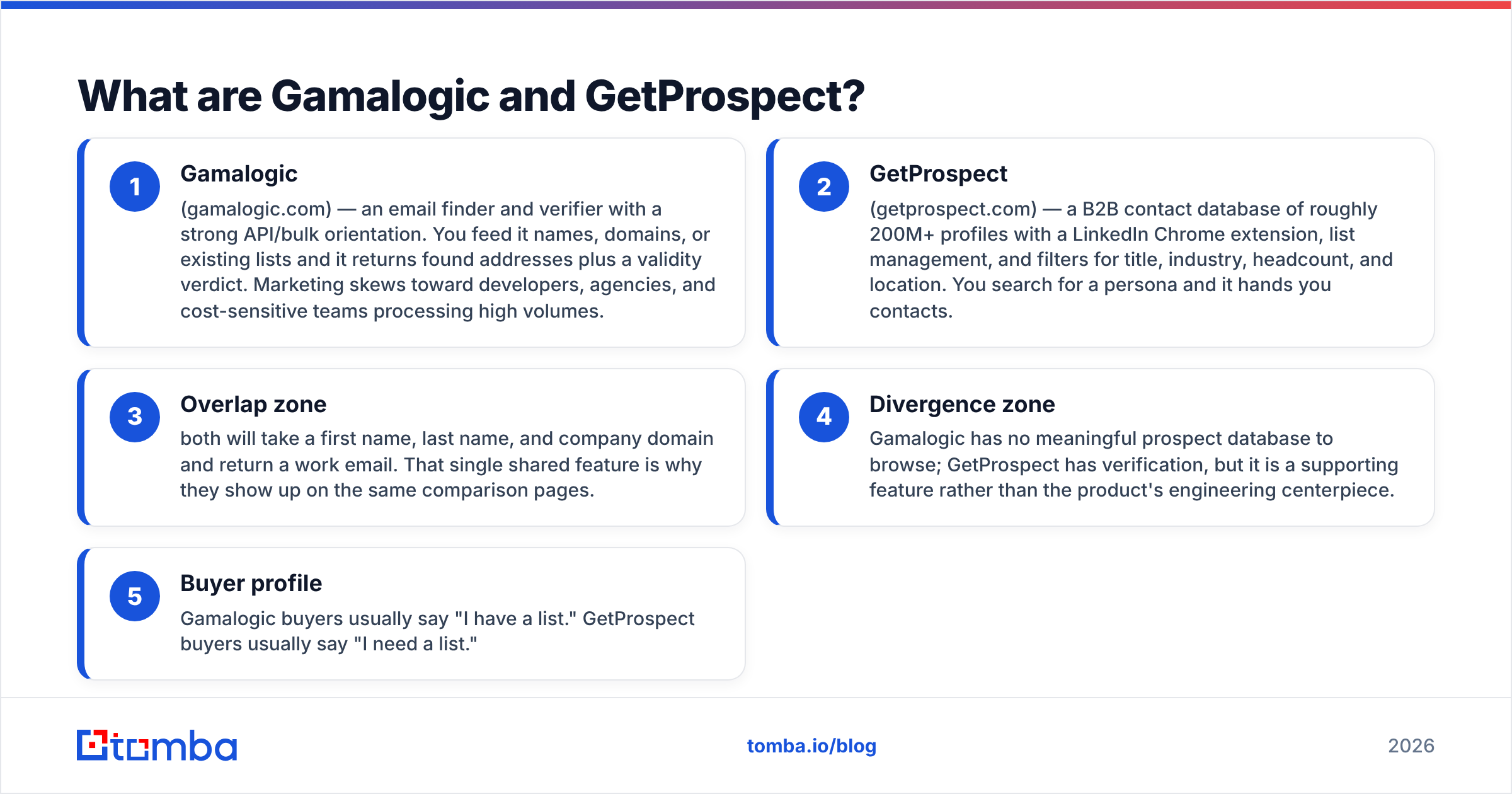
They get compared a lot. They are not the same kind of tool. Gamalogic is a water filter. GetProspect is a well. One cleans what you have. The other is where you go to get it.
- Gamalogic (gamalogic.com) — an email finder and verifier built around a bulk API. You feed it names, domains, or a list. It returns addresses plus a verdict on each one. It aims at developers, agencies, and teams that watch cost.
- GetProspect (getprospect.com) — a B2B contact base of 200M+ profiles. It ships a LinkedIn Chrome plugin, saved lists, and filters for job title, industry, size, and place. You search a persona and it hands you contacts.
- Shared ground — both take a first name, last name, and domain, then return a work email. That one shared feature is why they share so many compare pages.
- Where they split — Gamalogic has no real database to browse. GetProspect does check emails, but that is a side feature, not the core build.
- Who buys what — Gamalogic buyers say "I have a list." GetProspect buyers say "I need a list."
Get this right and you save money. Teams who buy GetProspect to clean an old 40,000-row CSV pay for a database they never open. Teams who buy Gamalogic to search "VP Marketing, SaaS, 50–200 staff" find there is nothing to search.

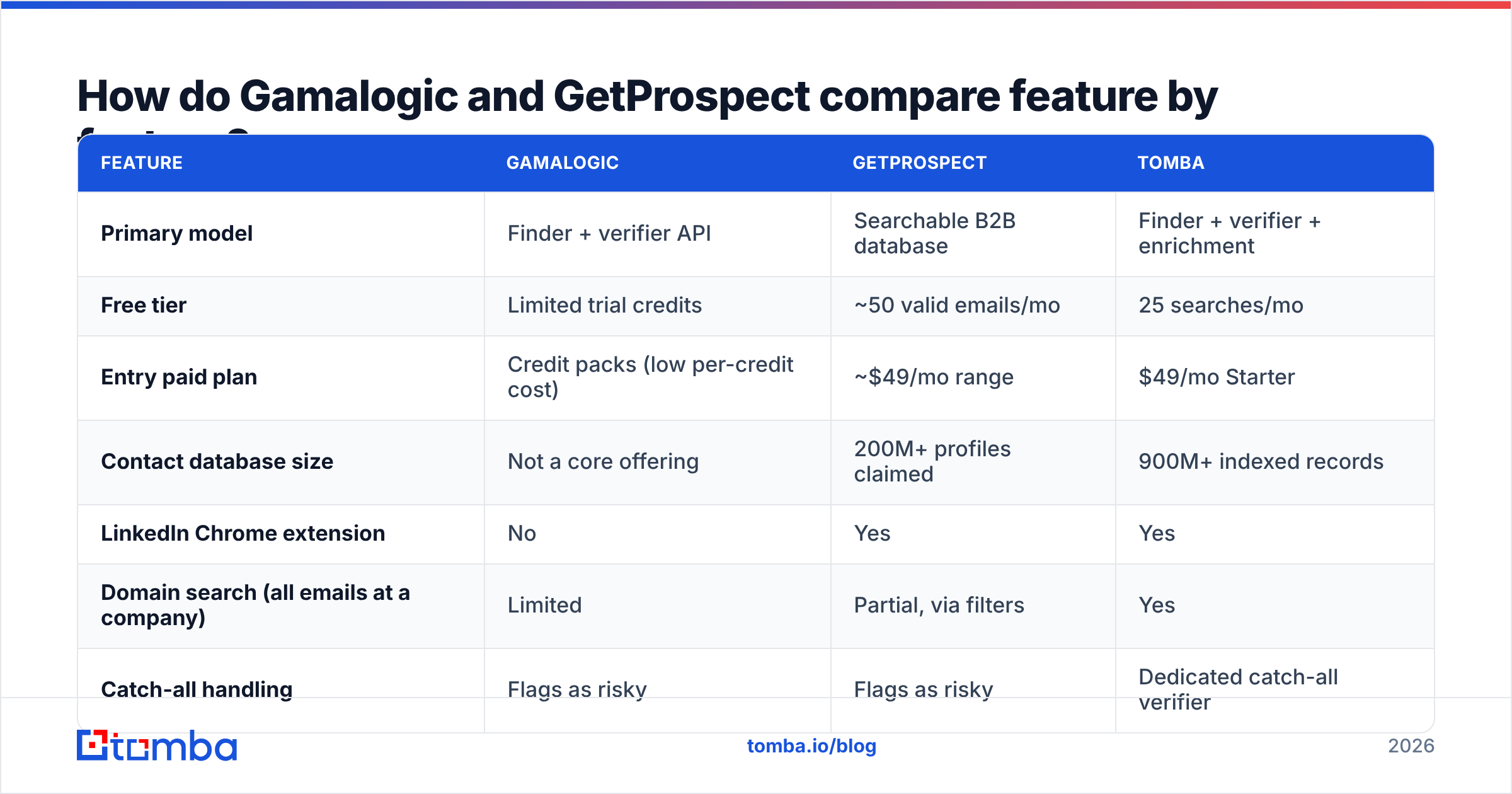
Gamalogic vs GetProspect: how do they compare feature by feature?#
Here is the head-to-head. These are the traits that change your day. Prices move, so check each vendor page before you buy.
| Feature | Gamalogic | GetProspect | Tomba |
|---|---|---|---|
| Primary model | Finder + verifier API | Searchable B2B database | Finder + verifier + enrichment |
| Free tier | Limited trial credits | ~50 valid emails/mo | 25 searches/mo |
| Entry paid plan | Credit packs (low per-credit cost) | ~$49/mo range | $49/mo Starter |
| Contact database size | Not a core offering | 200M+ profiles claimed | 900M+ indexed records |
| LinkedIn Chrome extension | No | Yes | Yes |
| Domain search (all emails at a company) | Limited | Partial, via filters | Yes |
| Catch-all handling | Flags as risky | Flags as risky | Dedicated catch-all verifier |
| Bulk CSV processing | Yes, core strength | Yes | Yes |
| Public REST API | Yes | Yes | Yes, plus CLI and MCP |
| Phone numbers | No | Limited | Yes |
| Native CRM sync | Via Zapier | HubSpot, Pipedrive, Zapier | HubSpot, Salesforce, Pipedrive, Zapier, Make |
| Best for | Cleaning existing lists cheaply | Building lists from LinkedIn | Doing both in one API |
The split is clear. Gamalogic wins on cost per check. GetProspect wins on cold-start list building. Neither one covers the whole loop, from "who do I contact" to "is this safe to send."

Which tool finds more valid emails?#
Neither wins by much. The gap between the two is smaller than the gap between your good domains and your bad ones.
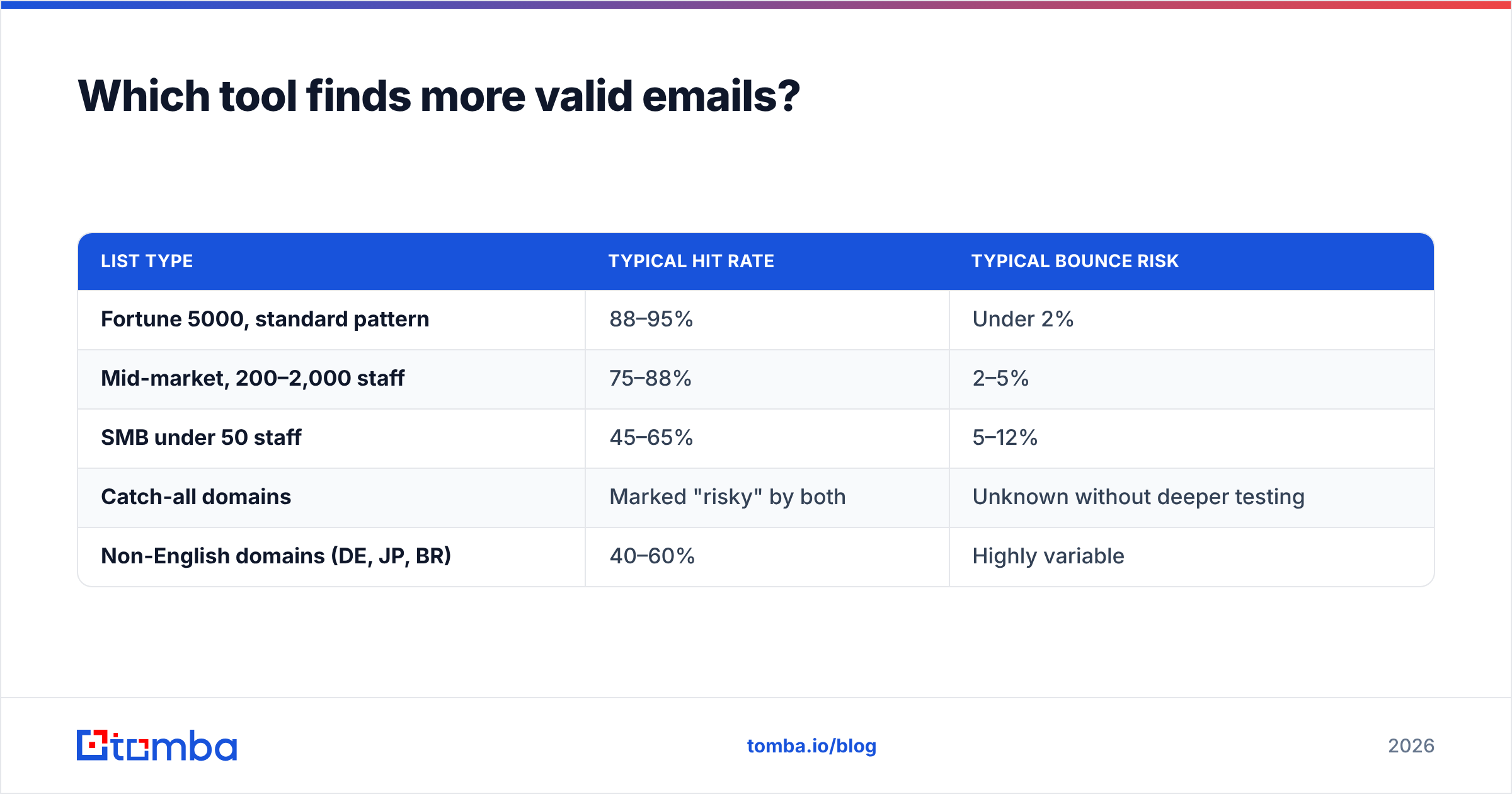
Every vendor here claims 95% to 99%. Those scores come from their best data: big firms with easy email patterns. Mixed lists tell a duller story. Expect numbers closer to this:
| List type | Typical hit rate | Typical bounce risk |
|---|---|---|
| Fortune 5000, standard pattern | 88–95% | Under 2% |
| Mid-market, 200–2,000 staff | 75–88% | 2–5% |
| SMB under 50 staff | 45–65% | 5–12% |
| Catch-all domains | Marked "risky" by both | Unknown without deeper testing |
| Non-English domains (DE, JP, BR) | 40–60% | Highly variable |

In 2026 the hit rate is not what sets tools apart. Catch-all domains are. These servers accept mail at any address, so a normal SMTP check proves nothing. Gamalogic and GetProspect both tend to say "accept-all" or "risky." Then they hand the call back to you. That is honest. It is not much help when a third of your target accounts sit behind catch-all setups.
A catch-all verifier changes the math. Saving one risky-but-real address beats finding one new contact. You already did the work on that account.
One more rule. Run every list through a second email verifier before you send. Vendors grade their own homework. A 500-row cross-check costs a few dollars. It often turns up a 4–8% gap. On a 20,000-address send, that gap is the line between a clean inbox and a burned domain.
How does pricing really compare?#
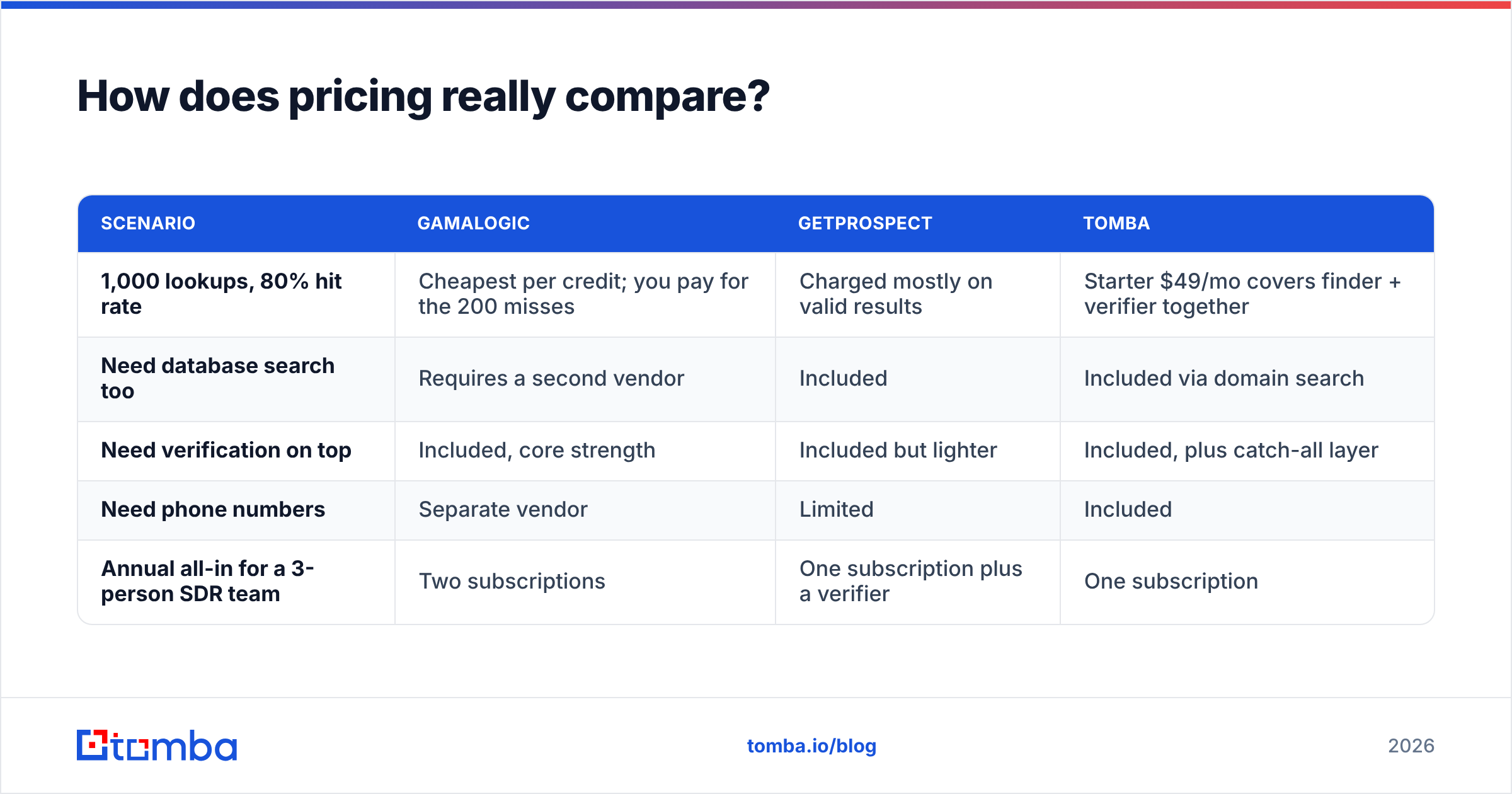
Sticker price lies here, because each vendor sells a different unit. Gamalogic sells credits. GetProspect sells valid emails per seat per month. A credit can burn on a miss. A valid email mostly does not.
Work out the cost per usable contact instead:
| Scenario | Gamalogic | GetProspect | Tomba |
|---|---|---|---|
| 1,000 lookups, 80% hit rate | Cheapest per credit; you pay for the 200 misses | Charged mostly on valid results | Starter $49/mo covers finder + verifier together |
| Need database search too | Requires a second vendor | Included | Included via domain search |
| Need verification on top | Included, core strength | Included but lighter | Included, plus catch-all layer |
| Need phone numbers | Separate vendor | Limited | Included |
| Annual all-in for a 3-person SDR team | Two subscriptions | One subscription plus a verifier | One subscription |
Run one tool only, and GetProspect tends to look cheaper on paper. Sit on a big list from events, webinars, or scrapes, and Gamalogic's credit model wins on cleaning cost.
The trap is the middle case, and most teams live there. You need some list building, plus real checks, plus the odd enrichment. Two vendors means two APIs, two balances, two support queues, and a tidy-up every month.
Tomba's pricing folds that into one line: Free (25 searches/mo), Starter $49/mo, Growth $99/mo, Pro $249/mo, and Enterprise. Finder, verifier, domain search, catch-all checks, and enrichment share one credit pool.

Who should choose Gamalogic?#
Pick Gamalogic if three of these fit you:
- You already own the data. Event lists, CRM exports, partner lists, or scraped rosters. They need matching and checks, not discovery.
- You watch cost at volume. You push 100k+ rows a quarter. A fraction of a cent per credit adds up fast.
- You are technical. You can wire an API into a script or an n8n flow. A slick UI is not the point.
- You run an agency. Cleaning client lists is steady, high-volume work with thin margins. Input cost is the whole game.
- You skip LinkedIn. Your outreach starts somewhere other than Sales Navigator.
Where it grates: there is no rich persona search. The UI is plain. CRM links run shallow next to the big names. If your reps live in a browser plugin, this is not their tool.
Who should choose GetProspect?#
Pick GetProspect if this sounds like your week:
- You prospect on LinkedIn. The Chrome plugin pulls contacts off profiles and search pages. It is the best thing here.
- You build lists from zero. Filter by title, size, industry, and place. No data contract needed.
- You want a light CRM feel. Saved lists, custom columns, and tags give a small team enough shape.
- Your team is not technical. The UI covers it all. The API is there, but you can skip it.
- You like the free tier. Roughly 50 valid emails a month is enough to test a niche.
Where it grates: checks are fine but shallow, coverage thins on small and non-US firms, and per-seat pricing stings as you add reps. Review threads on G2 flag credit confusion on partial hits. Read those before you sign for a year.
What do both tools miss?#
Four gaps show up in almost every Gamalogic vs GetProspect review:
- Catch-all resolution. Both flag them. Neither solves them. On big-company lists, much of your ICP stays in limbo.
- Phone data. Gamalogic has none. GetProspect has little. Mixing calls with email means a third vendor, or a phone finder in the same tool.
- Fresh data. B2B contacts decay 25–30% a year as people move jobs. Neither tool treats re-checking saved contacts as a core job, so lists rot in your CRM.
- Bulk workflow. Both take a CSV. Neither makes "find, verify, enrich, dedupe, export" easy in one run. A bulk email finder should handle that chain in one pass.
None of these kill a deal on its own. Together they show why teams who start with one tool buy a second within a year.
Is there a better option than both?#
For most teams, Gamalogic vs GetProspect is a choice between two halves.
Tomba covers what each one does well. You get an email finder with 900M+ records, built-in checks with a catch-all layer, domain search to map every public address at a firm, a LinkedIn plugin, phone data, and enrichment. One credit pool. One API key.
That matters most for teams who build. One key means one setup, one rate limit, and one place to debug. If you run outreach from a script, a Google Sheet, or an AI agent, a single data layer cuts a lot of glue code.
Two fair caveats. Tomba is not the cheapest per credit for pure list cleaning at huge volume; Gamalogic packs can beat it. And Tomba's search starts from domains and firms, not from a LinkedIn people search. That is GetProspect's home turf. Pick on your main workflow, not on the feature grid.
How should you actually run the evaluation?#
Trust no published accuracy score, including the ones here. Run this test instead:
- Build a 200-row control list. Mix 60 enterprise, 60 mid-market, 60 SMB, and 20 non-US contacts you can confirm yourself.
- Run it through each trial. Gamalogic trial credits, GetProspect's free 50 a month over two months, and Tomba's free 25 searches.
- Track three numbers. Hit rate, precision, and the share left as catch-all.
- Send a 50-address smoke test. Use a warmed spare domain. Count real bounces. That is the number that pays your bills.
- Divide total cost by delivered contacts. Not credits. Not rows. That is your true price.
Teams who run this test often flip their ranking. A tool that costs 40% more per credit but returns 25% more good addresses is cheaper on every count that matters.
Ready to skip the two-vendor stitch-up? Start with the Tomba Email Finder — 25 free searches a month, no card needed, with checks and catch-all on the same credits. Test it on your own control list. Compare the cost per delivered contact to Gamalogic and GetProspect. Keep the winner. That is the only test that counts.
Related guides#
Ready to find emails that actually work?
Join 150,000+ professionals who stopped guessing and started sending. Free credits on signup — no credit card required.
Get the Tomba newsletter
Practical outbound tactics and product updates — once every two weeks.
About the author