Gamalogic vs Leadsforge: Which Email Finder Wins in 2026?
Two very different takes on B2B contact data: Gamalogic sells verified email lookups by the credit, Leadsforge sells AI-built lead lists by the seat. Here's how they compare on accuracy, pricing, and workflow fit — and when neither is the right call.
TL;DR
- Gamalogic is a lookup-first tool: you feed it names and domains, it returns verified email addresses on a credit model. It is closer to a data utility than a prospecting suite.
- Leadsforge is a list-building tool: you describe your ICP in plain language, its AI assembles a lead list, and email discovery happens as a step inside that flow.
- They are not really the same product. Choosing between them is a workflow decision — do you already know who you want to reach, or do you need the tool to tell you?
- On raw email accuracy, both publish confidence-style scores, and both leave catch-all domains as the weak spot. Verify before you send regardless of which you pick.
- If you need an API-first finder with a verifier, catch-all handling, and predictable per-credit pricing, a third option — Tomba — usually beats both on cost per usable contact.
What are Gamalogic and Leadsforge?#
They solve adjacent problems, and confusing the two is the most expensive mistake buyers make in this category.
Gamalogic positions itself as an email finding and verification service. The core loop is mechanical: supply a first name, last name, and company domain, and it returns the most likely professional address along with a validation status. It ships bulk CSV processing and an API, which is the giveaway — this is built for people who already have a list of people and are missing the contact column.
Leadsforge comes at it from the other end. Its pitch is conversational lead generation: you tell an AI assistant what kind of company and role you're after, and it builds the list for you, contact details included. The discovery of the email is bundled into the list-building experience rather than exposed as a standalone utility.
That distinction drives almost everything downstream — pricing shape, accuracy expectations, integration options, and who on your team actually logs in.

How do Gamalogic and Leadsforge compare head to head?#
Here's the structural comparison before we get into numbers. Treat vendor-published figures as directional and verify current terms on each site — this category changes plans frequently.
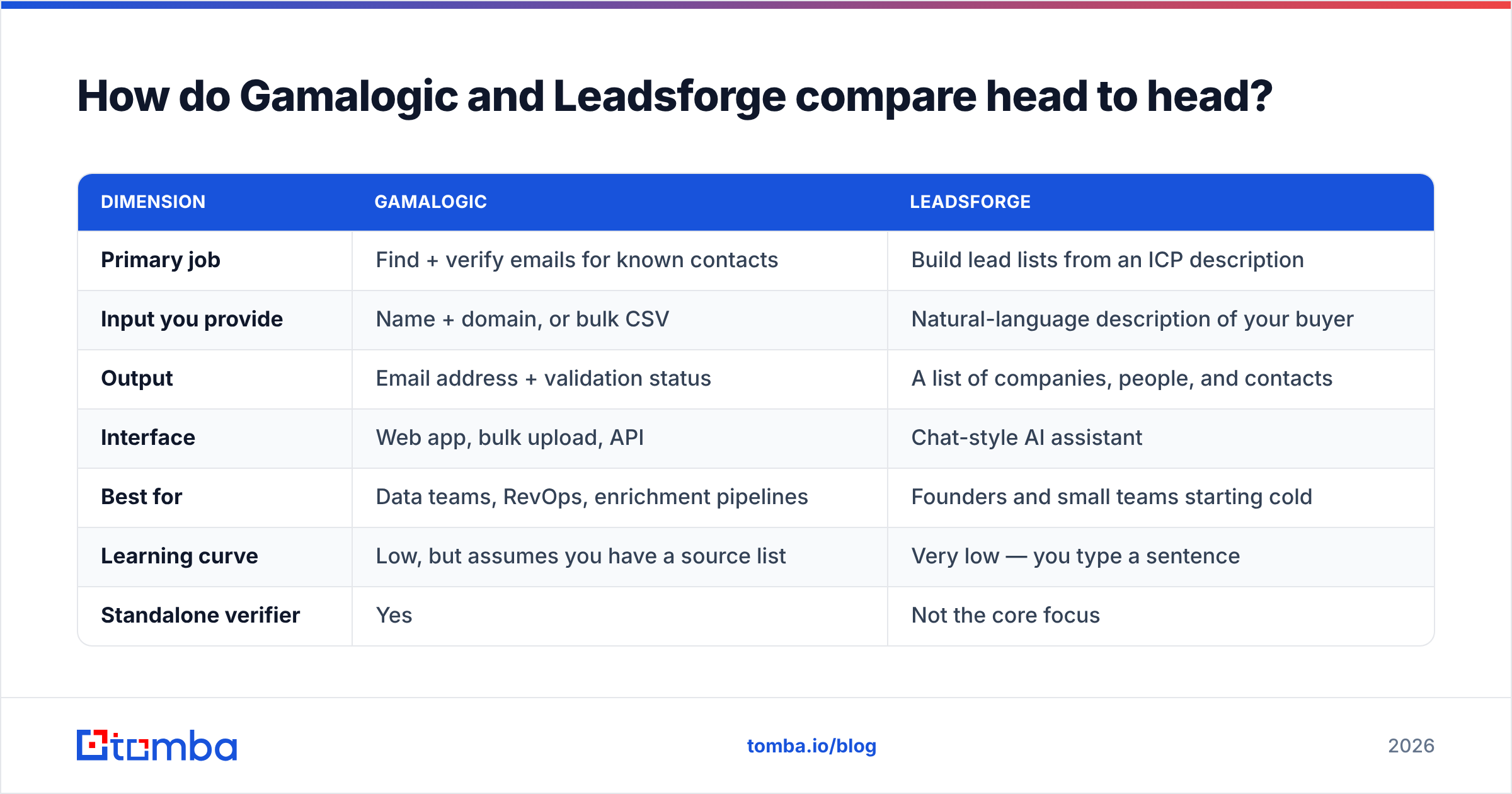
| Dimension | Gamalogic | Leadsforge |
|---|---|---|
| Primary job | Find + verify emails for known contacts | Build lead lists from an ICP description |
| Input you provide | Name + domain, or bulk CSV | Natural-language description of your buyer |
| Output | Email address + validation status | A list of companies, people, and contacts |
| Interface | Web app, bulk upload, API | Chat-style AI assistant |
| Best for | Data teams, RevOps, enrichment pipelines | Founders and small teams starting cold |
| Learning curve | Low, but assumes you have a source list | Very low — you type a sentence |
| Standalone verifier | Yes | Not the core focus |
| Developer access | API available | Limited / product-led |
If your CRM already has 4,000 contacts missing an email column, Gamalogic's shape fits. If you have a blank spreadsheet and a rough idea of "Series A fintech CTOs in the UK," Leadsforge's shape fits.
The trap: buying the list-builder when you needed the enrichment utility, then paying seat pricing to do a job that costs pennies per row elsewhere.
Which one actually finds more valid emails?#
Neither vendor publishes an independently audited accuracy figure, so anyone quoting a hard percentage is quoting marketing copy.
What you can compare is methodology, and that's where the real differences live. Email discovery tools generally combine three techniques:
- Pattern inference — deducing
first.last@domain.comfrom other known addresses at that company. Cheap, fast, and wrong often enough to matter on companies with mixed formats. - Crawled and licensed sources — public web pages, filings, bylines, and partner data. Coverage depends entirely on how much the vendor has indexed.
- SMTP-level validation — pinging the receiving mail server to confirm the mailbox exists without sending anything. This is what separates a guess from a verified address.
Gamalogic leans visibly on steps 1 and 3 — it markets validation as a first-class feature, which matters because a finder without a verifier just hands you a plausible-looking bounce. Leadsforge leans on step 2, since list-building requires a broad company and people index to draw from in the first place.

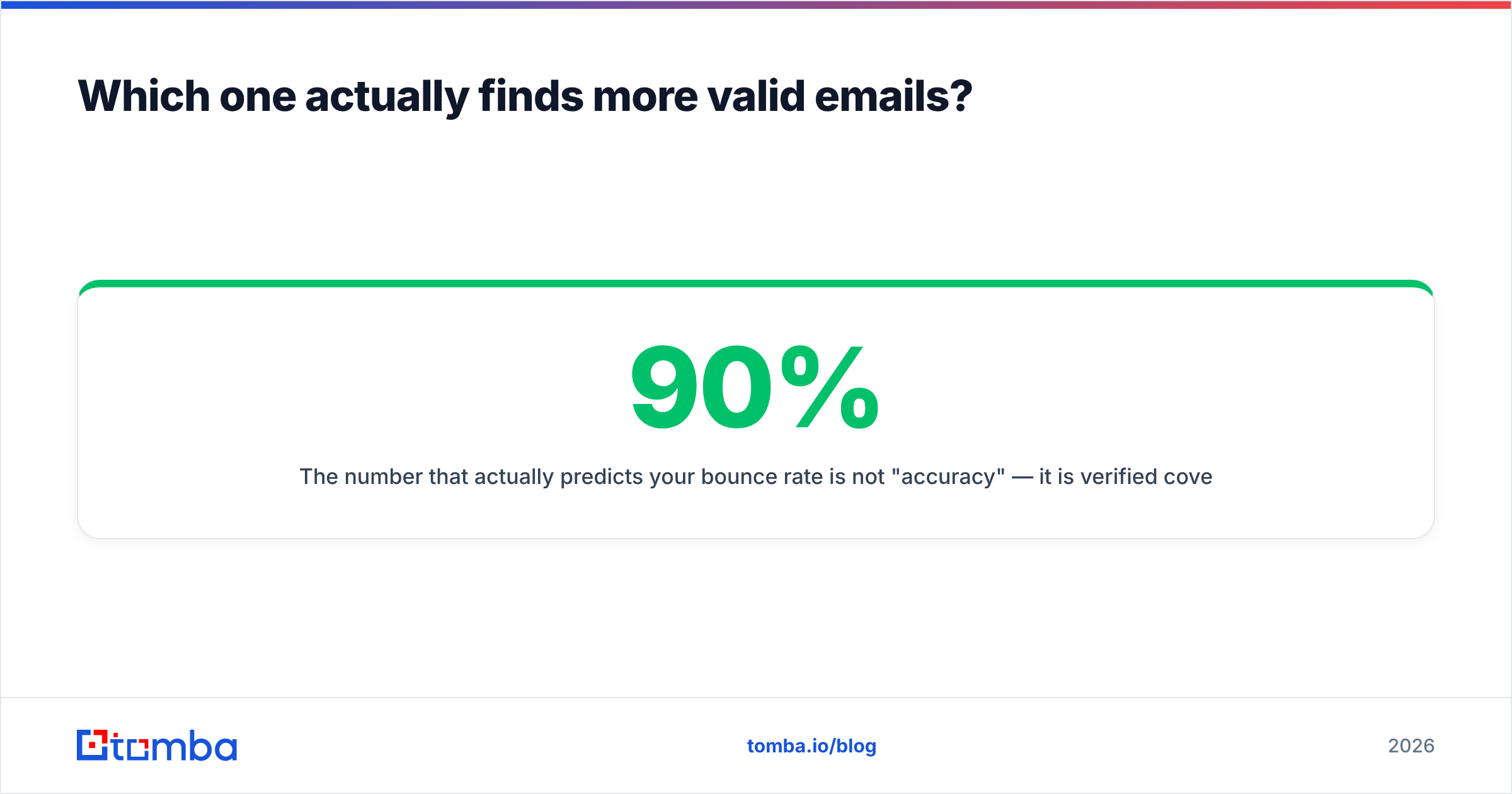
The number that actually predicts your bounce rate is not "accuracy" — it is verified coverage: what share of your input rows come back with a confirmed address, not a guessed one. A tool returning 90% of rows at 60% confidence is worse than one returning 55% of rows at 98% confidence, because the first one quietly torches your sending domain.
Test it the boring way. Take 200 contacts you already have confirmed addresses for, strip the email column, run both tools, and score them on:
- Match rate — rows returned with any address at all
- Exact match rate — rows where the returned address equals your known-good one
- False positive rate — rows marked "valid" that don't match. This is the killer metric.
- Catch-all rate — rows the tool punts on because the domain accepts everything
That last one is where most tools in this bracket get quiet. A catch-all domain accepts mail to any address, so SMTP validation returns "yes" for nonsense. Handling it properly requires a dedicated catch-all verifier rather than a generic valid/invalid flag — otherwise every catch-all row is a coin flip you're paying for.
How does pricing actually work for each?#
Two different pricing philosophies, and the comparison is genuinely unfair in both directions depending on volume.
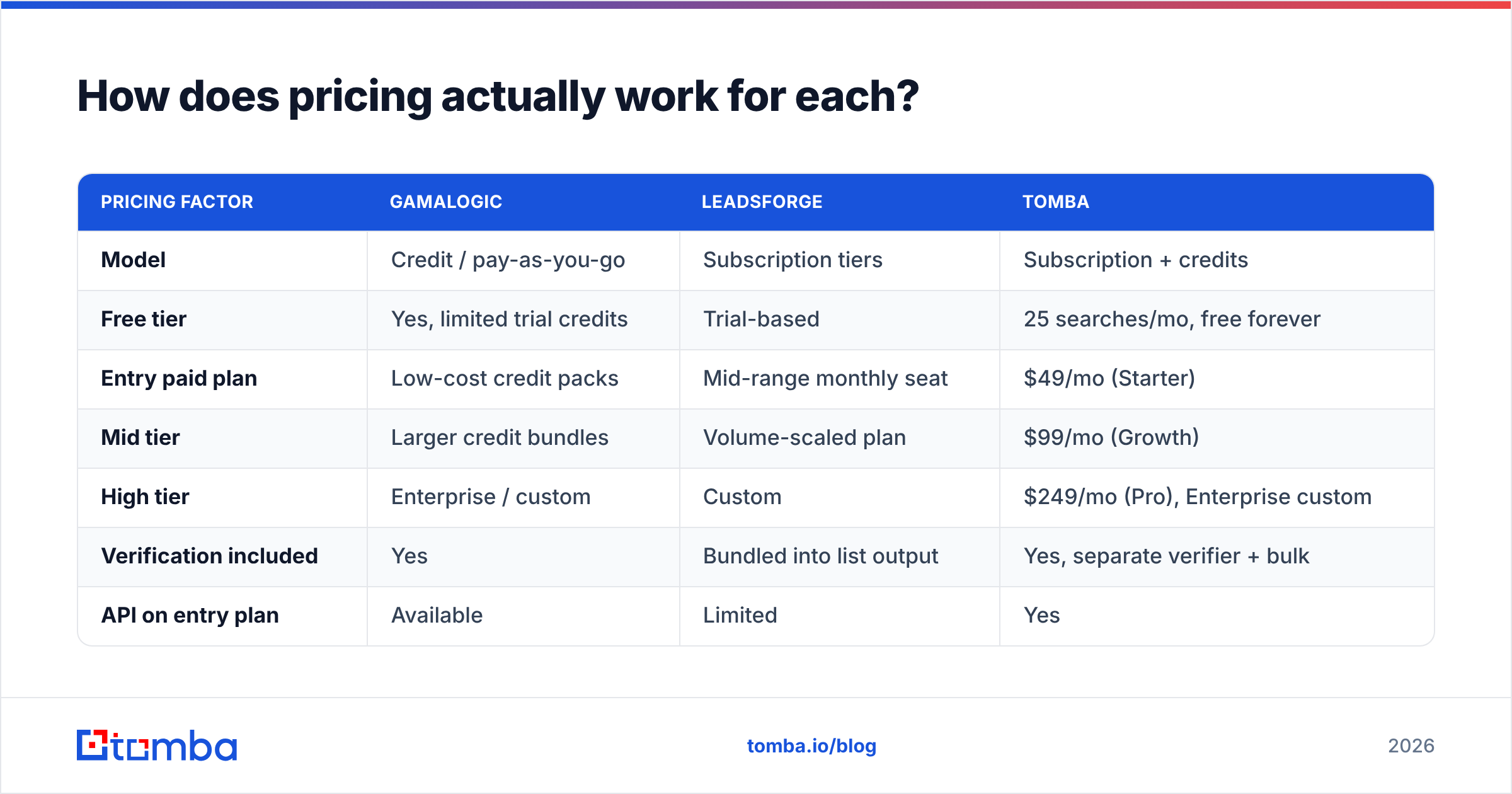
Gamalogic uses credit-based pricing with a free allowance to start, which suits spiky, project-based usage — enrich 3,000 rows this month, nothing next month. Leadsforge uses subscription tiers tied to lead volume and seats, which suits steady, always-on prospecting where you want a predictable monthly line item.
| Pricing factor | Gamalogic | Leadsforge | Tomba |
|---|---|---|---|
| Model | Credit / pay-as-you-go | Subscription tiers | Subscription + credits |
| Free tier | Yes, limited trial credits | Trial-based | 25 searches/mo, free forever |
| Entry paid plan | Low-cost credit packs | Mid-range monthly seat | $49/mo (Starter) |
| Mid tier | Larger credit bundles | Volume-scaled plan | $99/mo (Growth) |
| High tier | Enterprise / custom | Custom | $249/mo (Pro), Enterprise custom |
| Verification included | Yes | Bundled into list output | Yes, separate verifier + bulk |
| API on entry plan | Available | Limited | Yes |
| Unused credit rollover | Varies by pack | Typically no | Plan-dependent |
Three cost traps worth pricing in before you sign anything:
- Charging for unverified results. If a tool bills a credit for a "possible" address you can't safely send to, your effective cost per usable contact can be double the sticker price.
- Seat multiplication. Subscription list-builders often price per user. Three SDRs on a $99 tool is a $297 tool.
- Re-enrichment. B2B contact data decays roughly 25–30% per year as people change jobs. Whatever you pay this year, budget for re-running a chunk of it next year. See where the data comes from before you assume freshness.
Check current Tomba pricing and both vendors' own pages before budgeting — none of these plans stay static for a full year.
Who should choose Gamalogic?#
Pick Gamalogic if your bottleneck is a missing column, not a missing list.
Concretely, it fits when:
- You have a source of truth already. A CRM export, a conference attendee list, a scraped set of LinkedIn profiles, a partner database — anything with names and companies attached.
- You want a utility, not a platform. No sequencer, no dialer, no dashboard you'll never open. Just input, output, done.
- Your volume is bursty. Credits beat subscriptions when you run three big enrichment jobs a quarter and nothing in between.
- You need bulk CSV as a first-class flow. Uploading 10,000 rows and getting a file back is a genuinely different product from clicking one contact at a time.
Where it gets awkward: if you don't already know who you're targeting, Gamalogic won't help you figure that out. It answers "what is this person's email," not "who should I email."
Who should choose Leadsforge?#
Pick Leadsforge if your bottleneck is the blank page.
It fits when:
- You're pre-process. No ICP spreadsheet, no scraped list, no RevOps function — just a product and a hunch about who buys it.
- Non-technical users own prospecting. A conversational interface removes the filter-building skill that platforms like Apollo or ZoomInfo assume you have.
- Speed to first list matters more than cost per row. Getting 300 plausible prospects in ten minutes has real value when you're validating a market.
- You don't need programmatic access. If nobody on your team is going to call an API, you're not paying for capability you'll waste.
Where it gets awkward: AI-assembled lists inherit whatever the underlying index knows, and "the AI picked them" is not a targeting strategy you can audit or reproduce. When a campaign underperforms, you want to know which filter was wrong — and a chat log is a poor substitute for an explicit query. It also gives you less leverage when you want to plug discovery into an existing pipeline rather than run it in a separate tab.

Where does a dedicated email finder like Tomba fit?#
Between the two, for most teams past the first ten customers.
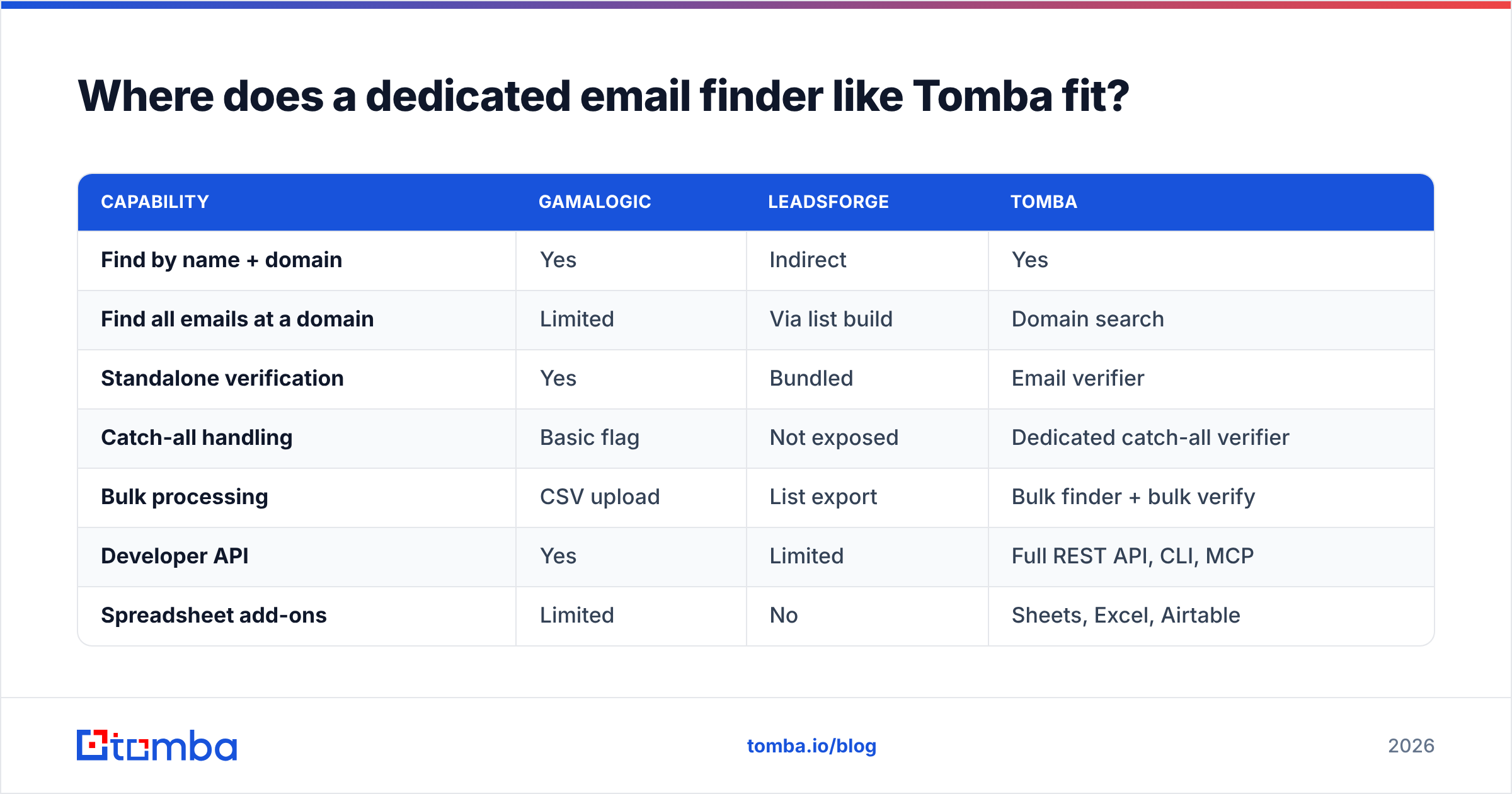
The honest framing: Gamalogic and Leadsforge each optimize for one half of the problem. Gamalogic is strong on lookup, thin on discovery. Leadsforge is strong on discovery, opaque on verification. A dedicated finder-plus-verifier stack covers the lookup half properly while staying cheap enough to run at volume.

| Capability | Gamalogic | Leadsforge | Tomba |
|---|---|---|---|
| Find by name + domain | Yes | Indirect | Yes |
| Find all emails at a domain | Limited | Via list build | Domain search |
| Standalone verification | Yes | Bundled | Email verifier |
| Catch-all handling | Basic flag | Not exposed | Dedicated catch-all verifier |
| Bulk processing | CSV upload | List export | Bulk finder + bulk verify |
| Developer API | Yes | Limited | Full REST API, CLI, MCP |
| Spreadsheet add-ons | Limited | No | Sheets, Excel, Airtable |
| Free tier | Trial credits | Trial | 25 searches/mo ongoing |
| Starting paid price | Credit packs | Monthly seat | $49/mo |
The practical argument isn't feature count — it's that a finder you can call from a script, a spreadsheet, and a browser extension gets used by everyone on the team, while a chat interface gets used by whoever opened the tab. When enrichment lives in your Sheets workflow or fires automatically from your CRM, coverage stops being a manual project.
That said, if you genuinely have no list and no ICP, none of this helps. Buy the discovery tool first, then move the lookup layer to something cheaper once your targeting stabilizes. That sequencing saves more money than picking "the best tool" ever will.
What should you test before you commit?#
Run this in an afternoon. It costs almost nothing and it beats reading a hundred reviews on G2.
- Build a 200-row golden set. Contacts where you already know the correct address — customers, past deals, inbound leads. Strip the email column.
- Run both tools on the identical file. Same rows, same order, no cherry-picking. Log match rate, exact-match rate, and false positives separately.
- Segment by company size. Tools diverge sharply between a 50,000-person enterprise (well-indexed, predictable patterns) and a 12-person startup (thin data, custom domains). Your ICP skew decides the winner.
- Count the catch-alls. Note what percentage of rows land in "accept-all" limbo and how each tool labels them. This is the single biggest hidden cost in email data.
- Send a 50-address test batch through a throwaway sending domain and record the actual bounce rate. Vendor-claimed validity is a prediction; a bounce is a fact. Keep it under 2% or your email deliverability is already in trouble.
- Price it per usable contact, not per credit. Divide total spend by the number of addresses that were both returned and verified and didn't bounce. The ranking often flips at this step.
Do step 6 on both tools and the "Gamalogic vs Leadsforge" question usually answers itself in your specific context — which is the only context that matters.
The verdict#
Gamalogic wins if you already know your targets. It's the cheaper, more mechanical choice for enriching an existing list, and its verification focus means fewer nasty surprises at send time.
Leadsforge wins if you're starting from zero. The conversational list build genuinely collapses the time from "I have an idea about my buyer" to "I have 300 names," and for early-stage teams that speed is worth real money.
Neither wins on cost per verified contact at scale, which is where a dedicated finder with a real verifier, catch-all handling, and API access pulls ahead. If your outbound program is past the experiment phase and you're enriching thousands of rows a month, that's the layer to optimize.
Start with the Tomba Email Finder free tier — 25 searches a month, no card, enough to run the golden-set test above against whatever you're currently paying for. If the exact-match rate and bounce numbers come out ahead, the $49/mo Starter plan replaces a lot of tooling. If they don't, you've lost an afternoon and gained a benchmark you can hold every vendor to.
Related guides#
Ready to find emails that actually work?
Join 150,000+ professionals who stopped guessing and started sending. Free credits on signup — no credit card required.
Get the Tomba newsletter
Practical outbound tactics and product updates — once every two weeks.
About the author