Gamalogic vs Nymeria: Which Email Finder Wins in 2026?
Gamalogic and Nymeria both promise verified B2B emails, but they solve different problems. Here is an honest breakdown of accuracy, pricing, LinkedIn coverage, API limits and who each tool actually fits.
TL;DR
- Gamalogic is a bulk email-finding and verification engine. You feed it names, domains, or lists; it returns addresses with a validity status. It is built for volume and API work, not for browsing LinkedIn.
- Nymeria is a LinkedIn-first enrichment tool. Its Chrome extension is the product; the search and bulk features exist, but the browser workflow is where it shines.
- Pick Gamalogic if your input is a spreadsheet of companies or contacts. Pick Nymeria if your input is a LinkedIn profile or Sales Navigator list and you also want phone numbers.
- Neither is the cheapest per verified email at scale. If cost-per-valid-address is your metric, run a side-by-side test against a third option before committing to an annual plan.
- Credit models differ in a way that bites: one charges for the lookup, the other charges for the result. Read the pricing section before you buy.
What are Gamalogic and Nymeria, exactly?#
They get lumped together because both sell "find B2B email addresses," but they were built from opposite ends of the funnel.
Gamalogic is an email-finding and verification API with a web app wrapped around it. The core loop is: give it a person's name plus a company domain (or just a domain), and it returns candidate addresses plus a verification verdict — valid, invalid, catch-all, unknown. It handles bulk CSV uploads and exposes a REST API for developers. There is no meaningful social layer. It does not care where your list came from.
Nymeria starts from the person, not the domain. Install the browser extension, open a LinkedIn profile, and it surfaces work email, personal email, and often a phone number in the sidebar. It also has a searchable contact database and bulk enrichment, but most users buy it for the extension and the LinkedIn workflow around it.
That difference explains almost every downstream disagreement about which is "better." A RevOps engineer enriching a 40,000-row account list and an SDR working 60 Sales Navigator profiles a day are not evaluating the same product.
Here is the practical way to frame the choice:
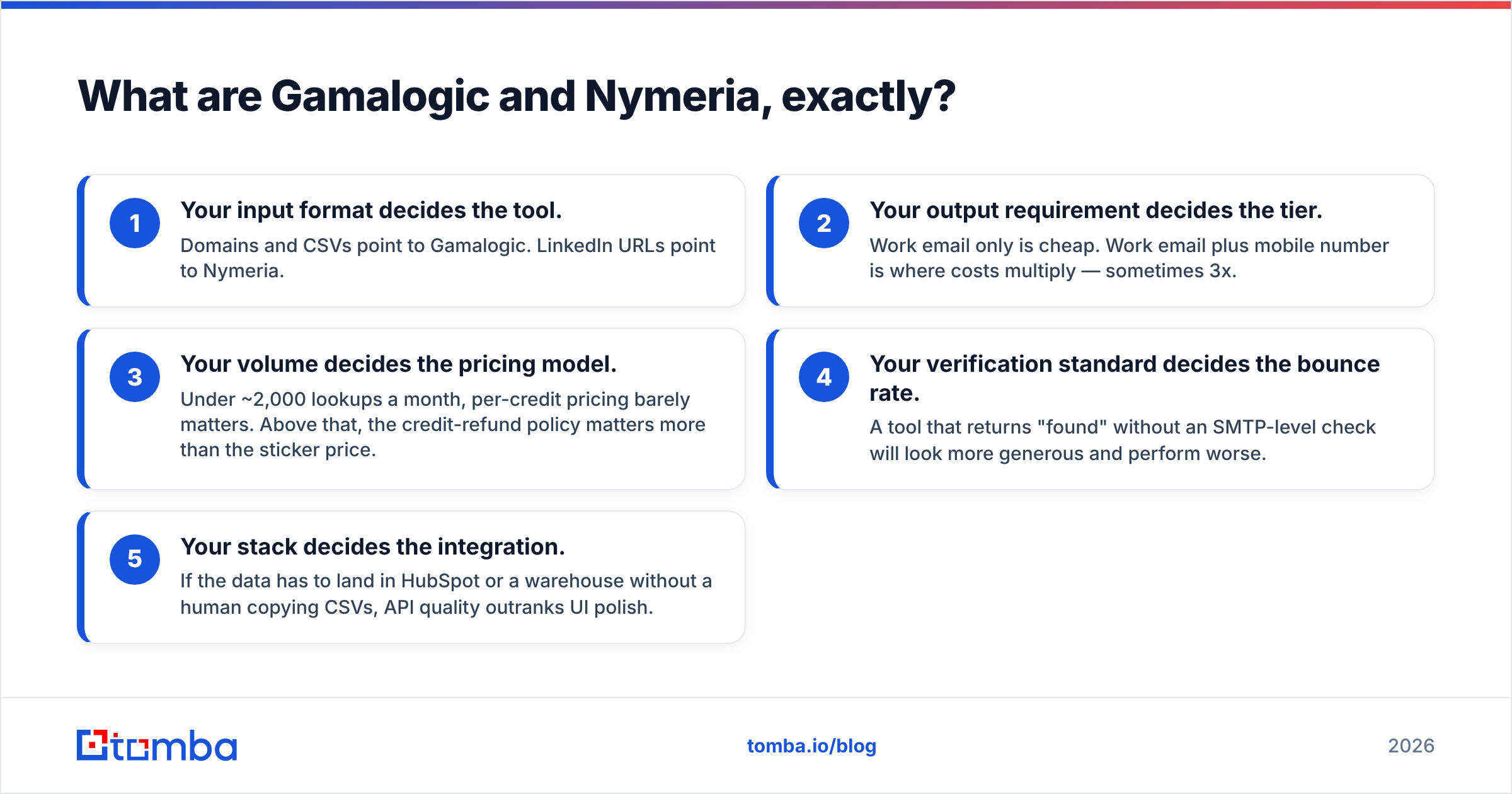
- Your input format decides the tool. Domains and CSVs point to Gamalogic. LinkedIn URLs point to Nymeria.
- Your output requirement decides the tier. Work email only is cheap. Work email plus mobile number is where costs multiply — sometimes 3x.
- Your volume decides the pricing model. Under ~2,000 lookups a month, per-credit pricing barely matters. Above that, the credit-refund policy matters more than the sticker price.
- Your verification standard decides the bounce rate. A tool that returns "found" without an SMTP-level check will look more generous and perform worse.
- Your stack decides the integration. If the data has to land in HubSpot or a warehouse without a human copying CSVs, API quality outranks UI polish.

How do Gamalogic and Nymeria compare feature by feature?#
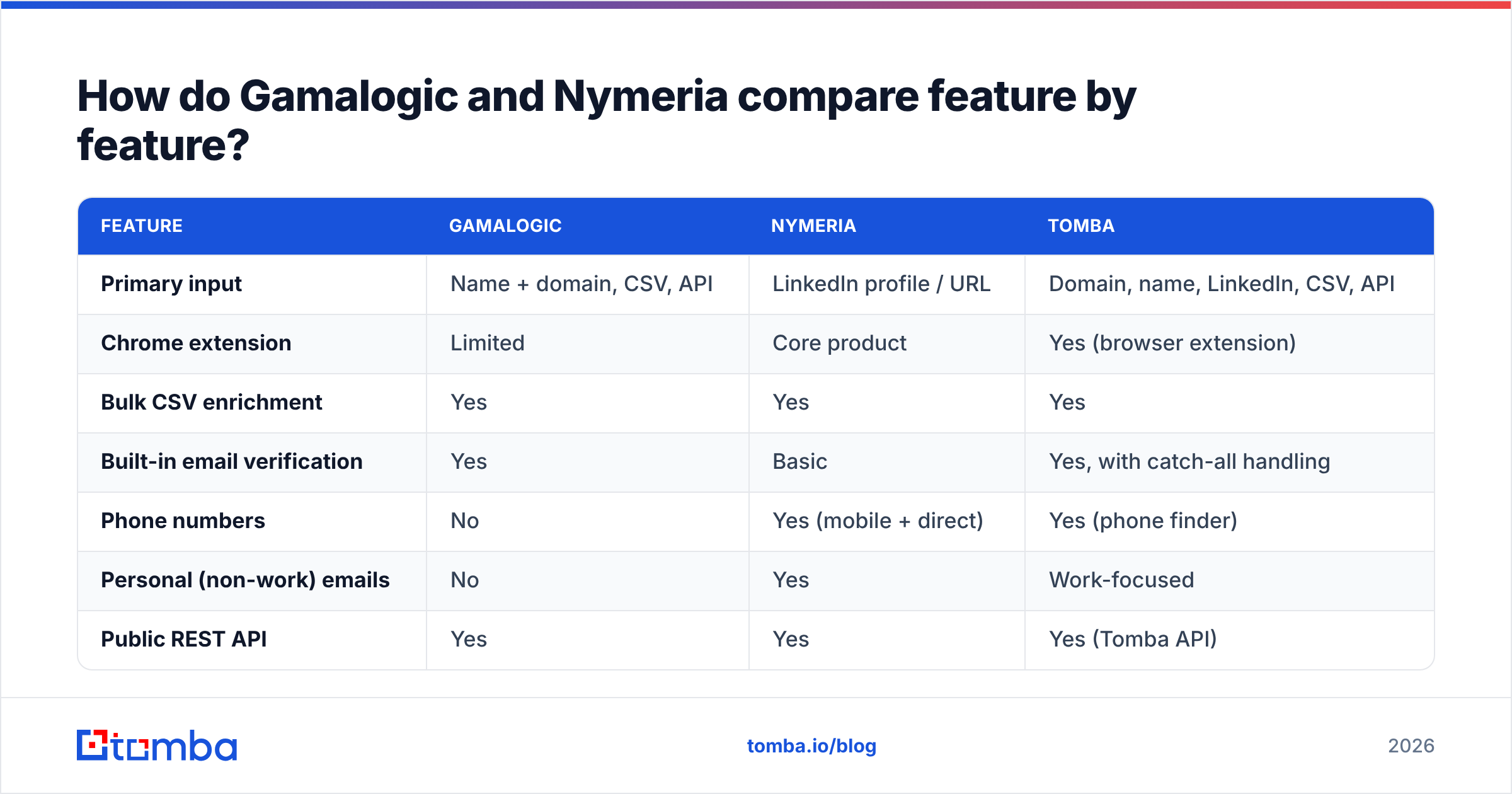
| Feature | Gamalogic | Nymeria | Tomba |
|---|---|---|---|
| Primary input | Name + domain, CSV, API | LinkedIn profile / URL | Domain, name, LinkedIn, CSV, API |
| Chrome extension | Limited | Core product | Yes (browser extension) |
| Bulk CSV enrichment | Yes | Yes | Yes |
| Built-in email verification | Yes | Basic | Yes, with catch-all handling |
| Phone numbers | No | Yes (mobile + direct) | Yes (phone finder) |
| Personal (non-work) emails | No | Yes | Work-focused |
| Public REST API | Yes | Yes | Yes (Tomba API) |
| Free tier | Trial credits | Limited free plan | 25 searches/mo, no card |
| Entry paid plan | ~$29/mo range | ~$39/mo range | $49/mo Starter |
| Best fit | Bulk list enrichment | LinkedIn prospecting | Both, with verification built in |
Two things to flag honestly. First, published pricing on all three moves — treat the numbers above as the shape of the market, not a quote, and check each vendor's page before you buy. Second, "built-in verification" means different things. Gamalogic runs a real verification pass and will tell you a domain is catch-all. Nymeria's confidence signal is more of a source-quality score than an SMTP verdict, which is fine for LinkedIn-sourced contacts but means you should still run a separate email verifier pass before you load a sequence.
Which one finds more valid emails?#
Neither vendor publishes an independently audited hit rate, and you should be skeptical of any blog — including this one — that claims a precise number without showing the test set.
What we can say from repeated bench tests across email-finding tools is that hit rate is almost entirely a function of which list you test:
- On mid-market and enterprise domains with public teams pages, hit rates cluster in the 70–90% range across every serious vendor. The differences are small.
- On small businesses, agencies, and sub-20-employee companies, hit rates diverge sharply — 30–60% is common, and the gap between tools widens.
- On catch-all domains (roughly a third of B2B domains, in our sampling), tools that do not explicitly handle catch-alls will either return nothing or return an unverified guess. That single behavior explains most bounce-rate complaints.

Gamalogic's advantage is that it is honest about catch-alls — it labels them rather than silently passing them through. Nymeria's advantage is source diversity: because it draws on profile-linked data rather than pattern inference alone, it often returns an address on domains where pattern-guessing tools return nothing, including personal addresses.
The failure modes are different too. Gamalogic's misses tend to be "no result." Nymeria's misses tend to be stale results — an address that was valid at a previous employer. Stale data is more expensive than no data, because you only find out after the bounce.
If you are serious about this, do not take anyone's word for it. Build a 200-row test list from your actual ICP, run it through both trials, and then verify every returned address through a neutral third-party checker. Score cost per valid email, not per returned email. A free email checker is enough to referee the test.
Test discipline that actually works: split your 200 rows into 100 enterprise and 100 SMB. Vendors optimize for the enterprise half. The SMB half is where you learn which tool you are actually buying.
How does the pricing really compare?#
This is where most buyers get surprised, and it has less to do with the monthly number than with the credit rules.
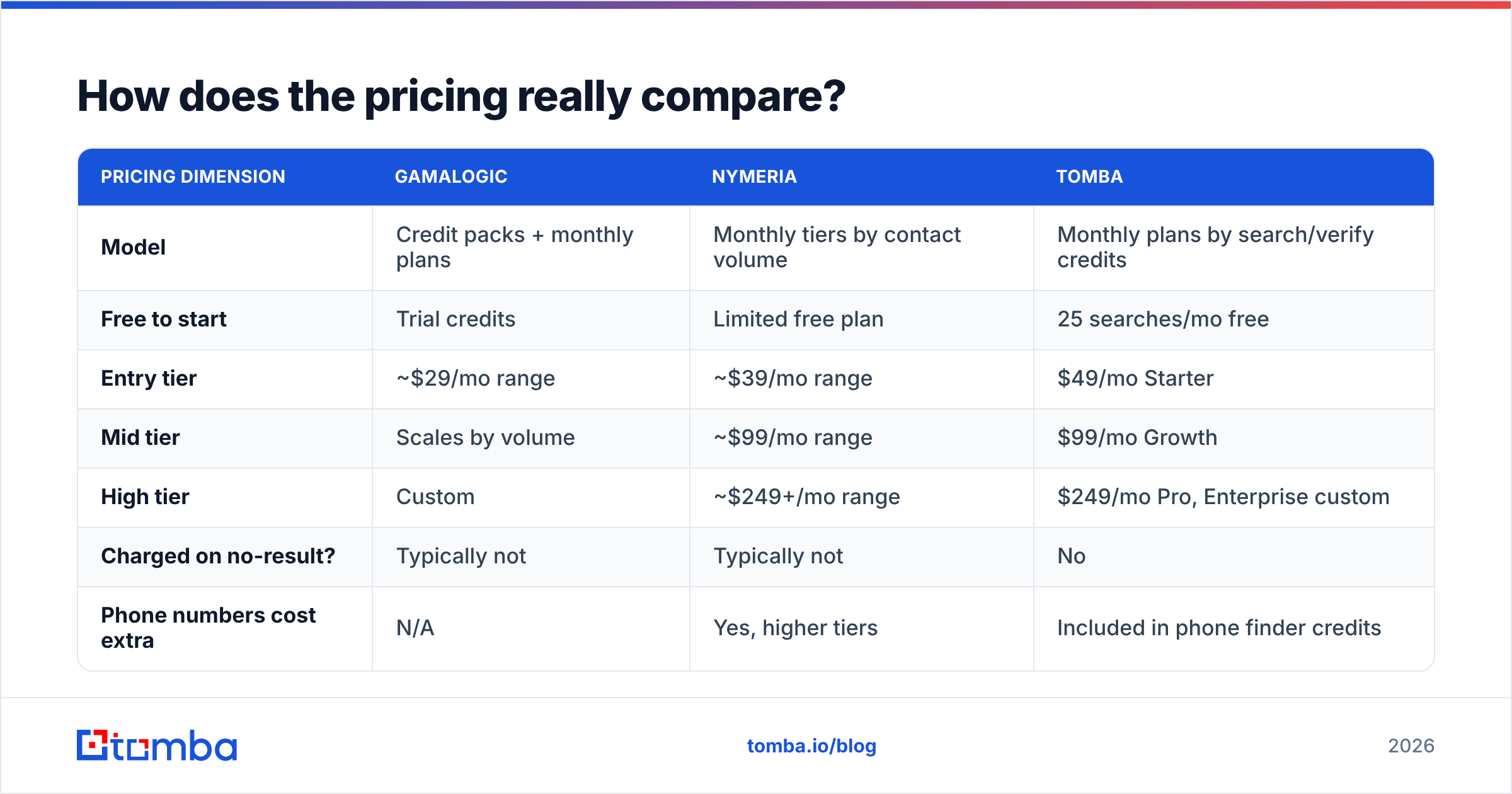
| Pricing dimension | Gamalogic | Nymeria | Tomba |
|---|---|---|---|
| Model | Credit packs + monthly plans | Monthly tiers by contact volume | Monthly plans by search/verify credits |
| Free to start | Trial credits | Limited free plan | 25 searches/mo free |
| Entry tier | ~$29/mo range | ~$39/mo range | $49/mo Starter |
| Mid tier | Scales by volume | ~$99/mo range | $99/mo Growth |
| High tier | Custom | ~$249+/mo range | $249/mo Pro, Enterprise custom |
| Charged on no-result? | Typically not | Typically not | No |
| Phone numbers cost extra | N/A | Yes, higher tiers | Included in phone finder credits |
| Verification included | Yes | Partial | Yes |
| Annual discount | Yes | Yes | Yes |

Three cost traps to check before you enter a card:
1. Does a lookup burn a credit, or does a result? Vendors that charge per attempt look cheap and get expensive on messy lists. Vendors that charge per result cost more per unit and are more predictable. Ask support directly and get the answer in writing.
2. Do phone numbers share the same credit pool? On Nymeria-style plans, mobile numbers are typically the premium unlock. If your team enriches every contact with a phone "just in case," you will burn a month of credits in a week.
3. Do unused credits roll over? Mostly no. If your outbound is seasonal, monthly plans quietly waste 30–40% of what you pay for. Credit packs or a pay-as-you-go tier fit lumpy usage better.

For reference, Tomba pricing runs Free (25 searches/mo), Starter $49/mo, Growth $99/mo, Pro $249/mo, and custom Enterprise — with search and verification in the same plan rather than sold as separate products. That bundling is the main reason cost-per-valid-email tends to land lower than the raw sticker comparison suggests: you are not paying twice to find an address and then confirm it is real.
Which tool fits LinkedIn-first prospecting?#
Nymeria, clearly — if LinkedIn is genuinely your workflow.
The extension model has real advantages. You see the person, you see the context, you pull the contact, you move on. There is no CSV export, no column mapping, no re-import. For an SDR working named accounts, that friction reduction is worth real money.
It also has real limits:
- Extension throughput is capped by LinkedIn, not by the vendor. Aggressive profile viewing gets accounts restricted regardless of which tool you use. Any vendor promising unlimited LinkedIn scraping is describing a risk, not a feature.
- Extension data quality varies by profile completeness. A sparse profile yields a sparse enrichment.
- You cannot easily reproduce the workflow at scale. 50 profiles a day is fine. 5,000 rows is not an extension job.
Gamalogic simply does not compete here. Feed it a LinkedIn URL and you are outside its design.
If you want both — LinkedIn-sourced contacts and bulk domain work in one credit pool — that combination is what tools like Tomba's LinkedIn finder and domain search are built to cover, and it removes the two-subscription problem entirely.
What about phone numbers and personal emails?#
Nymeria wins this category outright against Gamalogic, which does not offer phone data at all.
Two caveats worth stating plainly. First, mobile-number accuracy across the entire B2B data industry is materially worse than email accuracy — independent buyer reviews on G2 consistently show phone coverage as the top complaint for nearly every vendor in the category, not just these two. Budget for a validation step rather than assuming the number is dialable.
Second, personal emails carry compliance weight. Under GDPR and similar regimes, a personal Gmail address is not equivalent to a role-based work address, and "we bought it from a vendor" is not a lawful basis. If you sell into the EU or UK, get your legal team's position before you build sequences on personal data.
If dialing is central to your motion, run numbers through a phone validator before they hit a dialer. The cost of a bad number is not the credit — it is the rep's time.
What do the APIs and integrations look like?#
Gamalogic is the more developer-shaped product of the two. Clean REST endpoints, bulk job support, straightforward auth. If you are building enrichment into a warehouse job or a Zapier-style pipeline, it slots in without much ceremony.
Nymeria has an API as well, and it is competent, but the product's center of gravity is the extension. Teams that adopt it API-first often find themselves paying for capability they do not use.
Questions to ask either vendor before you build against them:
- What is the rate limit per second and per day, and what happens when you exceed it — 429 with backoff, or a hard block?
- Is there a bulk/async endpoint, or do you have to loop single lookups? Looping 50,000 rows through a single-lookup endpoint is a bad afternoon.
- Does the API return the verification status, or only the address?
- Are there official SDKs, or are you writing the HTTP client yourself?
- What is the data-deletion path for contacts you must purge on request?
If your team lives in a spreadsheet rather than a codebase, the equivalent question is whether the vendor has a native Google Sheets or Excel path, since that is usually where the work actually happens.
Which should you choose in 2026?#
Short version:
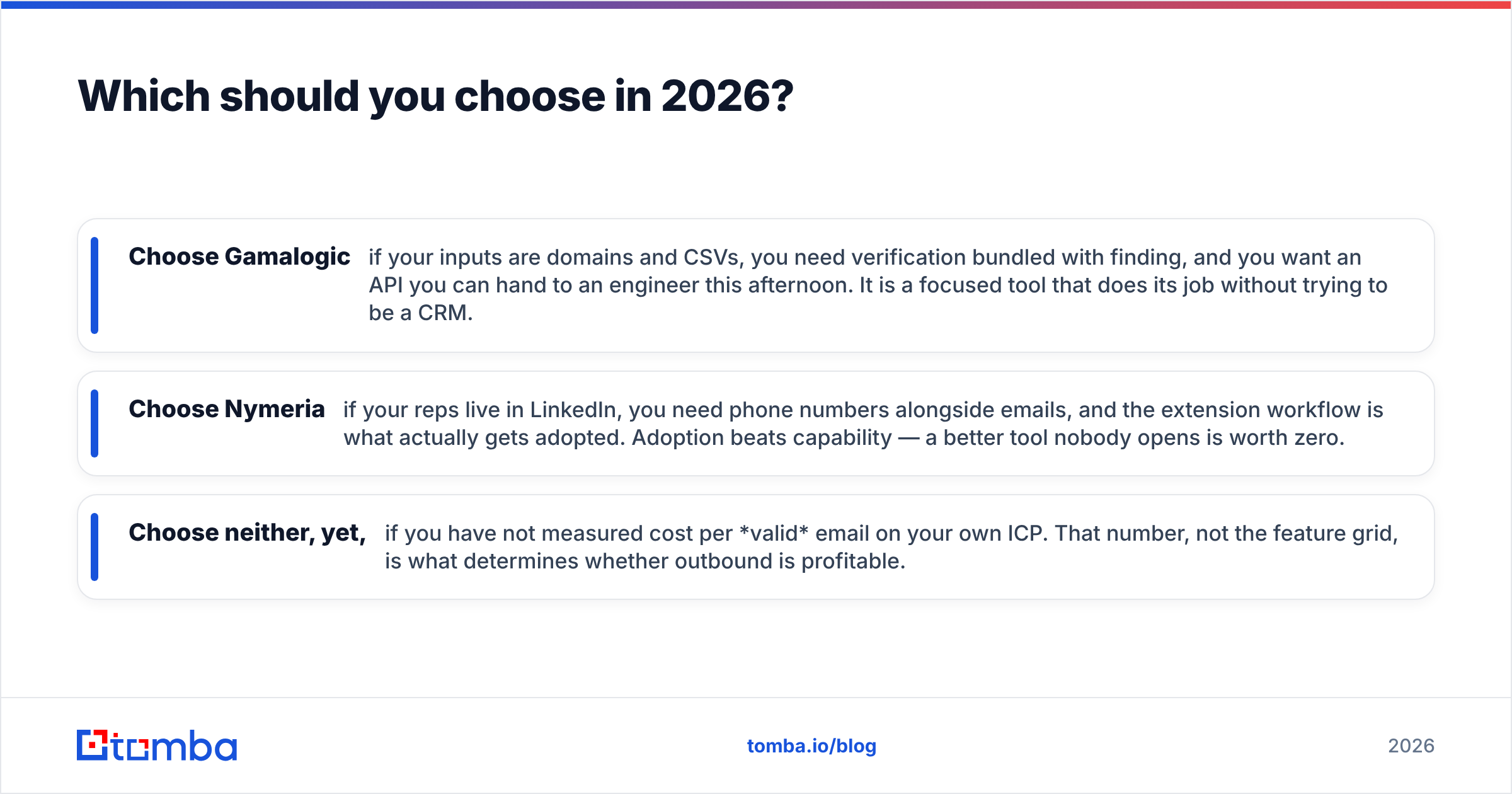
- Choose Gamalogic if your inputs are domains and CSVs, you need verification bundled with finding, and you want an API you can hand to an engineer this afternoon. It is a focused tool that does its job without trying to be a CRM.
- Choose Nymeria if your reps live in LinkedIn, you need phone numbers alongside emails, and the extension workflow is what actually gets adopted. Adoption beats capability — a better tool nobody opens is worth zero.
- Choose neither, yet, if you have not measured cost per valid email on your own ICP. That number, not the feature grid, is what determines whether outbound is profitable.
The honest position on this matchup is that Gamalogic and Nymeria rarely compete for the same buyer once you look closely. The people genuinely torn between them usually need both halves of the job — LinkedIn-sourced contacts and bulk domain enrichment, with verification that handles catch-alls instead of shrugging at them — and end up either buying two subscriptions or consolidating onto one platform that covers both.
If consolidation is where you are heading, start with the free tier and run your own bench test. Tomba's email finder gives you 25 searches a month at no cost and no card, covers domain search, LinkedIn lookups, catch-all verification, and phone data in a single credit pool, and exposes all of it through one API. Run your 200-row ICP list through it alongside Gamalogic and Nymeria trials, score cost per verified address, and let the data pick the winner instead of the feature page.
Related guides#
Ready to find emails that actually work?
Join 150,000+ professionals who stopped guessing and started sending. Free credits on signup — no credit card required.
Get the Tomba newsletter
Practical outbound tactics and product updates — once every two weeks.
About the author