Gamalogic vs UpLead 2026: Email Finder Accuracy and Pricing
Gamalogic sells cheap email verification credits. UpLead sells a 160M-contact database with filters. They solve different problems — and only one of them is right for your list. Here is the honest breakdown.
TL;DR
- These are not the same product. Gamalogic is primarily an email finder and bulk verifier you point at a list you already have. UpLead is a searchable B2B contact database you buy access to, with verification bundled in.
- UpLead wins if you have no list. Filters for industry, headcount, tech stack and intent, plus real-time verification at export, mean you build a list from zero in an afternoon.
- Gamalogic wins if you already have names and domains and just need addresses found and cleaned cheaply, especially in bulk.
- Credit economics decide the winner more than accuracy claims do. UpLead's entry plan lands around $99/mo for a modest credit allowance; Gamalogic sells cheaper credit packs but gives you no discovery layer.
- If you want both jobs — find and verify — at one price, a dedicated finder-plus-verifier stack like Tomba at $49/mo Starter is usually cheaper per usable contact than either.
What is Gamalogic and what is UpLead?#
Start with the category confusion, because it is the single most common reason teams buy the wrong one.
Gamalogic is an email discovery and validation tool. You feed it a first name, last name and company domain — or a bulk CSV of thousands of those rows — and it returns a probable business email plus a validity status. It also does standalone bulk verification of lists you already own. Its pitch is throughput and price per credit, not database size.
UpLead is a B2B contact and company database. Its core asset is a repository of roughly 160 million contacts that you search with filters: job title, seniority, industry, employee count, revenue, location, technologies used, and buyer-intent signals. Emails are verified in real time at the moment you reveal them, and UpLead markets a 95%+ accuracy guarantee with credit refunds on bounces.
The practical difference: Gamalogic assumes you know who you want. UpLead helps you decide who you want.
If you already have a scraped LinkedIn export, a conference attendee list, or a CRM full of stale records, Gamalogic-style tooling is the correct shape. If you are staring at a blank spreadsheet and a rough ICP description, a database like UpLead is the correct shape. Buying the wrong shape means paying for capability you will never open.
How do Gamalogic and UpLead actually differ?#
Here is the side-by-side on the attributes that change your workflow, not the ones that pad a feature grid.
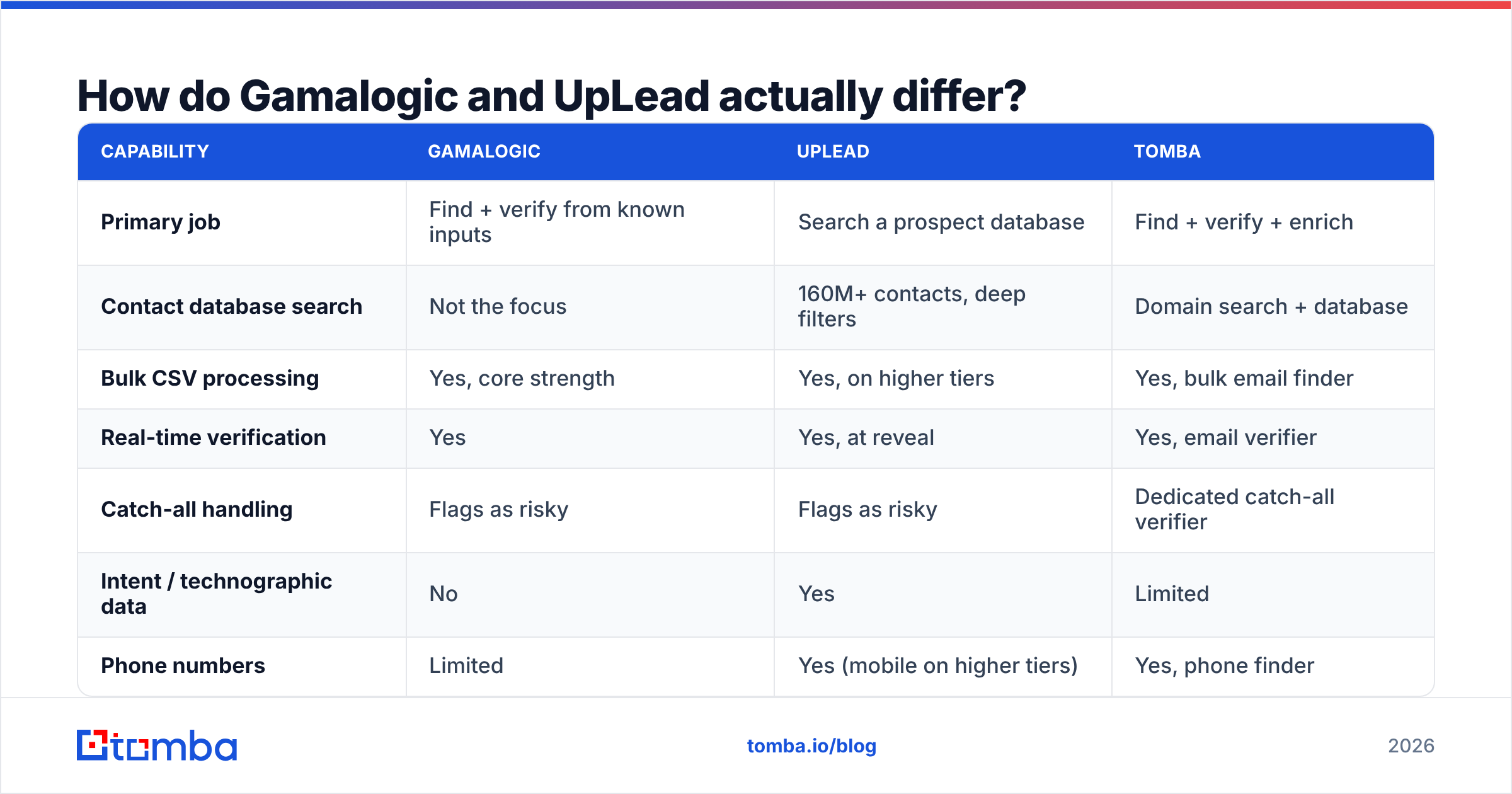
| Capability | Gamalogic | UpLead | Tomba |
|---|---|---|---|
| Primary job | Find + verify from known inputs | Search a prospect database | Find + verify + enrich |
| Contact database search | Not the focus | 160M+ contacts, deep filters | Domain search + database |
| Bulk CSV processing | Yes, core strength | Yes, on higher tiers | Yes, bulk email finder |
| Real-time verification | Yes | Yes, at reveal | Yes, email verifier |
| Catch-all handling | Flags as risky | Flags as risky | Dedicated catch-all verifier |
| Intent / technographic data | No | Yes | Limited |
| Phone numbers | Limited | Yes (mobile on higher tiers) | Yes, phone finder |
| Public API | Yes | Yes | Yes, documented Tomba API |
| Free tier | Trial credits | 5 trial credits | 25 searches/mo, no card |
| Entry paid price | Low-cost credit packs | ~$99/mo | $49/mo |
Prices and counts are list figures at the time of writing. Both vendors change packaging often — check their pricing pages before you commit to an annual term.
Two things in that table deserve more than a row.
Intent data. UpLead's intent signals are genuinely differentiating for enterprise-motion teams. If your sales cycle depends on catching accounts while they are researching, that column is worth the premium on its own. Gamalogic makes no such claim and does not pretend to.
Catch-all domains. This is where most "95% accuracy" claims quietly leak. A catch-all server accepts every address at a domain, so a naive SMTP check returns "valid" for asdfgh@company.com. Roughly a fifth of mid-market domains are catch-all. Whether a tool marks those as risky, guesses, or silently passes them through as valid changes your real bounce rate more than any headline accuracy number. Run your own test on ten known catch-all domains before you believe anyone's percentage.

Which one finds more valid emails?#
Neither vendor will lose their own benchmark, so treat both published numbers as marketing until you replicate them.
What we can say from how the two systems are built:
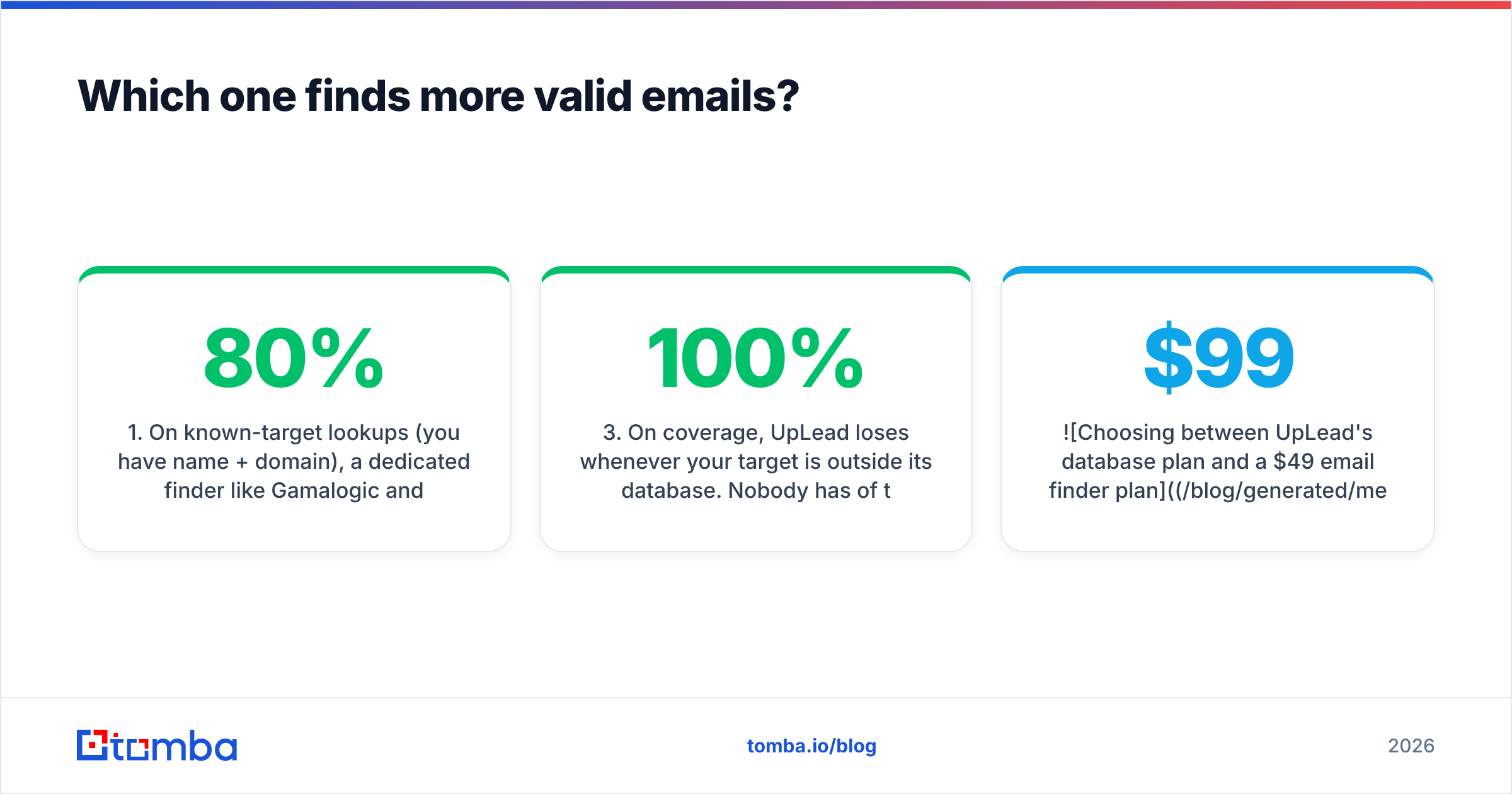
- On known-target lookups (you have name + domain), a dedicated finder like Gamalogic and a pattern-plus-verification engine like Tomba tend to converge. Both are solving the same permutation-and-validate problem, and hit rates cluster in the 60–80% band depending on company size. Small companies with no public email footprint drag every tool down.
- On database reveals, UpLead has an advantage: the address already exists in its store and was sourced, not guessed. Its verification step is confirming a known record rather than testing a hypothesis. That is why reveal-based tools post higher "valid" rates — they only show you contacts they already have.
- On coverage, UpLead loses whenever your target is outside its database. Nobody has 100% of the market. Long-tail, non-US, or sub-20-employee companies are where database tools return "no results" and finder tools still produce a candidate.
The honest framing: UpLead has higher precision on the contacts it holds; finder tools have higher recall across the whole internet. Which metric matters depends on whether your ICP is well-covered commercial territory or the long tail.
Build your own test the boring way. Take 100 rows you can independently confirm — people you have emailed, colleagues at target accounts, addresses published on company sites. Run them through each trial. Score four buckets: correct, wrong, not found, and marked-valid-but-bounced. That fourth bucket is the one that costs you sender reputation.

What do Gamalogic and UpLead cost in 2026?#
Sticker price is the least interesting number. Cost per usable, non-bouncing, actually-in-ICP contact is the number your CFO should see.
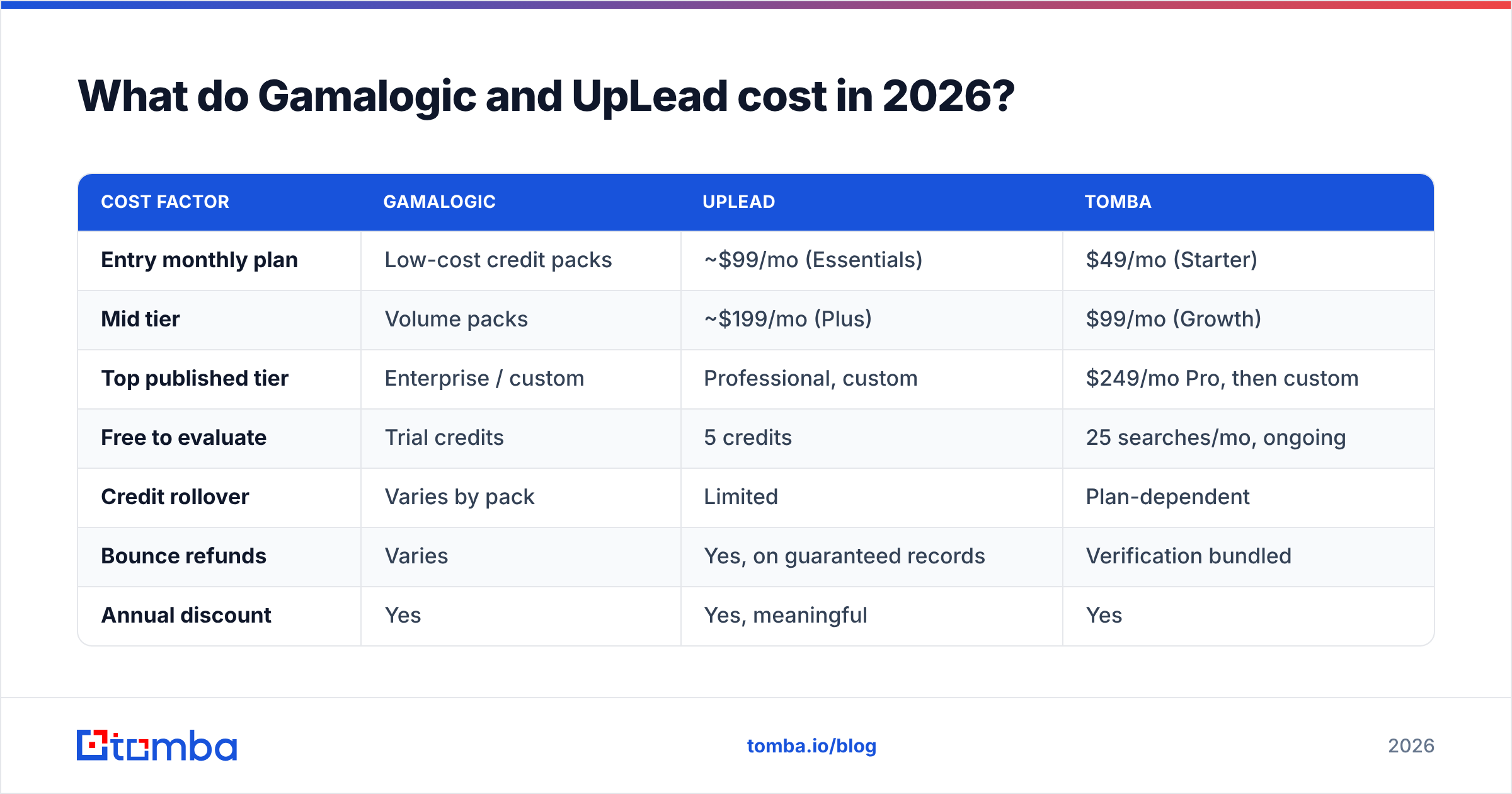
| Cost factor | Gamalogic | UpLead | Tomba |
|---|---|---|---|
| Entry monthly plan | Low-cost credit packs | ~$99/mo (Essentials) | $49/mo (Starter) |
| Mid tier | Volume packs | ~$199/mo (Plus) | $99/mo (Growth) |
| Top published tier | Enterprise / custom | Professional, custom | $249/mo Pro, then custom |
| Free to evaluate | Trial credits | 5 credits | 25 searches/mo, ongoing |
| Credit rollover | Varies by pack | Limited | Plan-dependent |
| Bounce refunds | Varies | Yes, on guaranteed records | Verification bundled |
| Annual discount | Yes | Yes, meaningful | Yes |
Three cost traps to price in:
- Credit burn on reveals you discard. With a database tool, every filter mistake costs credits. Reveal 200 contacts, realise 60 are the wrong seniority, and you paid for 200. Finder tools charge on lookups you explicitly requested, so waste is more controllable.
- Separate verification bills. If a finder's confidence flags are weak, you end up paying a second vendor to verify. That doubles your effective per-contact cost. Check whether verification is bundled or metered separately.
- Annual lock-in. UpLead's headline pricing is friendliest on annual terms. That is fine if you have validated coverage for your ICP. It is expensive if you discover in month two that half your target accounts return no results. Prove coverage on the trial first.

Who should choose Gamalogic?#
Pick Gamalogic when these describe you:
- You already own the list. Scraped exports, event attendee lists, webinar registrants, partner referrals, or a CRM you inherited. You need addresses attached and dead rows removed.
- Volume matters more than filters. You are processing tens of thousands of rows and price per credit dominates your unit economics.
- You do not need intent or technographics. Your qualification happens elsewhere — from your own product data, a partner signal, or manual research.
- Budget is tight and the workflow is batch. Upload, wait, download, load into your sequencer. No one on the team needs a UI to browse prospects in.
Where it disappoints: it will not tell you who to target. If your GTM problem is "we don't know which 500 companies to hit," a bulk verifier is answering a question you have not asked yet.
Who should choose UpLead?#
Pick UpLead when these describe you:
- You are starting from an ICP description, not a list. Filters plus intent get you from "mid-market fintechs in the US using Segment" to a downloadable list in one session.
- You need phone numbers alongside email. Multi-channel sequences with a calling component justify the higher per-contact price.
- Your reps do their own prospecting in-app. Sellers who research and build their own lists get real value from a browsable UI and a Chrome extension. Batch tools frustrate them.
- Your ICP sits in well-covered territory. US, English-speaking, 50+ employees, established industries. Database coverage is excellent here and poor at the edges.
Where it disappoints: cost per contact at low volume, and coverage gaps on small or international companies. If you get "0 results" on three of your five target segments during the trial, walk away regardless of how good the UI feels.
Where do both tools fall short?#
Every vendor in this category shares the same three structural weaknesses. Neither Gamalogic nor UpLead escapes them, and neither does Tomba.
Catch-all ambiguity. No tool can prove an address exists on a catch-all domain without sending mail. The honest answer is a risk score, not a green tick. Tools that return "valid" on catch-alls are inflating their own accuracy stat at the cost of your bounce rate. Use a dedicated catch-all verifier and treat those contacts as a separate, lower-volume send segment.
Data decay. B2B contact data rots at roughly 2–3% per month through job changes alone. A record verified in January is meaningfully worse in July. Any list you bought and did not re-verify before sending is a liability. Re-verify immediately before every campaign, not at purchase time.
Verification is not deliverability. A clean list stops hard bounces. It does not fix a missing SPF record, a cold domain, or spam-triggering copy. Teams routinely blame their data vendor for reply rates that were actually killed by email deliverability fundamentals. Check your authentication and warm your domain before you blame the data.
Compliance. If you sell into the EU or UK, GDPR applies to scraped and purchased B2B contact data. Both vendors publish compliance positions; read them, and keep suppression and opt-out handling on your side airtight. Third-party category listings on G2 are a reasonable place to sanity-check how buyers in your region actually rate each vendor's data practices.
Is there a better option than both?#
Often, yes — because most teams need the find and verify jobs done at one price, without an enterprise database commitment.
That is the gap Tomba sits in. The email finder handles name-plus-domain lookups and domain-wide discovery; verification is built into the same workflow rather than billed as a second product; and the free tier is 25 searches per month on an ongoing basis, not a five-credit trial that expires in a week.
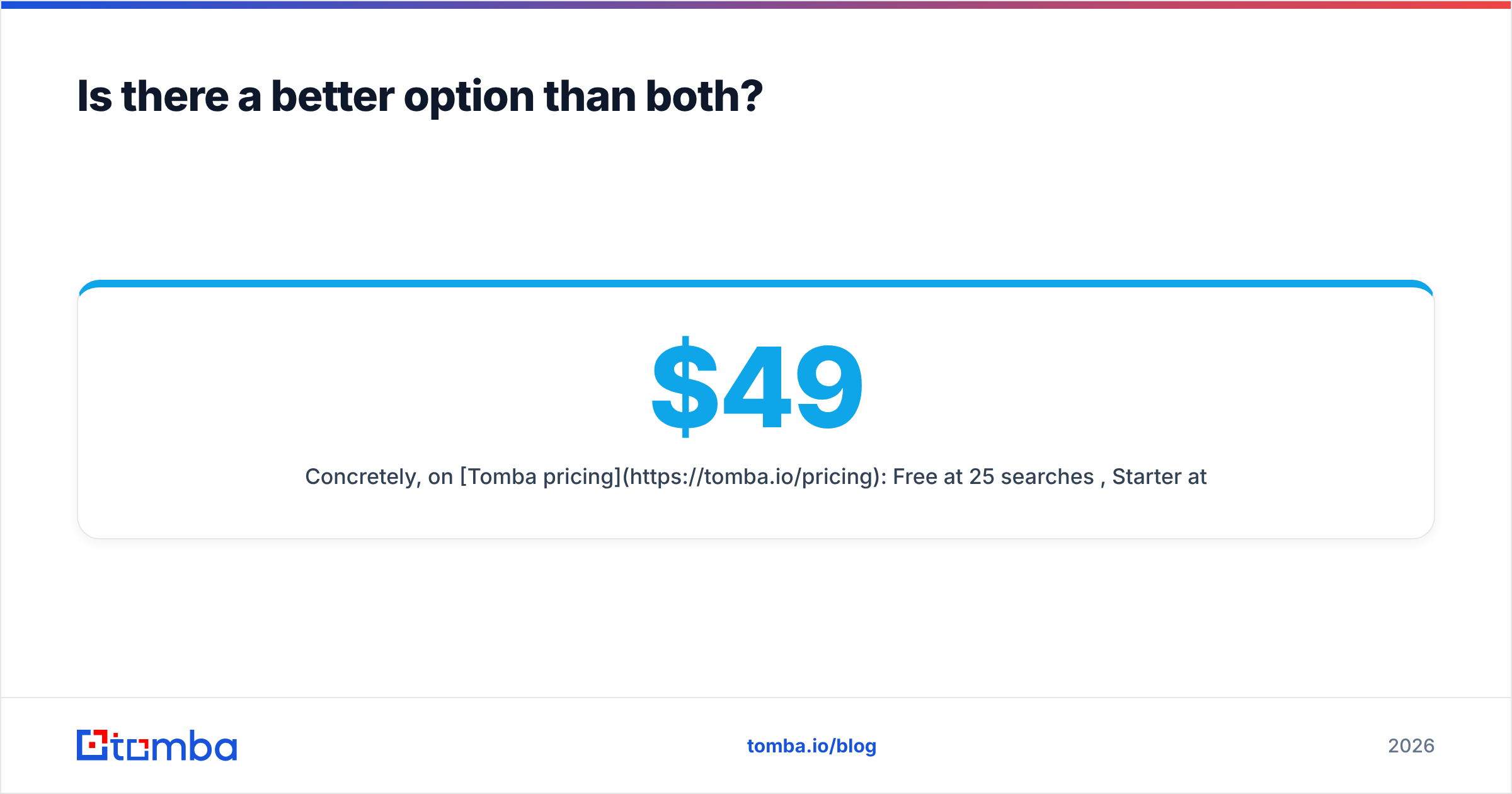
Concretely, on Tomba pricing: Free at 25 searches/mo, Starter at $49/mo, Growth at $99/mo, Pro at $249/mo, Enterprise custom. The Growth tier lands at the same price as UpLead's entry plan while covering both discovery and verification.
Where Tomba is not the right answer, stated plainly: if you need buyer-intent signals, deep technographic filtering, or a browsable database your reps live inside all day, UpLead does that job better. Pick the tool that matches the job, not the one with the friendliest pricing page.
How do you test all three in 48 hours?#
Run the same protocol against every trial. Vendor demos are designed to show you their strongest segment.
- Build a 100-row truth set. Real target accounts, mixed sizes, mixed countries, at least ten known catch-all domains. Include twenty contacts whose addresses you can independently verify.
- Run each tool on the identical file. No cherry-picking, no re-runs. Same input, same day.
- Score four buckets: found-and-correct, found-and-wrong, not-found, and marked-valid-then-bounced. Bucket four is the expensive one.
- Divide plan cost by bucket one. That is your true cost per usable contact. It is almost never the number on the pricing page.
- Send a 50-contact test campaign through a warmed domain and record actual bounce rate against each tool's predicted rate. The gap tells you how honest the confidence scoring is.
- Check ICP coverage separately. Count how many of your five target segments each tool returns meaningful volume for. A cheap tool with 40% coverage of your market is not cheap.
Forty-eight hours of this beats forty-eight days of arguing about vendor benchmark PDFs.
The verdict#
Gamalogic if you have the list and need it cleaned cheaply. UpLead if you need to build the list and can justify $99+/mo for filters, intent and phone coverage. They are complements as often as they are competitors, and plenty of teams end up running a database for discovery and a cheap verifier for hygiene.
If that two-vendor stack sounds like overhead you would rather not carry, start with a single tool that does both. Try the Tomba Email Finder free — 25 searches per month, no card required — run it against your own 100-row truth set alongside your Gamalogic and UpLead trials, and let the cost-per-usable-contact number pick the winner for you.
Related guides#
Ready to find emails that actually work?
Join 150,000+ professionals who stopped guessing and started sending. Free credits on signup — no credit card required.
Get the Tomba newsletter
Practical outbound tactics and product updates — once every two weeks.
About the author