Gazelle vs Kipplo (2026): Honest Comparison and Our Pick
Gazelle and Kipplo are both low-profile B2B contact-data vendors with thin public documentation. Here is what you can actually verify, the bake-off that settles it, and when a mainstream option is the safer call.
TL;DR
- Neither Gazelle nor Kipplo publishes the kind of documentation you would get from an established sales-intelligence vendor. Before you compare them, you have to force both to produce numbers.
- The only comparison that matters is a blind bake-off on the same 500 contacts, scored on verified-deliverable rate, not on raw "found" counts.
- Cost per usable contact — not headline price per credit — is the metric that decides this. A cheaper tool with a 60% deliverable rate is more expensive than a pricier one at 92%.
- If either vendor refuses a sample file, a written accuracy definition, or a GDPR/CCPA data-sourcing statement, that is your answer.
- For most teams, the safe default is a documented, API-first email finder with a free tier you can test without a call. That is where Tomba, and peers like BookYourData, tend to land.
Who are Gazelle and Kipplo, and why is this comparison hard?#
Start with the honest part: both of these names sit far outside the well-documented tier of B2B data tools. Unlike Apollo, ZoomInfo, or Clearbit, neither has a large public review footprint, a published data-sourcing methodology, or an openly documented API you can read before you buy. Search either on G2's sales intelligence category or Capterra's lead generation listings and you will find far less signal than you would for a mainstream vendor.
That is not automatically disqualifying. Plenty of good niche data vendors are quiet, regionally focused, or sell mainly through partners. But it changes what a comparison can honestly do. Anyone publishing a "Gazelle vs Kipplo" post with a confident feature matrix and exact per-credit pricing is almost certainly inventing it.
So this post does the useful thing instead: it gives you the evaluation framework that settles the question in about four hours of real work, the exact questions that force each vendor to reveal what they actually are, and the fallback if neither clears the bar.
If you are evaluating these two because a rep emailed you, treat this as a procurement exercise, not a shopping trip.
What should you actually compare in a B2B contact-data tool?#
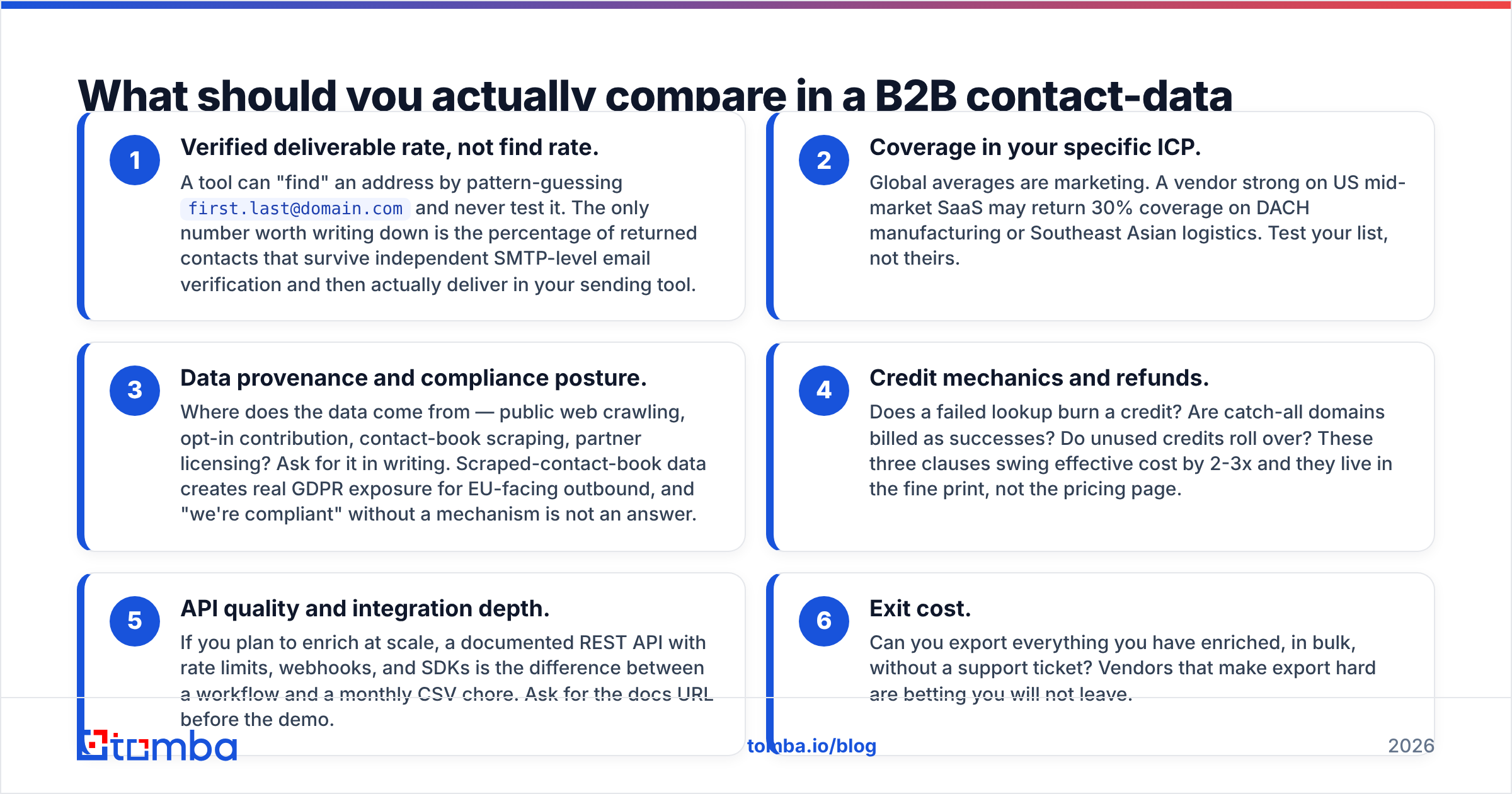
Feature lists lie. These six dimensions do not:
- Verified deliverable rate, not find rate. A tool can "find" an address by pattern-guessing
first.last@domain.comand never test it. The only number worth writing down is the percentage of returned contacts that survive independent SMTP-level email verification and then actually deliver in your sending tool. - Coverage in your specific ICP. Global averages are marketing. A vendor strong on US mid-market SaaS may return 30% coverage on DACH manufacturing or Southeast Asian logistics. Test your list, not theirs.
- Data provenance and compliance posture. Where does the data come from — public web crawling, opt-in contribution, contact-book scraping, partner licensing? Ask for it in writing. Scraped-contact-book data creates real GDPR exposure for EU-facing outbound, and "we're compliant" without a mechanism is not an answer.
- Credit mechanics and refunds. Does a failed lookup burn a credit? Are catch-all domains billed as successes? Do unused credits roll over? These three clauses swing effective cost by 2-3x and they live in the fine print, not the pricing page.
- API quality and integration depth. If you plan to enrich at scale, a documented REST API with rate limits, webhooks, and SDKs is the difference between a workflow and a monthly CSV chore. Ask for the docs URL before the demo.
- Exit cost. Can you export everything you have enriched, in bulk, without a support ticket? Vendors that make export hard are betting you will not leave.
Score both tools 1-5 on each dimension. Weight accuracy and coverage double. That single spreadsheet resolves most "which is better" arguments before the second demo call.
How do Gazelle and Kipplo compare on the criteria that matter?#
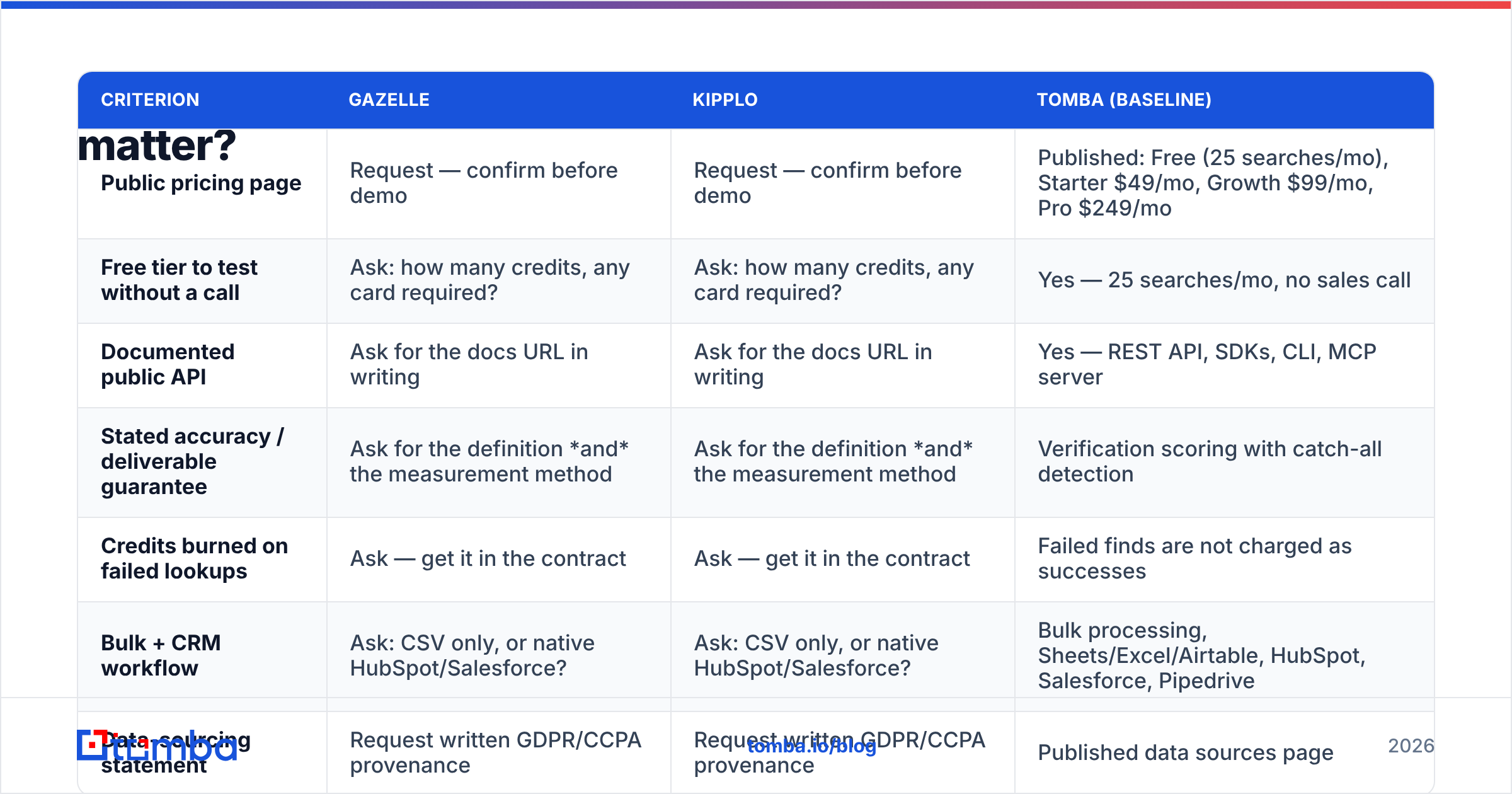
Here is the comparison table — with a rule: anything not publicly verifiable is marked as a question you must ask, not a number invented for the sake of a tidy grid. The Tomba column is included as a documented baseline so you have something concrete to measure the other two against.
| Criterion | Gazelle | Kipplo | Tomba (baseline) |
|---|---|---|---|
| Public pricing page | Request — confirm before demo | Request — confirm before demo | Published: Free (25 searches/mo), Starter $49/mo, Growth $99/mo, Pro $249/mo |
| Free tier to test without a call | Ask: how many credits, any card required? | Ask: how many credits, any card required? | Yes — 25 searches/mo, no sales call |
| Documented public API | Ask for the docs URL in writing | Ask for the docs URL in writing | Yes — REST API, SDKs, CLI, MCP server |
| Stated accuracy / deliverable guarantee | Ask for the definition and the measurement method | Ask for the definition and the measurement method | Verification scoring with catch-all detection |
| Credits burned on failed lookups | Ask — get it in the contract | Ask — get it in the contract | Failed finds are not charged as successes |
| Bulk + CRM workflow | Ask: CSV only, or native HubSpot/Salesforce? | Ask: CSV only, or native HubSpot/Salesforce? | Bulk processing, Sheets/Excel/Airtable, HubSpot, Salesforce, Pipedrive |
| Data-sourcing statement | Request written GDPR/CCPA provenance | Request written GDPR/CCPA provenance | Published data sources page |
| Public review volume | Thin | Thin | Established across major review sites |
Read the pattern rather than the cells. When a vendor's entire column is "ask," you are being asked to buy on trust. That is fine for a $49 monthly plan you can cancel. It is not fine for an annual commitment with a minimum seat count.
Two follow-ups that separate serious vendors from resellers of the same underlying database:
- "Which upstream data providers do you license from?" Many small tools are thin wrappers over one or two wholesale sources. If Gazelle and Kipplo both resell the same provider, your bake-off will show near-identical results and the decision collapses to price and support.
- "Show me a sample of 50 contacts in my ICP, before I sign anything." A vendor confident in coverage will do this. One that will not is telling you something.
How do you run a fair Gazelle vs Kipplo bake-off?#
Four hours, one spreadsheet, no ambiguity. Run it like this:
Step 1 — Build a frozen test list. Take 500 real target contacts: name, company, domain, job title. Pull them from your CRM or from LinkedIn exports of accounts you actually sell to. Do not let either vendor pick the list. Do not include contacts you already have emails for — that biases toward whichever tool has the same source as your existing data.
Step 2 — Run the same list through both tools, blind. Same day, same file, no manual cleanup between runs. Record: contacts returned, contacts marked "verified," contacts marked "catch-all" or "risky," and credits consumed.
Step 3 — Verify with a neutral third party. Never accept a vendor's own verification verdict as the score. Push every returned address through an independent email verifier so both tools are graded by the same referee. Track catch-all domains separately — they are neither pass nor fail, and vendors love to count them as finds.
Step 4 — Send a small, real campaign. Take 100 verified addresses from each tool and send a genuine, low-volume sequence from a warmed domain. Bounce rate is the ground truth. Anything above 3% means the "verified" label is decorative. If you are unsure whether your own sending setup is skewing results, fix email deliverability basics first — SPF, DKIM, DMARC, warmed domain — or you will blame the data for your infrastructure.
Step 5 — Compute cost per usable contact. The formula: total spend ÷ (contacts returned × verified rate × (1 − bounce rate)). This is the only number you should bring to the budget conversation.
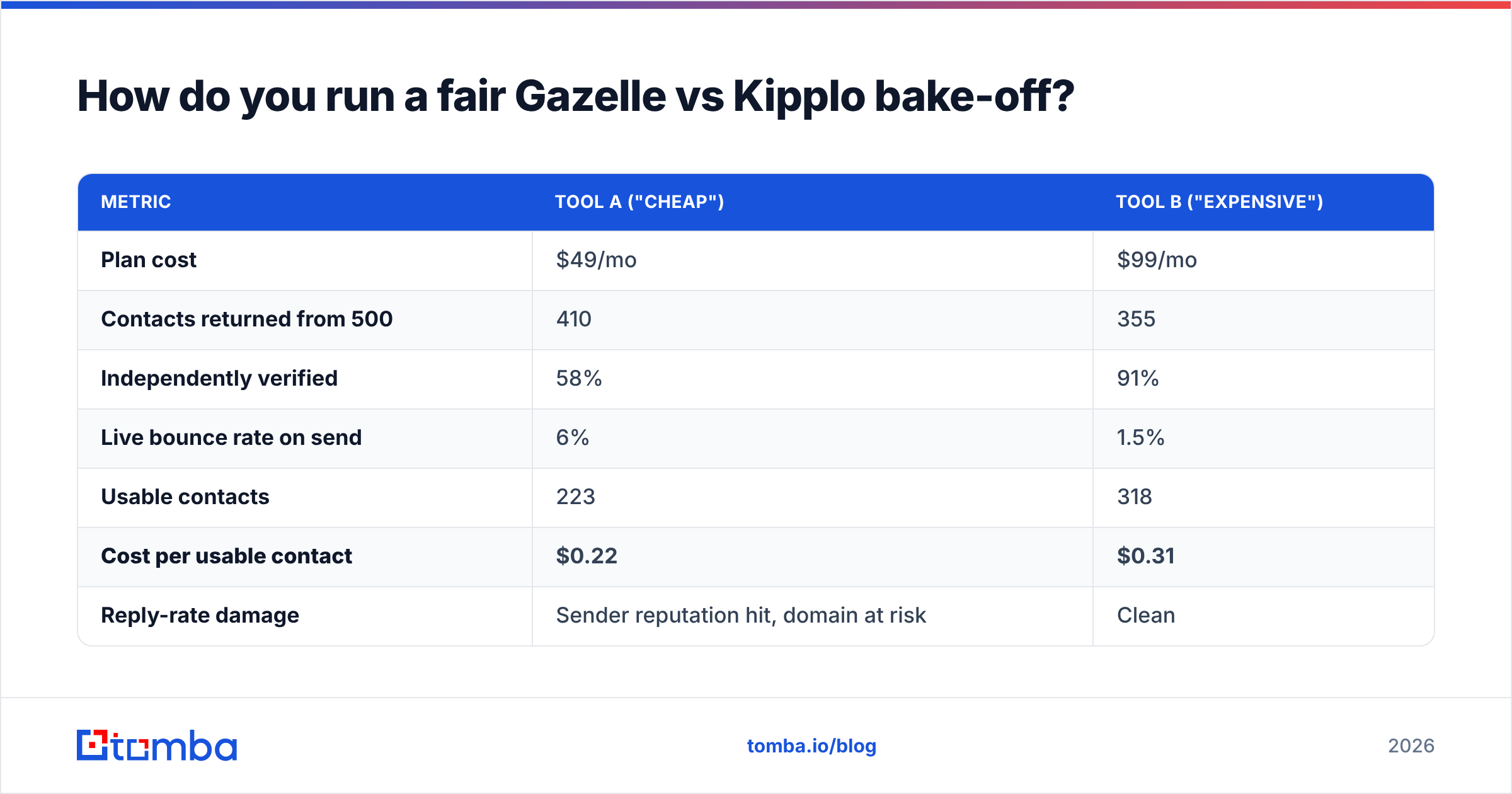
Worked example of why headline price misleads:
| Metric | Tool A ("cheap") | Tool B ("expensive") |
|---|---|---|
| Plan cost | $49/mo | $99/mo |
| Contacts returned from 500 | 410 | 355 |
| Independently verified | 58% | 91% |
| Live bounce rate on send | 6% | 1.5% |
| Usable contacts | 223 | 318 |
| Cost per usable contact | $0.22 | $0.31 |
| Reply-rate damage | Sender reputation hit, domain at risk | Clean |
Tool A looks cheaper per contact and is still the worse buy, because the 6% bounce rate degrades sender reputation across every campaign that follows. Data quality compounds. So does data damage.
What are the red flags in either vendor's sales process?#
Watch for these during evaluation. Each one has cost real teams money:
- No self-serve trial. A mandatory demo before you can see a single result usually means the product cannot survive an unsupervised test.
- Accuracy claims with no definition. "99% accurate" means nothing unless the vendor states the denominator, the verification method, and the sample. Ask: accurate against what, measured how, on how many records?
- Annual-only contracts at the entry tier. Fine for enterprise. A warning sign for a tool you have never used.
- Credits that expire monthly with no rollover, plus overage billing. This combination is designed to make you overbuy.
- Vague answers on data sourcing. If the rep cannot tell you whether the data comes from crawling, contribution, or licensing, nobody at the company is thinking about your compliance risk.
- No bulk export. Ask to see the export button during the demo. Watch what happens.
None of these are proof a vendor is bad. All of them are reasons to shorten your commitment and keep a fallback ready.
Is there a safer default if neither clears the bar?#
Yes — and this is the practical outcome for most teams running this evaluation.
If Gazelle and Kipplo both come back with thin documentation, no free tier, and reluctance to share a sample, the sensible move is to run your outbound on a documented, API-first tool while you keep evaluating. You lose nothing: the test list you already built transfers directly.
What "documented and API-first" looks like in practice:
- A real free tier. Tomba's free plan includes 25 searches per month with no sales call, which is enough to run a coverage spot-check on your ICP the same afternoon.
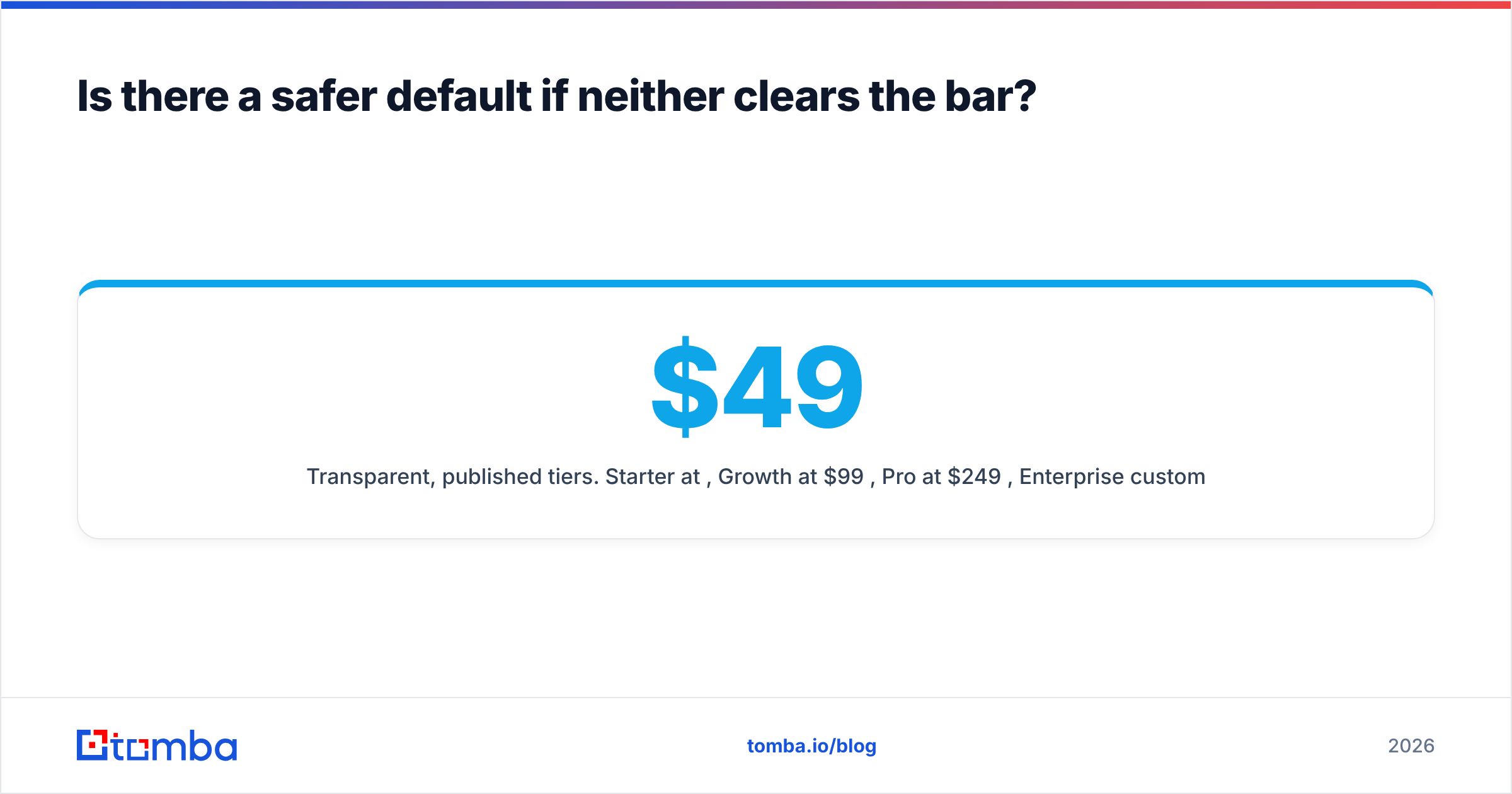
- Transparent, published tiers. Starter at $49/mo, Growth at $99/mo, Pro at $249/mo, Enterprise custom — visible on the Tomba pricing page before you talk to anyone.
- Find and verify in one place. The email finder locates addresses by name and domain; verification, catch-all handling, and domain-wide search sit alongside it rather than requiring a second vendor.
- Workflow integrations that are not CSV-only. Sheets, Excel, Airtable, HubSpot, Salesforce, Pipedrive, plus a documented API for anything custom.
- Peer options worth including in the same bake-off. BookYourData is a solid, well-established comparison point if you want a third column in your test — running three vendors costs barely more than running two, and it makes your accuracy numbers far more meaningful.
The broader point holds regardless of which tool you pick: HubSpot's sales research consistently shows that pipeline quality tracks data quality more tightly than it tracks activity volume. Sending more emails to worse addresses does not scale.
Gazelle vs Kipplo: which should you actually pick?#
The honest verdict: you cannot decide this from public information, and neither can anyone else. Any post that hands you a winner without a bake-off is guessing.
Here is the decision rule that works:
- Pick whichever one gives you a no-call trial first. That single willingness correlates strongly with product confidence.
- If both offer trials, run the 500-contact test and pick on cost per usable contact. Not on find rate. Not on the demo.
- If neither offers a trial, do not sign an annual contract. Negotiate a one-month paid pilot with a written accuracy definition and an exit clause, or move on.
- If both fail the pilot, you already have your fallback list built. Point it at a documented alternative and get back to selling.
Whatever you choose, keep verification separate from sourcing. Grading a vendor with its own scorecard is how teams end up with a 12% bounce rate and a burned domain.
Ready to run the test? Start with the Tomba Email Finder — the free tier gives you 25 searches a month with no sales call, which is enough to benchmark your ICP against whatever Gazelle or Kipplo return before you commit a dollar to either. Bring the same 500-contact list, score all three on verified deliverable rate, and let the numbers decide.
Related guides#
Ready to find emails that actually work?
Join 150,000+ professionals who stopped guessing and started sending. Free credits on signup — no credit card required.
Get the Tomba newsletter
Practical outbound tactics and product updates — once every two weeks.
About the author