How to Generate Email Addresses That Actually Deliver in 2026
Generating email addresses is guesswork until you verify. Here is the pattern math, the bounce risk, and the 2026 tool costs — with a workflow that keeps your domain safe.
TL;DR — here is how to generate email addresses that actually land.
- To generate email addresses means to build a likely address from a name plus a domain. It is a guess, not a lookup.
- About eight patterns cover most B2B inboxes. A raw guess list still bounces hard. Expect 40–70% of it to be invalid.
- It is cheap and fast to generate email addresses. Checking them is what makes them usable.
- Never send to a guessed address that has not passed an SMTP check.
- Catch-all domains break simple checks. They accept every address, so they need their own workflow.
- The 2026 rule: search a real dataset first, generate email addresses only as a fallback, then verify every one.
What does it mean to generate email addresses?#
To generate email addresses means to build a candidate from parts you already know. You need a first name, a last name, and a company domain. Then you apply the name format that company uses. Look at john.smith@acme.com, jsmith@acme.com, and john@acme.com. Same person, three guesses, one of them is probably real.
Finding an email is a different job. A finder searches a stored dataset of addresses that were seen in public — crawled pages, code repos, press releases, signatures. A generator only builds a string that might exist.
The email address spec allows a huge range of local parts. But most IT teams pick one of a handful of formats. That is the only reason you can generate email addresses at all.
Here is the honest ranking of methods, best first:
- Direct source — the address is published on a site, a paper, a commit, or an event page. Best confidence, zero guessing.
- Dataset lookup — a vendor has already seen and stored the address. Strong confidence, often with a source link.
- Known company format — you know Acme uses
first.last, so you apply it. Strong when the sample size is large. - Blind guessing — you know nothing, so you build 8–20 variants and test them all. It works, but it creates most of the bounce risk.
- Role address —
info@,sales@,contact@. It will deliver. The person you want will rarely read it. - Guessing with no check — this is not a method. This is how domains get blocked.
The rule is simple. Use method 3 or 4 only after 1 and 2 have failed for that contact.

Which patterns should you use to generate email addresses?#
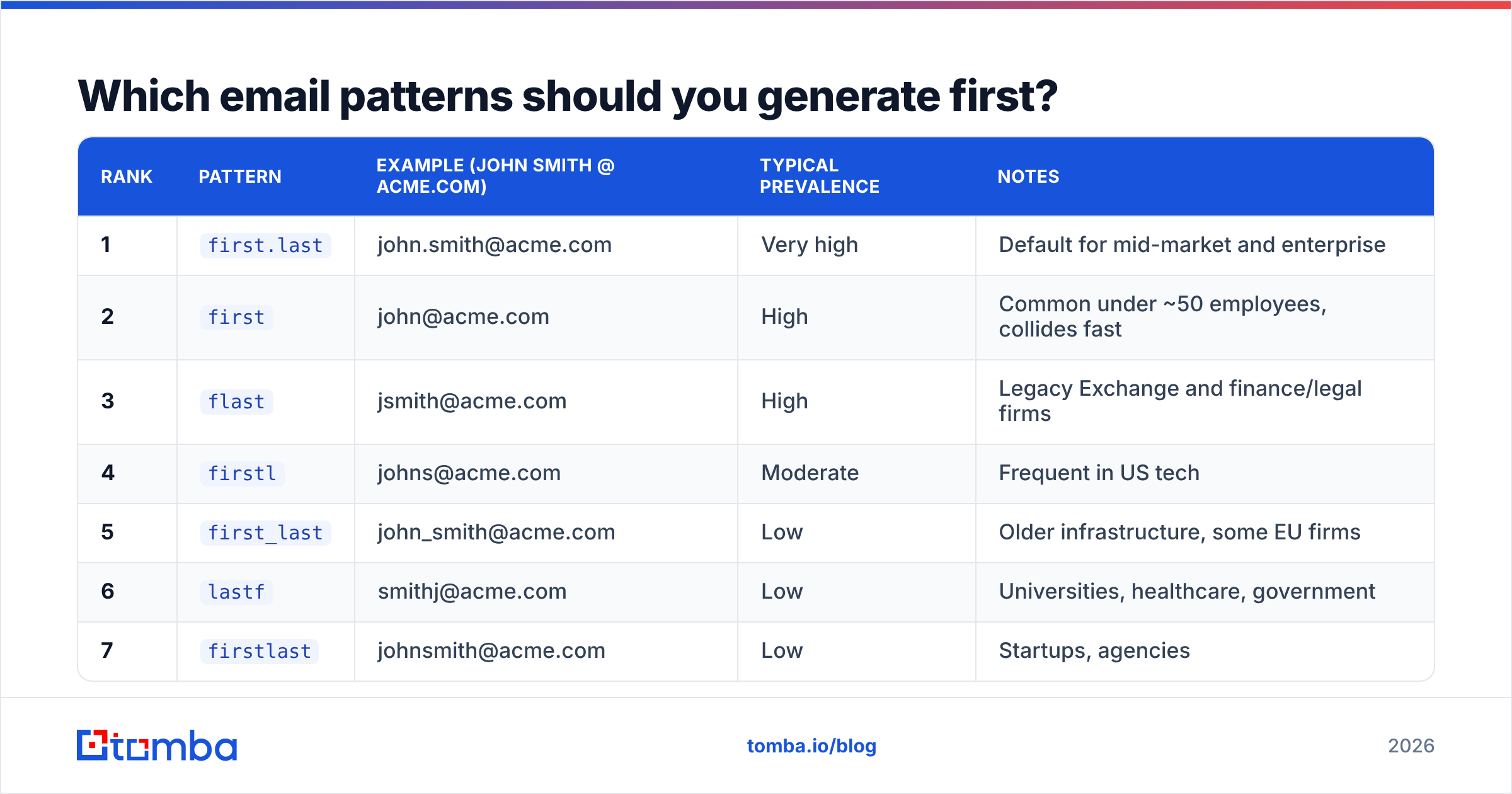
Company email formats cluster tightly. A short ranked list covers most mailboxes at most B2B domains. Order matters. Every extra candidate you test costs a credit and adds SMTP noise.
| Rank | Pattern | Example (John Smith @ acme.com) | Typical prevalence | Notes |
|---|---|---|---|---|
| 1 | first.last |
john.smith@acme.com | Very high | Default for mid-market and enterprise |
| 2 | first |
john@acme.com | High | Common under ~50 employees, collides fast |
| 3 | flast |
jsmith@acme.com | High | Legacy Exchange and finance/legal firms |
| 4 | firstl |
johns@acme.com | Moderate | Frequent in US tech |
| 5 | first_last |
john_smith@acme.com | Low | Older infrastructure, some EU firms |
| 6 | lastf |
smithj@acme.com | Low | Universities, healthcare, government |
| 7 | firstlast |
johnsmith@acme.com | Low | Startups, agencies |
| 8 | f.last |
j.smith@acme.com | Low | Common in DACH and France |
Two things shorten this list fast.
First, confirm the company format from one known employee. Then you can skip guessing and apply that single format across the whole org. That is why a company email pattern check should be step one.
Second, watch out for accents, hyphens, and middle initials. They break simple tools. A contact named María López-García may sit at mlopez@, maria.lopezgarcia@, or maria.lopez@. It depends on how IT handled the accent.
Want to build the list by hand for one contact? An email permutator does the string work in a second. That is the cheap part. The money and the risk both sit in the next step.
Why do bounces spike when you generate email addresses?#
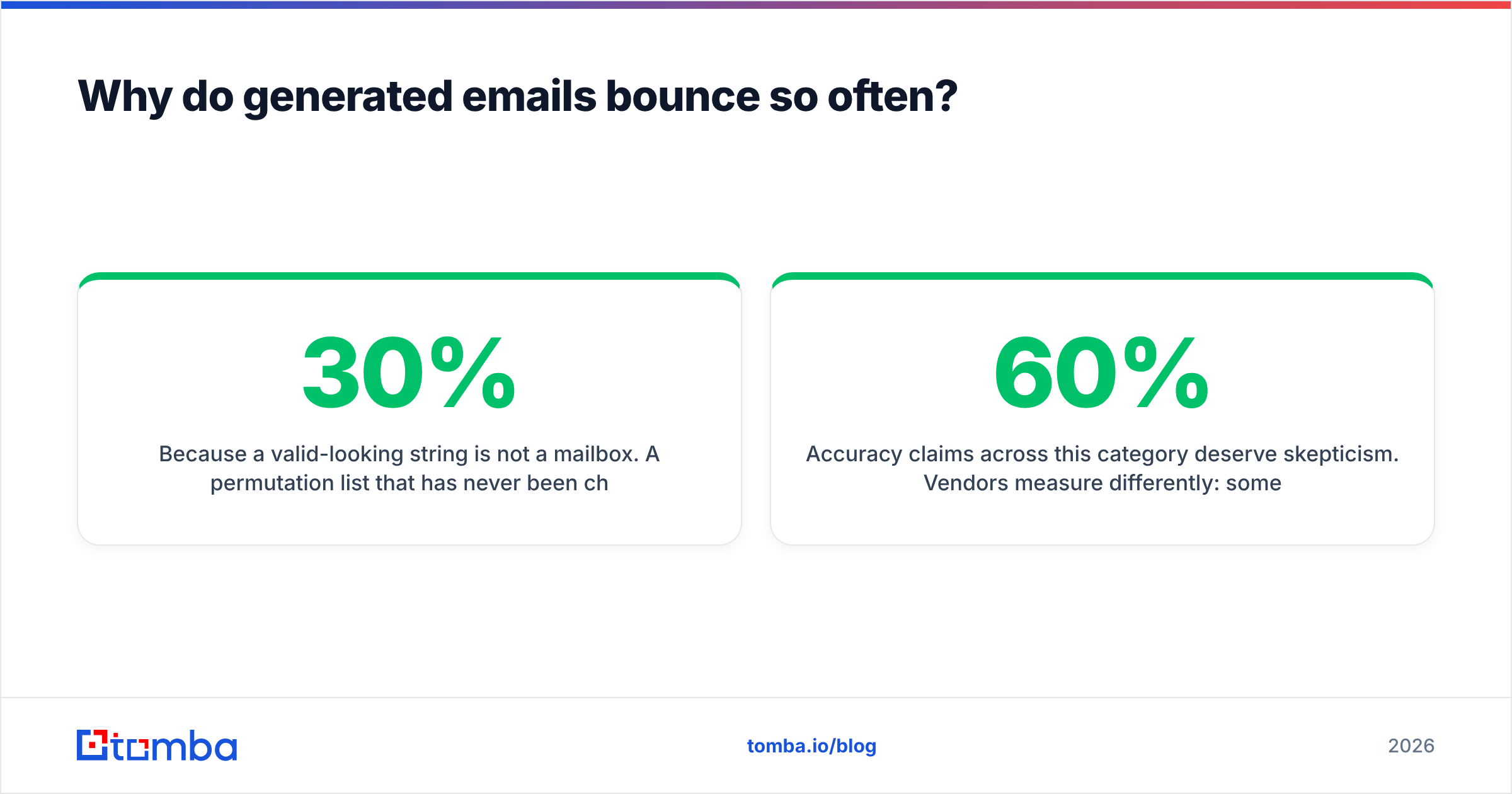
Because a valid-looking string is not a mailbox. A guess list that has never been checked is often only 30% to 60% valid. The invalid half is not harmless. Hard bounces are the fastest way to wreck your sender reputation. Mailbox providers read a spike in unknown-user rejects as a spam signal. Good copy does not save you.
Four failure modes cause almost all of it:
- The person left. The format was right. The mailbox was closed six months ago. Vendors with fresh data catch this. Guesswork never does.
- The company changed domains. After a merger,
@oldco.commay still answer but reject new mail. - The format is right, but the name is taken. Two John Smiths means one of them is
john.smith2@orjsmithb@. - The domain is catch-all. Every candidate you test "accepts." You cannot tell which one is real. Sending to all of them is how you hit a spam trap.

Treat accuracy claims with care. Vendors measure them in different ways. Some report the deliverable rate on results they return. That looks great if they return very few. Others report coverage. That looks great if they return junk.
One number matters for your pipeline: valid addresses per 100 target contacts. It is coverage and accuracy multiplied. A tool that finds 60% of your list at 95% valid beats one that finds 90% at 60% valid. Every time.
Generate email addresses, find them, or verify them?#
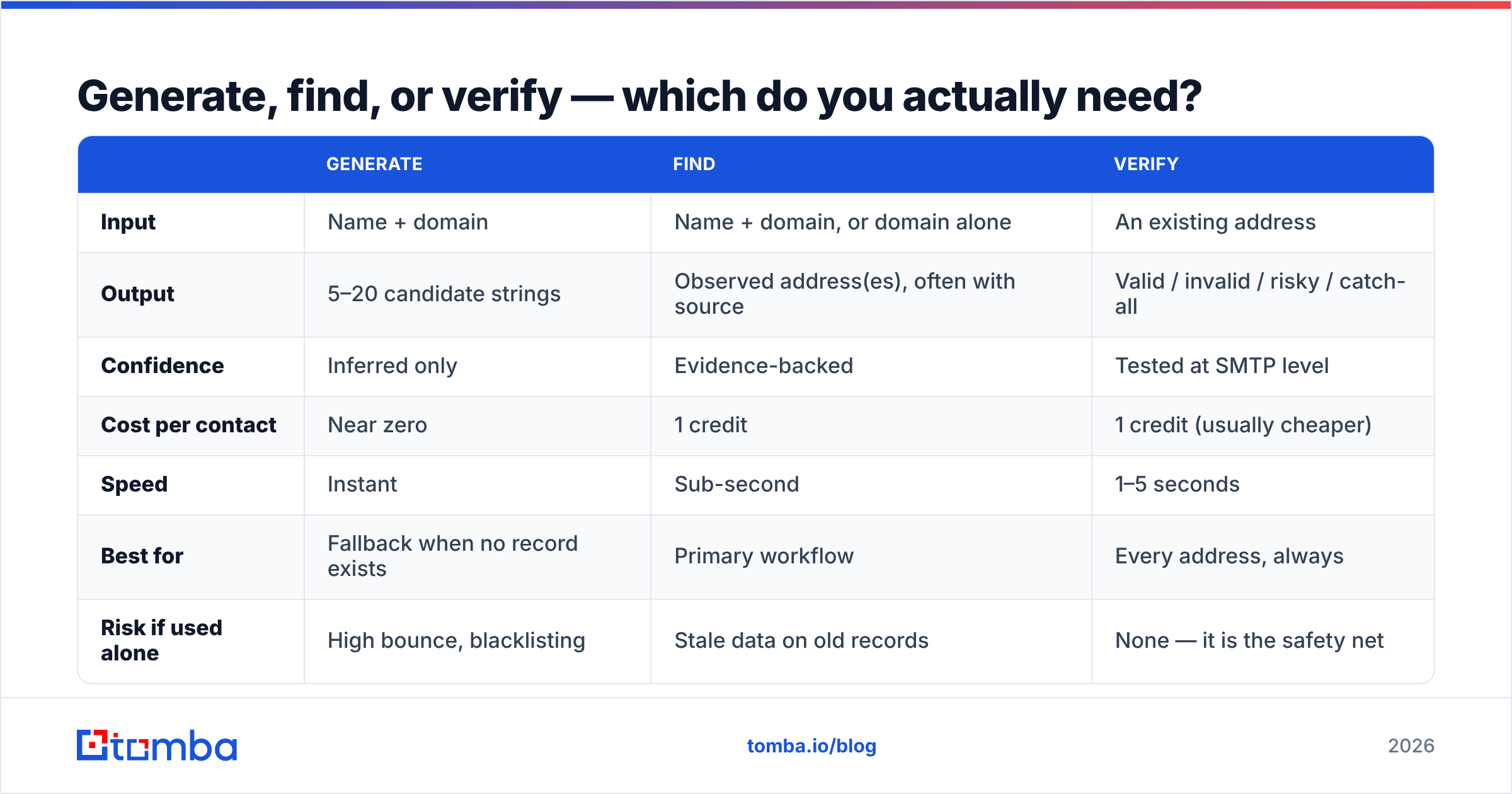
These are three different jobs. Buying the wrong one is the most common mistake in this category.
| Generate | Find | Verify | |
|---|---|---|---|
| Input | Name + domain | Name + domain, or domain alone | An existing address |
| Output | 5–20 candidate strings | Observed address(es), often with source | Valid / invalid / risky / catch-all |
| Confidence | Inferred only | Evidence-backed | Tested at SMTP level |
| Cost per contact | Near zero | 1 credit | 1 credit (usually cheaper) |
| Speed | Instant | Sub-second | 1–5 seconds |
| Best for | Fallback when no record exists | Primary workflow | Every address, always |
| Risk if used alone | High bounce, blacklisting | Stale data on old records | None — it is the safety net |
The right setup is a waterfall. Search first. Generate email addresses only for the misses. Then verify both sets.
Making guesswork your main method flips the cost structure. You save a few cents on lookups. You pay it back tenfold in lost deliverability.
What tools generate email addresses and verify them in 2026?#
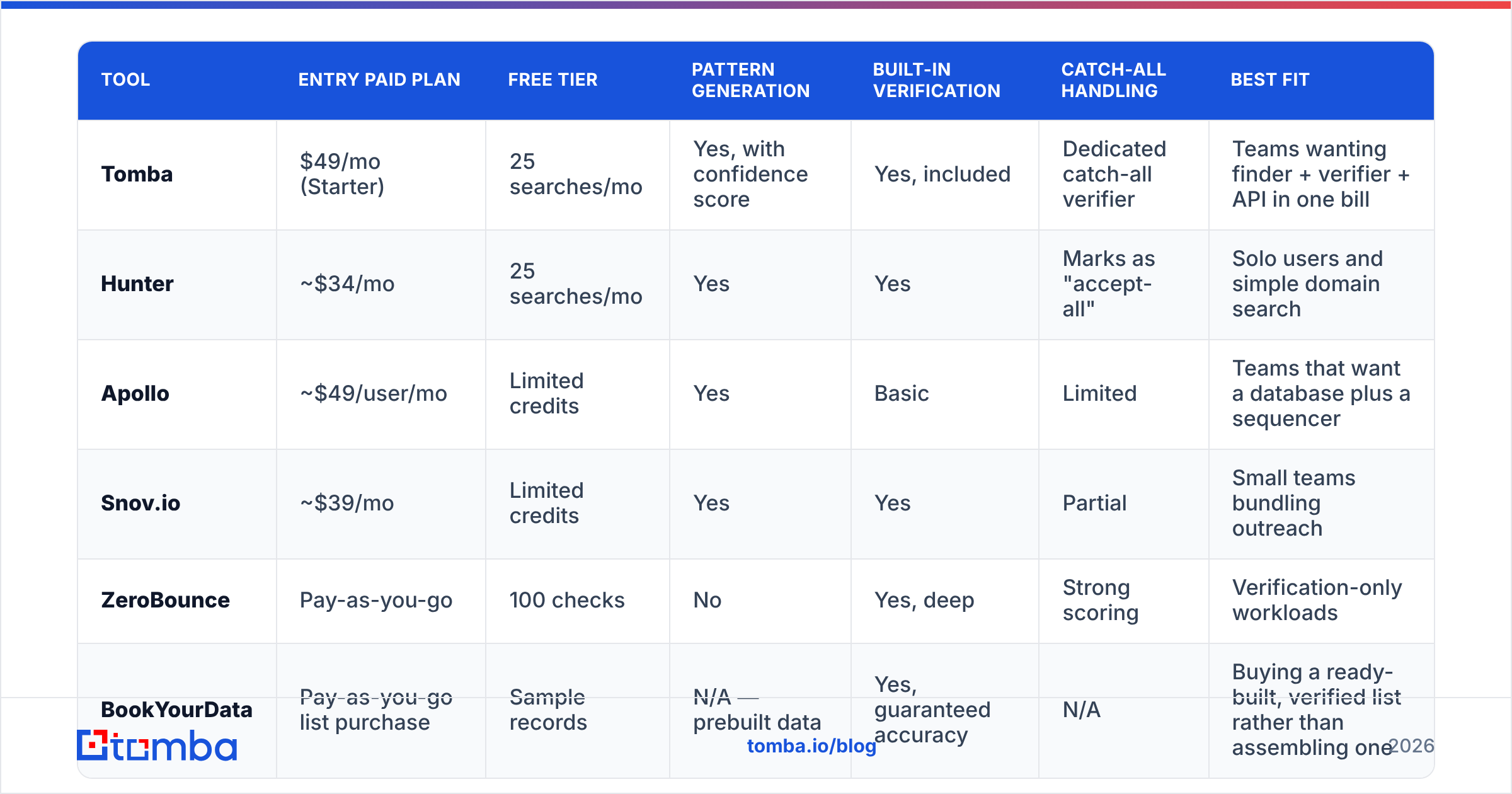
Most serious tools now bundle generation, search, and checks in one product. Here is how the main options compare on the things that decide a purchase. Prices are list prices today and change often. Check each vendor before you buy.

| Tool | Entry paid plan | Free tier | Pattern generation | Built-in verification | Catch-all handling | Best fit |
|---|---|---|---|---|---|---|
| Tomba | $49/mo (Starter) | 25 searches/mo | Yes, with confidence score | Yes, included | Dedicated catch-all verifier | Teams wanting finder + verifier + API in one bill |
| Hunter | ~$34/mo | 25 searches/mo | Yes | Yes | Marks as "accept-all" | Solo users and simple domain search |
| Apollo | ~$49/user/mo | Limited credits | Yes | Basic | Limited | Teams that want a database plus a sequencer |
| Snov.io | ~$39/mo | Limited credits | Yes | Yes | Partial | Small teams bundling outreach |
| ZeroBounce | Pay-as-you-go | 100 checks | No | Yes, deep | Strong scoring | Verification-only workloads |
| BookYourData | Pay-as-you-go list purchase | Sample records | N/A — prebuilt data | Yes, guaranteed accuracy | N/A | Buying a ready-built, verified list rather than assembling one |
The table cannot carry every detail. Pay-as-you-go vendors like ZeroBounce are very good at their one job. Pair one with any finder if you run high volume.
BookYourData sits in a different lane. If your ask is "hand me 5,000 verified CFOs in manufacturing," a ready-built list beats any guess tool. If your ask is "resolve these 200 names I already have," it does not. Apollo's value is the sequencer next to the data, not the accuracy per contact.
Read the credit rules closely. Some vendors charge a credit for a search that returns nothing. Others only charge for a hit. Ask before you commit.
Tomba pricing runs Free (25 searches a month), Starter at $49/mo, Growth at $99/mo, and Pro at $249/mo. Checks are included rather than billed on the side. That matters once you verify every candidate you build.

How do you check a guessed address without burning your domain?#
Never test candidates by emailing them. That is the whole point of a verifier. It runs the handshake without sending a message.
A solid check runs these layers in order:
- Syntax check — kills typos and broken local parts for free.
- Domain and MX check — confirms the domain can receive mail at all. Dead domains stop here.
- Throwaway and role check — flags
info@,noreply@, and burner domains so you can route them apart. - SMTP mailbox probe — asks the receiving server if the mailbox exists, then hangs up before sending.
- Catch-all check — tests a fake address on the same domain. If that "accepts" too, the SMTP result means nothing.
- Risk score — rolls all of it into valid, invalid, or risky, plus a confidence number you can set a cut-off on.
Run every candidate through an email verifier before it enters your sequencer. Keep your list bounce rate under 2%. Above 3%, providers start to throttle you. No subject line rewrite fixes that. The email deliverability basics are worth an hour of your time.
What do you do about catch-all domains?#
Catch-all domains are where guesswork quietly fails. The server accepts mail for every local part. So asdkjh12@company.com looks as valid as john.smith@company.com. Build 12 candidates for one person there and you get 12 "valid" hits. None of them is proof.
Three responses work:
- Do not send to all of them. Pick one. Use the most common format for that company, ideally confirmed by a colleague's address.
- Use a catch-all workflow. A catch-all verifier ranks candidates with other signals, such as past engagement and provider behavior.
- Send from a separate domain. Keep the risk apart, so a test on 200 unsure addresses cannot hurt your main domain.
Catch-alls are common in large firms and in security-minded industries. Writing them off means writing off part of your market. Treat them as their own segment with their own rules.
What does a clean workflow to generate email addresses look like?#
Here is the order that keeps volume high and bounces low:
- Resolve the domain. Company name to website, then website to the real mail domain. Rebrands break this step more often than people expect.
- Detect the format once per company. Pull two or three known staff, read the format, and cache it. One check replaces dozens of per-contact guesses.
- Search before you generate. Query a real dataset by name and domain. A sourced record beats anything you built. A domain search also shows colleagues you did not know to ask for.
- Generate email addresses only for the misses. Apply the cached format first. Then fall back to the top three variants.
- Verify everything, found addresses included. Records go stale. A hit from six months ago is a guess with better odds.
- Sort by confidence. Valid goes to the main sequence. Risky and catch-all go to a small, isolated test. Invalid gets deleted, not "tried once just in case."
- Feed results back. Log the format that worked per domain and reuse it. Your accuracy compounds over quarters.
Above a few hundred contacts, run this loop through an API or a bulk job rather than a browser tab. A bulk email finder or the Tomba API turns a two-day chore into a scheduled job.
Is it legal to generate email addresses?#
It is not illegal to build a business email address. What you do next is regulated.
Under GDPR, a work email tied to a named person is personal data. You need a lawful basis, and for B2B that is usually legitimate interest. You also need real relevance to the person's role, a clear sender identity, and a working opt-out.
CAN-SPAM in the US is softer on consent. It is strict on honest headers, a postal address, and fast unsubscribes. CASL in Canada is stricter than both. In practice it asks for consent or a documented business relationship.
Two guardrails help. Do not generate email addresses for consumers or personal mailboxes. And keep a note of why each contact fits your offer.
Analysts like Gartner have said for years that untargeted outbound keeps losing ground. The safe move and the effective move point the same way. When you compare vendors, third-party reviews in G2's sales intelligence category read faster than any vendor compliance page. Cross-check them against the vendor's stated data sources.
Where should you start?#
Invert the default. Most teams guess first and check never. Teams with 1% bounce rates do the opposite. They search first, generate email addresses as a narrow fallback, and verify every address before it reaches a sequencer.
Guesswork is a useful tool with one job: filling gaps a dataset could not. It is a poor main strategy.
Want that waterfall in one place? Run your list through the Tomba Email Finder. It searches an indexed dataset first. If no record exists, it will generate email addresses from known patterns with a confidence score. Then it verifies the result before handing it back.
So what lands in your CRM is a checked address, not a hopeful string. The free tier gives you 25 searches a month. Test it on contacts whose answer you already know. That is the only benchmark that tells you anything.
Related guides#
Ready to find emails that actually work?
Join 150,000+ professionals who stopped guessing and started sending. Free credits on signup — no credit card required.
Get the Tomba newsletter
Practical outbound tactics and product updates — once every two weeks.
About the author