How to Generate Email Leads in 2026: A Complete Playbook
Most teams generate email leads the expensive way: scraping volume, skipping verification, then burning a sending domain. Here is the channel-by-channel breakdown, real cost per lead, and the sequence that actually holds up.
TL;DR
- The bottleneck in generating email leads is almost never volume. It is match rate, verification, and whether the lead fits your ICP.
- Inbound capture produces the highest-intent email leads but the slowest ramp. Outbound sourcing produces volume in days but needs a verification layer or your domain pays for it.
- Expect $0.15–$0.60 per verified B2B email lead when you source it yourself, versus $2–$8 per lead from paid inbound channels.
- A 4-step build (define ICP → source → verify → enrich) beats a 40,000-row scraped list every single time on reply rate.
- Verification is not optional. Lists older than 90 days decay roughly 2–2.5% per month as people change jobs.
What is an email lead, and what isn't?#
An email lead is a business contact where you have three things: a working email address, enough context to write a relevant first line, and a plausible reason that person cares about your product. Miss any one of those and you have a row in a spreadsheet, not a lead.
That distinction matters because most "lead generation" advice conflates three separate jobs:
- Identifying accounts — deciding which companies match your ideal customer profile (industry, headcount, tech stack, funding stage, geography).
- Identifying people — finding the specific human inside that account who owns the problem you solve.
- Resolving contact data — turning "Sara Nakamura, VP Ops at Acme" into a deliverable mailbox plus supporting context.
- Confirming deliverability — proving the mailbox accepts mail before you send to it.
Teams that skip step 1 and start at step 3 end up with big lists and 1% reply rates. Teams that do steps 1 and 2 well can send 200 emails a week and beat a competitor sending 5,000.
Why do most email lead lists underperform?#
Three failure modes account for nearly all of it.
Decay. B2B contact data goes stale fast. Job changes, role changes, company mergers, and mailbox retirements chew through a list continuously. A list you built in January and mail in June is not the list you built. Industry estimates for B2B database decay cluster around 22–30% per year, which is roughly 2–2.5% a month, and it is worse in high-churn functions like sales and marketing.
Guessed patterns. Plenty of tools "generate" emails by permuting first.last@domain.com and shipping the guess. That works for the two or three most common patterns and silently fails everywhere else. If your provider does not tell you why it believes an address is real, you are buying permutations with a confidence score painted on.
Catch-all confusion. A growing share of corporate domains accept everything at the SMTP layer and sort it out internally. Standard verification returns "accepted" for a mailbox that does not exist. Then you send, the mail lands nowhere or in a quarantine queue, and your engagement metrics quietly rot. This is why a dedicated catch-all verifier matters more in 2026 than it did in 2020.

The economics are brutal but simple. If 30% of your list bounces, you did not just waste 30% of your sends. You damaged the sender reputation that governs the other 70%.
Which channels generate email leads fastest?#
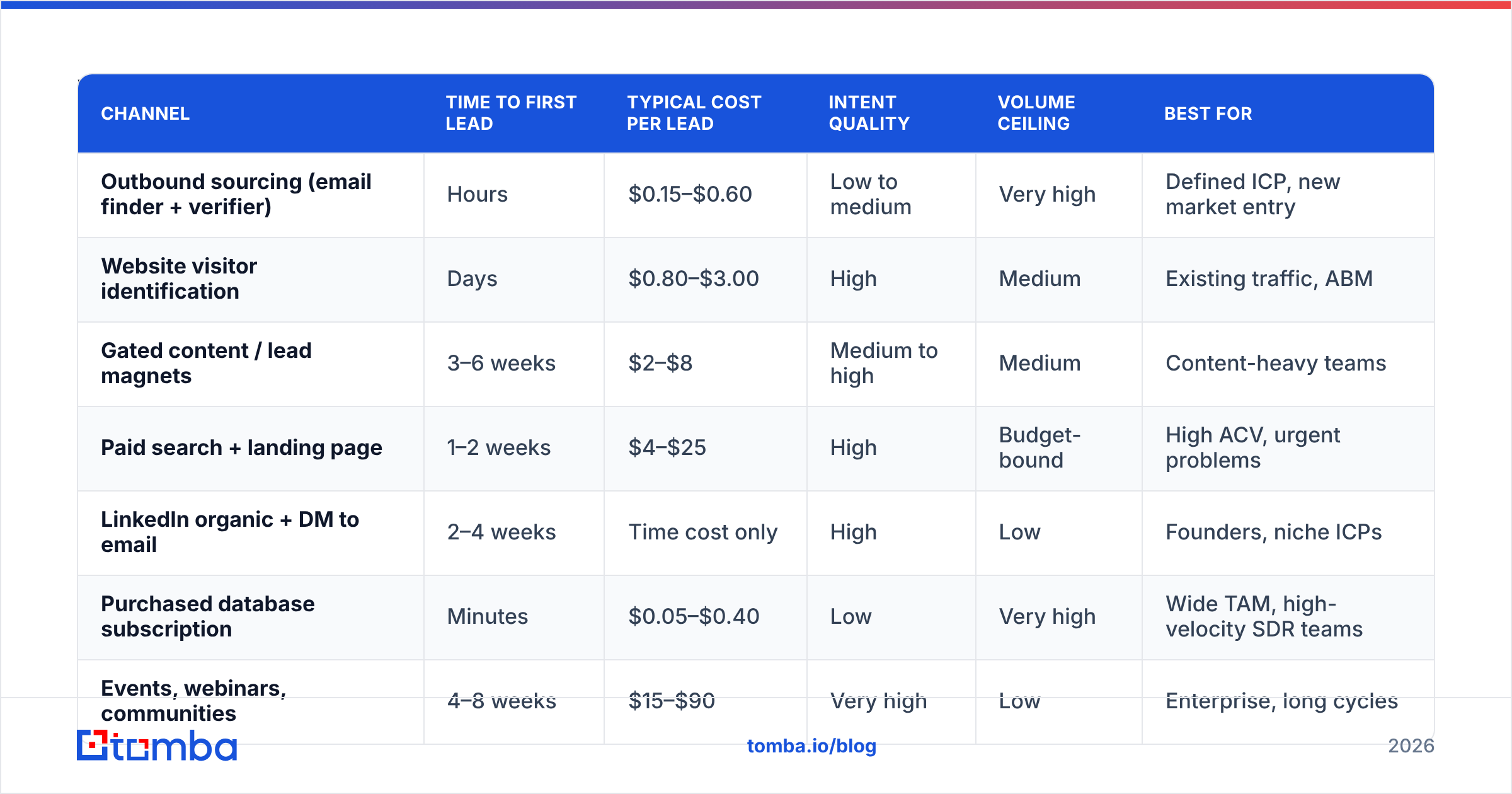
There is no single best channel. There is a best channel for your ramp time, budget, and ICP density. Here is how the main options compare on the metrics that actually decide your quarter.
| Channel | Time to first lead | Typical cost per lead | Intent quality | Volume ceiling | Best for |
|---|---|---|---|---|---|
| Outbound sourcing (email finder + verifier) | Hours | $0.15–$0.60 | Low to medium | Very high | Defined ICP, new market entry |
| Website visitor identification | Days | $0.80–$3.00 | High | Medium | Existing traffic, ABM |
| Gated content / lead magnets | 3–6 weeks | $2–$8 | Medium to high | Medium | Content-heavy teams |
| Paid search + landing page | 1–2 weeks | $4–$25 | High | Budget-bound | High ACV, urgent problems |
| LinkedIn organic + DM to email | 2–4 weeks | Time cost only | High | Low | Founders, niche ICPs |
| Purchased database subscription | Minutes | $0.05–$0.40 | Low | Very high | Wide TAM, high-velocity SDR teams |
| Events, webinars, communities | 4–8 weeks | $15–$90 | Very high | Low | Enterprise, long cycles |
Two honest observations about that table.
First, cost per lead is a vanity metric on its own. A $25 paid-search lead that closes at 8% is cheaper than a $0.20 sourced lead that closes at 0.05%. Always divide by conversion rate before comparing.
Second, the fastest channels are the ones where you already know who you want. If you cannot describe your ICP in one sentence with three filters, no tool will fix that. Outbound sourcing amplifies whatever targeting logic you feed it, including bad targeting logic.
How do you build an email lead list from scratch?#
Here is the sequence that holds up under scale. Run it in order; skipping a step just moves the cost downstream.
- Write the ICP as filters, not adjectives. "Mid-market SaaS" is not a filter. "Software companies, 50–500 employees, US or UK, using Salesforce, funded in the last 24 months" is. If you cannot express it as filters, you cannot automate it.
- Build the account list first. Pull 200–500 companies that match. Sanity-check 20 of them manually. If more than 3 are obviously wrong, your filters are wrong, and every downstream step multiplies that error.
- Resolve contacts per account. Use a domain search to see every known mailbox and detected pattern at a company, then narrow by role. This is faster and more accurate than guessing one name at a time, and it shows you the org's actual email format instead of assuming one.
- Verify before you enrich. Verification is cheap; enrichment is not. Drop the invalid addresses first so you are not paying to enrich rows you will never mail. Run catch-all domains through a separate check rather than treating "accepted" as "valid."
- Enrich only what survived. Add job title, seniority, company size, tech stack, and a recent trigger event. Two enriched fields you actually reference in the email beat fifteen you never open.
- Segment into sending cohorts of 100–300. Smaller cohorts let you attribute reply-rate differences to messaging instead of noise, and they keep a bad segment from torching a whole domain.
For anything above a few hundred rows, do steps 3 through 5 in batch rather than one lookup at a time. A bulk email finder workflow that accepts a CSV of domains and names and returns verified addresses removes the single biggest time sink in this process.
Should you buy a list or build your own?#
Buy when your TAM is wide and generic, and you need volume this week. Build when your ICP is narrow, your ACV is high, or your differentiator is relevance.
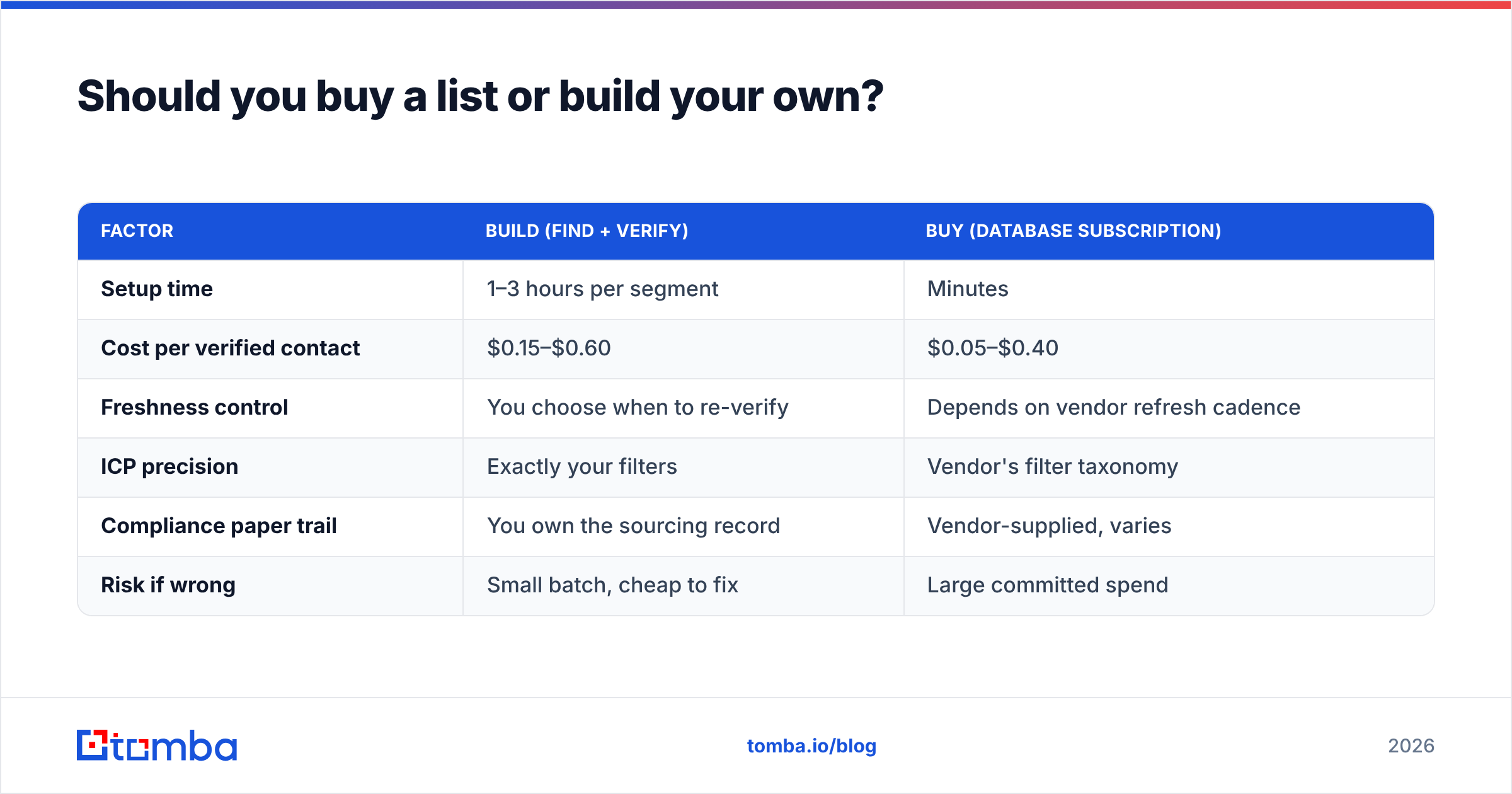
The honest version of this comparison:
| Factor | Build (find + verify) | Buy (database subscription) |
|---|---|---|
| Setup time | 1–3 hours per segment | Minutes |
| Cost per verified contact | $0.15–$0.60 | $0.05–$0.40 |
| Freshness control | You choose when to re-verify | Depends on vendor refresh cadence |
| ICP precision | Exactly your filters | Vendor's filter taxonomy |
| Compliance paper trail | You own the sourcing record | Vendor-supplied, varies |
| Risk if wrong | Small batch, cheap to fix | Large committed spend |
Reputable database vendors have improved a lot. BookYourData, for example, sells pay-as-you-go verified B2B contacts with an accuracy guarantee, which suits teams that want volume without a monthly platform commitment. That is a legitimate route, especially for broad horizontal products.
But even with a good vendor, re-verify at send time. No provider's snapshot survives contact with a hiring freeze, a layoff round, or a rebrand. Treat purchased data as a strong starting point, not a finished artifact.

What tools do you actually need to generate email leads?#
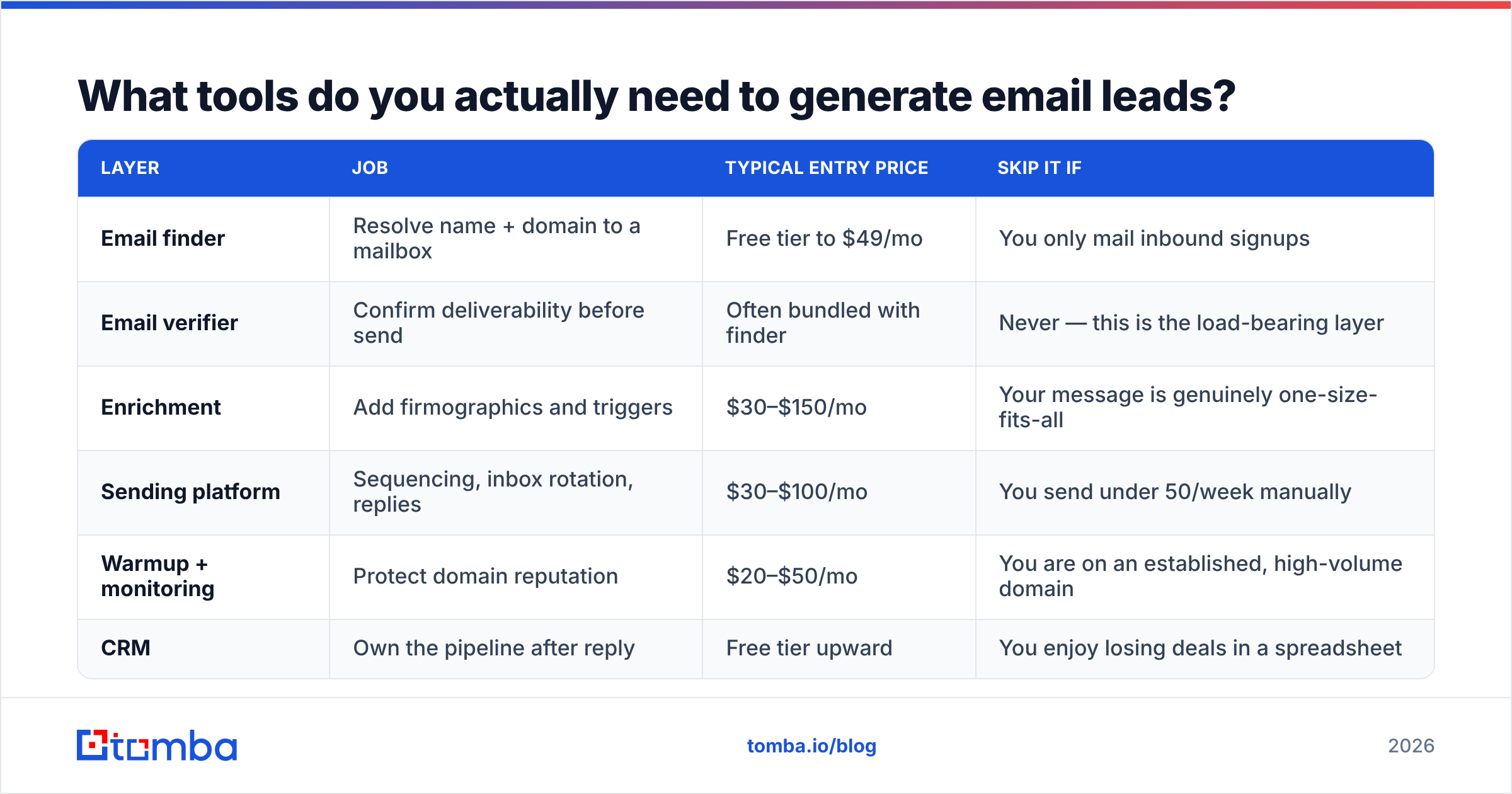
Fewer than the average stack suggests. Here is the minimum viable set and what each layer is for.
| Layer | Job | Typical entry price | Skip it if |
|---|---|---|---|
| Email finder | Resolve name + domain to a mailbox | Free tier to $49/mo | You only mail inbound signups |
| Email verifier | Confirm deliverability before send | Often bundled with finder | Never — this is the load-bearing layer |
| Enrichment | Add firmographics and triggers | $30–$150/mo | Your message is genuinely one-size-fits-all |
| Sending platform | Sequencing, inbox rotation, replies | $30–$100/mo | You send under 50/week manually |
| Warmup + monitoring | Protect domain reputation | $20–$50/mo | You are on an established, high-volume domain |
| CRM | Own the pipeline after reply | Free tier upward | You enjoy losing deals in a spreadsheet |
On pricing, know what you are comparing. Tomba pricing starts with a free tier at 25 searches a month, then Starter at $49/mo, Growth at $99/mo, and Pro at $249/mo, with enterprise quoted separately. Most vendors in this category price on credits, so the number that matters is cost per verified result, not cost per lookup. A cheap tool with a 55% match rate is more expensive than a pricier one at 85%.
If you want a broader map of the category before committing, G2's lead intelligence grid is a reasonable neutral starting point, and HubSpot's lead generation guide covers the inbound side in more depth than this post does.
How do you protect deliverability while scaling?#
You can generate perfect email leads and still fail, because mailbox providers decide whether your mail gets seen.
Authenticate everything. SPF, DKIM, and DMARC on every sending domain, no exceptions. Gmail and Yahoo have enforced bulk-sender authentication requirements since 2024, and the tolerance for unauthenticated mail keeps shrinking.
Keep bounce rate under 2%. That is the practical ceiling before providers start throttling. Verification is how you get there; there is no clever workaround.
Cap complaint rate under 0.3%. If your targeting is bad enough that people mark you as spam, the fix is upstream in step 1, not in your subject line.
Warm and rotate. New domains need weeks of gradual volume increase. A separate sending domain protects your primary corporate domain from outbound consequences.
Re-verify at 60–90 days. Anything older is a bounce risk. Running a saved segment through an email verifier before each campaign costs a fraction of what a reputation repair costs.
And stay on the right side of the rules. In the US that means CAN-SPAM requirements — accurate headers, a real physical address, a working opt-out honored within ten business days. In the EU and UK, legitimate-interest B2B outreach is workable but requires documented reasoning and easy opt-out. Neither regime bans cold email to businesses. Both punish sloppiness.
How do you know whether it is working?#
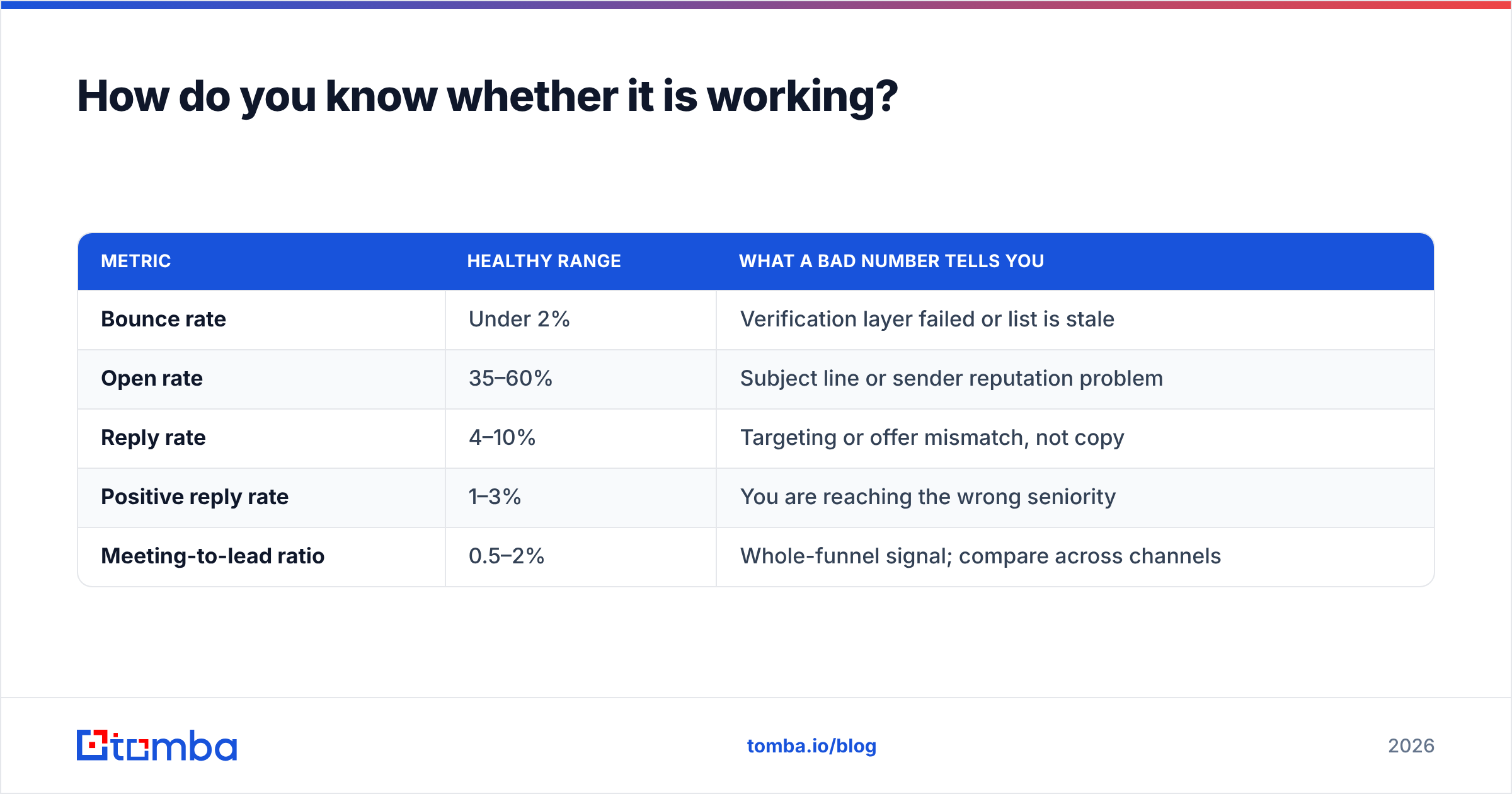
Track five numbers per campaign, and track them per segment rather than in aggregate.
| Metric | Healthy range | What a bad number tells you |
|---|---|---|
| Bounce rate | Under 2% | Verification layer failed or list is stale |
| Open rate | 35–60% | Subject line or sender reputation problem |
| Reply rate | 4–10% | Targeting or offer mismatch, not copy |
| Positive reply rate | 1–3% | You are reaching the wrong seniority |
| Meeting-to-lead ratio | 0.5–2% | Whole-funnel signal; compare across channels |
If bounce rate is fine but reply rate is under 2%, stop rewriting copy. The problem is almost always in who you selected, not what you said to them. Go back to the ICP filters and cut the list in half.
Run one variable at a time per cohort. Change the segment or change the message, never both, or you will learn nothing from an expensive test.
Where should you start this week?#
Pick one narrow segment — 200 accounts, one role, one geography. Build it properly using the four-step sequence. Verify everything. Send in cohorts of 100. Measure per cohort. That single disciplined run will teach you more about your market than 10,000 scraped rows ever will.
When you are ready to build the list, the Tomba Email Finder handles the sourcing and verification layers in one place: search by domain, name, or company, get a confidence score with the sources behind it, and run bulk CSVs through the same pipeline. Start on the free tier at 25 searches a month to sanity-check match rates against your own ICP, then move to Starter at $49/mo once you know the data holds up. Verify first, then send — in that order, every time.
Related guides#
Ready to find emails that actually work?
Join 150,000+ professionals who stopped guessing and started sending. Free credits on signup — no credit card required.
Get the Tomba newsletter
Practical outbound tactics and product updates — once every two weeks.
About the author