How to Generate Warm Leads in 2026: The Complete Playbook
Cold lists convert at 1-2%. Warm leads convert 5-10x higher because the buyer already showed intent. Here's the exact signal stack, scoring model, and outreach sequence that turns anonymous intent into booked meetings.
TL;DR
- A warm lead is not "a nicer cold lead" — it's a contact who has produced an observable intent signal (site visit, content download, job change, funding event, competitor churn) within a defined recency window.
- Teams that route on intent signals typically see reply rates in the 8-15% range versus 1-3% on unqualified cold lists. The lift comes from timing, not from better copy.
- The practical stack is four layers: capture signal → resolve identity → verify contact data → sequence within 48 hours. Break any layer and the warmth evaporates.
- Most "warm lead" programs fail at layer 3. You detect the account, you find a name, then you email a guessed address that bounces — and your sender reputation absorbs the cost.
- Budget reality: a functional warm-lead stack runs $150-$400/month for a small team. The signal tools cost more than the data tools.
What Is a Warm Lead, Exactly?#
A warm lead is a person or account that has taken an action indicating they are in-market, and that action happened recently enough to still be relevant.
Think of it like a restaurant host reading the room. A cold lead is someone walking past on the sidewalk. A warm lead is someone who stopped, read the menu in the window, and looked at their watch. Same person, entirely different conversation.
The definition matters because most teams use "warm" to mean "we've emailed them before," which is not warmth — that's just repetition. Warmth is a property of the prospect's behavior, not yours.
Three attributes separate a genuinely warm lead from a cold one:
- Observable action — They did something you can point to: visited a pricing page, downloaded a comparison guide, joined a competitor's webinar, posted about a problem you solve, or changed jobs into a role that owns your budget line.
- Recency — The signal decays. A pricing-page visit is worth a lot on day one and almost nothing on day 30. Most B2B intent signals have a useful half-life of 7-14 days.
- Fit — Warmth without fit is noise. A student researching your category for a term paper produces the same page-view signal as a VP of Ops with budget. You need firmographic filtering on top of behavioral signal.
Miss any of the three and you're back to cold outreach with extra steps.

How Do Warm Leads Compare to Cold and Hot Leads?#
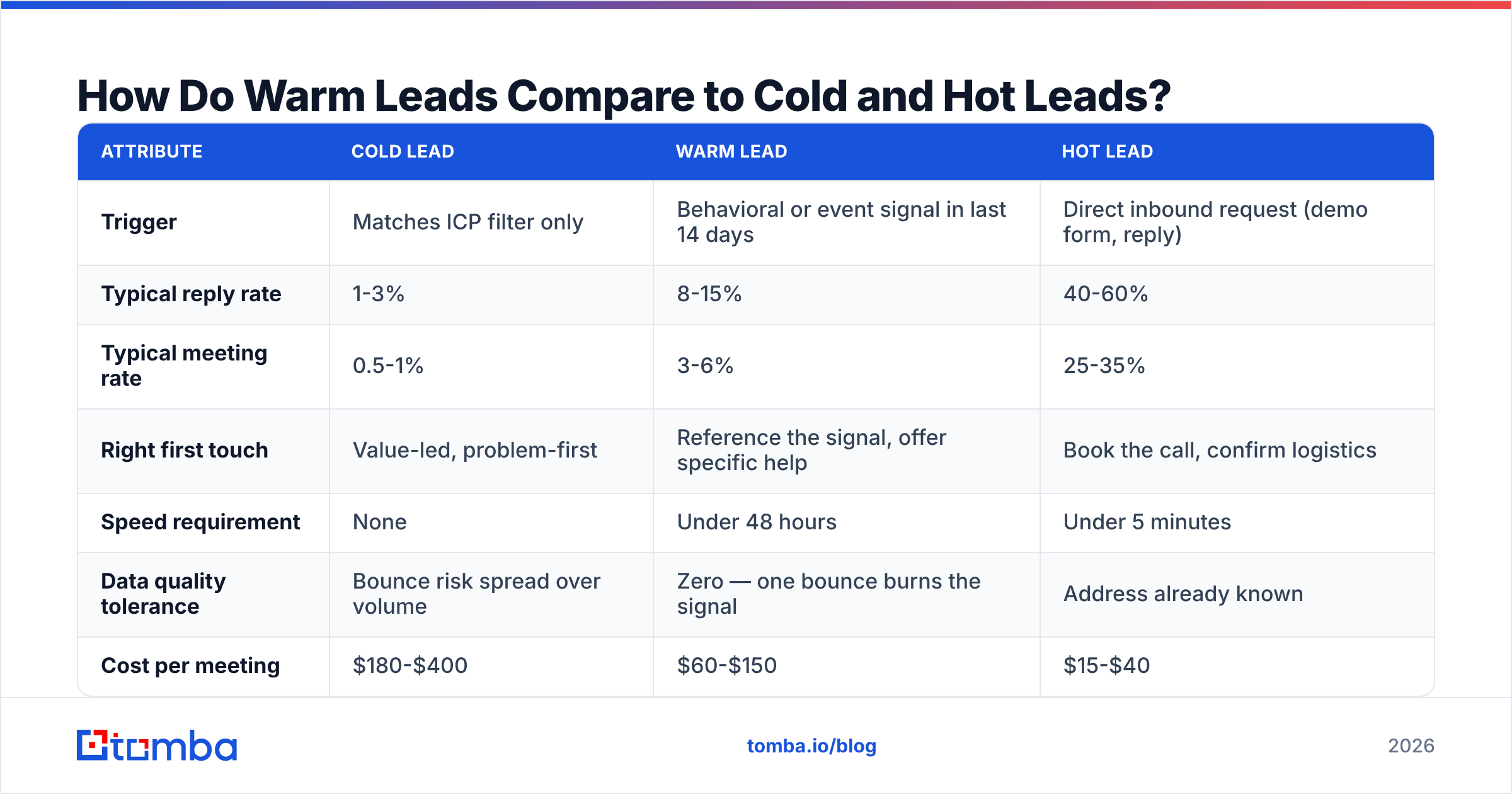
Warm sits in a spectrum, and the handling changes at each stage. Treating a warm lead like a hot one (aggressive close language) kills it. Treating it like a cold one (generic sequence) wastes the signal.
| Attribute | Cold lead | Warm lead | Hot lead |
|---|---|---|---|
| Trigger | Matches ICP filter only | Behavioral or event signal in last 14 days | Direct inbound request (demo form, reply) |
| Typical reply rate | 1-3% | 8-15% | 40-60% |
| Typical meeting rate | 0.5-1% | 3-6% | 25-35% |
| Right first touch | Value-led, problem-first | Reference the signal, offer specific help | Book the call, confirm logistics |
| Speed requirement | None | Under 48 hours | Under 5 minutes |
| Data quality tolerance | Bounce risk spread over volume | Zero — one bounce burns the signal | Address already known |
| Cost per meeting | $180-$400 | $60-$150 | $15-$40 |
| Volume available | Effectively unlimited | 20-200/month for most SMBs | 5-40/month |
The cost-per-meeting numbers are the argument. Warm-lead programs are not cheaper per contact — they're more expensive per contact, because signal data costs money. They're cheaper per meeting, which is the only unit that matters.
Notice the data-quality row. On a cold blast of 2,000 contacts, a 6% bounce rate is an annoyance. On a warm list of 40 high-intent contacts, six bounces means you lost 15% of the only prospects who were actually ready to buy. That asymmetry is why verification sits at the center of every warm-lead workflow.
What Signals Actually Predict Warmth?#
Not all intent signals are equal. Here's the ranked list based on how directly each maps to a buying decision.
Tier 1 — Direct product intent (act within 24 hours)
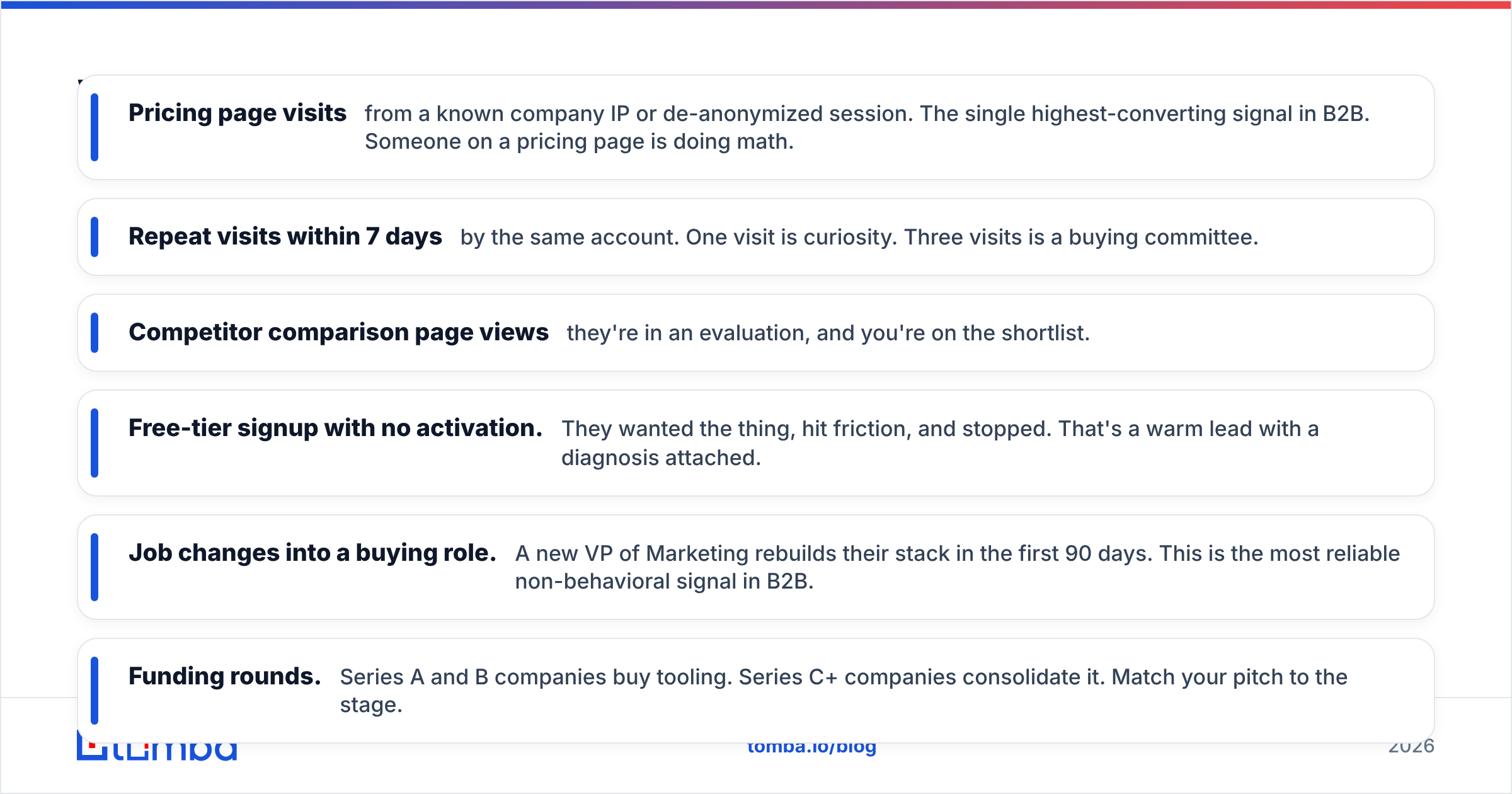
- Pricing page visits from a known company IP or de-anonymized session. The single highest-converting signal in B2B. Someone on a pricing page is doing math.
- Repeat visits within 7 days by the same account. One visit is curiosity. Three visits is a buying committee.
- Competitor comparison page views — they're in an evaluation, and you're on the shortlist.
- Free-tier signup with no activation. They wanted the thing, hit friction, and stopped. That's a warm lead with a diagnosis attached.
Tier 2 — Contextual triggers (act within 7 days)
- Job changes into a buying role. A new VP of Marketing rebuilds their stack in the first 90 days. This is the most reliable non-behavioral signal in B2B.
- Funding rounds. Series A and B companies buy tooling. Series C+ companies consolidate it. Match your pitch to the stage.
- Hiring signals. A company posting three SDR roles is about to have an outbound data problem.
- Tech-stack changes. Adding or dropping a tool in your category means the evaluation window is open.
Tier 3 — Engagement signals (act within 14 days)
- Content downloads — useful but noisy. Weight by content depth: an ROI calculator beats a blog subscribe.
- Webinar attendance, especially anyone who stayed past the 60% mark.
- Social engagement on category-relevant posts. Weakest of the three, but free.
The mistake most teams make is treating Tier 3 like Tier 1. A newsletter signup does not justify a "I saw you were evaluating solutions" email. It justifies a nurture sequence. Match the intensity of the outreach to the intensity of the signal.
How Do You Turn a Signal Into a Contactable Person?#
Here's the gap nobody talks about: signals arrive as accounts, contacts arrive as people. Your visitor-identification tool tells you Acme Corp read your pricing page four times. It does not tell you which of Acme's 340 employees to email.
Bridging that gap is a four-step pipeline.
Step 1 — Resolve the account. Reverse-IP or pixel-based website visitor reveal turns anonymous traffic into a company name and domain. Expect 25-45% match rates on B2B traffic; anything higher is a vendor overstating things.
Step 2 — Identify the right people. Once you have the domain, run a domain search filtered by department and seniority. For a pricing-page signal, target the function that owns the budget plus one practitioner who feels the pain. Two contacts per account, not eight — spray-emailing an entire org is how you get marked as spam by all of them at once.
Step 3 — Verify before you send. Every found address goes through an email verifier before it enters a sequence. This is the step teams skip, and it is the step that determines whether the other three mattered. Catch-all domains need special handling — a generic SMTP check returns "unknown" on them, so use a dedicated catch-all verifier rather than guessing.
Step 4 — Sequence within the decay window. Tier 1 signals go out same-day. Tier 2 within a week. Automate the handoff so a signal never sits in a queue waiting for a human to notice it.

What Does a Warm-Lead Tech Stack Cost?#
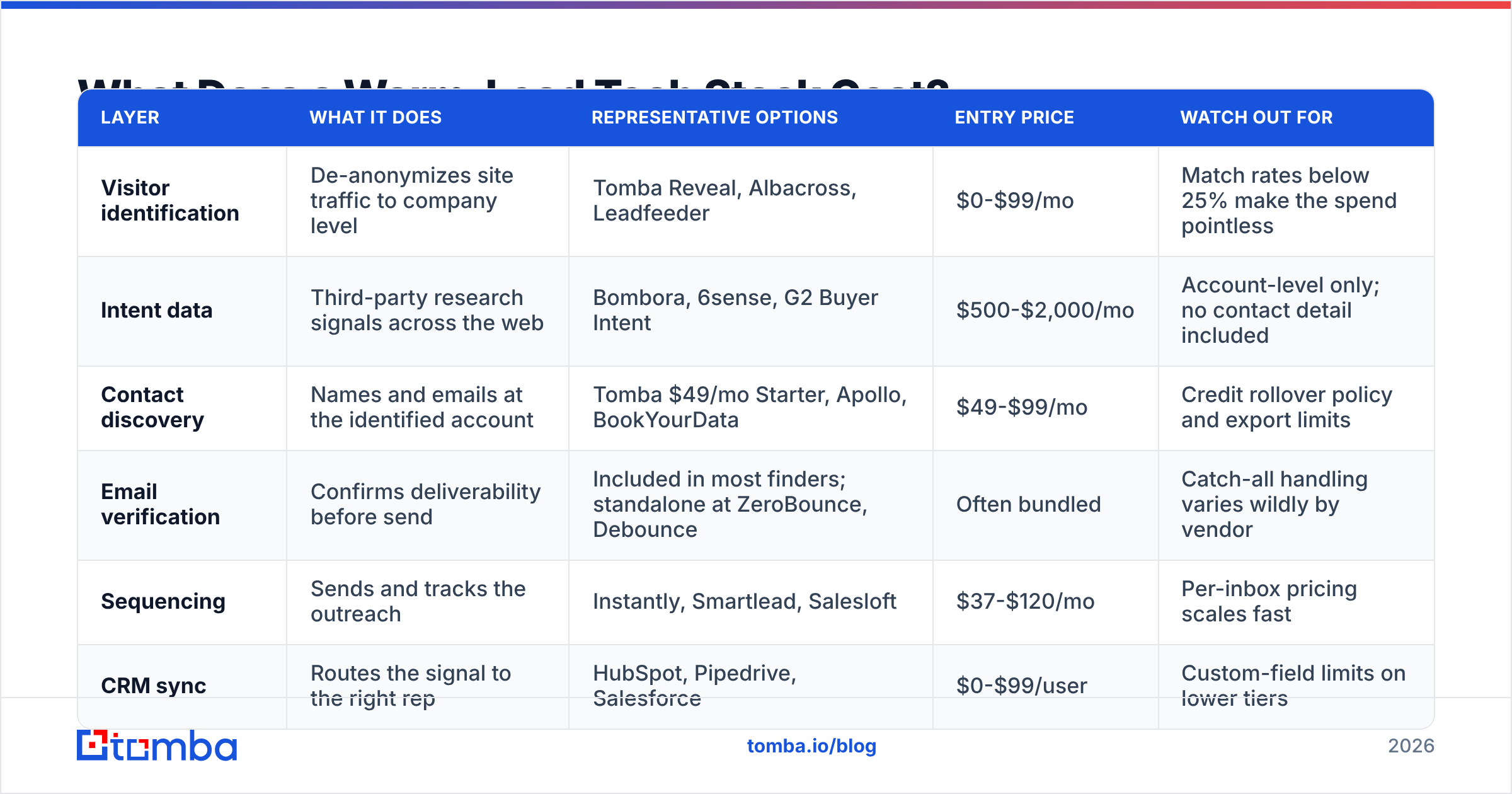
You need three capabilities: signal capture, contact data, and sequencing. Some vendors bundle them, most don't. Here's a realistic comparison of how the pieces price out for a 3-5 person sales team.
| Layer | What it does | Representative options | Entry price | Watch out for |
|---|---|---|---|---|
| Visitor identification | De-anonymizes site traffic to company level | Tomba Reveal, Albacross, Leadfeeder | $0-$99/mo | Match rates below 25% make the spend pointless |
| Intent data | Third-party research signals across the web | Bombora, 6sense, G2 Buyer Intent | $500-$2,000/mo | Account-level only; no contact detail included |
| Contact discovery | Names and emails at the identified account | Tomba $49/mo Starter, Apollo, BookYourData | $49-$99/mo | Credit rollover policy and export limits |
| Email verification | Confirms deliverability before send | Included in most finders; standalone at ZeroBounce, Debounce | Often bundled | Catch-all handling varies wildly by vendor |
| Sequencing | Sends and tracks the outreach | Instantly, Smartlead, Salesloft | $37-$120/mo | Per-inbox pricing scales fast |
| CRM sync | Routes the signal to the right rep | HubSpot, Pipedrive, Salesforce | $0-$99/user | Custom-field limits on lower tiers |
Two honest notes on this table.
First, third-party intent data (Bombora-style) is the most expensive line and the least actionable for small teams. It tells you an account is researching your category somewhere on the internet. It doesn't tell you who, and it doesn't give you an address. For teams under $5M ARR, first-party signals from your own site plus job-change tracking will outperform a $1,500/month intent subscription.
Second, contact-data vendors differ more on coverage by geography and company size than on headline accuracy. BookYourData is strong on pre-verified bulk lists where you know exactly which segment you want. Real-time finders like Tomba are better when the signal arrives first and you need to resolve a specific person at a specific domain right now. They solve different halves of the problem — one is a warehouse, the other is a lookup.
For a lean setup: visitor reveal + Tomba pricing at the $49/mo Starter tier + a $37/mo sequencer lands you under $150/month with verification built in. Scale the contact-data tier to $99/mo Growth when volume justifies it.
How Should You Score Warm Leads?#
Scoring exists so reps spend their hours on the top decile. A simple additive model beats a complicated one, because you'll actually maintain it.
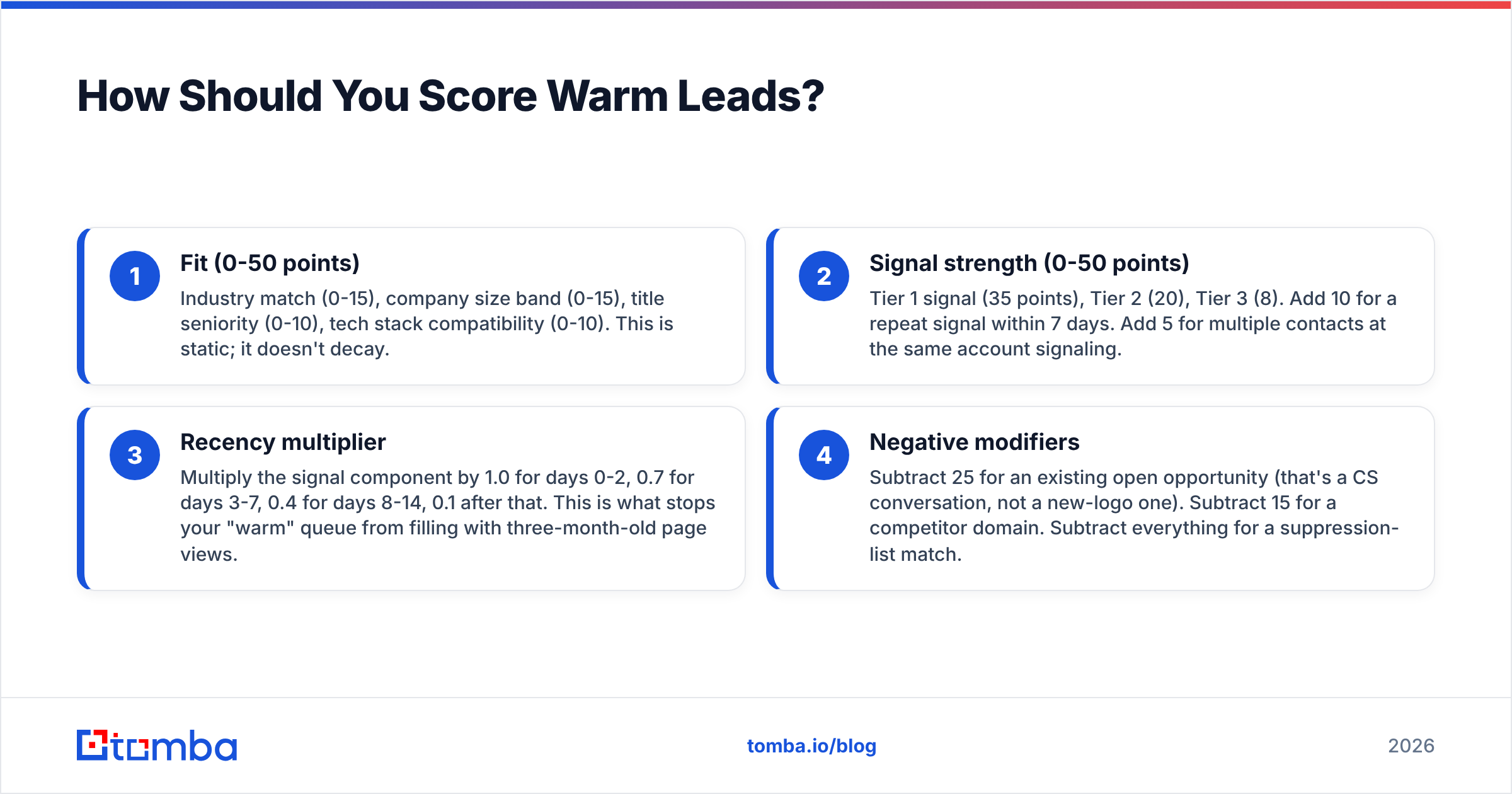
Start with a 100-point scale split across two axes:
- Fit (0-50 points) — Industry match (0-15), company size band (0-15), title seniority (0-10), tech stack compatibility (0-10). This is static; it doesn't decay.
- Signal strength (0-50 points) — Tier 1 signal (35 points), Tier 2 (20), Tier 3 (8). Add 10 for a repeat signal within 7 days. Add 5 for multiple contacts at the same account signaling.
- Recency multiplier — Multiply the signal component by 1.0 for days 0-2, 0.7 for days 3-7, 0.4 for days 8-14, 0.1 after that. This is what stops your "warm" queue from filling with three-month-old page views.
- Negative modifiers — Subtract 25 for an existing open opportunity (that's a CS conversation, not a new-logo one). Subtract 15 for a competitor domain. Subtract everything for a suppression-list match.
Route anything above 65 to a rep for manual, personalized outreach within 24 hours. Send 40-65 into an automated sequence with signal-referencing merge fields. Below 40 goes to nurture.
The recency multiplier does most of the work here. If you implement nothing else from this section, implement decay. A lead scoring model without time decay quietly turns into a list of stale contacts within a quarter.
What Should the First Warm Email Actually Say?#
Different from a cold email in one specific way: you reference the signal without being creepy about it.
The failure mode is surveillance language. "I saw you visited our pricing page three times yesterday" is technically accurate and completely off-putting. The fix is to reference the category of interest, not the tracking detail.
Structure that works:
- Line 1 — Contextual opener. Tie to the trigger at the level of business context, not browser activity. For a job change: "Congrats on the move to Head of RevOps." For a funding round: "Saw the Series A — congrats." For a pricing visit: skip the reference entirely and lead with the problem that page solves.
- Line 2 — Specific observation about their situation. One sentence proving you looked at their business, not their IP address.
- Line 3 — The relevant outcome. Not features. What a comparable company achieved, with a number.
- Line 4 — Low-friction ask. "Worth a look?" outperforms "Do you have 15 minutes Tuesday at 2?" on warm leads, because you're not the one setting the pace — their signal is.
Keep it under 90 words. Warm leads have already done research; they don't need education, they need a path forward. If you want a starting frame, the cold email templates library is a reasonable base to adapt — just strip out the education-heavy opening that cold templates need and warm ones don't.
On timing: send Tier 1 follow-ups on a 2-day, 4-day, 8-day cadence, max three touches. Warm leads that don't respond in three touches aren't warm anymore, and the fourth email costs you more in sender reputation than it returns in replies.
What Are the Most Common Ways This Breaks?#
Signal latency. The most expensive failure. A pricing-page visit routed to a rep 6 days later converts like a cold lead, because it is one. Audit your median signal-to-first-touch time; if it's above 48 hours, fix that before you buy another tool.
Over-broad account targeting. Detecting Acme Corp and then emailing 12 people there converts worse than emailing two. Multiple simultaneous cold emails from the same domain into the same company is a well-known spam pattern, and Google's bulk sender rules have made the consequences sharper since 2024. Google's own sender guidelines are worth reading in full if you're sending at any volume.
Unverified addresses in a low-volume list. Covered above, but worth repeating because it's the most common technical failure. Warm lists are small; each bounce is proportionally devastating.
No suppression hygiene. Emailing an existing customer or an open opportunity as a "warm lead" makes you look like you have no internal systems. Sync suppression lists back from your CRM daily, not monthly.
Scoring without decay. Discussed above. It's the difference between a warm-lead program and a slowly-cooling-lead program.
Attribution confusion. When a warm lead converts, both marketing (sourced the signal) and sales (worked it) claim it. Decide the credit-split rule before the first deal closes, not after. G2's buyer behavior research consistently shows B2B buying committees averaging 6-10 stakeholders — attribution gets messy fast when that many people touch the process.
How Do You Build This in 30 Days?#
Week 1 — Instrument. Add visitor identification to your site. Define your Tier 1/2/3 signal list. Set up a single Slack channel or CRM view where every signal lands. Do nothing else yet; you need a baseline of how many signals you actually get per week.
Week 2 — Resolve. Wire domain-to-contact lookup into the signal flow. For each account that fires a signal, automatically pull 2-3 contacts by department and run them through verification. A Zapier integration or HubSpot integration handles this without engineering time.
Week 3 — Score and route. Implement the additive model above. Start with round numbers and tune after 50 signals, not before. Set the SLA: Tier 1 same-day, Tier 2 within 72 hours.
Week 4 — Sequence and measure. Write three sequences — one per tier. Track signal-to-touch time, bounce rate, reply rate, and meeting rate separately by tier. Kill any signal type that doesn't beat your cold baseline after 100 sends.
The measurement discipline is what separates the teams that get 5x lift from the teams that add tooling cost and see no change. If a signal category doesn't outperform your cold list, it isn't a signal — it's noise you're paying for.
Where Should You Start?#
Start with the layer that's broken, not the layer that's exciting. Most teams already have some signal capture and no reliable way to turn it into a verified, sendable contact. That middle layer is where warm-lead programs leak.
If that's your gap, the Tomba Email Finder closes it: give it a domain and a name, or just a domain plus a department filter, and get back verified professional addresses with source attribution and a confidence score. Verification runs inline, catch-all domains get their own resolution path, and the API drops into whatever routing you've already built. The free tier gives you 25 searches a month to test the workflow against real signals before committing; Starter is $49/mo when you're ready to run it at volume.
Get the signal, find the person, verify the address, send within 48 hours. That's the whole playbook — the tools just determine how much of it you have to do by hand.
Related guides#
Ready to find emails that actually work?
Join 150,000+ professionals who stopped guessing and started sending. Free credits on signup — no credit card required.
Get the Tomba newsletter
Practical outbound tactics and product updates — once every two weeks.
About the author