Generect vs FindEmails.com (Toofr): Which Wins in 2026?
Generect sells a filtered B2B lead database with an API. FindEmails.com (formerly Toofr) sells cheap per-email lookups. They solve different problems — here is which one actually fits your outbound motion, and what each really costs.
TL;DR
- Generect is a lead-database-first tool: you filter a B2B dataset (or scrape LinkedIn searches), then export contacts with emails attached. It sells volume and API access, not one-off lookups.
- FindEmails.com (the tool formerly known as Toofr) is the opposite: a low-cost, single-purpose email finder with bulk CSV upload and a simple credit meter. Cheap, narrow, no database to browse.
- Neither one is a verification platform. Both hand you addresses; you still need a separate SMTP-level check before you send.
- If your bottleneck is building lists, Generect's model fits. If your bottleneck is filling in emails for names you already have, FindEmails.com is the cheaper shape.
- If you need both — find, verify, enrich, and hit an API from your own stack — a combined platform like Tomba is usually less total spend than stacking two point tools.
What are Generect and FindEmails.com?#
They look like competitors because both end with "here is an email address." Underneath, they are built on different assumptions.
Generect treats prospecting as a query problem. You come in with an ideal customer profile — industry, headcount, seniority, geography, or a saved LinkedIn Sales Navigator search — and the platform returns a list of matching people with contact data attached. It leans heavily on LinkedIn-sourced signals and pushes teams toward its API for programmatic list building. The pitch is throughput: define the segment once, pull contacts continuously.
FindEmails.com treats prospecting as a lookup problem. It grew out of Toofr, a long-running indie email finder, and kept that DNA: give it a first name, last name, and company domain, and it returns the most likely address with a confidence score. Upload a CSV of 500 rows and it processes them. There is no database to browse, no filters, no segment builder. You bring the names.
That single distinction drives almost every other difference — price, accuracy profile, and who each one is actually for.
How do Generect and FindEmails.com differ in approach?#
Four structural differences matter more than any feature checklist:
- Data origin — Generect leans on LinkedIn-derived profile data plus its own contact index, so records carry job titles, company size, and profile URLs. FindEmails.com is pattern-and-source driven: it infers the email format for a domain and validates candidates, so it returns an address rather than a full profile.
- Unit of work — Generect's unit is a list; FindEmails.com's unit is a row. That changes how you budget. A Generect seat only pays for itself if you're pulling thousands of contacts a month. FindEmails.com is priced so that 300 lookups is a perfectly sane month.
- Enrichment depth — Generect returns firmographic context alongside the email. FindEmails.com returns the email and a score. If you need company size for routing or scoring, one of those requires a second tool.
- Where it lives in your stack — Generect is API-forward and expects to feed a CRM or sequencer automatically. FindEmails.com is web-app-forward: upload, download, paste into your sequencer. Both have integrations, but the center of gravity differs.
Neither approach is wrong. The mistake is buying the list-builder when you already have lists, or buying the lookup tool when your real problem is that nobody has told you who to contact.

How accurate is each tool?#
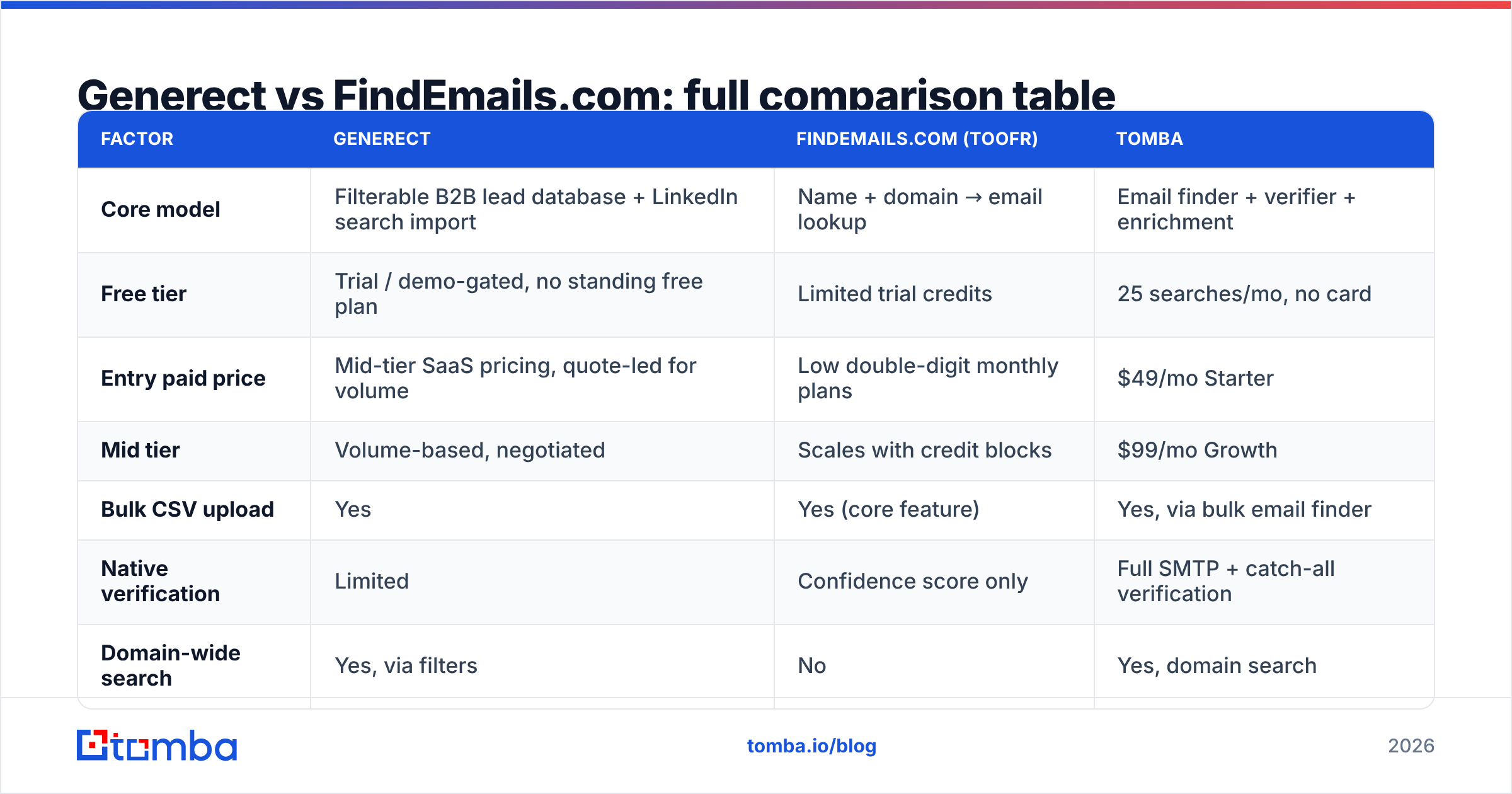
Accuracy in this category is slippery, because vendors measure different things. A "98% accuracy" claim usually means of the emails we returned, 98% passed our own validation — not we found 98% of the people you asked about. Those are two very different numbers, and the second one (hit rate or coverage) is the one that decides whether your list is usable.
Judge any email finder on three axes, not one:
- Coverage / hit rate — what percentage of your input rows come back with any address at all. This is where cheap tools quietly lose: a 45% hit rate on 1,000 rows means you paid for 1,000 and got 450 prospects.
- Precision — of the addresses returned, how many actually deliver. Pattern-guessing tools inflate coverage by returning plausible-but-wrong guesses.
- Freshness — how recently the record was seen. B2B contact data decays roughly 2-3% per month as people change jobs, so a database refreshed quarterly is materially worse than one refreshed weekly.

Generect's accuracy story is tied to its LinkedIn-derived layer: when the profile is current, the match is strong; when someone changed roles and the profile hasn't updated, you inherit the staleness. FindEmails.com's accuracy story is tied to pattern confidence: it is candid about scoring, which is honest, but a "70% confidence" address is still a coin flip you're paying to send against.
The practical fix for both: run every export through an email verifier before it touches your sequencer. Bounce rate above 3% is what triggers inbox-provider throttling, and no finder — Generect, FindEmails.com, or anyone else — should be trusted as the last gate before send.
[Suggested screenshot: FindEmails.com bulk upload results screen showing per-row confidence scores]
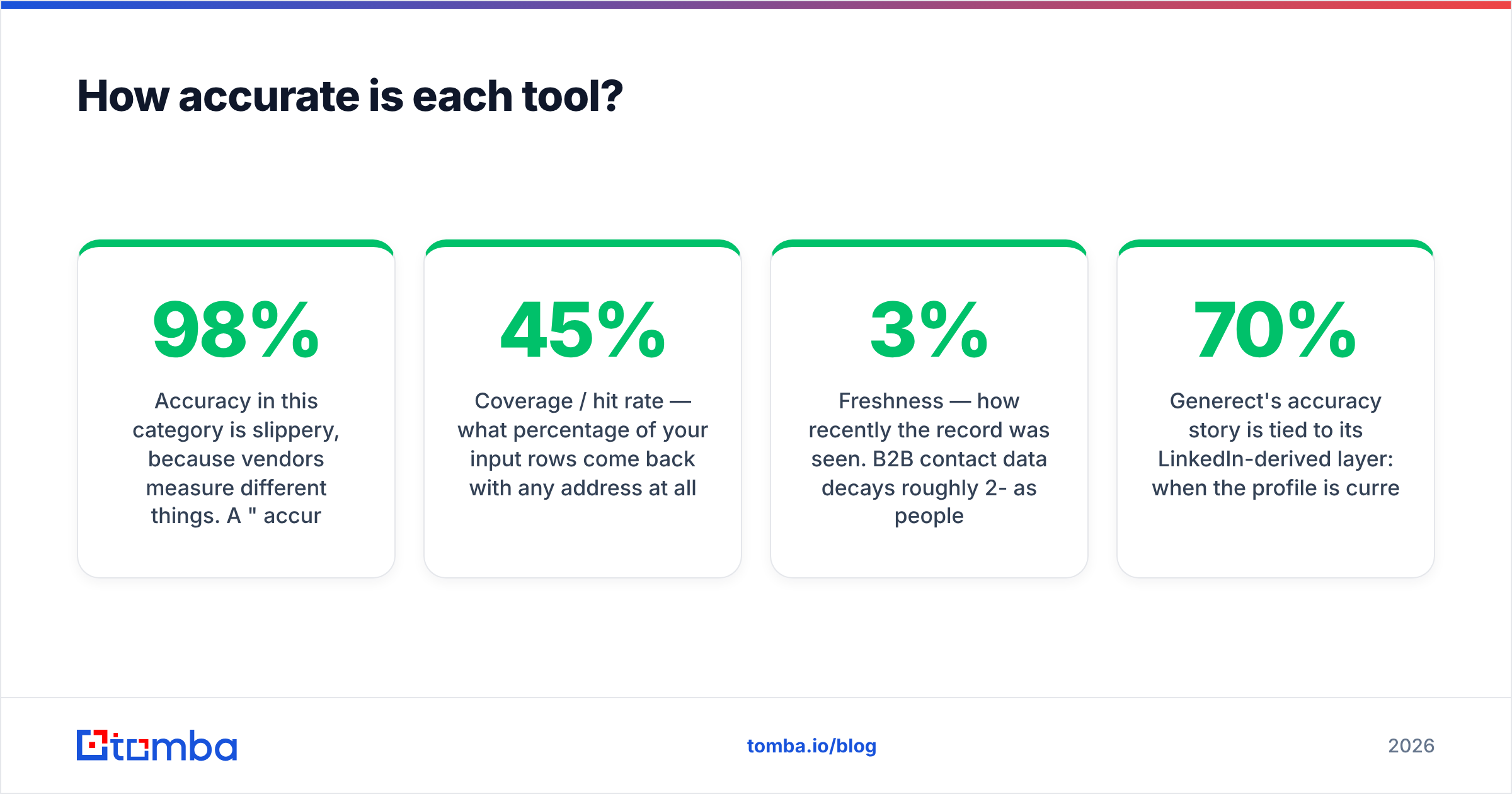
Generect vs FindEmails.com: full comparison table#
Pricing in this category moves. Treat the figures below as the published shape at time of writing and confirm on each vendor's own pricing page before you buy.
| Factor | Generect | FindEmails.com (Toofr) | Tomba |
|---|---|---|---|
| Core model | Filterable B2B lead database + LinkedIn search import | Name + domain → email lookup | Email finder + verifier + enrichment |
| Free tier | Trial / demo-gated, no standing free plan | Limited trial credits | 25 searches/mo, no card |
| Entry paid price | Mid-tier SaaS pricing, quote-led for volume | Low double-digit monthly plans | $49/mo Starter |
| Mid tier | Volume-based, negotiated | Scales with credit blocks | $99/mo Growth |
| Bulk CSV upload | Yes | Yes (core feature) | Yes, via bulk email finder |
| Native verification | Limited | Confidence score only | Full SMTP + catch-all verification |
| Domain-wide search | Yes, via filters | No | Yes, domain search |
| Public API | Yes, API-forward | Yes, basic | Yes, documented email finder API |
| Firmographic enrichment | Yes | No | Yes |
| Phone numbers | Partial | No | Yes |
| Best for | Building net-new segmented lists at volume | Filling emails into an existing name list | Teams that need find + verify in one place |

Two things jump out of that grid.
First, the free-tier gap. Generect and FindEmails.com both gate evaluation behind a trial or a card. That's a real friction cost when you're trying to benchmark hit rate on your ICP — and hit rate on your ICP is the only benchmark that matters. A standing free tier lets you test 25 of your own known-good contacts and measure precision directly.
Second, the verification gap. Neither tool closes the loop. You will end up buying a verifier anyway, which changes the total-cost math considerably — a $29/mo finder plus a $49/mo verifier is not a $29/mo stack.
What does each one really cost per usable contact?#
Sticker price is the wrong unit. The number that matters is cost per contact you can actually email.
Work it like this:
- Step 1 — take the monthly price and divide by credits to get raw cost per lookup.
- Step 2 — multiply credits by your observed hit rate. A 60% hit rate turns 1,000 credits into 600 addresses.
- Step 3 — subtract the invalid ones your verifier catches. If 12% fail verification, you're down to 528.
- Step 4 — divide price by that final number. That's your true cost per usable contact.
Run this on a trial before you commit annually. Tools that look 3x cheaper on the pricing page routinely land within 20% of each other after step 4, because cheap tools compensate with lower coverage and looser confidence thresholds. The tool that charges you nothing for a no-result lookup is worth more than the tool with the lower headline rate.
Also check the credit-consumption policy. Some platforms bill a credit whether or not they return an address; others only charge on a successful find. Over 10,000 monthly lookups, that policy difference is worth more than the plan tier you picked.
Which one should you choose?#
Match the tool to the bottleneck, not to the review score.
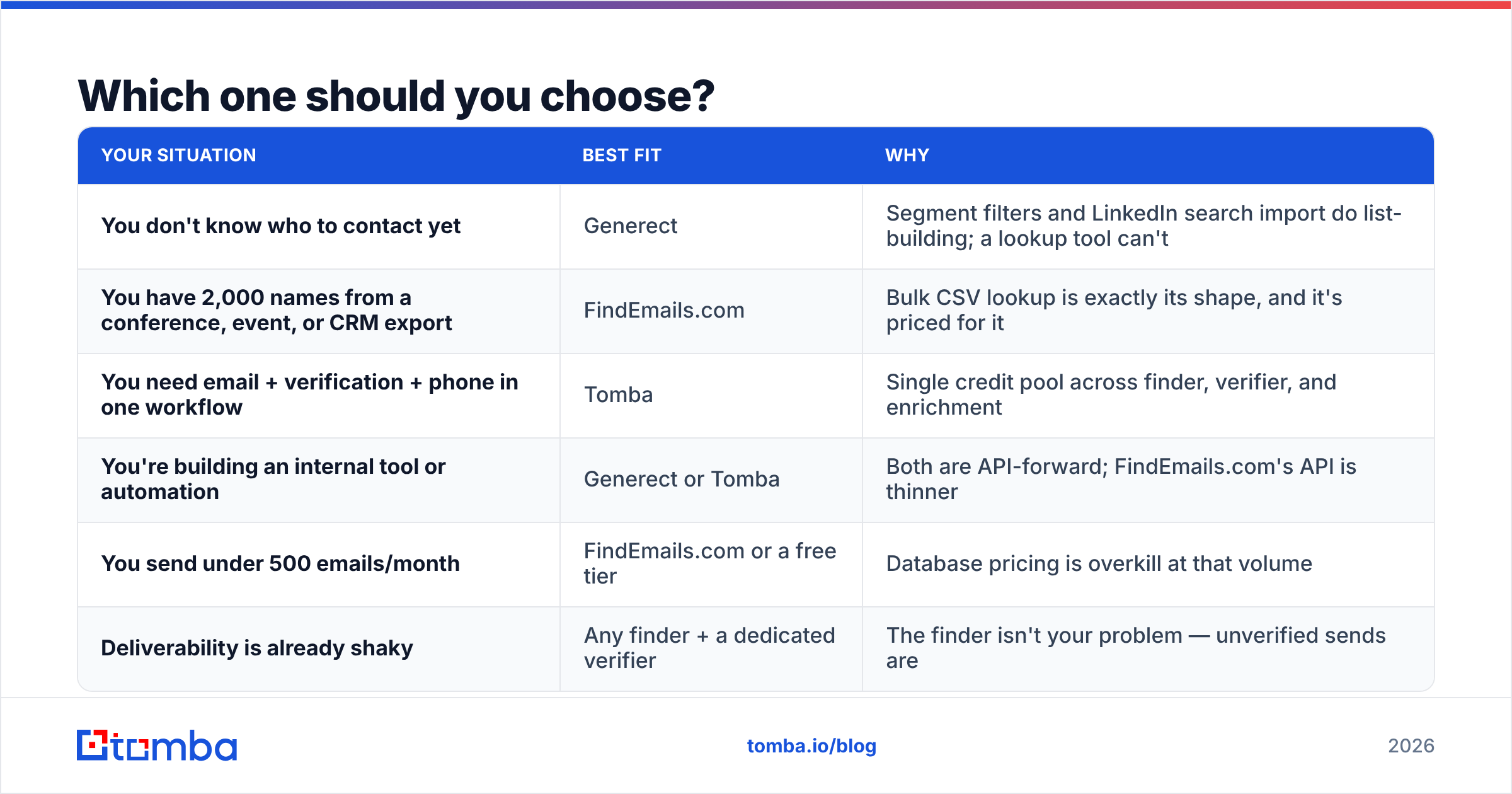
| Your situation | Best fit | Why |
|---|---|---|
| You don't know who to contact yet | Generect | Segment filters and LinkedIn search import do list-building; a lookup tool can't |
| You have 2,000 names from a conference, event, or CRM export | FindEmails.com | Bulk CSV lookup is exactly its shape, and it's priced for it |
| You need email + verification + phone in one workflow | Tomba | Single credit pool across finder, verifier, and enrichment |
| You're building an internal tool or automation | Generect or Tomba | Both are API-forward; FindEmails.com's API is thinner |
| You send under 500 emails/month | FindEmails.com or a free tier | Database pricing is overkill at that volume |
| Deliverability is already shaky | Any finder + a dedicated verifier | The finder isn't your problem — unverified sends are |

What are the alternatives worth checking?#
The two-way comparison is artificially narrow. Depending on what you're solving, three other shapes are worth a look.
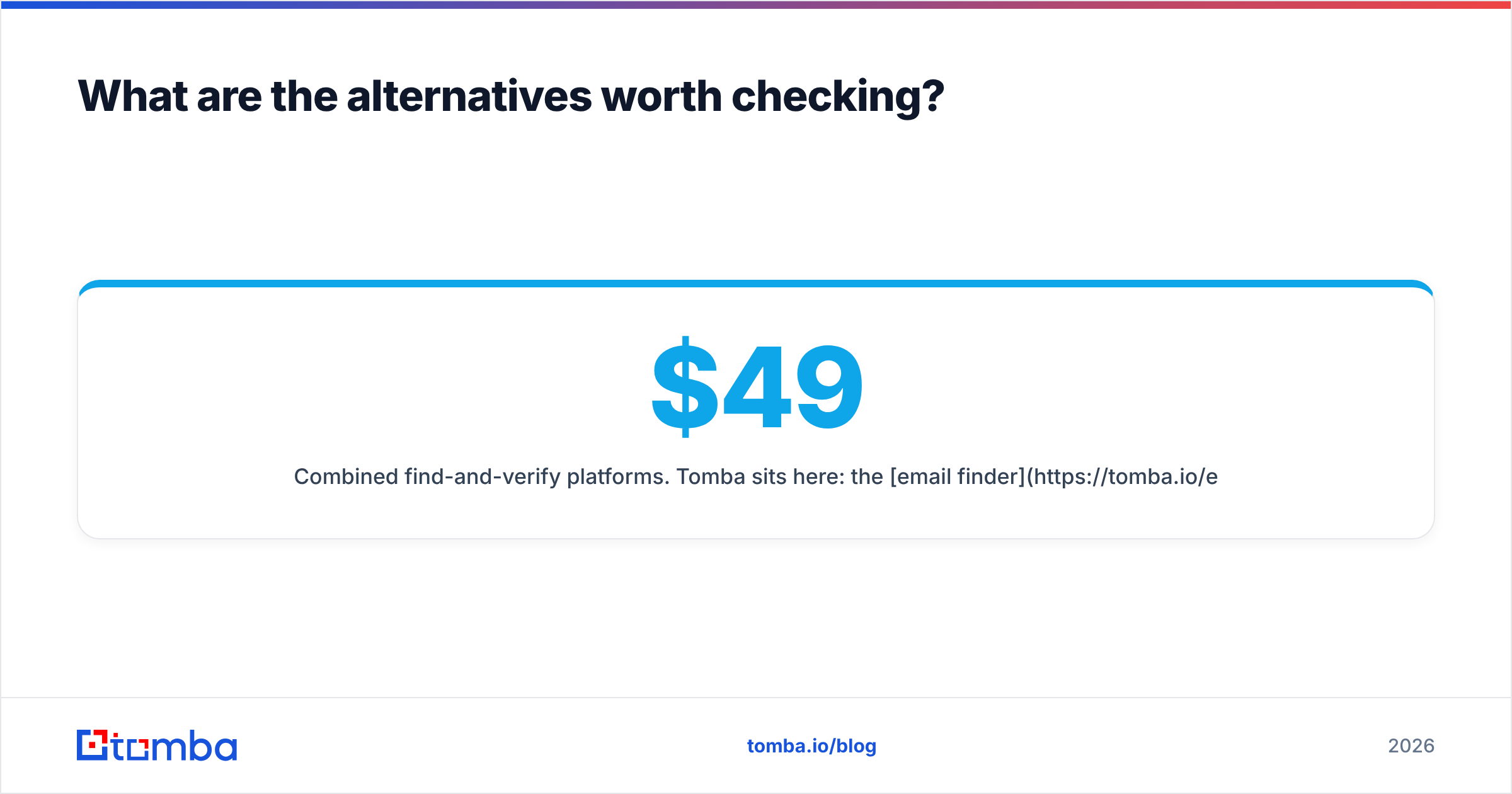
Combined find-and-verify platforms. Tomba sits here: the email finder and verifier share one credit pool, alongside domain search, catch-all handling, phone lookup, and enrichment. The free tier is 25 searches a month, Starter is $49/mo, Growth is $99/mo, and Pro is $249/mo — see Tomba pricing for the current breakdown. The argument for this shape isn't that any single module beats every specialist; it's that you stop paying two vendors and reconciling two credit systems.
Prepaid B2B contact databases. BookYourData is a strong option if you'd rather buy a targeted list outright than rent a search seat — pay-as-you-go credits, no subscription, and a bounce guarantee on the records you pull. For teams doing a few large campaigns a year rather than continuous prospecting, that pricing model is often a better fit than either tool in this comparison.
Full sales-engagement suites. Apollo, ZoomInfo, and similar platforms bundle data with sequencing and dialing. They're heavier and more expensive, but if you're also shopping for a sequencer, buying data separately may not make sense. Cross-check current user sentiment on G2 before you sign anything annual — the category churns fast, and last year's leader is not automatically this year's.
Frequently asked questions#
Is FindEmails.com the same as Toofr? Yes. Toofr was the original product name; the service rebranded to FindEmails.com. Older reviews and blog posts referencing Toofr are describing the same lineage, though features and pricing have moved since.
Does Generect scrape LinkedIn? Generect works with LinkedIn-derived data and supports importing Sales Navigator searches. Whether that's appropriate for your organization is a compliance question — check LinkedIn's terms and your own legal guidance before you build a workflow that depends on it.
Can I use either tool without a verifier? You can, but you shouldn't. Confidence scores are not deliverability guarantees. Push unverified addresses into a cold sequence and you'll find out how quickly a bounce rate over 3% degrades sender reputation.
Which has better GDPR posture? Both publish compliance documentation; neither absolves you of lawful-basis obligations for outbound in the EU. If you're prospecting into Europe, the relevant question is your own legitimate-interest assessment, not the vendor's badge.
What about catch-all domains? Catch-all servers accept every address, so standard verification returns "unknown." Neither tool resolves this well. If a meaningful share of your ICP sits on catch-all domains, you need a dedicated catch-all verifier or you'll be flying blind on a chunk of your list.
The bottom line#
Generect wins when the job is building a segmented list at volume and feeding it to systems automatically. FindEmails.com wins when the job is completing a list you already have, at the lowest possible cost per row. Buying the wrong one isn't a small mistake — it's paying for a database you never query, or paying per row for a list you don't have yet.
Before you commit to either, run the same 25 known contacts through all three options and measure hit rate and precision yourself. Tomba's free tier gives you 25 searches a month with no card, so you can benchmark against your actual ICP rather than a vendor's marketing number — then move to the $49/mo Starter plan if the numbers hold up. Start with the Tomba Email Finder and check the results against contacts you already know are good. Whatever you conclude, that test costs nothing and beats trusting anyone's accuracy claim, including ours.
Related guides#
Ready to find emails that actually work?
Join 150,000+ professionals who stopped guessing and started sending. Free credits on signup — no credit card required.
Get the Tomba newsletter
Practical outbound tactics and product updates — once every two weeks.
About the author