Generect vs Global Database: Which B2B Data Tool Wins?
Generect sells LinkedIn-native lead APIs. Global Database sells firmographic and financial company records. They look like competitors, but they solve different problems — and only one fits a high-volume outbound motion.
TL;DR
- Generect vs Global Database, in one line: one finds people, the other sizes up companies.
- Generect is a LinkedIn-native lead API. You feed it a Sales Navigator search or a company list. It sends back contacts with work emails and phone numbers. It is built for coders and outbound teams.
- Global Database is a company data tool. It holds UK and EU company facts, credit files, tech stack data, and the contacts tied to each firm. It suits research, credit risk, and account picking.
Two more points shape the choice.
- Both sell B2B contact data. They split on almost everything else. The real question: reach a person now, or size up the account first?
- Prices are hidden on both sides. Generect sells credit packs. Global Database sells yearly seats, and you must book a demo to get a quote.
- Just need work emails for a list you own? A plain email finder costs less than either tool. Bolt it onto the data you already have.
What are Generect and Global Database?#
Be honest about why these two share a page. Both sell B2B contact records. Neither was built to fight the other.
Generect is a lead generation API. You hand it a LinkedIn Sales Navigator search URL, a company domain, or a list of profiles. It sends back clean lead records. Each one has a name, a job title, a company, a work email, and at times a direct dial. The API comes first, and the app wraps around it. Buyers tend to be growth engineers, agencies with many client campaigns, or RevOps teams.
Global Database comes from the business data world. It pulls in company filings, credit scores, accounts, staff counts, trade codes, tech stacks, and contact details. It sells access by module and by country. It is strongest in the UK and Europe, where filings are public and well ordered. Buyers tend to be market researchers, credit teams, risk analysts, or ABM leads.
That split drives almost every Generect vs Global Database debate. One tool starts with a person. The other starts with a firm.
How does Generect actually work?#
Generect assumes you know who you want to reach.
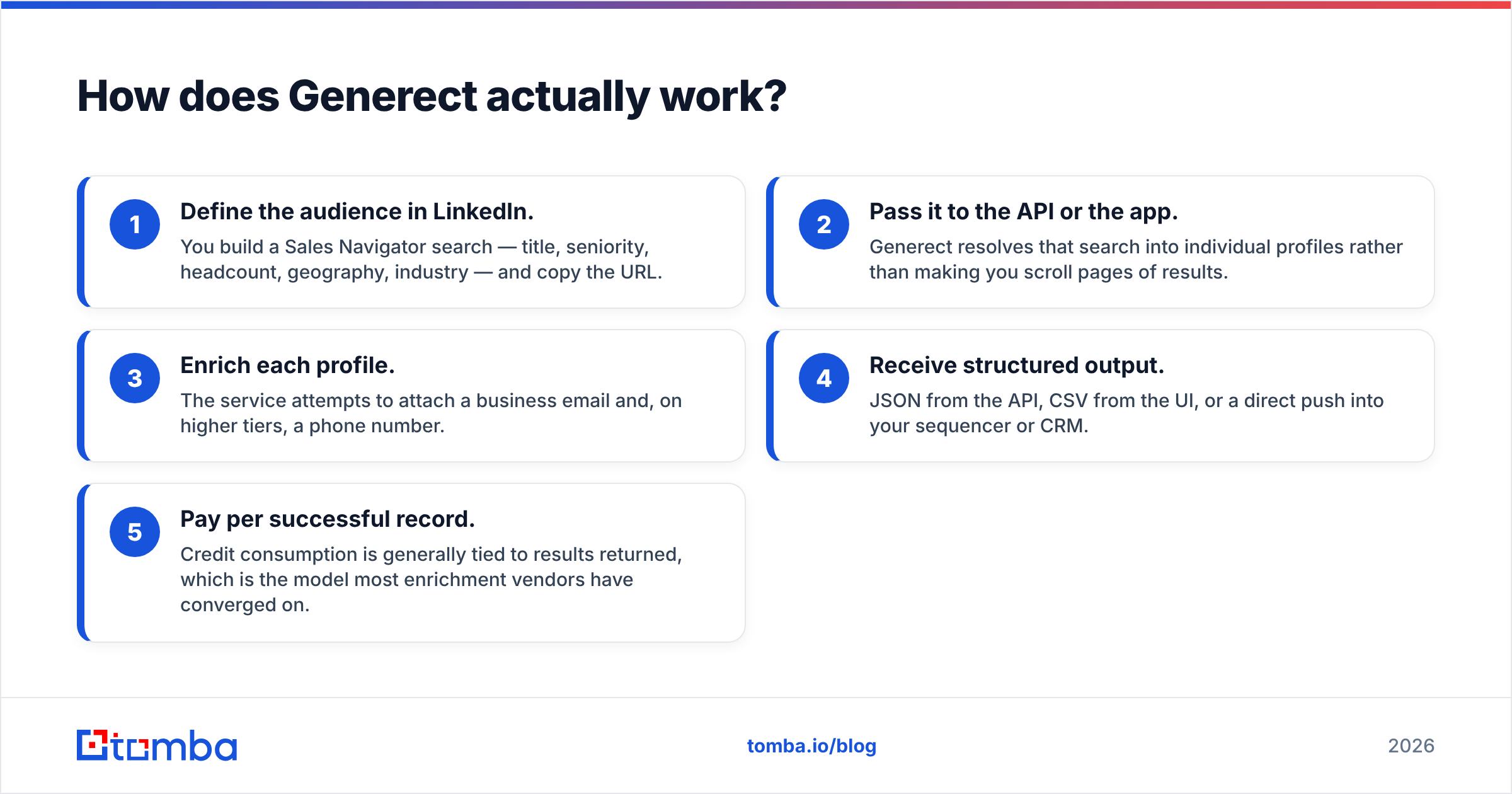
- Set the audience in LinkedIn. Build a Sales Navigator search: job title, level, headcount, region, trade. Copy the URL.
- Pass it to the API or the app. Generect turns that search into single profiles. You skip page after page of scrolling.
- Fill in each profile. The tool tries to add a work email. Higher tiers add a phone number.
- Take the output. JSON from the API, CSV from the app, or a push straight into your sequencer or CRM.
- Pay per record. Credits track the results sent back. Most data vendors now price this way.
The strength is speed. If your ICP fits a LinkedIn filter, you can build a list in minutes. You do not need a data analyst. The weakness is the leash. LinkedIn sets what you can target. Profile data is only as fresh as the person keeps it. A VP who moved jobs six months ago, and never updated the page, hands you a wrong record.

What does Global Database do differently?#
Global Database flips the order. You start with the firm, not the person.
A session looks like this. Filter UK makers with 50–200 staff. Add sales above £5m, a solid credit score, no court claims, and Shopify Plus in the tech stack. That search is not possible in a LinkedIn-native tool. Those fields do not exist there. Once the account list is set, you pull the contacts tied to each firm.
You trade fresh data for deep data. Filings and credit files are solid, but they lag. Annual accounts can be nine months old by the time they go public. Contacts tied to company files skew to directors, finance leads, and shared role inboxes. The mid-level people who reply to cold email are often missing. If you sell to a CFO, that is a gift. If you sell to a demand gen manager, it is a gap.
Global Database also brings legal cover, which matters in regulated deals. When your legal team asks where a record came from, "public company filings" is an easy answer. "A scraped social profile" is not. Anyone who runs outbound in Europe should read the GDPR legitimate interest basics first. No vendor makes you compliant by default.
Which has better data accuracy?#
The Generect vs Global Database accuracy question has no audited answer. Neither vendor shares one. Treat any figure on either site as a claim until you test it.
You can still reason about how each tool fails. That beats one number.
- Generect fails at the person level. The firm is real. The person is real. The email pattern is likely right. But the person left. You get bounces, or replies from the wrong human.
- Global Database fails at the contact level. The company record is rich and right. The contact tied to it is a front desk inbox, or a director three levels above your buyer. You get low reply rates, not hard bounces.
Both failures are fine if you check the list before you send. A separate pass — SMTP checks, catch-all flags, role-address filters — is not optional in 2026. Run every list through an email verifier first. Keep catch-all domains in their own bucket with a catch-all verifier. Do not mix them in with valid addresses.

Here is a fair test. Pull 200 records from each vendor for the same ICP. Check all 400 with a neutral third-party tool. Compare valid rate, catch-all rate, and bounce rate after a real send. The test costs less than one month of either plan. It settles the Generect vs Global Database argument with your own numbers.
Generect vs Global Database: how do they compare head-to-head?#
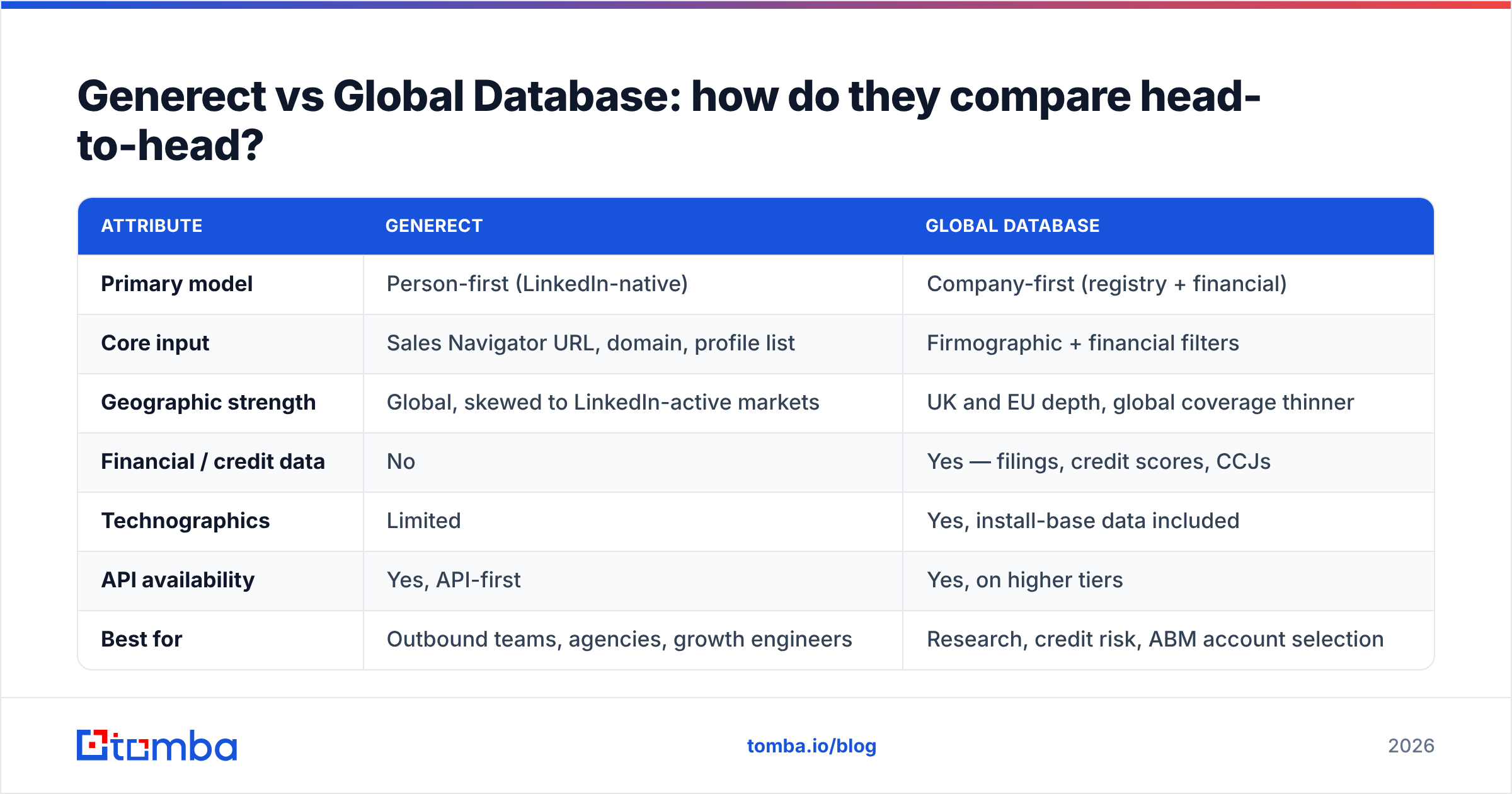
| Attribute | Generect | Global Database |
|---|---|---|
| Primary model | Person-first (LinkedIn-native) | Company-first (registry + financial) |
| Core input | Sales Navigator URL, domain, profile list | Firmographic + financial filters |
| Geographic strength | Global, skewed to LinkedIn-active markets | UK and EU depth, global coverage thinner |
| Financial / credit data | No | Yes — filings, credit scores, CCJs |
| Technographics | Limited | Yes, install-base data included |
| API availability | Yes, API-first | Yes, on higher tiers |
| Best for | Outbound teams, agencies, growth engineers | Research, credit risk, ABM account selection |
| Typical buying process | Self-serve trial then credit package | Demo-gated annual licence |
| Pricing transparency | Partial — quote for volume | Low — quote required |
| Weakest point | Profile staleness, LinkedIn dependency | Contact granularity, refresh lag |

Read the table as a fork, not a scoreboard. Do most rows you care about sit in the finance and tech stack column? Then Global Database wins before you check a single email. Do your rows all point to speed, from ICP to sequencer? Then Generect wins.
How do the pricing models compare?#
Price is the murkiest part of any Generect vs Global Database review. Neither vendor posts list prices. That is the top gripe in buyer reviews on G2. The shape of each model matters more than the sticker.
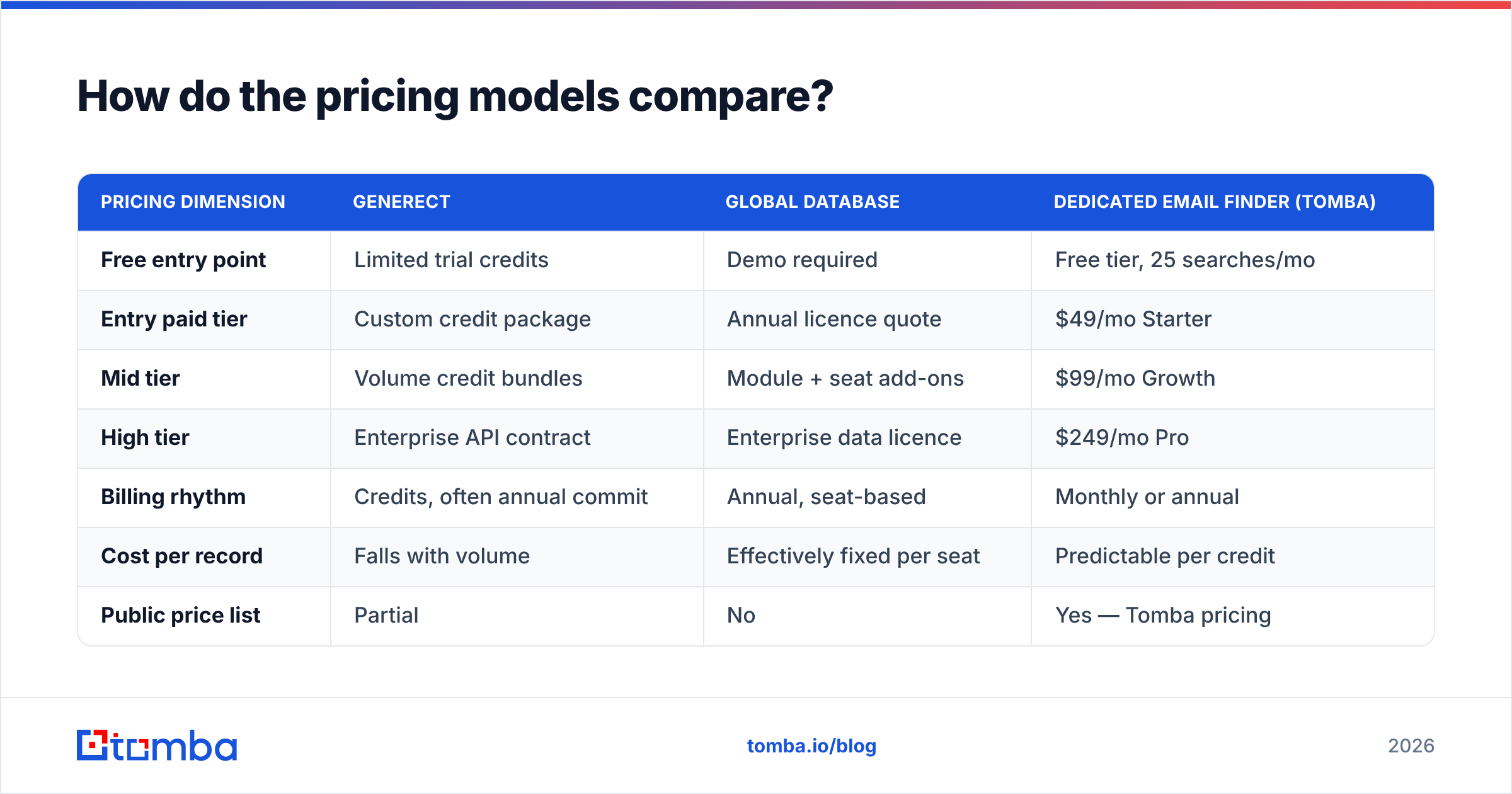
| Pricing dimension | Generect | Global Database | Dedicated email finder (Tomba) |
|---|---|---|---|
| Free entry point | Limited trial credits | Demo required | Free tier, 25 searches/mo |
| Entry paid tier | Custom credit package | Annual licence quote | $49/mo Starter |
| Mid tier | Volume credit bundles | Module + seat add-ons | $99/mo Growth |
| High tier | Enterprise API contract | Enterprise data licence | $249/mo Pro |
| Billing rhythm | Credits, often annual commit | Annual, seat-based | Monthly or annual |
| Cost per record | Falls with volume | Effectively fixed per seat | Predictable per credit |
| Public price list | Partial | No | Yes — Tomba pricing |
Here is the point. Yearly seat plans punish small teams that need lots of records. Credit plans punish big teams that need a few records each. Map your real usage before you sit through a demo. A four-person SDR team that burns 8,000 records a month has a very different sweet spot than a two-person research team that pulls 300 rich accounts a quarter.

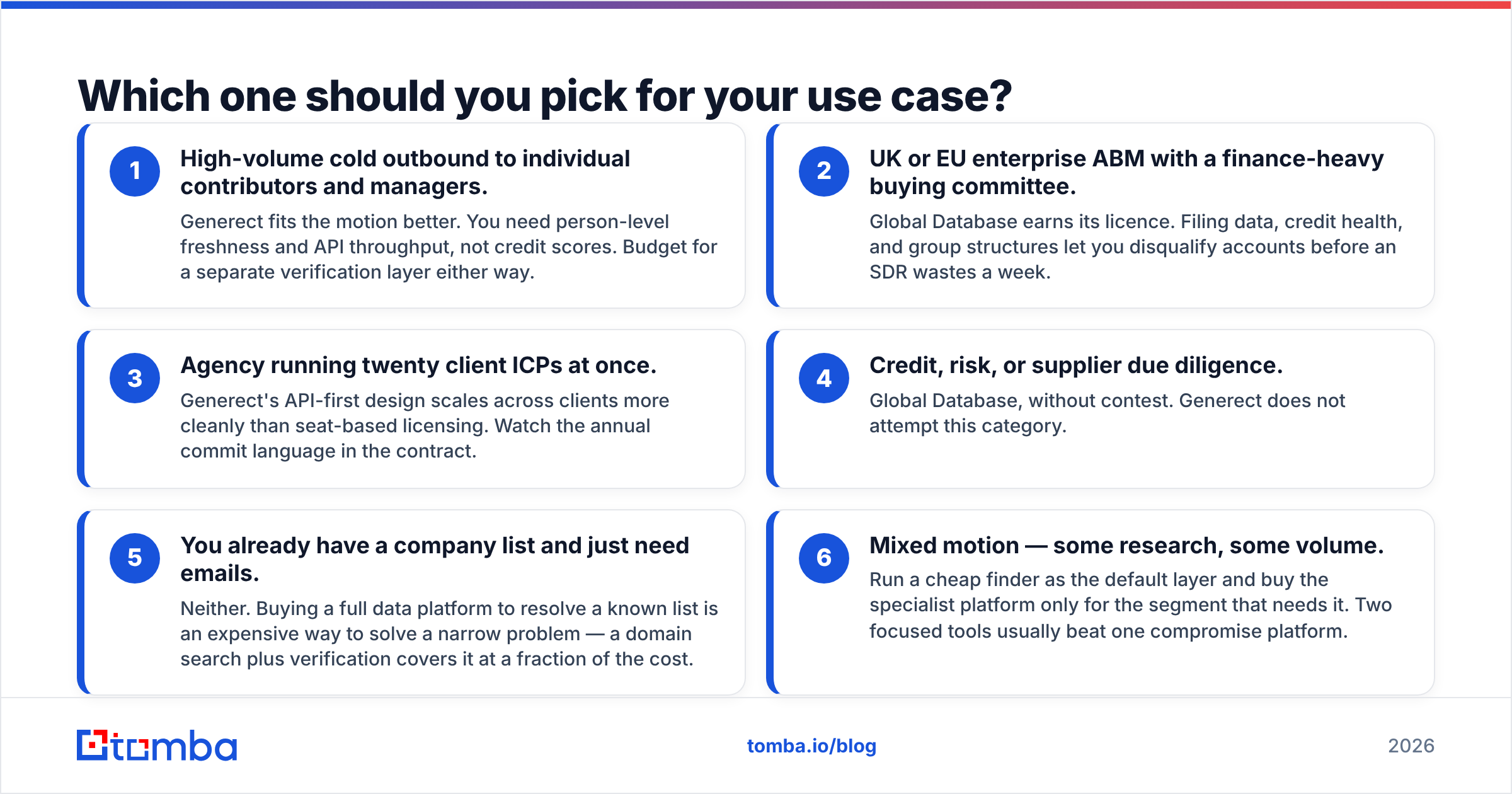
Which one should you pick for your use case?#
Pick by the job to be done. The first three cases below are clear cut.
- High-volume cold outbound to ICs and managers. Generect fits better. You need fresh person data and API speed, not credit scores. Budget for a check layer either way.
- UK or EU enterprise ABM with a finance-led buying group. Global Database earns its licence. Filings, credit health, and group links let you drop bad accounts early. Your SDRs stop losing weeks.
- An agency running twenty client ICPs at once. Generect's API-first build scales across clients better than seat plans. Watch the yearly commit clause in the contract.
For the next three, the Generect vs Global Database answer is often "neither."
- Credit, risk, or supplier checks. Global Database, hands down. Generect does not try to serve this need.
- You have the company list and just need emails. Neither one. Buying a full data platform to work a known list is a costly fix for a small problem. A domain search plus a check pass covers it.
- A mixed motion — some research, some volume. Run a cheap finder as the base layer. Buy the specialist tool only for the slice that needs it. Two sharp tools beat one blunt one.
Where does a dedicated email finder fit in this stack?#
The Generect vs Global Database debate hides a third option. Both tools bundle contact lookup into a bigger product, and bundling costs you. You pay platform rates for a plain job.
An email finder does one thing. It turns a name plus a domain into a work address that lands. It prices for that one job. So you keep the platform your team truly needs for its rare data. And you stop paying platform rates for the part that is not rare.
A workable stack looks like this:
- Account layer — whichever source has the firm data you cannot get elsewhere. Global Database for EU finance data, your CRM for live ties, intent data for timing.
- Contact layer — a fast, cheap finder that resolves people at those firms. Tomba's email finder handles name-plus-domain lookups. The bulk email finder runs the same job across a whole CSV.
- Check layer — SMTP tests and catch-all handling before a single record hits your sequencer.
- Top-up layer — data enrichment to fill the fields your CRM needs for routing and scoring.
- Send layer — your sequencer, with volume matched to domain health, not to list size.
Each layer can be swapped. That is the point. Teams that buy one all-in-one platform learn the switching cost later. The data slips in one spot, and the contract still has ten months to run.
What should you test before you buy?#
Before you commit to either side of the Generect vs Global Database choice, run four checks with your own ICP:
- Match rate on a known list. Take 100 contacts whose emails you have already checked. Ask each vendor to resolve them cold. Compare hit rate and exact matches, not just "did it send back something."
- Bounce rate on a live send. Use 200 fresh records each, checked the same way, sent from the same domain. Above 3% hard bounces is a problem, whatever the vendor claims.
- Refresh pace. Ask straight out: how often is a record re-checked, and what sets off a refresh? A vague answer usually means "on request."
- Exit terms. Can you export what you paid for? Yearly data licences often limit what you keep after you leave. Read that clause before the discount tempts you.
Also ask where the data comes from. A solid vendor answers plainly. Tomba posts its own data sources for that reason.
The verdict: Generect vs Global Database#
Generect wins when your bottleneck is reaching people fast. Global Database wins when your bottleneck is knowing which firms are worth reaching. Neither tool is a mistake. Buying the wrong one for your motion is.
Maybe you read this Generect vs Global Database comparison and thought something else. "I do not need filings or a LinkedIn scraper. I just need good work emails for a list I already have." That instinct is right. Start with the Tomba Email Finder. The free tier gives you 25 searches a month, enough to test accuracy against your current tool. Paid plans start at $49/mo with posted per-credit prices, not a quote request. Test it on your own list before your next renewal date.
Related guides#
Ready to find emails that actually work?
Join 150,000+ professionals who stopped guessing and started sending. Free credits on signup — no credit card required.
Get the Tomba newsletter
Practical outbound tactics and product updates — once every two weeks.
About the author