Generect vs Lead Kahuna: Which B2B Lead Tool Wins in 2026?
Generect and Lead Kahuna both promise clean B2B contact data, but they solve different problems. Here is an honest breakdown of accuracy, pricing, LinkedIn coverage, and which one actually fits your outbound motion.
Generect vs Lead Kahuna is a fair question, but the two tools do different jobs. Generect indexes B2B people data. Lead Kahuna scrapes local business listings. Here is how they compare on accuracy, price, and fit — and when neither one is the right pick.
TL;DR
- Generect is a LinkedIn-first lead database with an API. It suits teams that want structured company and people data at scale.
- Lead Kahuna is a desktop scraping tool for agencies and local-business prospecting. It harvests from directories, maps, and websites rather than a curated B2B index.
- They are not really competitors. Generect sells a data index; Lead Kahuna sells a harvester. Pick the wrong one and you lose months to bad lists.
- Neither is a strong verification layer. Both expect you to bring your own email validation before you send.
- If you mainly need the right work email for one person at one company, a dedicated email finder with a verification step usually wins on cost per valid contact.
Generect vs Lead Kahuna: what each tool actually is#
Start with the honest framing. These two tools show up in the same Google searches because both promise "B2B leads." Under the hood, they are built in completely different ways.
Generect (generect.com) is a real-time B2B lead database with heavy LinkedIn coverage. You query by filters — industry, headcount, geography, job title, technology. You get back structured records: company, role, profile URL, and contact fields. It also ships an API. That is the part RevOps teams care about, because the data can flow into your CRM without anyone touching a CSV.
Lead Kahuna is a Windows desktop app in the lead-scraping category. It pulls business listings from public sources such as search engines, maps, and directories. Then it adds whatever contact details it can find on the target's website. Its natural buyer is a local marketing agency, an SEO shop, or a services business selling to dentists, contractors, and restaurants.
So the real decision is not "which is better." It is "which data shape matches the companies I sell to."
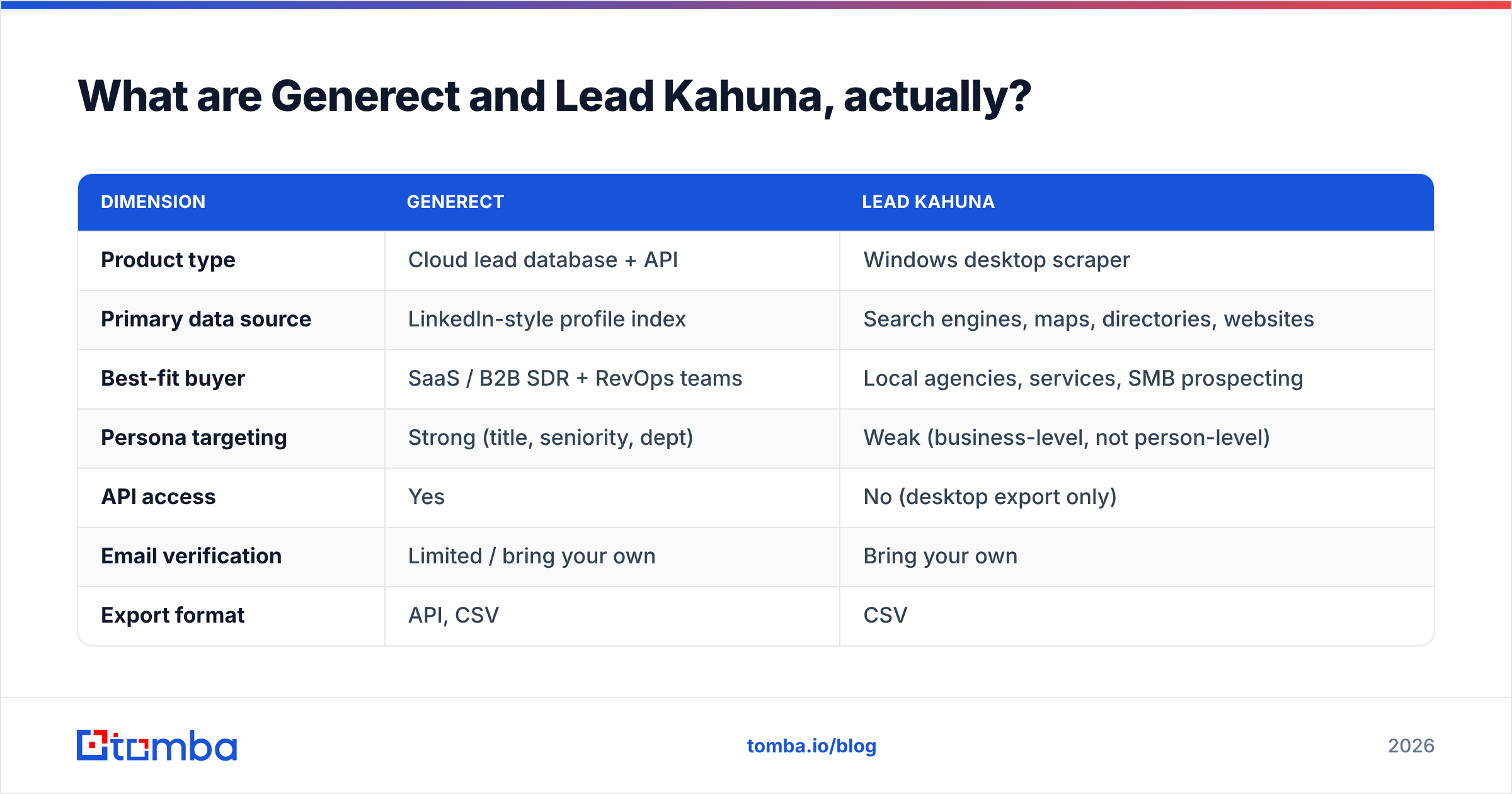
| Dimension | Generect | Lead Kahuna |
|---|---|---|
| Product type | Cloud lead database + API | Windows desktop scraper |
| Primary data source | LinkedIn-style profile index | Search engines, maps, directories, websites |
| Best-fit buyer | SaaS / B2B SDR + RevOps teams | Local agencies, services, SMB prospecting |
| Persona targeting | Strong (title, seniority, dept) | Weak (business-level, not person-level) |
| API access | Yes | No (desktop export only) |
| Email verification | Limited / bring your own | Bring your own |
| Export format | API, CSV | CSV |
| Typical entry cost | Mid three figures/mo (quote-based) | One-time / annual license |

Which one gives you better data accuracy?#
Accuracy depends on what you ask each tool to be accurate about.
Generect's strength is person-level precision. Its index is built around professional profiles, so job title, seniority, and department are first-class fields. Filter for "VP of Engineering at 200-1000 employee fintech companies in Germany" and those attributes are structured, not guessed. The weak spot is shared by every profile-based database: profiles go stale. People change jobs and forget to update. Independent reviews of B2B data vendors put annual role decay at 25-30%. That is a category problem, not a Generect one.
Lead Kahuna's strength is fresh business-level data. A listing scraped from a maps result or a live website was published recently by definition. If a plumbing company posted a new phone number last week, a scraper sees it. The weak spot is that you rarely get a named decision-maker. You get info@ and contact@ addresses. Those convert poorly in cold outbound, and they often land in a shared inbox nobody reads.
Both tools underserve a third layer: does the email accept mail today? Neither one is built for SMTP-level validation. Push an unverified list into a cold sequence and bounce rates climb. Your sender reputation takes the hit. That is the expensive failure mode. One bad send can cost you weeks of domain recovery.
A practical rule: run every list through an email verifier before it touches your sending tool. Aim for a bounce rate under 2%. Google and Yahoo now treat high bounce and spam-complaint rates as a hard gate, not a suggestion (Google's bulk sender guidelines).
Generect vs Lead Kahuna: how does the pricing compare?#
The two pricing models differ so much that a per-lead comparison misleads.
Generect is quote-based and subscription-shaped. You buy a plan with a credit or record allowance, and API access usually sits on the higher tiers. Expect enterprise data vendor economics: a real monthly commitment, annual contracts, and per-seat or per-record limits that start to bite once your team grows past two SDRs.
Lead Kahuna sells a license. You pay once (or yearly), install it on a machine, and scrape until the sources themselves rate-limit you. That is genuinely attractive for a solo operator or a small agency. The hidden cost is time. A desktop scraper that runs six hours to build 3,000 rows of info@ addresses is not free. It is just off the invoice.
Here is how total cost breaks down once you count the work each model pushes onto you:
- License or subscription cost — Lead Kahuna wins on sticker price. Generect wins on cost per qualified record for B2B SaaS targeting.
- Enrichment cost — Generect ships enriched records. Lead Kahuna often needs a second pass to find a named contact, so you pay for a separate data enrichment tool.
- Verification cost — Both need it. Budget for it on purpose. Unverified sends are the most expensive mistake in outbound.
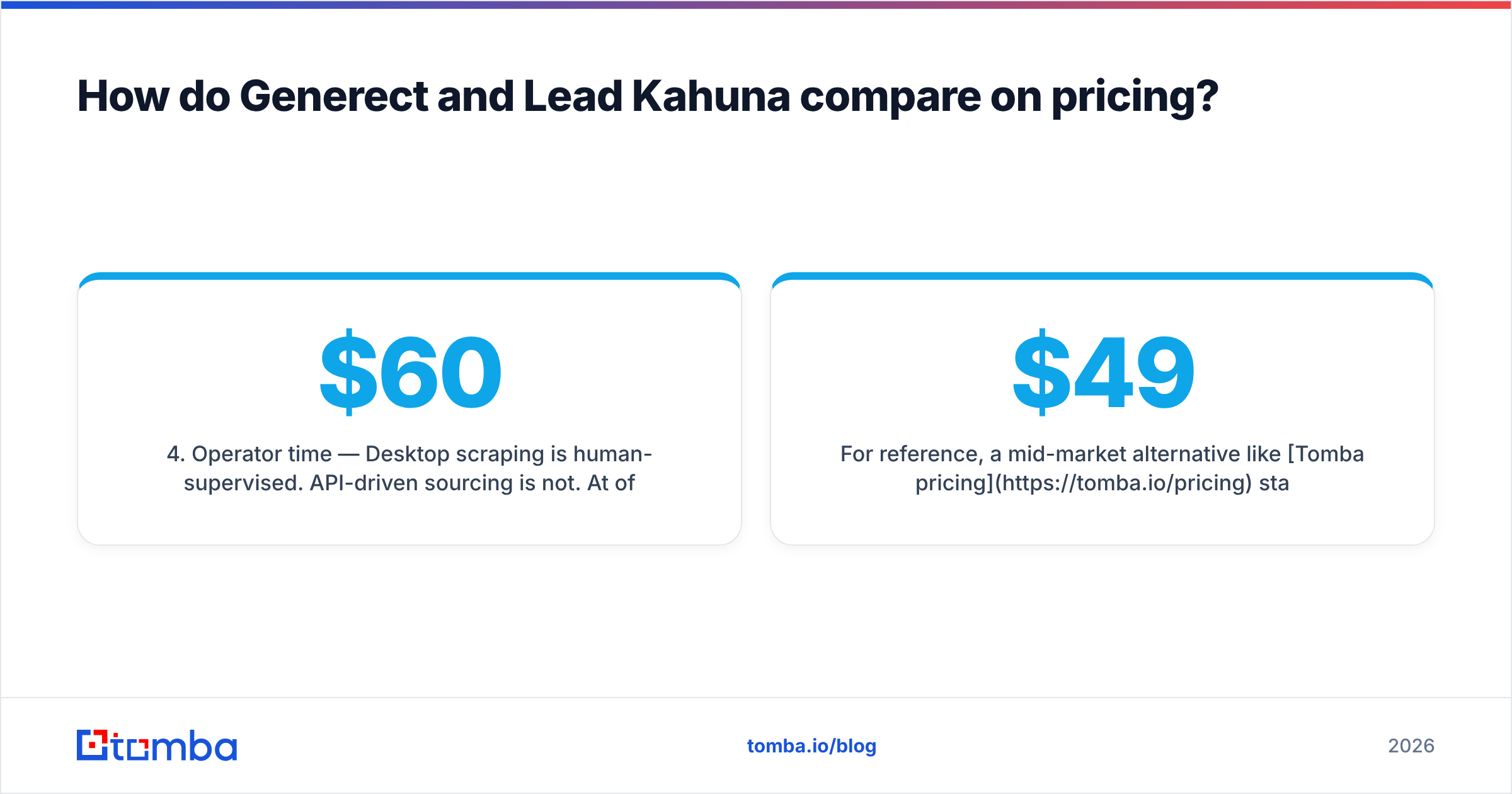
- Operator time — Desktop scraping needs a human watching it. API sourcing does not. At $60/hr of SDR time, ten hours of scraping a month costs more than most subscription tiers.
- Deliverability risk — Shared inboxes and stale roles both inflate bounces. The cost lands on your domain, and it compounds.
- Switching cost — A desktop-only tool with no API leaves you a manual CSV workflow that is painful to unwind later.
For reference, Tomba pricing starts with a free tier of 25 searches a month, then $49/mo Starter, $99/mo Growth, and $249/mo Pro. That is the band most two-to-five-person outbound teams work in. Bookyourdata takes a different but equally valid route: pay-as-you-go verified B2B contacts, which suits teams that buy in bursts.
Is Generect better than Lead Kahuna for cold outbound?#
For B2B SaaS cold outbound: yes, clearly. For local-business outbound: no, and it is not close.
Cold outbound works when your message reaches a named human whose job matches the problem you solve. Generect's filters build that list natively. You can query "Head of Demand Gen at Series B martech companies" and hand the result to your sequencer.
Lead Kahuna cannot do that reliably. Directory and maps data is organized by business, not by person. That is fine when your ICP is "dental practices within 50 miles of Austin." For that ICP, Generect's LinkedIn-shaped index is thin, because small local businesses rarely keep professional profiles.
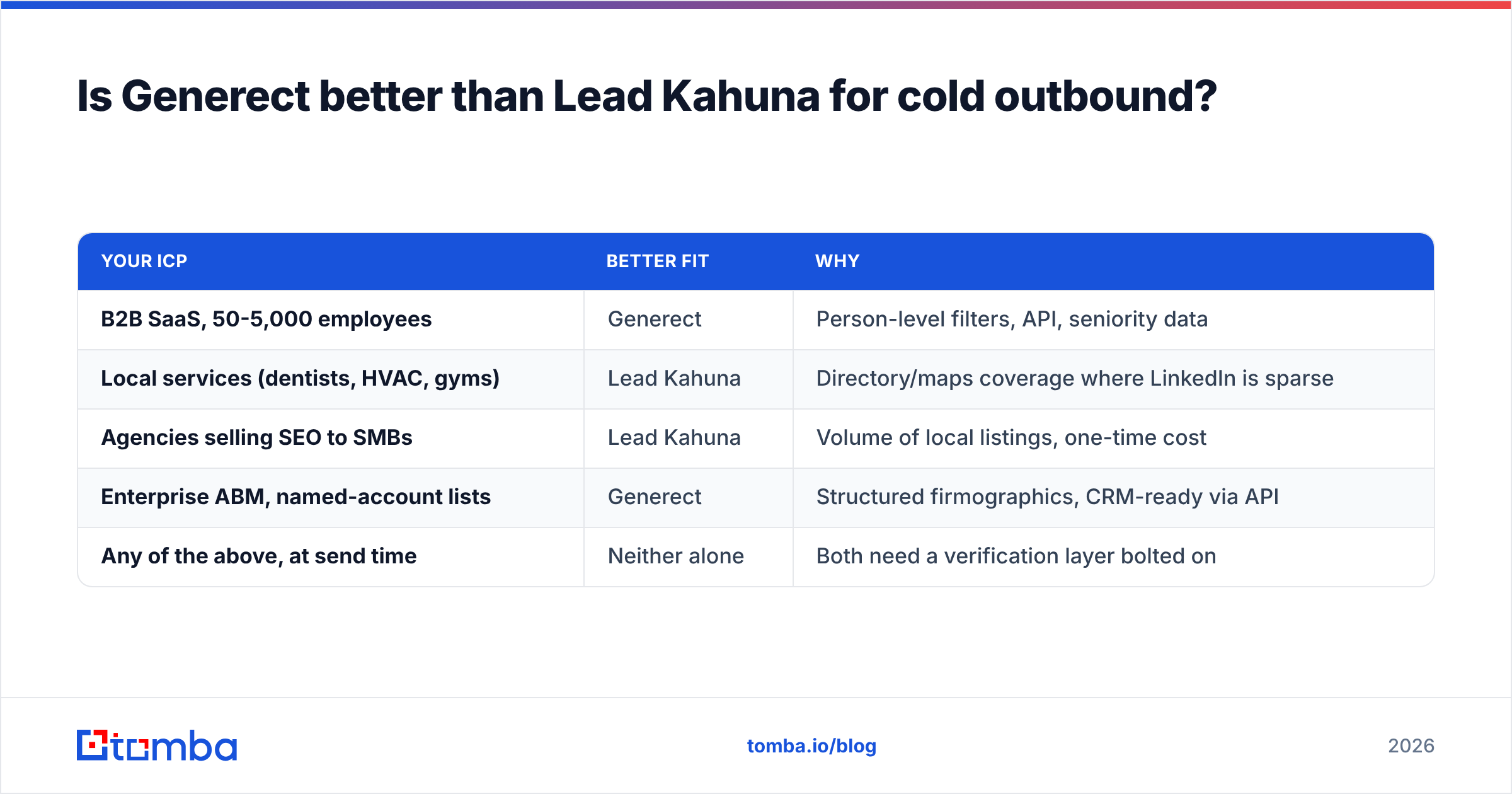
So the honest matrix:
| Your ICP | Better fit | Why |
|---|---|---|
| B2B SaaS, 50-5,000 employees | Generect | Person-level filters, API, seniority data |
| Local services (dentists, HVAC, gyms) | Lead Kahuna | Directory/maps coverage where LinkedIn is sparse |
| Agencies selling SEO to SMBs | Lead Kahuna | Volume of local listings, one-time cost |
| Enterprise ABM, named-account lists | Generect | Structured firmographics, CRM-ready via API |
| Any of the above, at send time | Neither alone | Both need a verification layer bolted on |

What are the real limits of each tool?#
Generect's limits:
- Pricing opacity. A quote-based sales cycle slows down small teams that just want to swipe a card and start.
- Coverage skew. Profile-based indexes over-represent tech, marketing, and English-speaking markets. If you sell to manufacturing in Central Europe or logistics in Southeast Asia, test first.
- Verification depth. A plausible email pattern is not a confirmed mailbox. Plan a separate catch-all verifier step for domains that accept everything.
Lead Kahuna's limits:
- Desktop-bound. No API means no automation, no CRM sync, no scheduled refresh. Every list is a manual artifact.
- Contact quality ceiling. Generic inboxes convert far below named contacts. You will spend extra effort finding a real person.
- Source fragility. Scrapers depend on page layouts that change. When a directory redesigns, output degrades until the vendor ships a patch.
- Compliance surface. Scraping public sources sits in a grey zone, and the rules vary by country and source. Review the terms of every source you harvest. GDPR's legitimate-interest basis for B2B contact data is defensible, but only if you document it.
Both tools share one more structural issue: data ages. Analysts have long put B2B contact decay in the double digits each year. So "buy a list once" is not a strategy. A quarterly refresh is the difference between a working database and a liability.
How do you build a stack that beats either one alone?#
The strongest setup splits the three jobs that both tools try to bundle.
Job 1 — Find the accounts. This is where firmographic filters matter. Generect handles it well for tech-adjacent B2B. Lead Kahuna handles it well for local. Use whichever matches your ICP, or pull accounts from your own product data and intent signals.
Job 2 — Find the person and their email. This is a separate problem. Give a domain search a company domain and it returns the email pattern and named contacts there, no matter which tool sourced the account. Most stacks leak money at this step, because generic-inbox lists get sequenced as if they were named contacts.
Job 3 — Verify before sending. Non-negotiable. Run SMTP-level checks, flag catch-all domains separately, and hold risky records out of the main sequence. Watch your bounce rate as an early warning. If it crosses 3%, stop sending and re-verify.
Splitting the jobs also keeps any single vendor from holding your outbound hostage. If Generect's coverage thins in a new market, you swap the sourcing layer and keep your verification and CRM pipeline intact. Teams comparing vendors on G2's lead intelligence category tend to land on this modular pattern for that reason.
Run a sanity test before you sign anything. Take 100 records from a trial, verify them yourself, and work out your real cost per valid, named, deliverable contact. That number is what you are buying, not the list price. Most teams find it is 2-4x the headline price once bounces and generic inboxes come out.
Which should you choose in 2026?#
Choose Generect if you sell software or services to defined B2B roles, you have an engineer who can consume an API, and you can absorb a subscription. The person-level structure earns its price when your buyers live on professional networks.
Choose Lead Kahuna if you run an agency or a local services business, your prospects are storefronts rather than org charts, and a one-time license fits your cash flow. You are trading automation for a lower price.
Choose neither as your whole stack. Both are sourcing tools. Neither closes the gap between "here is a company" and "here is a verified, named person who will receive your email."
That last mile is what Tomba is built for. Once you know which companies to hit — from Generect, from Lead Kahuna, from your CRM, or from a founder's spreadsheet — the Tomba Email Finder finds the named contact and their verified work email. The free tier gives you 25 searches to test your own list first. Run 50 of your records through it, compare the valid-contact rate with your current tool, and let the bounce data decide.
Related guides#
Ready to find emails that actually work?
Join 150,000+ professionals who stopped guessing and started sending. Free credits on signup — no credit card required.
Get the Tomba newsletter
Practical outbound tactics and product updates — once every two weeks.
About the author