Generect vs LeadIQ (2026): Which B2B Data Tool Wins?
Generect sells lead data through an API. LeadIQ sells a seat-based prospecting workflow. They are not the same product — here is how they compare on coverage, accuracy, pricing and fit, plus when neither is the right buy.
TL;DR
- Generect is an API-first B2B data provider. You send it a LinkedIn search URL, a company domain, or a person record, and it returns structured leads with emails. There is no sequencing layer and barely a UI to speak of.
- LeadIQ is a seat-based prospecting workstation. Its Chrome extension captures contacts off LinkedIn, enriches them, writes AI intro lines, and pushes them into Salesforce or Outreach in one click.
- They rarely compete head-to-head. Generect wins when engineering owns the pipeline; LeadIQ wins when SDRs own the pipeline.
- Cost shape differs more than cost level: Generect bills for volume, LeadIQ bills per seat with annual commitments and credit caps that bite mid-quarter.
- If all you actually need is verified work emails at predictable prices, a dedicated finder like Tomba starts at $49/mo with no seat minimum — cheaper than either for most teams under 10 reps.
What are Generect and LeadIQ, exactly?#
They solve the same business problem — getting contactable B2B leads — from opposite ends of the stack.
Generect positions itself as a lead-generation data layer. Its headline feature is LinkedIn-search-to-leads: paste a Sales Navigator or LinkedIn search URL, and the API returns the matching people or companies as structured records with emails attached. There are endpoints for company lookup, people lookup, and email finding. The company leans heavily on "no scraping infrastructure to maintain on your side" as the pitch. You are buying data delivery, not software.
LeadIQ is the opposite. It is built around the rep's day. The Chrome extension overlays LinkedIn profiles and Sales Navigator lists; you click "capture," and LeadIQ grabs the name, title, work email, and mobile, then syncs it to your CRM with the correct field mapping. Layered on top: Scribe (AI email writing), tracked job-change alerts, and data-health checks that flag stale CRM records. It is sold per seat because it is used per seat.
The practical translation: Generect is a supplier. LeadIQ is a tool. A supplier is judged on cost per record and match rate. A tool is judged on how many minutes it saves a human per day. Comparing them on one axis will always mislead you.

How do Generect and LeadIQ differ in day-to-day workflow?#
Six differences decide most evaluations:
- Point of use. Generect runs server-side, inside your enrichment job or n8n/Make workflow. LeadIQ runs in the browser tab where your rep already lives. If your reps do not prospect manually, half of LeadIQ's value evaporates.
- Unit of purchase. Generect sells volume (records/credits). LeadIQ sells seats with credit allocations attached. Ten reps who each need 200 contacts a month cost very differently under those two models.
- CRM depth. LeadIQ's Salesforce, HubSpot, Outreach, and Salesloft integrations are genuinely deep — duplicate detection, field mapping, sequence enrolment. Generect expects you to build that yourself or wire it through a Zapier integration-style automation layer.
- Phone data. LeadIQ invests visibly in mobile numbers, which is why call-heavy teams shortlist it. Generect's phone coverage is thinner and more region-dependent.
- AI layer. LeadIQ Scribe drafts personalised openers from profile and company signals. Generect has no writing layer at all — deliberately.
- Speed to first value. LeadIQ: install extension, capture a contact, done in ten minutes. Generect: read the docs, get a key, write the call, handle pagination and rate limits — a half-day for a competent developer, zero for a non-technical buyer.
That last point is the real fork in the road. Generect assumes someone on your side writes code. If nobody does, the comparison ends there.
Generect vs LeadIQ: the side-by-side comparison#
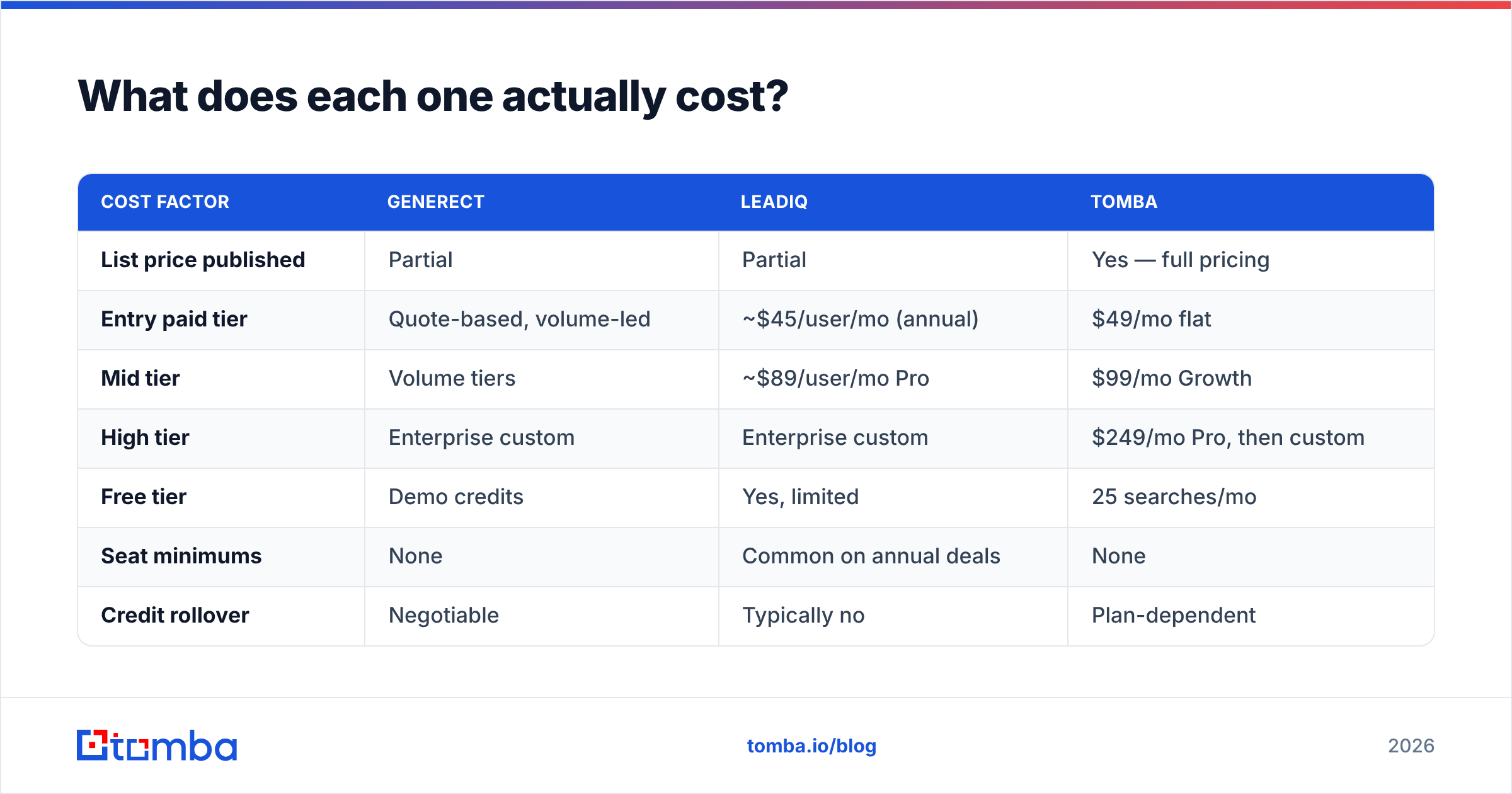
Pricing on both sides moves and is partly quote-gated, so treat these as directional and confirm on the vendor pages before you sign anything.
| Attribute | Generect | LeadIQ |
|---|---|---|
| Primary form factor | REST API + LinkedIn-URL search | Chrome extension + web app |
| Buyer | RevOps / engineering / agencies | SDR and AE teams, sales leadership |
| Pricing model | Volume / credit-based, quote-led | Per seat, annual commitment favoured |
| Entry price | Custom, typically low three figures/mo | Free tier; paid seats from roughly $45–$89/user/mo |
| Free tier | Trial/demo credits on request | Yes — limited monthly credits |
| Work email finding | Core strength | Yes, plus verification signals |
| Mobile phone numbers | Limited, region-dependent | Strong — a headline feature |
| CRM sync | Build it yourself | Native Salesforce, HubSpot, Outreach, Salesloft |
| AI email writing | No | Yes (Scribe) |
| Job-change tracking | No | Yes |
| Bulk list building | Via API pagination | Via extension + list capture |
| Best-fit team size | Any, if technical | 5+ reps doing manual prospecting |
| Worst fit | Non-technical solo founders | Teams that never touch LinkedIn manually |
Two things stand out. First, there is almost no feature overlap outside "gives you an email address." Second, LeadIQ's per-seat model means its cost scales with headcount while Generect's scales with volume — so a 3-person team pulling 50,000 records and a 30-person team pulling 5,000 records will get opposite recommendations.

Which one has better data accuracy?#
Neither vendor will hand you an audited accuracy number, and any figure they publish is measured on their own sample. Run your own test — it takes an hour and it is the only number that matters.
Here is the protocol we use and recommend:
- Build a 200-row control list from a segment you actually sell into — same countries, same company sizes, same seniority band. Generic Fortune-500 lists flatter every vendor.
- Run the identical list through both tools.
- Record three numbers separately: match rate (rows that returned an email), valid rate (emails that pass independent SMTP verification), and catch-all share (rows returned as accept-all, which are unverifiable by design).
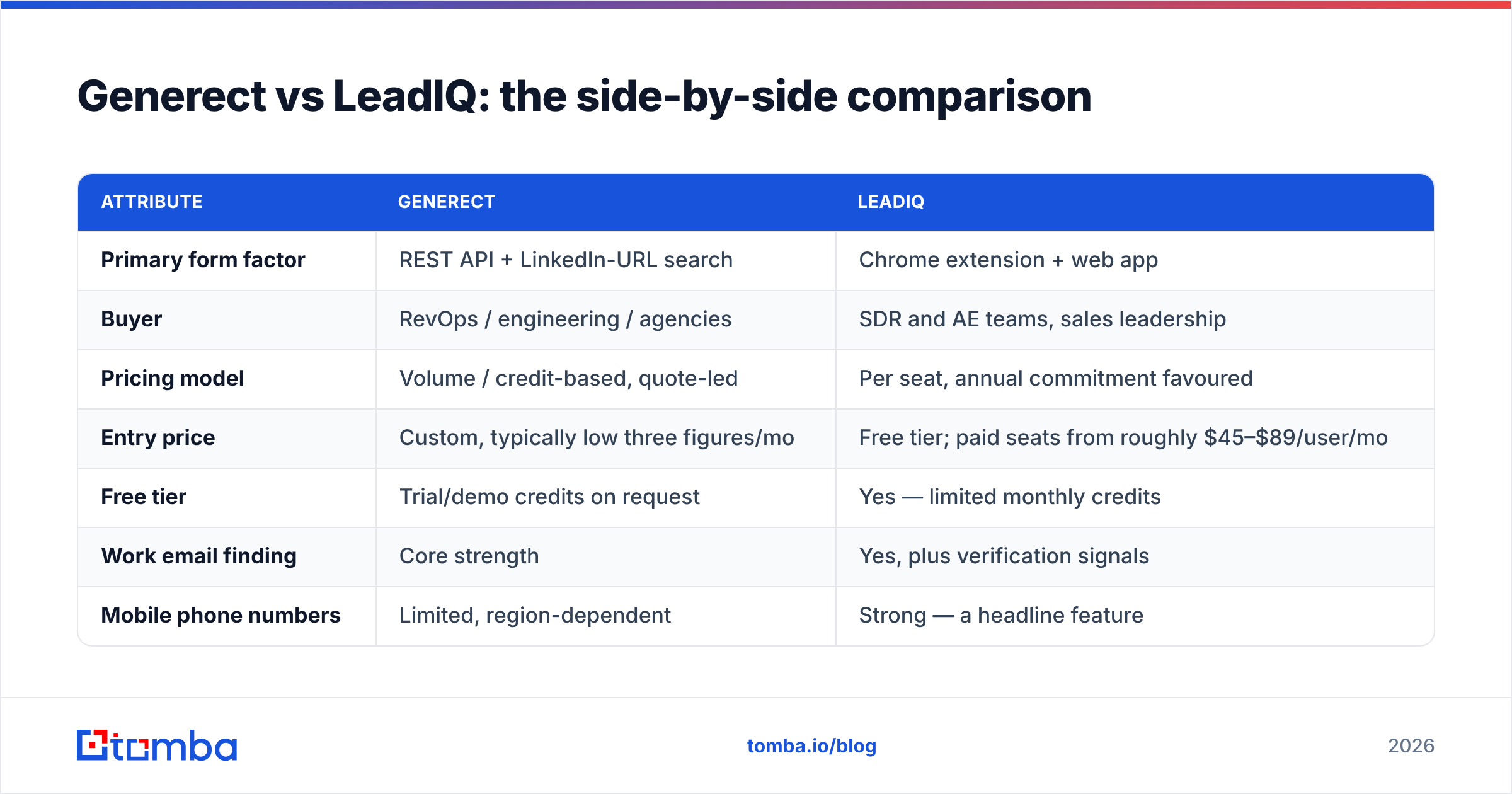
- Verify with a third-party email verifier rather than the vendor's own confidence flag. Grading your own homework is how "98% accurate" claims are born.
- Compute cost per valid email, not cost per credit. A tool with a 70% match rate at half the price beats a 90% tool at triple the price.

Patterns worth knowing before you test:
- LinkedIn-sourced tools skew toward LinkedIn-active people. Both tools lean on profile data, so coverage of engineers, sales, and marketing in North America and Western Europe is strong; coverage of operations managers at regional manufacturers is much weaker.
- Catch-all domains are the hidden variable. In some verticals, 25–40% of target domains accept all mail. Any tool will "find" an address there; none can prove it exists without extra signals. A catch-all verifier is the difference between a usable list and a bounce-rate problem.
- Freshness beats raw size. A 2023-vintage record for someone who changed jobs in 2025 is worse than no record, because it costs you a bounce and a wasted touch. This is where LeadIQ's job-change tracking earns its keep.
- Match rate is segment-specific. We have seen the same two tools swap places entirely between a US SaaS list and a DACH industrial list.
Independent user reviews on G2 are useful for spotting recurring complaints — support responsiveness, credit rollover policy, extension breakage after LinkedIn UI changes — but they are useless for accuracy. Everyone's segment is different.
What does each one actually cost?#
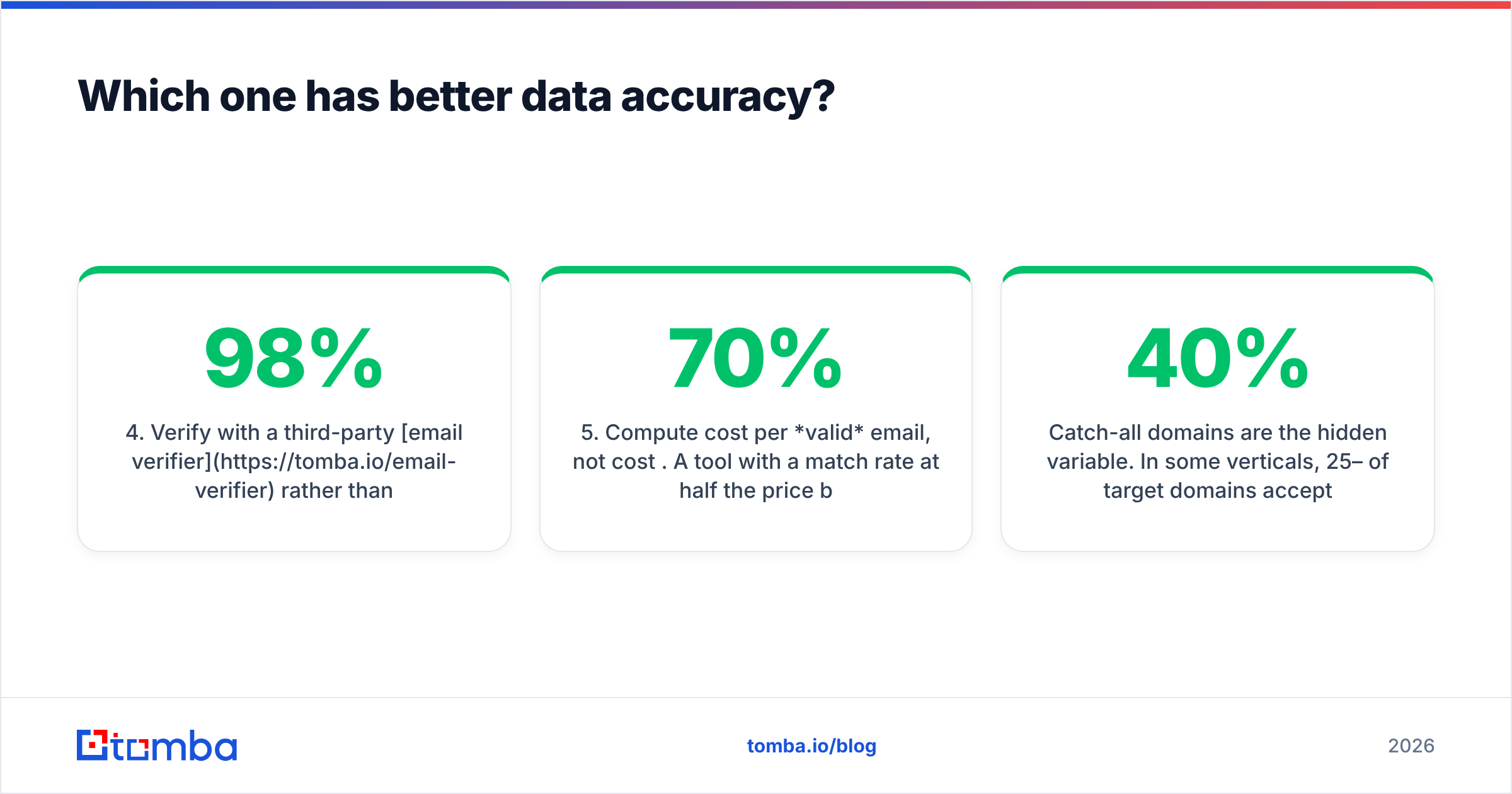
Both vendors gate real numbers behind a form, which is itself a signal about how they expect the sales cycle to go.
| Cost factor | Generect | LeadIQ | Tomba |
|---|---|---|---|
| List price published | Partial | Partial | Yes — full pricing |
| Entry paid tier | Quote-based, volume-led | ~$45/user/mo (annual) | $49/mo flat |
| Mid tier | Volume tiers | ~$89/user/mo Pro | $99/mo Growth |
| High tier | Enterprise custom | Enterprise custom | $249/mo Pro, then custom |
| Free tier | Demo credits | Yes, limited | 25 searches/mo |
| Seat minimums | None | Common on annual deals | None |
| Credit rollover | Negotiable | Typically no | Plan-dependent |
| Overage behaviour | Buy more volume | Hard stop until reset | Upgrade or wait |
The trap in seat-based pricing is not the sticker. It is the combination of a seat minimum, an annual term, and per-seat credit caps. A 10-seat annual deal where three reps burn their credits by week two and four never log in is the single most common way teams overspend on prospecting data. Audit actual per-seat usage after 30 days and renegotiate before renewal.
The trap in volume-based pricing is different: you pay for every record your job requests, including the ones your ICP filter should have excluded upstream. Tighten filters before you scale the job, not after.

Who should choose Generect?#
Pick Generect when all of these are true:
- You have a developer, or at least a comfortable automation builder, who owns the data pipeline.
- Your volume is high enough that per-seat pricing looks absurd — an agency running lists for 20 clients, or a growth team enriching tens of thousands of records a month.
- You want lead data as an input to something else you have built: a scoring model, a warm-outbound trigger, an internal dashboard.
- Your reps do not manually prospect on LinkedIn. Lists arrive in their sequencer already built.
Skip it if your buying committee cannot answer "who will write the integration?" without looking at each other.
Who should choose LeadIQ?#
Pick LeadIQ when:
- Reps prospect manually on LinkedIn every day and the capture-to-CRM round trip is a real time sink.
- You need mobile numbers for a call-heavy motion — this is one of LeadIQ's genuine strengths.
- Salesforce or Outreach hygiene matters to you and you want field mapping and duplicate handling handled without a RevOps ticket.
- Job-change tracking maps to your motion — for example, land-and-expand where a champion moving companies is your highest-converting signal.
Skip it if your outbound is fully programmatic, or if you have more licences than active prospectors. If you are already down this path and the seat math does not work, our breakdown of LeadIQ alternatives covers the cheaper routes.
Where does each tool fall short?#
Generect's weak points. No UI worth using for non-technical staff. No sequencing, no CRM logic, no writing help — everything downstream of "here are the records" is your problem. Documentation and support are lighter than incumbent vendors. Phone coverage is not a reason to buy. And because pricing is quote-led, small buyers often get less attention than agencies.
LeadIQ's weak points. Cost per contact climbs fast once you count idle seats. Credit caps reset monthly with limited rollover, so a big campaign month means an emergency upgrade. The Chrome extension is coupled to LinkedIn's DOM, so LinkedIn UI changes occasionally break capture until a patch ships — an industry-wide problem, not unique to LeadIQ, but it is your problem when it happens. And European coverage, while decent, is thinner than the North American dataset.
Shared weak point. Both anchor on LinkedIn-adjacent data. If your ICP lives off LinkedIn — trades, local services, public sector, many APAC and LATAM segments — both will disappoint you, and you will be better served by domain-pattern discovery plus verification. A domain search that walks a company's public web presence often outperforms profile-derived data in exactly those segments.
Is there a better option than either?#
Depends on what you are actually buying.
If you need a full prospecting workstation with CRM writeback, AI copy, and phone data, LeadIQ is a reasonable buy and its direct competitors are Apollo, ZoomInfo, and Cognism — not Generect.
If you need bulk lead data delivered programmatically, Generect competes with the API tier of every major data provider, and you should benchmark it on cost per valid record against two others before committing.
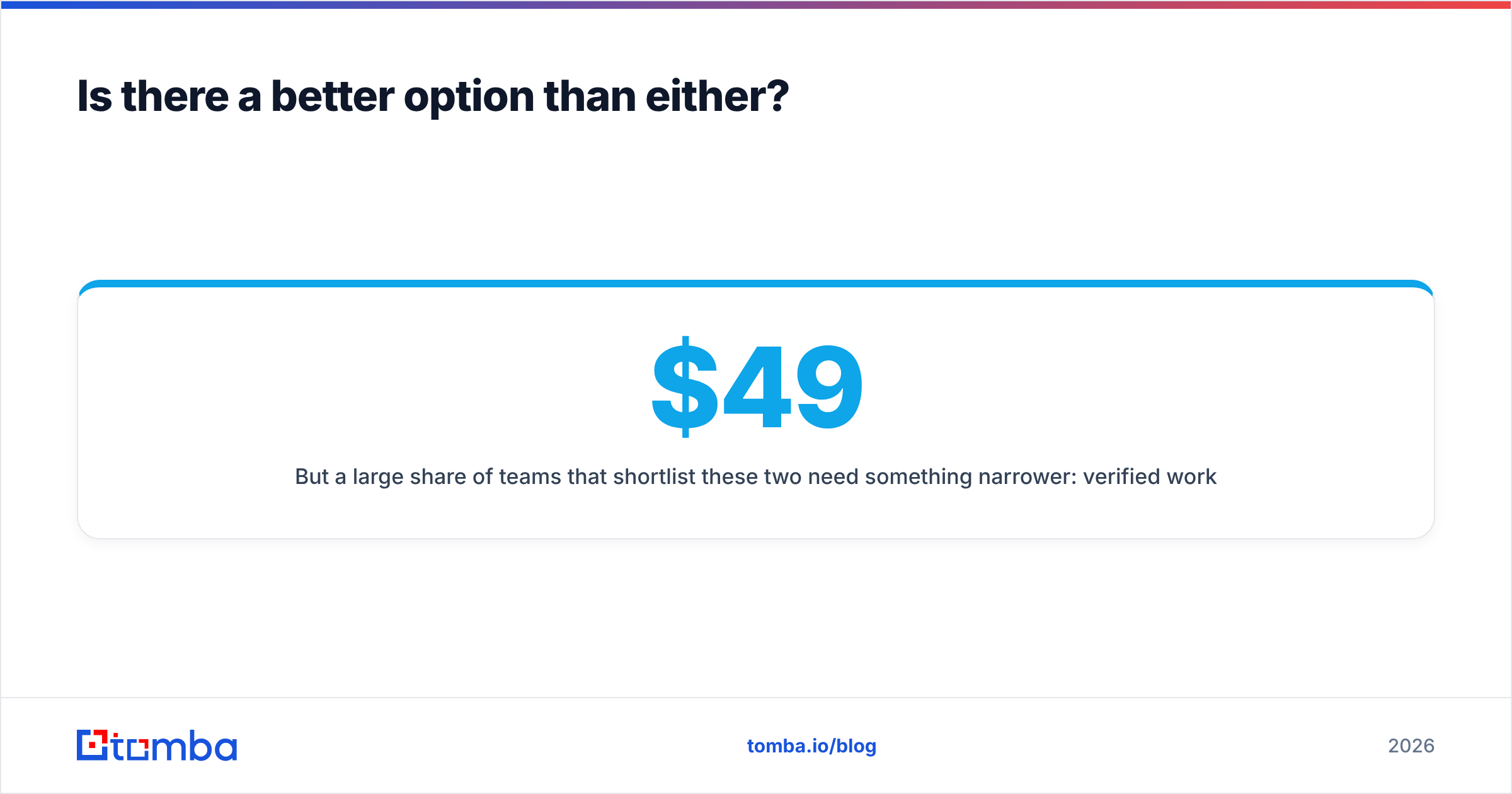
But a large share of teams that shortlist these two need something narrower: verified work emails, on demand, at a predictable price. That is a different product category and it costs a fraction as much. A focused email finder covers finder, verifier, domain search, catch-all handling, and bulk processing without seat minimums or annual terms. Tomba's Free tier gives 25 searches a month, Starter is $49/mo, Growth is $99/mo, and Pro is $249/mo — flat, per account, not per rep. There is a REST API for the engineering-led workflow Generect targets, and a Chrome extension plus Sheets and Excel add-ins for the rep-led workflow LeadIQ targets.
The honest framing: Tomba is not trying to be a sequencer or a CRM. If you need Scribe and job-change alerts, buy LeadIQ. If you need only the data, paying seat prices for it is a choice, not a requirement.
How should you run the evaluation?#
Do not run a feature-checklist bake-off. Run a cost-per-valid-email test:
- Pull a real 200-row target list from your ICP.
- Trial all three candidates in the same week, on the same list.
- Verify every returned email with one neutral verifier.
- Divide monthly cost by valid emails produced.
- Add a qualitative score for time saved per rep per day — that is where LeadIQ recovers ground it loses on raw price.
- Re-run the winner's numbers at 3× volume to see where the pricing cliff sits.
Teams that skip step 6 sign annual deals that break in month four.
Ready to test the data layer without a seat-based contract? Start with the Tomba Email Finder — run your control list on the free tier, verify the results, and compare cost per valid email against whatever quote Generect or LeadIQ puts in front of you. If the numbers favour them, buy them. If they do not, you just saved a year of licence fees.
Related guides#
Ready to find emails that actually work?
Join 150,000+ professionals who stopped guessing and started sending. Free credits on signup — no credit card required.
Get the Tomba newsletter
Practical outbound tactics and product updates — once every two weeks.
About the author