Generect vs Leadrocks (2026): Which B2B Data Tool Wins
Generect sells live LinkedIn-sourced lead generation with an API. Leadrocks sells a huge pre-built contact database at a low one-time price. Here's how they actually differ — and which one belongs in your outbound stack.
Generect vs Leadrocks comes down to one question: do you want fresh data on demand, or a big cheap list you clean yourself?
TL;DR
- Generect builds lists live from LinkedIn, and it ships a real API. You send a query, it returns contacts. Best for teams that want current data and can wire up an integration.
- Leadrocks is a pre-built B2B contact database with a Chrome extension. It is cheap, and it often sells as a lifetime deal. Best for solo founders and small teams who want volume today.
- Neither tool is a verifier. Both will hand you addresses that bounce if you skip a cleaning step.
- Need emails at named companies? An email finder plus a verifier usually beats both on cost per valid contact.
- Pick Generect for API pipelines. Pick Leadrocks for cheap bulk exports. Budget for verification either way.
What are Generect and Leadrocks, actually?#
People compare them all the time. But they are not the same kind of product.
Generect is a lead generation platform. It runs live queries against LinkedIn and Sales Navigator. You describe an audience: job titles, headcount, location, tech stack, recent hires. Generect turns that into contact records with work emails. Higher plans add phone numbers. Two things set it apart. The search runs against current sources, not an old snapshot. And an API exposes all of it, so a workflow can start a search without anyone opening a dashboard.
Leadrocks is a B2B contact database. It sells access to a very large pool of records: LinkedIn URLs, work emails, phone numbers, job titles, and company data. You filter the pool and export what you need. A Chrome extension pulls contacts while you browse LinkedIn. Saved lists keep your exports tidy. Leadrocks made its name on price, including lifetime deals that make the cost per thousand records look tiny.
That one gap — built on request versus stored and searched — drives almost every other difference in this Generect vs Leadrocks matchup.

How do Generect vs Leadrocks compare head to head?#
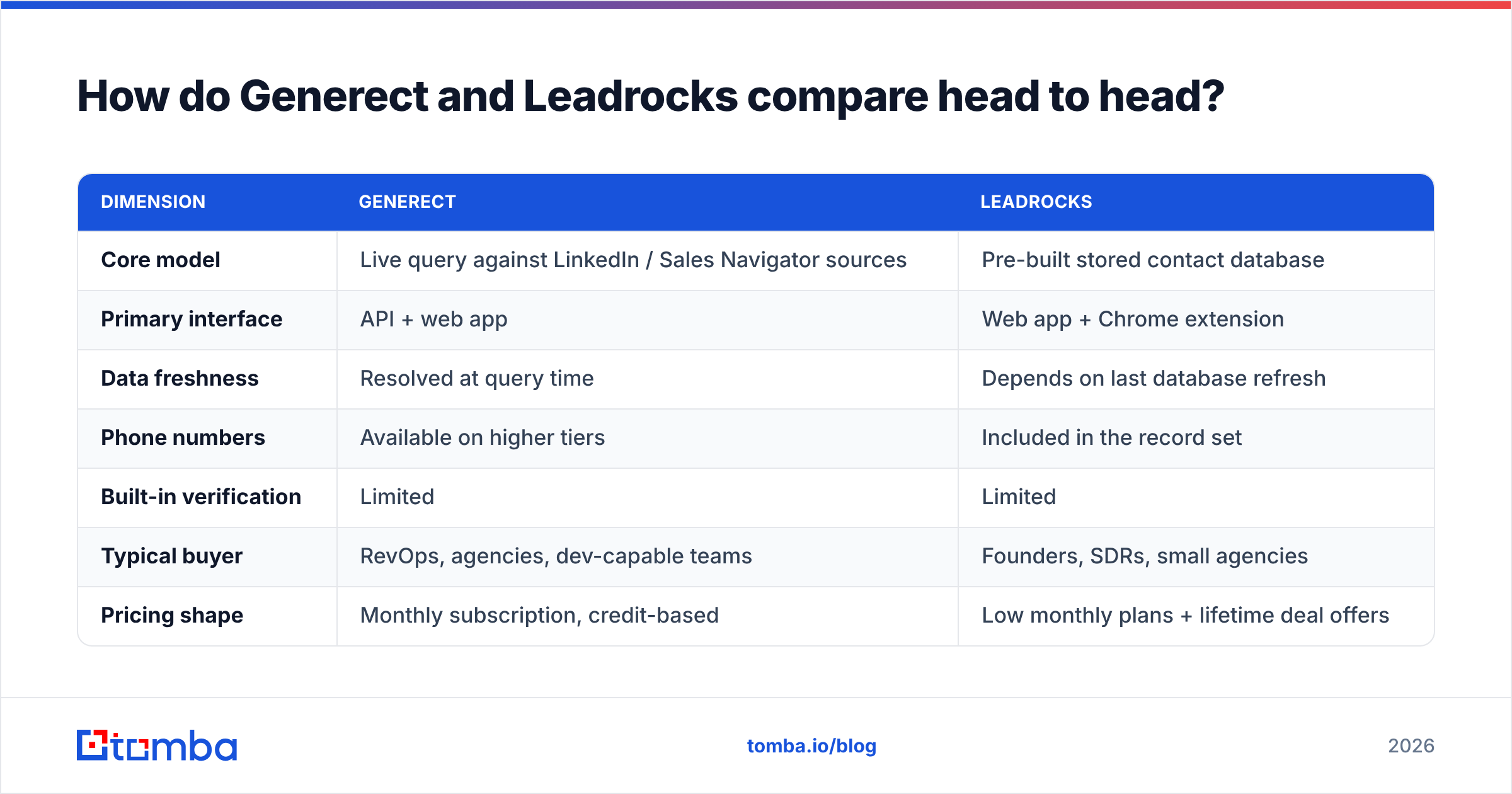
| Dimension | Generect | Leadrocks |
|---|---|---|
| Core model | Live query against LinkedIn / Sales Navigator sources | Pre-built stored contact database |
| Primary interface | API + web app | Web app + Chrome extension |
| Data freshness | Resolved at query time | Depends on last database refresh |
| Phone numbers | Available on higher tiers | Included in the record set |
| Built-in verification | Limited | Limited |
| Typical buyer | RevOps, agencies, dev-capable teams | Founders, SDRs, small agencies |
| Pricing shape | Monthly subscription, credit-based | Low monthly plans + lifetime deal offers |
| Learning curve | Higher (API concepts, query design) | Low (filter, select, export) |
| Best at | Precise, repeatable, current audiences | Cheap volume and fast browsing |
Two caveats before you screenshot that table. First, both vendors change plans often, so check their own pricing pages before you buy.
Second, freshness is a spectrum, not a switch. Generect's live sourcing is fresher on average. But a live query can still return someone who left the company six months ago, because the profile itself is stale.
Which one gives you better data coverage?#
Coverage is the first real split in Generect vs Leadrocks. It has two parts, and buyers mix them up. Breadth is how many people sit in the system. Hit rate is how many of the people you want come back with a usable email.
Leadrocks wins on breadth. A database with hundreds of millions of records holds more names than a query engine that builds lists on demand. If your ICP is wide — say, any marketing manager in North America — Leadrocks gives you bigger exports, and it gives them to you faster.
Generect tends to win on hit rate for narrow, current audiences. Say your ICP is "Series B fintech firms in the UK that hired a Head of Growth in the last 90 days". A snapshot database struggles here. Recent job changes go stale first. They are also the records that drive the best replies.
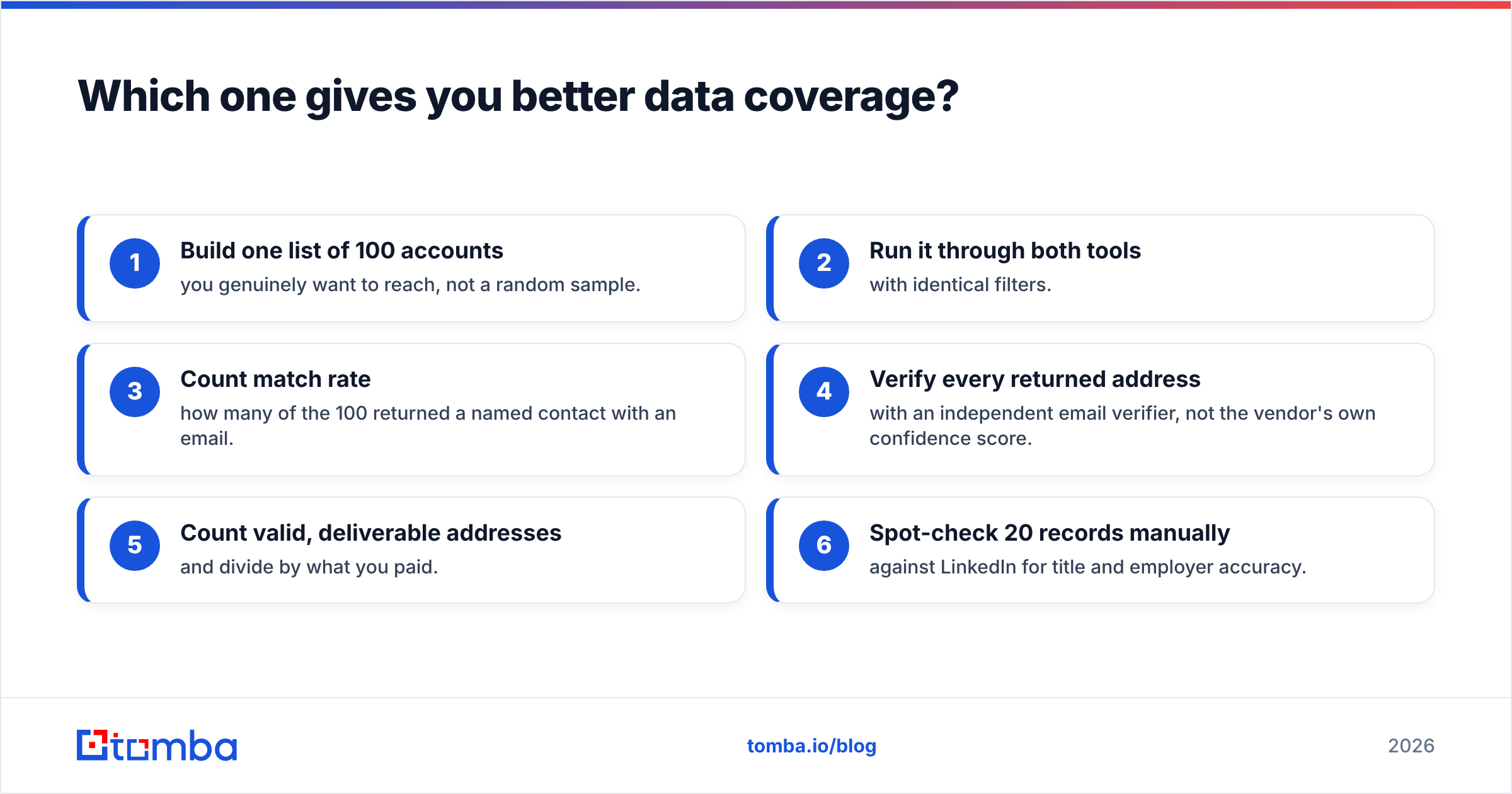
The practical test takes an afternoon:
- Build one list of 100 accounts you truly want to reach. No random samples.
- Run it through both tools with the same filters.
- Count the match rate. How many of the 100 came back with a named contact and an email?
- Verify every address with an independent email verifier. Do not trust the vendor's own score.
- Count the valid, deliverable addresses and divide by what you paid.
- Spot-check 20 records against LinkedIn for title and employer.
Cost per valid contact is the number that matters. Cost per record is a marketing metric.

How accurate is the email data from each?#
Here is the part vendors hate. On email accuracy, Generect vs Leadrocks look more alike than different. Neither one gives you send-ready addresses.
A database like Leadrocks decays between refreshes. B2B contact data rots by roughly 25–30% a year. People change jobs. Companies rebrand domains. Mailboxes get shut off. A record that was perfect on the day it was ingested can be dead a year later, and the export will not tell you which is which.
Live tools like Generect fail in a different way. The profile data is current. But the email is often a guess from a pattern: first.last@domain, f.last@domain, firstinitiallast@domain. A guess stays a guess until something confirms it. Confirming means an SMTP check, catch-all handling, role-address filtering, and a screen for throwaway domains.
So the mature stack has three parts: a sourcing tool, then a verification layer, then a sequencer. Skip the middle step and you get a 12% bounce rate, a burned domain, and an awkward chat about email deliverability with whoever owns it.
Prefer not to stitch three vendors together? An email finder that verifies as it searches merges the first two steps into one call. You get one confidence score instead of two that disagree.

What do Generect vs Leadrocks cost?#
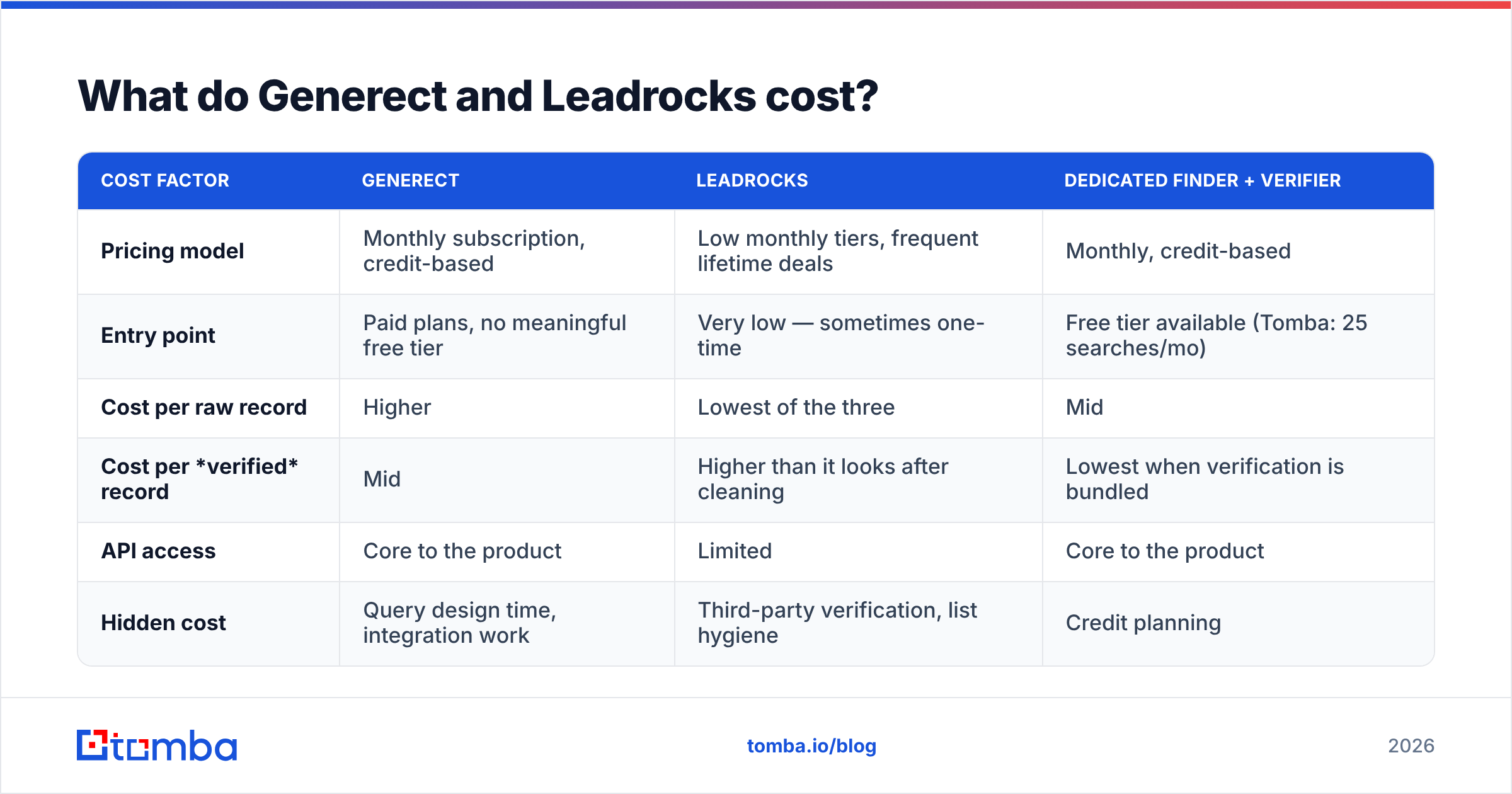
Generect vs Leadrocks pricing moves constantly. Leadrocks also runs lifetime offers that break any snapshot comparison. What stays stable is the shape of the pricing, and that is what you should plan around.
| Cost factor | Generect | Leadrocks | Dedicated finder + verifier |
|---|---|---|---|
| Pricing model | Monthly subscription, credit-based | Low monthly tiers, frequent lifetime deals | Monthly, credit-based |
| Entry point | Paid plans, no meaningful free tier | Very low — sometimes one-time | Free tier available (Tomba: 25 searches/mo) |
| Cost per raw record | Higher | Lowest of the three | Mid |
| Cost per verified record | Mid | Higher than it looks after cleaning | Lowest when verification is bundled |
| API access | Core to the product | Limited | Core to the product |
| Hidden cost | Query design time, integration work | Third-party verification, list hygiene | Credit planning |
For reference, Tomba pricing starts with a free tier of 25 searches a month. Starter is $49/mo, Growth is $99/mo, Pro is $249/mo, and Enterprise is custom. Verification is included, not sold as a separate SKU. That matters here, because it removes the second invoice most Leadrocks users end up paying.
The lifetime-deal math deserves a warning. Pay $79 once for 100,000 credits and each contact looks like $0.0008. Now run those contacts through verification. Drop the 30–40% that fail. Drop the role addresses and the catch-alls you cannot confirm. Your real cost per contact you can safely email is five to ten times the headline number — before you count the hours spent cleaning.
Which is better for API and automation workflows?#
On automation, Generect vs Leadrocks is a short debate. Generect wins, and it is not close.
Generect treats the API as the product. That makes it a fit for the patterns RevOps teams actually want. Enrich a lead the moment it lands in the CRM. Refresh records on a schedule. Start a search when a target account raises funding. Fill a list inside an orchestration tool with no export button in sight.
Leadrocks is built for humans who click. The extension and the filtered export are the intended flow, and they work well. But you cannot easily turn "new signup at a target account" into an automatic lookup.
If API-first is your requirement, look past these two. A serious email finder API should offer single and bulk endpoints, verification in the same response, clear rate limits, and SDKs you do not have to write. Judge on those four things, not on the marketing page.
Doing enrichment instead of discovery? You already have the names and only need the missing fields. A data enrichment endpoint costs less than paying database-search prices to fill gaps a lookup could have filled.
Where does each tool fall short?#
Generect's weak spots:
- Price. There is no real free tier, so even a trial costs money.
- Setup effort. To get value from the API, someone on your side has to integrate it.
- Source limits. LinkedIn data inherits LinkedIn's gaps. Trades, manufacturing, local services, and non-English markets are thin.
- Verification depth. You still need your own check before you send, above all on catch-all domains.
Leadrocks' weak spots:
- Staleness. Every snapshot database has this problem. Job changes are the first casualty.
- Bounce risk. Exports need a hard clean. Treating them as send-ready is the most common mistake users make.
- Thin filtering. Fewer intent, tech, and company filters than enterprise providers.
- Automation ceiling. Great for manual list building, limited for pipelines.
Neither tool is bad. They serve different buyers. Both are honest that they sell leads, not deliverability. Rivals like BookYourData attack the same job with pay-as-you-go pricing, so it is fair to trial more than two options. Category listings help you build a shortlist, and you can sanity-check reviews on G2 before you talk to a rep.
Which should you choose for your team?#
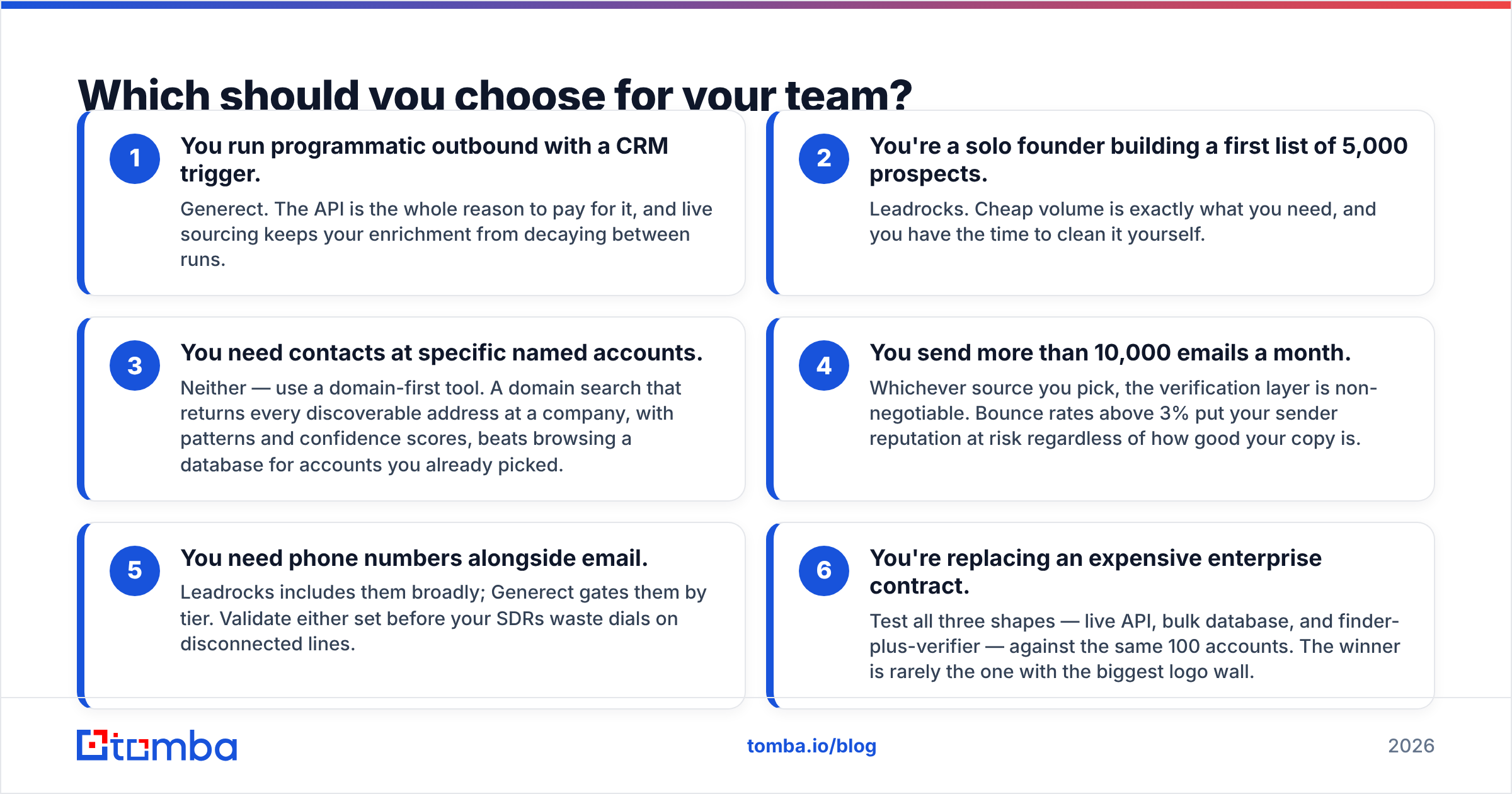
Match the tool to the motion, not to the feature list.
- You run programmatic outbound from a CRM trigger. Generect. The API is the whole reason to pay for it, and live sourcing keeps your data from decaying between runs.
- You are a solo founder building a first list of 5,000 prospects. Leadrocks. Cheap volume is what you need, and you have time to clean it.
- You need contacts at specific named accounts. Neither. Use a domain search that returns every address at a company, with patterns and confidence scores.
- You send more than 10,000 emails a month. Verification is not optional. A bounce rate above 3% puts your sender reputation at risk, however good your copy is.
- You need phone numbers too. Leadrocks includes them broadly. Generect gates them by tier. Check either set before your reps waste dials.
- You are replacing a costly enterprise contract. Test all three shapes against the same 100 accounts: live API, bulk database, and finder plus verifier. The winner is rarely the biggest logo.

What's the verdict on Generect vs Leadrocks?#
Pick Generect if you want current data through an API, and you have the budget and the engineering time to use it well. Pick Leadrocks if you want the lowest entry price for bulk records, and you accept that cleaning is your job.
There is a third answer. Many teams weighing Generect vs Leadrocks are solving the wrong problem. They do not need a database to browse, or a query engine to design. They need to turn a list of companies and names into deliverable addresses, at a price they can predict, without a second vendor for verification.
If that sounds like you, start with a tool built for that job. Tomba Email Finder finds emails by domain, name, or company. It verifies them in the same request. You get an API, a Chrome extension, and Google Sheets. The free tier gives you 25 searches a month, which is enough to run the 100-account test above. If the numbers do not beat Generect vs Leadrocks on cost per valid contact, you will at least have real data to decide with.
Related guides#
Ready to find emails that actually work?
Join 150,000+ professionals who stopped guessing and started sending. Free credits on signup — no credit card required.
Get the Tomba newsletter
Practical outbound tactics and product updates — once every two weeks.
About the author