Generect vs Leadsrush 2026: Which B2B Lead Tool Wins?
Generect and Leadsrush both promise fresh B2B contacts on demand, but they solve different problems. Here's an honest breakdown of coverage, accuracy, API access, and cost — plus when neither is the right call.
TL;DR
- Generect is built around a live-lookup B2B database with a developer-first API, and it leans heavily on LinkedIn-derived company and people data. It suits teams that want to pipe leads into their own stack rather than click around a UI.
- Leadsrush positions itself as a faster, lighter prospecting tool for small teams — search, filter, export, send. Less infrastructure, more workflow.
- Neither tool wins on every axis. Generect is the better fit for engineering-backed GTM teams; Leadsrush is the better fit for a two-person agency that needs a list by Friday.
- Accuracy is where both get tested. Any database that sells "verified" contacts should be re-verified before you load a sequence — bounce rates above 3% will cost you far more than the credits you saved.
- If you mostly need email discovery and verification rather than a full database subscription, a dedicated email finder with per-search pricing usually costs less than either platform.
What are Generect and Leadsrush?#
Short answer: both sell B2B contact data, but they sit at different points on the "database vs. workflow" spectrum.
Generect (generect.com) markets itself as a B2B lead generation database with real-time search. Its differentiator is the API — you can query companies and people programmatically, filter on firmographics and job attributes, and pull results directly into a CRM, a data warehouse, or an internal scoring model. Generect also emphasizes LinkedIn-sourced enrichment, which is why its people records tend to carry richer job-title and tenure detail than a pure email-scraping tool would.
Leadsrush is the lighter of the two. It's built for the operator who wants to open a browser tab, apply a handful of filters, export a CSV, and get back to sending. The pitch is speed and simplicity rather than infrastructure. That's a genuine product decision, not a shortcoming — most small outbound teams never touch an API, and paying for one you don't use is a real cost.
The practical way to think about it: Generect is a data source you build on top of. Leadsrush is a data tool you work inside of.
How do Generect and Leadsrush differ on core capability?#
Here are the five dimensions that actually change your day-to-day, ranked by how often they bite:
- Search granularity — Generect generally offers deeper filtering (headcount bands, technology signals, seniority, department, geography). Leadsrush covers the standard set: industry, size, location, title. If your ICP is "VP Eng at 200-500 person SaaS companies using Kubernetes," the deeper filter set matters. If it's "marketing managers in Texas," it doesn't.
- Delivery method — Generect ships an API and bulk export. Leadsrush is UI-first with CSV export. A CSV workflow is fine until you need daily refreshes, at which point manual export becomes the bottleneck.
- Email quality handling — Both return work emails. The difference is what happens with risky records: catch-all domains, role addresses, and stale contacts. Ask each vendor directly whether catch-alls are billed as valid.
- Enrichment depth — Generect's LinkedIn-leaning profile data is its strongest card. Leadsrush returns the fields you need to personalize a first line, not build a scoring model.
- Time-to-first-list — Leadsrush wins here, comfortably. A non-technical user can be exporting inside ten minutes. Generect's API rewards a day of setup with better long-term leverage.
Sorry — that renders as: 
Which one is more accurate on email data?#
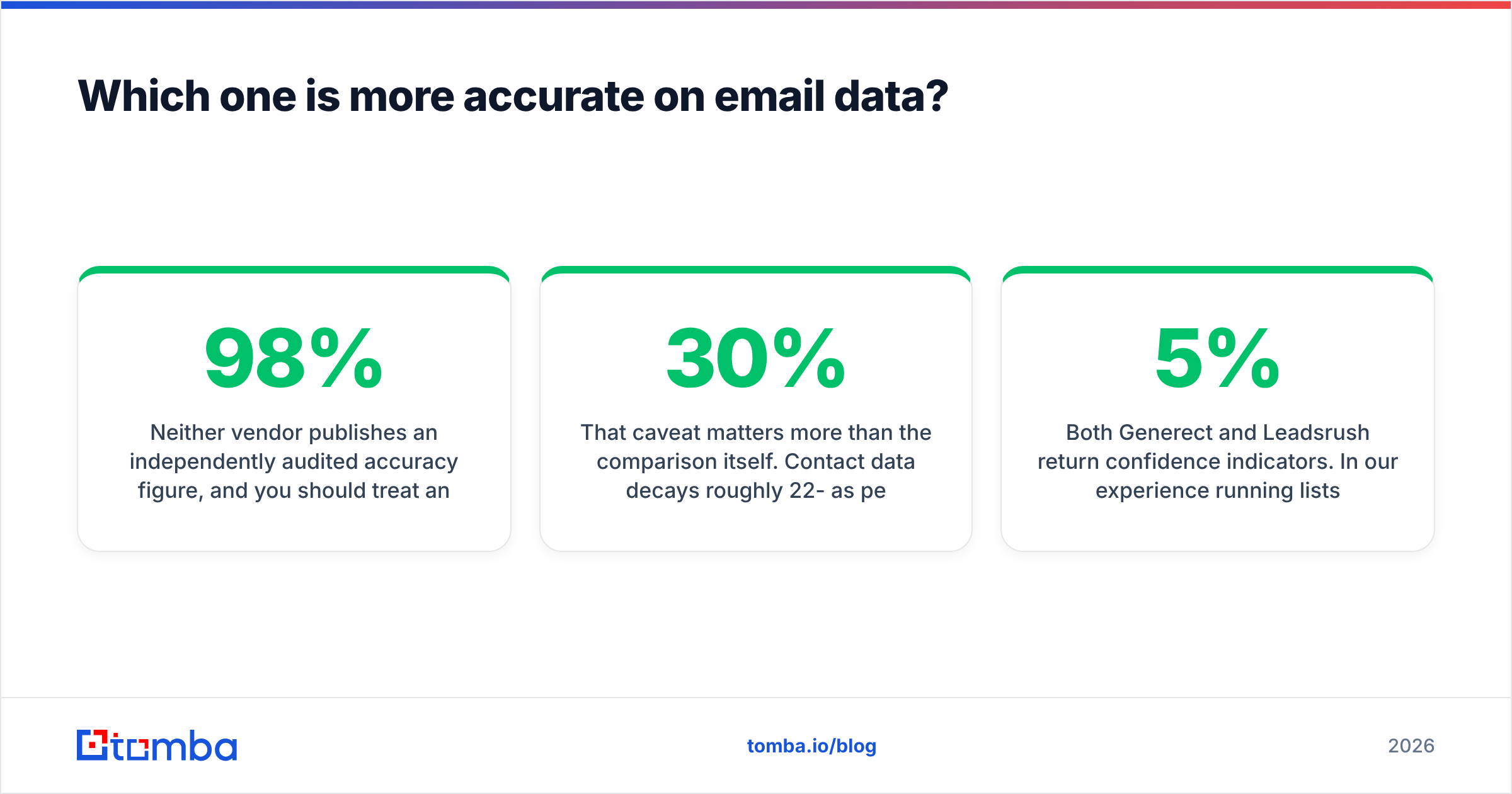
Neither vendor publishes an independently audited accuracy figure, and you should treat any self-reported "98% accurate" claim as a marketing number until you've tested it on your own ICP.
That caveat matters more than the comparison itself. Contact data decays roughly 22-30% per year as people change jobs, and a database that was accurate at ingest can be badly stale by the time you query it. The gap between "we have 200M contacts" and "we have 200M contacts that still work today" is where most bounce problems live.

What separates tools in practice is not the size of the index but the verification layer sitting in front of it:
- SMTP-level checking at query time rather than at ingest time.
- Catch-all handling — does the tool flag catch-all domains, guess at them, or silently bill you for an unverifiable address?
- Confidence scoring you can threshold on, so you can drop anything under, say, 90 before it reaches your sequencer.
Both Generect and Leadsrush return confidence indicators. In our experience running lists from multi-source databases, re-running the export through a dedicated email verifier still catches a meaningful slice of dead addresses — usually somewhere between 5% and 15% depending on how old the segment is. That second pass is cheap insurance. A 12% bounce rate can put your sending domain on a blocklist inside two campaigns, and no credit refund makes that whole again.
If you want a broader view of how the email-finding category benchmarks against itself, G2's lead intelligence category is a reasonable place to sanity-check vendor claims against reviewer volume and recency.
Generect vs Leadsrush: the full comparison#
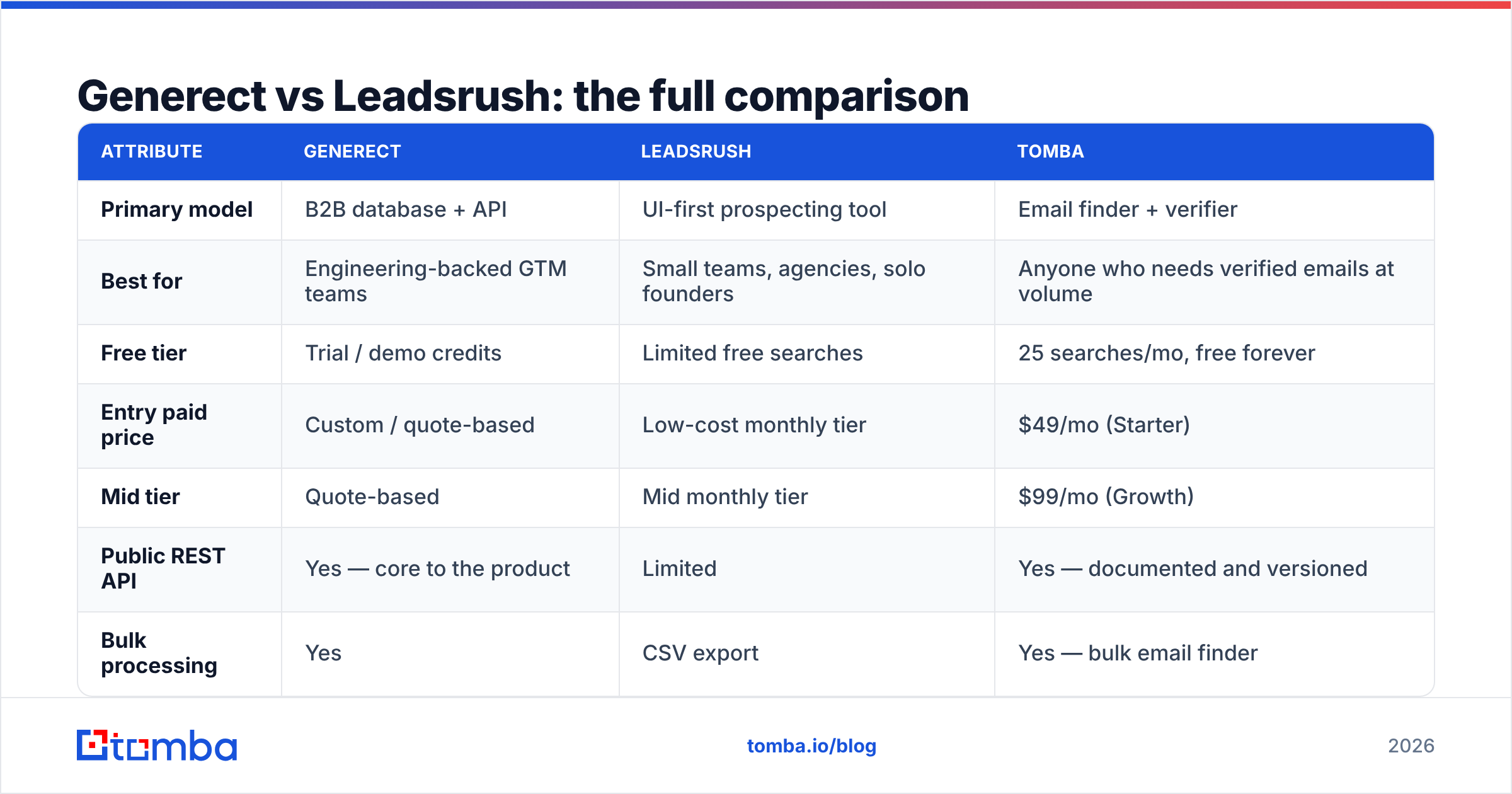
Pricing for both vendors moves, and both run custom quotes at the upper tiers — treat the figures below as indicative of the published tiers at time of writing and confirm on the vendor site before you buy.

| Attribute | Generect | Leadsrush | Tomba |
|---|---|---|---|
| Primary model | B2B database + API | UI-first prospecting tool | Email finder + verifier |
| Best for | Engineering-backed GTM teams | Small teams, agencies, solo founders | Anyone who needs verified emails at volume |
| Free tier | Trial / demo credits | Limited free searches | 25 searches/mo, free forever |
| Entry paid price | Custom / quote-based | Low-cost monthly tier | $49/mo (Starter) |
| Mid tier | Quote-based | Mid monthly tier | $99/mo (Growth) |
| Public REST API | Yes — core to the product | Limited | Yes — documented and versioned |
| Bulk processing | Yes | CSV export | Yes — bulk email finder |
| Catch-all handling | Flagged | Flagged | Dedicated catch-all verifier |
| LinkedIn-based enrichment | Strong | Basic | LinkedIn finder available |
| Chrome extension | Limited | Yes | Yes |
| Native CRM integrations | Via API | Limited native set | HubSpot, Salesforce, Pipedrive, Zapier |
| Setup time to first list | Half a day (API) | Under 15 minutes | Under 5 minutes |
| Credit rollover | Plan-dependent | Plan-dependent | Plan-dependent |
The row that most buyers under-weight is setup time. If you're a four-person startup with no data engineer, an API-first product is a cost, not a feature — you'll end up using 20% of what you pay for. Conversely, if you're running a programmatic outbound motion where lists refresh nightly, a CSV-export tool forces a human into a loop that shouldn't have one.
What do Generect and Leadsrush actually cost?#
Both vendors keep meaningful parts of their pricing behind a conversation, which is normal in the B2B data category and also the main reason comparisons like this get murky.
Generect is quote-driven at the API tier. Expect the sales conversation to center on query volume and whether you need real-time lookups or bulk pulls. Quote-based pricing usually works out well if you're buying a lot and badly if you're buying a little — there's rarely a cheap entry point.
Leadsrush publishes lower-cost monthly plans aimed at individuals and small teams. The trade-off is credit ceilings: the entry plan is genuinely affordable, but you'll hit the wall faster than you expect once you start filtering aggressively and discarding half the results.
Three cost traps to check before signing either contract:
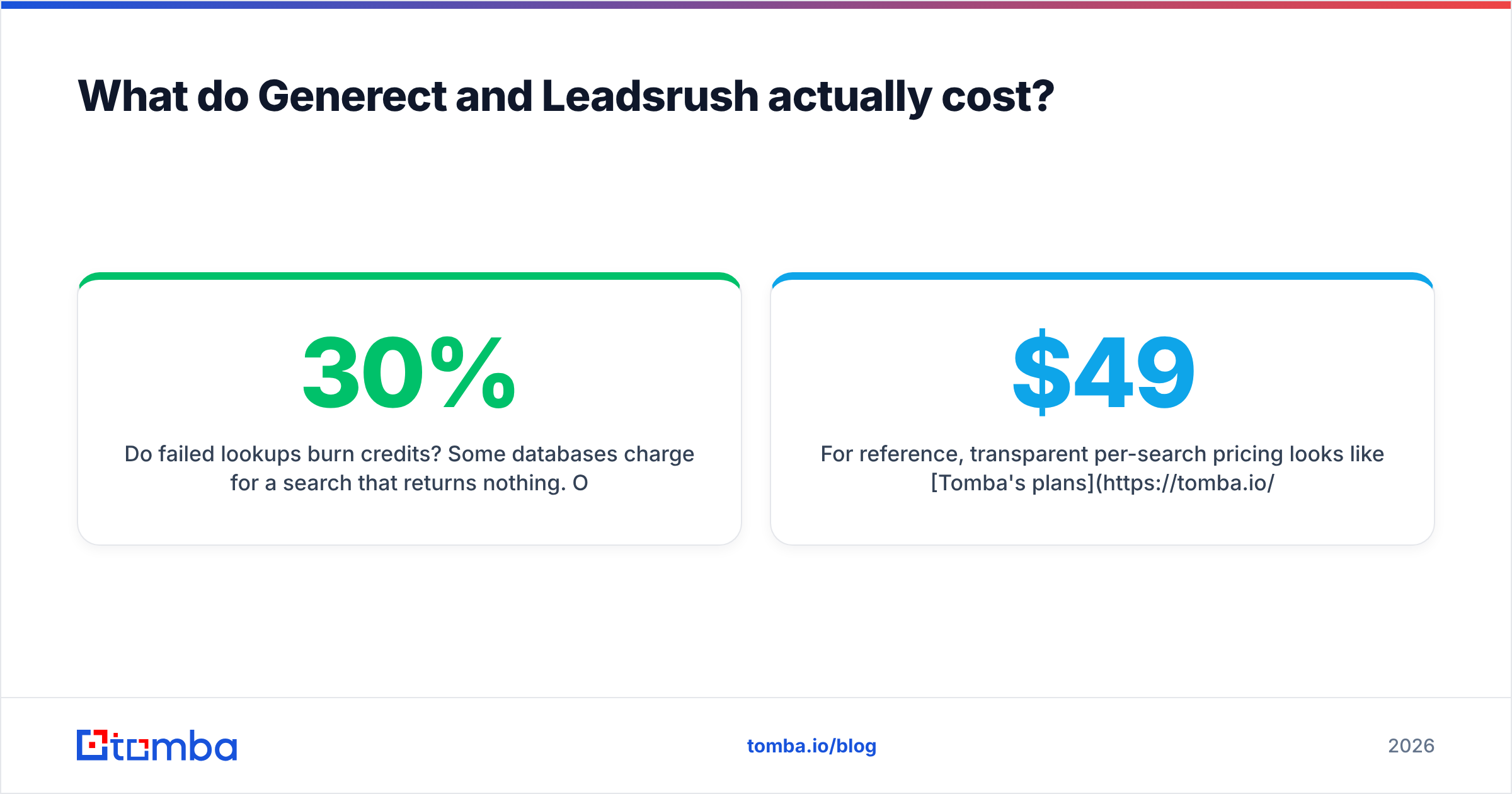
- Do failed lookups burn credits? Some databases charge for a search that returns nothing. Over a month of prospecting a hard-to-reach ICP, that's a 20-30% effective price increase.
- Are catch-all addresses billed as valid? If yes, you're paying full price for records you can't safely send to without a second verification step.
- Is there a seat fee on top of the credit fee? Two-axis pricing (seats × credits) scales much worse than credits alone once you add a second SDR.
For reference, transparent per-search pricing looks like Tomba's plans: a free tier at 25 searches per month, Starter at $49/mo, Growth at $99/mo, and Pro at $249/mo, with Enterprise custom. You can model your cost per verified contact before you talk to anyone, which is the point.
Rendered: 
Who should pick Generect?#
Pick Generect if three or more of these are true:
- You have someone who can write against a REST API, or you already run a data pipeline (Airbyte, Fivetran, a custom ETL) that new sources plug into.
- Your ICP definition is narrow enough that shallow filters return mostly noise.
- You want enriched people records — seniority, tenure, department — to feed lead scoring, not just a first name for a merge tag.
- You're refreshing lists on a schedule rather than pulling one-off exports.
- Your volume is high enough that quote-based pricing beats per-search pricing.
Where Generect will frustrate you: if you're a non-technical operator, the surface area you're paying for goes unused. And like every database, the coverage is uneven — strong in tech and North America, thinner in long-tail industries and non-English-speaking regions. Run your own ICP against a trial before committing to an annual.
Who should pick Leadsrush?#
Pick Leadsrush if:
- You're one to five people and nobody's job title contains the word "engineer."
- You need a list today, not a pipeline next quarter.
- Your ICP is broad enough that standard filters (industry, size, geography, title) get you most of the way.
- Budget predictability matters more than data depth.
- You're comfortable running a separate verification step before sending — which you should be doing regardless.
Where Leadsrush will frustrate you: once you scale past a couple of thousand contacts a month, the manual export loop becomes the constraint. And the shallower enrichment means more manual research per account if you're doing genuinely personalized outbound rather than volume plays.
Where does a dedicated email finder fit?#
Here's the thing most "database vs. database" comparisons skip: a lot of teams don't need a database subscription at all.
If you already know your target accounts — from a conference list, an investor portfolio, a G2 category, a scraped directory, your own CRM — you don't need to pay for search across 200 million records. You need to turn a company domain and a person's name into a verified, deliverable email address. That's a different, cheaper problem.
That workflow looks like:
- Build your account list from wherever you already have signal.
- Run domain search to pull every public email pattern and named contact at each company.
- Use the email finder for the specific people you identified by name.
- Verify everything, including catch-all domains, before it touches a sequencer.
- Enrich only the records that survive step 4.
That five-step loop typically costs a fraction of a database seat, because you're paying for the lookups you actually need rather than access to an index you'll query 2% of. It also produces better lists, because you controlled the targeting instead of inheriting a vendor's filter taxonomy.
The counter-argument is real, though: if you don't have a source of account signal, a database is exactly what you're buying. Don't cargo-cult the cheap option if discovery is your actual bottleneck. HubSpot's sales research is a decent read on where prospecting time actually goes if you want to audit your own workflow first. And when you're comparing shortlists, Capterra's user reviews are useful for spotting support and billing complaints that never show up on a feature page.
How do you test either tool in one afternoon?#
Don't take anyone's word for coverage — including this post's. Run the same benchmark against both:
- Build a control list of 100 contacts you already know are correct. Pull them from your CRM's closed-won accounts. Real emails, real companies, real titles.
- Strip the emails. Keep name + company domain only.
- Run the list through each tool. Record match rate (how many returned anything) and accuracy rate (how many matched your known-good email exactly).
- Run a second list of 100 contacts you've never touched through both tools, then verify the results with an independent verifier. Record the bounce-risk rate.
- Log credits consumed, including failed lookups, and divide total cost by verified contacts — not returned contacts.
That last number, cost per verified contact, is the only figure that matters. A tool with a 70% match rate at $0.02 per lookup beats a tool with a 90% match rate at $0.10 every time, and neither vendor's pricing page will tell you that.
Budget two hours. It will save you a quarter of arguing about why reply rates dropped.
The verdict#
Generect if you're building infrastructure and have the technical capacity to exploit an API — the enrichment depth and programmatic access justify the quote-based pricing at volume.
Leadsrush if you're a small team that needs speed and predictable cost, and you're willing to add a verification step yourself.
Neither, if what you actually have is a list of target accounts and a missing-email problem. That's the cheapest problem in this whole category to solve, and paying database prices for it is the most common overspend we see in B2B GTM budgets.
Whichever way you go, verify before you send. Every list from every vendor decays, and your sending domain doesn't get a second first impression.
Start with the lookup, not the subscription. If your bottleneck is turning known names and domains into deliverable addresses, the Tomba Email Finder does exactly that — with SMTP-level verification, catch-all detection, a documented API, and 25 free searches a month to benchmark it against whatever you're using now. Run your control list through it before you sign anyone's annual contract.
Related guides#
Ready to find emails that actually work?
Join 150,000+ professionals who stopped guessing and started sending. Free credits on signup — no credit card required.
Get the Tomba newsletter
Practical outbound tactics and product updates — once every two weeks.
About the author