Generect vs LFBBD Lead For Business: 2026 Data Comparison
Generect and LFBBD Lead For Business both sell B2B contact data, but they solve different problems. Here's how coverage, accuracy, pricing models, and API access actually compare in 2026 — and when neither is the right buy.
TL;DR
- Generect is a real-time, API-first B2B lead data provider built around LinkedIn-style company and people search. You query it, it returns contacts on demand.
- LFBBD (Lead For Business Big Data) sits closer to the bulk-database end of the market: large pre-built contact files, list building, and export-heavy workflows.
- The real split is not "who has more records" — it's query-time data vs. warehouse data. That choice determines your bounce rate more than any vendor's marketing page does.
- Neither vendor publishes a fully transparent self-serve price ladder the way tooling vendors do, so budget comparisons require a sales conversation and a paid pilot.
- Whatever you buy, verify before you send. A separate email verifier pass is the cheapest insurance in outbound.
What are Generect and LFBBD Lead For Business?#
Start with the category, because both tools get filed under "B2B data" and that label hides the difference that matters.
Generect positions itself as a lead-generation data engine with an API at the center. The pitch is freshness: instead of shipping you a snapshot of a database that was assembled months ago, it resolves company and people queries closer to request time and returns structured records — name, title, company, domain, and contact fields. Teams typically wire it into an enrichment step, a sequencer, or an internal script rather than logging into a UI every morning.
LFBBD — marketed as "Lead For Business Big Data" — leans the other way. The value proposition is volume and coverage: large, pre-assembled B2B contact sets you can filter by industry, geography, company size, and role, then export. If you have ever bought an industry list to seed a new territory, you know the shape of this product.
Think of it like groceries. Generect is the delivery service that picks your order when you place it. LFBBD is the warehouse with everything already on the shelf. The delivery service is fresher; the warehouse is faster to raid at scale. Both are legitimate. They just fail in different ways.
Here is the mental model to hold onto:
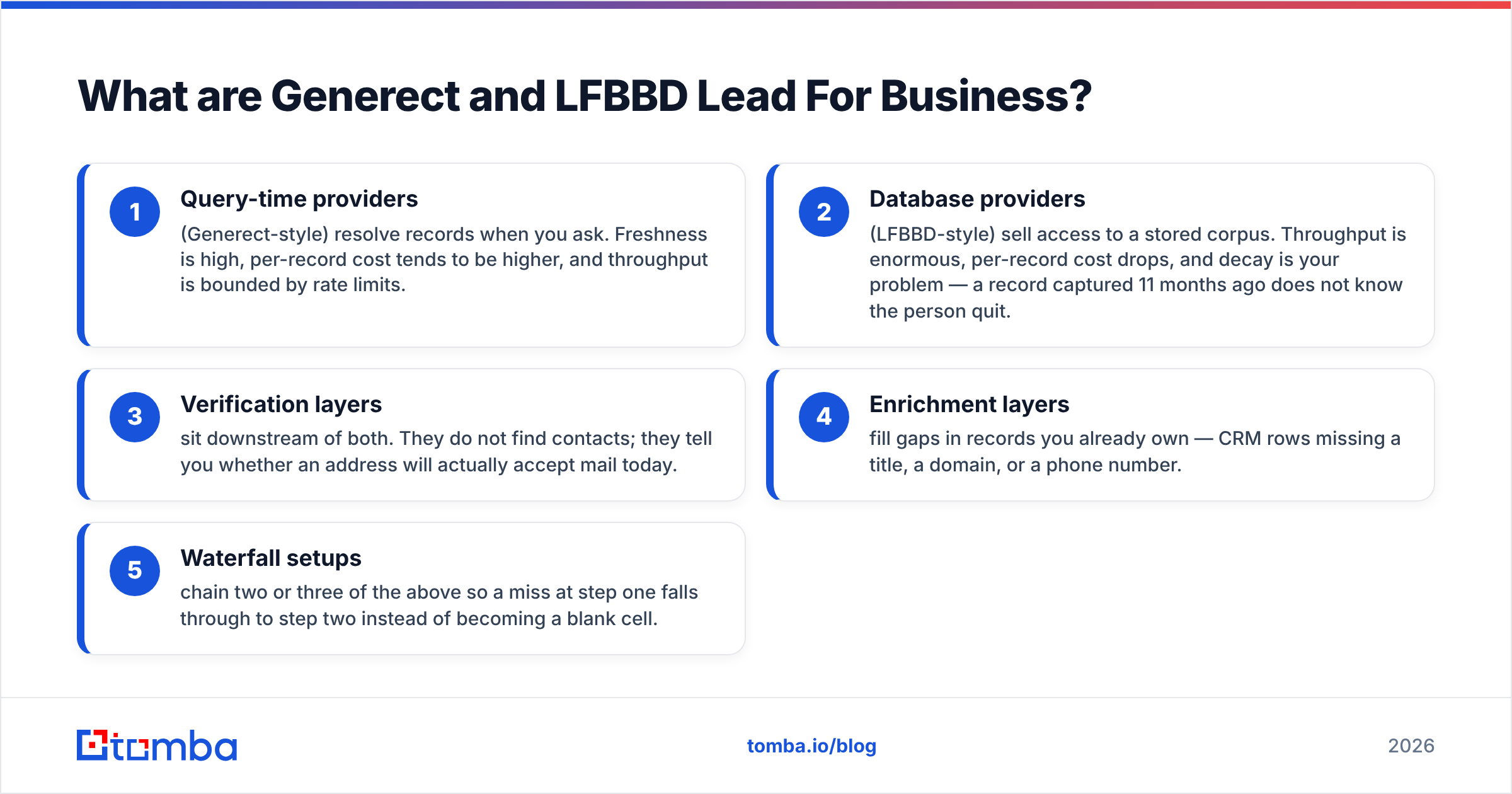
- Query-time providers (Generect-style) resolve records when you ask. Freshness is high, per-record cost tends to be higher, and throughput is bounded by rate limits.
- Database providers (LFBBD-style) sell access to a stored corpus. Throughput is enormous, per-record cost drops, and decay is your problem — a record captured 11 months ago does not know the person quit.
- Verification layers sit downstream of both. They do not find contacts; they tell you whether an address will actually accept mail today.
- Enrichment layers fill gaps in records you already own — CRM rows missing a title, a domain, or a phone number.
- Waterfall setups chain two or three of the above so a miss at step one falls through to step two instead of becoming a blank cell.
Most teams that complain about "bad data" bought one layer and expected it to do the work of three.
Which one has better data coverage?#
Coverage is the metric buyers ask about first and the one that misleads most.
LFBBD-style database vendors will almost always quote a bigger headline number. That is structural: a stored corpus accumulates. It includes contacts scraped in 2023, company records from firms that have since been acquired, and role data for people who have changed jobs twice since capture. Big number, unknown decay.
Generect's model produces a smaller nominal universe but a higher hit rate on the segment you actually query. If you ask for "Heads of RevOps at Series B SaaS companies in DACH," a query-time system tends to resolve fewer records with more of them being currently true.
So reframe the question. Instead of "how many records do you have," ask vendors these four:
- What percentage of records in my ICP filter have a work email, not just a company domain?
- What is the median record age for that segment?
- What is your catch-all rate in that segment? (Catch-all domains accept everything at SMTP level and tell you nothing — you need a catch-all verifier to resolve them.)
- Will you run my 500-row sample and let me verify the output independently?
That last one is the whole test. Any vendor confident in its data will do it. A vendor that refuses is telling you something.
How accurate is each provider in practice?#
Accuracy claims in this market are close to meaningless without a definition. "96% accurate" can mean syntax-valid, deliverable at time of capture, or deliverable right now. Those are three different numbers and only the third one pays your rent.

In the outbound teams I have seen run this properly, the pattern holds consistently: query-time providers post lower bounce rates on freshly pulled segments, and database providers post competitive numbers on stable segments — enterprise finance, government, large manufacturers, universities — where people stay in roles for years. If your ICP is 40-person startups in AI, a warehouse file will decay under you within a quarter. If your ICP is directors at 5,000-employee insurers, the warehouse holds up fine.
Run the test yourself instead of trusting either page:
- Pull 300 contacts from each provider on the same ICP filter.
- Deduplicate across both sets and note the overlap — high overlap means you are paying twice for one dataset.
- Push both sets through the same verification pass so the scoring is identical.
- Send from a warmed domain and record hard bounces separately from soft bounces.
- Compare cost per verified, deliverable contact — not cost per credit.
That final metric is the only one that survives contact with a CFO. A cheap record that bounces costs you more than an expensive record that lands, because bounces damage sender reputation and reputation damage taxes every future send.

Generect vs LFBBD Lead For Business: how do they compare?#
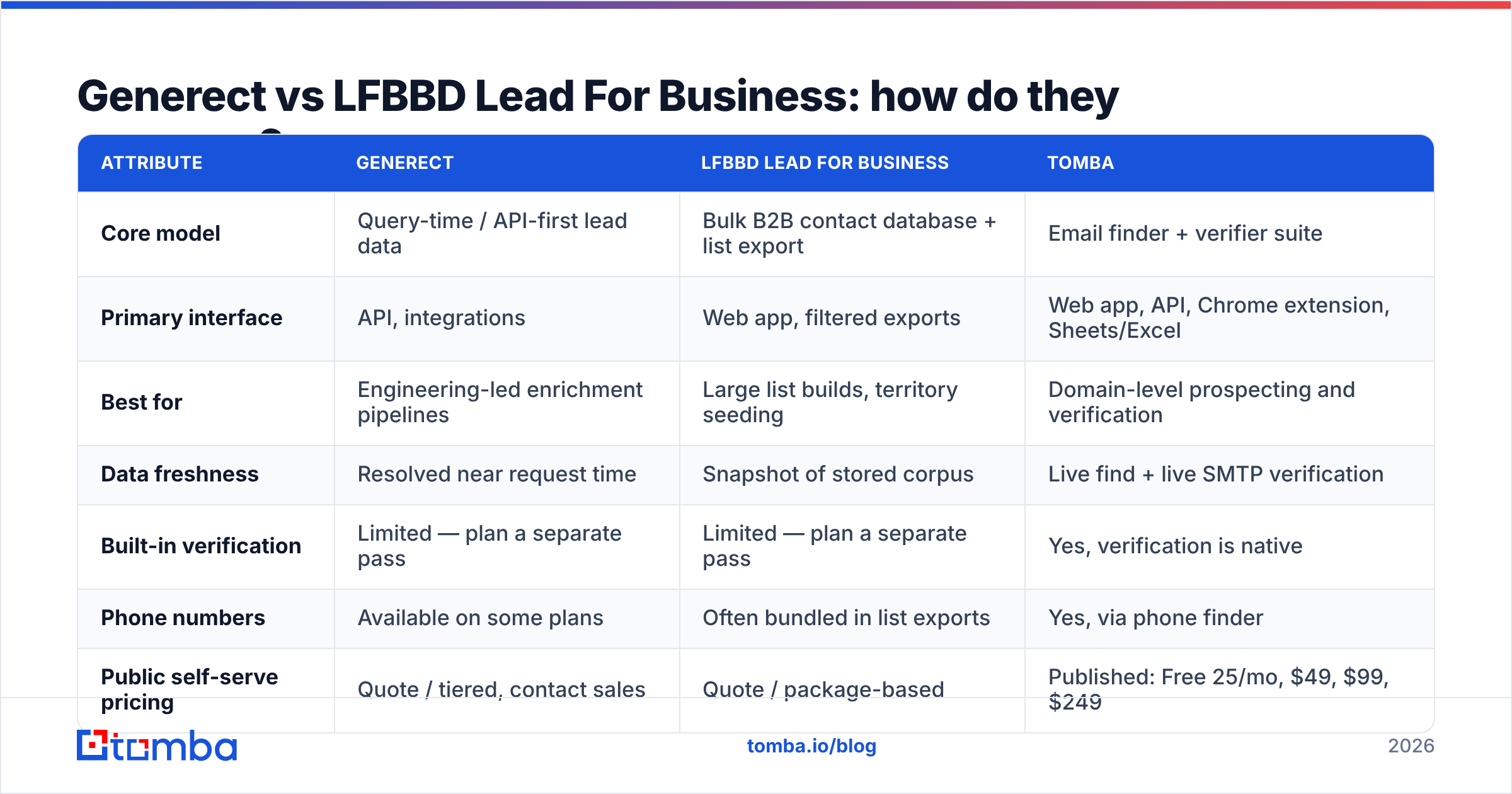
Here is the side-by-side. Where a vendor does not publish a figure openly, the honest answer is "quote-based" — do not let anyone tell you otherwise, and do not plan a budget around a number you found on a third-party aggregator page.
| Attribute | Generect | LFBBD Lead For Business | Tomba |
|---|---|---|---|
| Core model | Query-time / API-first lead data | Bulk B2B contact database + list export | Email finder + verifier suite |
| Primary interface | API, integrations | Web app, filtered exports | Web app, API, Chrome extension, Sheets/Excel |
| Best for | Engineering-led enrichment pipelines | Large list builds, territory seeding | Domain-level prospecting and verification |
| Data freshness | Resolved near request time | Snapshot of stored corpus | Live find + live SMTP verification |
| Built-in verification | Limited — plan a separate pass | Limited — plan a separate pass | Yes, verification is native |
| Phone numbers | Available on some plans | Often bundled in list exports | Yes, via phone finder |
| Public self-serve pricing | Quote / tiered, contact sales | Quote / package-based | Published: Free 25/mo, $49, $99, $249 |
| Free tier | Trial credits on request | Sample file on request | 25 searches/mo, no card |
| Bulk processing | Via API concurrency | Native strength | Native bulk email finder |
| Typical buyer | RevOps / growth engineer | Demand gen / list buyer | SDR teams, agencies, founders |

Two honest caveats on that table. First, both vendors iterate quickly and package deals differently by region and volume, so treat pricing rows as "ask, don't assume." Second, coverage strength varies wildly by geography — several database vendors are far stronger in North America than in EMEA or APAC, and a global average tells you nothing about the market you sell into.
Is Generect better than LFBBD for outbound teams?#
It depends on who runs your data layer.
Choose Generect if you have an engineer or a technical RevOps person who will own the integration. The API-first model pays off when enrichment happens automatically — a new form fill arrives, your workflow fires a lookup, the CRM record populates before an SDR ever sees it. You are trading upfront build time for ongoing freshness. If nobody on your team will write that integration, you are buying a Ferrari to sit in a garage.
Choose LFBBD if your motion is campaign-shaped rather than trigger-shaped. You plan a quarter, define three segments, need 40,000 contacts by Friday, and you will run them through a sequencer in waves. Warehouse economics win here, and the per-record price difference at that volume is not a rounding error.
Choose neither, yet, if you cannot answer this question: what happens to a record after you buy it? Teams that skip data enrichment hygiene end up with three copies of the same contact under two spellings and one dead domain. The tool did not create that mess; the missing process did.
There is also a compliance dimension that gets skipped in feature comparisons. If you sell into the EU or the UK, the legal basis for processing purchased contact data matters — review the GDPR requirements around legitimate interest, and ask any vendor directly where its data originates and how opt-out requests propagate. "We are GDPR compliant" on a homepage is a claim, not a document. Ask for the document.
What does each one cost, really?#
Neither vendor runs the fully public, self-serve price ladder that smaller tools do, which makes budgeting harder than it should be. Assume a sales call, assume annual pressure, and assume the quoted per-credit rate improves at volume.
Three cost traps to price in before you sign:
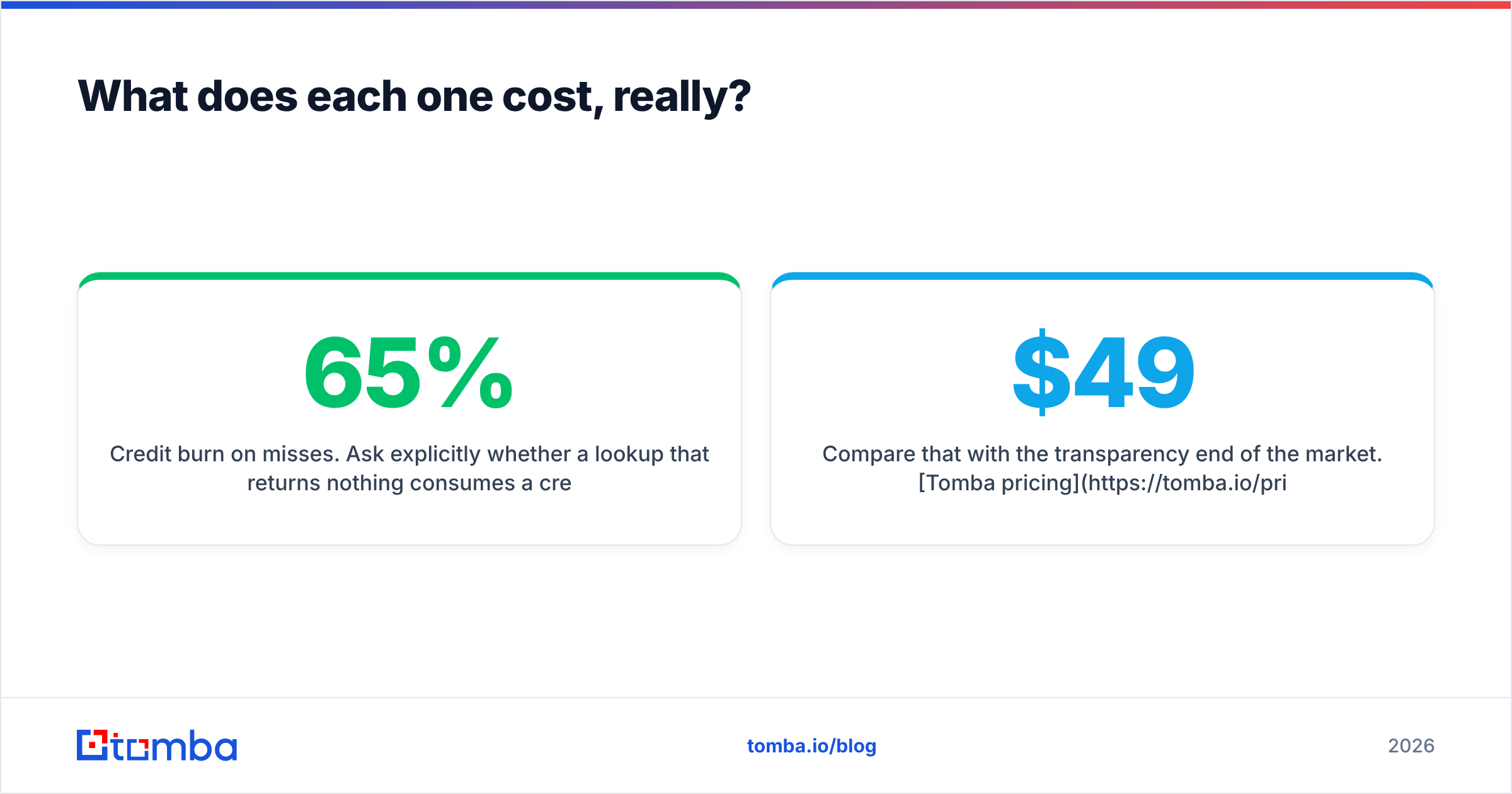
- Credit burn on misses. Ask explicitly whether a lookup that returns nothing consumes a credit. On a 50,000-row job with a 65% hit rate, this single clause moves your effective cost by a third.
- Verification not included. If you must add a verification layer downstream, that is a second line item. Budget it at the start rather than discovering it after the first bounce report.
- Seat and export limits. Warehouse-style products often cap monthly export volume or charge per seat. A cheap per-record price with a tight monthly cap is not cheap.
Compare that with the transparency end of the market. Tomba pricing publishes the whole ladder — a free tier at 25 searches per month, Starter at $49/mo, Growth at $99/mo, Pro at $249/mo, and custom Enterprise terms. You can model your cost before you talk to anyone. That is not a knock on quote-based vendors, who genuinely do need to scope enterprise deployments — it is just a different buying experience, and for a team of four it usually matters.
For an unbiased read on how buyers rate these categories, the lead intelligence category on G2 is a reasonable starting point, with the usual caveat that review volume correlates with marketing spend as much as product quality.
How do they fit into a real prospecting stack?#
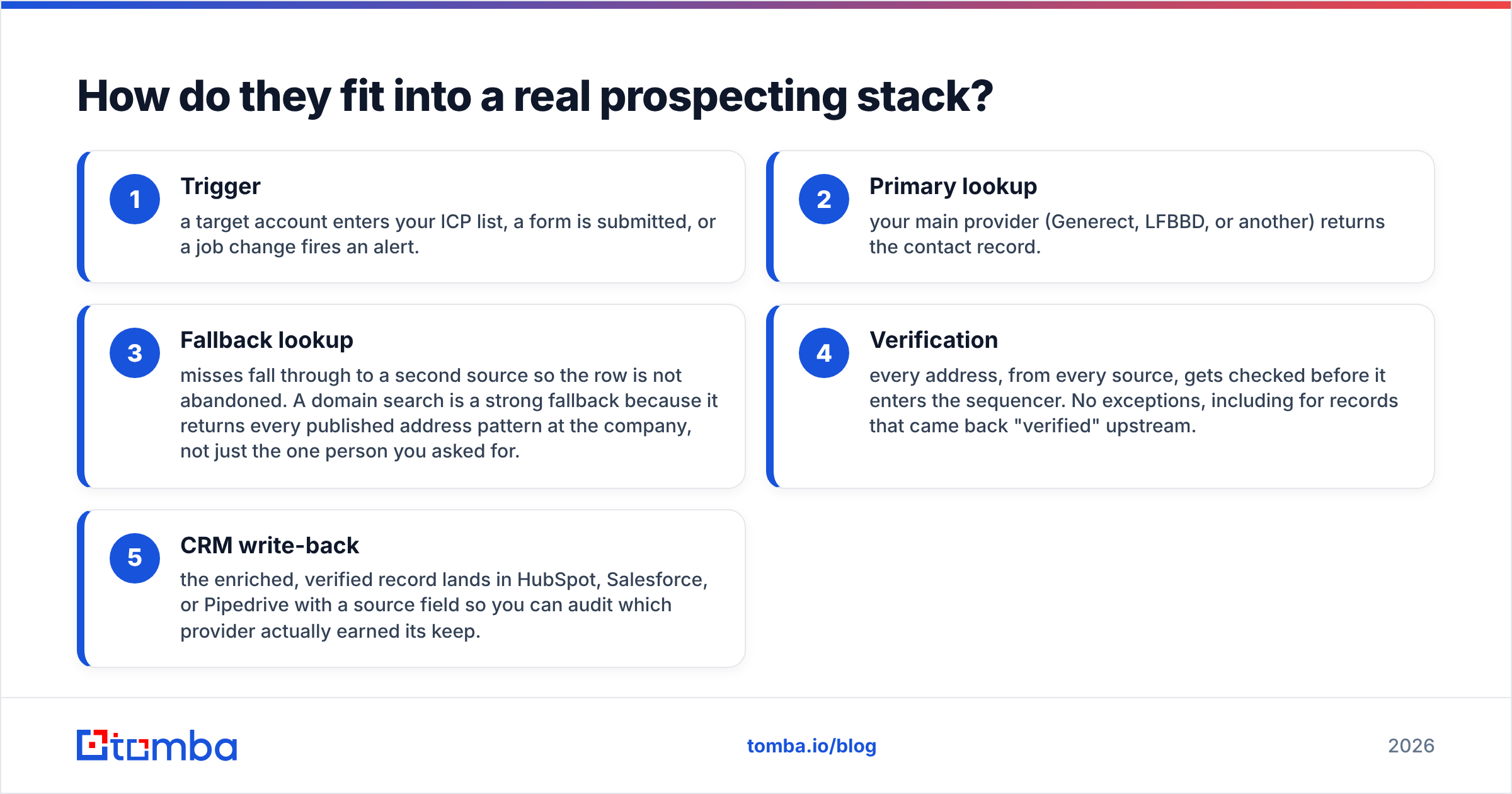
Almost nobody runs one data source. The teams with the lowest bounce rates run a waterfall, and it looks like this:
- Trigger — a target account enters your ICP list, a form is submitted, or a job change fires an alert.
- Primary lookup — your main provider (Generect, LFBBD, or another) returns the contact record.
- Fallback lookup — misses fall through to a second source so the row is not abandoned. A domain search is a strong fallback because it returns every published address pattern at the company, not just the one person you asked for.
- Verification — every address, from every source, gets checked before it enters the sequencer. No exceptions, including for records that came back "verified" upstream.
- CRM write-back — the enriched, verified record lands in HubSpot, Salesforce, or Pipedrive with a source field so you can audit which provider actually earned its keep.
Step five is the one teams skip and later regret. Tag every record with its origin. Six months in, that field tells you which contract to renew and which to cut — with data instead of vibes.
The pattern also protects you from vendor risk. Data providers change coverage, get acquired, or shift pricing. If your pipeline assumes exactly one API will always answer, one bad quarter at a vendor becomes your bad quarter too.
Which should you pick?#
Short version: Generect if your data layer is code, LFBBD if your data layer is campaigns. Generect rewards teams that automate enrichment and care more about freshness than raw volume. LFBBD rewards teams that build big segmented lists on a planning cycle and can tolerate some decay in exchange for scale economics.
But run the pilot before you commit to either. Pull the same 300-contact ICP slice from both, verify with a neutral third tool, and compare cost per deliverable contact. That test costs you a week and has repeatedly overturned assumptions built on headline record counts.
And whichever you choose, put a verification step between the data source and the send. It is the highest-ROI 20 minutes of setup in the entire outbound stack.
Ready to test your list quality before you commit to a contract? Run a sample through the Tomba Email Finder — find work emails by domain, name, or company, with live SMTP verification built into the same call rather than bolted on afterwards. The free tier gives you 25 searches a month with no card required, which is enough to benchmark any vendor's sample file against a neutral source before you sign anything.
Related guides#
Ready to find emails that actually work?
Join 150,000+ professionals who stopped guessing and started sending. Free credits on signup — no credit card required.
Get the Tomba newsletter
Practical outbound tactics and product updates — once every two weeks.
About the author