Generect vs Listclean 2026: Which B2B Data Tool Wins?
Generect finds and enriches leads. Listclean cleans and verifies them. We compare pricing, accuracy, workflow fit, and which one your outbound stack actually needs in 2026.
TL;DR
- Generect and Listclean solve different halves of the same problem: Generect sources B2B contacts (company and people search, LinkedIn-driven enrichment), Listclean cleans the emails you already have.
- If you compare them head-to-head on "which finds better emails," Generect wins by default — Listclean is not a finder. The real question is whether you need one, both, or a platform that does both.
- Generect's pricing sits in the mid-market lead-database bracket; Listclean is priced per-verification and is cheap on a per-record basis.
- Running two vendors means two dashboards, two credit pools, two APIs, and a manual handoff between sourcing and verification. That handoff is where most teams leak budget.
- Tomba's Free tier (25 searches/mo), Starter at $49/mo, Growth at $99/mo, and Pro at $249/mo bundle finding and verification in one credit pool — which is the practical answer for most teams evaluating this pair.
If you landed here typing "generect vs listclean," you probably have a spreadsheet of prospects, a bounce rate you're not happy with, and a budget line that only stretches to one more tool. Let's sort out what each product actually does, where they overlap, and what a sane 2026 stack looks like.
What is Generect and what does it actually do?#
Generect (generect.com) is a B2B lead-generation and data platform. Its pitch is real-time lookup rather than a stale static database: you define a company or people search — industry, headcount, geography, job title, LinkedIn URL — and it returns contact records with emails, and in some tiers, phone numbers.
The core use cases:
- Company search. Build a target account list by firmographics — size, sector, tech, location.
- People search. Find decision-makers inside those accounts by title, seniority, or department.
- LinkedIn-based enrichment. Feed a LinkedIn profile or company URL and get back a work email.
- API access. Pull records programmatically into your CRM or sequencer rather than exporting CSVs.
- Bulk lists. Run enrichment across an uploaded file instead of one lookup at a time.
Generect competes with the RocketReach / Apollo / Lusha class of tools. It's a supply product: it puts new contacts into your funnel that you didn't have before.
What is Listclean and where does it fit?#
Listclean is an email verification and list-hygiene service. You upload a list of addresses — from a form, a webinar, a scraped export, an old CRM segment — and it tells you which ones are deliverable, which will bounce, which are role accounts (info@, sales@), which are disposable, and which sit on catch-all domains it can't be certain about.
Verification is a quality control product. It doesn't add contacts. It stops you from mailing dead ones. That matters because bounce rate is one of the loudest negative signals inbox providers use — Google and Yahoo's 2024 bulk-sender requirements formalized what deliverability people had been saying for a decade, and the penalty for sloppy lists has only gotten steeper since. If you want the mechanics, our glossary entry on email deliverability covers the signal stack.
Is Generect vs Listclean even a fair comparison?#
Not really — and that's the most useful thing to know before you spend money.
Comparing them is like comparing a grocery store to a refrigerator. One gets you the food; the other keeps it from going bad. You can't substitute either for the other.
Where the confusion comes from: modern platforms blur the line. Most finders now include some level of verification on output, and several verifiers have bolted on lookup features. So buyers see two tools that both promise "accurate B2B emails" and assume they're alternatives.
Here's the honest split:
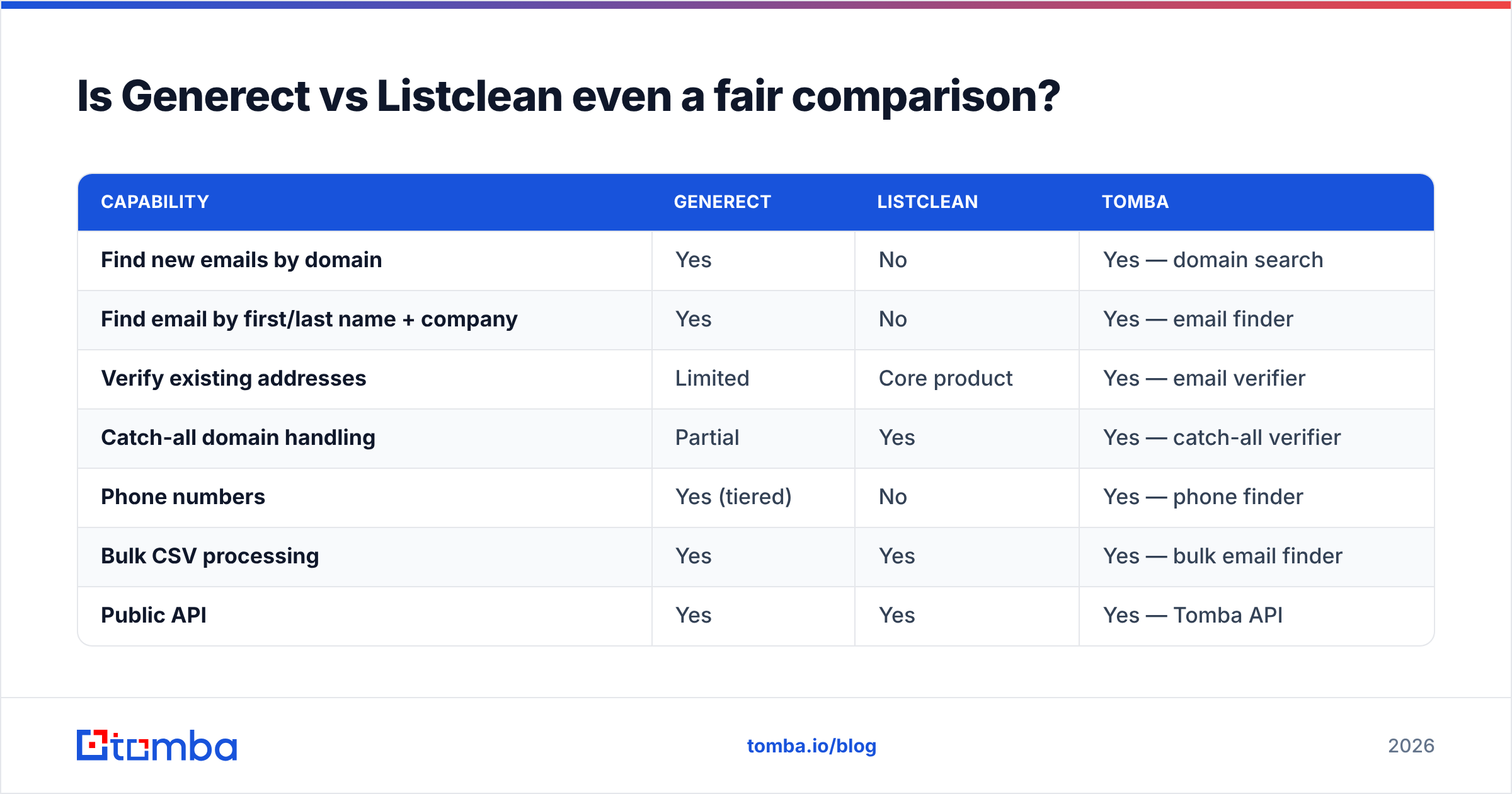
| Capability | Generect | Listclean | Tomba |
|---|---|---|---|
| Find new emails by domain | Yes | No | Yes — domain search |
| Find email by first/last name + company | Yes | No | Yes — email finder |
| Verify existing addresses | Limited | Core product | Yes — email verifier |
| Catch-all domain handling | Partial | Yes | Yes — catch-all verifier |
| Phone numbers | Yes (tiered) | No | Yes — phone finder |
| Bulk CSV processing | Yes | Yes | Yes — bulk email finder |
| Public API | Yes | Yes | Yes — Tomba API |
| Free tier | Trial credits | Trial credits | 25 searches/mo, no card |
| Entry paid price | Mid-market, quote-driven | Per-verification, low | $49/mo Starter |
If your list is empty, Listclean is useless to you today. If your list is full of two-year-old addresses, Generect is solving a problem you don't have yet.
How accurate is each one, really?#
Accuracy means two different things here, and vendors exploit the ambiguity.
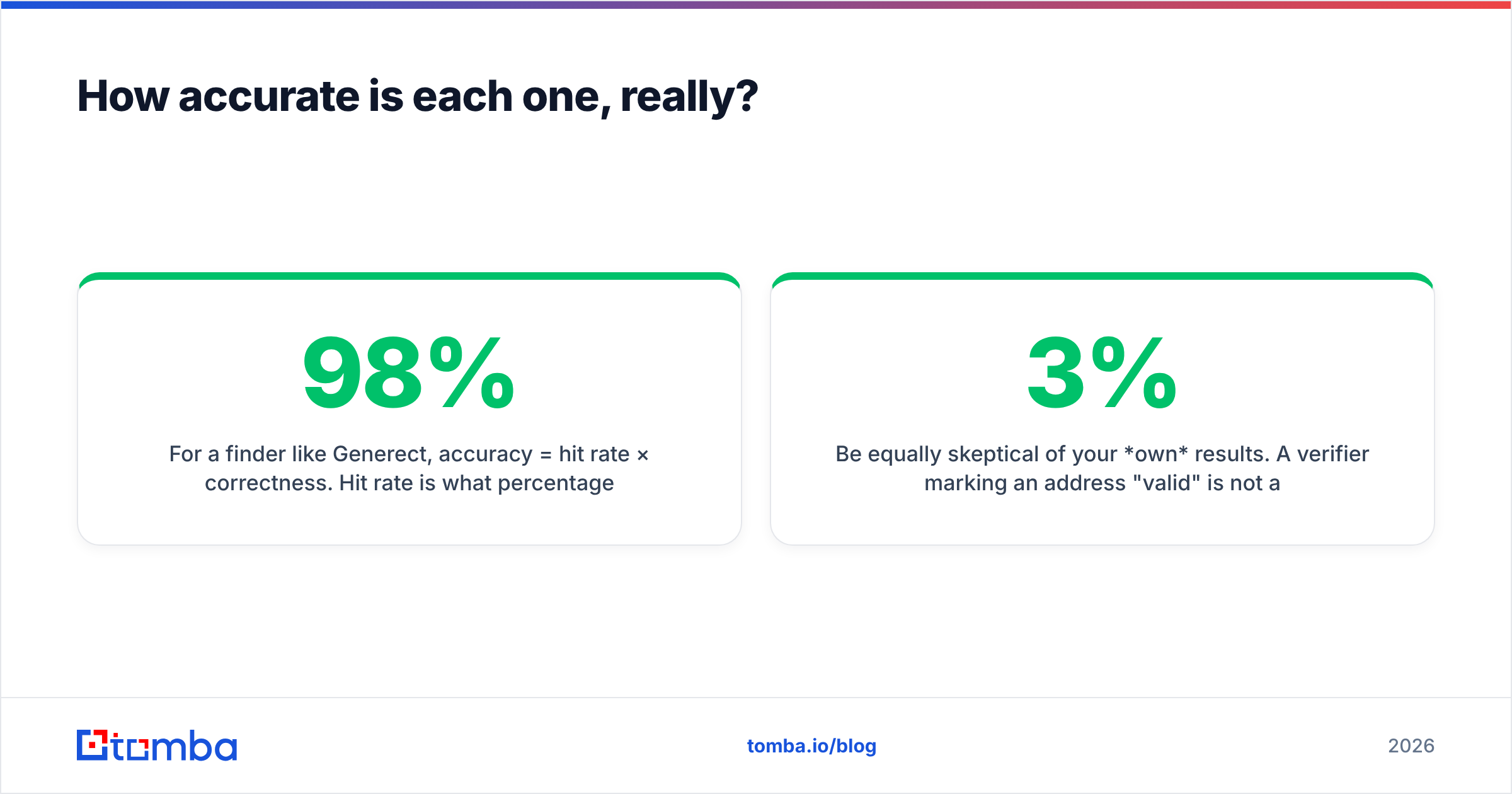
For a finder like Generect, accuracy = hit rate × correctness. Hit rate is what percentage of your input rows come back with any email. Correctness is what percentage of those are the right person's real, deliverable address. A tool bragging about "98% accuracy" while only returning emails for 40% of your inputs is quietly worse than one at 92% correctness with a 75% hit rate.
For a verifier like Listclean, accuracy = how often its verdict matches reality. The hard cases are catch-all domains (the server accepts everything, so SMTP probing tells you nothing) and greylisting servers that deliberately stall. Any verifier's headline number is mostly a statement about how it handles those edge cases — and whether it marks them "unknown" or guesses.

The practical test, and the only one worth trusting: take 100 contacts you can independently confirm — your own customers, your LinkedIn first-degree connections, people who've replied to you — strip the emails, and run them through each tool. Score hit rate and correctness separately. Vendor benchmark pages are marketing; your own 100-row sample is data. Tomba publishes where its data comes from precisely so you can judge the methodology rather than the number.
Be equally skeptical of your own results. A verifier marking an address "valid" is not a promise of a reply. It's a statement about SMTP acceptance at one moment in time. Job changes invalidate roughly 2-3% of B2B contacts every month regardless of what any tool told you last quarter.
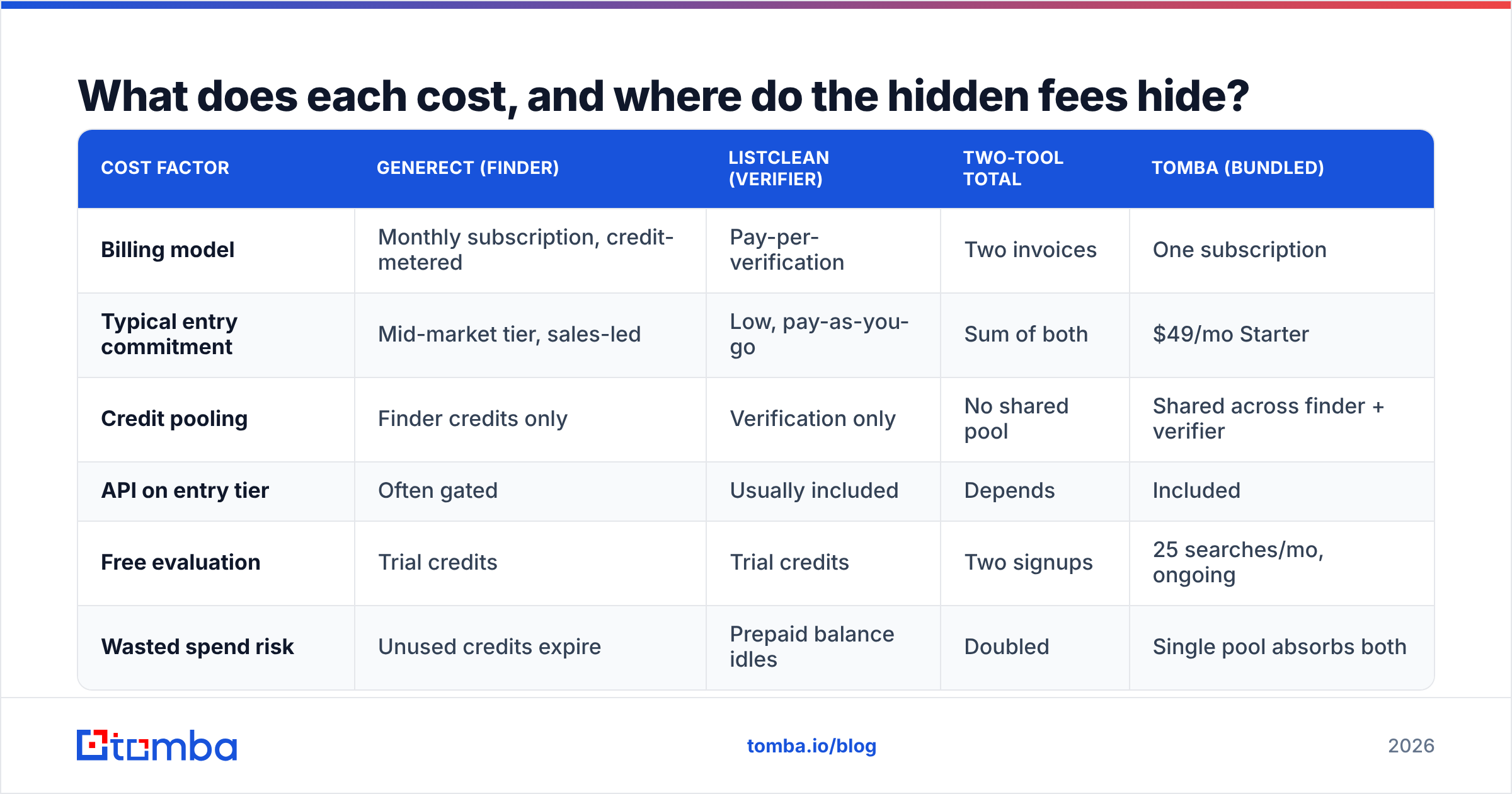
What does each cost, and where do the hidden fees hide?#
Generect prices in the mid-market lead-database bracket — plan tiers scale by monthly credits, with API access and phone-number reveals typically gated to higher tiers. Listclean, like most verifiers, charges per verification with volume discounts, so a 50,000-address clean is a one-time cost rather than a subscription commitment.
That difference matters for budgeting. Verification is bursty (you clean a list when you get one). Finding is continuous (your SDRs burn credits daily). Buying both on the wrong billing model means you either overpay for idle verification capacity or run out of finder credits mid-month.
| Cost factor | Generect (finder) | Listclean (verifier) | Two-tool total | Tomba (bundled) |
|---|---|---|---|---|
| Billing model | Monthly subscription, credit-metered | Pay-per-verification | Two invoices | One subscription |
| Typical entry commitment | Mid-market tier, sales-led | Low, pay-as-you-go | Sum of both | $49/mo Starter |
| Credit pooling | Finder credits only | Verification only | No shared pool | Shared across finder + verifier |
| API on entry tier | Often gated | Usually included | Depends | Included |
| Free evaluation | Trial credits | Trial credits | Two signups | 25 searches/mo, ongoing |
| Wasted spend risk | Unused credits expire | Prepaid balance idles | Doubled | Single pool absorbs both |
The hidden cost nobody quotes: the handoff. Export from Generect, import to Listclean, wait, export again, re-import to your sequencer, reconcile the rows that changed. Call it 20-40 minutes per list, plus the field-mapping errors that creep in. At two lists a week, that's a workday a month spent as a human ETL pipeline. Full Tomba pricing is public precisely to make that math comparable.

Which should you choose for your use case?#
Match the tool to the shape of your problem, not to the review score.
- You have zero contacts and need to build a pipeline from scratch. You need a finder. Generect works; so does Tomba's email finder at a lower entry price with verification included. Listclean does nothing for you here.
- You have a 60,000-row list from a 2023 event and a 14% bounce rate. You need a verifier. Listclean is a legitimate choice. So is a bulk verification run on any credible platform.
- You're doing continuous outbound at 500-2,000 new contacts a month. You need both, continuously — which is the case where a single bundled platform stops being a preference and starts being an operational necessity.
- You're a solo founder or a two-person team. Skip the two-vendor stack entirely. The admin overhead will cost you more than the tools.
- You're an agency running lists for multiple clients. You need API-first access and clean per-client accounting. Check whether entry tiers include API before you commit — this is where "cheap" plans get expensive.
- You buy verified lists from a provider like BookYourData. You're paying for pre-verified data, so your marginal need is periodic re-verification, not a full finder subscription. Solid option if you'd rather buy than build.

Is a bundled platform actually better than two specialists?#
The specialist argument is real: a company that does one thing usually does it slightly better than a company that does eight. If you're processing ten million verifications a year, a dedicated verifier's edge cases and throughput will beat a generalist's.
But most teams aren't at that volume, and the specialist edge is smaller than the integration tax. Here's what bundling actually buys you:
- One credit pool. A find and its verification draw from the same balance. No stranded prepaid verification credits at month end.
- Verification at the point of discovery. Addresses get scored when they're found, not three days later after a CSV round trip. Confidence scores arrive with the record.
- One API surface. A single auth token, one rate limit to reason about, one SDK in your codebase. If you're wiring this into a CRM, that's the difference between an afternoon and a sprint.
- Native destinations. HubSpot, Salesforce, Google Sheets, and Zapier connections mean the data lands where reps work without a manual export step.
- One vendor to hold accountable. When a batch comes back wrong, you're not refereeing a dispute between two support teams about whose data was bad.
- Predictable billing. One line item, one renewal date, one procurement approval.
The counter-case is honest too: if you have deep existing investment in one vendor and it works, ripping it out for marginal consolidation gain is churn for its own sake. Bundle when you're buying, not out of tidiness.
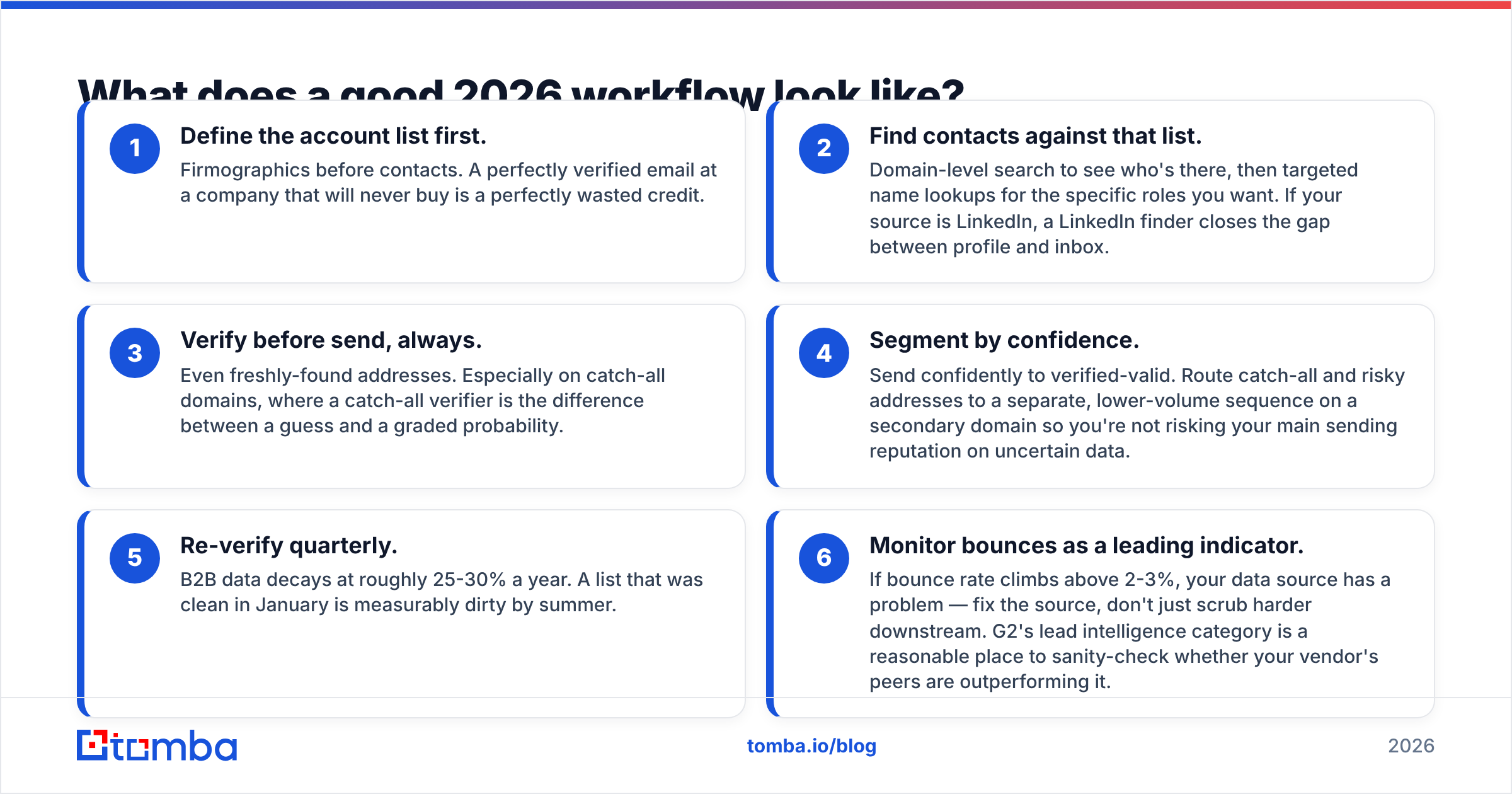
What does a good 2026 workflow look like?#
Whatever combination you land on, the sequence should be the same:
- Define the account list first. Firmographics before contacts. A perfectly verified email at a company that will never buy is a perfectly wasted credit.
- Find contacts against that list. Domain-level search to see who's there, then targeted name lookups for the specific roles you want. If your source is LinkedIn, a LinkedIn finder closes the gap between profile and inbox.
- Verify before send, always. Even freshly-found addresses. Especially on catch-all domains, where a catch-all verifier is the difference between a guess and a graded probability.
- Segment by confidence. Send confidently to verified-valid. Route catch-all and risky addresses to a separate, lower-volume sequence on a secondary domain so you're not risking your main sending reputation on uncertain data.
- Re-verify quarterly. B2B data decays at roughly 25-30% a year. A list that was clean in January is measurably dirty by summer.
- Monitor bounces as a leading indicator. If bounce rate climbs above 2-3%, your data source has a problem — fix the source, don't just scrub harder downstream. G2's lead intelligence category is a reasonable place to sanity-check whether your vendor's peers are outperforming it.
Step 4 is where most teams lose money. They treat "unknown" as "valid" because the list looks bigger that way, then blame the sequencer when open rates crater. Track sender reputation as its own metric and the tradeoff becomes obvious.
So which one wins?#
Generect wins on sourcing. Listclean wins on hygiene. Neither wins the matchup, because they're not in the same weight class. The genuine decision is whether you assemble a two-vendor stack or buy one platform that covers both jobs.
Choose Generect if your bottleneck is supply — you need net-new contacts and you're already happy with your verification setup. Choose Listclean if your bottleneck is quality — you have plenty of contacts and too many of them bounce. Choose a bundled platform if, like most outbound teams, your bottleneck moves week to week and you'd rather not re-architect your stack each time it does.
Run the 100-contact test on whichever two you shortlist. Score hit rate and correctness separately. Include the integration time in your cost model, because it's real money even though nobody invoices you for it.
Ready to stop paying two vendors for one workflow? The Tomba Email Finder finds professional email addresses by domain, name, or company — and verifies them from the same credit pool, so you're never exporting a CSV just to check whether an address is real. Start on the free tier with 25 searches a month, no card required, and scale to Starter at $49/mo when your pipeline does. Run your own 100-row accuracy test on it before you commit to anything.
Related guides#
Ready to find emails that actually work?
Join 150,000+ professionals who stopped guessing and started sending. Free credits on signup — no credit card required.
Get the Tomba newsletter
Practical outbound tactics and product updates — once every two weeks.
About the author