Generect vs MyEmailVerifier: 2026 Comparison and Verdict
Generect builds lead lists. MyEmailVerifier cleans them. They are not really competitors — but most teams only budget for one. Here is how the two compare on data, accuracy, pricing, and API fit in 2026.
Generect vs MyEmailVerifier is an odd match-up. One tool finds new leads. The other checks the leads you already have.
TL;DR
- Generect and MyEmailVerifier are not direct rivals. Generect finds B2B contacts. MyEmailVerifier checks the contacts you already have.
- An empty list gives a verifier nothing to clean. A dirty list will still burn your domain, even if the data came from a good database.
- MyEmailVerifier wins on price per check. Verification is cheap, and it is priced that way.
- Generect wins on fresh data. It pulls company and people records in real time instead of from an old dump.
- Buying both means two contracts, two credit systems, and two APIs to join up.
- One platform can do both jobs on a single credit balance. Tomba works this way. For teams under 50 seats, that is usually the cheaper and simpler path.
What are Generect and MyEmailVerifier?#
They sit at opposite ends of the same pipeline.
Generect is a B2B lead data platform. You give it filters: industry, headcount, country, job title, tech stack. It hands back companies and decision-makers with work emails. Many records also carry phone numbers and LinkedIn URLs. The pitch is real-time lookup. Instead of serving an old snapshot, it builds records when you ask. It sells mostly through its API, to agencies and product teams that plug lead search into their own tools.
MyEmailVerifier does one job. It takes a list of email addresses and tells you which ones will bounce. It runs syntax checks, MX lookups, and SMTP handshakes. It also flags role accounts, throwaway domains, and catch-all servers. Upload a CSV and you get a scored file back: valid, invalid, catch-all, unknown. The tool has been around for years, and it competes on price.
People often treat this as a straight choice. It is not. You are picking a shape of stack. Either one vendor does both jobs, or you bolt two vendors together.
Generect vs MyEmailVerifier: how do they compare at a glance?#
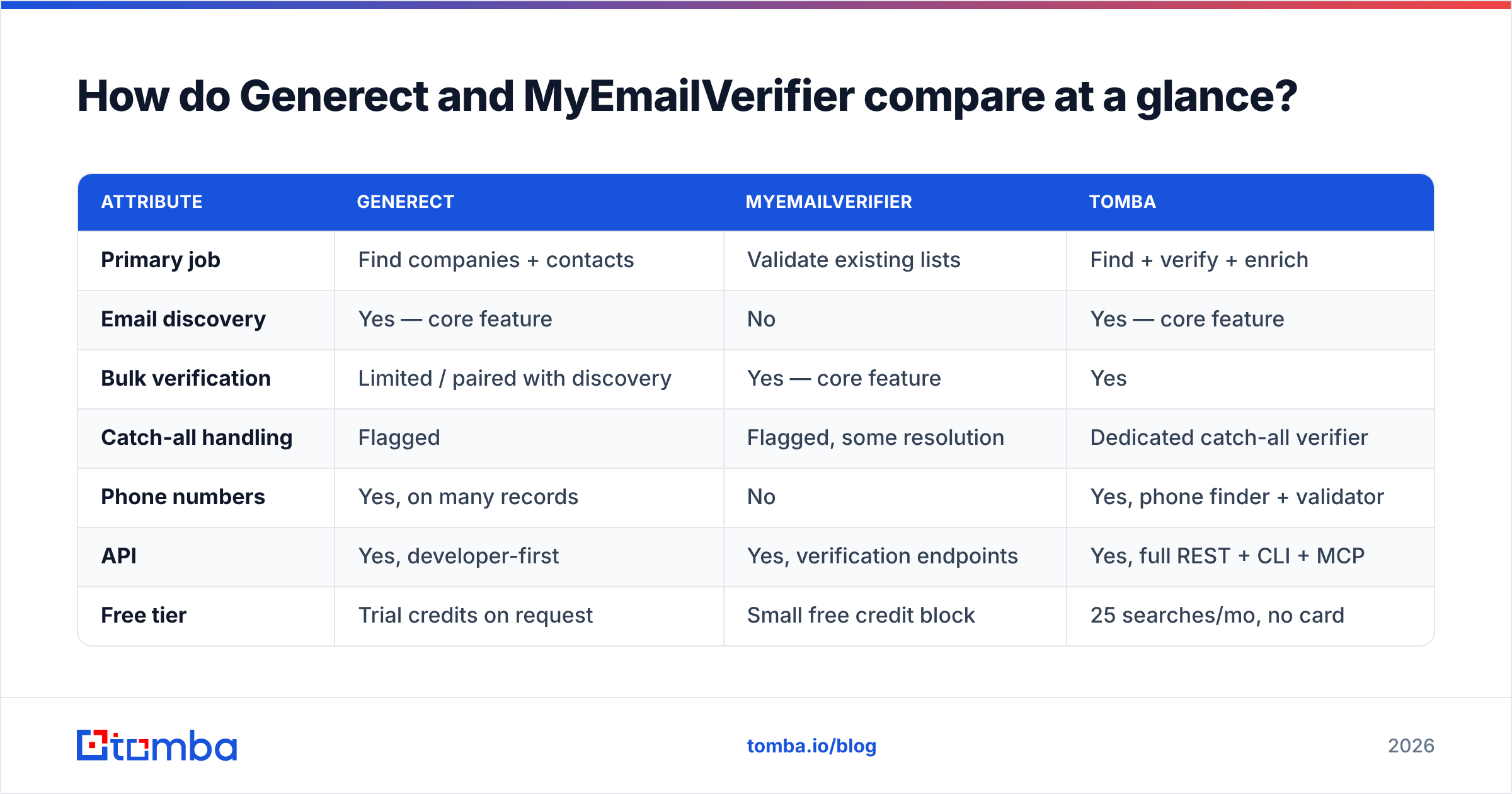
| Attribute | Generect | MyEmailVerifier | Tomba |
|---|---|---|---|
| Primary job | Find companies + contacts | Validate existing lists | Find + verify + enrich |
| Email discovery | Yes — core feature | No | Yes — core feature |
| Bulk verification | Limited / paired with discovery | Yes — core feature | Yes |
| Catch-all handling | Flagged | Flagged, some resolution | Dedicated catch-all verifier |
| Phone numbers | Yes, on many records | No | Yes, phone finder + validator |
| API | Yes, developer-first | Yes, verification endpoints | Yes, full REST + CLI + MCP |
| Free tier | Trial credits on request | Small free credit block | 25 searches/mo, no card |
| Entry paid plan | Quote-based, mid three figures typical | Pay-as-you-go, tens of dollars | $49/mo Starter |
| Best for | Building net-new lists | Cleaning inherited or scraped lists | Teams that need both without two bills |
Prices at both vendors move, so check their live pages before you sign. The bigger difference is how they charge. Generect charges for records found. MyEmailVerifier charges for checks run. Those units are not the same. That is why a head-to-head price comparison misleads people.

What does Generect do well?#
Four things stand out.
Fresh records, not old dumps. Most lead databases buy a bulk file and resell it. Records age fast. In tech sales, 20 to 25 percent of people change jobs each year. So a file that is a year old is badly wrong. Generect leans on live lookups. That cuts the decay, though it does not remove it.
Company-first filters. Some teams define their target market by size, funding stage, or tech stack rather than by named accounts. Generect is built for that. You describe the segment, and it returns the people.
API first. The product works as real infrastructure, not as a UI with an API bolted on. Agencies that resell lists and SaaS products that embed prospecting both use it this way.
More than email. One record can carry email, phone, and LinkedIn. That saves you a second enrichment step when your sequences go beyond the inbox.
Where it gets thin: proof that an address works. Finder tools return a confidence score, not a full mailbox check. A score is a guess about patterns. It is not the same as a mail server saying yes. Teams that treat it as one end up with 8 percent bounce rates on lists they thought were clean.
How accurate is the data on each side?#
Accuracy means two different things here. Mixing them up is the costliest mistake in this market.
For a finder like Generect, the question is simple. Of the emails it returns, how many belong to that person and accept mail? Honest numbers sit near 85 to 95 percent on common domains. The rate drops on small firms, catch-all domains, and non-English markets. A vendor that claims 99 percent on every domain is measuring a narrow slice, usually the records it already marked high-confidence.
For a verifier like MyEmailVerifier, the question is different. Of the addresses it marks valid, how many arrive? Good verifiers reach the high 90s on normal domains. Catch-all domains are the hard part. Those servers accept every address and tell you nothing. Each tool handles them in its own way. Some mark them unknown and charge nothing. Some guess. Some dig further with other signals.

So the two scores are not swaps for each other. Buy Generect alone and skip checks, and you are sending on guesses. Buy MyEmailVerifier alone, and you have a filter with nothing to filter. Teams that care about sender reputation need both signals. You can get them from two vendors, or from one platform whose email verifier runs on the records its finder just produced.
Which one is cheaper in practice?#
MyEmailVerifier is cheaper per unit, and it is not close. Checks are cheap across the whole market. At volume they cost a fraction of a cent, and MyEmailVerifier prices low even in that band. Generect is quote-driven and sits where lead databases sit, with a real monthly commitment. Building a record costs far more than checking one.
But price per unit is the wrong lens for Generect vs MyEmailVerifier. Model the total cost of a normal month instead.
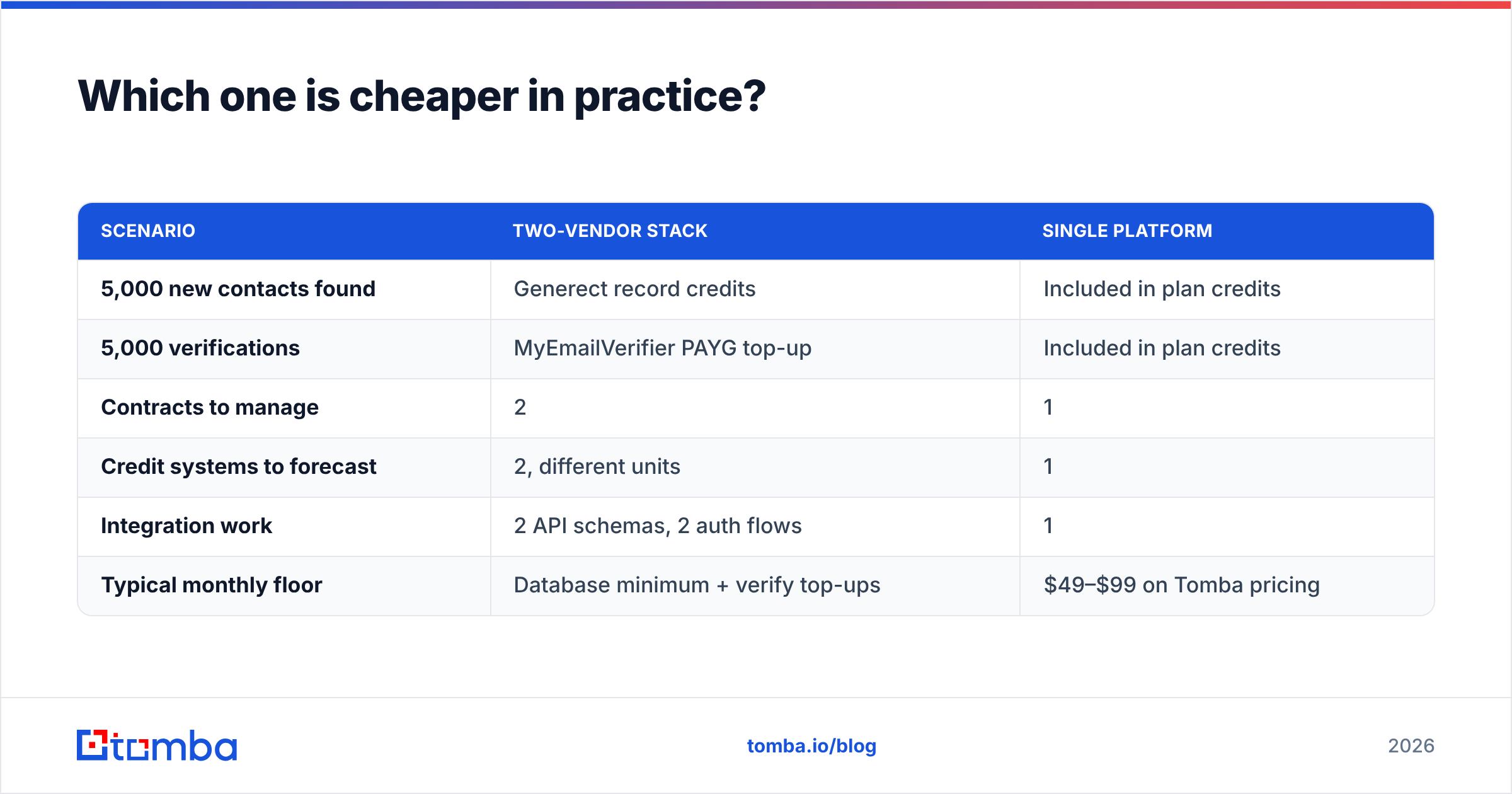
| Scenario | Two-vendor stack | Single platform |
|---|---|---|
| 5,000 new contacts found | Generect record credits | Included in plan credits |
| 5,000 verifications | MyEmailVerifier PAYG top-up | Included in plan credits |
| Contracts to manage | 2 | 1 |
| Credit systems to forecast | 2, different units | 1 |
| Integration work | 2 API schemas, 2 auth flows | 1 |
| Typical monthly floor | Database minimum + verify top-ups | $49–$99 on Tomba pricing |
Take a two-person outbound team that works through a few thousand contacts a month. For them, two vendors usually cost more in money and in engineering hours. An agency pushing hundreds of thousands of records is a different case. At that scale, specialist tools win. Bulk verify pricing beats bundled credits, and a dedicated database filters deeper than a bundled tool does.

Check current numbers on both vendor sites and on G2's email verification category before you commit. Published tiers here change several times a year. Review volume also tells you how fast support replies, which no pricing page will.
Do you actually need both tools?#
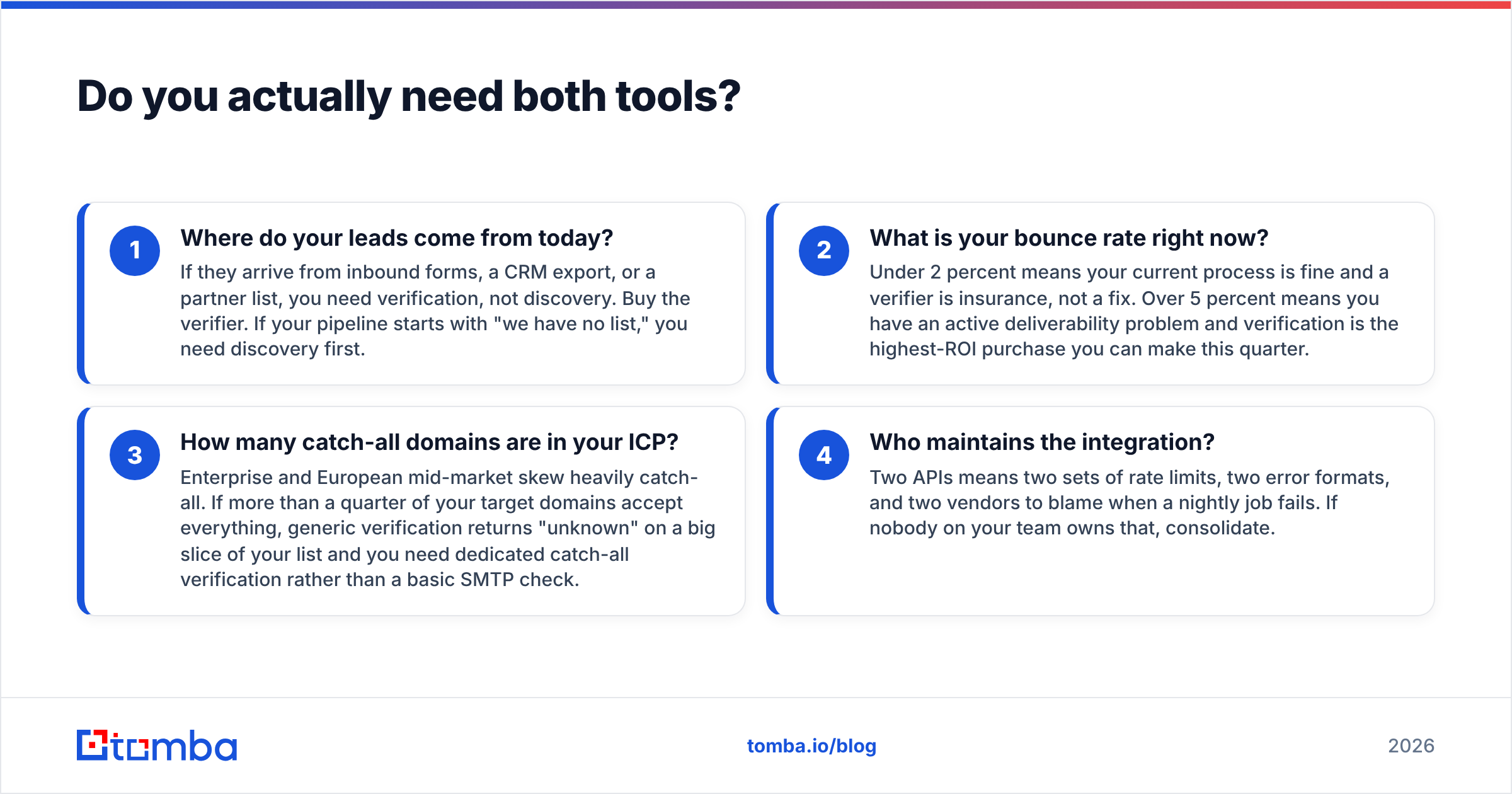
Ask four questions, in this order.
Where do your leads come from today? Inbound forms, a CRM export, or a partner list mean you need checks, not discovery. Buy the verifier. If your pipeline starts with an empty sheet, start with discovery.
What is your bounce rate now? Under 2 percent means your process is fine, and a verifier is only insurance. Over 5 percent means you have a live delivery problem. Then verification is the best money you can spend this quarter.
How many catch-all domains are in your target market? Large firms and the European mid-market skew catch-all. If more than a quarter of your target domains accept everything, a basic check returns "unknown" on much of your list. You need catch-all verification instead.
Who owns the integration? Two APIs mean two rate limits, two error formats, and two vendors to blame when a nightly job fails. If nobody on your team owns that work, use one tool.
Most teams that answer honestly land in the same place. Bundle now, split later if volume earns it.

Where does Tomba fit in this comparison?#
Tomba covers both halves on one credit balance. There are no two bills to match and no two credit systems to forecast.
The email finder turns a name and a domain into a work email, with a confidence score and the sources behind it. Domain search returns every published address on a company domain when you want coverage instead of one named contact. The verifier runs syntax, MX, SMTP, role, and throwaway checks. Catch-all domains get their own path. Bulk processing takes a CSV in and hands back a clean, enriched CSV, so you do not script pagination yourself.
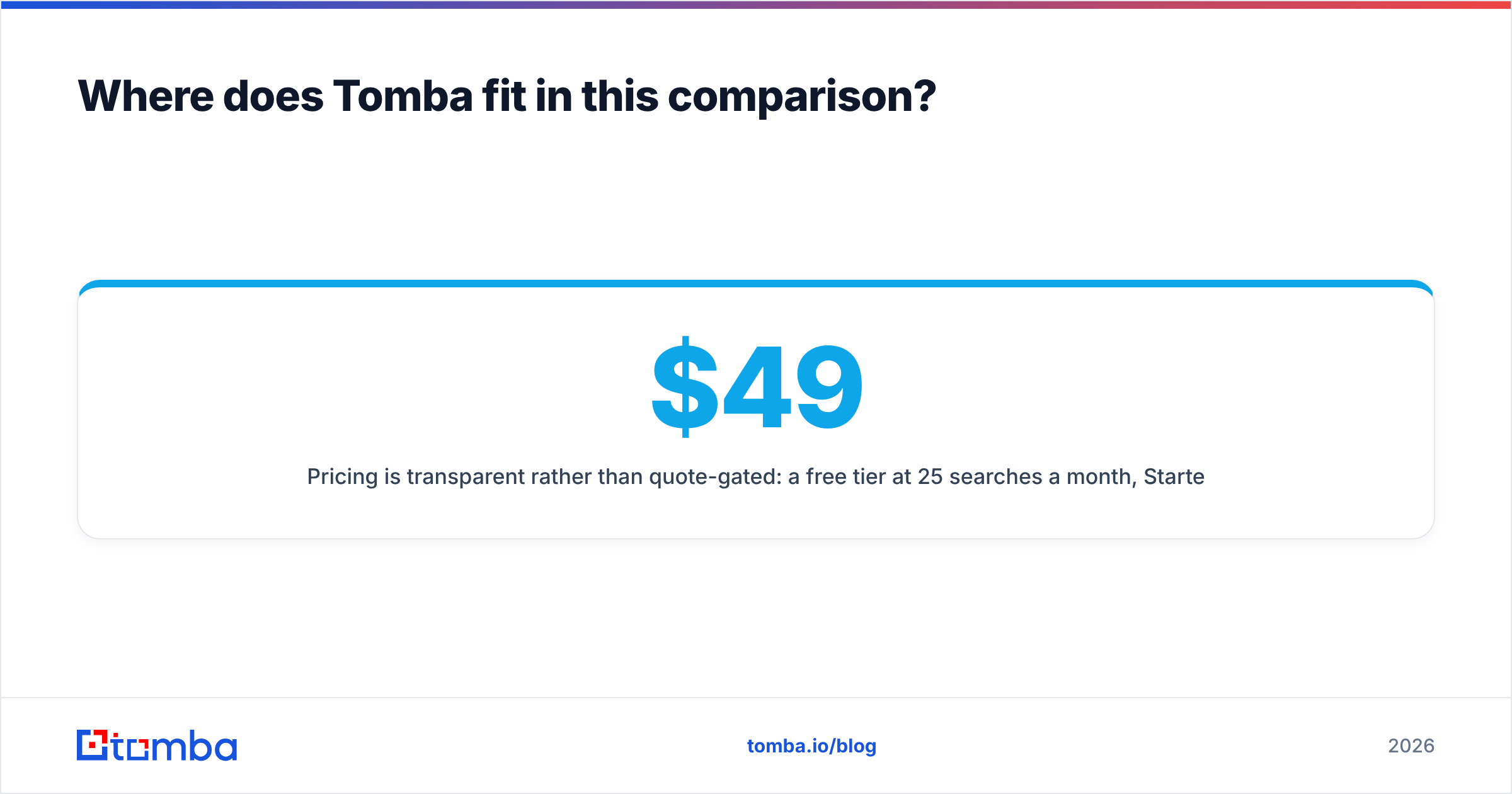
Pricing is public rather than quote-gated. The free tier gives 25 searches a month. Starter is $49/mo, Growth $99/mo, Pro $249/mo, and Enterprise on request. That matters when the other option wants a sales call before you learn whether the data even covers your market.
Honest limits: Tomba is not a deep company search engine. Say your workflow is "show me every Series B fintech in DACH with 50 to 200 staff and Salesforce installed." A purpose-built database does that better, and Generect is one of them. Tomba is strongest when you know the targets and need verified, reachable contact data. You reach it through the API, a CLI, or a spreadsheet add-on, so you never have to sit inside a UI.
What should you buy for your situation?#
You have a list and a bounce problem. Buy MyEmailVerifier. It is cheap, focused, and built for this. Run the list, delete the invalids, park the unknowns, then test your sending again in two weeks.
You have no list and a clear target profile. Generect is a fair fit, above all if you are technical and plan to use the API. Budget for a checking layer on top before you send anything.
You have named target accounts and need reachable contacts. One tool that finds and verifies is the faster path. You are not filtering a whole market. You are resolving a known set. Start on a free tier and measure the hit rate on your own account list before you pay anyone.
You are an agency at high volume. Specialists beat bundles at scale. Pair a database with a bulk verifier and negotiate both. The setup cost spreads across clients.
You are a team of two to ten. Use one tool. The hours you would spend gluing two vendors together cost more than the license gap.
So the short answer on Generect vs MyEmailVerifier is this: pick by the shape of your pipeline, not by the sticker price.
Ready to stop paying two vendors for one workflow?#
Start with the free tier and test it on your own accounts, not on a vendor demo list. Run 25 target contacts through the Tomba Email Finder. Verify them in the same dashboard. Then send to a handful and see what lands. That test tells you more in an afternoon than a month of comparison tables, this one included. If the hit rate holds on your market, $49/mo covers find and verify on one bill. If it does not, you have lost nothing, and you now know exactly which specialist to call.
Related guides#
Ready to find emails that actually work?
Join 150,000+ professionals who stopped guessing and started sending. Free credits on signup — no credit card required.
Get the Tomba newsletter
Practical outbound tactics and product updates — once every two weeks.
About the author