Generect vs OutboundView: Which Lead Gen Model Wins in 2026?
Generect sells you lead data. OutboundView sells you an outsourced SDR team. They are not the same purchase — and picking the wrong one burns a quarter. Here is the honest breakdown.
TL;DR
- Generect and OutboundView are not competitors in the normal sense. Generect is a B2B lead data platform (search, export, API). OutboundView is a US-based outbound agency that rents you SDRs, sequences, and booked meetings.
- Pick Generect (or another data tool) if you already have someone to send the emails. Pick OutboundView if you have budget but no bodies.
- Cost gap is roughly 20–50x. Data tooling lands in the tens-to-low-hundreds of dollars per month. Managed appointment setting starts in the thousands per month and usually wants a multi-month commitment.
- Neither one solves deliverability for you. Bad data kills domains regardless of who is sending, which is why a separate verification step matters more than either vendor's marketing admits.
- Most teams that scale past $1M ARR end up hybrid: cheap data in-house, agency only for a segment they can't cover.
What are Generect and OutboundView, exactly?#
Start here, because the naming makes them look interchangeable and they are not.
Generect is a lead generation data provider. You search for companies and people by filters (industry, headcount, title, geography, LinkedIn signals), it returns contact records with work emails and sometimes phone numbers, and you export them to CSV or pull them through an API. It is a self-serve product. Nobody at Generect writes your subject lines or books your calls. You are buying rows.
OutboundView is a B2B outbound sales agency. You brief them on your ICP, they build the list, write the sequences, run cold email and sometimes cold calling, and hand you meetings on your calendar. It is a service. You are buying outcomes — or at least activity that is supposed to produce outcomes.
So the real question in "Generect vs OutboundView" is not "which tool has better data." It is: do you want to own the outbound motion or rent it?
That framing changes the whole evaluation. A data platform is a fixed, small, predictable cost that scales with your discipline. An agency is a large recurring cost that scales with their headcount allocation to your account — which you don't control.
How do the two models actually differ?#
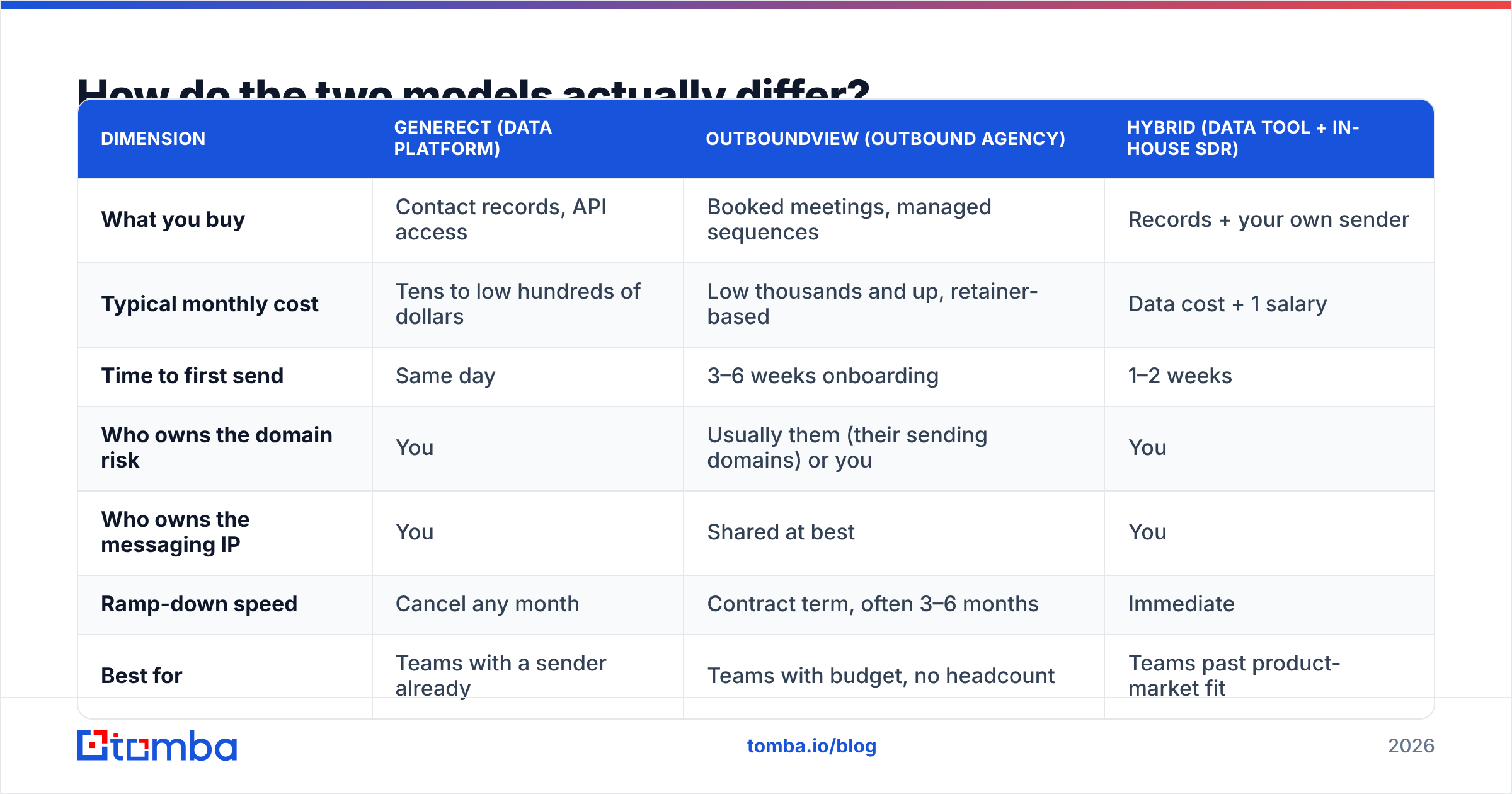
| Dimension | Generect (data platform) | OutboundView (outbound agency) | Hybrid (data tool + in-house SDR) |
|---|---|---|---|
| What you buy | Contact records, API access | Booked meetings, managed sequences | Records + your own sender |
| Typical monthly cost | Tens to low hundreds of dollars | Low thousands and up, retainer-based | Data cost + 1 salary |
| Time to first send | Same day | 3–6 weeks onboarding | 1–2 weeks |
| Who owns the domain risk | You | Usually them (their sending domains) or you | You |
| Who owns the messaging IP | You | Shared at best | You |
| Ramp-down speed | Cancel any month | Contract term, often 3–6 months | Immediate |
| Best for | Teams with a sender already | Teams with budget, no headcount | Teams past product-market fit |
| Worst for | Teams with nobody to execute | Pre-PMF startups still testing ICP | Solo founders with no time |
The row that decides most deals is "time to first send." If you need pipeline this month and you have someone who can write and send, a data tool wins on speed alone. If your problem is that nobody in the company has 20 hours a week for outbound, no amount of cheap data fixes it.
The row that decides most renewals is "who owns the messaging IP." Agencies learn what works in your market. When the contract ends, that knowledge often walks out with them unless you insisted on getting copies of every sequence, every A/B result, and every disqualification reason from day one.
What does each one actually cost in 2026?#
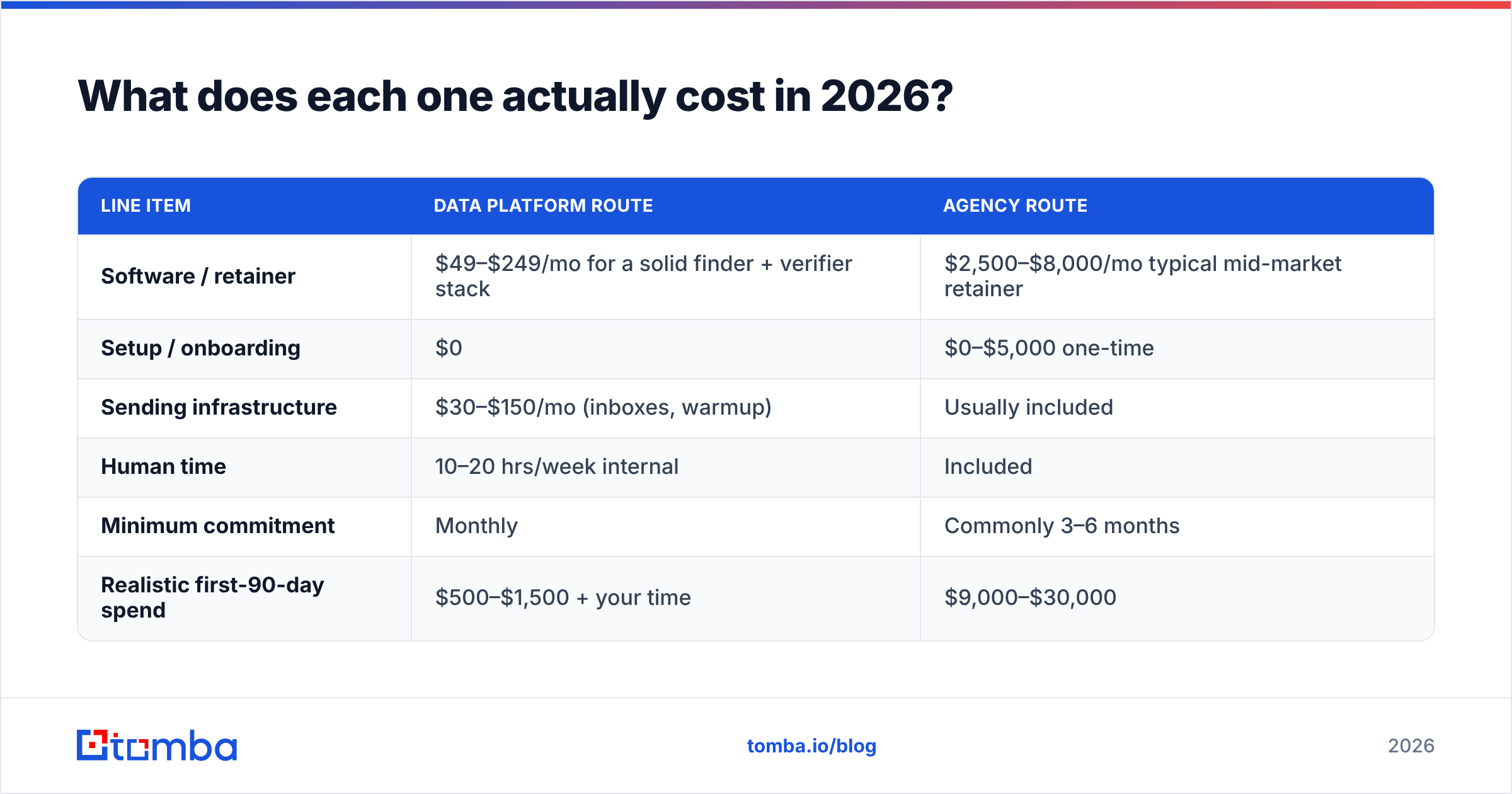
Published pricing moves, and agencies price per engagement, so treat the numbers below as market ranges rather than quotes. Always check the vendor's own page before you budget.
| Line item | Data platform route | Agency route |
|---|---|---|
| Software / retainer | $49–$249/mo for a solid finder + verifier stack | $2,500–$8,000/mo typical mid-market retainer |
| Setup / onboarding | $0 | $0–$5,000 one-time |
| Sending infrastructure | $30–$150/mo (inboxes, warmup) | Usually included |
| Human time | 10–20 hrs/week internal | Included |
| Minimum commitment | Monthly | Commonly 3–6 months |
| Realistic first-90-day spend | $500–$1,500 + your time | $9,000–$30,000 |
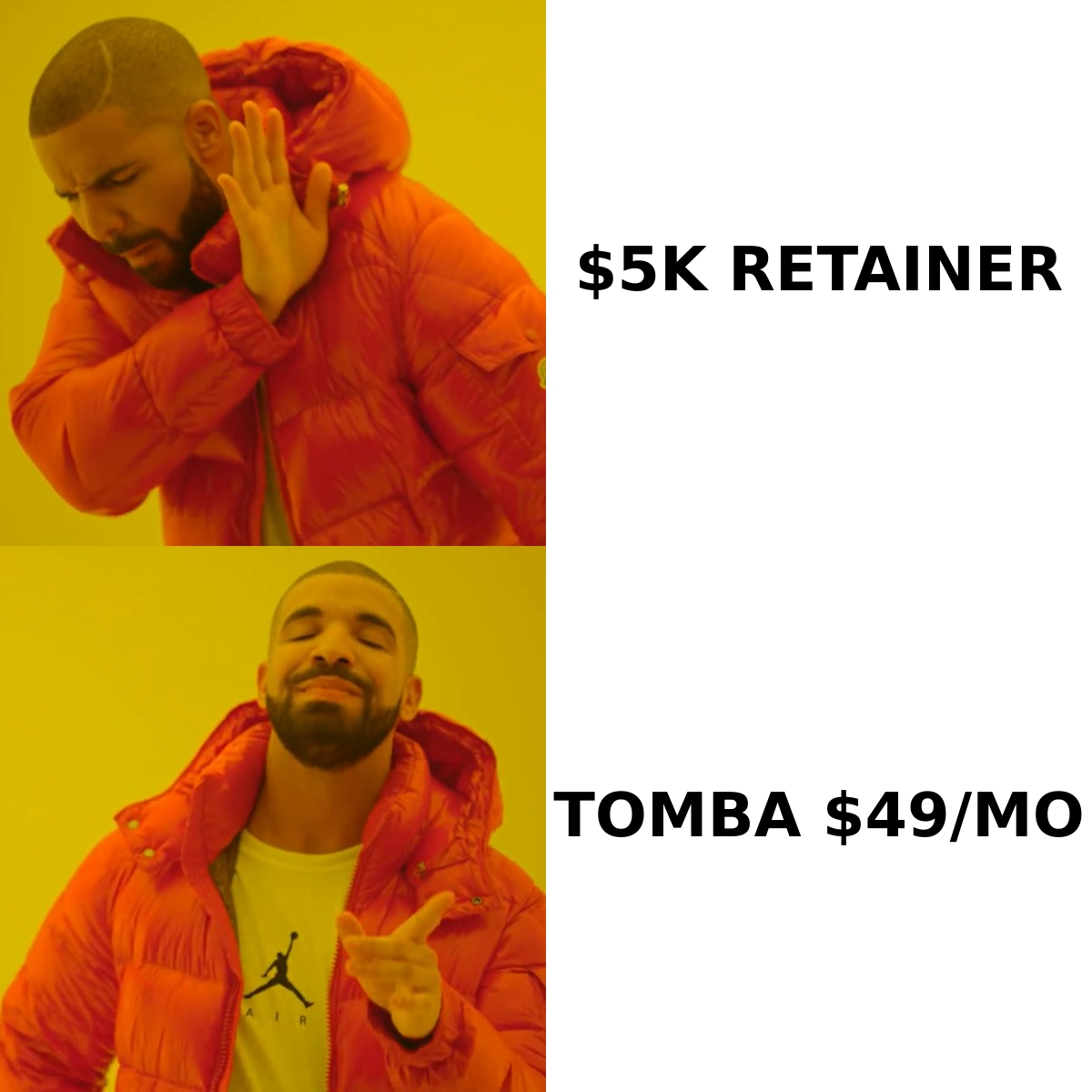
For reference, Tomba pricing runs Free (25 searches/mo), Starter at $49/mo, Growth at $99/mo, Pro at $249/mo, and custom Enterprise — which is roughly the shape of the data-side column above. Generect sits in a similar self-serve band. An agency retainer is a different budget line entirely; it usually comes out of the same pot as a headcount, because that's what it replaces.
The honest math: if a mid-market agency retainer is $5,000/mo and books you six meetings, your cost per meeting is $833 before any close-rate assumption. Run the same list yourself with a $99/mo data stack and 15 hours a week of an SDR earning $60K, and your loaded cost per meeting is usually a third of that — if the SDR is competent and your ICP is correct. Both of those ifs are load-bearing.
Is Generect's data accurate enough to run outbound on?#
Accurate enough to start. Not accurate enough to send unverified. That's true of every provider in this category, including the ones that publish 95%+ claims.
Here's why. B2B contact databases are built from crawls, contributed data, and pattern inference. A record that was correct in November can be dead in February because the person changed jobs, the company migrated domains, or IT switched to a catch-all configuration that makes SMTP checks ambiguous. Vendors measure accuracy at time of collection. You send at time of use. The gap between those two moments is where bounce rates come from.
Practical rule: never import a purchased list straight into your sequencer. Run it through an independent email verifier first, drop anything that comes back invalid, and route catch-all domains into a separate low-volume segment instead of your main send. A 4% bounce rate looks small on a spreadsheet and looks like a reputation problem to Google.
Agencies are not immune to this either. When OutboundView or any agency runs sends on their own infrastructure, a bad list damages their domains — which is a real advantage for you, since your primary domain stays clean. That is one of the genuinely underrated arguments for the agency model, and most comparison posts skip it.
When is OutboundView the better choice?#
Four situations where paying for a managed service is the correct decision, not a lazy one:
- You have no one to execute. A founder-led sales team where the founder is also doing product, support, and fundraising will not run consistent outbound. Inconsistent outbound is worse than none — you burn the list and learn nothing.
- Your ACV justifies it. At a $40K average contract value, one closed deal from a quarter of agency work pays for the year. At $200/mo ACV, the math almost never works.
- You need US-based phone coverage. OutboundView's positioning includes calling alongside email, and staffing a domestic calling function in-house is expensive and slow. If you already have B2B phone numbers but nobody to dial them, an agency closes that gap faster than hiring.
- You're protecting a primary domain. If your main domain carries transactional and marketing mail you can't risk, outsourcing cold sends to third-party infrastructure is a legitimate risk-transfer play.
And four where it usually disappoints:
- You haven't nailed your ICP. Agencies optimize execution, not positioning. Hand them a fuzzy ICP and you get efficient delivery of the wrong message.
- Your product needs deep technical framing. Generic SDRs struggle with sequences that require real domain knowledge, and the ramp cost eats the contract.
- You expect meetings in month one. Onboarding, domain warmup, and list building realistically consume the first 30–45 days. Contracts that promise faster are usually recycling a list.
- You want to build the muscle internally. Every month you outsource is a month your team doesn't learn what makes your buyers reply.
What do most teams actually end up doing?#
The hybrid, in a specific order. This is the pattern that shows up repeatedly in reviews on G2 and in postmortems from teams that tried both:
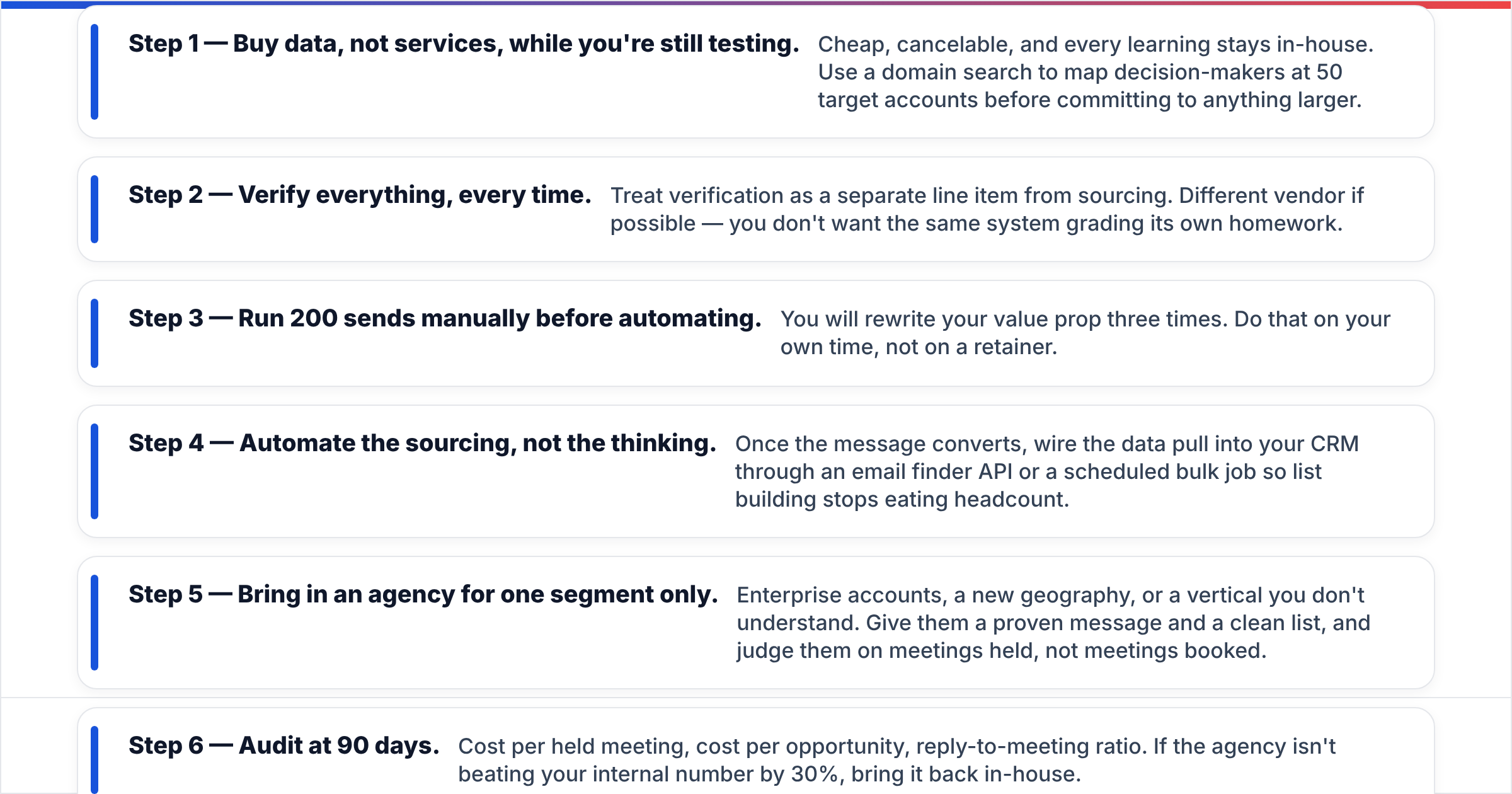
- Step 1 — Buy data, not services, while you're still testing. Cheap, cancelable, and every learning stays in-house. Use a domain search to map decision-makers at 50 target accounts before committing to anything larger.
- Step 2 — Verify everything, every time. Treat verification as a separate line item from sourcing. Different vendor if possible — you don't want the same system grading its own homework.
- Step 3 — Run 200 sends manually before automating. You will rewrite your value prop three times. Do that on your own time, not on a retainer.
- Step 4 — Automate the sourcing, not the thinking. Once the message converts, wire the data pull into your CRM through an email finder API or a scheduled bulk job so list building stops eating headcount.
- Step 5 — Bring in an agency for one segment only. Enterprise accounts, a new geography, or a vertical you don't understand. Give them a proven message and a clean list, and judge them on meetings held, not meetings booked.
- Step 6 — Audit at 90 days. Cost per held meeting, cost per opportunity, reply-to-meeting ratio. If the agency isn't beating your internal number by 30%, bring it back in-house.
If you're evaluating other data sources alongside Generect, providers like BookYourData are worth a look too — the category has several credible options and the right answer depends heavily on which geography and job function you're targeting.
Which one should you pick?#
Short version: if the question is "Generect vs OutboundView," you probably already know the answer and are looking for permission.
Choose the data platform route if you have — or can free up — 10+ hours a week of a competent human. You'll pay less, learn more, and keep the asset. The failure mode is that nobody actually does the work, and the subscription becomes shelfware.
Choose the agency route if that human genuinely does not exist and your ACV covers the retainer. The failure mode is a fuzzy ICP producing polite, well-executed irrelevance.
A quick self-scoring pass:
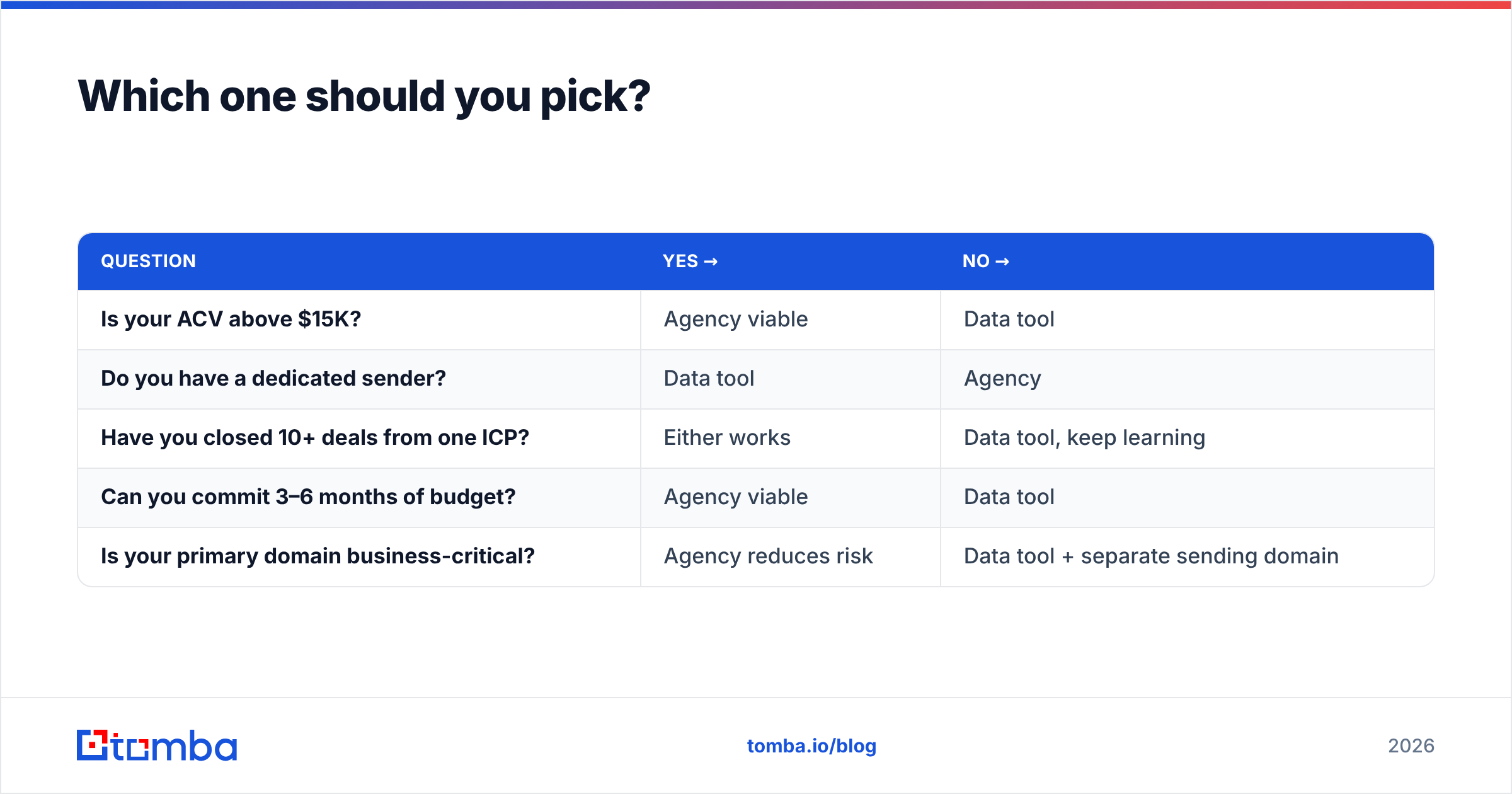
| Question | Yes → | No → |
|---|---|---|
| Is your ACV above $15K? | Agency viable | Data tool |
| Do you have a dedicated sender? | Data tool | Agency |
| Have you closed 10+ deals from one ICP? | Either works | Data tool, keep learning |
| Can you commit 3–6 months of budget? | Agency viable | Data tool |
| Is your primary domain business-critical? | Agency reduces risk | Data tool + separate sending domain |
Three or more answers pointing the same direction is your answer. A split result means start with data, revisit the agency question next quarter.
What should you check before signing either contract?#
Ask a data vendor: what's the refund policy on invalid records, how fresh is the average record, do catch-all addresses count against my credits, and can I export everything if I leave? Ask an agency: who exactly works my account and what else are they staffing, do I own the sequences and the list at termination, what's the definition of a "qualified meeting," and what happens to the retainer if you miss the target two months running. Get that last one in writing.
Also decide up front where enrichment lives. If you're pushing records into HubSpot or Salesforce, a clean data enrichment step at the point of import prevents the duplicate-and-stale-field mess that makes CRM reporting useless six months later. HubSpot's own guidance on data hygiene is worth reading before you wire anything up.
Start with the data layer#
Whichever direction you lean, you need accurate contact data underneath it — an agency with a bad list produces the same bounces you would. Start with the Tomba Email Finder to source and verify work emails by domain, name, or company. The free tier gives you 25 searches a month to test data quality against accounts you already know, Starter runs $49/mo, and everything is API-accessible when you're ready to automate. Test the data before you commit five figures to anyone else's process.
Related guides#
Ready to find emails that actually work?
Join 150,000+ professionals who stopped guessing and started sending. Free credits on signup — no credit card required.
Get the Tomba newsletter
Practical outbound tactics and product updates — once every two weeks.
About the author