Generect vs Pipileads: Which B2B Lead Data Tool Wins?
Generect sells a LinkedIn-shaped lead database with an API. Pipileads sells fast email lookup. They solve different halves of the same problem, and picking wrong costs you a quarter of pipeline.
Generect vs Pipileads looks like a straight fight. It is not. One tool builds lists. The other finds single email addresses. This guide shows where each one wins, what each costs, and which fits your outbound stack.
TL;DR
- Generect is a lead database with an API. Query by company, role, industry, or headcount and get structured B2B records back. Best for teams building lists at volume.
- Pipileads is a lead-finding tool. Point it at a domain or a name and it returns emails. Lighter filters, lower entry price.
- Neither publishes a full self-serve price ladder. Budget comparison needs a sales call on at least one side.
- Verification is the real gap. Ten thousand rows with 12% bad emails will burn your sender reputation.
- Want both jobs on one bill? Tomba starts at $49/mo, with a free tier to test first.
What are Generect and Pipileads?#
They are not the same kind of product. That is the most useful thing to know before you compare them.
Generect is a real-time B2B lead data source. The pitch is LinkedIn-shaped data: people, companies, job titles, headcount bands, technologies. You reach it through search filters and an API, not a static CSV that rots on your drive. The natural buyer is a RevOps or growth-engineering team. They want to pull segments straight into a CRM, a warehouse, or a sequencer.
Pipileads sits at the other end of the workflow. It finds and validates email addresses. You get domain lookups, name-plus-company lookups, and bulk uploads. The natural buyer is an SDR, a founder doing outbound, or a small agency. They already know who to reach. They just need the address.
Both get filed under "lead generation tool" on review sites. That is where the confusion starts. Generect answers "who should I contact at 400 Series-B fintechs in Germany?" Pipileads answers "what is the email for this person at this company?" Many teams need both answers. That is why bundles keep winning on cost.

Generect vs Pipileads: how do they compare head-to-head?#
Here is the practical breakdown. Where a vendor does not publish a number, the table says so. Treat "quote only" as a real cost signal, not a gap.
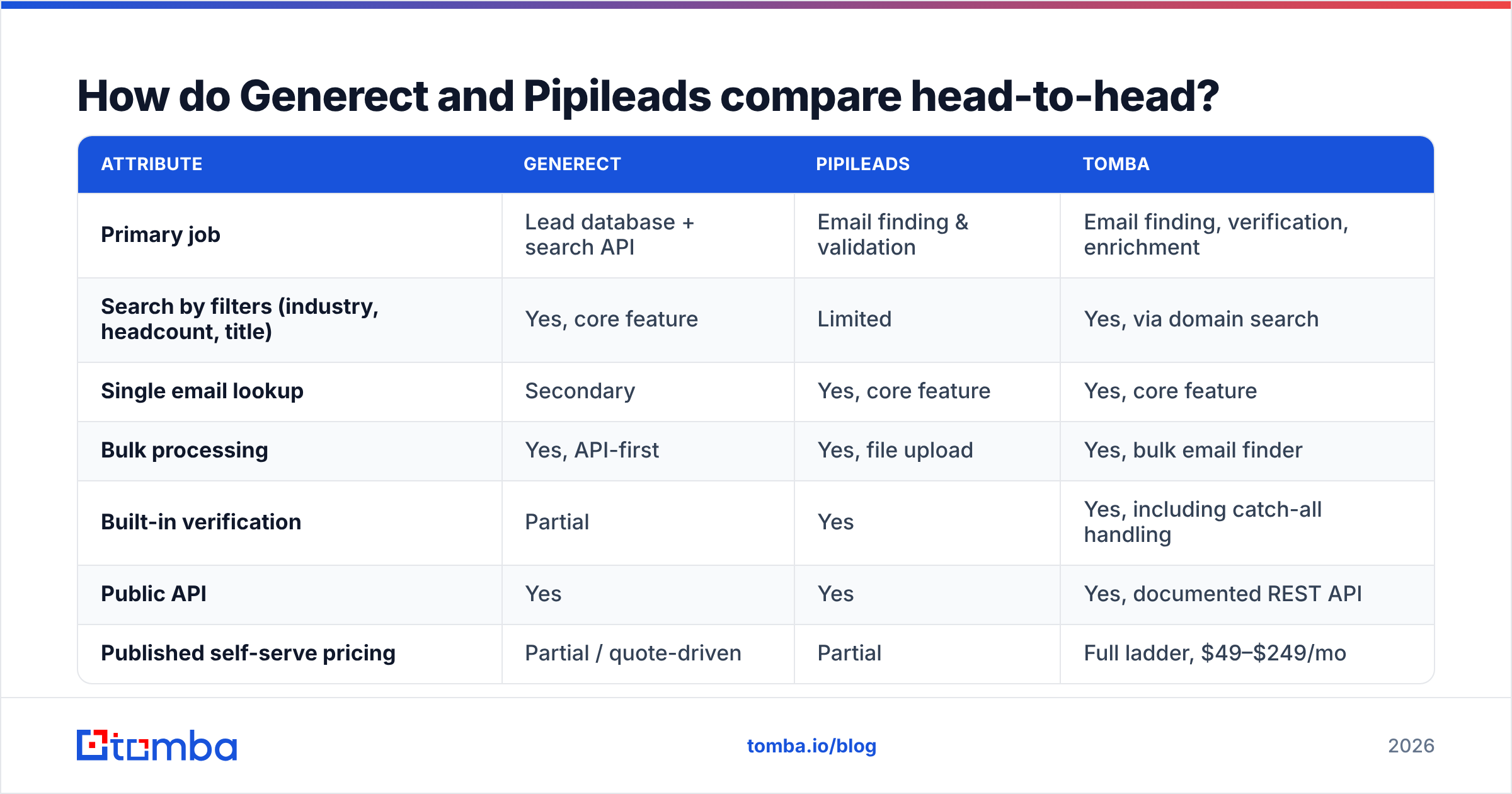
| Attribute | Generect | Pipileads | Tomba |
|---|---|---|---|
| Primary job | Lead database + search API | Email finding & validation | Email finding, verification, enrichment |
| Search by filters (industry, headcount, title) | Yes, core feature | Limited | Yes, via domain search |
| Single email lookup | Secondary | Yes, core feature | Yes, core feature |
| Bulk processing | Yes, API-first | Yes, file upload | Yes, bulk email finder |
| Built-in verification | Partial | Yes | Yes, including catch-all handling |
| Public API | Yes | Yes | Yes, documented REST API |
| Published self-serve pricing | Partial / quote-driven | Partial | Full ladder, $49–$249/mo |
| Free tier to test | Trial / demo-gated | Limited free credits | 25 searches/mo, no card |
| Native CRM integrations | Via API / partners | Limited | HubSpot, Salesforce, Pipedrive, Zapier |
| Best fit | RevOps building segments at volume | Solo SDR / small agency | Teams needing find + verify in one place |

The pattern is clear. Generect gives you breadth of selection. Pipileads gives you speed of retrieval. Neither is trying to be the other. Buy Generect for one-off email lookups and you will overpay. Buy Pipileads to slice a 40,000-company market by funding stage and you will be let down.
How accurate is the data on each?#
Accuracy is where vendor marketing goes vague. So be precise about what the number means.
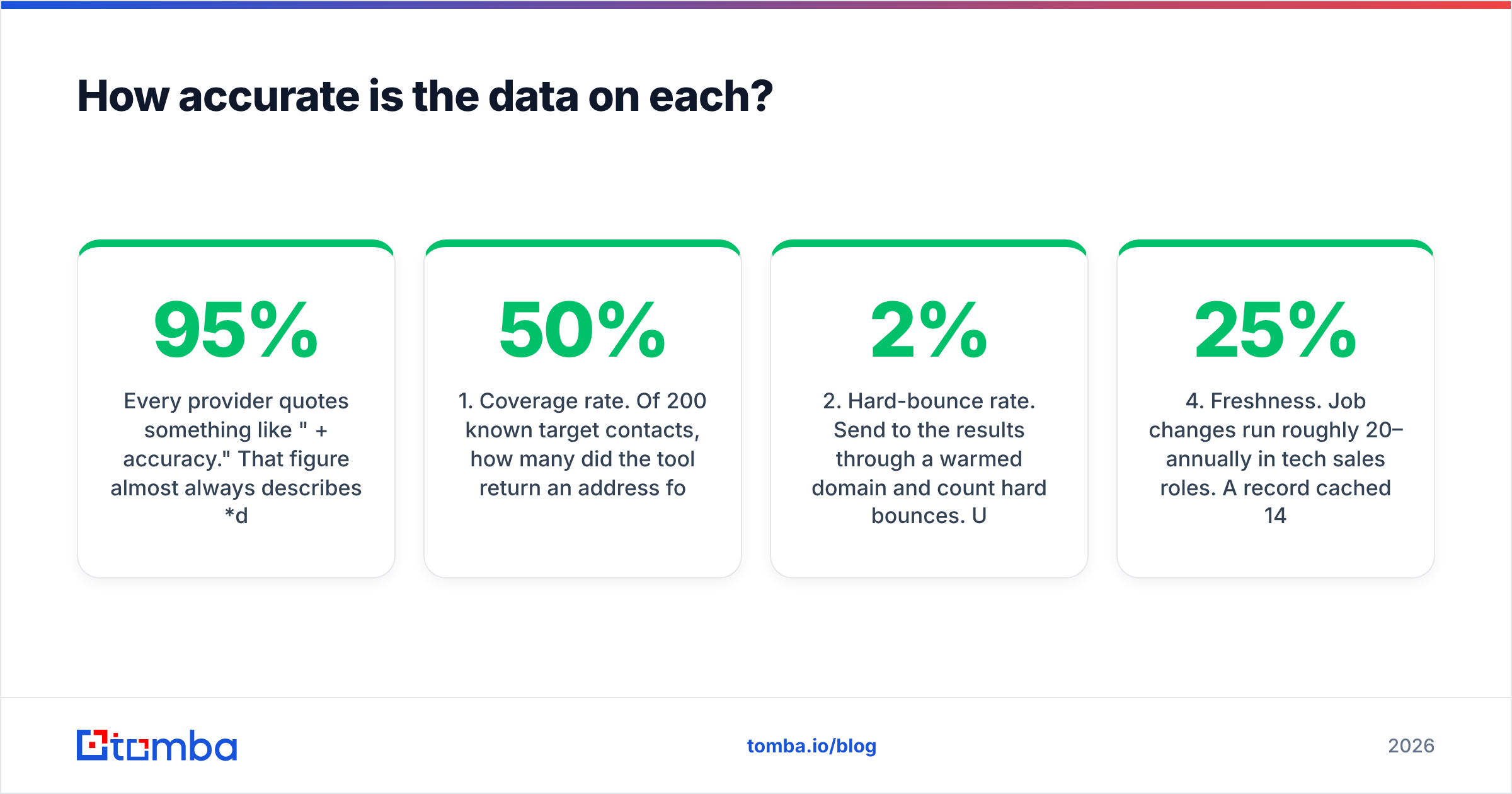
Every provider quotes "95%+ accuracy." That figure almost always covers deliverability of returned results. Of the emails we chose to return, this share accepts mail. It says nothing about coverage. Coverage is the share of your target list the tool found anything for. A tool that returns nothing for 60% of your list can still post a great accuracy number. It is still useless to you.

Run your own test. Measure four things.
- Coverage rate. Of 200 known contacts, how many got an address back? Under 50% on a normal B2B list is weak.
- Hard-bounce rate. Send from a warmed domain and count hard bounces. Under 2% is fine. Over 5% damages your sender reputation.
Then check the two numbers vendors rarely volunteer.
- Catch-all share. Many corporate domains accept every address at the SMTP layer. "Valid" means nothing there. Ask how the vendor scores catch-alls. A catch-all verifier that returns a confidence band beats a plain yes.
- Freshness. Job changes run 20–25% a year in tech sales roles. A record cached 14 months ago is a coin flip.
Generect's real-time model helps most on point four. Queries hit live sources, not a frozen snapshot. Pipileads leans on point two, because validation is a core feature. Neither claim replaces your own 200-contact test.
What does each one actually cost?#
Both vendors price in ways that make a straight comparison awkward. That is a commercial choice, not an oversight.
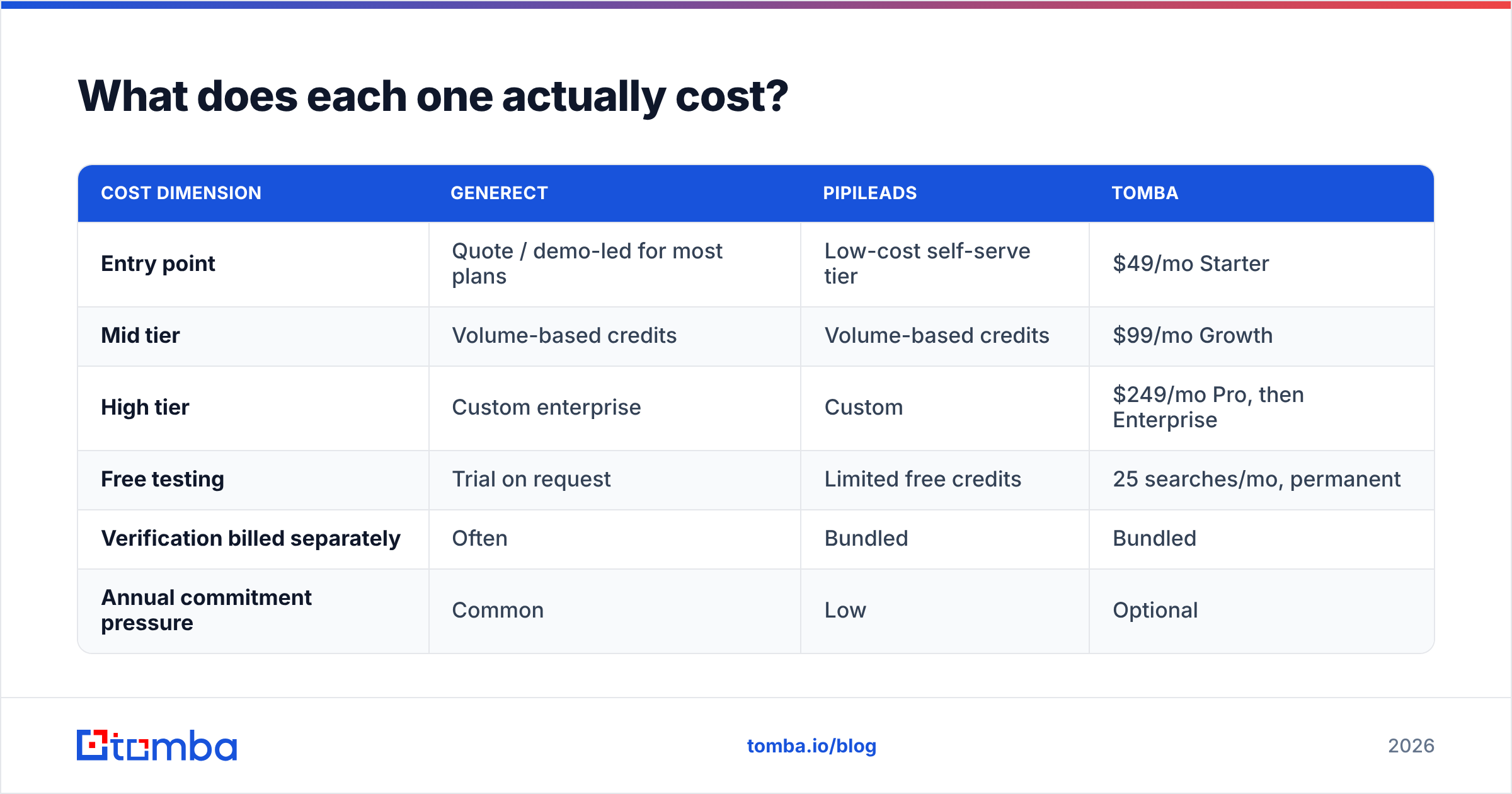
| Cost dimension | Generect | Pipileads | Tomba |
|---|---|---|---|
| Entry point | Quote / demo-led for most plans | Low-cost self-serve tier | $49/mo Starter |
| Mid tier | Volume-based credits | Volume-based credits | $99/mo Growth |
| High tier | Custom enterprise | Custom | $249/mo Pro, then Enterprise |
| Free testing | Trial on request | Limited free credits | 25 searches/mo, permanent |
| Verification billed separately | Often | Bundled | Bundled |
| Annual commitment pressure | Common | Low | Optional |
Two cost traps show up again and again in this category.
The first is credit burn on failures. Ask directly: do you charge a credit when a lookup returns nothing? Vendors that bill only on hits are much cheaper at the same sticker price. On messy lists the gap can reach 30–40%.
The second is verification double-billing. Say your finder returns unverified addresses. You then pay a second vendor per row to check them. Your true cost per usable contact is the sum, not the sticker. Run the math on cost per verified contact. That is the only number that maps to pipeline. Check any quote against a published ladder like Tomba pricing before you sign.
Which one fits your workflow?#
Match the tool to how your team works, not to the feature grid.
- You pipe leads into a warehouse. Generect. The API-first design and filterable segments fit, and you can handle verification downstream.
- You are a solo founder emailing 40 people a week. Pipileads. You need addresses fast, not a segmentation engine.
- You run a 5–15 person SDR team. You need both halves. Two vendors doubles your admin overhead. Look at consolidated platforms first.
Three more cases need a different answer.
- You are enriching an existing CRM. Neither fits alone. You want data enrichment that matches existing records and fills gaps.
- You need phone numbers too. Both are email-first. Add a phone finder to the stack cost.
- You sell into the EU. Ask both vendors for lawful-basis docs and their data-subject-request process in writing. GDPR makes this non-optional. Vague answers are a red flag.
Is there a better option than either?#
Sometimes. It depends on what you are optimizing for.
If you want a large verified database with clear per-record pricing, look at BookYourData. It sells pay-as-you-go access to verified B2B records with no subscription lock-in. That suits teams who buy lists now and then, rather than enriching all year.
If you want one bill covering find, verify, and enrich, that is where Tomba fits. The email finder handles name-and-domain lookups. Domain search covers the "everyone at this company" job that Generect users care about. The email verifier runs on the same credits, so there is no second contract. Pricing is published end to end: free at 25 searches/mo, then $49, $99, and $249 per month.
If you want enterprise-scale intent and firmographic depth, none of these three is the answer. You are shopping in the ZoomInfo and Clearbit tier. Expect five-figure annual deals. Check current positioning on G2 first.
How should you run the evaluation?#
Do not judge on demos. Demos are curated against the vendor's best data.
Build a 200-row control list you can verify yourself. Use people you already email, CRM contacts with confirmed addresses, or public team pages. Strip the emails out. Feed the names and domains to each tool. Then score four things:
- Match rate against your known-good answers
- False positives, meaning confident answers that are wrong. These cost far more than blanks.
- Cost per correct answer, on the plan you would really buy
- Time to first useful output, including onboarding and any sales-call gate
Run both trials in the same week. Data freshness shifts fast. Two weeks apart is enough for a company to reorganize and skew your results.
Check one more thing: how each vendor handles catch-all email domains. This is the biggest source of quiet bounce risk in B2B. Catch-all domains accept mail at the gateway, then reject it internally hours later. By then you have counted the send as delivered. A tool that flags catch-alls with a confidence score lets you route them into a safer sequence. A tool that calls them "valid" hands you a deliverability problem you will not spot for three weeks.
So which one wins?#
There is no single winner in Generect vs Pipileads, because the two tools do different jobs.
Pick Generect if segment-building at volume through an API is your bottleneck. You will need engineering support and patience with a quote-driven sales cycle. Real-time sourcing is a genuine edge on freshness.
Pick Pipileads if you want fast, cheap, verified lookups with no sales call. Your list-building happens elsewhere: Sales Navigator, a conference list, a CRM segment.
Pick a consolidated platform if you do both jobs. Two vendors means two contracts, two credit pools with different expiry dates, two support queues, and a seam where data quality quietly rots.
The discipline matters more than the logo. Test on your own list. Measure cost per verified contact. Never send to unverified data at volume.
Ready to test the bundled approach? Start with the Tomba Email Finder. You get 25 free searches a month and no card. Find and verify run on the same credit pool, so your cost per usable contact is a number you can actually calculate. Run it against the same 200-row control list, and let the match rate decide.
Related guides#
Ready to find emails that actually work?
Join 150,000+ professionals who stopped guessing and started sending. Free credits on signup — no credit card required.
Get the Tomba newsletter
Practical outbound tactics and product updates — once every two weeks.
About the author